

10 Best HR Document Management Software for 2026

HR Document Management Software


HR document management software helps your team organize, store, and secure employee records, policies, and compliance documents in one digital system. If you’re searching for ways to reduce manual paperwork, improve audit readiness, or keep sensitive files accessible but protected, the right platform can make a real difference.
This list will help you compare top HR document management solutions for 2026, so you can find tools that fit your compliance needs, workflow preferences, and business size.
Why Trust Our Software Recommendations
Our team has been testing and reviewing software since 2012. As HR experts ourselves, we know how difficult—and important—it is to choose the right software.
For this guide, we evaluated tools using hands-on testing and independent research, scoring tools using our selection criteria. We also draw on insights from industry thought leaders and practicing HR experts.
Our reviews reflect our human editorial judgment, not a sales pitch.
Expert reviewers:
HR Document Management Software Reviews Comparison Table
This comparison table summarizes pricing details for my top HR document management software selections.
| Tool | Best For | Trial Info | Price | ||
|---|---|---|---|---|---|
| 1 | Best for benefits document centralization | Not available | From $599/employee/month | Website | |
| 2 | Best for global workforce onboarding | Free demo available | From $599/user/month | Website | |
| 3 | Best for customizable document approval flows | Free demo available | From $8/user/month | Website | |
| 4 | Best for multi-entity HR file compliance | Free demo available | Pricing upon request | Website | |
| 5 | Best for real-time collaboration | Free plan + trial available | From $7/user/month (billed annually) | Website | |
| 6 | Best for small business onboarding | Free demo available | From $4/user/month + $50/month | Website | |
| 7 | Best for secure cloud-based archiving | Free demo available | Pricing upon request | Website | |
| 8 | Best with enterprise collaboration tools | 14-day free trial | From CAD$21/user/month (billed annually) | Website | |
| 9 | Best for advanced search capabilities | 14-day free trial + free demo available | Pricing upon request | Website | |
| 10 | Best with integrated payroll management | Free demo available | Pricing upon request | Website |

HR Document Management Software Reviews
Below are my detailed summaries of the HR document management software that made it onto my shortlist. My reviews offer a detailed look at the features, best use cases, and integrations of each platform to help you find the best one for you.

Best for benefits document centralization

If your HR team needs a single place to manage all benefits-related documents, Justworks is designed for you. The platform centralizes benefits enrollment forms, plan details, and compliance notices so nothing gets lost or overlooked. It’s especially useful for small and midsize businesses that want to simplify benefits administration and document access for employees.
Why I Picked Justworks
Centralizing benefits documents is a challenge for many HR teams, and Justworks addresses this need directly. I picked Justworks because it stores all benefits-related forms, plan summaries, and compliance notices in one secure location, making it easy for both HR and employees to find what they need. The platform also lets you manage enrollment documents and distribute required notices electronically, reducing paperwork and manual tracking. For organizations that want to keep benefits documentation organized and accessible, Justworks offers a focused solution.
Justworks Key Features
In addition to benefits document centralization, Justworks offers several other features for HR teams:
- Automated onboarding checklists: Assign and track required onboarding tasks and documents for new hires.
- E-signature support: Collect digital signatures on HR forms and agreements directly within the platform.
- Document expiration alerts: Receive notifications when important HR documents are nearing expiration or require updates.
- Employee self-service portal: Allow employees to access, download, and upload HR documents securely on their own.
Justworks Integrations
Integrations include Greenhouse, Ramp, Vouch, Lever, Brex, Electric, JazzHR, Trainual, Leapsome, and Vanta.
Pros and Cons
Pros:
- 24/7 expert HR consultant access
- Automated payroll tax filing storage
- PEO-integrated compliance document management
Cons:
- No built-in document editing capability
- Lacks granular document permission settings

Deel HR
Best for global workforce onboarding
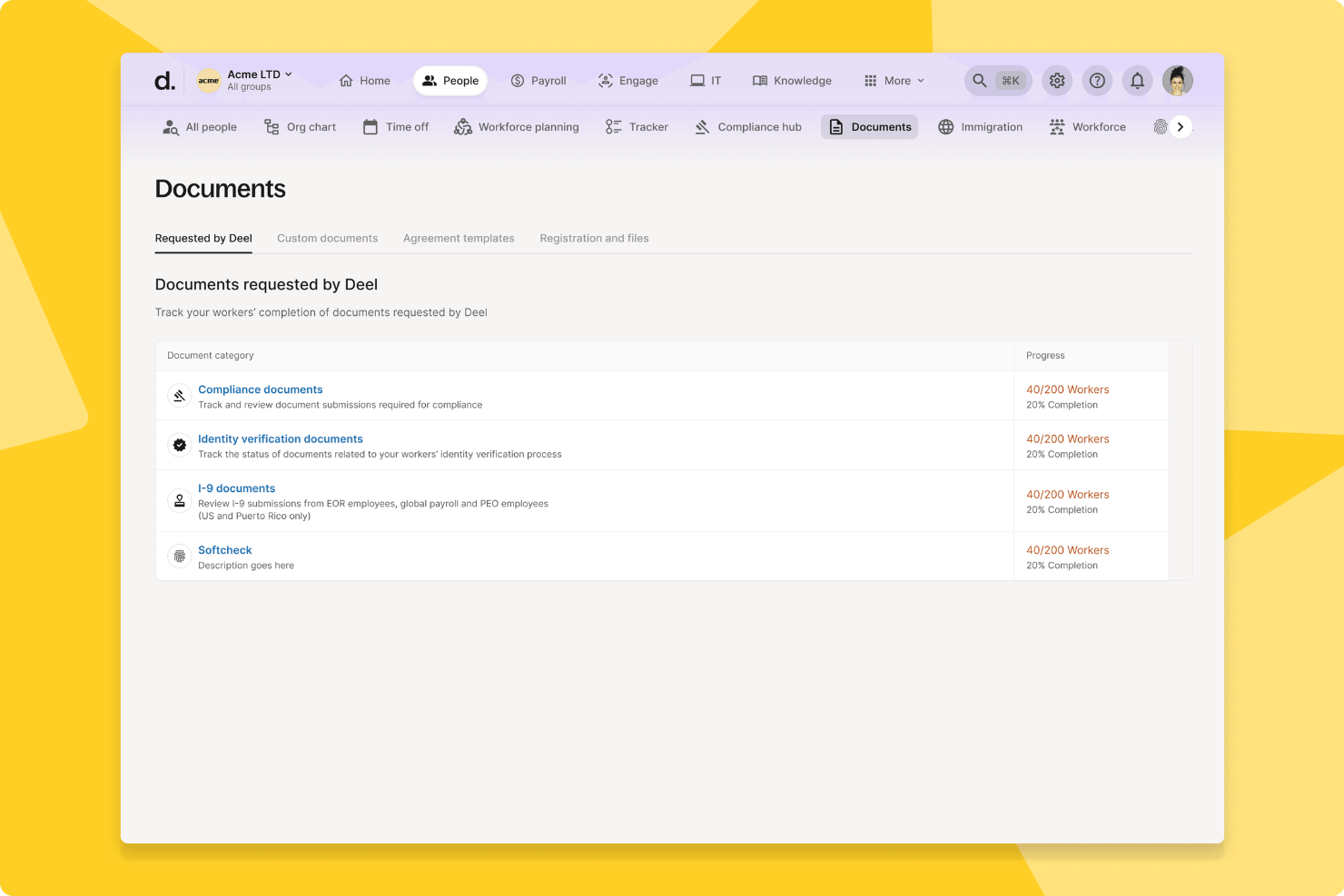
Deel HR is a global HR document management platform that centralizes employee records, automates compliance workflows, and supports international onboarding, contracts, and document storage for distributed teams.
Who Is Deel HR Best For?
Deel HR suits HR teams at multinational companies managing employee documents, onboarding, and compliance across multiple countries and regions.
Why I Picked Deel HR
I picked Deel HR as one of the best because my team can onboard employees in over 100 countries with localized document templates and compliance checks built in. I like that Deel HR automates document collection and e-signatures for new hires, so we never miss a required form. My team is able to track onboarding progress and store all employment agreements securely in one place.
Deel HR Key Features
- Role-based access controls: Set permissions for document visibility and editing by user role.
- Audit trails: Track every document action with time-stamped logs for compliance.
- Bulk document upload: Upload and organize multiple HR files at once for faster management.
- Custom document fields: Add and manage unique data fields to tailor records to your organization’s needs.
Deel HR Integrations
Deel HR offers native integrations with platforms like Workday, BambooHR, Greenhouse, HiBob, and QuickBooks. An API is available for custom integrations.
Pros and Cons
Pros:
- Provides audit trails for document activity
- Centralizes contractor and employee document storage
- Includes digital signature collection for HR files
Cons:
- Limited customization for document templates
- Bulk document upload can be slow
New Product Updates from Deel HR

Deel Expands Stablecoin Wallet to 80+ Countries
Deel expands its Stablecoin Wallet to 80+ countries with dollar-backed balances and optional rewards. This gives eligible contractors more ways to hold and manage earnings inside Deel. For more information, visit Deel’s official site.
 .
.
Best for customizable document approval flows
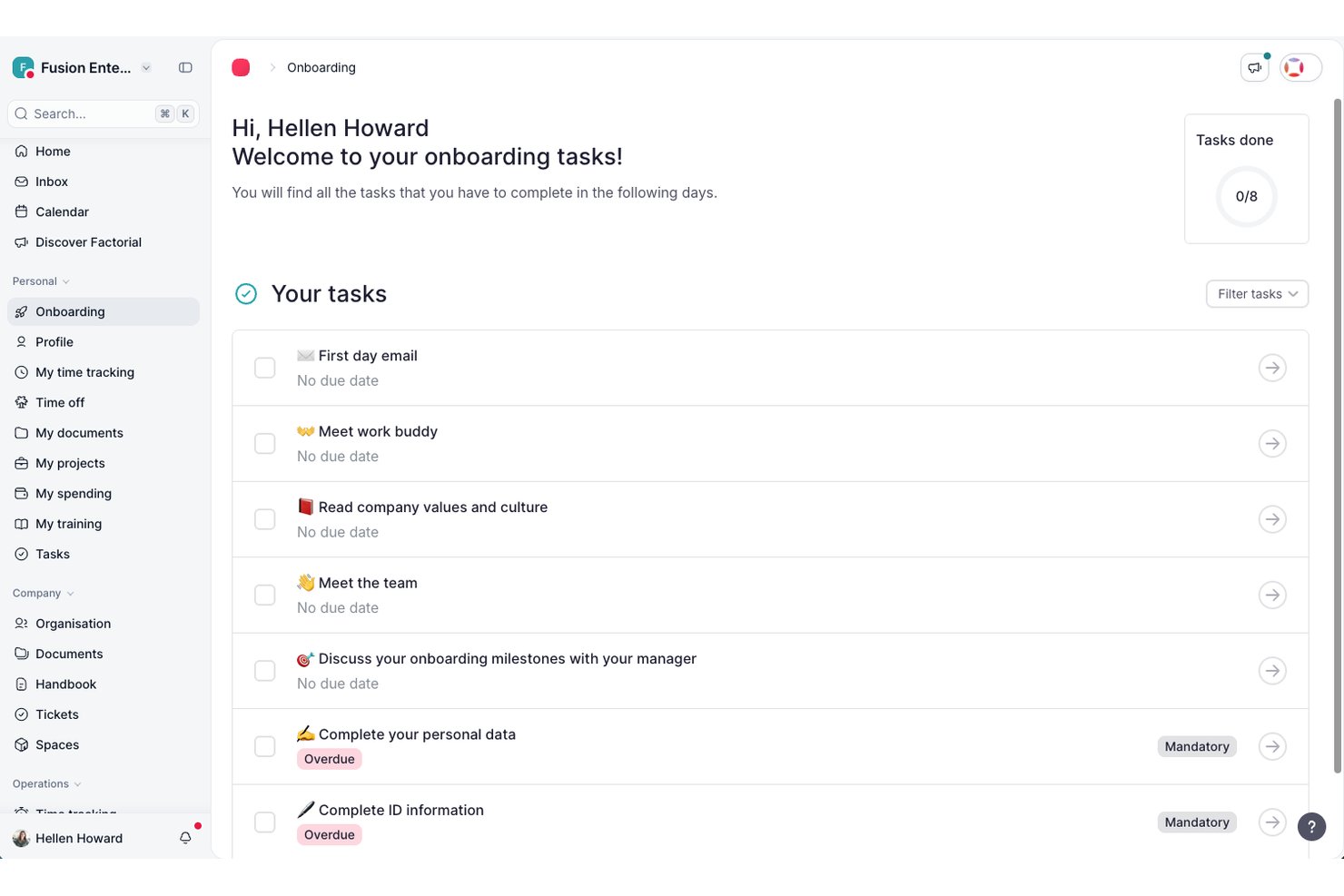
Factorial is an HR platform with a built-in document management system that covers centralized document storage, fillable templates with employee data variables, e-signatures, configurable permission groups, and bulk document distribution.
Who Is Factorial Best For?
Factorial is a good fit for mid-sized companies that need a single platform to manage HR operations and employee documents together.
Why I Picked Factorial
Factorial is one of my top picks because I love how it lets you build document approval workflows with assignable reviewers at each step. You can create approval groups for different roles—managers, HR, finance—and route documents through each one in sequence. What I find most useful is the Workflow Center, where you can use ready-made templates or build a custom flow from scratch, then track the progress of each pending document directly in the platform. It keeps the approval chain transparent without requiring anyone to chase signatures manually.
Factorial Key Features
- Fillable document templates: Create templates with dynamic variables that auto-populate employee data, like name, job title, and start date, when sent.
- eIDAS-compliant e-signatures: Collect legally valid electronic signatures on documents directly within the platform.
- Bulk document requests: Send a document request to multiple employees at once, asking them to upload files to their employee hub.
- Custom folder structure: Organize employee and company documents into configurable folders with separate storage for personal and company-wide files.
Factorial Integrations
Factorial offers a marketplace with 99 integrations, including Google Workspace, LinkedIn, Slack, Okta, Monday, Microsoft Dynamics 365, and Microsoft Power BI. It also connects with Zapier and provides a public API for custom integrations.
Pros and Cons
Pros:
- Supports eight languages across the platform
- Automatic payslip matching to employees
- Built-in e-signatures on HR documents
Cons:
- Post-onboarding support can be slow
- Approval workflows lack advanced conditional logic
Doxis
Best for multi-entity HR file compliance
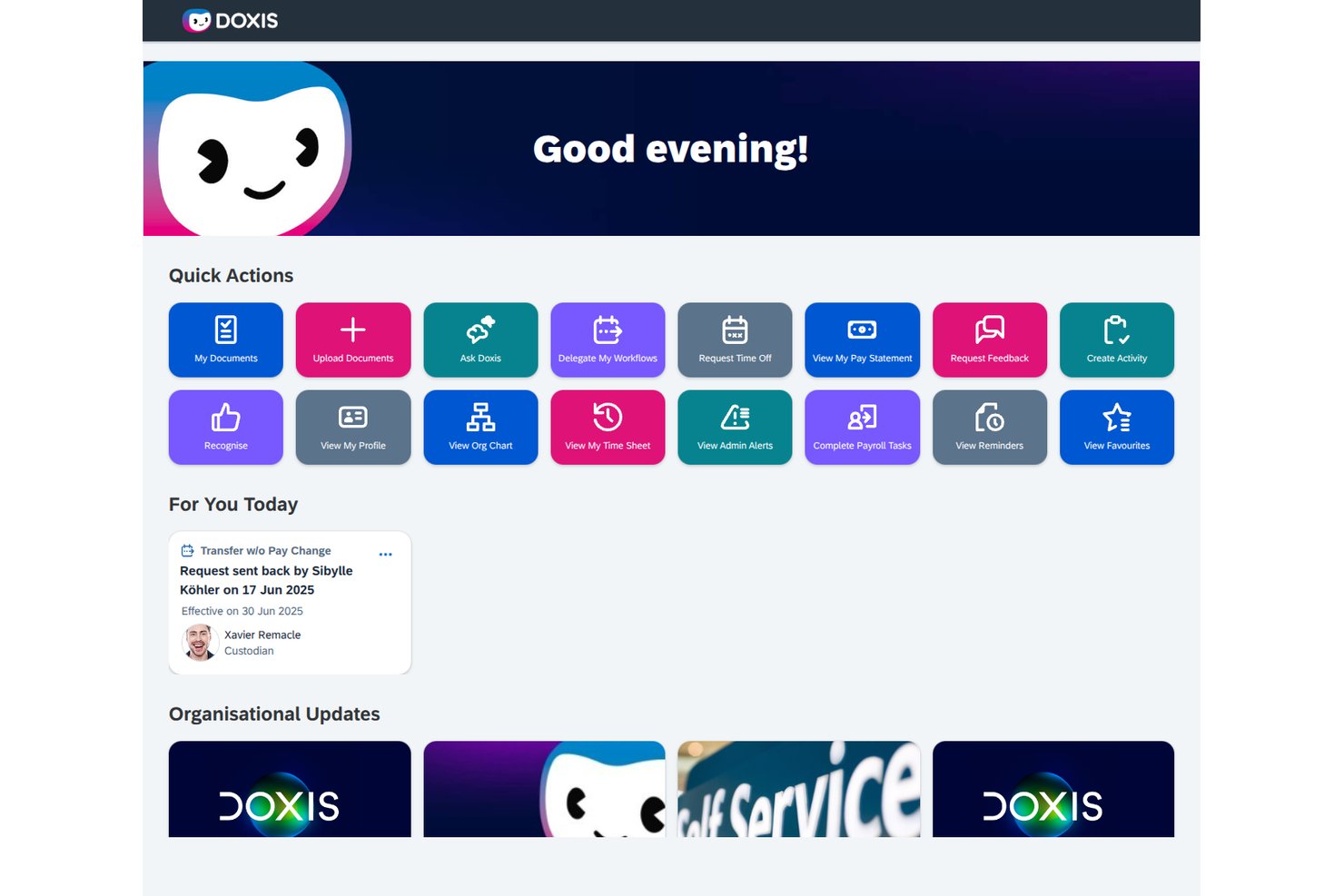
Doxis is an AI-first HR document management platform that centralizes digital personnel files, automates document workflows, and enforces retention and compliance rules across multiple entities and locations.
Who Is Doxis Best For?
Doxis is a strong fit for enterprise HR teams managing personnel files across multiple legal entities or countries, especially those already running SAP SuccessFactors or Workday.
Why I Picked Doxis
I picked Doxis as one of the best because it's built specifically for the complexity that comes with running HR across multiple legal entities or countries. Where most tools treat personnel files as a single structure, Doxis lets you configure document types, retention rules, and folder structures by country or legal entity, so a team in Germany and one in the Netherlands each get the right compliance rules applied automatically. I also like how its AI completeness checker flags missing or expiring documents per file, which matters when you're auditing dozens of entity-specific records at once.
Doxis Key Features
- HR eFile: Each employee gets a structured digital personnel file with a preset folder layout that holds contracts, payroll documents, training records, and performance reviews across the full employee lifecycle.
- BPMN 2.0 workflow builder: HR workflows for onboarding, approvals, and offboarding are built using low-code tools with conditional logic, multi-step approvals, and automated email or SMS notifications.
- Employee self-service portal: Employees can view their own file within an HR-defined time window, upload documents like sick notes, request certificates, and submit personal data changes with effective dates.
- Automated retention scheduling: Retention periods are set per document type and enforced automatically, with each deletion logged in the audit trail to support GDPR and GoBD compliance.
Doxis Integrations
Doxis offers documented integrations with SAP SuccessFactors, Workday, SAP HCM, ADP, Oracle PeopleSoft, and Microsoft Dynamics. Marketplace integrations include DocuSign, Adobe Acrobat Sign, FP Sign, MOXIS, and e-Sign Agent.
Pros and Cons
Pros:
- Teams can expand from department pilots
- Automated retention supports entity-specific compliance rules
- Reviewers praise adaptable electronic personnel records
Cons:
- HR signing often depends on external services
- Enterprise scope can overwhelm smaller HR teams
Best for real-time collaboration
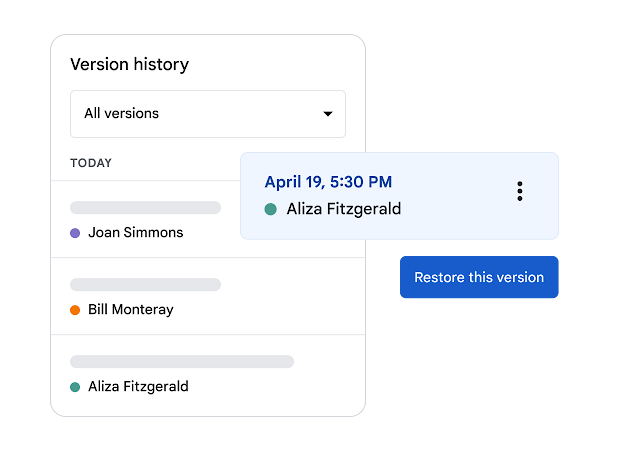
Google Docs is a cloud-based document management platform that lets HR teams create, organize, and collaborate on employee files and HR documents in real time.
Who Is Google Docs Best For?
HR teams at small to midsize companies who need a simple, cloud-based solution for document collaboration and sharing.
Why I Picked Google Docs
I picked Google Docs as one of the best because my team can collaborate on HR files in real time, making updates and comments instantly visible. I like that we can control sharing permissions for sensitive documents and organize folders for onboarding, compliance, and employee records. In practice, that means HR staff can work together on policies or contracts without version confusion.
Google Docs Key Features
- Template gallery: Access pre-built templates for HR policies, onboarding checklists, and employee forms.
- Version history: Track document changes and restore previous versions as needed.
- Commenting and suggestions: Add comments or suggest edits without altering the original text.
- Mobile editing: Create and update HR documents from any mobile device.
Google Docs Integrations
Google Docs offers native integrations across the Google Workspace ecosystem, including Google Drive, Google Sheets, Google Slides, and Gmail. An API is available for custom integrations.
Pros and Cons
Pros:
- Cloud-based storage with automatic saving
- Simple permission settings for document access
- Easy sharing with internal and external users
Cons:
- Not designed for sensitive HR data security needs
- No built-in HR compliance or retention tools

Eddy
Best for small business onboarding
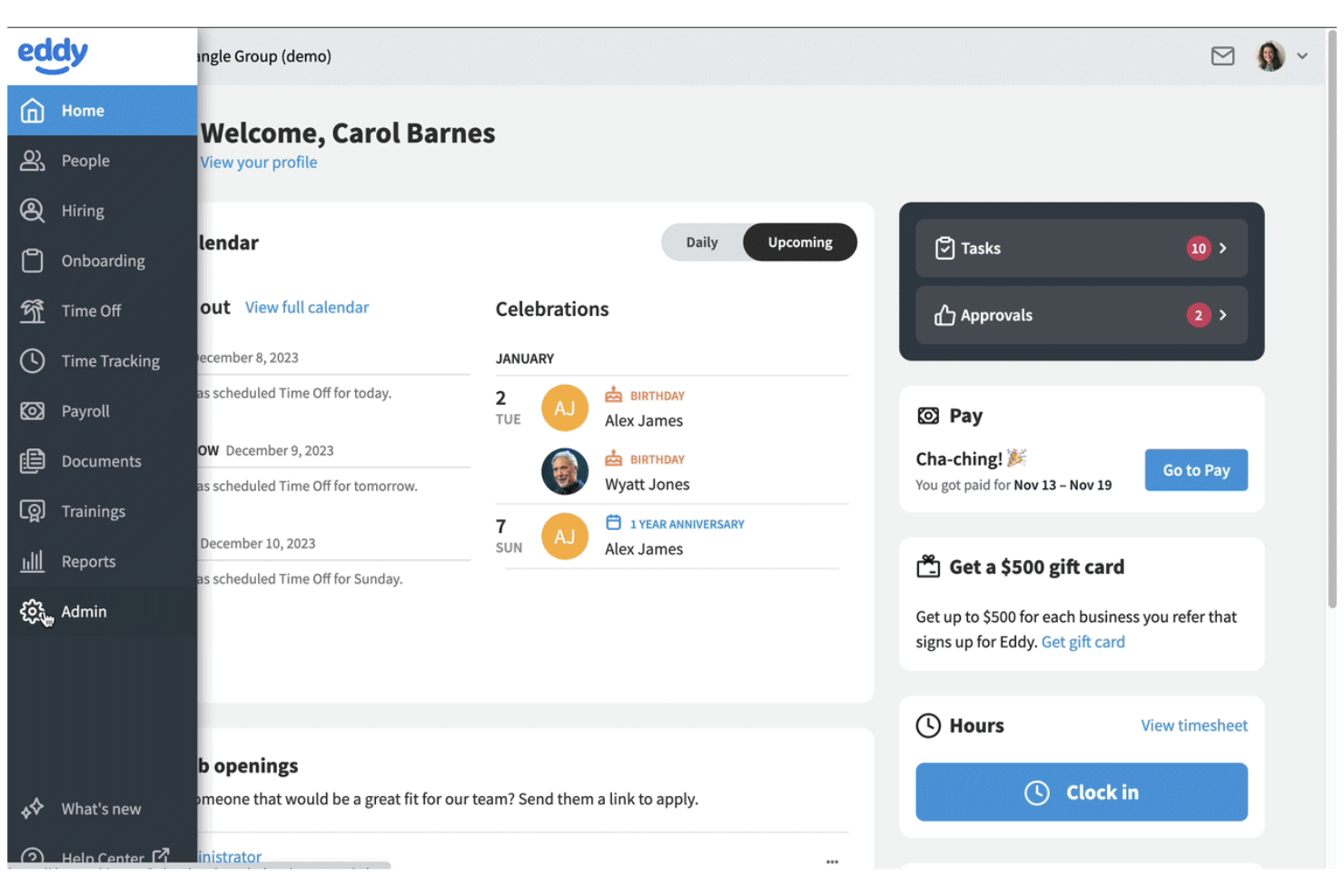
Eddy offers small businesses a way to centralize HR documents and onboarding tasks in one dashboard. It’s especially useful for teams that want to digitize paperwork, manage employee files, and automate onboarding without a complex setup. If you’re looking for a solution that simplifies document collection and compliance for new hires, Eddy is built with those needs in mind.
Why I Picked Eddy
For small businesses that want to simplify onboarding and document management, Eddy offers a focused set of tools. Its employee onboarding checklists let you assign, track, and store required documents for each new hire, making it easy to stay organized. I picked Eddy because it gives HR teams a way to manage employee files, collect digital signatures, and ensure compliance without extra complexity. If you need a straightforward platform to optimize onboarding paperwork and document storage, Eddy is designed with those priorities in mind.
Eddy Key Features
Some other features in Eddy that HR teams may find helpful include:
- Role-based document permissions: Control who can view, edit, or upload specific HR documents within the platform.
- Document expiration tracking: Set and monitor expiration dates for certifications, licenses, or other time-sensitive documents.
- Custom document templates: Create and reuse templates for recurring HR forms and agreements.
- Employee document request tool: Send requests for missing documents directly to employees and track responses.
Eddy Integrations
Integrations include SimplyInsured, Checkr, LinkedIn, Next, QuickBooks Online, SmartPay, 401GO, Indeed, Employee Navigator, and Express Evaluations.
Pros and Cons
Pros:
- Custom templates for recurring HR documents
- Digital signatures are included for HR forms
- Onboarding checklists automate document collection
Cons:
- Limited reporting on document activity history
- No bulk upload for employee documents

DocuWare
Best for secure cloud-based archiving
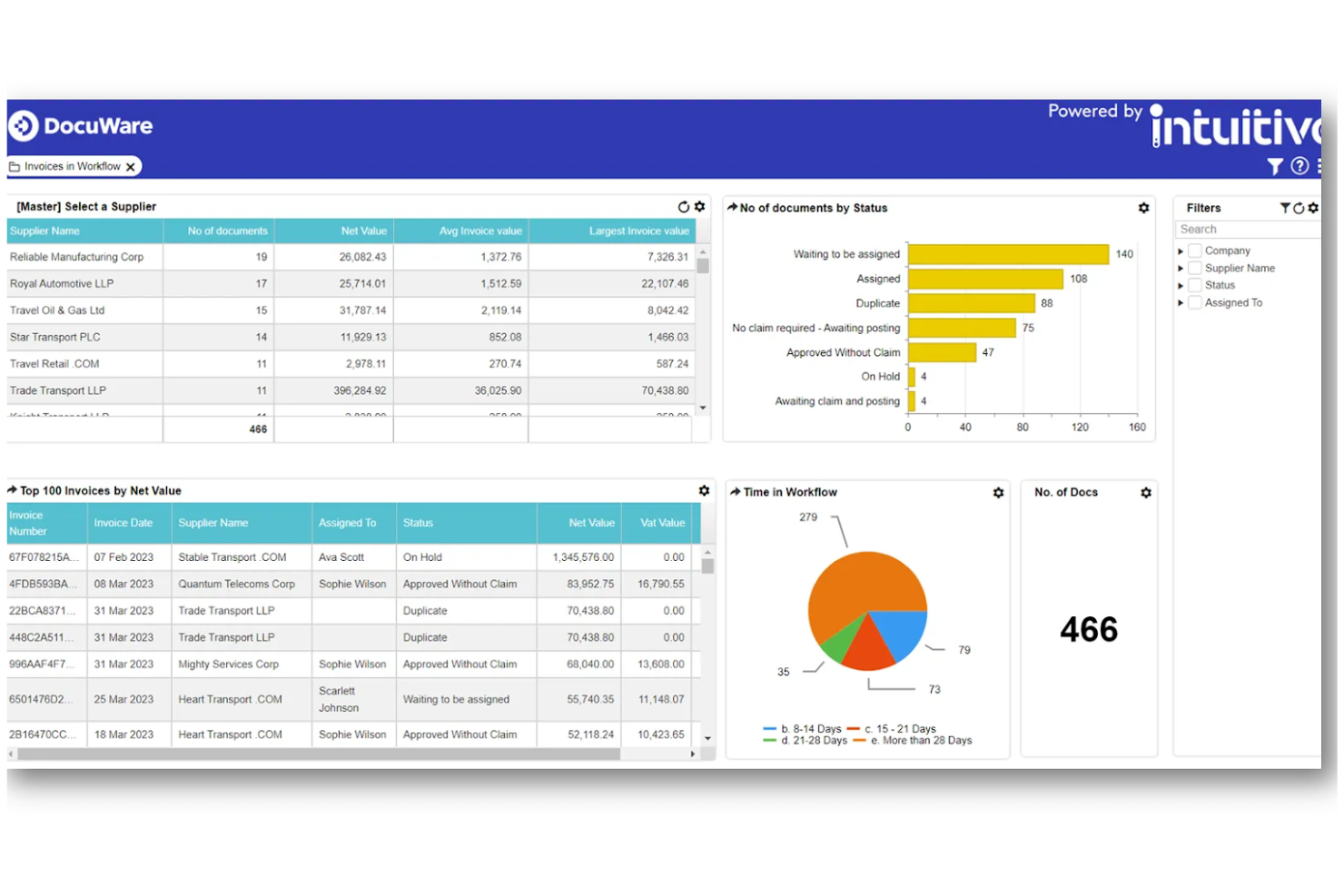
DocuWare offers HR teams a secure way to archive and manage sensitive employee documents in the cloud. It’s especially useful for organizations that need to meet strict compliance standards or handle confidential records across multiple locations. With advanced encryption and automated retention policies, DocuWare helps you keep HR files protected and organized.
Why I Picked DocuWare
When secure, cloud-based archiving is a top priority for HR, DocuWare offers a focused solution. I picked DocuWare because it uses advanced encryption and access controls to keep sensitive HR documents protected at every stage. Automated retention and deletion policies help HR teams stay compliant with regulations and internal policies. These features make DocuWare a strong choice for organizations that need to safeguard confidential employee records in the cloud.
DocuWare Key Features
Some other features in DocuWare that HR teams may find valuable include:
- Automated document workflows: Route HR documents for approvals, signatures, or reviews based on custom rules.
- Mobile access: View, upload, and manage HR files securely from mobile devices.
- Full-text search: Locate employee records and documents quickly using keyword searches.
- Template-based document creation: Generate standard HR forms and letters using pre-built templates.
DocuWare Integrations
Integrations include SAP, Microsoft Outlook, Sage, QuickBooks, SharePoint, Infor, Oracle, JD Edwards, Microsoft Dynamics, and Microsoft Teams.
Pros and Cons
Pros:
- Pre-filled W-4 and I-9 forms
- Full-text search across all uploaded documents
- Offers intelligent document indexing data
Cons:
- No built-in payroll system integration
- Limited offline access to documents
Box
Best with enterprise collaboration tools
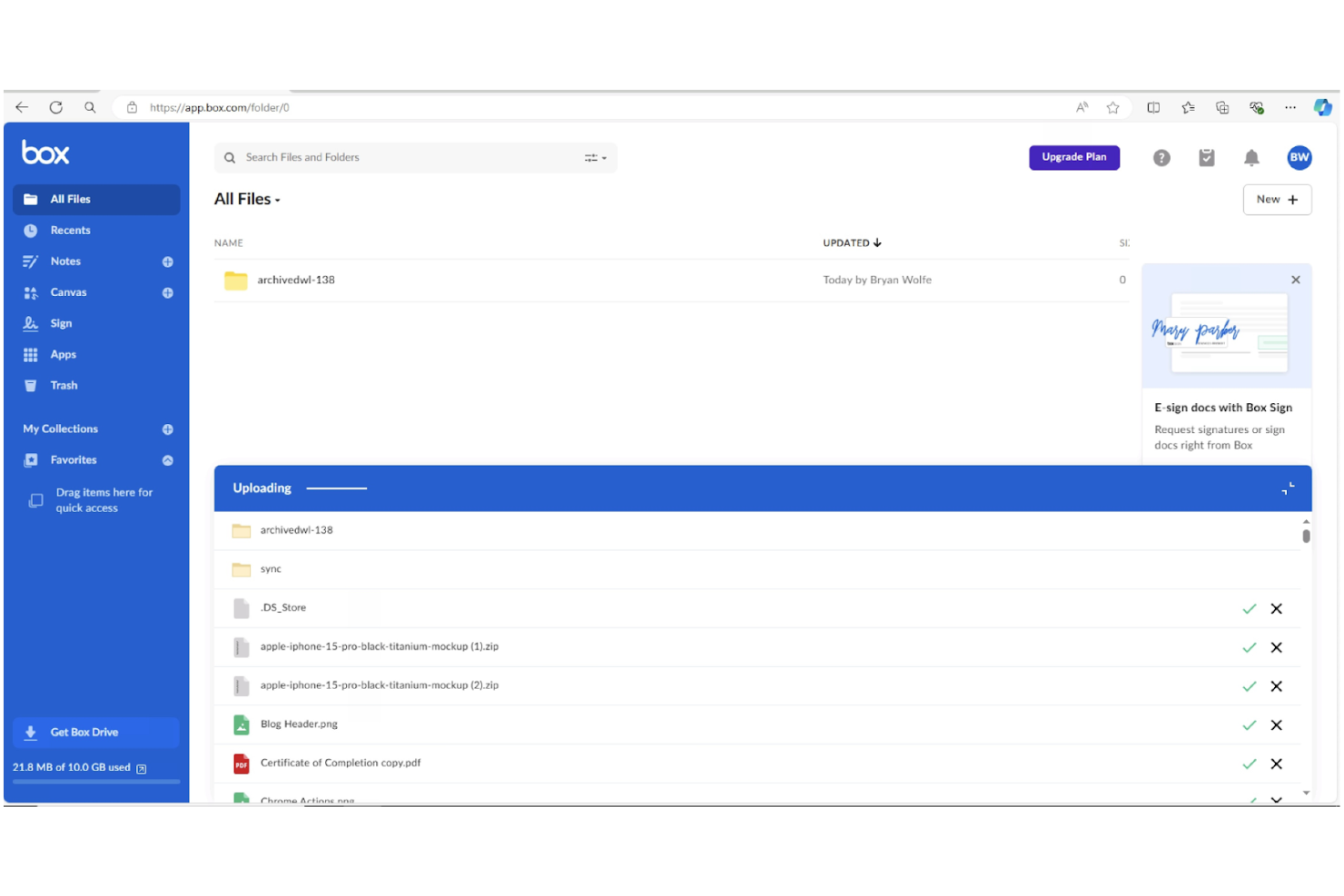
For HR teams that need to collaborate across departments or locations, Box offers a secure platform for managing and sharing sensitive employee documents. Its integration with popular enterprise tools makes it a strong fit for larger organizations with complex workflows. Box helps HR professionals centralize files, control access, and simplify document collaboration without sacrificing compliance.
Why I Picked Box
When HR teams need to collaborate with other departments or external partners, Box stands out for its enterprise-grade collaboration features. I picked Box because it allows multiple users to securely co-edit, comment on, and manage sensitive HR documents in real time. Its granular permission controls let you set access levels for different stakeholders, which is especially important for protecting confidential employee information. For organizations that rely on cross-functional teamwork and need to maintain strict document security, Box offers a flexible and scalable solution.
Box Key Features
Some other features that make Box useful for HR document management include:
- Automated workflow templates: Build and deploy repeatable document processes for tasks across the employee lifecycle like onboarding.
- Document version history: Track and restore previous versions of files as needed.
- Legal e-signature integration: Collect signatures directly within Box using Box Sign.
- Advanced search with metadata tagging: Locate documents quickly using custom tags and filters.
Box Integrations
Integrations include Microsoft 365, Google Workspace, Salesforce, Workday, Slack, Oracle NetSuite, Okta, Broadcom, Splunk, Adobe, and Palo Alto Networks.
Pros and Cons
Pros:
- Built-in e-signature tool for approvals
- Native 120+ file type preview support
- Granular AES 256-bit encryption controls
Cons:
- Bulk upload speeds can be inconsistent
- Complex external folder permission architecture
Revver
Best for advanced search capabilities
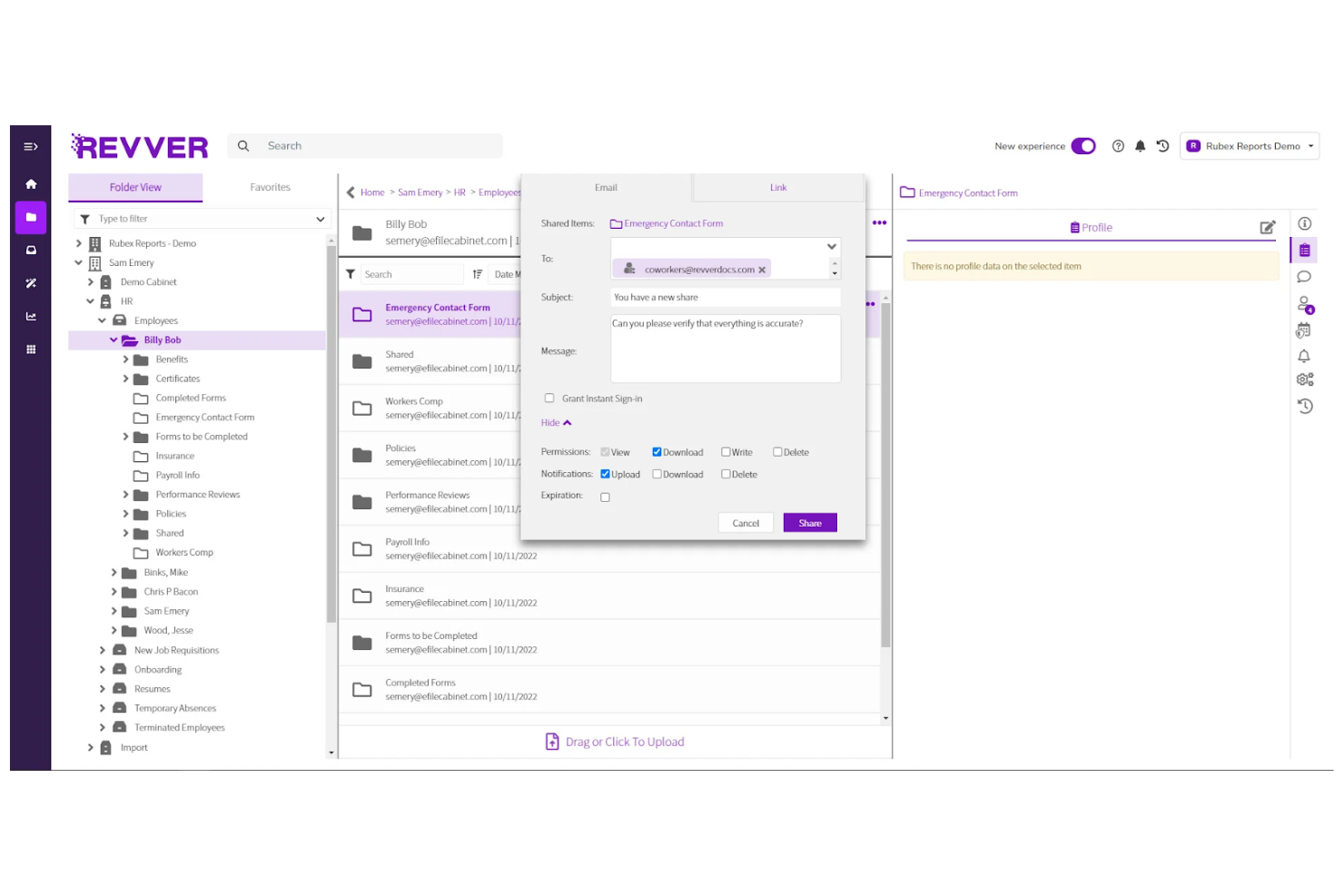
When you need to quickly locate HR documents across a large or complex repository, Revver offers advanced search tools that stand out. The platform is built for HR teams and organizations that manage high volumes of files and require precise, fast retrieval. Its search capabilities help reduce time spent hunting for policies, employee records, or compliance documents, making it a strong fit for teams with demanding document access needs.
Why I Picked Revver
Finding the right document quickly can be a challenge for HR operations, especially when managing thousands of files. I picked Revver because its advanced search capabilities let you filter by metadata, keywords, and document types, making it much easier to pinpoint exactly what you need. The platform also supports full-text search within documents, so you can locate specific information even if you don’t remember the file name. For HR professionals who need reliable, granular search tools to manage complex document libraries, Revver offers a clear advantage.
Revver Key Features
Some other features that make Revver useful for HR document management include:
- Automated document retention policies: Set rules for how long documents are stored and when they should be deleted.
- Role-based access controls: Assign permissions to users based on their role to protect sensitive HR files.
- Version history tracking: View and restore previous versions of documents as needed.
- Bulk upload and tagging: Upload multiple files at once and apply tags for easier organization.
Revver Integrations
Integrations include Microsoft 365, Google Drive, Microsoft Teams, Microsoft Outlook, Microsoft OneDrive, Google Docs, Google Sheets, Microsoft Word, and Microsoft PowerPoint.
Pros and Cons
Pros:
- 20TB top-tier storage capacity
- Dual-screen document version comparison tool
- Advanced search filters for complex queries
Cons:
- Limited workflow automation for HR approvals
- Lacks collaborative real-time document editing

Dayforce
Best with integrated payroll management
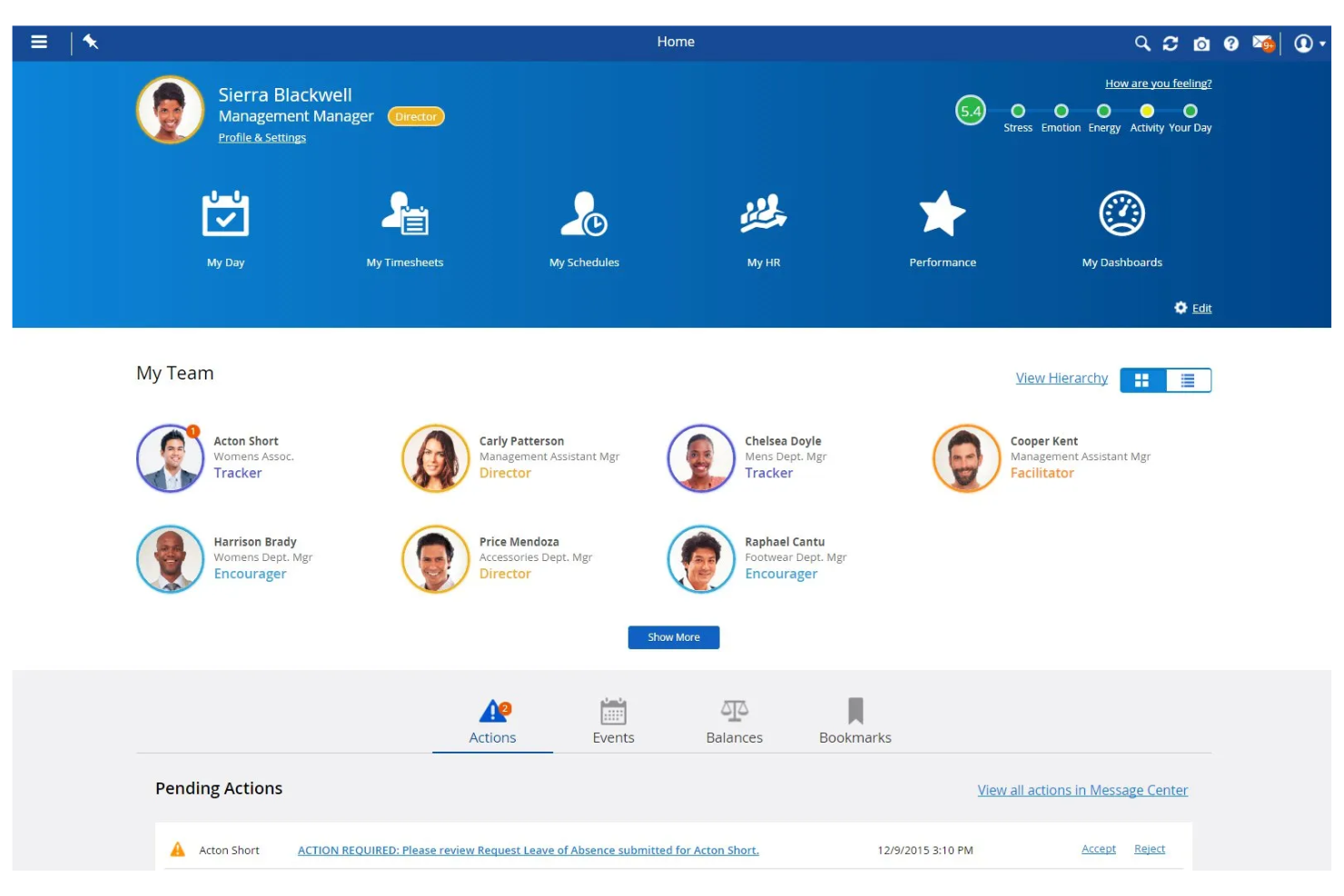
Dayforce stands out for HR teams that want document management tightly connected to payroll and workforce data. This all-in-one platform is a strong fit for organizations that need to manage sensitive employee files alongside payroll, benefits, and compliance records in one place. If you’re looking to reduce manual data entry and ensure payroll accuracy through integrated document workflows, Dayforce brings these capabilities together.
Why I Picked Dayforce
What sets Dayforce apart is its ability to connect HR document management directly with payroll processing. This integration means you can store, update, and access employee documents—like tax forms, contracts, and compliance records—right alongside payroll data, reducing the risk of errors and duplicate entries. I picked Dayforce because it automatically syncs document changes with payroll updates, which helps HR teams maintain accurate records for audits and reporting. For organizations where payroll accuracy and compliance are closely linked to document workflows, Dayforce offers a unified solution.
Dayforce Key Features
Some other features in Dayforce that HR teams may find valuable include:
- Automated document expiration alerts: Get notified when important HR documents are nearing expiration or require renewal.
- Role-based document access controls: Assign permissions so only authorized users can view or edit specific files.
- Bulk document upload and tagging: Upload multiple documents at once and tag them for easier organization and retrieval.
- Audit trail tracking: Monitor all document actions and changes for compliance and accountability.
Dayforce Integrations
Integrations include Salesforce, Microsoft Dynamics, Workday, SAP, Oracle, ADP, Kronos, QuickBooks, Ceridian, and Infor.
Pros and Cons
Pros:
- Document audit trails for all user actions
- AI-powered employee document self-service
- Global multi-currency payroll compliance storage
Cons:
- Frequent updates cause system instability
- Complex custom report creation interface
Other HR Document Management Software
Here are some additional HR document management software (DMS) options that didn’t make it onto my shortlist, but are still worth checking out:
- PandaDoc
For e-signature document workflows
- Document Locator
With Microsoft Office integration
- DynaFile
For scanning paper records to digital
- WorkDocs
For automated compliance tracking
- Paycom
For employee self-service access
- Zoho People
For employee file organization
- OpenText
With large-scale document automation
- Hyland
For configurable retention policies


How I Evaluate HR Document Management Software
I split my evaluation into two layers: baseline capabilities a tool must have—like structured employee filing and compliant e-signatures—and the differentiators that separate the best from the rest.
Core Functionality (Table Stakes For This List)
When I'm selecting tools for my list, I rank each one on a scale from 0 (does not offer the functionality) to 5 (excels in this area) for each core functionality listed below. Then, I calculate the tool's total score into a percentage. Each tool needs to achieve a minimum total score of 65% to be considered for inclusion.
- Employee File Management: I look for a structured, employee-centric file system where documents are organized by profile—not just dumped into generic folders you have to sort through manually.
- Access Controls & Permissions: Sensitive files like disciplinary records or medical documentation need granular, role-based restrictions so only authorized personnel can view them.
- E-Signature & Document Workflows: I evaluate whether a tool supports native e-signatures and automated routing, like sending an offer letter for approval and then to the candidate for signing.
- Compliance & Retention Policies: I check for built-in retention schedules, audit trails, and regulatory support so your team can track I-9 expiration dates or honor GDPR erasure requests.
- Document Templates & Generation: Pre-built and customizable templates with merge fields matter—things like auto-populating an employment contract with a new hire's details from their profile.
- HRIS & Payroll Integration: The tool should connect with your existing HRIS or payroll platform so employee data flows between systems without duplicate entry or manual uploads.
Once I have a list of tools that meet the criteria, I consider what sets each platform apart.
Differentiating Factors (What Sets Vendors Apart)
Here's how I compare and contrast different vendors:
Standout Features
Automated onboarding packets are a big differentiator—I look for tools that bundle new-hire forms into sequenced kits with reminders so nothing slips through during someone's first week. A self-service employee portal also adds real value, giving staff direct access to pay stubs, policies, and personal documents without submitting an HR request. I also evaluate whether a platform uses AI or OCR to auto-classify uploaded files, which saves hours of manual tagging when you're migrating legacy records.
Beyond Features
Security certifications matter when you're storing sensitive employee data. I check for SOC 2 Type II or ISO 27001 compliance, plus encryption standards and SSO/MFA support. Integration depth is equally important—your document management tool should sync with your existing HRIS and payroll stack so employee records stay current without manual re-entry. I also evaluate implementation and migration support, especially bulk import options for teams transitioning from paper files or shared drives with thousands of legacy documents to organize.
How to Choose HR Document Management Software
It’s easy to get bogged down in long feature lists and complex pricing structures. To help you stay focused as you work through your unique software selection process, here’s a checklist of factors to keep in mind:
| Factor | What to Consider |
|---|---|
| Scalability | Will the software handle your document volume as your workforce grows or changes over time? |
| Integrations | Does the tool connect natively with your HRIS, payroll, or other core systems you already use? |
| Customizability | Can you tailor document workflows, permissions, and templates to match your organization’s needs? |
| Ease of use | Will HR staff and employees be able to navigate and use the system with minimal training? |
| Implementation and onboarding | How long will it take to migrate documents and train users? Are onboarding resources provided? |
| Cost | Are pricing tiers clear and predictable? Watch for per-user fees, storage limits, or extra charges. |
| Security safeguards | Does the software offer encryption, access controls, and audit logs to protect sensitive data? |
| Compliance requirements | Can the system support your industry’s document retention, privacy, and audit standards? |
What Is HR Document Management Software?
HR document management software is a digital system that stores, organizes, and secures employee records and HR documents in one centralized location. These platforms help HR teams manage access permissions, track document versions, and ensure compliance with legal and company policies.
By digitizing document workflows, HR teams reduce manual paperwork, improve data security, and make it easier for employees and managers to find and manage important files.
Features
When selecting HR document management software, keep an eye out for the following key features:
- Document storage: Centralizes all HR files and records in a secure, digital repository, making it easy to organize and retrieve documents as needed.
- Access controls: Lets you set permissions for who can view, edit, or share specific documents, protecting sensitive employee information.
- Version tracking: Maintains a history of document changes, so you can see who made updates and revert to previous versions if necessary.
- Document distribution: Enables HR to send documents to individuals or groups, track delivery, and confirm receipt or acknowledgment.
- E-signature support: Allows employees and managers to provide an electronic signature, speeding up approvals and reducing paper use.
- Audit trails: Records all document activity, including views, edits, and downloads, to support compliance and internal audits.
- Search functionality: Provides search tools to quickly locate documents by keyword, date, or employee name.
- Retention policy management: Automates document archiving and deletion based on legal or company requirements, reducing compliance risks.
- Custom form creation: Lets HR teams build and distribute digital forms for onboarding, policy updates, or other HR processes.
- Mobile access: Offers secure access to documents from smartphones or tablets, supporting remote and on-the-go HR work.
Benefits
Implementing HR document management software provides several benefits for your team and your business. Here are a few you can look forward to:
- Improved compliance: Automated audit trails, retention policies, and acknowledgment tracking help you meet legal and company requirements with less manual effort.
- Faster document retrieval: Centralized storage and advanced search tools provide easy access to employee records and HR files when you need them.
- Enhanced data security: Access controls and encryption protect sensitive employee information from unauthorized access or accidental sharing.
- Reduced paperwork: Digital forms, e-signatures, and automated workflows minimize manual paperwork and physical storage needs.
- Better employee experience: Self-service access to documents empowers employees to find and manage their own records without waiting on HR.
- Simplified onboarding and offboarding: Automated document distribution and custom forms simplify the process of bringing new hires on board or managing departures.
- Scalability for growing teams: Cloud-based storage and flexible permissions allow your document management system to grow with your organization.
Costs and Pricing
Selecting HR document management software requires an understanding of the various pricing models and plans available. Costs vary based on features, team size, add-ons, and more. The table below summarizes common plans, their average prices, and typical features included in HR document management software solutions:
Plan Comparison Table for HR Document Management Software
| Plan Type | Average Price | Common Features |
|---|---|---|
| Free Plan | $0 | Basic document storage, limited user access, simple search, and basic support. |
| Personal Plan | $5-$15/user/month | Individual document management, e-signature support, basic access controls, and limited storage. |
| Business Plan | $15-$30/user/month | Team document sharing, advanced permissions, audit trails, custom forms, and integration options. |
| Enterprise Plan | $30-$60/user/month | Unlimited storage, advanced compliance tools, custom workflows, dedicated support, and SSO options. |
HR Document Management Software FAQs
Here are some answers to common questions about HR document management software:
How do HR document management systems help with compliance?
HR document management systems help with compliance by automating retention schedules, tracking document acknowledgments, and maintaining audit trails. These features make it easier to meet legal requirements, prepare for audits, and ensure that sensitive employee data is handled according to regulations.
Can HR document management software integrate with other HR tools?
Yes, most HR document management software can integrate with HRIS, payroll, and onboarding platforms. Integrations reduce manual data entry, keep employee records consistent, and allow HR teams to manage documents within their existing workflows.
What should I look for when evaluating security in HR document management software?
Look for features like encryption, role-based access controls, and detailed audit logs. These safeguards protect sensitive employee information from unauthorized access and help you monitor who views or edits documents.
How long does it take to implement HR document management software?
Implementation time varies, but most cloud-based solutions can be set up in a few days to a few weeks. Factors include the size of your document library, integration needs, and the availability of onboarding resources like training and migration support.
Is it possible to migrate existing paper files into a digital HR document management system?
Yes, you can digitize paper files by scanning and uploading them into the system. Many vendors offer migration support or partner with scanning services to help you convert and organize your existing records.