

10 Best Occupancy Tracking Software in 2026

Best Occupancy Tracking Software Shortlist


Occupancy tracking software monitors how people use and move through your spaces, giving you real-time data to make smarter workplace decisions. If you’re searching for the best occupancy tracking software, you’re probably facing the challenge of balancing safety, efficiency, and cost while supporting a flexible, productive environment. The right tool helps you keep up with shifting occupancy demands, meet compliance requirements, and avoid wasted space or overcrowding. In this list, you’ll find proven options that address these priorities—so you can confidently choose a solution that truly fits your team’s needs.
Why Trust Our Software Recommendations
Our team has been testing and reviewing software since 2012. As HR experts ourselves, we know how difficult—and important—it is to choose the right software.
For this guide, we evaluated tools using hands-on testing and independent research, scoring tools using our selection criteria. We also draw on insights from industry thought leaders and practicing HR experts.
Our reviews reflect our human editorial judgment, not a sales pitch.
Expert reviewers:
Comparison Table: Occupancy Tracking Software
This comparison table summarizes pricing details for my top occupancy tracking software selections.
| Tool | Best For | Trial Info | Price | ||
|---|---|---|---|---|---|
| 1 | Best for flexible workspace booking | Free trial + free demo available | From $5/user/month (billed annually) | Website | |
| 2 | Best for actionable workplace utilization data | Free demo available | Pricing upon request | Website | |
| 3 | Best for hybrid office coordination | Free demo available | Pricing upon request | Website | |
| 4 | Best for custom space access rules | 30-day free trial + free demo available | From $249/month (billed annually) | Website | |
| 5 | Best for team attendance planning | Free demo available | Pricing upon request | Website | |
| 6 | Best for real-time desk availability insights | Free demo available | Pricing upon request | Website | |
| 7 | Best for visitor and employee flow management | Free plan + free demo available | From $362/location/month (billed annually) | Website | |
| 8 | Best for enterprise-grade facility integration | 14-day free trial + free demo available | From $3,315.15 | Website | |
| 9 | Best for privacy-first people counting | Free demo available | From $229/unit | Website | |
| 10 | Best wireless sensor accuracy for workplaces | Free demo available | Pricing upon request | Website |

Best Occupancy Tracking Software Reviews
Below are my detailed summaries of the best occupancy tracking software that made it onto my shortlist. My reviews offer a detailed look at the features, integrations, and best use cases of each platform to help you find the best one for you.

deskbird
Best for flexible workspace booking
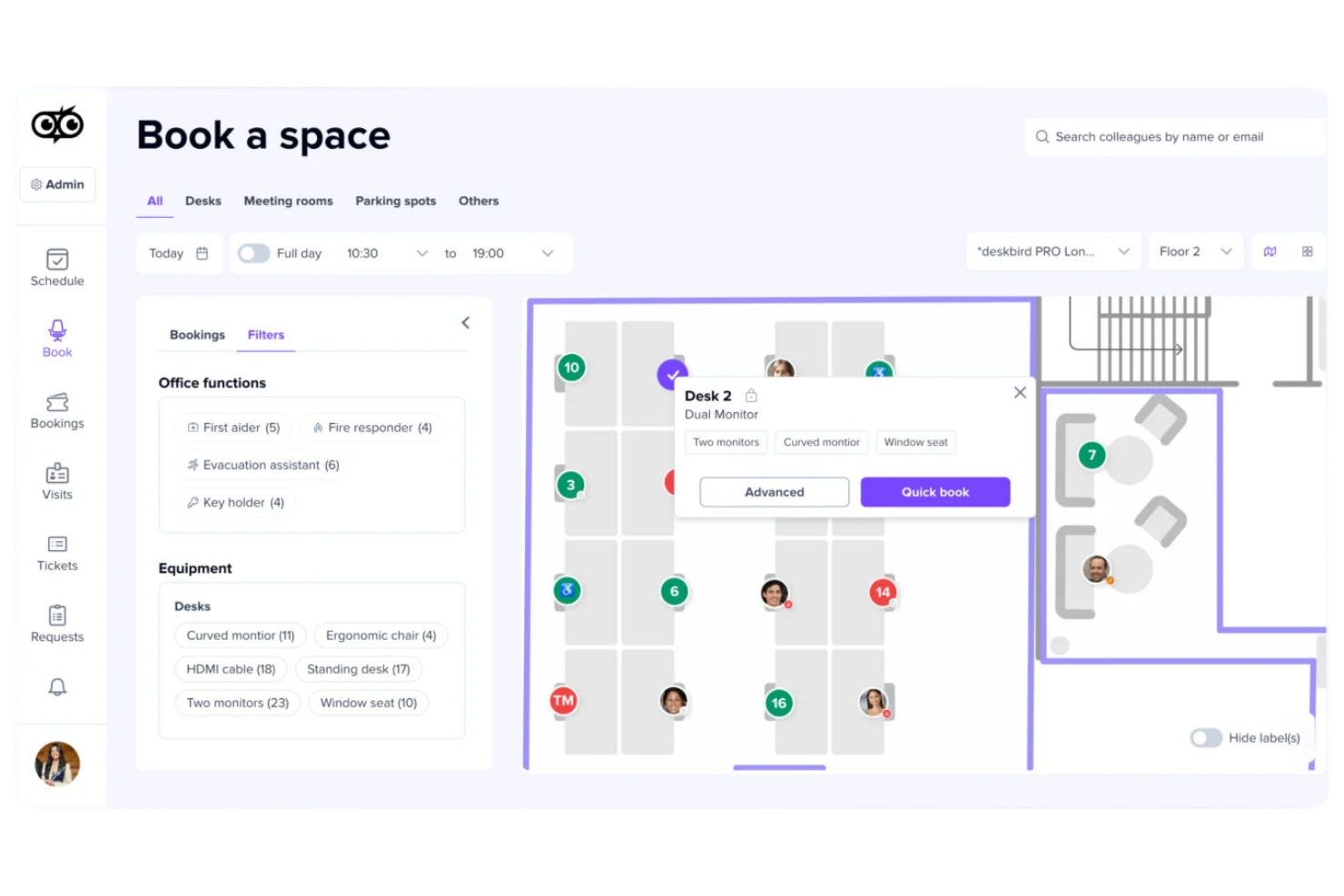
deskbird is a hybrid workplace management platform that covers desk booking, meeting room booking, parking space reservations, visitor management, and real-time occupancy analytics across multiple office locations.
Who is deskbird Best for?
deskbird is a strong fit for mid-sized companies managing hybrid work schedules who need employees to self-manage desk and resource bookings.
Why I Picked deskbird
I've included deskbird on this list because its flexible booking system genuinely covers the full range of hybrid workspace scenarios. I particularly like that you can mix hot desking and assigned seating on the same interactive floor plan, so teams that use a neighbourhood model don't have to manage two separate systems. The auto-booking and smart desk recommendations, which suggest spots based on team schedules and past habits, make the booking experience low-effort for employees. And when occupancy data feeds directly into the analytics dashboard, I find it much easier to act on real utilization patterns rather than estimating from headcounts.
deskbird Key Features
- Meeting room booking: Reserve meeting rooms directly from the floor plan or calendar view, with real-time availability and capacity details visible before booking.
- Week planning: Employees can map out their in-office and remote schedule for the week ahead, giving managers visibility into team attendance patterns.
- Visitor management: Register and track guests with digital check-in, host notifications, and visitor logs tied to specific office locations.
- Parking space booking: Employees can reserve parking spots alongside their desk, with the same booking and release logic applied to parking occupancy.
deskbird Integrations
deskbird offers a large catalogue of integrations spanning Microsoft Teams, Slack, Microsoft Outlook, Google Calendar, MS Entra ID, Google Workspace, Okta, BambooHR, Personio, and HiBob, plus dozens of additional HRIS, SSO, access control, and hardware integrations. An API is available for custom integrations.
Pros and Cons
Pros:
- Auto-release frees no-show desk bookings
- Employees can coordinate in-office days
- Interactive floor plans with amenity filters
Cons:
- Per-user pricing scales up quickly
- Analytics lack depth for larger teams
Best for actionable workplace utilization data
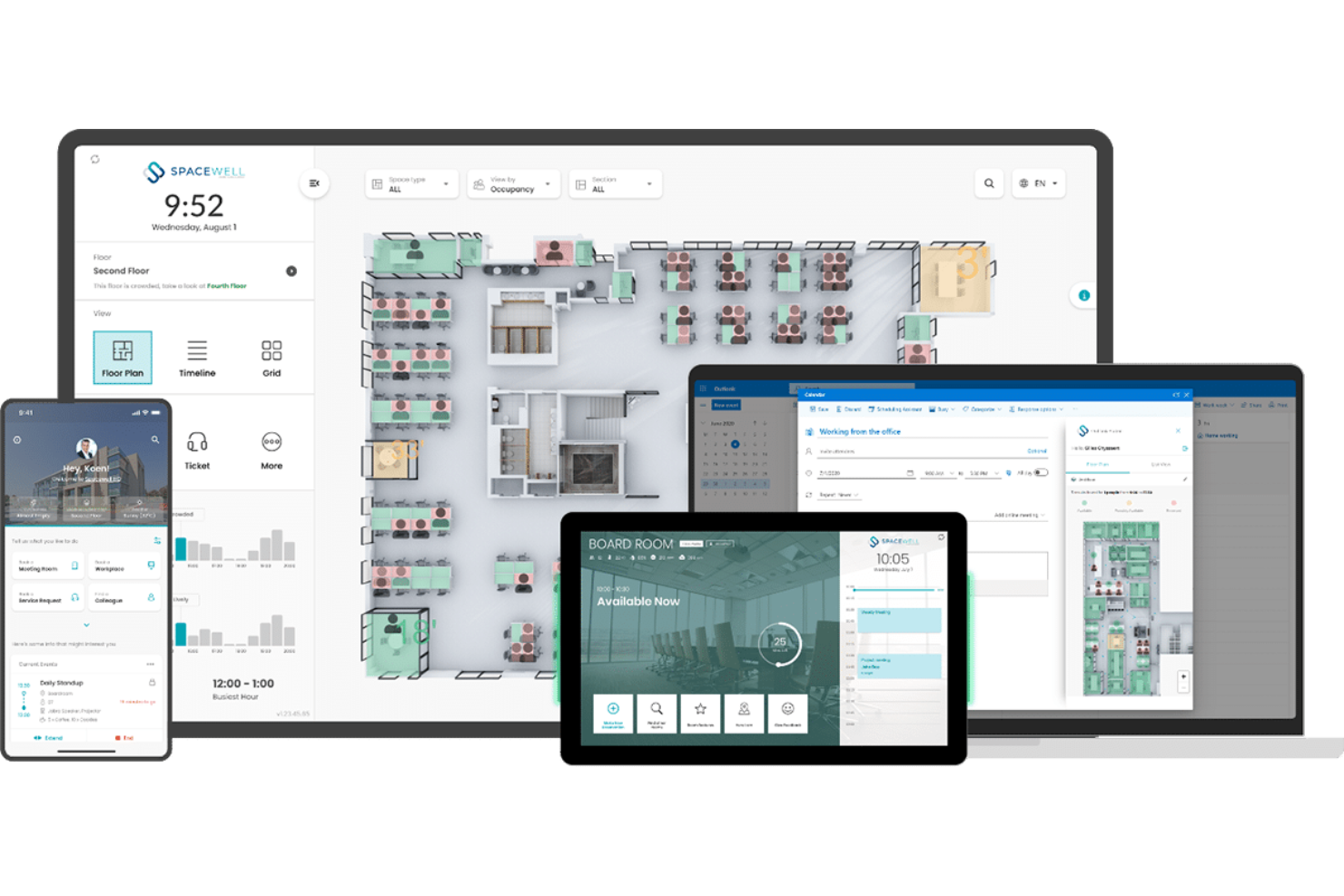
Spacewell is a smart building platform that combines workplace space management, IoT-based occupancy monitoring, indoor air quality tracking, desk and room reservations, and space utilization analytics across building portfolios.
Who Is Spacewell Best For?
Spacewell is a strong fit for facilities managers and corporate real estate teams in mid-to-large enterprises that rely on IoT sensor data to make space decisions.
Why I Picked Spacewell
I picked Spacewell as one of the best because it's one of the few occupancy tracking tools that turns raw IoT sensor data into genuinely actionable insights. I like that the Opportunity Simulator lets you benchmark space performance across your entire portfolio and run consolidation scenarios before committing to any changes. The timelapse feature also stands out to me: you can replay past occupancy trends to understand how space is actually used over time, not just in the moment. That combination of historical playback and multi-building benchmarking makes it unusually strong for data-driven real estate decisions.
Spacewell Key Features
- Sensor management console: Configure, monitor, and troubleshoot connected occupancy sensors across your building from a single interface.
- Indoor environmental quality monitoring: Track CO2 levels, temperature, humidity, and noise in real time alongside occupancy data.
- Desk and room reservations: Let employees book workspaces through a self-service portal, with occupancy data feeding directly into availability displays.
- Workplace app: Employees can check space availability, navigate the office, and submit service requests from a mobile device.
Spacewell Integrations
Spacewell offers pre-built connectors for Microsoft 365, Google Workspace, SAP, Oracle, Microsoft Dynamics, ServiceNow, Jira, Freshservice, Workday, and SuccessFactors, and also supports connections to AutoCAD, Revit, and BMS platforms. REST APIs, SDKs, and webhook support are available for custom integrations.
Pros and Cons
Pros:
- Modular design scales across multiple buildings
- Real-time air quality and occupancy combined
- IoT sensor-agnostic platform supports any hardware
Cons:
- Mobile app lacks some advanced desktop features
- Complex initial setup needs technical expertise

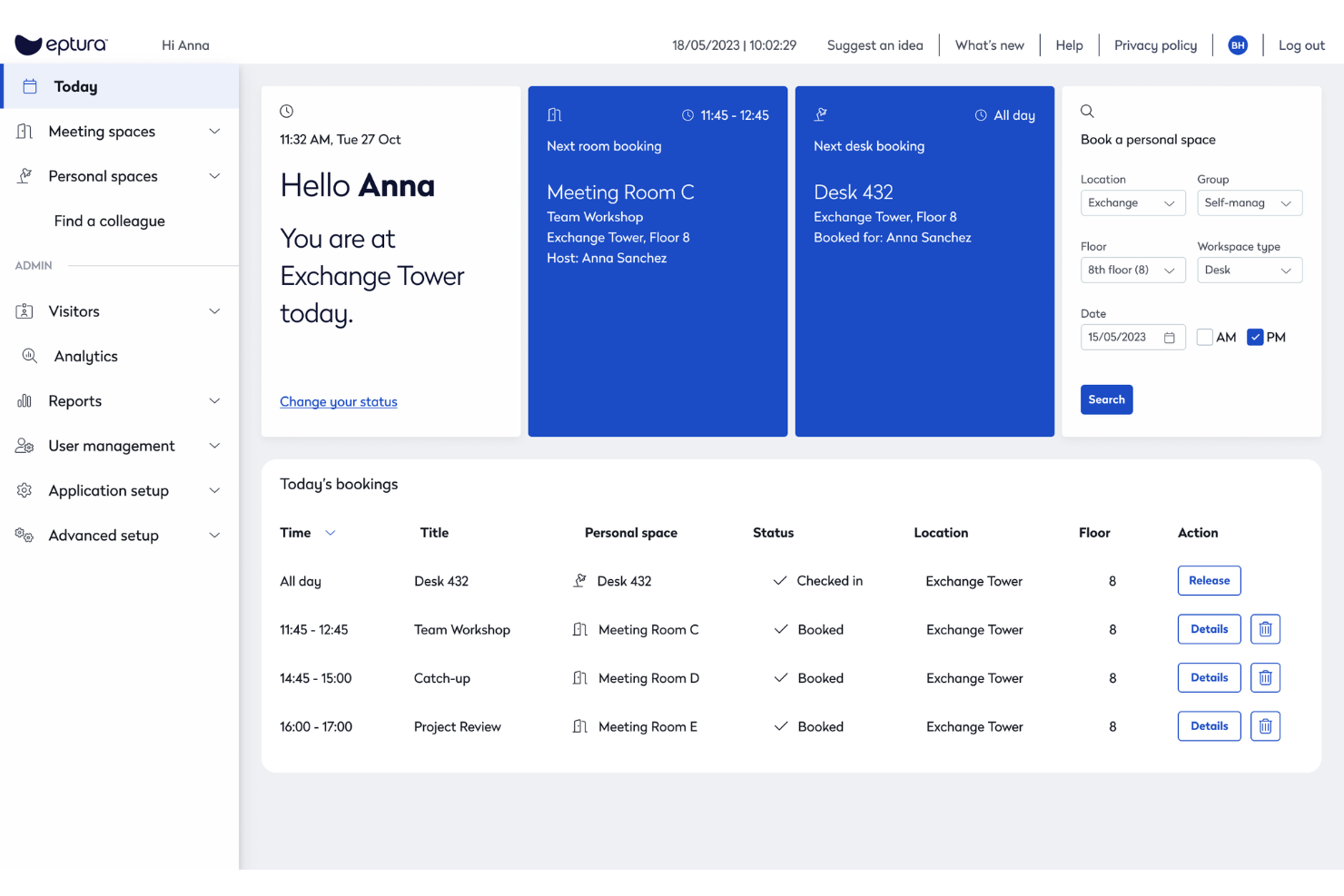
Eptura Workplace is a workplace operations and space management platform that combines desk booking, room scheduling, occupancy analytics, space planning, and move management across single and multi-site office environments.
Who Is Eptura Workplace Best For?
Eptura Workplace is a strong fit for large enterprises managing complex, multi-site office portfolios where real estate decisions need to be backed by live occupancy and utilization data.
Why I Picked Eptura Workplace
I've included Eptura Workplace in my top picks because it handles hybrid office coordination better than most tools I've tested. The AI-powered Copilot lets employees book desks and rooms using natural language, and the team days feature lets coworkers see who's coming in and plan in-office time together. I also like that workplace analytics surface peak days, no-show rates, and utilization trends in one place, so space decisions are based on actual behaviour rather than assumptions.
Eptura Workplace Key Features
- Move management: Plan and execute employee moves end-to-end, from seat assignments to department relocations, with built-in tracking across each step.
- Wayfinding: Let employees navigate the office and locate desks, rooms, and colleagues through interactive floor maps.
- Service request tickets: Submit and track workplace maintenance or facilities requests directly within the platform.
- Space planning: Redesign floor plans and model seating scenarios using live occupancy data and interactive layout tools.
Eptura Workplace Integrations
Eptura Workplace offers a broad tech partner ecosystem with integrations across categories like access control, sensors, calendars, collaboration, HR, and SSO. Native integrations include Microsoft Teams, Microsoft Outlook, Google Calendar, Slack, Okta, Power BI, and VergeSense, and the platform connects with access control providers like Brivo, Genetec, and Gallagher. An API is available for custom integrations.
Pros and Cons
Pros:
- Per-office policy settings across multiple locations
- Custom dashboards for occupancy reporting
- Interactive floor plans show live desk availability
Cons:
- Outlook room bookings don't always sync back
- Requires manual CAD imports

Skedda
Best for custom space access rules

Skedda is a space booking and scheduling platform that covers desk reservations, meeting room bookings, visitor management, and space utilization tracking with a customizable rules and permissions engine.
Who Is Skedda Best For?
Skedda suits facilities and workplace teams at mid-size to enterprise organizations that need granular control over who can access and book shared spaces.
Why I Picked Skedda
I picked Skedda as one of the best because its rules and roles engine is the most granular I've seen in this space. I can set booking conditions by team (for example, only the marketing team can book desks between 9 AM and 5 PM), cap individual usage with quotas, and require admin approval for specific rooms. For organizations where not every space should be open to every employee, that level of access control is exactly what the tool is built around.
Skedda Key Features
- Interactive floor map: Browse a visual map of your space to see real-time desk and room availability before booking.
- Visitor management: Register and track guests, send invitations, and log visitor activity alongside internal space bookings.
- Recurring bookings: Set up repeat reservations on a daily or weekly schedule without recreating the booking each time.
- Calendar sync: Connect bookings to Google Calendar or Microsoft 365 so reservations appear alongside existing schedules.
Skedda Integrations
Skedda offers native (direct) integrations with Microsoft 365, Microsoft Teams, Microsoft Entra ID, Google Workspace, Slack, Zoom, Stripe, Okta, OneLogin, and JumpCloud, along with third-party connections to ServiceNow, Kisi, QuickBooks, Xero, and Trello. It also connects with Zapier and supports webhooks for custom integrations.
Pros and Cons
Pros:
- No-show auto-release frees unused spaces
- Granular booking rules per team and role
- Wi-Fi-based occupancy tracking needs no hardware
Cons:
- No native HRIS integration via aggregator
- Visitor management costs extra as add-on
New Product Updates from Skedda

Skedda Expands Visit Exports With Custom Field Data
Skedda adds Summary and Breakdown visit exports with custom field data, filter support, and XLSX or CSV formats. These updates give teams more flexibility when exporting visit- and visitor-level information for reporting and analysis. For more information, visit Skedda’s official site.
 .
.
Kadence
Best for team attendance planning

Kadence is a workplace management platform that combines desk and space booking, team scheduling, occupancy analytics, visitor management, and AI-driven space planning into a single system.
Who Is Kadence Best For?
Kadence is a strong fit for mid-sized and enterprise companies managing hybrid teams across multiple office locations.
Why I Picked Kadence
I picked Kadence as one of the best because of how well it handles team attendance planning alongside occupancy tracking. The Team Kadences feature lets managers suggest and coordinate in-office days across their teams, so you can see real attendance intent before the day even starts. I also like the office activity view, which shows team bookings across the week and gives you a live read on how occupied your space will actually be.
Kadence Key Features
- Desk booking: Reserve individual desks by date, location, or floor directly within the platform, with auto-release for no-show bookings.
- Capacity limits: Set occupancy thresholds per floor or area on any given day to prevent overcrowding across your office.
- Kadence Sense: Tracks real workplace occupancy data without physical sensors, giving you accurate usage insights from booking behaviour alone.
- Scenario planning: Models "what-if" situations like headcount growth or policy changes to evaluate the impact on space and costs before making decisions.
Kadence Integrations
Kadence offers native integrations with Microsoft Teams, Slack, Google Calendar, Microsoft Outlook, Google Workspace, Microsoft Azure, BambooHR, Rippling, Workday, and Okta, among others, including SSO providers like OneLogin, JumpCloud, and Ping Identity, plus ticketing tools like Zendesk, Jira, ServiceNow, and Freshdesk. A public API is also available for custom integrations.
Pros and Cons
Pros:
- Multi-location management from one dashboard
- AI suggests the best days to commute
- Sensorless occupancy tracking via booking data
Cons:
- Advanced support limited to enterprise plans
- Floor plan setup requires manual effort
New Product Updates from Kadence
Kadence MCP Comes to Popular AI Assistants
Kadence launches MCP support for Claude, ChatGPT, and Microsoft Copilot to manage workplace tasks and access space insights. This brings booking, scheduling, and reporting into the AI assistants teams already use. For more information, visit Kadence’s official site.
 .
.
Robin
Best for real-time desk availability insights

Robin is a hybrid workplace platform that covers desk booking, meeting room scheduling, visitor management, and space utilization analytics across office environments.
Who Is Robin Best For?
Robin is a strong fit for mid-size to enterprise companies managing hybrid work schedules across multi-floor office environments.
Why I Picked Robin
Robin earns its spot on my shortlist because of how it handles real-time desk availability. Its interactive floor maps update live, showing which desks are booked, checked in, or open across every floor. I also like the AI-powered auto-booking, which reads past behaviour and preferences to reserve the right desk automatically. On top of that, the real-time "who's in the office" view lets employees see where teammates are sitting before they even arrive.
Robin Key Features
- In-office policies: Set and communicate hybrid work policies, and let employees track their own in-office attendance progress
- Visitor management: Handle pre-registration, check-in, and visit logs for office guests in one place
- Access control data: Connect your access control system to trigger automatic check-ins and pull badge data into occupancy reports
- Wayfinding: Let employees and visitors navigate office floors and locate available resources on a live map display
Robin Integrations
Integrations include Microsoft, Outlook, Teams, Exchange, Google, Slack, Zoom, Okta, OneLogin, and Rippling.
Pros and Cons
Pros:
- Predictive analytics forecast future space usage
- Auto-cancels ghost meetings to free rooms
- Visualizes live seat vacancy
Cons:
- Per-headcount pricing penalizes low attendance
- Floor plan edits require vendor assistance

Envoy
Best for visitor and employee flow management
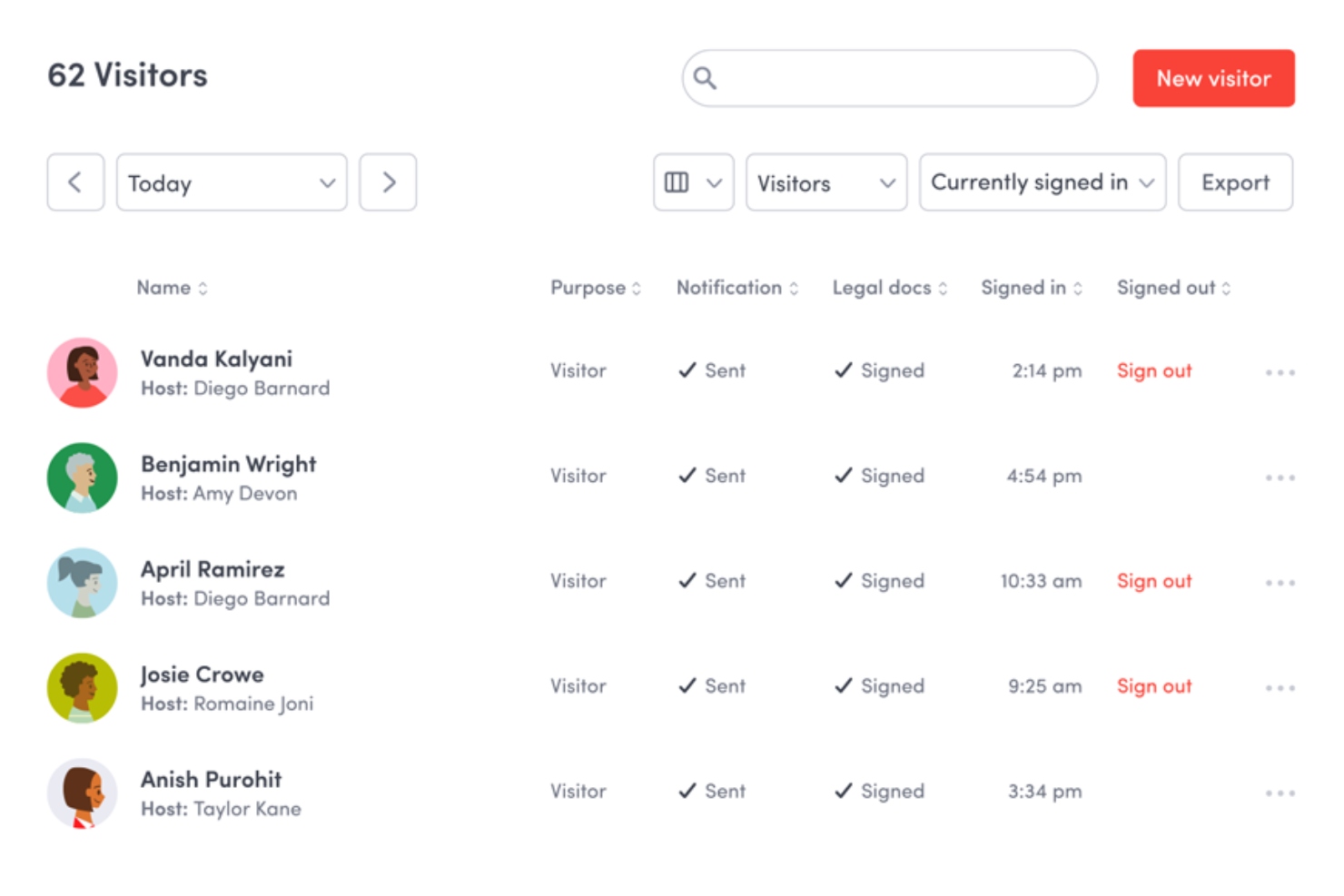
Envoy is a workplace management platform that combines visitor management, desk and room booking, occupancy analytics, emergency notifications, and digital signage into a single connected system.
Who Is Envoy Best For?
Envoy is a strong fit for mid-size to large companies managing hybrid workplaces where tracking both visitor check-ins and employee desk usage matters daily.
Why I Picked Envoy
Envoy earns its spot on my shortlist because no other tool I've tested handles the intersection of visitor check-in and employee desk booking with this level of live visibility. I particularly like the interactive live map, which lets my team see in real time which desks are occupied and where specific coworkers are sitting. Envoy's presence signals also feed directly into occupancy analytics, so I can see actual attendance patterns rather than just booking data.
Envoy Key Features
- Room booking: Reserve conference rooms directly through Envoy, with real-time availability visible across the workplace.
- Neighbourhood management: Group desks into zones assigned to specific teams, making it easier to manage seating arrangements at scale.
- Capacity limits: Set maximum occupancy thresholds per space and prevent bookings from exceeding defined limits.
- Emergency headcount: Trigger alerts during safety events and track who has confirmed their status in real time.
Envoy Integrations
Envoy offers over 100 integrations through its app directory, including Slack, Microsoft Teams, Google Calendar, Microsoft Outlook, Okta, Salesforce, Brivo Access, Verkada, Kisi, and Butlr. It also connects with Zapier and provides an API for custom integrations.
Pros and Cons
Pros:
- Multi-channel emergency alerts tied to headcounts
- Visitor and employee tracking in one view
- Live map shows real-time desk occupancy
Cons:
- Add-on modules increase total cost quickly
- Require iPad hardware setups in the kiosk operations
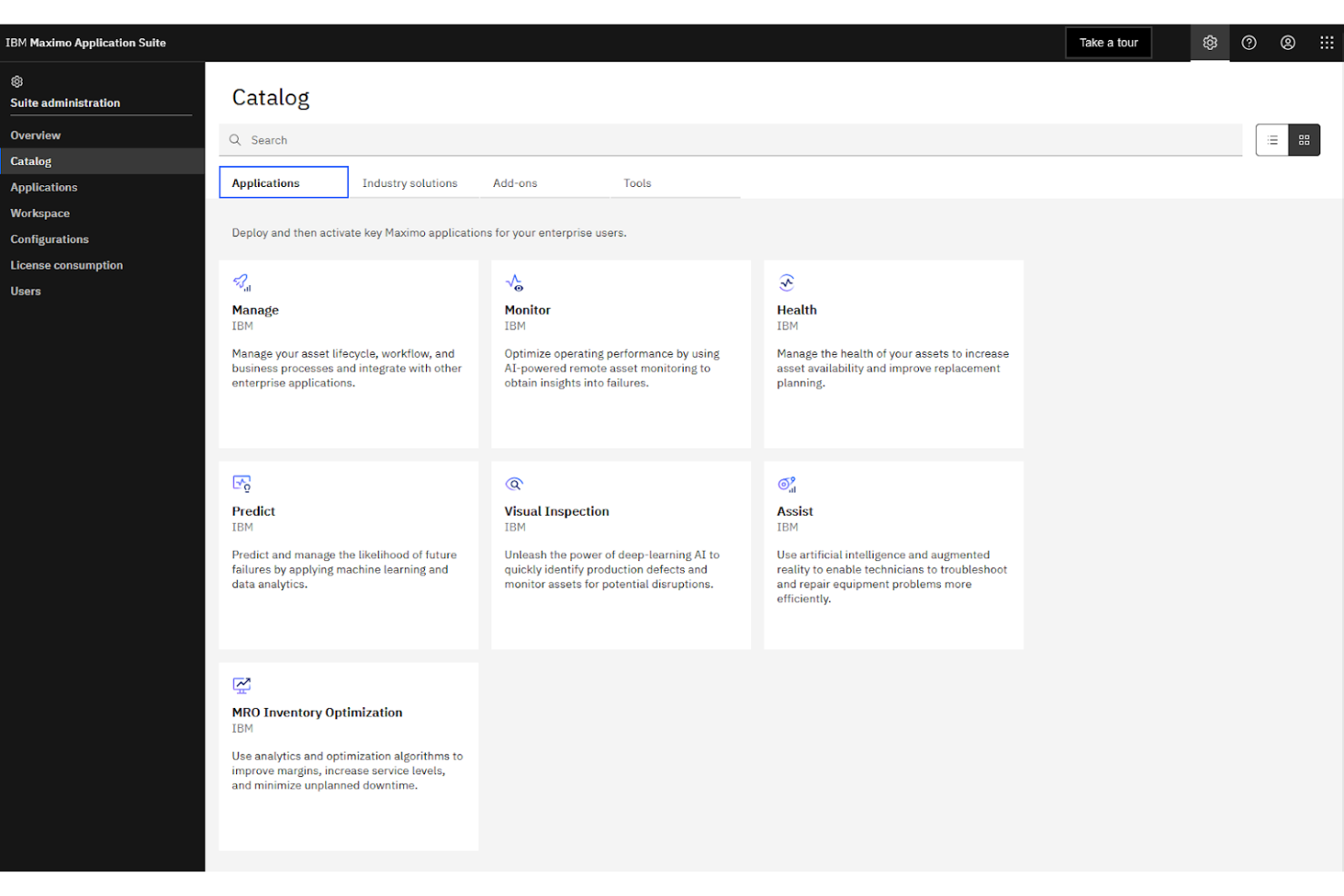
IBM Maximo is an enterprise asset management platform that tracks space utilization, manages work orders, monitors facility assets, and connects with IoT-enabled building systems across large-scale operations.
Who Is IBM Maximo Best For?
IBM Maximo is purpose-built for large enterprises and public sector organizations managing complex, multi-site facility and infrastructure portfolios.
Why I Picked IBM Maximo
I picked IBM Maximo because no other tool on this list connects occupancy data to the physical infrastructure of a building the way it does. Maximo's asset topology maps link space utilization data directly to the equipment, systems, and maintenance records within that space. I also like that it pulls live sensor data from BMS and IoT-connected devices into a single asset record, so facility teams aren't toggling between platforms to understand what's happening across a campus or multi-site portfolio.
IBM Maximo Key Features
- Space management: Track room assignments, area classifications, and occupancy allocations across an entire location hierarchy
- Work order automation: Automatically generate maintenance work orders when occupancy thresholds or asset conditions trigger predefined rules
- AI-powered health scoring: Use built-in AI to assess asset and facility conditions based on real-time utilization and sensor data
- Inspection management: Schedule and log facility inspections tied directly to specific locations and assets within the system
IBM Maximo Integrations
IBM Maximo integrates with enterprise systems like SAP, Oracle, Microsoft Dynamics, ServiceNow, Workday, and Esri GIS platforms through its built-in Maximo Integration Framework (MIF) and dedicated connectors. IBM App Connect extends connectivity further to tools like Jira, Salesforce, and Slack, and a REST API is available for custom integrations.
Pros and Cons
Pros:
- AI flags asset issues before failures occur
- Covers multi-site portfolios in one platform
- IoT sensor data tied to individual assets
Cons:
- Adding assets to the hierarchy is slow
- Initial setup demands significant IT resources

Density Waffle is a plug-and-play radar sensor paired with occupancy software that delivers real-time and historical people count data for meeting rooms, phone booths, open spaces, and desks.
Who Is Density Waffle Best For?
Density Waffle is a particularly good fit for workplace teams at mid-sized companies that need accurate room and desk occupancy data without the cost or complexity of enterprise-grade sensor systems.
Why I Picked Density Waffle
I picked Density Waffle as one of the best because its radar-based sensor counts people without capturing any images or biometric data, which removes the privacy review process that camera-based sensors typically trigger. In practice, that means my team can deploy it across sensitive spaces like private offices and phone booths without compliance pushback. I also like that Waffle counts in three discrete tiers (0, 1, 2, or 3+ people) with under one second of data latency, giving genuinely actionable real-time occupancy data.
Density Waffle Key Features
- Flexible mounting options: Waffle supports three mounting configurations, so you can install it on ceilings, walls, or furniture without structural changes.
- Historical occupancy data: Alongside real-time counts, Waffle stores historical usage data can be queried to analyze space trends over time.
- Mobile access: View live and historical occupancy data directly from a mobile device, without needing to log into a desktop dashboard.
- Real-time and historical API: Access raw occupancy data through a dual-mode API, enabling custom reporting, wayfinding displays, or third-party system connections.
Density Waffle Integrations
Density Waffle relies on a real-time and historical API with WebSocket support, which you can use to pipe occupancy data into your existing tools, dashboards, or building management systems.
Pros and Cons
Pros:
- Sub-one-second real-time data latency
- Self-installable with no professional help needed
- Radar sensors ensure complete occupant anonymity
Cons:
- iOS is required for initial sensor setup
- Counts max three people per sensor

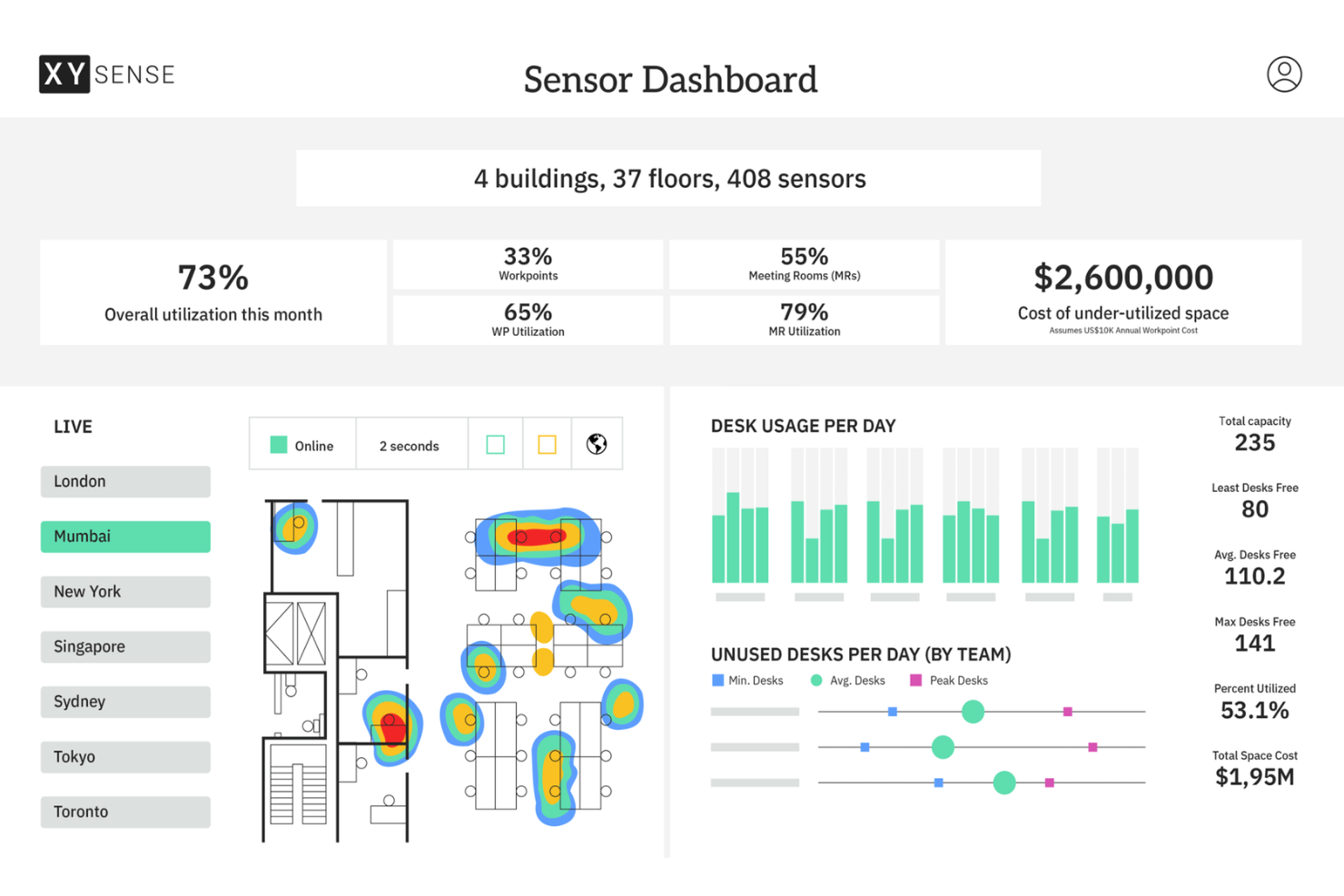
XY Sense is an occupancy intelligence platform that combines wireless sensors, a real-time insights dashboard, and an API to track how meeting rooms, open areas, small spaces, and building entries are used throughout the workday.
Who Is XY Sense Best For?
XY Sense is a strong fit for enterprise workplace teams and corporate real estate managers who need precise, floor-level occupancy data across large, multi-zone office environments.
Why I Picked XY Sense
I picked XY Sense as one of the best because its Area Pro Sensor covers up to 3,000 sq ft per unit and tracks people to within one foot, updating every two seconds. That level of precision means I can map real movement patterns across large open floors, not just detect whether a zone is occupied. I also like that the sensors run on wired PoE, so there's no battery maintenance, degrading data quality over time across a large deployment.
XY Sense Key Features
- Occupancy replays: Review a visual, time-stamped playback of how desks, rooms, and floors were used throughout the day
- Predictive forecasting: View projected demand and capacity trends before they become visible in real-time data
- Neighbourhood and department balancing: See how specific teams use zones across a floor to inform space allocation decisions
- Customizable alerts: Set occupancy thresholds for specific spaces and get notified the moment those thresholds are crossed
XY Sense Integrations
Integrations include Microsoft, Google, Appspace, Calven, Entrak, GoSpace, Habitap, HubStar, NHance, and Nura.
Pros and Cons
Pros:
- Real-time desk-level occupancy detection available
- Thermal sensing avoids collecting identifiable data
- Battery-powered sensors need no wired infrastructure
Cons:
- Dashboard reporting could offer deeper granularity
- Limited booking features compared to competitors
Other Occupancy Tracking Software
Here are some additional occupancy tracking software options that didn’t make it onto my shortlist, but are still worth checking out:
- VergeSense
For AI-powered spatial analytics
- SpaceIQ
For scenario-based office space planning
- YAROOMS
For AI assistant integration in Teams
- Tactic
For unified workplace request management
- Archie
For coworking space automation
- Officely
For chat-based check-ins via Teams
- OfficeSpace
For visual seat allocation layouts
- Eden Workplace
For connected desk and visitor reservations
- HybridHero
With integrated employee leave workflows
- Maptician
For multi-floor real-time presence mapping


How I Evaluate Occupancy Tracking Software
I evaluate occupancy tracking tools across two layers: the baseline capabilities every platform must have—like real-time monitoring and HRIS sync—and what separates the best fits for hybrid HR teams.
Core Functionality (Table Stakes For This List)
When I'm selecting tools for my list, I rank each one on a scale from 0 (does not offer the functionality) to 5 (excels in this area) for each core functionality listed below. Then, I calculate the tool's total score into a percentage. Each tool needs to achieve a minimum total score of 65% to be considered for inclusion.
- Real-Time Occupancy Monitoring: I look for live headcount visibility across buildings, floors, and zones so workplace leaders can spot underused wings or overcrowded areas as the workday unfolds.
- Attendance & Check-In Tracking: Whether it's badge swipes, mobile check-ins, or Wi-Fi detection, I evaluate how many automated methods a platform supports and how reliably it logs individual employee presence.
- Space Utilization Analytics: Strong reporting goes beyond raw counts. I check for historical trend dashboards, peak-time analysis, and the ability to filter by department or location to support workforce planning conversations.
- Capacity Threshold Management: I look at whether admins can set per-space occupancy caps and receive automated alerts when a floor or meeting area approaches its limit, which matters for safety compliance and event planning.
- Desk & Room Booking Integration: Booking data only tells half the story. I evaluate whether a tool reconciles reservations against actual usage, surfacing ghost bookings and no-shows that distort utilization reports.
- HRIS & Calendar Integration: Syncing with platforms like Workday, BambooHR, Google Calendar, or Outlook keeps employee rosters and schedules current, so I check for native connectors and the depth of data flowing between systems.
Once I have a list of tools that meet this criteria, I consider what sets each platform apart.
Differentiating Factors (What Sets Vendors Apart)
Here's how I compare and contrast different vendors:
Standout Features
Real-time heatmaps make a difference when workplace leaders need to assess density at a glance. I look for live floor plan overlays that color-code zones by occupancy level, so you can spot a packed floor without pulling a report. Predictive analytics add another layer—platforms that forecast next week's occupancy from historical patterns help HR teams plan desk availability proactively. Sensor-agnostic hardware support also matters, since teams that inherit existing sensors shouldn't need to rip and replace to adopt a new platform.
Beyond Features
Privacy and compliance posture is one of the first things I check. HR teams tracking employee presence need anonymized counting methods and clear GDPR or CCPA documentation, especially when legal reviews how occupancy data is collected. Deployment flexibility matters too. I evaluate whether a platform supports wireless sensors that retrofit into existing office infrastructure without major construction. Pricing structure also shapes long-term viability—I look at whether vendors charge per sensor, per location, or per square foot, and whether hardware is bundled as a service or requires upfront capital investment.
How to Choose Occupancy Tracking Software
It’s easy to get bogged down in long feature lists and complex pricing structures. To help you stay focused as you work through your unique software selection process, here’s a checklist of factors to keep in mind:
| Factor | What to Consider |
|---|---|
| Scalability | Will this tool handle your team size and future growth across multiple locations or departments without major system overhauls or extra cost? |
| Integrations | Does the software work with your HRIS, calendar, or access control systems so you avoid manual data entry and maintain accurate attendance records? |
| Customizability | Can you easily tailor policies, floor plans, user permissions, and workspace categories to match your specific hybrid or office requirements? |
| Ease of use | Will employees and admins quickly understand the interface, or will adoption stall due to confusing navigation, slow loading, or unnecessary steps? |
| Implementation and onboarding | Are there templates, setup guides, or support resources to help you configure the tool and import directory data or floor plans with minimal IT support? |
| Cost | Do the pricing tiers match your budget, or are there costly add-ons and usage limits that could turn a low initial price into a high total cost? |
| Security safeguards | Does the solution offer strong user authentication, role-based access, data encryption, and options to comply with privacy standards such as GDPR? |
| Support availability | Will you get timely help if issues arise, and does the vendor offer live chat, phone, or onboarding services aligned with your business needs? |
What Is Occupancy Tracking Software?
Occupancy tracking software is a digital tool that monitors, records, and manages how people use shared spaces within a workplace or facility. These systems provide real-time and historical data on occupancy patterns, support desk or room reservations, and help teams enforce capacity and safety policies. Using this information, organizations can optimize space usage, improve workplace experience, and make informed decisions about office layouts and resource planning.
Features of Occupancy Tracking Software
When selecting occupancy tracking software, keep an eye out for the following key features:
- Real-time occupancy monitoring: Tracks the number of people in a space at any given moment using sensors, user check-ins, or system integrations, helping you maintain safe and efficient space use.
- Desk and room booking: Let employees reserve specific desks or meeting rooms in advance, reducing conflicts, supporting hybrid work, and providing clear insights into future occupancy.
- Interactive floor plans: Offers digital maps that show available and occupied spaces in real time, so employees can easily find and book workstations or meeting areas that suit their needs.
- Capacity limit enforcement: Automatically limits reservations or sends alerts when spaces are about to exceed maximum occupancy, supporting compliance with safety or distancing policies.
- Usage analytics and reporting: Provides data and visual dashboards on how spaces are used over time, enabling HR and facilities teams to identify trends, underutilization, or bottlenecks.
- Visitor management: Tracks external guests entering the workplace, ensuring accurate occupancy records, smoother check-ins, and enhanced security for employees and visitors.
- Mobile access: Enables users to check availability, make reservations, and receive notifications on the go, which is critical for hybrid or flexible working environments.
- Integration with calendars: Syncs reservations and occupancy data with your existing calendar systems, so booking information appears alongside meetings and employee schedules.
Common Occupancy Tracking Software AI Features
Beyond the standard occupancy tracking software features listed above, many of these solutions are incorporating AI with features like:
- Predictive space usage analytics: Uses AI to analyze historical occupancy trends and forecast future space demand, helping you plan for busy periods and optimize office layouts.
- Smart booking recommendations: Suggests the best available desks or meeting rooms based on employee preferences, work patterns, and team schedules, saving time and improving workplace satisfaction.
- Automated anomaly detection: Monitors occupancy data for unusual patterns, such as persistent over-capacity or underused areas, then flags issues for review and action.
- AI-driven policy enforcement: Applies machine learning models to automatically adjust access permissions and reservation rules in response to changing workplace policies or actual utilization.
- Occupancy-based cleaning scheduling: Schedules cleaning or maintenance based on real-time and forecasted space usage, ensuring high-traffic areas are prioritized for health and safety.
Benefits of Occupancy Tracking Software
Implementing occupancy tracking software provides several benefits for your team and your business. Here are a few you can look forward to:
- More efficient space usage: Gain real-time and historical data to optimize workplace layouts, eliminate wasted space, and ensure resources match team needs.
- Improved safety and compliance: Automatically enforce capacity limits and track occupancy to support health guidelines, emergency planning, and organizational policies.
- Enhanced employee experience: Make it easier for employees to find and reserve suitable workspaces, supporting flexible work arrangements and collaboration.
- Informed decision-making: Use analytics and forecasting to plan office expansions, consolidations, or redesigns based on real occupancy trends and needs.
- Reduced administrative workload: Automate routine tasks like desk bookings, visitor tracking, and reporting, freeing up HR and facilities teams for higher-value work.
- Cost savings on facilities: Identify underused areas and opportunities to downsize or repurpose space, reducing lease and operational costs over time.
- Stronger workplace security: Monitor who is on-site, manage visitor access, and keep accurate logs to support emergency response or audits.
Costs and Pricing of Occupancy Tracking Software
Selecting occupancy tracking software requires an understanding of the various pricing models and plans available. Costs vary based on features, team size, add-ons, and more. The table below summarizes common plans, their average prices, and typical features included in occupancy tracking software solutions:
Plan Comparison Table for Occupancy Tracking Software
| Plan Type | Average Price | Common Features |
|---|---|---|
| Free Plan | $0 | Basic occupancy tracking, limited desk booking, single location support, and basic reporting. |
| Personal Plan | $5-$15/user/month | Desk and room booking, standard floor plans, mobile access, email support, and simple analytics. |
| Business Plan | $15-$35/user/month | Multi-location support, advanced analytics, visitor management, integrations, and automated capacity enforcement. |
| Enterprise Plan | $35-$70/user/month | Custom workflows, priority support, single sign-on, compliance tools, API access, and dedicated customer success. |
Occupancy Tracking Software FAQs
Here are some answers to common questions about occupancy tracking software:
How does occupancy tracking software work?
Occupancy tracking software uses sensors, employee check-ins, or system integrations to collect real-time data on how many people are in each area of a workplace. This data is processed and displayed through cloud-based dashboards, interactive heatmaps, or reports to help teams manage space, reservations, and capacity limits without any guesswork.
Can occupancy tracking software help with hybrid work arrangements?
Yes, occupancy tracking software is often used to support hybrid work by allowing employees to reserve desks or rooms on the days they come in. It improves the user experience for remote teams and provides managers with data on office usage so they can adjust layouts, staffing, or policies as needs change.
What integrations should I look for in occupancy tracking software?
You should look for integrations with HR systems, calendars (like Google or Outlook), access control, HVAC units, and communication platforms. The right integrations help automate reservations, support check-ins, and keep records accurate without manual data entry.
Is occupancy tracking software suitable for multi-location organizations?
Yes, most modern solutions can manage occupancy across multiple locations or offices from a single dashboard. This lets you track usage patterns, enforce policies, and create reports, whether your workforce is centralized or spread across a region.
How do these systems protect employee privacy?
Good occupancy tracking software protects privacy by using anonymized or aggregated data, minimizing individual tracking, and complying with regulations like GDPR. Admin settings also control what information different users can access. Always review a vendor’s privacy statement before implementation.