

The 10 Best HR Services Reviewed in 2026

10 Best HR Services Shortlist


The best HR services help you handle payroll, compliance, benefits, and employee management, freeing up time focus on growing your business instead of getting buried in admin work.
Managing HR in-house can be time-consuming and risky, especially when juggling changing labor laws, payroll deadlines, and employee requests. The right HR partner streamlines these processes, reduces compliance risks, and ensures your people operations run smoothly from onboarding to offboarding.
In this guide, I’ve reviewed and compared the top HR service providers to help you find the best fit for your team’s needs and goals. You’ll discover trusted partners that save time, simplify HR, and support your organization’s success.
Why Trust Our Software Reviews
We’ve been testing and reviewing HR software systems since 2019. As HR experts ourselves, we know how critical and difficult it is to make the right decision when selecting software.
We invest in deep research to help our audience make better software purchasing decisions. We’ve tested more than 2,000 tools for different HR management use cases and written over 1,000 comprehensive software reviews. Learn how we stay transparent & our software review methodology.
Best HR Services Summary
This comparison chart summarizes pricing details for my top HR services selections to help you find the best one for your budget and business needs.
| Service | Best For | Trial Info | Price | ||
|---|---|---|---|---|---|
| 1 | Best for global HR services and payroll in one | Not available | Pricing upon request | Website | |
| 2 | Best for employee self-service tools | Not available | Pricing upon request | Website | |
| 3 | Best for integrated time tracking | Not available | From $9/employee/month + $50/month base fee | Website | |
| 4 | Best for advanced analytics and reporting | Free demo available | Pricing upon request | Website | |
| 5 | Best for integrated HR and payroll | Free demo available | Pricing upon request | Website | |
| 6 | Best for tech-driven HR automation | Free demo + free trial available | Pricing upon request | Website | |
| 7 | Best for managing global contractors | Free demo available | From $29/contractor/month to $499/EOR employee/month | Website | |
| 8 | Best for industry-specific HR expertise | Free demo available | Pricing upon request | Website | |
| 9 | Best for hands-on HR outsourcing | Free demo available | Pricing upon request | Website | |
| 10 | Best for aligning HR with business strategy | Not available | Pricing upon request | Website |


-

Remote People
Visit WebsiteThis is an aggregated rating for this tool including ratings from Crozdesk users and ratings from other sites.5 -
Paycom
Visit WebsiteThis is an aggregated rating for this tool including ratings from Crozdesk users and ratings from other sites.4.3 -
edays
Visit WebsiteThis is an aggregated rating for this tool including ratings from Crozdesk users and ratings from other sites.4.7



Best HR Services Reviews
Below are my detailed summaries of the best HR services providers that made it onto my shortlist. My reviews offer a look at each provider’s key services, unique specialties, and pros & cons to help you find the best one for your needs.

The Deel platform empowers companies with global teams by letting you hire, pay, and manage employees and contractors in 150+ countries—all from one HR system. If you’re scaling internationally and don’t want to set up local entities or wrestle with tax and labor-law detail per country, this could be the fit for your team.
Why I Picked Deel
I picked Deel because it puts global hiring and compliance into a single workflow rather than forcing you to patch together separate services. It lets you onboard workers anywhere while handling payroll, taxes, and benefits through its own legal entities—so you don’t need to create your own local entity to hire someone in a new country.
I like that you can pay employees and contractors in 130+ countries with local-law compliance baked in, and the platform gives you one dashboard for tracking head-count, spending, and workforce data across borders, making it easier to get clarity on global labour and month-end numbers.
Deel Key Features
Here are some key features worth highlighting:
- Global EOR Services: Hire full-time employees in 100+ countries via Deel’s own entity network, removing the need for you to open local entities.
- Multi-Country Payroll & Compliance: Process payroll in 130+ countries with automatic tax calculation, filing support, and local regulatory monitoring built in.
- Unified Contractor & Employee Management: Onboard, classify, and pay contractors or full-employees in one system—so you don’t have separate tools for each type of worker.
- Global HRIS Integration & Workforce Analytics: Sync your HR data across systems, consolidate workforce insights globally, and view metrics like headcount, spending, and compliance alerts in one place.
Deel Integrations
Integrations include BambooHR, HiBob, SAP SuccessFactors, Workday, Xero, QuickBooks, Expensify, and Zapier.
Pros and Cons
Pros:
- Single platform for employees + contractors
- Lets you hire and pay across 150+
- Integrated reporting and analytics tools
Cons:
- Some performance/learning-modules less developed
- Complex features can take time to configure

Paycom is an HR services platform that handles payroll, benefits enrollment, onboarding, time and labor management, and compliance tracking from one centralized system.
Who Is Paycom Best For?
Paycom is a strong fit for mid-to-large organizations that need a unified HR and payroll system with minimal reliance on IT or third-party integrations.
Why I Picked Paycom
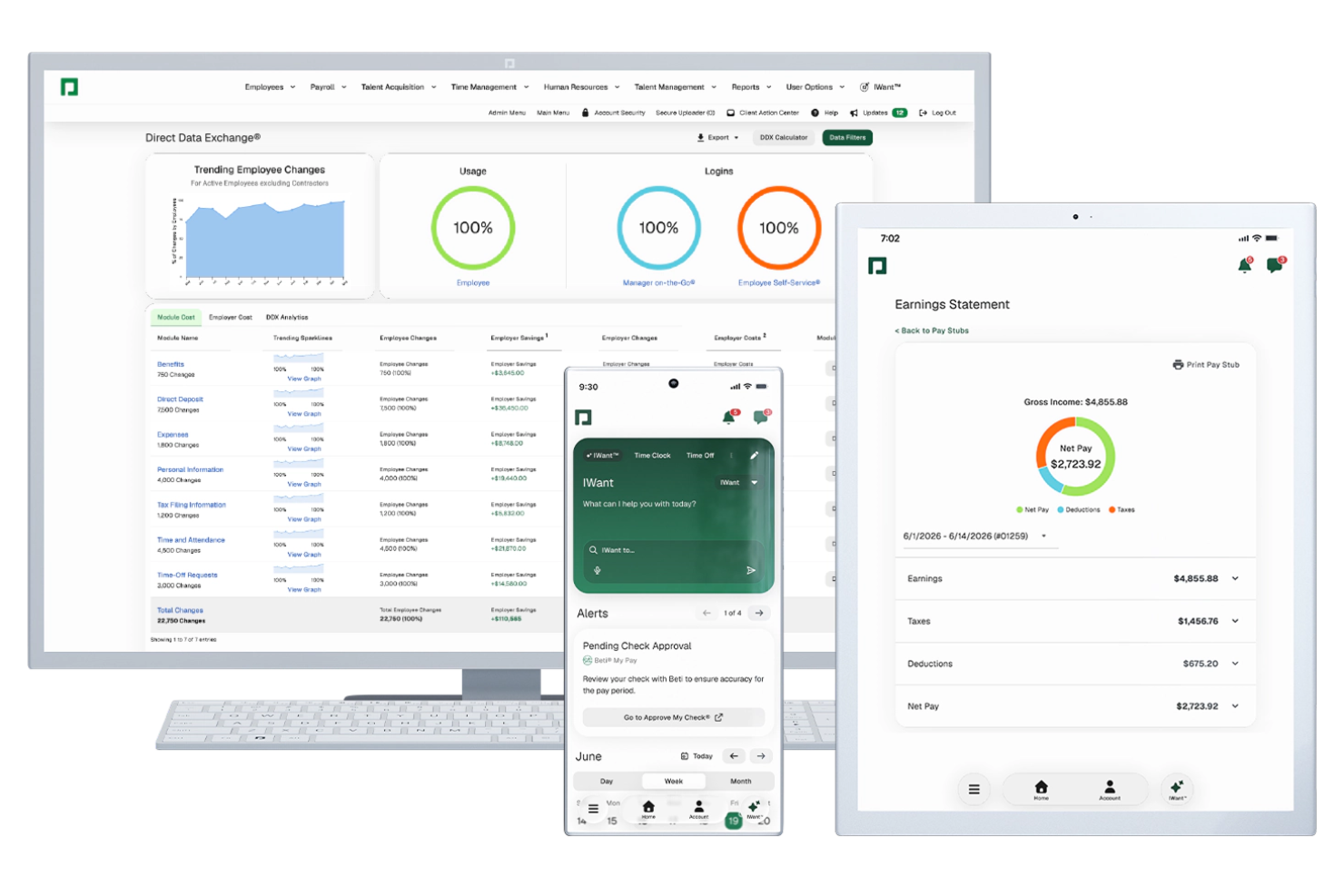
I picked Paycom as one of the best because its Employee Self-Service® tools go well beyond a basic employee portal. I particularly like Beti®, which lets employees review and correct their own payroll before it's submitted, catching errors at the source. Paired with IWant™, Paycom's command-driven AI engine, employees can ask natural-language questions and pull their own HR data instantly, no ticket to HR required. GONE® rounds this out by automating time-off request decisions based on rules your team sets.
Paycom Key Features
- Benefits enrollment: Employees can compare, select, and manage their benefits directly within the platform during open enrollment or qualifying life events.
- Applicant tracking: Post jobs, manage candidates, and move applicants through a configurable hiring pipeline from a single dashboard.
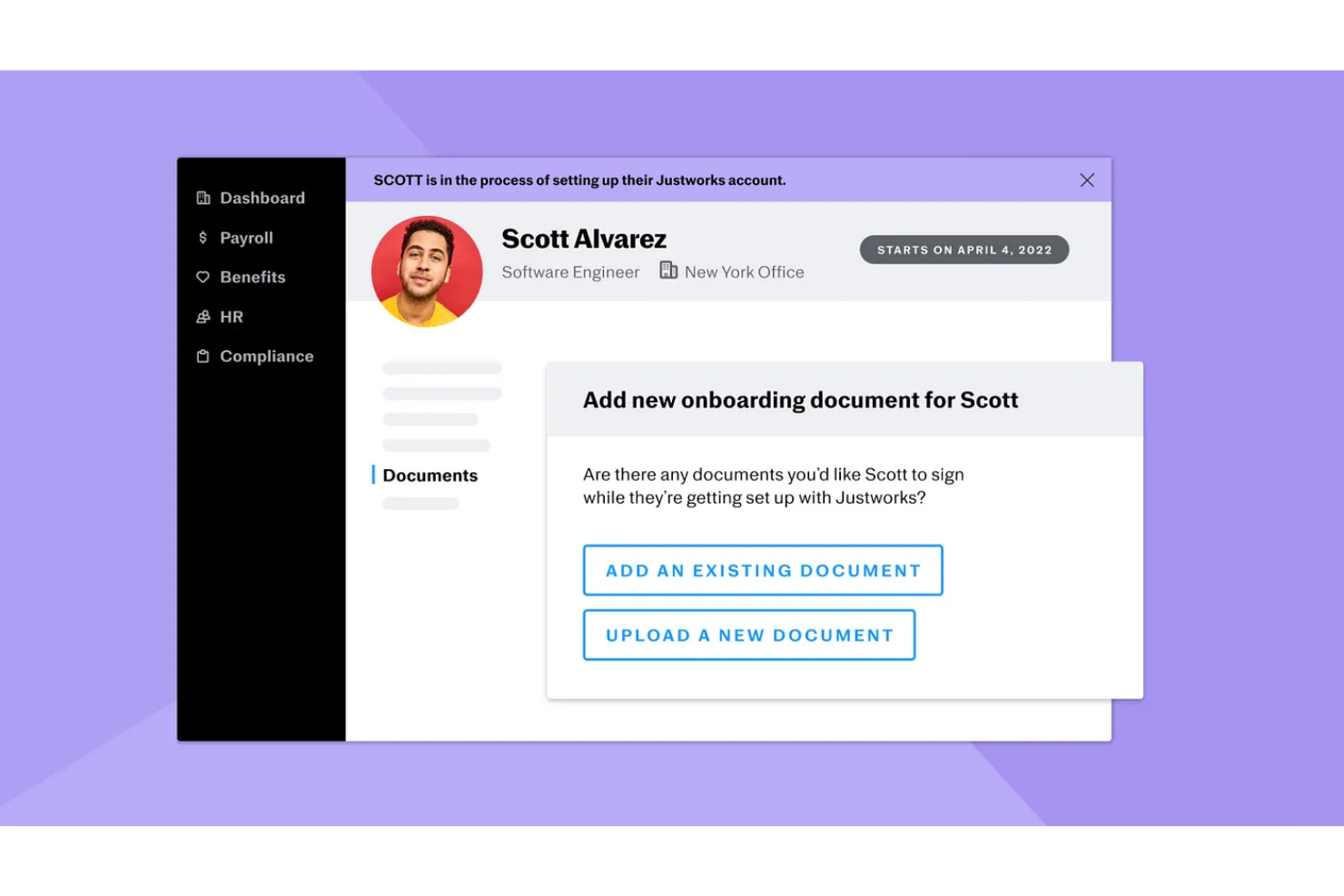
- Onboarding workflows: New hires complete paperwork, e-signatures, and training assignments digitally before their first day.
- Direct Data Exchange®: A real-time analytics tool that measures how actively employees are using self-service features and flags where HR is doing work employees could handle themselves.
Paycom Integrations
Paycom doesn't provide public APIs for direct integration. Paycom is built on a single-database architecture and doesn't offer a traditional marketplace or a wide set of native third-party integrations. Instead, companies can use third-party services like Knit, which offers ready-made integrations to connect Paycom's HR and payroll data with other systems. Zapier support is not clearly documented, and Paycom does not appear to be listed as a native Zapier app.
Pros and Cons
Pros:
- Dedicated specialist replaces ticket-based support model
- Employees review and fix paychecks before payday
- Single-database architecture eliminates duplicate data entry
Cons:
- Implementation feels complicated for new clients
- Custom reporting requires workarounds to configure

Justworks is a cloud-based PEO platform for HR services that combines payroll, benefits administration, compliance support, time tracking, and HR management tools for small and midsize businesses.
Who Is Justworks Best For?
Justworks is a good fit for small and midsize businesses that want a unified HR, payroll, and compliance solution.
Why I Picked Justworks
I picked Justworks as one of the best because it includes integrated time tracking right in the platform, which means my team can manage hours worked and sync them directly with payroll. I like that I can set up time tracking for hourly employees and contractors without needing a separate tool. In practice, that means I can review, approve, and export timesheets all from the same dashboard where I handle HR and benefits.
Justworks Key Services
- Automated payroll processing: Run payroll for salaried and hourly employees with automated tax filings.
- Benefits administration: Manage health, dental, vision, and 401(k) plans from a single dashboard.
- HR document storage: Store and organize employee handbooks, policies, and onboarding documents securely.
- PTO management: Track, approve, and report on paid time off requests within the platform.
Justworks Integrations
Native integrations are not clearly documented. The tool supports integrations via API for custom connections.
Pros and Cons
Pros:
- Access to large-group health insurance plans
- Automated payroll tax filings and payments
- Built-in time tracking for hourly employees
Cons:
- Onboarding workflows lack advanced automation features
- Customization options for reports are limited

Paycor is an HCM platform that covers payroll processing, benefits administration, talent management, workforce scheduling, and HR analytics across the full employee lifecycle.
Who Is Paycor Best For?
Paycor is a strong fit for mid-sized to enterprise-level organizations that need a unified HR and payroll platform with dedicated HR advisory support.
Why I Picked Paycor
I've included Paycor in my top picks because its analytics go well beyond standard headcount reports. I really like the predictive resignation feature, which uses AI to flag at-risk employees, surface the factors driving turnover risk, and forecast the probability of resignations across departments and locations over the next 12 months. Add to that unified workforce data that pulls from payroll, time, and talent into a single view, and you can answer executive questions on the spot—like filtering turnover by tenure in the middle of a leadership meeting without breaking a sweat. The automated report delivery feature, which lets you schedule and send reports to stakeholders at any frequency, makes it easy to keep leadership consistently informed.
Paycor Key Features
- Compensation benchmarking: Compare your employees' pay against real market data to identify gaps and adjust salary bands by role, location, or department.
- ACA compliance tracking: Monitor employee eligibility thresholds, generate 1095-C forms, and track hours worked to stay on top of Affordable Care Act requirements.
- On-demand HR advisor access: Connect with certified HR professionals for real-time guidance on compliance questions, policy development, and people management situations.
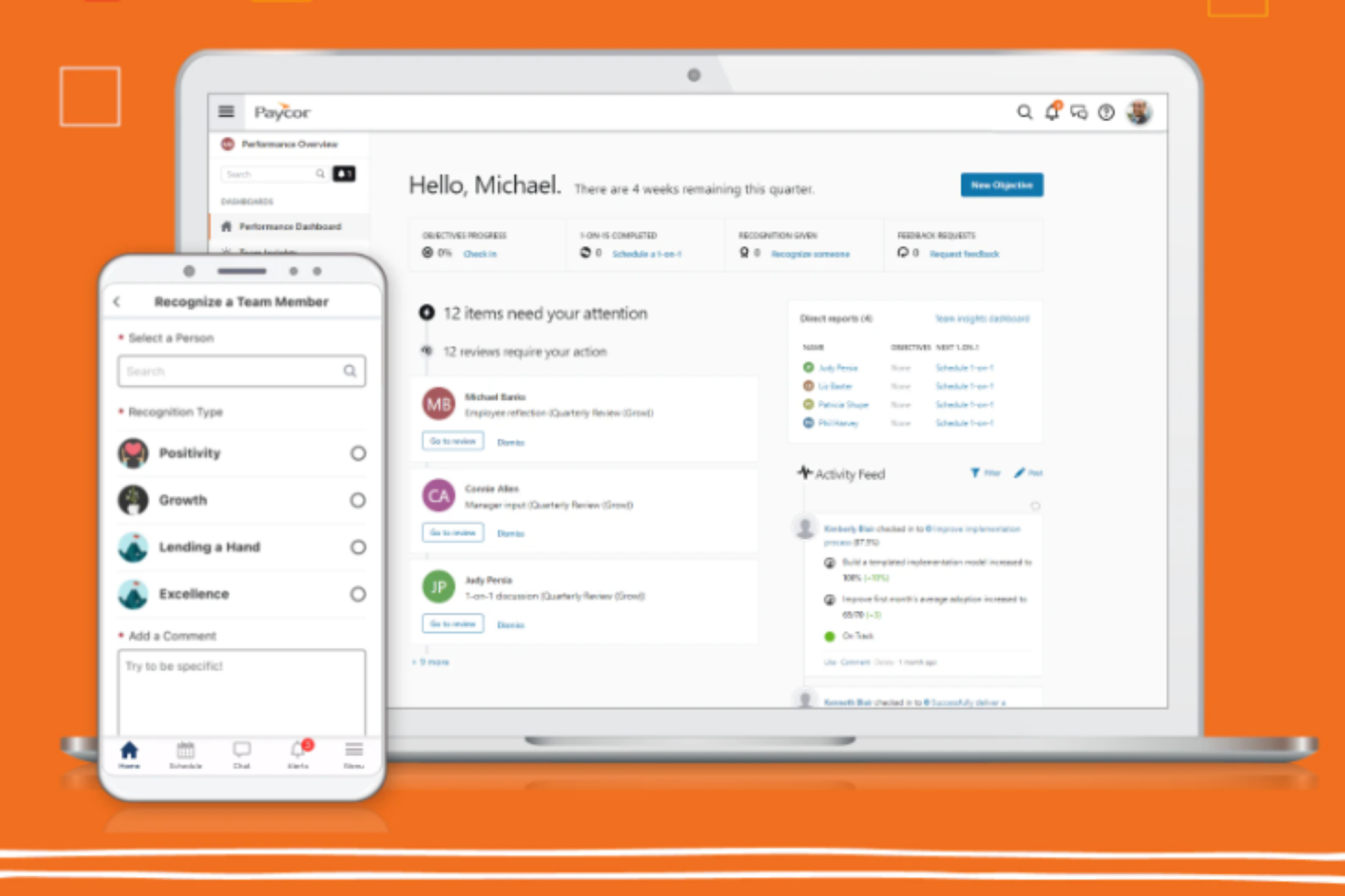
- Performance review management: Build and launch customizable review cycles, set goals, and track completion status across teams and managers in one place.
Paycor Integrations
Paycor offers over 320 marketplace integrations through its Integration Platform, including connectors to tools like QuickBooks, Sage Intacct, Greenhouse, iCIMS, Okta, Microsoft Entra ID, Google Workspace, Microsoft 365, ServiceNow, and NetSuite. An API with 140+ endpoints and a developer portal are available for building custom integrations. Zapier support is not currently available.
Pros and Cons
Pros:
- LMS with compliance and recruiting training
- Self-service workflows reduce HR admin tasks
- Built-in ATS and talent management tools
Cons:
- Modules feel disjointed between acquired products
- Custom report building options are limited


Paylocity is well-suited for mid-sized and growing organizations that want HR and payroll services supported by both automation and expert guidance. It’s especially helpful if your team needs reliable payroll processing, compliant HR practices, and access to specialists who can assist with complex workforce issues.
Why I Picked Paylocity
I picked Paylocity because it combines HR technology with hands-on service, giving you support beyond the software itself. You can manage payroll with automatic tax filing, benefits administration, and compliance tracking—all backed by an HR service team that helps you navigate policies and regulations.
I like that HR Edge provides direct access to consultants who assist with handbooks, compensation reviews, and state-specific requirements. Employees also benefit from engagement tools like surveys, peer recognition, and a communication feed that keeps your workforce informed.
Lastly, Paylocity’s dashboards give you clearer visibility into turnover, labor costs, and workforce patterns so you can make decisions with confidence.
Paylocity Key Features
Here are some key features worth highlighting:
- HR Edge Consulting: Ongoing access to HR professionals for policy creation, compliance support, and compensation guidance.
- Learning Management: Create, assign, and track employee training for onboarding and development.
- Time & Attendance Tools: Capture employee hours, manage shifts, and sync data directly to payroll.
- Employee Communication Hub: Send updates, share videos, and centralize internal communication in one place.
Paylocity Integrations
Integrations include Slack, Microsoft 365, Google Workspace, Salesforce, Greenhouse, Jobvite, Indeed, Zapier, QuickBooks, and Sage Intacct.
Pros and Cons
Pros:
- HR Edge service team
- Strong integration ecosystem
- Comprehensive HR and payroll coverage
Cons:
- Pricing available only upon request
- Advanced features may overwhelm newcomers

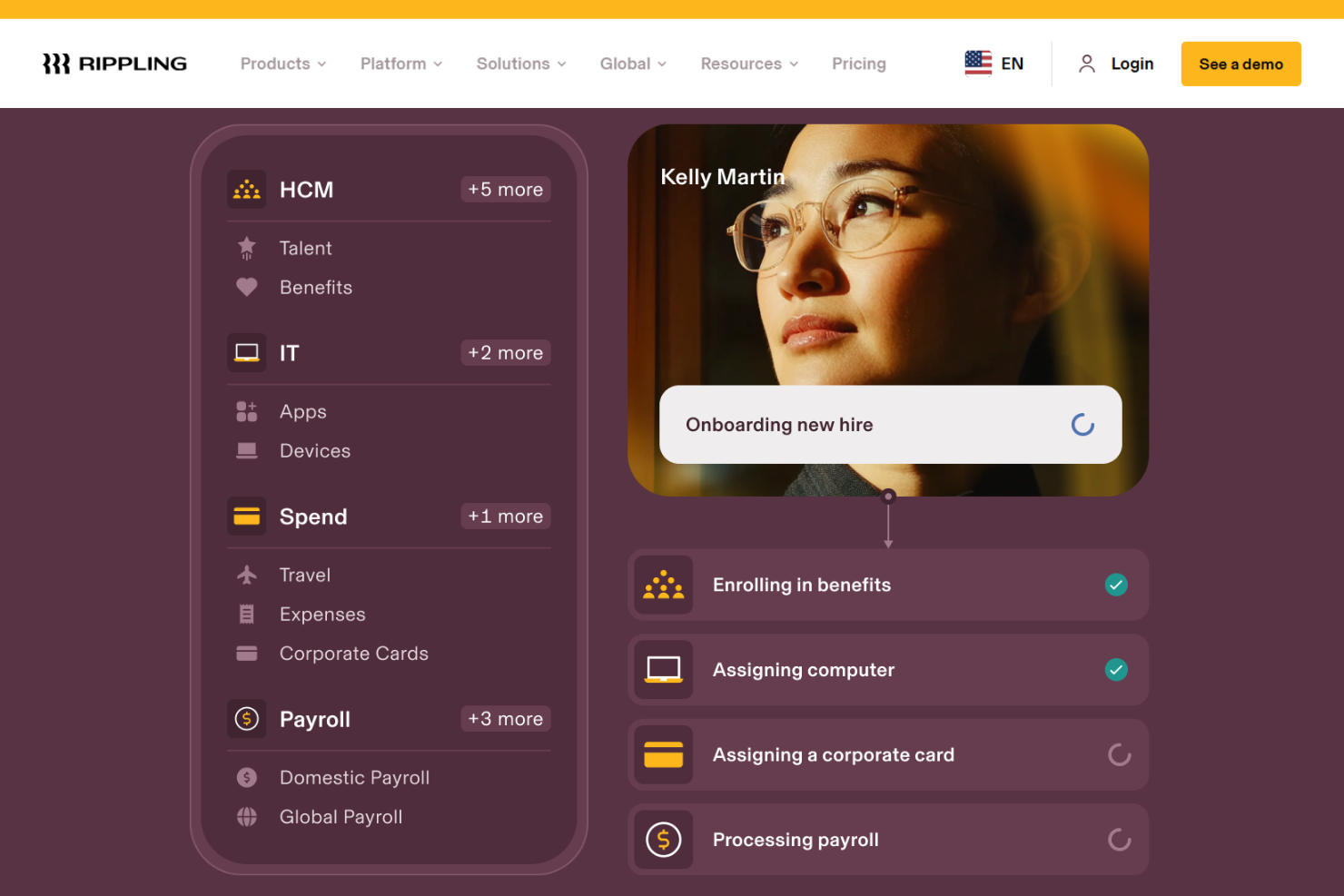
Rippling offers a workforce management platform that integrates HR, IT, and finance services, serving businesses of all sizes. They focus on payroll, benefits, and global hiring for tech-savvy teams needing integrated solutions.
Why I picked Rippling: Rippling stands out with its advanced tech integrations that cater to tech-savvy teams. Their platform allows you to manage HR, IT, and finance in one place, enhancing your team's efficiency. The focus on seamless integration of payroll and IT services aligns with the needs of tech-driven businesses.
Standout Services: Rippling provides global payroll management that simplifies paying employees worldwide, addressing complex international payroll challenges. Their identity and access management service ensures secure access to company systems, protecting sensitive data efficiently.
Target industries: Healthcare, technology, construction, financial services, and startups.
Specialties: HR management, payroll processing, IT security, expense management, and global hiring.
Pros and Cons
Pros:
- Caters to tech-driven teams
- Advanced workflow automation
- Integrates HR, IT, and finance
Cons:
- Limited industry-specific features
- Requires tech-savvy users


Omnipresent is designed for companies hiring across multiple countries and needing reliable support with global employment, payroll, and compliance. It’s a strong fit for teams that want to employ or contract talent internationally.
Why I Picked Omnipresent
I picked Omnipresent because it removes the biggest operational barriers to hiring abroad by acting as your in-country employer, handling contracts, payroll, and compliance on your behalf.
Its platform brings HR, finance, and legal tasks into one place so you can hire in 160+ countries without juggling external vendors. You get tools like OmniCalculator to estimate employer costs for each market—helpful when you’re planning budgets or comparing hiring scenarios.
I also like OmniAtlas, which gives your team country-by-country guidance on regulations, holidays, and employment rules.
Omnipresent Key Features
Here are some additional features worth highlighting:
- Localized Employment Contracts: Country-compliant agreements automatically generated for new hires.
- Multi-Country Payroll Management: Consolidated payroll across markets with automated tax and benefits handling.
- Benefits Administration: Access to location-specific benefits packages managed through Omnipresent.
- Global Onboarding Tools: Structured onboarding workflows tailored to the employment requirements of each country.
Omnipresent Integrations
Integrations include BambooHR, Personio, HiBob, Workday, SAP SuccessFactors, Greenhouse, Lever, Deel, Remote, and Rippling.
Pros and Cons
Pros:
- Excellent customer support
- Effective onboarding processes
- Offers cost estimation tools
Cons:
- Potential delays in setup
- Complexity with local laws


TriNet is ideal for small- to mid-sized businesses that operate in regulated industries and need HR support tailored to their sector. It offers end-to-end HR services—payroll, benefits, risk & compliance—while you retain control of the “work-site employer” functions.
Why I Picked TriNet
I picked TriNet because it lets you hand over the tedious HR admin while still keeping your business in the driver’s seat. Their industry-specific teams understand sectors like healthcare, finance and tech, so you’re not getting “generic HR”; you’re getting guidance that reflects your field.
Their co-employment model brings payroll processing, tax filings and benefits administration into their platform, so you’re shielded from the time-drains and legal risk. And you still get your own portal and mobile access, so your team remains empowered rather than sidelined.
TriNet Key Features
Here are some key features worth highlighting:
- Payroll processing & tax administration: Handles payroll, direct deposit, tax filings and W-2 prep so you don’t worry about state/federal compliance.
- Benefits administration: Gives employees access to health, dental, vision and retirement plans (even as a smaller employer) so you can compete for talent.
- Risk-mitigation & compliance support: Provides HR expert guidance, helps manage workers’ compensation and employer-liability issues so you minimise legal exposure.
- Industry-specific expertise: Offers teams and services aligned to your sector’s rules so your HR isn’t “one size fits all” but relevant to your business type.
TriNet Integrations
Integrations include Xero, Intuit QuickBooks Online, Oracle NetSuite, Sage Intacct, plus identity/SSO providers via API access.
Pros and Cons
Pros:
- Access to enterprise-level benefits
- Comprehensive risk management
- Industry-specific HR solutions
Cons:
- Potential integration challenges
- Limited to U.S.-based operations

Insperity offers small- and mid-sized U.S. businesses access to a dedicated HR team plus integrated payroll, benefits and compliance support—so you don’t have to coordinate multiple vendors or build a large in-house HR function.
Why I Picked Insperity
I picked Insperity because you get a hands-on HR outsourcing partner rather than just software. Their team handles payroll processing and tax filings for you, and their benefits administration service gives your employees access to competitive packages while taking the administrative burden off your plate.
They also provide compliance support, alerting you to federal and state employment law changes, and their workforce-management platform gives your team a central portal for PTO, time-tracking and HR data—so you’re not piecing together disparate tools.
Insperity Key Features
Here are some key features worth highlighting:
- Payroll & tax management: Insperity handles direct deposit, payroll tax filings and wage-garnishment processing so you don’t have to monitor each pay-period manually.
- Benefits plan sponsorship: They act as plan sponsor and administrator for health-, dental- and vision benefits, giving your team access to Fortune-500-level plans at small-business scale.
- Compliance risk monitoring: You get alerts from HR specialists on evolving employment laws and help with safety, workers’-comp and liability management so you can mitigate employer risk.
- Onboarding & time-attendance platform: Employees can self-service via the portal, track time off, clock in/out and integrate time-data with payroll, helping minimize errors and manual entry.
Insperity Integrations
Integrations include Workday (via their HR Scale solution), Microsoft Active Directory/Entra ID, ConnectWise PSA, Smartsheet (via a connector to their Premier platform) and other HR-tech apps.
Pros and Cons
Pros:
- Strong benefits access
- Payroll and benefits handled in one vendor contract
- Dedicated advisor-level support
Cons:
- Not ideal for companies operating globally
- Few custom policy options


Accenture HR offers enterprise-level services designed to support the human resources function across an organization. It provides consultancy, operations, and transformation support to help your HR team align with business goals.
Why I picked Accenture HR: I picked Accenture HR because it emphasizes linking workforce strategy directly to business outcomes – for example, its HR transformation practice helps you use people data and insights to access talent strategically and align HR with organizational goals. Additionally, its intelligent talent & HR operations service helps you optimize HR operations by shifting from administration to value-creation (e.g., improved employee satisfaction, and faster time to fill).
Standout Services: Accenture HR offers global capability centres, which help you access talent and innovation at scale by establishing or leveraging centres in optimal locations for skill, cost and innovation. It also includes leadership & culture development services that work on shaping leaders, culture and ways of working so your organization can adapt faster and work better.
Target industries: Technology, finance, healthcare, manufacturing, public sector, consumer goods.
Specialties: HR transformation, talent strategy, skills development, and organization design.
Pros and Cons
Pros:
- Leverages global delivery and cross-industry experience
- Improves HR operations through automation and analytics
- Aligns workforce strategy with business outcomes
Cons:
- Heavy on technology and transformation – less plug-and-play
- May require large change-management effort
Other HR Services
Here are some additional HR services providers that didn’t make it onto my shortlist, but are still worth checking out:
- Deloitte
For HR transformation at scale
- Vensure
For diverse industries
- G&A Partners
For small businesses
- CoAdvantage
For mid-sized companies
- ExtensisHR
For tailored HR solutions
- Remunance
For Indian entity setup support
- Yeo & Yeo HR Advisory Solutions
For personalized HR consulting
- FrankCrum
For payroll management
- Engage PEO
For legal expertise
- Oasis
For comprehensive PEO services
- HR Works
For compliance tracking
- Infiniti HR
For hospitality and franchise HR
- XcelHR
For PEO support with federal contracts
- Questco
For compliance support
- myHR Partner
For U.S.-based remote teams
- Emplova
For startups
- The Employers Association (TEA)
For training programs


What Are HR Services?
HR services are professional services that help businesses manage their human resources functions. They might offer things like:
- Payroll processing and management
- Employee benefits administration
- Recruitment and staffing support
- Compliance with labor laws
- Performance management systems
Small to mid-sized businesses, HR departments, and startups often seek out HR services to address challenges like payroll accuracy, benefits management, and compliance with labor regulations.
HR Services Selection Criteria
When selecting the best HR services providers to include in this list, I considered common business needs and pain points that these providers address. This included things like improving payroll accuracy and ensuring compliance with labor laws. I also used the following framework to keep my evaluation structured and fair:
Core Services (25% of total score):
To be considered for inclusion in this list, each provider had to offer these basic services:
- Payroll processing
- Employee benefits administration
- Compliance support
- Recruitment and staffing
- Performance management
Additional Standout Services (25% of total score):
To help further narrow down the competition, I also looked for unique or especially valuable services, such as:
- Leadership development programs
- Customized HR technology solutions
- International HR support
- Wellness programs
- Diversity and inclusion initiatives
Industry Experience (10% of total score):
To get a sense of the industry experience of each provider, I considered the following:
- Years in business
- Number of industries served
- Client testimonials
- Case studies
- Industry-specific expertise
Onboarding (10% of total score):
To evaluate the onboarding experience for each provider, I considered the following:
- Speed of implementation
- Clarity of process
- Availability of training resources
- Dedicated onboarding support
- User-friendly technology
Customer Support (10% of total score):
To assess the level of customer support each provider offers, I considered the following:
- Availability of support channels
- Response time
- Quality of assistance
- Availability of online resources
- Customer satisfaction ratings
Value For Price (10% of total score)
To evaluate the pricing and potential ROI of working with each provider, I considered the following:
- Transparency of pricing
- Flexibility of pricing plans
- Comparison with competitors
- Included features
- Return on investment potential
Customer Reviews (10% of total score):
To get a sense of the overall satisfaction of existing customers, I considered the following when reading customer reviews:
- Frequency of positive feedback
- Commonly mentioned strengths
- Areas for improvement
- Customer loyalty indicators
- Consistency of service quality
How to Choose an HR Services Provider
It’s easy to get bogged down in long lists of services and complex pricing structures. To help you prioritize the things that matter most for your business, keep the following factors in mind:
| Factor | What to Consider |
|---|---|
| Business Objectives | Ensure the provider aligns with your company's goals. For example, if you need to improve employee retention, look for a provider with strong benefits packages. |
| Service Scope and SLAs | Verify that the provider offers the services you need and check the service level agreements to ensure they meet your expectations. |
| Support Availability | Look for providers that offer 24/7 support if your team requires round-the-clock assistance. Alternatively, ensure there is adequate support during your business hours. |
| Costs and Pricing Structure | Understand the pricing model and ensure it fits your budget. Look for transparent pricing without hidden fees. |
| Communication and Reporting | Assess how the provider communicates updates and reports. You’ll want regular updates on compliance and payroll, for instance. |
| Technology Integration | Ensure their systems integrate with your existing software to avoid disruptions to your operations. |
| Reputation | Research customer reviews and testimonials to gauge satisfaction and reliability. |
| Customization Options | Check if the provider can tailor services to your specific needs, such as industry-specific compliance or unique HR strategies. |
Key HR Services And Features
When selecting an HR service provider, keep an eye out for the following key services:
- Payroll processing: HR service providers manage accurate and timely employee payments, including wage calculations, tax withholdings, deductions, and direct deposits. This reduces payroll errors and ensures full compliance with local, state/provincial, and federal tax laws.
- Employee benefits administration: Providers help design and manage competitive benefits packages—including health insurance, retirement plans, disability coverage, wellness programs, and more—to support talent attraction and retention while simplifying the administrative workload for HR teams.
- Compliance support: HR services ensure your organization stays compliant with labor laws, workplace regulations, employee classification rules, documentation requirements, and tax obligations. This minimizes legal risks, reduces penalties, and keeps policies current as regulations change.
- Recruitment and staffing: Many HR service providers offer full-cycle recruitment support, including job posting, candidate sourcing, screening, interviewing, and onboarding assistance. This helps you hire faster, build stronger teams, and reduce hiring costs.
- Performance management: Providers offer tools and strategies to evaluate employee performance, set goals, track progress, and facilitate regular reviews. These services help boost productivity, improve engagement, and align employees with company objectives.
- Risk management: HR services help identify, manage, and mitigate workplace risks—such as safety hazards, compliance gaps, and HR-related liabilities. They also support the creation of safe, compliant work environments and reduce exposure to costly claims.
- HR consulting: Expert consultants offer guidance on workforce planning, organizational structure, compensation strategy, HR policies, leadership development, and change management to strengthen your HR operations and align them with business goals.
- Training and development: Providers offer training programs, workshops, and learning tools that support employee skill-building, certification tracking, and career development. This helps maintain a competitive, capable workforce.
- HR technology solutions: Many HR services include software or integrate with existing HRIS, payroll, time tracking, and benefits platforms to streamline workflows, automate tasks, and centralize employee data.
- Diversity and inclusion initiatives: Providers help organizations design DEI strategies, implement inclusive hiring practices, create equitable work environments, and improve cultural awareness—strengthening both employee morale and innovation.
Common HR Services AI Features
Many HR service providers are incorporating AI to improve efficiency, accuracy, and employee experience, for example:
- Smart candidate screening: AI reviews resumes, matches candidates to job descriptions, and highlights top applicants—speeding up recruitment and improving quality of hire.
- Automated payroll accuracy checks: AI detects anomalies in payroll data, such as incorrect tax deductions or duplicate entries, ensuring error-free payroll processing.
- AI-driven compliance monitoring: AI tracks changes in HR regulations, labor laws, and tax rules, alerting HR teams to areas where policies or processes may need updating.
- Predictive turnover and performance insights: AI analyzes attendance patterns, engagement data, performance history, and team trends to predict turnover risks and identify high-potential employees.
- Automated onboarding workflows: AI personalizes onboarding sequences, schedules tasks, and provides recommendations for training based on role, department, and past behavior.
- Sentiment and engagement analysis: AI evaluates employee feedback, survey responses, and communication trends to gauge morale and highlight areas needing attention.
- Chatbot-driven employee support: AI-powered HR chatbots handle common employee questions 24/7—covering PTO balances, benefits details, payroll dates, or policy questions—reducing administrative strain on HR teams.
- Intelligent learning recommendations: AI suggests training modules based on employee performance, skills gaps, and career goals, helping personalize development plans.
- Advanced workforce analytics: AI identifies trends across productivity, attendance, engagement, and performance metrics to support strategic workforce planning.
- Fraud detection and risk alerts: AI monitors unusual activity in payroll, benefits, and HR systems and flags potential risks or unauthorized changes.
Benefits
Partnering with an HR services provider offers several benefits for your team and your business. Here are a few you can look forward to:
- Increased efficiency: HR services handle time-consuming tasks like payroll and compliance, freeing up your team to focus on core business activities.
- Improved compliance: With expert support, your business stays up-to-date with labor laws, reducing the risk of fines and legal issues.
- Access to expertise: Gain insights from HR professionals who provide guidance on best practices and strategies for workforce management.
- Enhanced employee satisfaction: Offering well-managed benefits and training programs can boost morale and retention.
- Cost savings: By outsourcing HR functions, you can reduce overhead costs and avoid the expenses associated with hiring full-time HR staff.
- Better talent acquisition: Recruitment services help you find and hire the right candidates, improving your team's overall performance.
- Risk reduction: Risk management services help identify potential issues, enabling you to create a safer and more compliant workplace.
Costs & Pricing
HR services typically come at a custom price to accommodate various business needs, sizes, and circumstances. Providers generally work within one of the following pricing structures:
- Subscription-based: Charges a recurring fee, often monthly, for ongoing access to HR services.
- Project-based: Costs are determined by specific HR projects, such as recruitment or compliance audits, and are charged as a one-time fee.
- Per employee: Pricing is based on the number of employees, making it scalable for businesses of different sizes.
- Hourly rate: Charges are based on the time spent providing HR services, suitable for ad-hoc consultations or temporary needs.
- Tiered pricing: Offers different service packages at varying levels, allowing businesses to choose the one that best fits their needs and budget.
For smaller organizations with limited budgets, you may find more appropriate partners in our roundup of the best HR services for startups too.
Key Factors That Influence HR Services Pricing
Beyond the specific pricing model, here are some additional factors that can influence the cost of HR services:
- Customization: Tailoring HR services to fit specific business needs can increase costs due to additional time and resources required.
- Industry regulations: Compliance with specific industry standards may require specialized expertise, which can impact pricing.
- Number of employees: More employees typically mean higher costs, especially in per-employee pricing models.
- Service scope: The range and complexity of services needed can affect pricing, with broader scopes generally costing more.
- Technology integration: Costs may rise if the provider needs to integrate their systems with your existing technology or manage data governance risks.
Being aware of these factors before you start seeking out custom quotes from providers helps you get a sense of what to expect, and compare and contrast quotes more effectively.
HR Services: FAQs
Here are some answers to common questions about HR services:
What should I expect during the onboarding process?
You can expect a straightforward onboarding process with most HR services. Typically, you’ll provide information about your business, employees, and specific HR needs. The service will then set up your account, guide you through their processes, and help you transfer any necessary payroll or employee records. Many HR services offer hands-on setup and dedicated support to ensure a smooth transition for small teams.
How can HR services improve compliance?
HR services help improve compliance by handling tasks like payroll, benefits administration, and staying up to date with changing employment laws. They can create and manage employee handbooks, ensure your business meets recordkeeping requirements, and keep you informed about important legal changes. For small teams, this reduces risk and saves time compared with managing compliance alone.
Are HR services suitable for small businesses?
Yes, HR services are designed to support businesses of all sizes, including micro and small teams. Outsourcing HR gives you access to expertise and tools without hiring a full HR department. This can help you manage tasks like hiring, payroll, compliance, and employee issues efficiently—even if you only have a few employees.
When should a company outsource HR services?
If you’re spending too much time on HR tasks or struggling to keep up with compliance, it’s a good time to consider outsourcing. Many small businesses choose HR services when they start to grow, face legal requirements, or want to improve their people management but lack in-house expertise.
Can HR services support remote or hybrid teams?
Yes, most HR services are equipped to support remote and hybrid teams. They offer digital onboarding, online document management, and compliance tools that work from anywhere. Some providers also help with cross-state HR regulations, making it easier for small businesses to manage distributed teams.
What are the risks of not having dedicated HR support as a small business?
Not having proper HR support can put your business at risk for legal issues, payroll mistakes, and poor employee relations. You may overlook required documentation, miss out on new labor laws, or mishandle complaints. HR services help small businesses avoid these common pitfalls by providing expertise and processes you might not have internally.
How do I choose the best HR service for my small business needs?
To choose the best HR service, look for providers that specialize in small businesses and offer flexible pricing. Consider your top HR challenges—like payroll, compliance, or hiring—and see which services excel in those areas. Read reviews from other small business owners, ask about onboarding support, and make sure the platform is easy to use for your team.
Is it better to hire an internal HR person or use an HR service?
For most small businesses, it’s more cost-effective to use an HR service than hire a full-time HR staff member. HR services provide a full range of support and let you scale as you grow. If your needs are very complex or you’re growing rapidly, hiring in-house HR staff may make sense, but for most small teams, outsourcing is simpler and more affordable.
What's Next?
To remain up to date on all the latest in people management, subscribe to our newsletter for leaders and managers. You'll receive insights and offerings tailored to leaders and HR professionals straight to your inbox.