

10 Best Employee Scheduling Software For Small Business

10 Best Employee Scheduling Software For Small Business List


Managing employee schedules can be tough, especially when you're juggling multiple tasks. You want to keep your team happy and productive, but manual scheduling can lead to errors and conflicts. That's where employee scheduling software comes in.
In my experience, these tools help you save time, reduce mistakes, and improve team communication. As someone deeply familiar with HR management, I've tested various solutions to bring you an unbiased review of the best options out there.
In this article, I'll guide you through top picks that cater to your business needs. Whether it's handling shift swaps or ensuring compliance, you'll find a solution that fits. Let's dive in and find the right tool for your team.
Why Trust Our Software Recommendations
Our team has been testing and reviewing software since 2012. As HR experts ourselves, we know how difficult—and important—it is to choose the right software.
For this guide, we evaluated tools using hands-on testing and independent research, scoring tools using our selection criteria. We also draw on insights from industry thought leaders and practicing HR experts.
Our reviews reflect our human editorial judgment, not a sales pitch.
Expert reviewers:
Employee Scheduling Software Comparison Table
This comparison table summarizes pricing details for my top employee scheduling software for small business selections.
| Tool | Best For | Trial Info | Price | ||
|---|---|---|---|---|---|
| 1 | Best for planning, distributing & swapping shifts in real time | 14-day free trial | From $29/month (billed annually) | Website | |
| 2 | Best for schedule policies | Free demo available | From $599/user/month | Website | |
| 3 | Best scheduling software for all-in-one team management | Free plan available; 14-day free trial | From $30/month | Website | |
| 4 | Best as AI for business | Free demo available | From $8/user/month | Website | |
| 5 | Best online time clock for small businesses | 14-day free trial + free demo available | From $4.99/user/month + $19/month base fee (billed annually) | Website | |
| 6 | Best for Canadian small businesses managing shifts | Free 21-day trial + free demo available | From $2.93/user/month (billed annually) | Website | |
| 7 | Best with self-service shift templates | 14-day free trial + free demo available | From £24/month/business | Website | |
| 8 | Best employee shift scheduling software for the restaurant industry | 14-day free trial + free plan available | From $39.99/month | Website | |
| 9 | Best for field service or construction businesses | 14-day free trial + free demo available | From $40/month | Website | |
| 10 | Best workforce ops software for the event industry | Free demo available | From $49/month | Website |

Best Employee Scheduling Software For Small Businesses Reviews
Below are my detailed summaries of the best employee scheduling software for small business that made it onto my shortlist. My reviews offer a detailed look at the key features, pros & cons, integrations, and ideal use cases of each tool to help you find the best one for you.

Best for planning, distributing & swapping shifts in real time
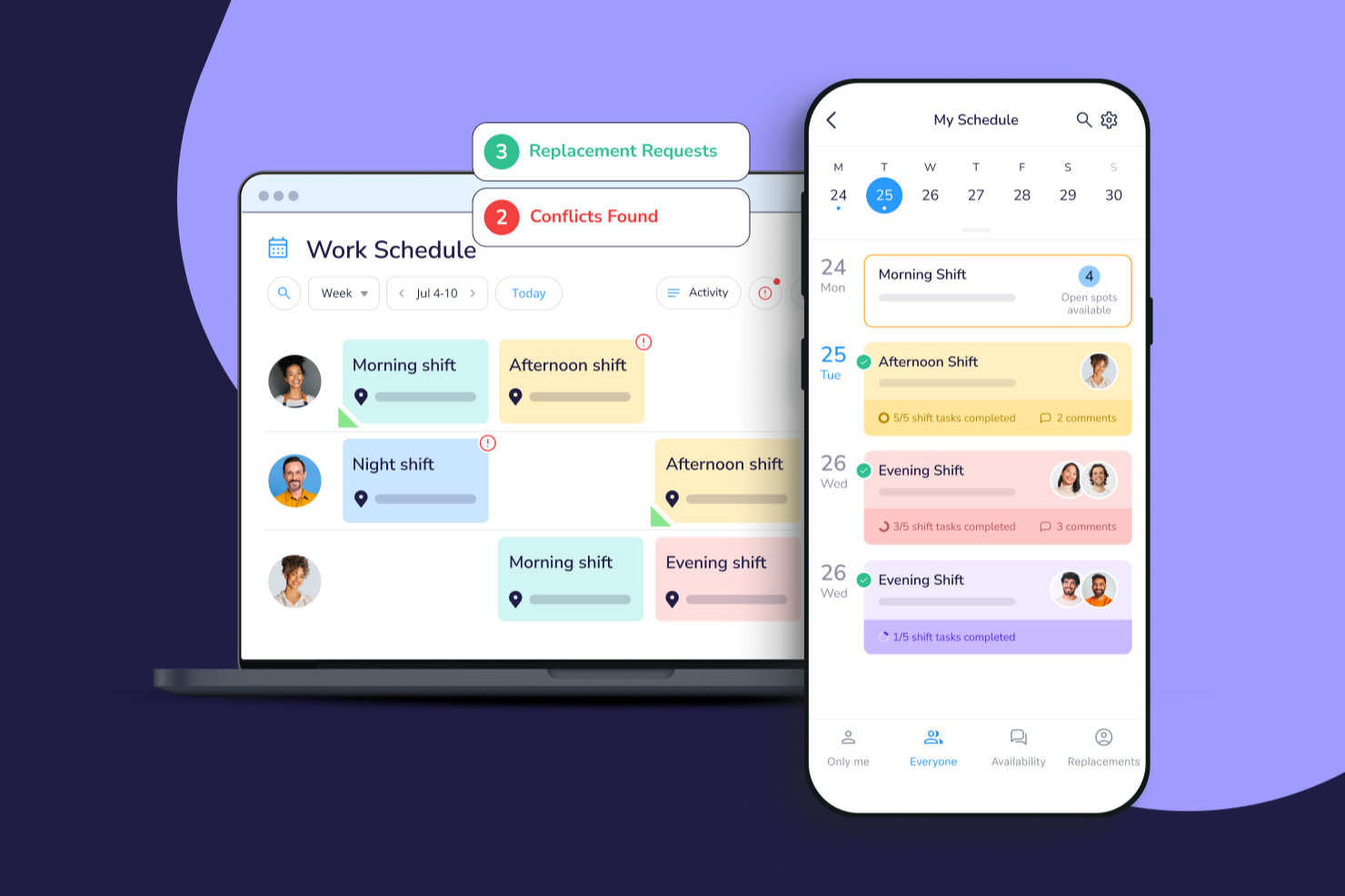
Connecteam gives small businesses and deskless teams a mobile-first platform to handle employee scheduling, time tracking, and shift communication, helping owners and managers keep everyone organized and connected.
Who Is Connecteam Best For?
Connecteam is a great fit for small businesses with hourly or shift-based workforces, particularly in industries like retail, hospitality, and field services.
Why I Picked Connecteam
I picked Connecteam as one of the best because of how well it handles the full scheduling cycle—from building shifts to getting them in front of employees in real time. I love the open shifts feature, which lets managers post unassigned shifts that employees can claim on a first-come, first-served basis, cutting out the back-and-forth of manual assignment. The shift replacement workflow is another highlight: employees can release a shift directly in the app, qualified teammates can pick it up, and managers can require approval before it's confirmed. In practice, my team can respond to last-minute coverage gaps without a single phone call.
Connecteam Key Features
- Drag-and-drop schedule builder: Create and edit weekly schedules visually by dragging shifts across a timeline view.
- GPS time clock: Employees clock in and out from their phones, with location verification to confirm they're on-site.
- Availability and time-off management: Staff can submit availability windows and time-off requests directly in the app for managers to approve.
- In-app chat: Send direct messages or group announcements to keep shift-based teams connected without needing a separate messaging tool.
Connecteam Integrations
Integrations include QuickBooks, Gusto, Xero, ADP, Wix, Lightspeed, PrismHR, Square, BambooHR, and Accu-Time Systems.
New Product Updates from Connecteam

Connecteam Expands Break and Timesheet Controls
Connecteam adds flexible break thresholds, personalized policies, auto-end options, a centralized exceptions report, and improved timesheet issue visibility to help teams manage breaks and timesheets more effectively. For more information, visit Connecteam’s official site.
 .
.
Deel HR
Best for schedule policies

Deel HR gives small businesses and distributed teams a way to manage employee schedules, compliance, and HR processes in one platform, helping you handle time-off, shift policies, and workforce documentation across locations.
Who Is Deel HR Best For?
Deel HR is a strong fit for small businesses managing remote or international teams who need centralized HR and scheduling tools across multiple locations.
Why I Picked Deel HR
Deel HR earns its spot on my shortlist because of how well it handles schedule policies for small businesses managing employees across different locations or time zones. I like that you can set up custom time-off policies, approval workflows, and work schedules that automatically apply based on an employee's location or contract type. In practice, that means my team can configure different scheduling rules for full-time, part-time, and contractor staff without manually tracking exceptions. The policy-based approach keeps scheduling consistent and compliant without requiring constant HR oversight.
Deel HR Key Features
- Automated workflow builder: Create onboarding, offboarding, and compliance workflows without coding, with no limits on the number of workflows you can build.
- AI-powered HR assistant (Deel AI): Ask HR and compliance questions and get answers trained on data from legal and HR experts across 150+ countries.
- Centralized employee records (HRIS): Store and manage all people data, documents, and employment history in one place as a single source of truth.
- Workforce analytics and reporting: Build custom reports and dashboards using any data point within Deel to track headcount, costs, and workforce trends.
Deel HR Integrations
Integrations include FaceUp, Snowflake, DefensX, Microsoft Finance, Kintsugi, ReFresh OS, Revo.ai, Keeper, Human Interest, and Everyminute.
New Product Updates from Deel HR

Deel Expands Stablecoin Wallet to 80+ Countries
Deel expands its Stablecoin Wallet to 80+ countries with dollar-backed balances and optional rewards. This gives eligible contractors more ways to hold and manage earnings inside Deel. For more information, visit Deel’s official site.
 .
.
Homebase
Best scheduling software for all-in-one team management

Homebase gives small businesses in retail, hospitality, and service industries a way to handle employee scheduling, time tracking, and team communication from one platform, helping owners and managers keep shifts organized and teams connected.
Who Is Homebase Best For?
Homebase is a great fit for small business owners in hourly-work industries like food service, retail, and healthcare who need to manage shift-based teams without a dedicated HR department.
Why I Picked Homebase
I picked Homebase because it goes beyond scheduling to cover almost every aspect of managing an hourly team in one place. Scheduling connects directly to time tracking and payroll—when my team clocks in and out, those hours flow into timesheets and convert into wages without manual data entry. The built-in team messaging means I don't need a separate app to send shift reminders or last-minute coverage requests. Labor cost forecasting is useful—you can view scheduled hours against your sales data to see whether you're over- or understaffed before the week even starts.
Homebase Key Features
- Hiring and applicant tracking: Post jobs to multiple boards at once and manage all applicants in a single dashboard, with built-in screener questions and interview scheduling.
- Employee self-onboarding: Send new hires a digital welcome packet with W-4, I-9, and direct deposit forms to complete and e-sign before their first day.
- GPS time clock: Let employees clock in and out from their phones, with location verification to confirm they're on-site when they start their shift.
- PTO and time-off controls: Set blackout dates, request limits, and advance notice rules so employees can submit time-off requests directly through the app.
Homebase Integrations
Integrations include Square, Toast, Clover, Shopify, Lightspeed, QuickBooks, Gusto, ADP, Paychex, and Revel.

Best as AI for business
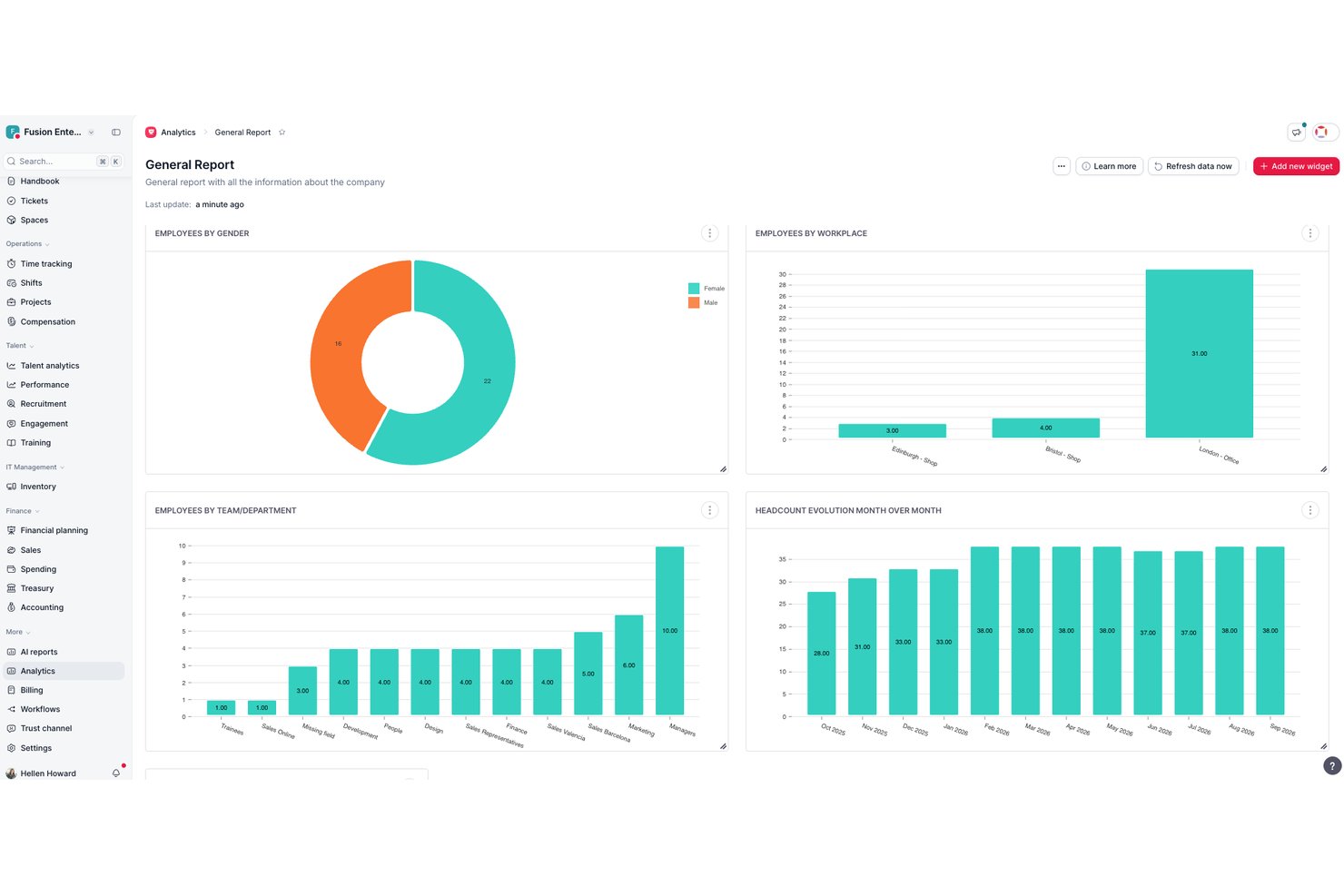
Factorial is an AI-driven HR platform that handles employee scheduling, shift planning, time tracking, and workforce management for small businesses.
Who Is Factorial Best For?
Factorial fits HR managers and operations managers who want a single AI-driven platform to handle scheduling, reporting, and employee policy questions across their day-to-day workflows.
Why I Picked Factorial
I've included Factorial in my top picks because its AI for business approach means it's doing more than just generating a schedule—it's helping you plan timetables, pull workforce reports, and answer employee policy questions automatically. I like that managers can drag and drop shifts, copy entire schedule periods, and resolve flagged conflicts before publishing, all without bouncing between tools. Employees can request swaps directly from the mobile app, keeping last-minute coverage changes contained in one place.
Factorial Key Features
- Shift conflict review: Factorial flags scheduling conflicts and requires managers to resolve them before a schedule can be published.
- Mobile shift swap requests: Employees can request shift swaps directly from the app, with colleague acceptance triggering a manager approval notification.
- Time-off calendar: Team absences and approved time-off requests appear in a centralized calendar so managers can see coverage gaps at a glance.
- GPS clock-in: The mobile app records GPS coordinates at clock-in and clock-out, giving managers location context for each time entry.
Factorial Integrations
Factorial lists marketplace integrations with Google Workspace, Slack, Microsoft Power BI, LinkedIn, Recruitee, and payroll tools including DATEV LODAS and Sage 200. It also supports REST APIs, webhooks, SDKs, OAuth 2.0, API keys, and Zapier.
Pros and Cons
Pros:
- AI assists timetable planning and reporting
- Reviewers praise centralized leave and time tracking
- Managers can copy schedules and resolve conflicts
Cons:
- Automatic shift planning requires Enterprise access
- No documented employee availability checks

Best online time clock for small businesses

Buddy Punch is a cloud-based employee scheduling and time tracking tool built for small businesses that need simple, accurate ways to manage shifts, track attendance, and handle time-off requests without manual spreadsheets or paperwork.
Who Is Buddy Punch Best For?
Buddy Punch is a strong fit for small business owners and managers in industries like retail, hospitality, and healthcare who need a straightforward way to schedule hourly workers and track time.
Why I Picked Buddy Punch
Buddy Punch earns its spot as one of the best on my shortlist because its online time clock is genuinely built with small businesses in mind. I like that employees can clock in via web browser, mobile app, or even a shared kiosk, with GPS tracking and webcam verification to confirm who's actually punching in. My team is able to set up geofencing so employees can only clock in when they're physically on-site, which cuts down on buddy punching without requiring expensive hardware. The automatic overtime alerts are another feature I rely on to keep labor costs in check before they become a problem.
Buddy Punch Key Features
- Drag-and-drop scheduling: Build and publish employee schedules visually, with the ability to copy shifts from previous weeks.
- PTO tracking: Employees can submit time-off requests directly in the app, and managers can approve or deny them in one click.
- Payroll reporting: Export timesheets with calculated regular, overtime, and PTO hours ready for payroll processing.
- Shift notifications: Automatically alert employees via email or push notification when their schedule is published or changed.
Buddy Punch Integrations
Integrations include QuickBooks Online, QuickBooks Desktop, ADP Workforce Now, Gusto, Paychex, Paylocity, Paycor, Rippling, Workday, and Justworks.

Agendrix
Best for Canadian small businesses managing shifts

Agendrix is a scheduling and time tracking platform built for small businesses that need to manage hourly staff, simplify shift planning, and handle time-off requests with less back-and-forth.
Who Is Agendrix Best For?
Agendrix is a great fit for small businesses in retail, hospitality, and healthcare that manage hourly or shift-based teams.
Why I Picked Agendrix
Agendrix earns its spot on my shortlist because it's purpose-built for the kind of shift-based scheduling that small Canadian businesses deal with every day. I particularly like the French-language support and bilingual interface, which makes it genuinely practical for businesses operating in Quebec or across bilingual teams. The platform also handles provincial labor compliance well—managers can set up schedules that respect overtime rules and rest period requirements without manually tracking them. I also use the time-off request and shift swap features regularly, and they cut down on the usual back-and-forth that eats up a manager's time.
Agendrix Key Features
- Drag-and-drop schedule builder: Create and adjust weekly schedules visually by dragging shifts directly onto an employee's row.
- Mobile time clock: Employees can clock in and out from their phones, with GPS verification to confirm on-site attendance.
- Employee messaging: Send announcements or direct messages to staff from within the platform, keeping shift-related communication in one place.
- Payroll export: Export hours and attendance data in formats compatible with payroll tools to reduce manual data entry.
Agendrix Integrations
Integrations include ADP Workforce Now, Ceridian, and Sage. An API is also available for custom integrations.
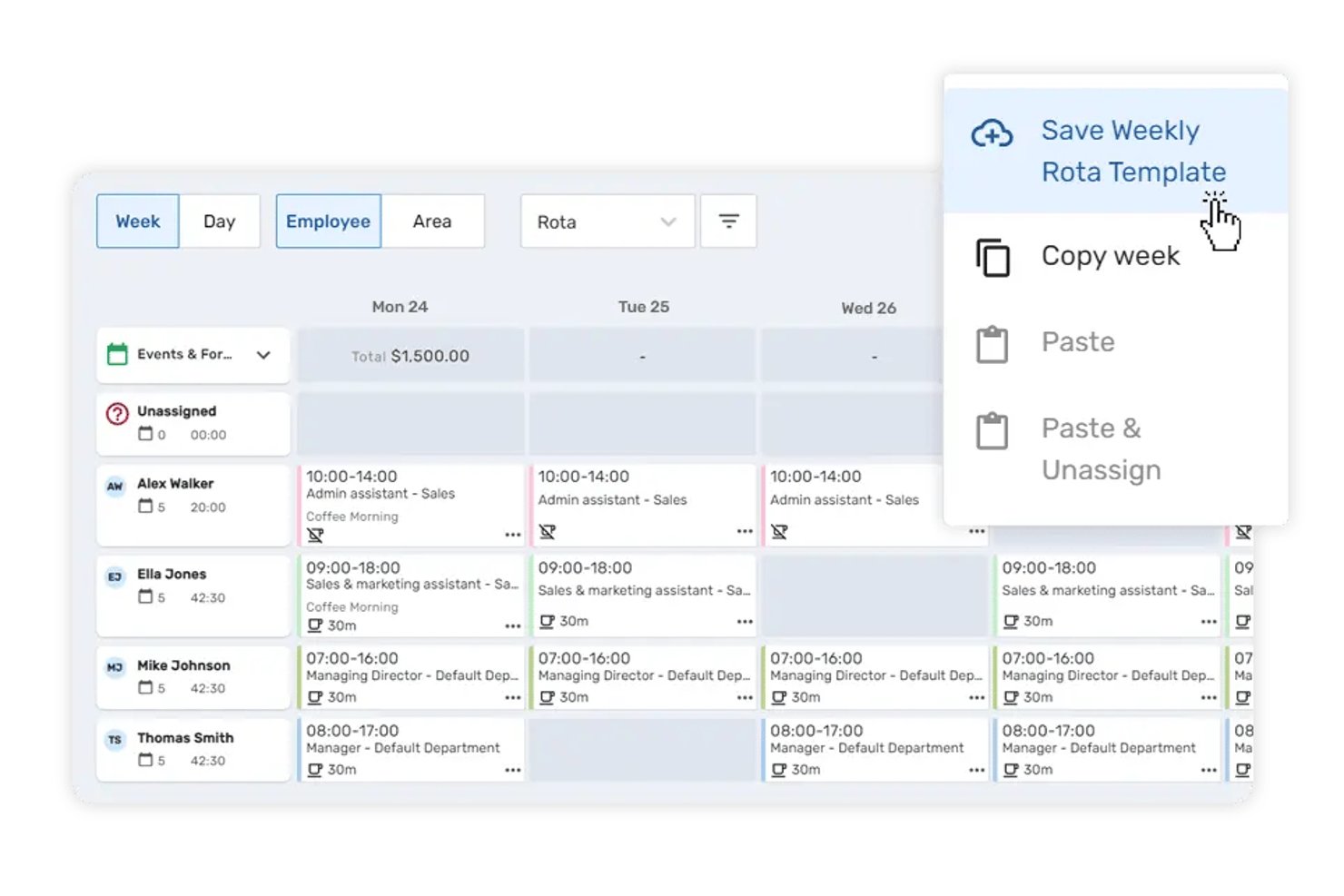
Breathe HR is a people management and employee scheduling platform for small businesses that combines a drag-and-drop rota builder, reusable shift templates, time tracking, and leave management in a single system.
Who Is Breathe HR Best For?
Breathe HR is a strong fit for UK-based small businesses with up to 250 employees in shift-heavy sectors like hospitality, retail, and social care.
Why I Picked Breathe HR
I picked Breathe HR as one of the best because its reusable shift templates let growing teams build new rotas in minutes rather than starting from scratch each week. I like that employees can offer, swap, and pick up shifts themselves through the mobile app, with managers retaining approval control throughout. Shift-overlap alerts and custom rota layouts add a layer of precision that's genuinely useful when scheduling across multiple roles or locations.
Breathe HR Key Features
- Location tracking for timeclock: Staff can clock in and out using geofenced mobile or tablet devices assigned to each worksite.
- Multi-location management: Manage schedules, staff, and attendance across different workplaces within a single account.
- Holiday and sickness tracking: Built-in workflows let employees request time off and report absences, all trackable in the same system.
- Document management with e-signatures: Securely store employee documents and collect digital signatures with built-in document tracking.
Breathe HR Integrations
Native integrations include Xero, Sage Payroll, and Natural HR. An API is available for custom integrations.
Pros and Cons
Pros:
- Holiday and sickness tracked alongside schedules
- Employee self-service shift swaps via mobile
- Reusable shift templates save rota-building time
Cons:
- Reporting tools lack depth for labor costs
- Limited scheduling automation
7shifts
Best employee shift scheduling software for the restaurant industry

7shifts is a scheduling and labor management platform designed for restaurant owners and managers who need to organize shifts, track attendance, and simplify team communication in fast-paced hospitality environments.
Who Is 7shifts Best For?
7shifts is a great fit for small and independent restaurant operators who need scheduling tools built around the realities of shift-based, hourly restaurant work.
Why I Picked 7shifts
7shifts earns its spot as one of the best on my shortlist because it's built exclusively for restaurants—not adapted from a generic scheduling tool. I love that the AI-driven sales forecasting pulls in your POS data to recommend exactly how many staff to schedule per shift, which is a real advantage when you're trying to hit labor cost targets on a tight margin. The labor compliance tools are also genuinely restaurant-specific: you get real-time alerts for "clopen" shifts, automated break enforcement, and minor scheduling restrictions built right into the schedule builder. On top of that, the Shift Pool feature lets your team self-manage swaps while keeping managers in the approval seat—something that matters a lot in high-turnover restaurant environments.
7shifts Key Features
- Time clocking: Staff can clock in and out directly from the 7shifts app or a shared tablet at the point of entry.
- Team messaging: Built-in chat lets managers and staff communicate by role, location, or individual without leaving the app.
- Tip pooling: Automatically calculate and distribute tips across your team based on hours worked or custom rules.
- Engagement tracking: Monitor team sentiment through regular pulse surveys sent directly to staff via the mobile app.
7shifts Integrations
Integrations include Toast, Square, Lightspeed, Clover, Revel, Aloha POS, ADP Workforce Now, QuickBooks, Heartland, and Micros.

Best for field service or construction businesses
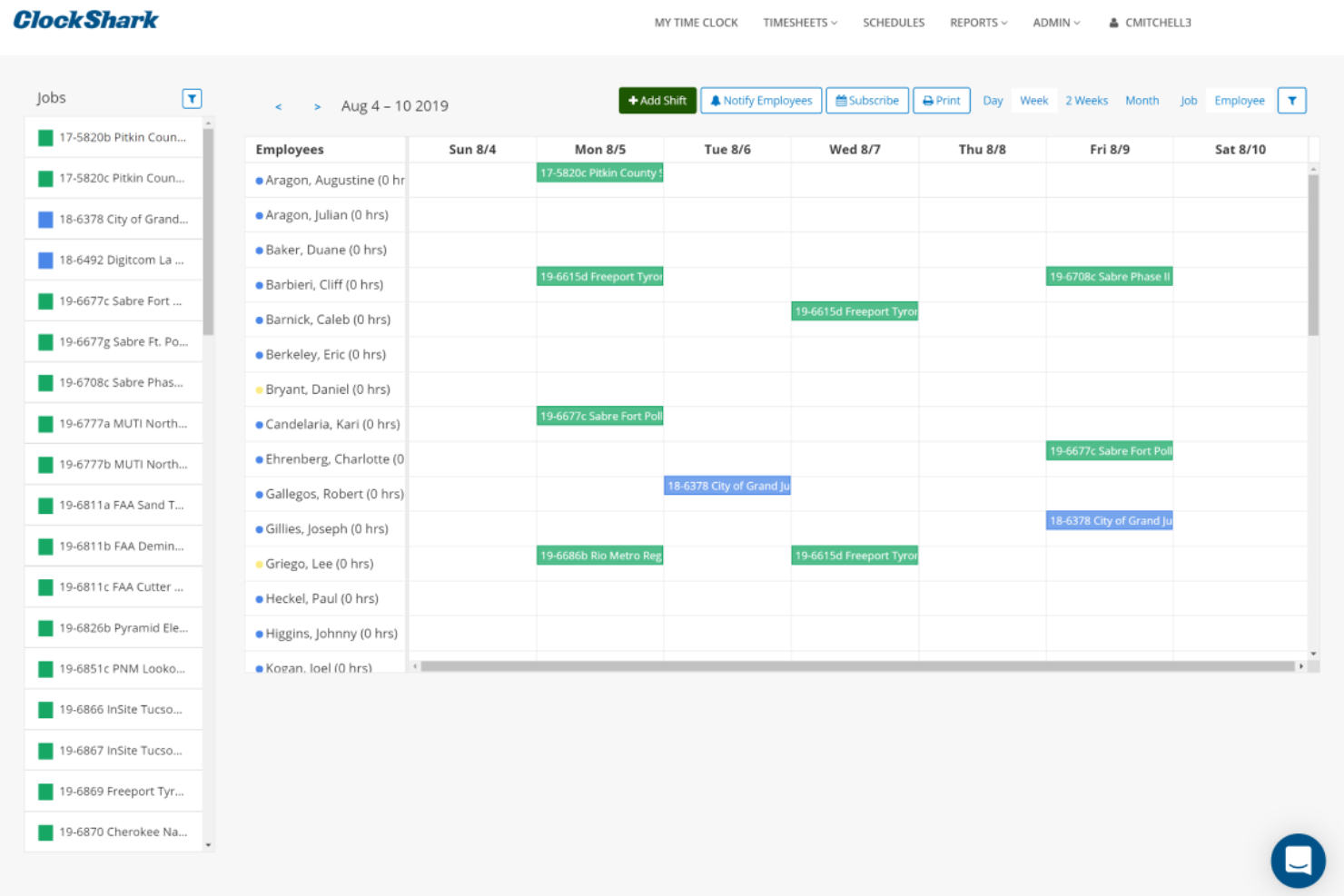
ClockShark is a scheduling and time tracking platform built for small businesses that manage mobile or field-based teams, helping you coordinate shifts, track hours, and simplify payroll with GPS and job assignment features.
Who Is ClockShark Best For?
ClockShark is a great fit for small businesses in construction, field service, and other industries where employees work across multiple job sites.
Why I Picked ClockShark
ClockShark earns its spot on my shortlist because it's purpose-built for field service and construction teams—not just adapted for them. I particularly like the GPS time clock, which logs employee location every time they clock in or out and generates a breadcrumb trail of their workday across job sites. The geofencing feature takes this further by creating a virtual boundary around each job site, automatically prompting workers to clock in when they arrive and clock out when they leave. For small construction or field service businesses juggling multiple crews across multiple locations, that combination removes a lot of the manual follow-up that typically falls on managers.
ClockShark Key Features
- Drag-and-drop employee scheduling: Build and adjust crew schedules visually, reassigning jobs and shifts in just a few clicks.
- Job costing: Track labor hours and costs per job and task, with employees able to upload receipt photos directly in the app.
- Shift wrap-up and compliance forms: Create custom clock-out questions to capture end-of-shift reports, injury disclosures, or hazard exposure notes.
- Conversations: Send and receive job-specific messages between office staff and field crews, keeping everyone updated on job progress.
ClockShark Integrations
Integrations include QuickBooks, QuickBooks Online, ADP Workforce Now, RUN Powered by ADP, Sage 100 Contractor, Xero, Simpro, Paychex, Gusto, and MYOB.

Ubeya
Best workforce ops software for the event industry

Ubeya is a workforce management platform for small businesses in hospitality, events, and staffing that need to schedule, communicate with, and manage hourly or shift-based teams.
Who Is Ubeya Best For?
Ubeya is a strong fit for small businesses in event production, catering, and hospitality that rely on flexible, shift-based workforces.
Why I Picked Ubeya
I chose Ubeya because it's built around the realities of event-based workforce management. I love that it handles multi-position event scheduling in one view—so if you're running a catering event with bartenders, servers, and kitchen staff all on the same night, you can assign and track each role without jumping between tools. I also like the AI-powered shift matching, which cross-references worker availability, skills, and labor rules to suggest the right people for each job. The auto arrival confirmation feature sends real-time check-ins before and during a shift, which is useful when you're managing staff across multiple event locations and can't be everywhere at once.
Ubeya Key Features
- Time and attendance tracking: Workers clock in and out via the mobile app, with GPS verification to confirm on-site presence.
- Automated payroll calculations: Ubeya calculates pay based on hours worked, rates, and overtime rules, ready for export to payroll.
- Staff availability management: Workers submit their availability directly in the app, so you're only scheduling people who are free.
- In-app messaging: Send broadcast messages or direct messages to individual workers or entire shift groups from within the platform.
Ubeya Integrations
Integrations include Teamtailor, SAP SuccessFactors, ADP, QuickBooks, Xero, BambooHR, Gusto, Workday, Paychex, and an open API for custom integrations.
Other Employee Scheduling Software For Small Business
Here are some other solid scheduling options to consider which didn’t make it into my top 10 list, but are still worth a look:
- ezClocker
GPS-enabled time tracking software
- Sage HR
Employee leave management for small businesses
- eResource Scheduler
For managing both human and non-human resources
- ABC Roster
For employee and shift constraint management
- monday AI Workspace
Schedule visualization tool for small teams
- Resource Guru
For efficient scheduling at small agencies
- BambooHR®
Applicant tracking system for small businesses
- WebWork Time Tracker
For tracking attendance and shifts
- Justworks
Employee scheduling software with 24/7 HR expert support team
- Wrike
For companies wanting visibility into each team member's availability
- TimeTrex
For automated scheduling
- Zoho Shifts
For scheduling and time-tracking in one
- TimeClock Plus
For shift management
- When I Work
Employee shift scheduling software for shift trading features
- Zoho People
Free cloud-based scheduling app for small business owners
- Hubstaff
Time tracking software for remote teams
- Skedulo
Scheduling automation engine
- Calendly
Free meeting scheduler for small business owners
- Schedule It
Resource management software for remote teams
- Shiftboard
Employee shift-scheduling software for mission-critical


How I Evaluate Employee Scheduling Software
I evaluate these tools in two layers: baseline must-haves like shift building, availability management, and mobile access, then differentiators like labor cost controls and payroll integrations.
Core Functionality (Table Stakes For This List)
When I'm selecting tools for my list, I rank each one on a scale from 0 (does not offer the functionality) to 5 (excels in this area) for each core functionality listed below. Then, I calculate the tool's total score into a percentage. Each tool needs to achieve a minimum total score of 75% to be considered for inclusion.
- Shift Scheduling & Assignment: I look for drag-and-drop builders, recurring templates, and conflict detection—things that matter when you're filling a 50-person rotating roster across multiple departments.
- Availability & Time-Off Management: Employees should be able to set recurring availability and submit PTO requests that feed directly into the schedule, so managers aren't cross-referencing spreadsheets.
- Shift Swapping & Self-Service: I check whether employees can pick up open shifts or initiate swaps on their own, with guardrails like role eligibility filters and manager approval workflows built in.
- Time & Attendance Tracking: The tool should connect scheduled shifts to actual clock-in data, whether through a built-in time clock, kiosk mode, or a native integration with a dedicated T&A system.
- Labor Compliance & Rules: I evaluate how the platform handles overtime thresholds, mandatory rest periods, and break rules—especially for teams managing minors or workers across multiple jurisdictions.
- Mobile Access & Notifications: Frontline workers rarely sit at a desk, so I look for a native mobile app with push notifications for new schedules, shift changes, and swap requests.
Once I have a list of tools that meet the criteria, I consider what sets each platform apart.
Differentiating Factors (What Sets Vendors Apart)
Here's how I compare and contrast different vendors:
Standout Features
AI demand forecasting is a major differentiator—tools that pull historical data to predict staffing needs save managers hours of guesswork during peak seasons. I also evaluate labor cost controls, particularly real-time budget tracking that flags when a draft schedule trends over target before it's published. For organizations running multiple sites, multi-location management matters. Being able to share staff across locations and view all schedules from one dashboard makes a real difference for regional managers juggling coverage gaps.
Beyond Features
Payroll and HRIS integrations are one of the first things I check. A scheduling tool that syncs hours directly to platforms like ADP, Gusto, or BambooHR eliminates double entry and reduces payroll errors. Pricing transparency also matters—I look for clear per-user or per-location models so growing teams can forecast costs as they scale. Finally, I consider industry fit. A tool built with healthcare credentialing workflows or retail fair workweek templates baked in will save your team significant configuration time compared to a generic platform.
How to Choose Employee Scheduling Software for Small Business
It’s easy to get bogged down in long feature lists and complex pricing structures. To help you stay focused as you work through your unique software selection process, here’s a checklist of factors to keep in mind:
| Factor | What to Consider |
|---|---|
| Scalability | Can the tool grow with your business? Look for options that support adding more users or locations without extra costs. Avoid tools that limit growth with restrictive plans. |
| Integrations | Does it connect with your existing systems? Check for compatibility with payroll, HR, and communication tools to ensure smooth data flow and avoid manual data entry. |
| Customizability | Can you tailor it to your workflows? Ensure the software allows for custom fields, reports, and settings to match your specific scheduling needs. |
| Ease of use | Is it simple for your team to use? Look for intuitive interfaces and easy navigation to minimize training time and reduce user frustration. |
| Implementation and onboarding | How quickly can you start using it? Consider the time and resources needed for setup. Tools with clear guides and support can help speed up the process. |
| Cost | Does it fit your budget? Compare pricing plans and watch out for hidden fees. Consider long-term costs and any discounts for annual subscriptions. |
| Security safeguards | Is your data protected? Ensure the software has encryption, secure access controls, and complies with relevant data protection regulations to safeguard sensitive information. |
| Support availability | Will you get help when needed? Check for 24/7 support options and the quality of customer service. Quick response times can be crucial during issues. |
What Is Employee Scheduling Software for Small Businesses?
Employee scheduling software for small businesses is a tool that helps manage and automate the scheduling of staff shifts and hours. These tools are generally used by managers, HR professionals, and team leaders to save time and reduce scheduling conflicts. Automated scheduling, shift swapping, and notification features help with efficient management and communication. Overall, these tools enhance productivity and reduce administrative workload for small businesses.
Features
When selecting employee scheduling software for a small business, keep an eye out for the following key features:
- Automated scheduling: Automatically create and adjust schedules based on employee availability and business needs, saving time and reducing errors.
- Shift swapping: Allow employees to swap shifts with ease, providing flexibility and reducing scheduling conflicts.
- Notifications and alerts: Send timely updates and alerts to employees about schedule changes, ensuring everyone is informed.
- Integration capabilities: Connect seamlessly with existing payroll and HR systems to ensure smooth data flow and reduce manual entry.
- Mobile access: Enable employees to view and manage their schedules on-the-go, increasing accessibility and convenience.
- Custom reporting: Generate tailored reports to analyze scheduling data and make informed decisions.
- Multi-location management: Handle scheduling across multiple business locations, streamlining operations for growing businesses.
- Time tracking: Monitor employee hours and attendance accurately, aiding in payroll processing and compliance.
- User-friendly interface: Ensure the software is easy to navigate, minimizing training time and enhancing user experience.
- Security safeguards: Protect sensitive employee data with encryption and secure access controls, ensuring compliance with regulations.
Benefits
Implementing employee scheduling software for a small business provides several benefits for your team and your business. Here are a few you can look forward to:
- Time savings: Automated scheduling reduces the time spent on creating and adjusting schedules manually.
- Improved communication: Notifications and alerts keep everyone informed about schedule changes, enhancing team communication.
- Flexibility: Shift swapping features provide employees with the flexibility to manage their schedules, boosting morale.
- Increased accuracy: Time tracking ensures precise monitoring of hours worked, aiding in accurate payroll processing.
- Better resource management: Multi-location management allows for efficient scheduling across different sites, optimizing resource allocation.
- Data-driven decisions: Custom reporting provides insights into scheduling patterns, helping make informed business decisions.
- Enhanced accessibility: Mobile access lets employees manage their schedules from anywhere, increasing convenience and engagement.
Costs & Pricing
Selecting employee scheduling software for a small business requires an understanding of the various pricing models and plans available. Costs vary based on features, team size, add-ons, and more. The table below summarizes common plans, their average prices, and typical features included in employee scheduling software for small business solutions:
Plan Comparison Table for Employee Scheduling Software for Small Business
| Plan Type | Average Price | Common Features |
|---|---|---|
| Free Plan | $0 | Basic scheduling, shift swapping, and limited user support. |
| Personal Plan | $5-$15/user/month | Automated scheduling, mobile access, notifications, and basic reporting. |
| Business Plan | $20-$40/user/month | Advanced reporting, integrations, multi-location management, and enhanced customer support. |
| Enterprise Plan | $50-$100/user/month | Customizable features, dedicated account manager, advanced security, and comprehensive analytics. |
FAQs
Before I wrap up, I wanted to address and discuss some FAQs related to employee scheduling software for small businesses. Here are some answers to common questions I’ve received:
Can these tools integrate with my current payroll system?
Yes, many employee scheduling software solutions offer integration capabilities with popular payroll systems. Check the software’s compatibility with your current system before purchasing. This ensures smooth data transfer and reduces manual workload, saving time and avoiding errors.
Is employee scheduling software difficult to implement?
No, most modern scheduling tools are designed for easy implementation. They often come with guides, tutorials, and customer support to help you get started quickly. Look for software with user-friendly interfaces and comprehensive onboarding resources to make the transition smooth for your team.
Do I need technical expertise to use these tools?
No, you don’t need technical expertise to use most employee scheduling software. They are typically designed with intuitive interfaces and easy navigation. However, having basic computer skills will help. Most providers offer support and training resources to assist users at any level.