

10 Best Team Communication Apps for Collaboration in 2026

10 Best Team Communication App Shortlist


With so many different team communication apps available, figuring out which is right for your organization is tough. You know you want an app to make team communication quick and efficient, but you need to figure out which one is best. In this post, I'll help you make your choice easy by sharing my personal insights on dozens of different team communication apps to help your team share information and coordinate tasks easier.
Why Trust Our Software Reviews
We’ve been testing and reviewing HR software systems since 2019. As HR experts ourselves, we know how critical and difficult it is to make the right decision when selecting software.
We invest in deep research to help our audience make better software purchasing decisions. We’ve tested more than 2,000 tools for different HR management use cases and written over 1,000 comprehensive software reviews. Learn how we stay transparent & our software review methodology.
10 Best Team Communication Apps: Quick Comparison Chart
This comparison chart summarizes basic details about each of my top team communication app selections. You can view pricing details and the availability of free trials or demos side-by-side to help you find the best app for your budget and business needs.
| Tool | Best For | Trial Info | Price | ||
|---|---|---|---|---|---|
| 1 | Best for managing deskless employees | 14-day free trial + free demo available | From $29/month (billed annually) | Website | |
| 2 | Best for SMEs and growing teams | Free trial + free demo available | Pricing upon request | Website | |
| 3 | Best for multi-channel internal messaging | Free demo available | Pricing upon request | Website | |
| 4 | Best for small businesses | 14-day free trial + free demo available | From $24/location/month | Website | |
| 5 | Best for building internal community | 30-day free trial | From $6employee/month | Website | |
| 6 | Best for AI-driven conversation summaries | Free demo available | From $15/user/month (billed annually) | Website | |
| 7 | Best for AI-powered meeting support | Free plan available | From $14.16/user/month (billed annually) | Website | |
| 8 | Best for strengthening company culture | Free demo available | Pricing upon request | Website | |
| 9 | Best for security-sensitive organizations | 30-day free trial + free demo available | From $2.50/user/month | Website | |
| 10 | Best for unlimited message history | 7-day free trial + free plan + free demo available | From $2.49/seat/month (billed annually) | Website |

-

Justworks
Visit WebsiteThis is an aggregated rating for this tool including ratings from Crozdesk users and ratings from other sites.4.6 -
Paycom
Visit WebsiteThis is an aggregated rating for this tool including ratings from Crozdesk users and ratings from other sites.4.3 -
HiBob
Visit WebsiteThis is an aggregated rating for this tool including ratings from Crozdesk users and ratings from other sites.4.5





Overviews of the 10 Best Team Communication Apps
Here’s a brief description of each team communication app that showcases each app’s best use case, and their noteworthy features. I’ve also included screenshots to give you a snapshot of their user interface too.

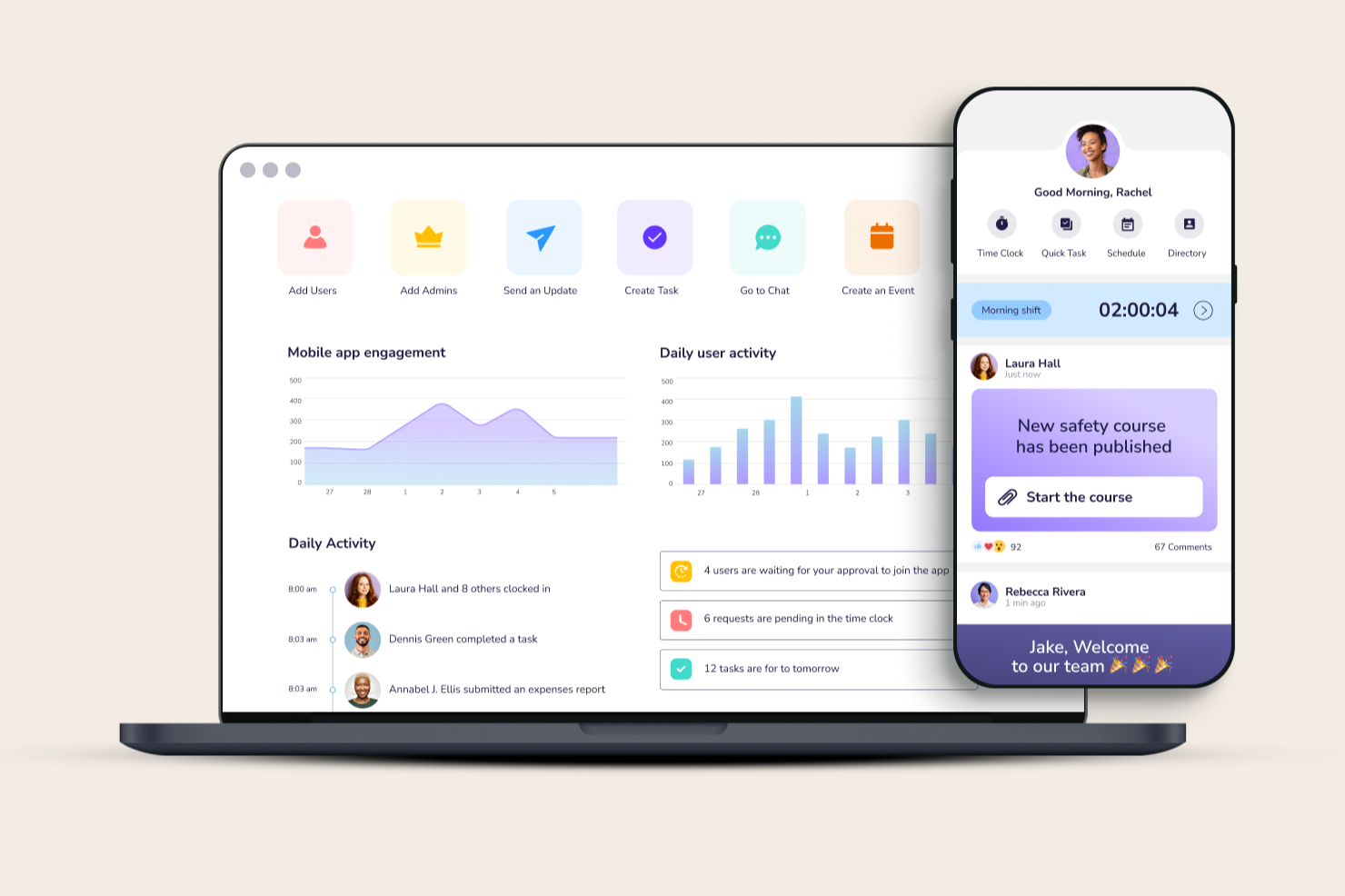
Connecteam is a mobile-first team communication app built for businesses with deskless or hybrid workforces who need to keep everyone connected, manage schedules, and coordinate daily operations from anywhere.
Who Is Connecteam Best For?
Connecteam is a strong fit for small to mid-sized businesses in industries like construction, retail, hospitality, and healthcare that rely on frontline or field-based teams.
Why I Picked Connecteam
I picked Connecteam as one of the best because it's purpose-built for teams where most employees never sit at a desk—think HVAC technicians, cleaning crews, or home care workers who need to stay connected without a company laptop or email address. I really like the GPS-enabled time clock, which lets my team clock in and out from job sites while I monitor live locations and assign last-minute jobs on the go. The job scheduling feature is also a standout for field operations—I can attach work order details, checklists, and client contact notes directly to each shift so technicians arrive prepared. The in-app chat lets field employees reach clients through the app without saving personal contact details—useful when managing a dispersed workforce.
Connecteam Key Features
- Updates feed: Post company-wide announcements and target them to specific teams, departments, or locations with read receipts to confirm visibility.
- Employee surveys and polls: Send quick pulse surveys or polls directly through the app to gather team feedback without needing a separate tool.
- Knowledge base: Store and share training materials, SOPs, and company documents in a searchable hub that employees can access from their phones.
- Task management: Create and assign tasks with due dates, checklists, and image attachments so field employees know exactly what's expected on each job.
Connecteam Integrations
Integrations include QuickBooks, Gusto, Xero, ADP, Wix, Lightspeed, PrismHR, Square, BambooHR, and Accu-Time Systems.
New Product Updates from Connecteam

Connecteam Adds Pay Period Locks and Break Premium Controls
Connecteam adds closed and locked pay periods, Payroll Manager permissions, and timesheet actions for dismissing or reapplying Break Premiums to protect payroll accuracy and simplify exception management. For more information, visit Connecteam’s official site.
 .
.

Hub is a modern intranet platform built for hybrid teams who need a central space to share updates, collaborate on projects, and keep everyone connected, whether they're in the office or working remotely.
Who Is Hub Best For?
Hub is a strong fit for SMEs and growing teams that need an affordable, easy-to-manage intranet without the complexity of enterprise-grade platforms.
Why I Picked Hub
Hub earns its spot on my shortlist because it gives SMEs and growing teams a genuinely manageable intranet that doesn't require a dedicated IT team to set up or maintain. I like how the branded intranet builder lets smaller teams create a polished, on-brand communication hub without needing developer support. My team also uses the built-in news and announcements features to keep hybrid employees informed in real time, which smaller organizations struggle to do without a centralized platform. The people directory is another feature I find particularly useful for growing teams onboarding new hires across different locations.
Hub Key Features
- Pulse surveys: Collect employee feedback with optional anonymity and hidden scoring to quantify responses across your team.
- Must reads: Mark content as mandatory so employees must confirm they've read it, with automated reminders sent to anyone who hasn't.
- Status updates: Let employees indicate whether they're in or out of the office, with customizable status options to reflect your team's working patterns.
- PWA mobile app: Give hybrid and remote employees full intranet access on any mobile device without requiring an app store download.
Hub Integrations
Native integrations include Slack, Microsoft Teams, Gmail, Google Drive, Microsoft OneDrive, Microsoft Outlook, and Sharepoint.


Haystack helps hybrid teams in fast-moving organizations centralize internal communications, making it easier for employees across locations and departments to stay informed and connected.
Who Is Haystack Best For?
Haystack is a strong fit for mid-sized companies with hybrid or distributed workforces that need a structured way to keep employees informed across departments.
Why I Picked Haystack
Haystack earns its spot as one of the best on my shortlist because of how it handles multi-channel delivery. I love that you can write one post and push it simultaneously to email, SMS, Slack, Microsoft Teams, and mobile push notifications—so hybrid employees get the message on whichever channel they actually check. The "Must Read" feature is particularly useful: it flags specific posts as required reading and sends automated reminders to anyone who hasn't opened them yet, which takes the follow-up burden off communicators. I also find the author alias feature genuinely practical—it lets comms teams draft and publish announcements on behalf of executives without needing to hand over account access.
Haystack Key Features
- Scheduled communications: Plan and queue posts in advance so announcements go out at the right time, without manual intervention.
- Content analytics: Track read rates, compare engagement across posts, and identify which message formats resonate most with employees.
- Publishing permissions and approval workflows: Control who can post and require admin approval before content goes live, keeping communications on-brand and accurate.
- Emergency alerts: Send urgent SMS notifications to all employees instantly, ensuring critical updates reach everyone regardless of their location.
Haystack Integrations
Integrations include Slack, Microsoft Teams, Google Drive, Atlassian Confluence, Jira, Box, Dropbox, Microsoft OneDrive, Zoom, and Tableau.


Homebase brings together team messaging, scheduling, and time tracking in one platform designed for hourly and shift-based teams who need to stay connected and coordinated across hybrid work environments.
Who Is Homebase Best For?
Homebase is a strong fit for small businesses in retail, hospitality, and food service that manage hourly or shift-based employees across one or a few locations.
Why I Picked Homebase
Homebase earns its spot on my shortlist because it packs scheduling, messaging, and time tracking into one place without the complexity that trips up small business owners. I like how the team messaging feature lets managers send shift reminders and announcements directly to employees' phones, which is genuinely useful when your team is split between on-site and remote shifts. The free plan covers a surprising amount of ground for a single location, including messaging and scheduling, so small businesses aren't forced into a paid tier just to get their team communicating.
Homebase Key Features
- Shift reminders and alerts: Automatically notify employees of upcoming shifts, schedule changes, and late clock-ins via in-app, text, or email.
- Direct and group messaging: Send one-on-one or group messages to specific employees, roles, or your entire team from within the app.
- Shift trade and coverage requests: Let employees request shift swaps or pick up open shifts directly in the app, with manager approval built in.
- Employee shout-outs: Recognize team members with in-app shout-outs to support engagement and morale across your workforce.
Homebase Integrations
Integrations include Square, Toast, Clover, Shopify, Lightspeed, QuickBooks, Gusto, ADP, Paychex, and Revel.


ThoughtFarmer is an intranet platform that combines internal communications, employee directories, knowledge management, and community-building tools for hybrid and distributed organizations.
Who Is ThoughtFarmer Best For?
ThoughtFarmer is a strong fit for mid-sized organizations (100–5,000 employees) that need a central hub to connect office-based, remote, and frontline workers.
Why I Picked ThoughtFarmer
ThoughtFarmer earns its spot on my shortlist because it's one of the few intranet platforms that bakes community-building directly into the communication layer. I like that features like shout-outs, microblogging, and unlimited groups (each with its own news feed) give hybrid teams a shared social space that doesn't depend on being in the same office. The Broadcast tool also lets me push targeted messages to specific teams, right to their phones, so no one falls through the cracks.
ThoughtFarmer Key Features
- Universal smart search: Quickly find documents, people, and content across the intranet and connected cloud drives.
- FormFlow digital workflows: Automate document processes with custom forms for tasks like onboarding and PTO requests.
- Employee directories: Browse rich profiles, team info, and organizational charts to connect with colleagues.
- Native mobile app: Give remote and frontline workers full access to the intranet and communications on any device.
ThoughtFarmer Integrations
ThoughtFarmer offers native integrations with Microsoft 365, SharePoint, OneDrive, Google Workspace, Microsoft Teams, and Slack, with an API available for custom integrations.
Pros and Cons
Pros:
- Rich employee profiles support connection
- Built-in peer recognition and shout-out features
- Targeted broadcast messaging for employee groups
Cons:
- Not purpose-built for fast-moving team conversations
- No native real-time chat or messaging
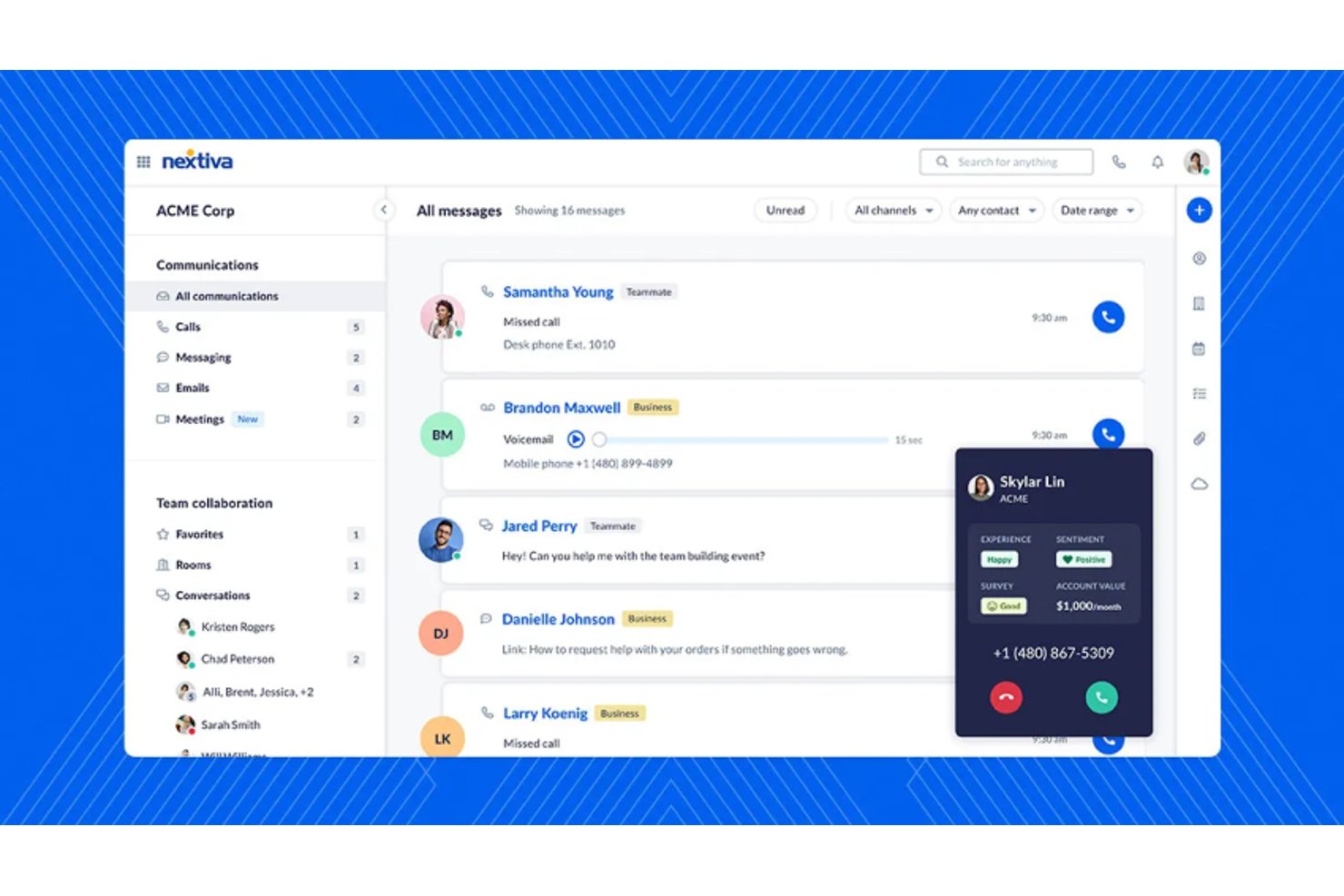
Nextiva is a cloud-based unified communications platform that brings together voice calling, video meetings, team chat, and SMS messaging in a single app for hybrid and distributed teams.
Who Is Nextiva Best For?
Nextiva suits small to mid-sized businesses that need to manage both internal team communication and customer-facing interactions from a single platform.
Why I Picked Nextiva
Nextiva earns its spot as one of the best on my shortlist because of how well its AI handles conversation summaries at the end of every call. After a video meeting or phone conversation, Nextiva's XBert AI automatically generates a summary with key points and next steps, so no one has to scramble through notes after the fact. I also like the real-time sentiment analysis, which flags shifts in tone mid-call so hybrid teams can course-correct before a conversation goes sideways.
Nextiva Key Features
- Team messaging channels: Create public or private channels to organize team and topic-based communication.
- Integrated file sharing: Share documents, images, and files directly within chat or meeting spaces.
- User role and permission management: Set roles and permissions to control access to sensitive conversations and channels.
- Third-party CRM and productivity integrations: Connect with tools like Salesforce, HubSpot, Microsoft Teams, and Google Workspace.
Nextiva Integrations
Nextiva offers native integrations with Salesforce, HubSpot, Zendesk, Microsoft Dynamics, Zoho CRM, Oracle, ServiceNow, ConnectWise, Google Workspace, Microsoft Teams, and more. An API is available for custom integrations.
Pros and Cons
Pros:
- Strong uptime reliability for distributed teams
- Unified voice, video, and chat in one
- AI call summaries save time post-meeting
Cons:
- Setup can be complex for small teams
- Mobile app has reported performance glitches


Zoom gives hybrid teams a flexible platform for video meetings, chat, and collaboration, helping businesses of all sizes connect remote and in-office employees with reliable communication tools.
Who Is Zoom Best For?
Zoom is a strong fit for mid-size to enterprise businesses that run frequent meetings and need a dependable video-first communication platform for hybrid teams.
Why I Picked Zoom
Zoom earns its spot on my shortlist because of how well its AI Companion handles the meeting overhead that bogs down hybrid teams. I particularly like the automatic meeting summaries and action item capture—after a call wraps up, my team doesn't have to scramble through notes to figure out who owns what. AI Companion also works across other platforms like Google Meet and Microsoft Teams, so even when a colleague hosts a meeting outside of Zoom, I can still get a transcript and summary without being the host. The "My Notes" feature is another one I use regularly, letting me jot thoughts mid-meeting while AI enriches and expands on them in context.
Zoom Key Features
- Breakout rooms: Split meeting participants into smaller groups for focused discussions or workshops, then bring everyone back to the main session.
- Translated captions: Display real-time captions in 33 languages, removing language barriers for globally distributed hybrid teams.
- Zoom Whiteboard: Collaborate on an interactive shared canvas using sticky notes, drawing tools, and smart connectors, both during and outside of meetings.
- Surveys and polls: Collect team input or feedback directly within a meeting using built-in polls and post-meeting surveys.
Zoom Integrations

Workvivo is an employee communication platform built for hybrid teams that want to keep everyone connected, engaged, and informed, and is popular with organizations aiming to improve internal communication and collaboration.
Who Is Workvivo Best For?
Workvivo is a strong fit for mid-to-large enterprises with hybrid or distributed workforces that need a dedicated internal communications platform to keep employees aligned and engaged.
Why I Picked Workvivo
Workvivo earns a spot on my shortlist because it treats company culture as a core feature rather than an afterthought. I love how the values feature lets teams tie shout-outs and posts directly to company values, so recognition isn't just social—it's reinforcing the behaviors that actually matter to the organization. The community spaces feature is another highlight, letting employees self-organize around shared interests, locations, or teams and helping build connection in a hybrid setup where people rarely share the same physical space.
Workvivo Key Features
- Surveys and polls: Capture employee sentiment with built-in surveys and quick polls that can be sent across the entire organization or to targeted groups.
- Live streaming: Broadcast company-wide updates, town halls, or leadership messages to all employees in real time.
- Auto-translate: Automatically translate content into employees' native languages, keeping hybrid and global teams equally informed.
- People directory and org chart: Give employees a searchable directory and visual org chart to understand team structures and find colleagues.
Workvivo Integrations
Integrations include Zoom, Slack, Google Workspace, Microsoft 365, BambooHR, Workday, Sage HR, Personio, Paychex, and Trello.

Troop Messenger is a team communication platform built for businesses and organizations that need secure, feature-rich messaging, file sharing, and collaboration tools to keep hybrid teams connected and productive.
Who Is Troop Messenger Best For?
Troop Messenger is a strong fit for government agencies, defense organizations, and enterprises in regulated industries that need strict control over their communication infrastructure.
Why I Picked Troop Messenger
I shortlisted Troop Messenger because it gives security-sensitive organizations control over where their data lives. I particularly like the self-hosting and on-premise deployment options, which let IT teams keep all messages and files entirely within their own infrastructure. For hybrid teams in government, defense, or regulated industries, this differs from cloud-only tools. The platform also includes end-to-end encryption and granular admin controls, so my team is able to manage access, monitor activity, and enforce compliance policies without relying on a third-party vendor's security posture.
Troop Messenger Key Features
- Burnout (private chat window): A self-destructing 1:1 chat window where messages automatically disappear after a pre-set timer expires.
- Location tracking: Share live location from the mobile app and view the location history of remote team members.
- Air-time group: A broadcast-style group where only the admin can send messages, keeping announcements one-directional.
- Screen sharing within group calls: Share your screen during a group audio or video call without needing host approval.
Troop Messenger Integrations
Integrations include Dropbox, Google Drive, LDAP, Cattlecall, Mailtrim (upcoming), GitHub (upcoming), Jira Software (upcoming) and Zapier. An API is available for custom integrations.

Pumble is a team communication app that offers unlimited message history, making it the best choice for businesses looking for comprehensive and reliable communication tools. It provides features such as channels, threads, file sharing, video conferencing, and guest access, making it a versatile and efficient tool for modern teams.
Why I picked Pumble: Pumbles offers a diverse feature set, which includes free communication, video conferencing, and robust security options. Pumble emphasizes on improving communication across a wide array of business contexts, from financial services to software development, and its suitability for both in-office and remote teams. Additionally, Pumble is best for unlimited message history because it provides teams with the ability to retain and easily search through their entire communication record. This is crucial for maintaining continuity over long-term projects and ensuring that no important information is lost over time.
Pumble Standout Features & Integrations:
Features include channels for organized conversations, direct messaging for individual or group communication, and threads for detailed sub-conversations within channels. It supports real-time communication with options for voice and video calls, including screen sharing capabilities, and offers unlimited message history and file sharing to centralize document storage. Additionally, Pumble allows for guest access, customizable notifications, and permission settings to manage team interactions effectively.
Integrations include Zapier, GitHub, RSS, and more.
Other Options
Here are a few more worthwhile options that didn’t make the best team communication apps list:
- Guidde
For video-first knowledge communication
- Spike
For connecting teams through conversational email
- Chanty
For team productivity and task management
- Flock
For a private channel for personal notes
- Xoxoday
With a built-in recognition and rewards system
- SnapComms
For flexible communication formats
- Workmates
For tracking mandatory information reviews
- Guru
For sharing internal announcements
- Mattermost
For program developers and other technical teams
- Slack
For asynchronous organizations
- LiveAgent
For customer support teams
- Axero
For real-time team chats
- PeopleOne
For personalized experiences
- ProofHub
Team communication app for tracking billable hours
- Brosix
Team communication app with an integrated whiteboard
- Blink
Team communication app for enabling frontline workers
- Staffbase
Team communication app for in-house communication teams
- Twist
Team communication app for threaded conversations
- Ryver
Team communication app for custom meeting invite links
- Convo
Team communication app for annotating documents in-app


How I Evaluate Team Communication Apps
I split my evaluation into baseline must-haves—like persistent channels, admin controls, and calling—and differentiators like AI summaries, HRIS integrations, and compliance certifications.
Core Functionality (Table Stakes For This List)
When I'm selecting tools for my list, I rank each one on a scale from 0 (does not offer the functionality) to 5 (excels in this area) for each core functionality listed below. Then, I calculate the tool's total score into a percentage. Each tool needs to achieve a minimum total score of 75% to be considered for inclusion.
- Real-Time Messaging: I check for threaded conversations, reactions, and persistent history so HR can revisit sensitive discussions like grievance follow-ups months later.
- Channels & Groups: Private channels matter here—HR teams need confidential spaces for topics like compensation planning that stay separate from company-wide channels.
- File Sharing & Search: I evaluate whether you can share policy documents and find them later using filters by date, sender, or file type across message history.
- Video & Voice Calling: Built-in or natively embedded calling is key for HR check-ins and interviews. I look at screen sharing, recording, and group call capacity.
- User & Permission Management: Tools like Slack and Microsoft Teams handle this differently, so I evaluate role-based controls, SSO support, and SCIM provisioning options.
- Third-Party Integrations: I look for connectors to HRIS, ATS, and calendar tools so onboarding tasks or interview scheduling can flow directly into team conversations.
Once I have a list of tools that meet the criteria, I consider what sets each platform apart.
Differentiating Factors (What Sets Vendors Apart)
Here's how I compare and contrast different vendors:
Standout Features
AI-powered channel summaries and meeting recaps are a big deal for HR teams juggling multiple onboarding cohorts or open roles at once. I look at how well each tool distills long threads into actionable takeaways. Built-in pulse surveys and polls also matter because they let you collect employee sentiment without pushing people to a separate platform. I evaluate workflow automation too, like triggering onboarding checklists or policy acknowledgment reminders directly inside chat.
Beyond Features
Security and compliance certifications weigh heavily in my evaluation because HR channels often carry sensitive employee data. I check for SOC 2, GDPR readiness, and encryption standards. HRIS and ATS integrations also shape my assessment—tools that connect to platforms like Workday or Greenhouse let HR teams route hiring updates and onboarding tasks without context-switching. I also consider how each vendor handles deployment for deskless or frontline workers, since mobile access is essential for reaching employees who aren't at a desk.
How to Choose Team Communication Tools
As you work through your unique software selection process, remember the following points.
- Ease of Use: The communication tool should be user-friendly to ensure high employee adoption rates. Complex tools can lead to low usage, which negates the benefits of having the tool in the first place. A user-friendly tool ensures that all departments, from engineering to HR, can use it effectively, thereby maximizing its value.
- Integrations: The tool should be capable of integrating with other essential tools that your organization uses daily. This flexibility and adaptability can simplify workflows and improve productivity. For instance, a communication tool that integrates with project management software, CRM systems, and cloud storage can centralize all communications.
- Security: With the increasing threat of cybercrime, security is a significant concern. The tool should offer security features to protect sensitive company data while allowing necessary external communications. For example, a tool that provides end-to-end encryption can safeguard against data breaches.
- Scalability: The tool should be able to grow with your organization without compromising performance. A scalable tool can handle an increasing number of users and data without slowing down or requiring significant additional investment. For larger organizations, enterprise communication software can provide the additional scale needed to support growing teams.
- Customization: The tool should be customizable to meet the unique needs and preferences of your organization. This includes tailoring features, user interfaces, and workflows to fit specific business processes. For example, a customizable tool can be adapted to support different communication styles, project requirements, and team structures.
What are Team Communication Apps?
Team communication apps are digital tools that simplify group communication and make it quick and easy to share information and coordinate tasks from a mobile device (Android or iOS). You can use them to sent instant messages, share files, manage tasks, or start a quick video call. They are an efficient way to replace emails and meetings with more faster and more flexible communication options.
A well-chosen team communication app can quickly connect your employees and improve their productivity by reducing delays communication delays and eliminating unnecessary meetings. They're loaded with features to help colleagues share ideas, collaborate on projects, and stay on task, and they increase transparency by keeping all members updated simultaneously.
Features of Team Communication Apps
Practical team communication tools help simplify communication, enhance collaboration, and ensure that everyone is on the same page. Here are some of the most essential features to look for in team communication tools.
- Instant Messaging: This feature allows team members to communicate via internal communication in real time, which is important for quick decision-making and problem-solving.
- Video Conferencing: Video calls enable face-to-face video conference communication, which helps build stronger relationships and ensures that non-verbal cues are not missed in virtual meetings.
- File Sharing: The ability to share documents and files within the communication tool ensures that everyone has access to the necessary resources without switching platforms. This feature is great for brainstorming and other teamwork exercises.
- Task Management: Integrating task management features helps teams keep track of their responsibilities and deadlines, ensuring that HR operations and other projects stay on track.
- Integration with Other Tools: Easy integration with other software like HR management systems (HRMS), project management tools, customer relationship management systems (CRMs), collaboration tools, calendars, and email helps create a unified workflow, reducing the need to switch between different applications.
- Search Functionality: A search feature allows team members to quickly find past conversations, files, and other important information, saving time and improving efficiency.
- Notifications and Alerts: Customizable notifications ensure that team members are aware of important updates and can respond promptly, without being overwhelmed by unnecessary alerts.
- User Roles and Permissions: This feature allows administrators to control access to different parts of the tool, ensuring that sensitive information is only accessible to those who need it.
- Mobile Access: Having a mobile communication app ensures that team members can stay connected and productive, even when they are away from their desks.
- Security and Compliance: Strong security features and compliance with industry standards protect sensitive business communication and ensure that the organization meets regulatory requirements.
Choosing the right team communication tool with these features can significantly enhance collaboration and productivity within your team. By focusing on these key aspects, you can ensure that your team has the resources it needs to communicate effectively and achieve its goals.
Benefits of Team Communication Apps
Team communication tools have become indispensable in facilitating interaction, collaboration, and productivity among team members. Below are five primary benefits of using team communication tools for both users and organizations.
- Enhanced Collaboration: Team communication tools enable real-time collaboration, allowing team members to work together on projects, share ideas, and provide feedback instantly, regardless of their physical location.
- Increased Productivity: By centralizing communication and reducing the need for lengthy email threads, these tools simplify workflows and help teams focus on their tasks, leading to higher productivity.
- Improved Transparency: These tools provide a clear record of all communications and decisions made, ensuring that everyone is on the same page and reducing the likelihood of misunderstandings or missed information.
- Better Project and Operational Management: With integrated project or business management features, team communication tools help track progress, set deadlines, and assign tasks, making it easier to manage tasks efficiently, meet deadlines, and improve processes.
- Enhanced Flexibility: Team communication tools support remote work by allowing team members to communicate and collaborate from anywhere, providing the flexibility needed to adapt to different working conditions and time zones.
Investing in team communication tools can significantly improve the way your team interacts and collaborates, leading to better outcomes and a more cohesive work environment. By leveraging these tools, organizations can ensure that their teams are well-connected, informed, and productive.
Costs & Pricing of Team Communication Apps
Here's a detailed estimate of average team communication plans and associated costs. The data is derived from an analysis of common pricing tiers and the features they offer. By understanding these pricing structures, users can better assess their needs and budget considerations when choosing team communication tools.
Plan Comparison Table for Team Communication Apps
| Plan Type | Average Price | Common Features |
| Free Plan | $0 | Basic messaging, limited file sharing, limited integrations, basic security |
| Personal Plan | $5-$10 per user /month | Enhanced messaging, video calls, more file storage, integrations, basic support |
| Business Plan | $10-$20 per user /month | Advanced messaging, video conferencing, extensive file storage, advanced integrations, priority support |
| Enterprise Plan | $20+ per user /month | Custom features, unlimited storage, advanced security, dedicated support, compliance tools |
Team Communication Apps FAQs
Still wondering about team communication apps and what they have to offer? Here are some answers to frequently asked questions that should clear things up:
How do team communication apps work?
Team communication apps are software systems that allow organizations to communicate with employees in a number of ways. Typically, these apps include individual and group chats, voice and video calls, SMS/text messages, and other forms of communication.
They are an essential piece of software for organizations who support hybrid or remote work, or have distributed teams that work across time zones. Team chat apps are also useful for employees who have mobile jobs, such as service providers or employees who conduct activities in the field.
What are the main benefits of using team communication apps?
Team communication is one of the main challenges of managing remote teams. Communication apps help remote teams engage with each other and build a sense of connection, often with fun ways to celebrate each other’s achievements and inject a little fun into the workday. They also improve communication and productivity by replacing slow processes like emails with live in-the-moment chats. This speeds up workflows, uncovers answers to questions faster, and cuts down on time consuming admin tasks.
Many team communication apps also include additional features that are beneficial for remote or hybrid teams, such as shared team to-do lists or other task management features. These help to ensure everyone is on the same page, regardless of if they’re working from the office, from home, or from the other side of the world.
What key features are included in team communication apps?
During your hunt for the perfect team communication app, you may find yourself trying to compare one system against another. While your specific needs may vary depending on your workforce set-up, you want to make sure you’re choosing wisely.
Here’s a short list of the main features you should expect to find within the best team chat apps:
- Chat channels (both public and private)
- Direct messages or 1:1 message tools
- Group chats
- File sharing
- Audio and video conferencing
- Audio and video message recording
- Screen sharing
- SMS or text messaging
- Notifications & reminders
- Quizzes, polls and survey tools
- Task management tools
- Checklists, forms & to-do lists
- Multimedia & emojis
- Employee directory
- Analytics
- Data encryption & security features
Use this list to vet your top app contenders to ensure the chat features you need are included.
What do team communication apps typically cost?
The team communication apps in this top 10 list range in price from $2 to $88 per user, per month, depending on the depth of the features they offer. To get you started, many of the app providers in this list do offer free trials or free plans (also known as freemium plans) to give you a sense of how their app works before you commit.
One popular team communication app that doubles as a workforce management system is Connecteam, which offers a range of very affordable pricing plans, in case you’re looking for an all-in-one yet affordable option.
Are there any free team communication apps?
Several team communication app providers in this list do offer free plans (also known as freemium plans), including Chanty, Flock, Spike, and Mattermost.
Freemium plans allow you to test an app before you commit to purchasing it. However, it’s worth noting that freemium plans generally only offer limited features compared to their full service paid plans.
There are some free forever plans as well, including Pumble, which is a worthwhile option for small businesses with limited budgets.
Other Software Reviews
Looking for other ways to keep your staff connected and productive? One of these other software lists might be a better fit:
- Best Task Management Software for Team Efficiency
- Best Productivity Tracking Software for Hybrid Teams
- Best Intranet Software Solutions to Connect Teams
- Best Remote Working Software for Distributed Teams
- Best Employee Communication Software for Internal Comms
- Best Communications Software & Communication Apps
- Best Remote Collaboration Software for Hybrid Teams
- Best Goal Setting Software for Keeping Teams on Track
- Best Remote Employee Monitoring Software
Other Resources for Distributed Teams
Here’s a collection of our other top resources to help you manage your remote and hybrid teams more effectively:
- How to Improve Business Operations through Internal Communications, a podcast with Lizabeth Wesely-Casella from L-12 Services
- How to Keep Virtual Teams Connected, a podcast with Ben Hoffman from cityHUNT
- 27 Best Practices for Managing Remote Teams
- 4 Key Elements to Leading Remote Teams in the New World
- Training Remote Workers: 5 Strategies for Success in the Digital Age
What's Next?
If you're in the process of researching team communication app, connect with a SoftwareSelect advisor for free recommendations.
You fill out a form and have a quick chat where they get into the specifics of your needs. Then you'll get a shortlist of software to review. They'll even support you through the entire buying process, including price negotiations.