

10 Best Restaurant Payroll Software Reviewed in 2026

Best Restaurant Payroll Software Shortlist


The best restaurant payroll software helps you manage hourly wages, tips, overtime, and compliance—without the stress of manual calculations or costly mistakes.
Restaurant payroll comes with unique challenges, from split shifts and tip pooling to constantly changing labor laws and high employee turnover. Without the right system, payroll can quickly become time-consuming and error-prone. The right software automates these complexities, ensuring accurate pay, proper tax handling, and compliance with wage and hour regulations.
To help restaurant owners and managers find solutions that actually work, I’ve researched and reviewed the top payroll platforms built specifically for the hospitality industry. In this guide, you’ll discover restaurant payroll software that simplifies tip tracking, streamlines payroll processing, and frees you up to focus on what matters most—running your restaurant.
Why Trust Our Software Reviews
Our team has been testing and reviewing software since 2012. As HR experts ourselves, we know how difficult—and important—it is to choose the right software.
For this guide, we evaluated tools using hands-on testing and independent research, scoring tools using our selection criteria. We also draw on insights from industry thought leaders and practicing HR experts.
Our reviews reflect our human editorial judgment, not a sales pitch.
Expert reviewers:
Restaurant Payroll Software Comparison Table
This comparison table summarizes pricing, trial, and demo details for my top payroll software selections for restaurant owners.
| Tool | Best For | Trial Info | Price | ||
|---|---|---|---|---|---|
| 1 | Best for customizable benefits plans | Not available | From $79/employee/month | Website | |
| 2 | Best for multi-location payroll with compliance | Free demo available | From $29/employee/month | Website | |
| 3 | Best for automated payroll processing | Free demo available | Pricing upon request | Website | |
| 4 | Best for tip reporting | Free demo available | From $49/month + $6/month/user | Website | |
| 5 | Best for hourly workforce | Free plan available | From $30/location/month | Website | |
| 6 | Best for scalable payroll packages for SMBs | 3-month free trial | Pricing upon request | Website | |
| 7 | Best for automatic tip calculations | 14-day free trial + free plan available | From $39.99/month | Website | |
| 8 | Best for integrated payments | Not available | From $35/month + $6/person/month | Website | |
| 9 | Best for POS system integration | Free demo available | From $69/month | Website | |
| 10 | Best for compliance support | Free demo available | Pricing upon request | Website |


Best Restaurant Payroll Software Reviews
Get the inside scoop on my top restaurant payroll software picks. Below, I break down what each tool does best, where it might fall short, and which types of restaurant teams it’s built for—so you can quickly figure out what fits your needs.

Best for customizable benefits plans
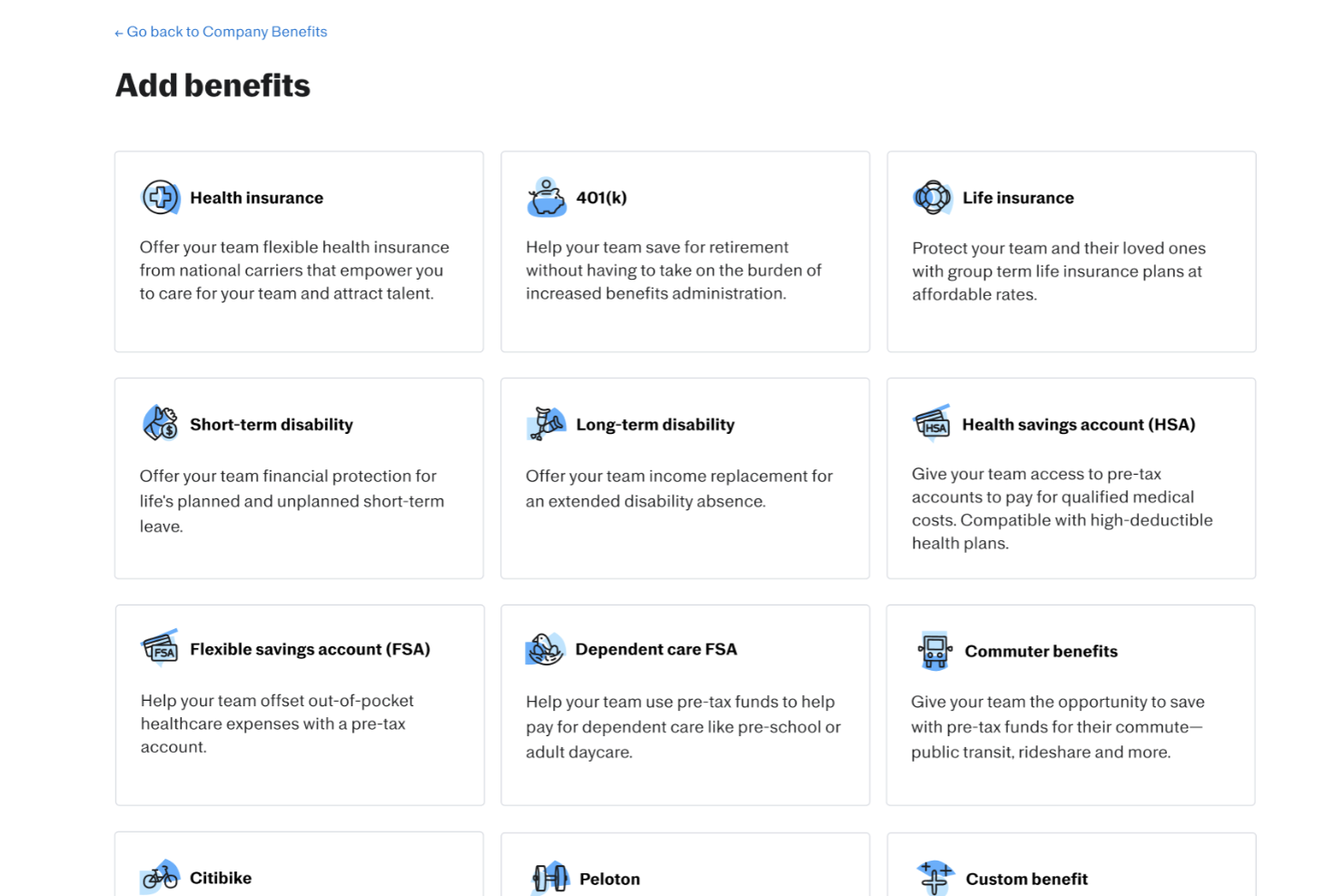
Justworks is a practical option for restaurants that need a payroll system with added HR support. It stands out for customizable benefits plans, giving restaurant owners more flexibility when offering health coverage and other employee perks. Alongside payroll processing and tax filings, it helps restaurants manage their teams while staying aligned with labor and compliance requirements.
Why I Picked Justworks
I picked Justworks because it addresses the unique challenges faced by restaurant owners, such as managing diverse employee roles and compliance with labor laws. Justworks offers full-service payroll processing, which ensures accurate and timely payment for both salaried and hourly employees, a crucial feature for restaurants with varying shift patterns. I also appreciate its robust compliance support, which helps your business avoid costly penalties by keeping you up to date on payroll regulations. These features make Justworks a practical choice for restaurant owners looking to streamline their administrative tasks.
Justworks Key Features
In addition to customizable benefits plans, Justworks offers:
- Time Tracking: Includes tools to monitor employee hours, ensuring accurate payroll and helping manage overtime.
- PTO Management: Simplifies tracking and managing paid time off, crucial for maintaining staff morale and scheduling.
- Onboarding Support: Provides dedicated specialists to assist with setup, ensuring a smooth transition to the platform.
Justworks Integrations
Integrations include QuickBooks, Xero, BambooHR, JazzHR, Guideline, and Mineral. An API is also available for custom integrations.
Pros and Cons
Pros:
- Automated payroll tax filings
- Clear employee dashboard for benefits and pay information
- Straightforward onboarding workflow for new hires
Cons:
- Reporting tools offer limited in-depth business insights
- Fewer advanced HR features than larger enterprise platforms

Best for multi-location payroll with compliance
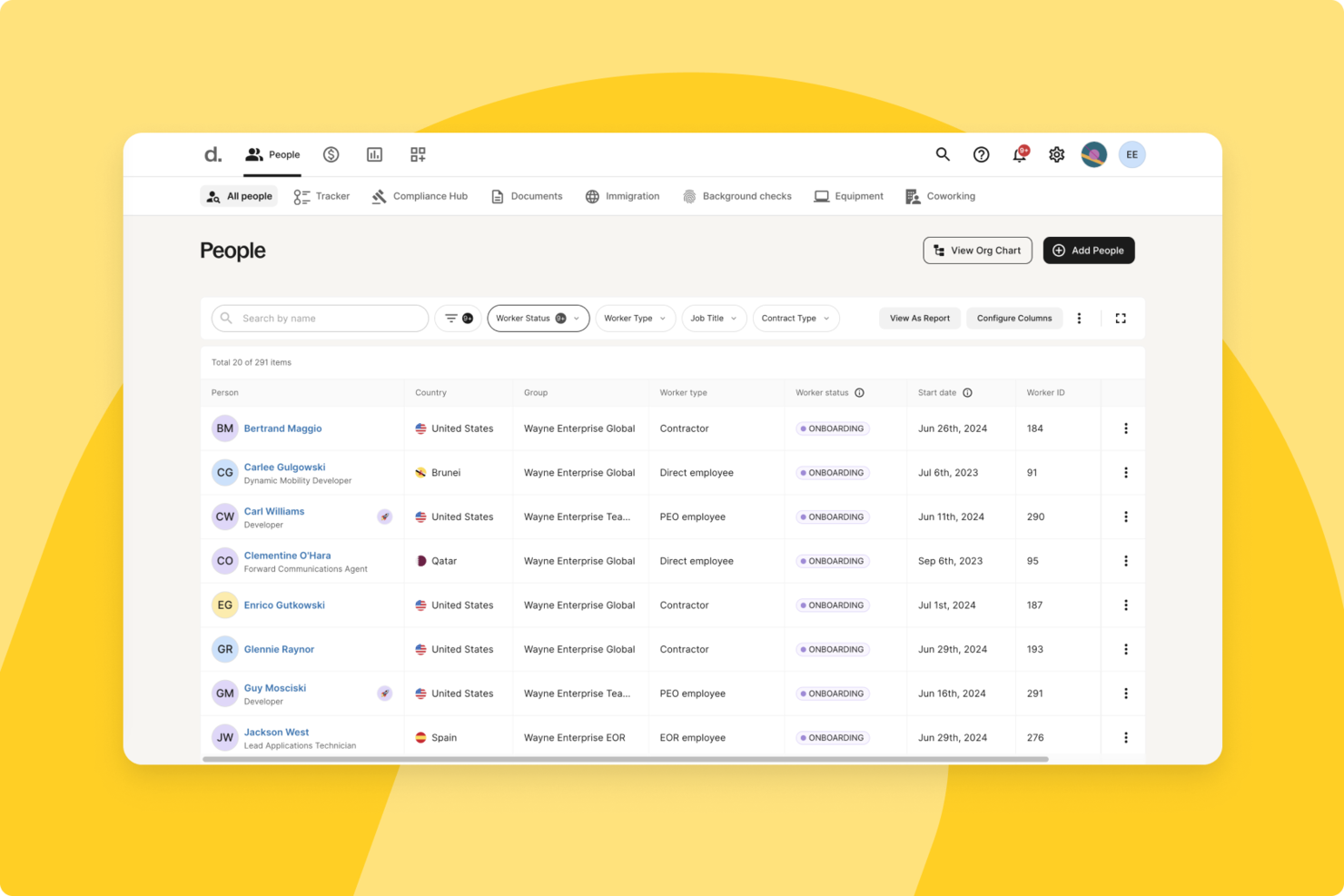
For restaurant owners looking for a multi-location payroll software that can support a distributed workforce, Deel provides tools to manage global teams while staying aligned with local labor laws. It is especially useful for restaurants operating across multiple countries, as it helps you handle international payments and region-specific compliance requirements in one platform. This can reduce the administrative burden of paying staff in different currencies and jurisdictions, so you can spend more time focused on running your restaurant.
Why I Picked Deel
I picked Deel because it helps you manage a mix of full-time staff and contractors across different regions without needing separate payroll systems. Its built-in compliance features can support adherence to local employment regulations, which is particularly important if you employ seasonal or international workers. I also like that automated payroll processing and multi-currency payments can reduce manual work, which may help you maintain efficiency during busy service periods.
Deel Key Features
In addition to its core functionalities, I also found several additional features that enhance Deel's suitability for restaurant payroll management:
- Instant Hiring: Enables quick onboarding of staff in over 150 countries, helping you fill positions swiftly.
- Automated Tax Calculations: Ensures accurate tax compliance across different jurisdictions, reducing the risk of errors.
- Real-Time Insights: Provides analytics and reporting tools to help you make informed financial decisions.
- Multi-Currency Support: Facilitates payments in various currencies, allowing for smooth transactions with international staff.
Deel Integrations
Integrations include Workday, SAP, NetSuite, Xero, QuickBooks, Gusto, BambooHR, Greenhouse, Lever, and Slack.
Pros and Cons
Pros:
- Integrates with major HR systems
- Built-in compliance and contract management
- Global payroll across 150 countries
Cons:
- Limited directory customization options
- Reporting features lack advanced filtering

Best for automated payroll processing
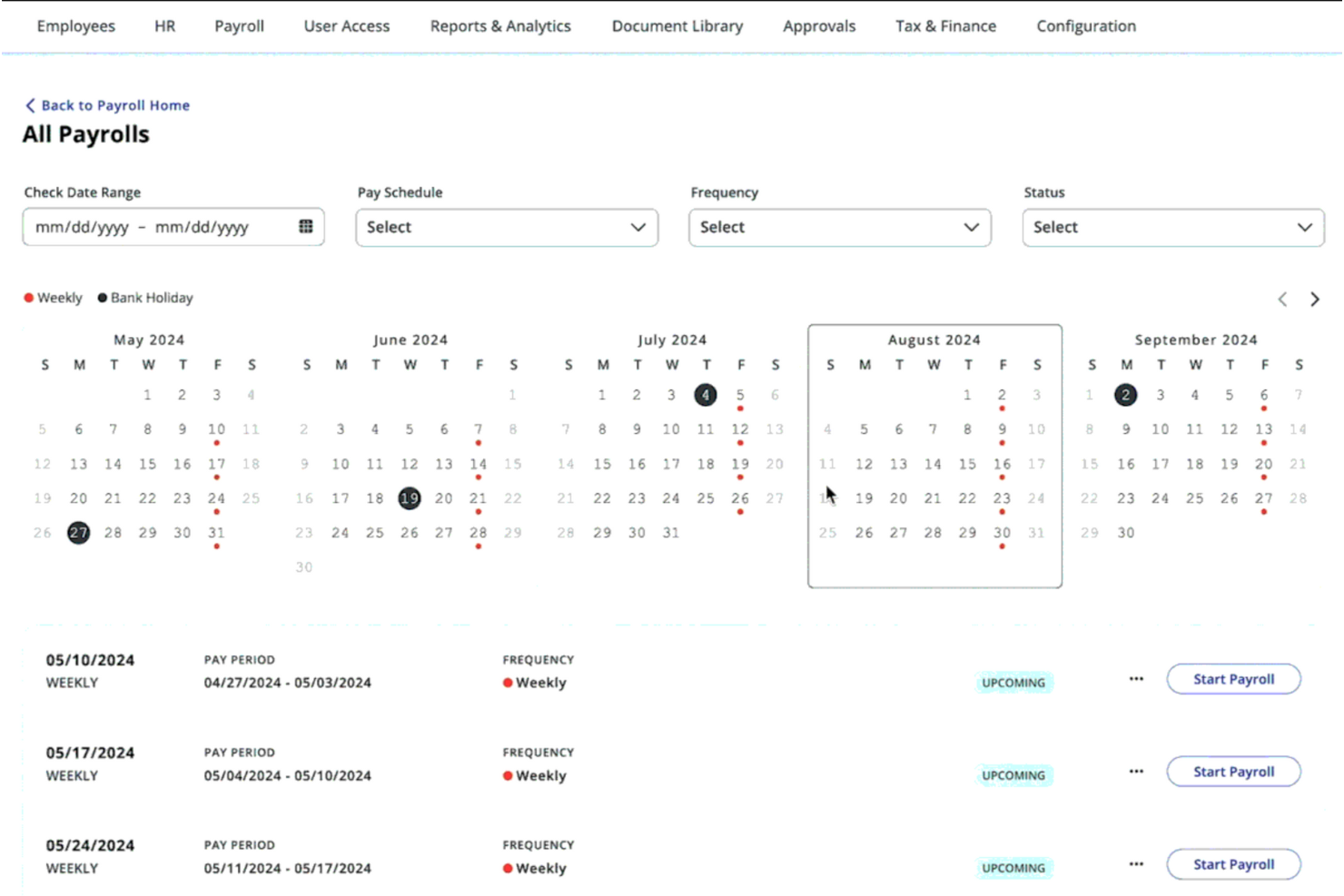
For restaurant owners seeking a reliable payroll solution, Paylocity supports automated payroll processing in fast-paced hospitality environments. This platform helps restaurants of all sizes manage complex payroll needs, including tipped wages and multi-role pay rates. By reducing manual payroll work and supporting labor law compliance, Paylocity allows managers to focus more on daily operations and staff service.
Why I Picked Paylocity
I picked Paylocity for its support of automated payroll processing for restaurant teams. It handles calculations for tipped wages and multiple pay rates, which helps reduce manual work and payroll errors. Its POS integrations also make it easier to pull in accurate hours and tip data, keeping payroll records consistent and up to date.
Paylocity Key Features
In addition to automated payroll processing, Paylocity offers several features that enhance restaurant management.
- Employee Scheduling: Allows managers to create and manage employee schedules, ensuring optimal staffing levels and reducing scheduling conflicts.
- Time Tracking: Provides tools for accurately tracking employee hours, including overtime and breaks, which are essential for compliance and payroll accuracy.
- Compliance Management: Helps restaurants stay compliant with labor laws and regulations, including minimum wage and overtime requirements.
- Mobile App: Enables employees to access their schedules, pay stubs, and other HR information on the go, improving communication and engagement.
Paylocity Integrations
Integrations include QuickBooks, Xero, NetSuite, Sage Intacct, Microsoft Dynamics, Kronos, SAP, Oracle, ADP, and Workday.
Pros and Cons
Pros:
- Employee scheduling feature reduces staffing conflicts and inefficiencies
- Integration with accounting software streamlines financial management
- Offers built-in compliance support for labor regulations
Cons:
- Some users find the interface less intuitive than competitors
- Limited customization options for specific restaurant needs
New Product Updates from Paylocity

Paylocity Expands Expense and Purchase Request Tools
Paylocity adds connected personal cards, smarter expense categorization, and a streamlined purchase request experience. This reduces manual entry and helps finance teams manage expenses and approvals more efficiently. For more information, visit Paylocity’s official site.
 .
.
Gusto
Best for tip reporting
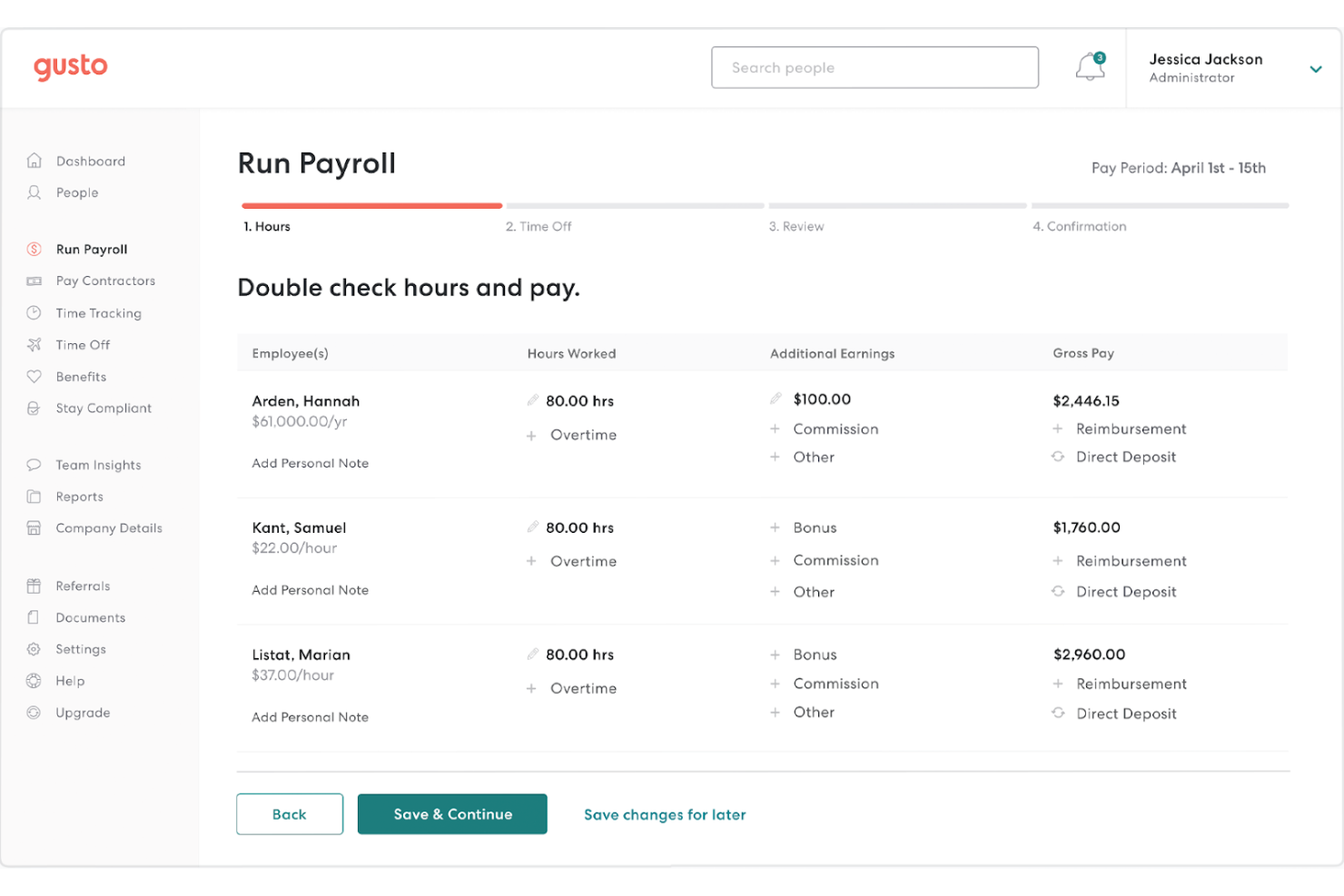
Gusto is a payroll and HR platform that combines automated payroll, tax filings, tip tracking, and basic HR tasks in one place, making it a strong choice for restaurants managing hourly staff, tipped employees, and compliance requirements.
Why I Picked Gusto
I picked Gusto because it lets restaurant owners handle payroll and compliance from one tool instead of juggling multiple apps. You can run unlimited payrolls and automatically calculate federal, state, and local taxes, which helps ensure your team gets paid accurately and on time.
Built-in tip reporting and support for FICA credits means your tipped staff are processed correctly without manual adjustments. Time tracking data feeds directly into payroll, so hours worked flow into pay runs with fewer errors. Plus, Gusto’s employee self-service lets your team access pay stubs and tax forms without adding HR overhead.
Gusto Key Features
Here are some key features worth highlighting:
- Automated Payroll & Tax Filing: Runs payroll and files federal/state/local taxes with no manual calculations.
- Tip Reporting & FICA Credit Support: Tracks tips properly and supports relevant compliance calculations.
- Time Tracking Integration: Associates employee hours with payroll to reduce errors.
- Employee Self-Service: Lets staff view pay stubs and tax documents online or via app.
Gusto Integrations
Integrations include QuickBooks Online, Xero, FreshBooks, TSheets (QuickBooks Time), When I Work, Clover, Shopify, Expensify, BambooHR, and Deputy — plus 100+ others spanning accounting and time-tracking tools.
Pros and Cons
Pros:
- Employee self-service reduces HR workload
- Built-in tip reporting meets restaurant payroll needs
- Time tracking links directly to payroll runs
Cons:
- May require supplementary services for full HR management
- The base price does not include all features
New Product Updates from Gusto
Gusto Adds Solo Advisory Tools and Mobile Money Features
Gusto adds Solo S-Corp Advisory Tools and Gusto Money on Mobile for tax guidance, invoicing, and bill payments. These updates help accountants advise solopreneurs and let users manage business finances from their phones. For more information, visit Gusto’s official site.

Homebase
Best for hourly workforce

Homebase is a workforce management platform specifically designed for small businesses with hourly employees, especially in restaurants, retail, hospitality, and service industries.
Why I Picked Homebase
I picked Homebase because it helps you reduce payroll friction by tying your actual hours worked directly to your pay runs, reducing manual errors through integrated timesheets and reporting.
Its scheduling tools let you build and adjust shifts quickly using drag-and-drop calendars, ensuring you match coverage to demand without extra spreadsheets, and you can track employee time from mobile devices or shared clocks with GPS to verify where work actually happens, which keeps your labor records accurate.
Homebase’s built-in messaging and shift alerts help your team stay aligned and updated on changes without juggling multiple apps. Finally, it supports compliance with wage, break, and overtime rules so you can manage workforce requirements with confidence.
Homebase Key Features
Here are some standout features worth highlighting:
- Employee Scheduling: Drag-and-drop schedule builder with shift publishing and swap options.
- Time Clocks & GPS Tracking: Clock in/out via mobile or kiosk with optional location verification.
- Automated Timesheets: Hours, overtime, breaks, and PTO feed directly into payroll runs.
- Team Messaging: Notify individuals or groups of schedule changes or announcements.
Homebase Integrations
Integrations include Square, QuickBooks, Gusto, Paychex, Rippling, Clover, Shopify, and Lightspeed.
Pros and Cons
Pros:
- Drag-and-drop scheduling with employee shift swap
- Compliance with city, state, and federal labor laws
- Automated time tracking and payroll integration
Cons:
- Requires the same EIN for multiple location payroll runs
- Limited to US-based businesses
Best for scalable payroll packages for SMBs
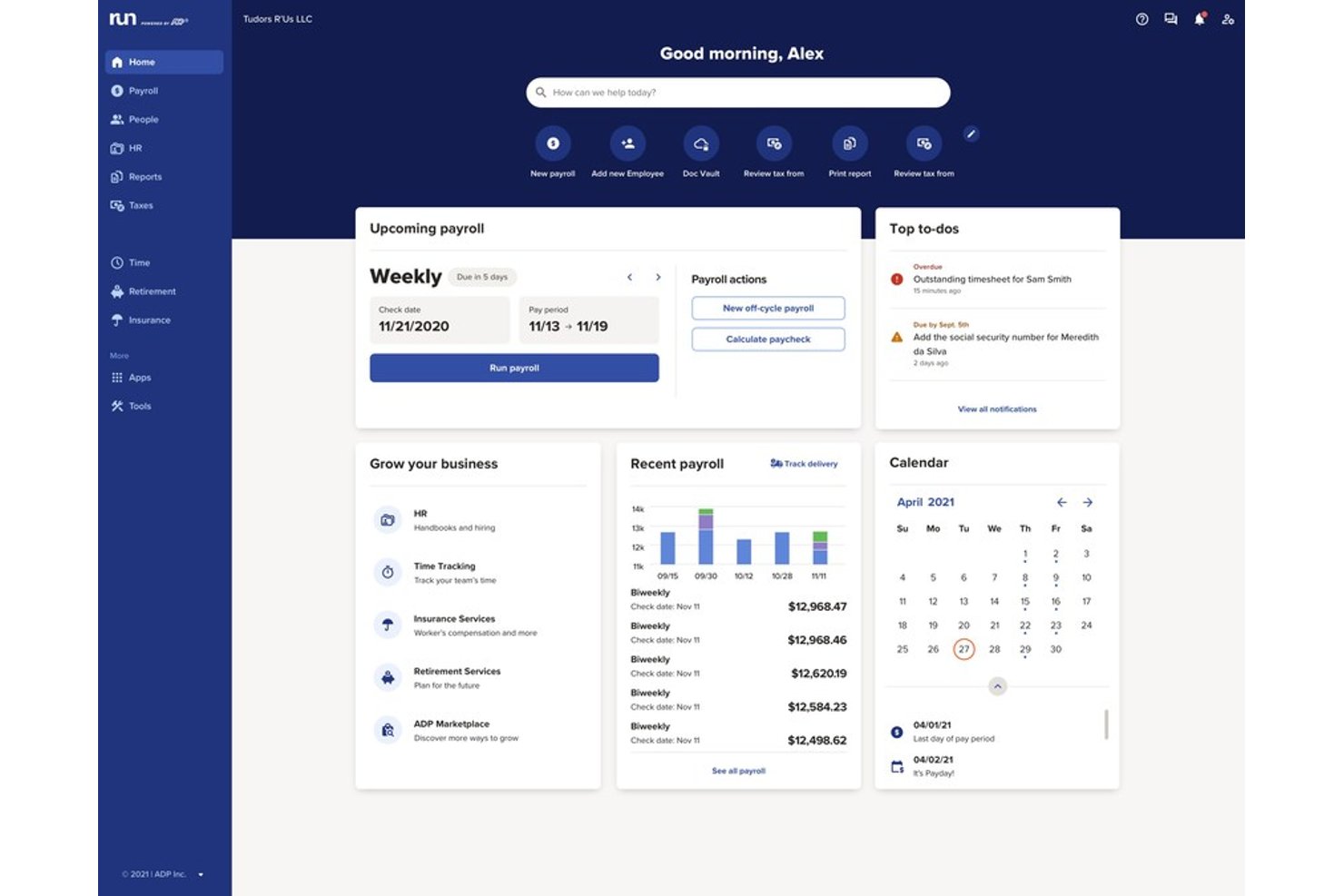
RUN Powered by ADP is a cloud-based payroll and HR software designed for restaurants and hospitality businesses that need reliable payroll processing, automated tax compliance, tip management, and integration with point-of-sale and accounting tools.
Who Is RUN Powered by ADP Best For?
Payroll and HR managers at growing restaurant groups or hospitality businesses with expanding teams and multi-location needs.
Why I Picked RUN Powered by ADP
I picked RUN Powered by ADP as one of the best because I can set up flexible payroll packages for different-sized restaurant teams, manage tipped employee payrolls, and automate compliance as locations grow. That kind of scalability matters for expanding businesses.
RUN Powered by ADP Key Features
- Automated tax filing: Handles federal, state, and local payroll taxes for all employee types.
- Employee self-service portal: Lets employees access paystubs, W-2s, and update personal details online.
- Mobile payroll app: Allows restaurant staff and managers to process payroll and view information from their phones.
- Tip credit calculation: Supports automated calculation and reporting for tipped wages and FICA tip compliance.
RUN Powered by ADP Integrations
RUN Powered by ADP offers native integrations with QuickBooks, Xero, Wave, Clover, and Square, and provides access to additional applications through the ADP Marketplace. An API is available for custom integrations.
Pros and Cons
Pros:
- Scalable for multi-location restaurant operations
- Automated restaurant tax and labor compliance
- Advanced support for tipped employee payroll
Cons:
- Requires manual page refreshes on some browsers
- Standard report layouts cannot be modified
7shifts
Best for automatic tip calculations

7shifts helps organizations run accurate payroll without manual tip tracking or spreadsheets. It’s especially well suited for tip-heavy operations like full-service restaurants and multi-location groups that want payroll to reflect real hours and real earnings.
Why I Picked 7shifts
I picked 7shifts because it handles restaurant-specific payroll challenges—especially tips—better than general payroll tools. You can automatically calculate cash and credit card tips based on actual hours worked, which reduces payroll errors and compliance risks.
I like that employee hours flow directly from time tracking into payroll, so you’re not re-entering data or reconciling mismatched records. For managers, this means faster payroll runs; for staff, it means more accurate and timely pay. It’s a strong choice if tip accuracy is critical to your payroll process.
7shifts Key Features
Here are some key features worth highlighting:
- Labor Forecasting Tools: Compare scheduled labor costs against sales to control payroll spend.
- Manager Log Book: Keep shift notes and operational updates tied to specific days and locations.
- Employee Engagement Tools: Let staff swap shifts, request time off, and communicate in one place.
- Mobile Employee App: Employees clock in, view schedules, and track earnings from their phones.
7shifts Integrations
Integrations include Toast, Square, TouchBistro, Clover, CAKE, DoorDash, Gusto, QuickBooks, ADP Workforce Now, and UKG Pro.
Pros and Cons
Pros:
- Efficient scheduling process & labor reporting
- Automated tip calculation & easy payouts
- Compliance with labor regulations
Cons:
- Payroll features available only as an add-on
- Limited to US-only businesses
Best for integrated payments

Square Payroll is an online payroll service designed to streamline payroll processes and help restaurant owner manage payroll directly from their dashboard.
Why I picked Square Payroll:
I chose Square Payroll for this list because of its comprehensive approach to payroll management, particularly its ability to integrate with other Square products. This integration simplifies the payroll process for restaurant owners who use Square POS.
I believe Square Payroll is the best for integrated payments because of its capability to import timecards and tips directly from the Square POS system, ensuring accurate and efficient payroll runs.
Standout features & integrations:
Standout features for Square Payroll include automated tax filings, compliance support, and direct deposit options, which make payroll management easier. It also provides add-on support from certified HR experts and pay-as-you-go workers' compensation that syncs with payroll.
Square Payroll integrates with QuickBooks Online, Square POS, Square Team App, Square Dashboard, Square Checking account, Cash App, and various health insurance, retirement, and accounting solutions.
Pros and Cons
Pros:
- Flexible pricing with unlimited pay runs and no long-term contracts
- Automated tax filings and compliance support
- Integrated with Square POS for easy payroll processing
Cons:
- Some features require additional add-on purchases
- Pricing may be higher for businesses with many employees due to the per-person fee

Toast
Best for POS system integration

Toast is best suited for restaurants that want payroll tightly connected to their point-of-sale system. It’s designed for operators who need wages, tips, and hours to flow directly from POS data into payroll without manual reconciliation.
Why I Picked Toast
I picked Toast because it connects payroll directly to POS timesheets, which reduces manual data entry and payroll errors for restaurant teams. You can automatically sync employee hours, tips, and overtime from the POS into payroll, so managers don’t have to cross-check multiple systems.
I like that payroll runs faster because time tracking, wage calculations, and tip reporting are handled in one place, and Toast also supports restaurant-specific pay scenarios, such as tipped employees and multiple job roles, using POS-driven labor data. For operators already using Toast POS, this tight connection makes payroll far easier to manage week after week.
Toast Key Features
Here are some key features worth highlighting:
- POS-Synced Payroll Processing: Pulls hours, tips, and wages directly from Toast POS timesheets.
- Restaurant-Specific Tip Handling: Supports pooled tips, tip credits, and compliant tip reporting.
- Mobile Employee Onboarding: Lets staff complete payroll setup from their phones.
- HR Toolkit Access: Provides restaurant-focused HR templates and compliance resources.
Toast Integrations
Integrations include QuickBooks, Xero, 7shifts, HotSchedules, Restaurant365, Tock, ADP, Paychex, Square, and Aloha.
Pros and Cons
Pros:
- Access to a comprehensive HR toolkit for restaurant-specific needs
- Simplified employee onboarding and payroll management
- Integrated payroll processing with POS timesheet data
Cons:
- Some features may be more tailored to larger operations rather than small businesses
- The platform may have a learning curve for new users

ADP
Best for compliance support

ADP simplifies payroll and human resources tasks for restaurants. It excels in compliance support with tools designed for industry-specific regulations.
Why I picked ADP: I selected ADP for its reputation and specialized offerings for the restaurant sector. Its focus on compliance sets it apart, ensuring restaurants can adhere to complex regulations.
I judge ADP to be the best for compliance support because it equips businesses with the necessary resources to manage labor laws, wage rules, and tax obligations effectively.
Standout features & integrations:
ADP offers several useful features such as integration with point-of-sale systems, management of various job roles and pay rates, and detailed labor cost insights. It also provides flexible payment methods, including Wisely by ADP, and integrates with leading accounting and HR systems.
ADP integrates natively with a broad range of tools to enhance its payroll and HR capabilities, including QuickBooks, Xero, Wave, Workday, Microsoft Dynamics, Oracle NetSuite, SAP, Salesforce, Slack, and TSheets.
Pros and Cons
Pros:
- Offers flexible employee payment options, including Wisely by ADP
- Integrates with leading POS and accounting software
- Tailored compliance support for the restaurant industry
Cons:
- The extensive range of features may be daunting for those seeking simplicity
- Potentially higher costs for smaller establishments
- Lack of transparent pricing information on the website
Other Restaurant Payroll Software To Consider
Below is a list of additional restaurant payroll software that didn’t make it into my top 10 list but are still worth checking out:
- SpotOn
For team management
- Paychex
For custom payroll solutions
- Push Payroll
For workforce management
- Rippling
For handling complex payroll scenarios
- QuickBooks Payroll
For existing QuickBooks users
- Paycom
For direct data entry by employees
- OnPay
For small business payroll
- Wave
For free accounting integration
- Restaurant365
For restaurant operations
- Payworks
For franchise payroll management


Related HR Software Reviews
If you still haven't found what you're looking for here, check out these other related tools that we've tested and evaluated:
- HR Software
- Payroll Software
- Recruiting Software
- Employer of Record Services
- Applicant Tracking Systems
- Workforce Management Software
How I Evaluate Payroll Software for Restaurants
I split my evaluation into baseline criteria—tip management, POS sync, tipped wage compliance—and differentiators that separate a good fit from the right one for your restaurant operation.
Core Functionality (Table Stakes For This List)
When I'm selecting tools for my list, I rank each one on a scale from 0 (does not offer the functionality) to 5 (excels in this area) for each core functionality listed below. Then, I calculate the tool's total score into a percentage. Each tool needs to achieve a minimum total score of 55% to be considered for inclusion.
- Tip Tracking & Distribution: I check whether the platform handles pooled tips, tip-outs by role, and tip credit calculations—not just basic manual tip entry fields.
- Restaurant POS Integration: Each tool's native connections to major POS systems like Toast, Square, and Clover matter because manual hour and tip imports create payroll errors.
- Multi-Rate & Tipped Wage Payroll: Servers who bus tables at a different rate need blended overtime. I evaluate how each platform handles multiple pay rates per employee.
- Labor Law Compliance: I look for automated FICA tip credit reporting, minimum wage adjustments, and awareness of predictive scheduling rules at the state and local level.
- Onboarding & Document Collection: High turnover means constant hiring. Digital I-9/W-4 collection, e-signature, and E-Verify support keep new hires from stalling at paperwork.
- Multi-Location Payroll Support: Franchise and multi-unit operators need separate EINs, jurisdiction-specific tax filings, and consolidated reporting from a single dashboard.
Once I have a list of tools that meet the criteria, I consider what sets each platform apart.
Differentiating Factors (What Sets Vendors Apart)
Here's how I compare and contrast different vendors:
Standout Features
Earned wage access is a big differentiator in restaurants—same-day tip payouts or on-demand pay can keep hourly staff from jumping to a competitor down the block. I also evaluate labor cost analytics, specifically whether the platform ties payroll data to sales so operators can track labor as a percentage of revenue per location. Built-in scheduling and time tracking rounds things out, especially geofenced clock-ins and break enforcement that feed directly into payroll without a separate tool.
Beyond Features
Pricing transparency matters a lot here—restaurants run lean margins, so I check whether vendors charge per employee, per pay run, or flat monthly, and whether multi-location rollouts come with hidden per-EIN fees. Support availability is another factor I weigh. Many operators close payroll on nights or weekends and need live help outside standard business hours. I also look at compliance guarantees, particularly whether the vendor covers tax filing penalties and keeps up with evolving fair workweek and tipped wage regulations.
How to Choose Restaurant Payroll Software
As you work through your payroll software decision process, keep the following points in mind:
- Compliance Management: Restaurants must adhere to various labor laws and tax regulations. The right payroll software should automatically update to reflect current tax rates and regulatory changes, reducing the risk of non-compliance. For instance, it should handle tip credits and minimum wage requirements specific to the food service industry.
- Integration Capabilities: The software should easily integrate with existing systems such as point of sale (POS) and time-tracking solutions. This integration allows for accurate and efficient data transfer, ensuring that employees' hours and tips are correctly reflected in their payroll.
- Scalability: As restaurants grow, their payroll needs may become more complex. Choose software that can scale with your business, accommodating new employees, locations, and potentially varying pay structures without requiring a complete system overhaul.
- User-Friendly Interface: Restaurant managers and staff often have limited time for administrative tasks. Payroll software with a user-friendly interface simplifies the payroll process, making it quicker to complete tasks and reducing the likelihood of errors.
- Customer Support and Training: Given the high turnover rates in the restaurant industry, continuous training and support are crucial. The chosen software should offer comprehensive customer service and training resources to ensure that new and existing staff can effectively use the system.
Trends for Restaurant Payroll Software in 2025
Here are the latest trends shaping the restaurant payroll software industry currently:
- Integration with Point of Sale Systems: Restaurant payroll software is increasingly integrating with point of sale (POS) systems. This integration allows for real-time data transfer, simplifying wage calculations based on hours worked. It's important because it reduces errors and saves time.
- Use of Artificial Intelligence: Artificial intelligence (AI) is being incorporated into payroll systems. AI can predict staffing needs and manage payroll more efficiently. This trend is interesting for its potential to reduce labor costs and improve financial management.
- Mobile Accessibility: Mobile accessibility for payroll software is becoming a standard. Using mobile apps, employees can view pay stubs and manage their details from anywhere, which is important for enhancing accessibility and empowering the workforce.
- Compliance with Changing Regulations: Payroll software is adapting to comply with rapidly changing labor laws. Automated updates ensure restaurants remain compliant without manual intervention. This is crucial for avoiding legal penalties and maintaining operational integrity.
- Enhanced Data Security: Data security measures in payroll software are being strengthened. Encryption and multi-factor authentication protect sensitive employee information. This trend is important due to the increasing cyber threats in the digital age.
These trends indicate a move towards more efficient, secure, and compliant payroll management in restaurants.
What is Restaurant Payroll Software?
Restaurant payroll software is a specialized solution designed to manage and automate the payroll process for businesses within the hospitality industry. It is utilized by restaurant owners, managers, and accounting personnel to calculate wages, manage employee hours, and ensure compliance with tax laws.
The software comprises features such as time tracking, tip distribution, tax calculation, and payroll reporting. These components work together to handle the unique payroll requirements of restaurants, such as tip credits and split shifts, providing accuracy and compliance in employee compensation.
Features of Restaurant Payroll Software
When selecting payroll software for a restaurant, it's crucial to consider the unique needs of the hospitality industry. The right software can simplify payroll processes, ensuring staff are paid accurately and on time. Here are the most important payroll software features to look for:
- Hourly wage and shift-based payroll: Restaurant payroll software is built to handle hourly employees, split shifts, variable schedules, and fluctuating hours. Automated calculations ensure accurate pay for every shift worked.
- Tip management and tip pooling: The software tracks tips from POS systems, supports tip pooling or tip sharing rules, and ensures tips are distributed fairly and compliantly—reducing disputes and manual reconciliation.
- Overtime and premium pay calculations: Restaurant payroll tools automatically calculate overtime, double time, and premium pay based on local labor laws, union rules, or company policies, helping prevent costly wage violations.
- POS and time clock integration: Seamless integrations with POS systems and time clocks ensure hours, tips, and sales data flow directly into payroll, eliminating duplicate entry and reducing errors.
- Tax filing and compliance support: Restaurant payroll software handles federal, state, and local payroll taxes, including tip-related taxes and credits, helping you stay compliant with wage and hour regulations.
- Employee self-service portal: Employees can access pay stubs, tip statements, tax forms, schedules, and direct deposit details—reducing administrative questions for managers.
- Multi-location payroll support: For restaurant groups or franchises, payroll systems support multiple locations, pay rates, and tax jurisdictions from a single platform.
- New hire onboarding and documentation: Built-in onboarding tools simplify I-9s, W-4s, direct deposit setup, and policy acknowledgements—helping restaurants onboard quickly despite high turnover.
- Scheduling and labor cost visibility: Many platforms connect payroll with scheduling tools to show real-time labor costs as a percentage of sales, helping managers control expenses.
- Reporting and audit readiness: Detailed payroll and labor reports support budgeting, audits, tip compliance, and labor cost analysis—critical for restaurant operations.
Common Restaurant Payroll Software AI Features
Modern restaurant payroll platforms increasingly use AI to reduce errors, improve compliance, and optimize labor costs, for example:
- AI-powered payroll error detection: AI scans payroll runs for anomalies such as missing hours, incorrect overtime, tip misallocations, or unusual wage patterns before payroll is finalized.
- Predictive labor cost forecasting: AI analyzes historical sales, staffing patterns, and seasonality to forecast labor costs and help managers plan schedules more accurately.
- Smart compliance monitoring: AI tracks changes in minimum wage laws, tip credit rules, overtime thresholds, and local labor regulations—alerting restaurants to compliance risks automatically.
- Automated tip anomaly detection: AI flags irregular tip patterns that may indicate reporting issues, POS sync problems, or compliance concerns.
- Intelligent scheduling recommendations: AI suggests optimal staffing levels based on forecasted demand, reducing overstaffing, understaffing, and unnecessary overtime.
- Turnover and staffing risk insights: AI identifies patterns linked to high turnover—such as excessive overtime, inconsistent scheduling, or pay volatility—helping managers improve retention.
- AI-driven employee support chatbots: Chatbots answer common employee questions about pay dates, tip distributions, tax forms, and schedules—reducing interruptions during service hours.
- Advanced reporting insights: AI surfaces trends in labor efficiency, tip distribution, overtime usage, and compliance risks, turning payroll data into actionable operational insights.
Benefits of Restaurant Payroll Software
Restaurant payroll software can significantly improve the way payroll is handled, offering a range of benefits that streamline the process. Here are five primary advantages that restaurant payroll software can offer to users and organizations:
- Simplified Tax Filing: Restaurant payroll software automates tax calculations and filings, reducing the likelihood of errors and saving time. This automation ensures that restaurants remain compliant with tax laws without the need for extensive manual effort.
- Integrated Time Tracking: The software integrates time tracking, which simplifies the process of calculating pay based on hours worked. This integration helps in accurately compensating employees for their time, including overtime and split shifts, which are common in the restaurant industry.
- Enhanced Compliance with Labor Laws: Payroll software helps restaurants adhere to labor laws by automatically applying the relevant regulations to payroll calculations. This feature is particularly beneficial for avoiding costly legal penalties and ensuring fair labor practices.
- Improved Payroll Accuracy: By automating payroll processes, the software minimizes human error, leading to more accurate payroll. Accurate payroll processing is essential for maintaining employees’ trust and avoiding discrepancies that can lead to financial losses.
- Efficient Payroll Management: Streamlined payroll management allows for quick adjustments to payroll when necessary, such as adding bonuses or tips. This efficiency means payroll administrators can handle changes swiftly, ensuring employees are paid correctly and on time.
Restaurant payroll software is a valuable tool for any restaurant looking to improve its payroll processes. It saves time, reduces errors, and helps maintain compliance with complex tax and labor regulations. By investing in this software, restaurants can provide a better work environment for their staff and a more stable financial operation.
Costs and Pricing for Restaurant Payroll Software
When considering restaurant payroll software, it's important to be aware of the different pricing plans that typically exist. The software generally offers a range of plans to suite different restaurant sizes, from free or basic plans for small establishments to larger, advanced plans suitable for enterprise-sized businesses.
Below is a table summarizing the plan types, average prices, and common features of restaurant payroll software.
Plan Comparison Table for Restaurant Payroll Software
| Plan Type | Average Price | Common Features |
| Free Option | $0 (Limited features) | Basic payroll processing, limited tax filing capabilities, and minimal customer support |
| Basic | $20 - $40 per month | Payroll processing, tax filing for some states, direct deposit, basic reporting, and an employee portal |
| Standard | $35 - $59 per month | Full-service payroll, tax filing and payment, multiple pay rates, and customer support |
| Plus | $39 - $99 per month | Advanced reporting, compliance support, benefits administration, HR tools, and multiple integrations |
| Premium | $45 - $199 per month | All Standard and Plus features, additional HR capabilities, expert setup, and advanced analytics |
| Enterprise | Custom pricing | Customizable plans, scalable solutions, dedicated support, full HR suite, and strategic analytics tools |
When selecting a restaurant payroll software plan, consider the size of your restaurant, the complexity of your payroll needs, and the level of support you require. Each plan offers a different set of features and pricing, so choose one that aligns with your business objectives and budget constraints.
Restaurant Payroll Software FAQs
Here are some answers to frequently asked questions you may have about payroll software for restaurants and how they work:
How does restaurant payroll software handle tips?
Restaurant payroll software typically includes functionality to manage tips effectively. It should allow for the input of tip amounts received by employees, both through credit card and cash tips. The software should also be able to allocate tips appropriately among staff, ensuring accurate distribution according to the restaurant’s tipping policy.
Can restaurant payroll software manage different types of employees?
Yes, good restaurant payroll software can manage various types of employees, including full-time, part-time, and temporary staff. It should accommodate different pay rates and schedules, and handle the complexities of wage laws for tipped employees versus non-tipped employees.
Is it possible to integrate restaurant payroll software with other systems?
Integration capabilities are a key feature of effective restaurant payroll software. It should be able to integrate with point-of-sale (POS) systems, accounting software, and time and attendance systems. This integration helps to streamline payroll processes and ensures accuracy in data management.
What kind of support can I expect with restaurant payroll software?
Support options vary by software provider, but you should expect access to customer service for troubleshooting and assistance with the software. Many providers offer online resources, such as help articles and tutorials, as well as phone, email, or chat support.
How does restaurant payroll software ensure tax compliance?
Restaurant payroll software should include features that assist with tax calculations, deductions, and filings. It should stay updated with the latest tax rates and regulations to ensure compliance. The software should also generate necessary tax forms and support electronic filing to the appropriate tax agencies.
Will restaurant payroll software work for a multi-location restaurant business?
Many restaurant payroll software solutions are designed to accommodate businesses with multiple locations. They can manage payroll operations across different sites while maintaining a centralized database for ease of administration and reporting.
How secure is restaurant payroll software?
Security is a critical aspect of any payroll software. Reputable restaurant payroll software should offer robust security measures, including data encryption, secure login protocols, and regular security audits. It’s important to ensure that the software complies with data protection regulations to safeguard sensitive employee information.
What makes payroll software tailored for restaurants different from generic payroll solutions?
Payroll software designed for restaurants typically includes features specific to the industry, such as tip reporting, labor cost tracking for multiple job roles, and compliance with restaurant labor laws.
Other Payroll Software Reviews
If this list didn't have exactly what you were hoping for, worry not. There are other types of payroll software out there that may be a better fit for your needs: