

Bir İK yazılımı listesi, İK ekibiniz için işe alım ve bordrodan performans takibi ile çalışan analitiğine kadar her şeyi merkezileştiren platformların derlenmiş bir seçkisidir. Seçeneklerinizi değerlendiriyor veya elektronik tablolardan geçiş yapıyorsanız, doğru seçim insan yönetimi stratejinizi gerçek sonuçlar elde edecek şekilde destekler ve çalışan sayınız arttıkça çalışan verilerinizi düzenli tutar. Bu listede, yoğun çalışan yöneticiler için iş gücü yönetimini pratik hâle getiren, planlama için özel içgörüler sunan ve İK profesyonellerinizin evrak işleri yerine insanlara odaklanmasını sağlayan özelliklere sahip çözümler bulacaksınız.
Why Trust Our Software Recommendations
6,700+
Reviews
20
Industry experts
16+
Evaluation factors
14
Years
Our team has been testing and reviewing software since 2012. As HR experts ourselves, we know how difficult—and important—it is to choose the right software.
For this guide, we evaluated tools using hands-on testing and independent research, scoring tools using our selection criteria. We also draw on insights from industry thought leaders and practicing HR experts.
Our reviews reflect our human editorial judgment, not a sales pitch.
Expert reviewers:
- Phil GrayCOO
 Kim BehnkeHR Tech Editor & Analyst
 Josh BarkerPeople Ops Manager

Karşılaştırma Tablosu: İK Yazılımı Listeleri
Bu karşılaştırma tablosu, en iyi İK yazılımı listesi seçimlerimin fiyatlandırma ayrıntılarını özetlemektedir.
Sorted by: Default
| Tool | Starting Price | Website | |
|---|---|---|---|
Best for employee-driven payroll accuracy | 4.3 out of 5 | Pricing upon request Free demo available | Book Demo |
Best for global hiring, payroll, and compliance | 4.8 out of 5 | $5/user/month Free demo available | Website |
Best for SMB employee experience and self-service | 3.9 out of 5 | $10.25/user/month 7-day free trial + demo available | Website |
Best for all-in-one SMB HR and compliance | 4.6 out of 5 | $79/user/month Free demo available | Book Demo |
Best with customizable workflows for HR teams | 4.5 out of 5 | Pricing upon request Free demo available | Website |
Best for AI-driven performance and engagement | 4.8 out of 5 | $4/employee/month 14-day free trial + demo available | Website |
Best for automated HCM and workforce management | 4.3 out of 5 | Pricing upon request Free demo available | Website |
Best for automated payroll and benefits | 4.6 out of 5 | $49/month Free trial + free demo available | Book Demo |
Best with full-service PEO and risk mitigation | 4.0 out of 5 | Pricing upon request Free demo available | Website |
Best with end-to-end HCM and HR analytics | 4.3 out of 5 | $99/month Free demo available | Website |


En İyi İK Yazılımı Listesi İncelemeleri
Aşağıda, kısa listeme giren en iyi İK yazılımı listesinin ayrıntılı özetlerini bulabilirsiniz. İncelemelerim, sizin için en uygun seçeneği bulmanıza yardımcı olmak amacıyla her platformun özelliklerine, en uygun kullanım alanlarına ve entegrasyonlarına ayrıntılı bir bakış sunmaktadır.
 Best for employee-driven payroll accuracy
- Free demo available
- Pricing upon request
Visit WebsiteCustomer Rating:4.3/5
Paycom offers a unified HR software platform with a payroll dashboard, mobile time clock, timesheet management, expense scanning, and an AI assistant accessible across desktop and mobile devices. Paycom is a single-database HR and payroll platform that covers the full employee lifecycle—from hiring and onboarding to time tracking, benefits administration, and payroll processing.
Who Is Paycom Best For?
Paycom is a strong fit for mid-to-large U.S.-based organizations that want a single platform to manage HR, payroll, and workforce operations without juggling multiple systems.
Why I Picked Paycom
I picked Paycom as one of the best for employee-driven payroll accuracy because of Beti, its built-in payroll experience that genuinely changes how payroll gets done. Instead of HR catching errors after the fact, Beti automatically flags issues throughout the pay period and guides employees to fix them before payroll is ever submitted. In practice, that means your team isn't chasing down missed punches or reversing incorrect checks. The whole process self-starts each pay period, pulling live data from timecards, approved expenses, and PTO into payroll automatically.
Paycom Key Features
- Talent acquisition tools: Post jobs, manage applicants, and move candidates through a customizable hiring pipeline from within the same system used for onboarding and HR.
- Benefits administration: Employees enroll in and manage their benefits directly through the platform, with eligibility rules and carrier connections handled automatically.
- GONE automated time-off decisions: Paycom's GONE feature reviews and approves or denies time-off requests based on your preset rules, without manager intervention.
- Performance management: Set goals, run 360-degree reviews, and track employee development through structured review cycles built into the platform.
Paycom Integrations
Paycom doesn't provide public APIs for direct integration. Paycom is built on a single-database architecture, meaning most HR, payroll, and talent management functions live natively within the platform rather than relying on third-party connections. Its GL Concierge tool maps payroll data to your general ledger for export to accounting systems. For teams that need to connect Paycom to external tools, third-party middleware services like Finch and Merge offer unified API connections, but native integrations and Zapier support are not clearly documented.
Pros and Cons
Pros:
- Built-in EEO-1 and OSHA compliance reports
- Employees review and fix paycheck errors pre-payday
- Single database eliminates duplicate data entry
Cons:
- Implementation process can be time-consuming
- Custom reporting often requires extra Excel work
 Best for global hiring, payroll, and compliance
- Free demo available
- From $5/user/month
Visit WebsiteCustomer Rating:4.8/5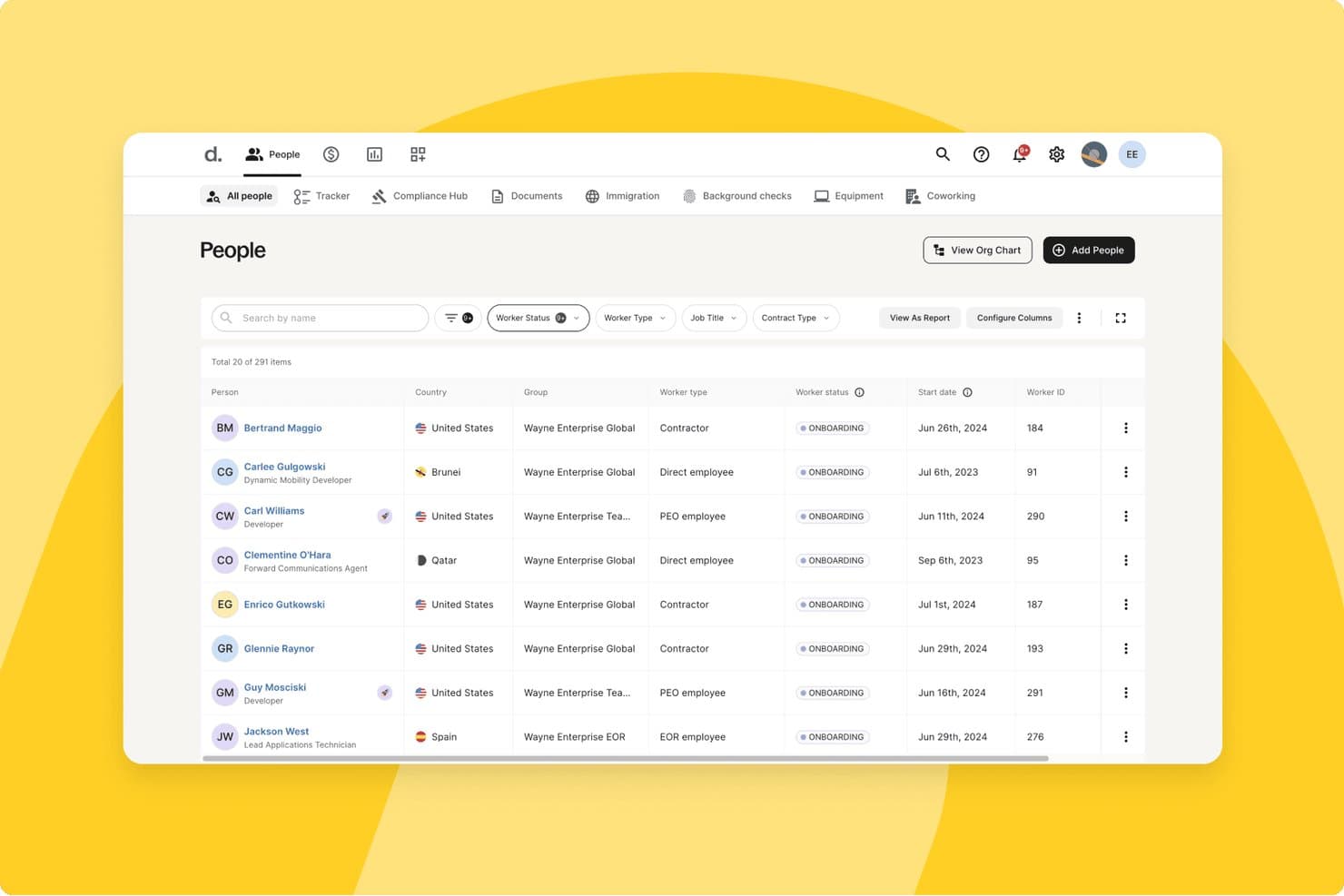
Deel HR centralizes employee records with filters and status tracking. Deel HR is an HR platform built for global teams that combines employee records, onboarding workflows, time-off management, payroll, contractor management, and compliance tools across 150+ countries.
Who Is Deel HR Best For?
Deel HR is a strong fit for companies hiring across multiple countries who need payroll, compliance, and HR management in one place.
Why I Picked Deel HR
Deel HR earns its spot as one of the best on my shortlist because no other platform handles global hiring, payroll, and compliance with this level of native depth. I love that it covers 150+ countries with localized employment contracts, statutory leave calendars, and automatic alerts when local labor laws change, so your team isn't scrambling to catch up. Its AI-powered misclassification risk detection is especially useful when you're managing a mixed workforce of direct employees and contractors across multiple regions.
Deel HR Key Features
- Employee self-service portal: Employees can update personal details, access pay stubs, manage documents, and submit time-off requests without HR involvement.
- Custom workflow builder: Configure multi-step approval chains and automated onboarding or offboarding sequences by role and region, with no developer input needed.
- Centralized document storage: Store contracts, tax forms, HR policies, and payslips in one place with folder structures, role-based permissions, and e-signature support.
- Org chart and employee directory: An auto-generated, interactive org chart updates in real time as employee data changes and is accessible via Slack or the Deel platform.
Deel HR Integrations
Deel HR supports integrations with QuickBooks, Xero, NetSuite, BambooHR, HiBob, Greenhouse, Slack, Microsoft Teams, Google Workspace, and Rydoo. It also provides an open REST API and Zapier.
Pros and Cons
Pros:
- Org charts update automatically as teams change
- AI assistant flags contractor misclassification risk
- Built-in global compliance across 150+ countries
Cons:
- Analytics reliability issues reported by users
- Free HR module only with paid payroll
 Best for SMB employee experience and self-service
- 7-day free trial + demo available
- From $10.25/user/month
Visit WebsiteCustomer Rating:3.9/5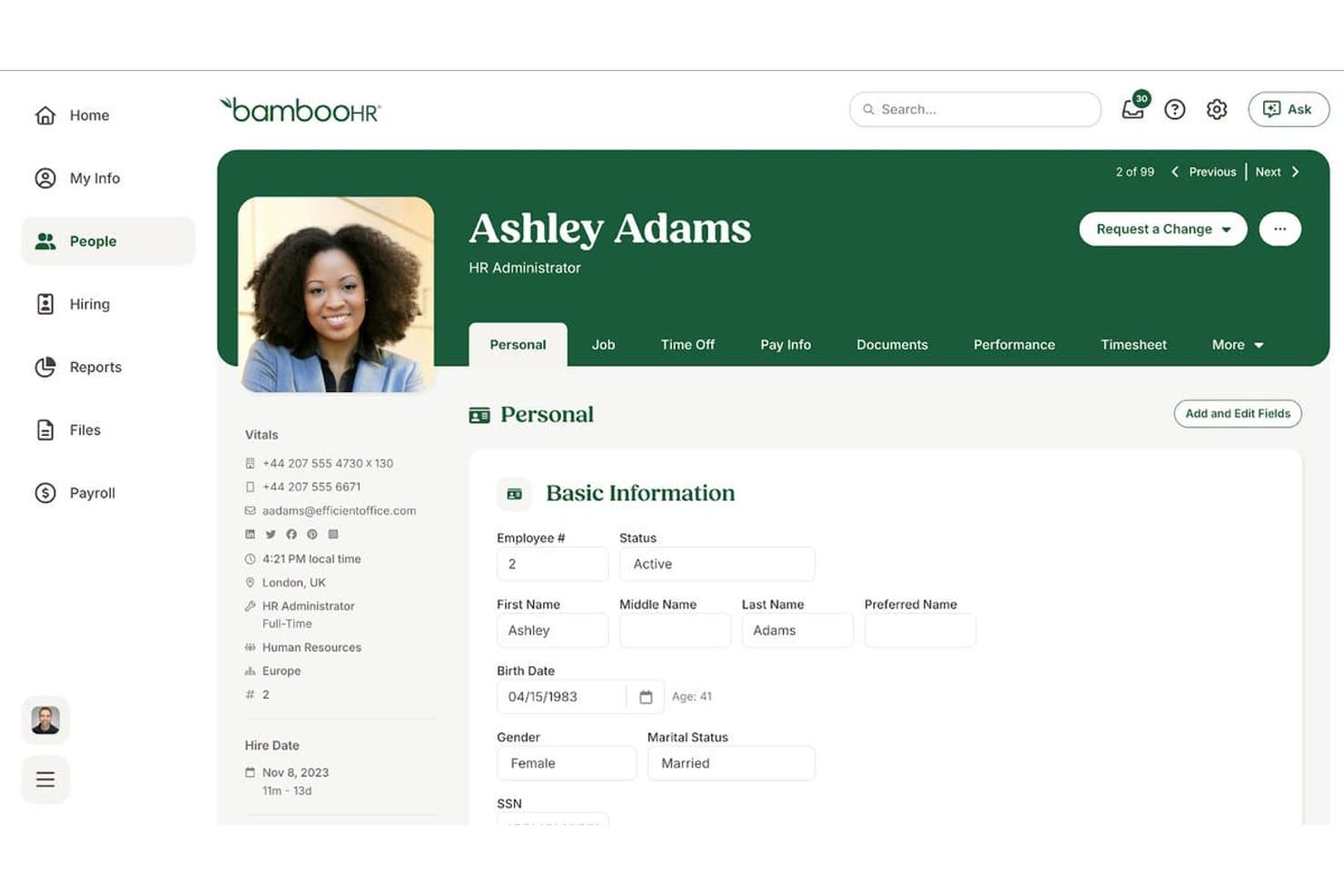
BambooHR® centralizes employee personal data in one profile view. BambooHR is an HR platform built for small and mid-sized businesses that covers the full employee lifecycle—from hiring and onboarding to time-off tracking, performance management, and reporting—through a centralized employee database and self-service portal.
Who Is BambooHR Best For?
BambooHR is a strong fit for HR generalists and people ops managers at small to mid-sized companies who need a single platform to manage the full employee lifecycle without a large HR team behind them.
Why I Picked BambooHR
BambooHR earns its spot on my shortlist because the employee self-service portal genuinely reduces the back-and-forth that bogs down small HR teams. Employees can update their own records, submit PTO requests, and access documents without filing a ticket or sending an email. I also like the auto-generated org chart, which pulls directly from employee data and stays current as your team changes, giving everyone visibility into company structure without manual upkeep.
BambooHR Key Features
- Customizable onboarding checklists: Build task lists with due dates, assigned owners, and automated reminders so new hires complete required steps before day one.
- Bamboo AI assistant: Ask HR data questions in plain language and get instant answers, generated reports, or workforce insights without building a query manually.
- 360° performance review cycles: Run peer, manager, and self-assessments on configurable schedules, with goal tracking and 1:1 meeting notes in one place.
- HR benchmarking data: Compare your turnover, eNPS, and headcount trends against industry data powered by Mercer to inform people strategy decisions.
BambooHR Integrations
BambooHR offers 150+ marketplace integrations, including Greenhouse, Lever, Checkr, ADP, Slack, Microsoft Teams, Okta, and NetSuite. It also provides an open REST API on higher plan tiers and is available on Zapier.
Pros and Cons
Pros:
- Org chart auto-updates as team changes
- Automated onboarding checklists simplify new hire tasks
- Employees update records through self-service portal
Cons:
- Key features require higher-tier plans
- No ongoing free plan available
 Best for all-in-one SMB HR and compliance
- Free demo available
- From $79/user/month
Visit WebsiteCustomer Rating:4.6/5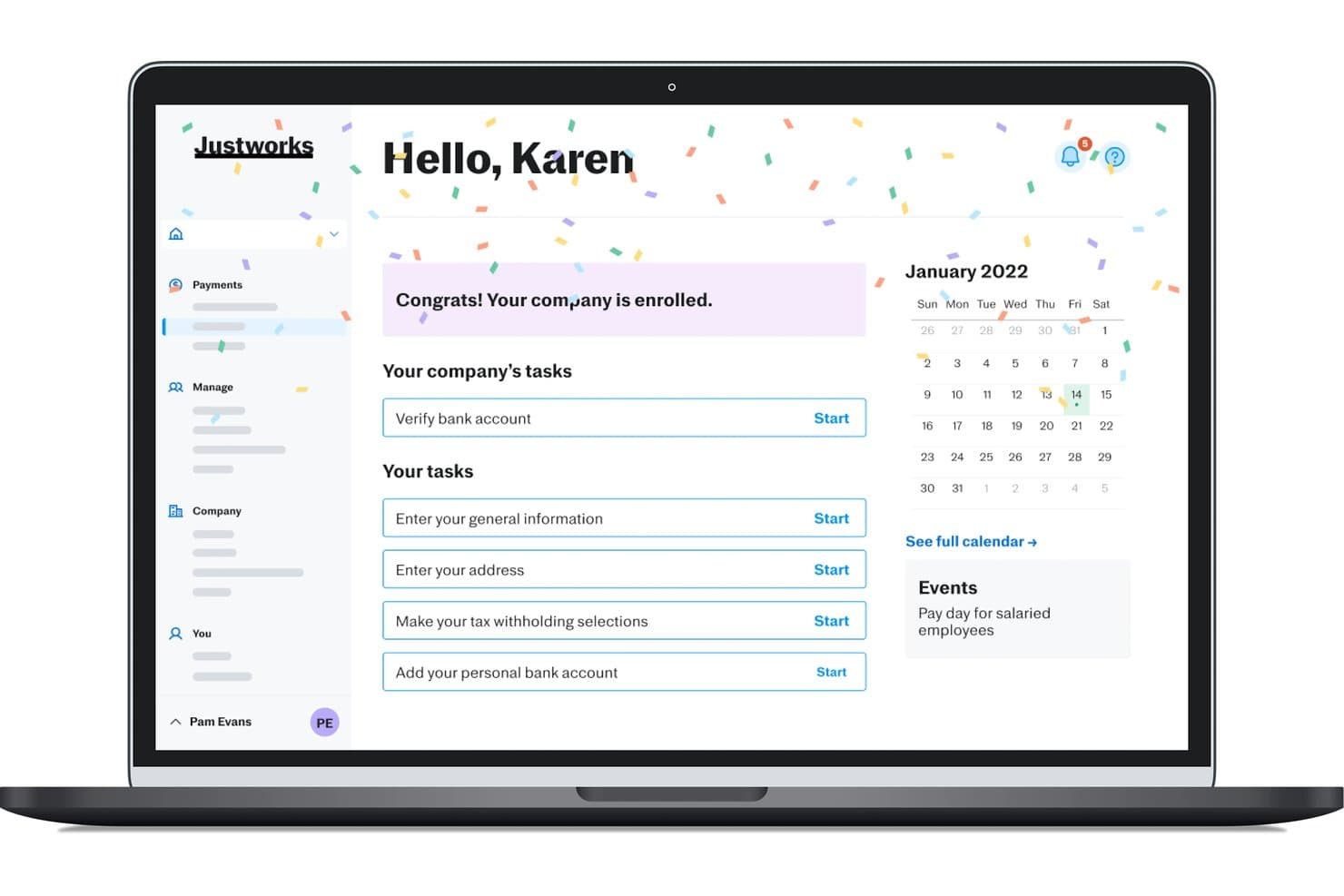
Justworks guides new users through onboarding tasks after enrollment. Justworks is an HR platform for small and midsize businesses that bundles payroll, benefits administration, compliance, onboarding, PTO management, and document handling into a single system.
Who Is Justworks Best For?
Justworks is a strong fit for small and midsize businesses that want payroll, benefits, compliance, and HR admin handled in one place—without needing a dedicated HR team to manage it all.
Why I Picked Justworks
Justworks earns its spot as one of the best on my shortlist because it genuinely consolidates what most small businesses need into a single platform, without requiring a dedicated HR team to run it. I'm particularly impressed by how the PEO model gives smaller companies access to large-group health insurance rates they simply couldn't negotiate independently. The built-in PTO management, digital onboarding with e-signatures, and compliance alerts all work together in one place, which matters when you're a small operation where one person is handling everything.
Justworks Key Features
- Employee self-service portal: Employees can update personal information, view pay stubs, and manage their own benefits elections directly from their dashboard.
- AI-powered report builder: Lets admins describe the report they need in plain language, then auto-generates it from payroll and workforce data.
- Company directory: A searchable, centralized directory available on all plans so employees and managers can find colleagues by department or role.
- International contractor payments: Supports payments to contractors in 60+ countries as an add-on, without needing a separate global payments platform.
Justworks Integrations
Justworks integrates with QuickBooks, NetSuite, Xero, Sage Intacct, Slack, allwhere, and Google Calendar. Justworks MCP connects HR data with Claude and ChatGPT for natural-language queries.
Pros and Cons
Pros:
- Offers 24/7 human support
- Includes e-signatures and onboarding checklists
- Access to group health benefits
Cons:
- Advanced reporting gated to higher tiers
- No free plan or trial available
Learn more about Justworks: Best with customizable workflows for HR teams
- Free demo available
- Pricing upon request
Visit WebsiteCustomer Rating:4.5/5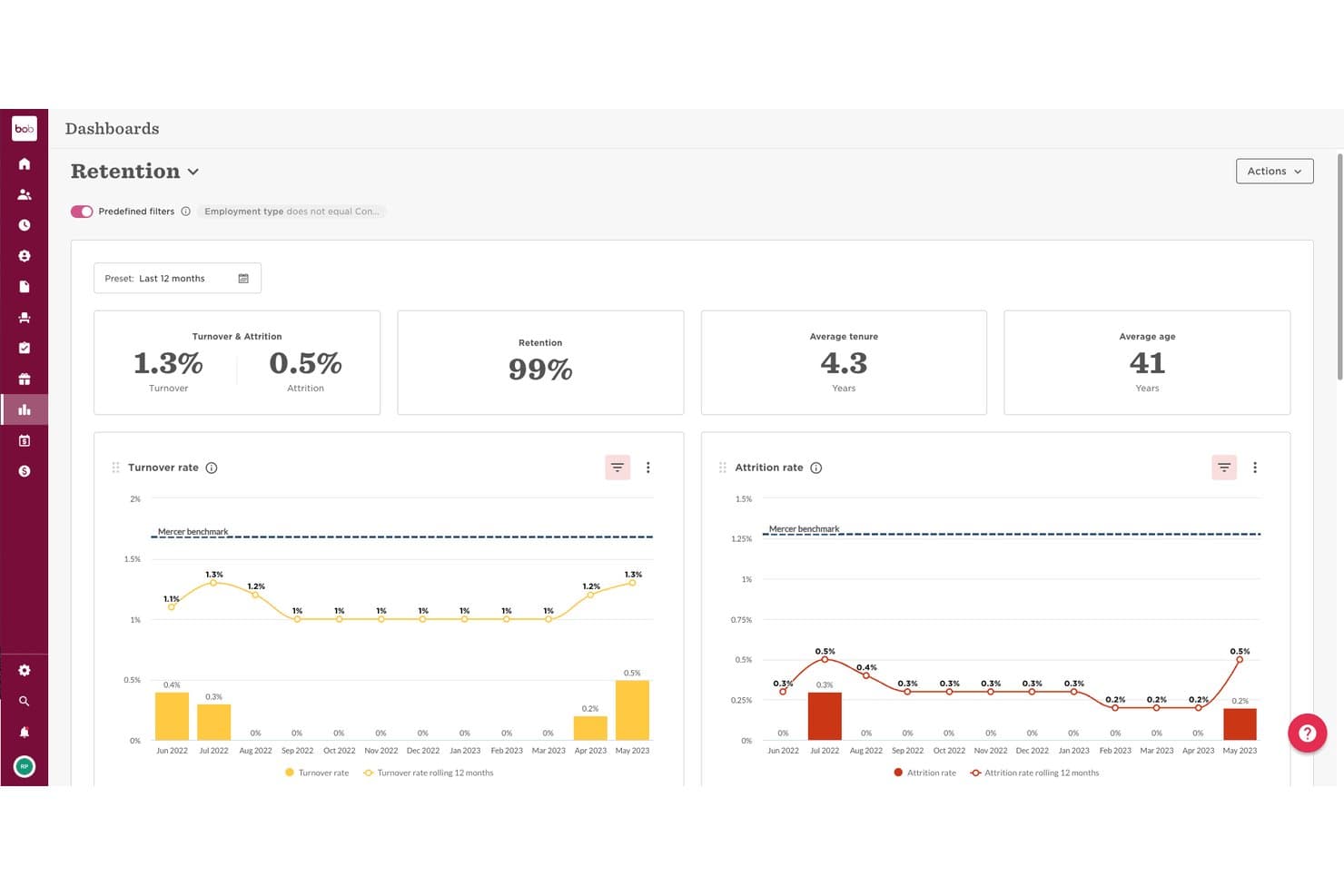
HiBob offers a Retention Dashboard with turnover, attrition, retention rate, average tenure, and age metrics visualized over 12 months. HiBob (Bob) is a people management platform that connects core HR, payroll, performance, and workforce planning in one modular system built for mid-sized and growing teams.
Who Is HiBob Best For?
HiBob is a strong fit for HR teams at mid-sized, fast-growing companies managing distributed or global workforces.
Why I Picked HiBob
HiBob earns its spot on my shortlist because its lifecycle workflow builder is genuinely flexible. I can configure multi-step onboarding journeys with task assignments, document collection, and automated reminders, all tailored by role, department, or location. The task stream feature means nothing slips through when a new hire starts or an employee transitions into a new position.
HiBob Key Features
- Employee self-service portal: Lets employees update personal details, request time off, and access documents without contacting HR.
- Org chart visualization: Auto-generates an interactive org chart from your employee data for easy org structure reference.
- Mobile app access: Offers iOS and Android apps so managers and employees can approve requests or check HR data on the go.
- Built-in reporting dashboards: Provides out-of-the-box reports for headcount, turnover, and time-off trends, viewable directly in the platform.
HiBob Integrations
HiBob offers native integrations with Slack, Microsoft Teams, Google Workspace, Okta, Adobe Acrobat Sign, DocuSign, Greenhouse, BambooHR, Jira, and Personio. An API is available for custom integrations.
Pros and Cons
Pros:
- Org chart updates automatically from employee data
- Strong performance and engagement tracking
- Highly configurable lifecycle workflow builder
Cons:
- Better suited for mid-size teams
- Reporting customization requires significant setup time
 Best for AI-driven performance and engagement
- 14-day free trial + demo available
- From $4/employee/month
Visit WebsiteCustomer Rating:4.8/5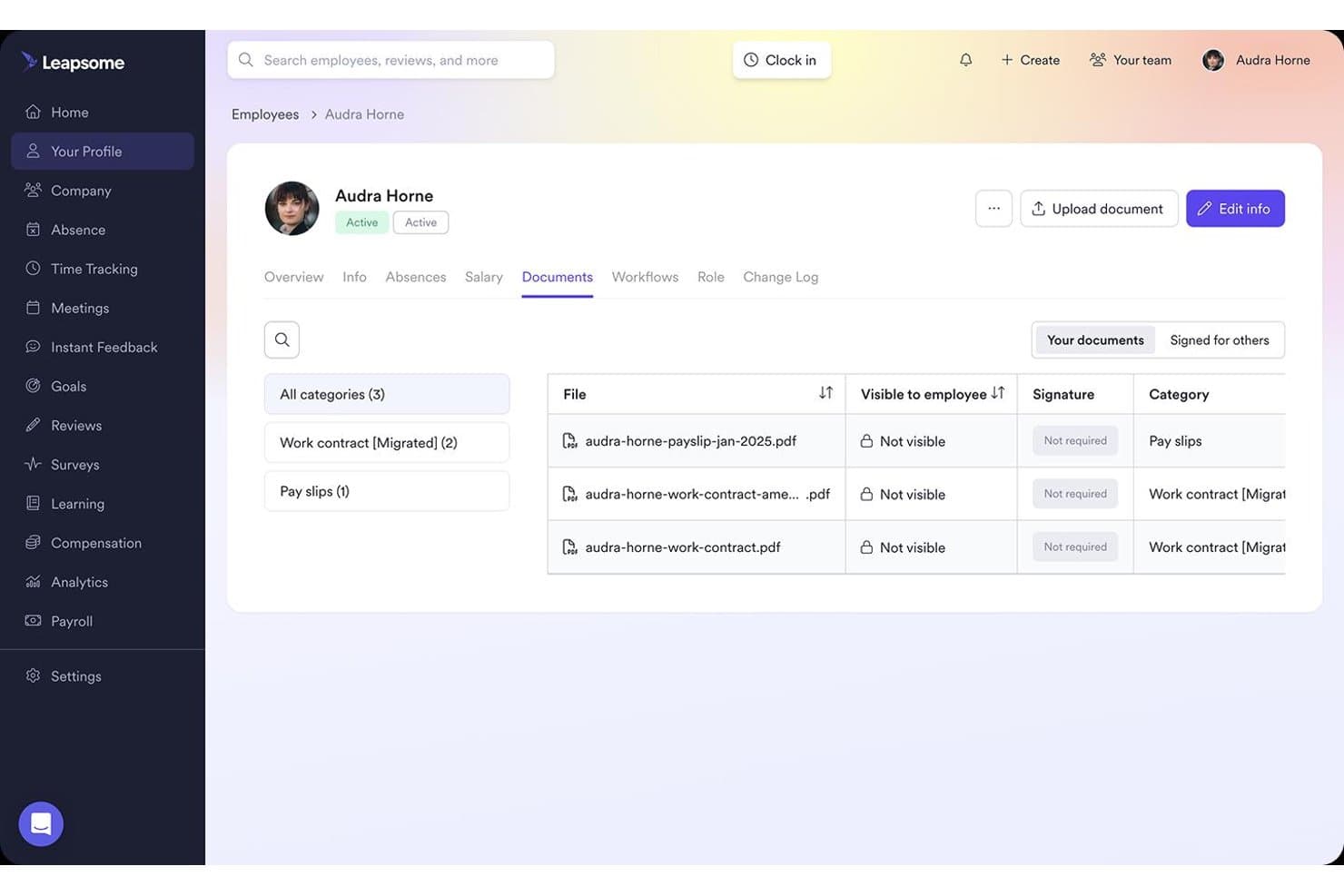
Leapsome centralizes employee documents with category filters and visibility controls. Leapsome is an AI-driven HR platform that combines HRIS, performance reviews, engagement surveys, goal tracking, learning, and compensation management into a single connected system.
Who Is Leapsome Best For?
Leapsome is a strong fit for people operations teams at mid-sized to large companies that want performance reviews, engagement, and core HR in one connected platform.
Why I Picked Leapsome
Leapsome earns its spot on my shortlist because its AI doesn't just assist—it acts, autonomously chasing document signatures, triggering onboarding tasks, and reconciling payroll changes within predefined limits. I'm particularly impressed by the AI-generated "Vibe Dashboards," which let you build custom analytics widgets using plain-language prompts, and the turnover prediction engine that flags flight risks before they become resignations. The Talent Suite and HRIS share one connected data record, so performance review outcomes feed directly into compensation reviews without any manual re-entry.
Leapsome Key Features
- Absence management: Employees submit time-off requests directly in the platform or via Slack, with configurable accrual rules, carryover limits, and multi-level approval workflows.
- Document templates and e-signatures: HR teams can generate documents from templates, collect e-signatures, and store signed files in a centralized repository with expiry tracking.
- Competency frameworks: Define and manage role-specific competency models that connect directly to performance reviews, career development, and compensation decisions.
- Cross-module analytics dashboards: Pre-built and custom reports cover headcount, retention, absence trends, pay gap data, and engagement benchmarks across all active modules.
Leapsome Integrations
Leapsome offers 100+ native integrations, including BambooHR, Workday, HiBob, Greenhouse, ADP Workforce Now, Slack, Microsoft Teams, Google Calendar, Jira, and Okta. An open API and SFTP support custom connections.
Pros and Cons
Pros:
- Turnover prediction highlights flight risks early
- Centralized employee records with audit trails
- AI automates onboarding and document workflows
Cons:
- No native mobile app for employees
- No permanent free plan available
 Best for automated HCM and workforce management
- Free demo available
- Pricing upon request
Visit WebsiteCustomer Rating:4.3/5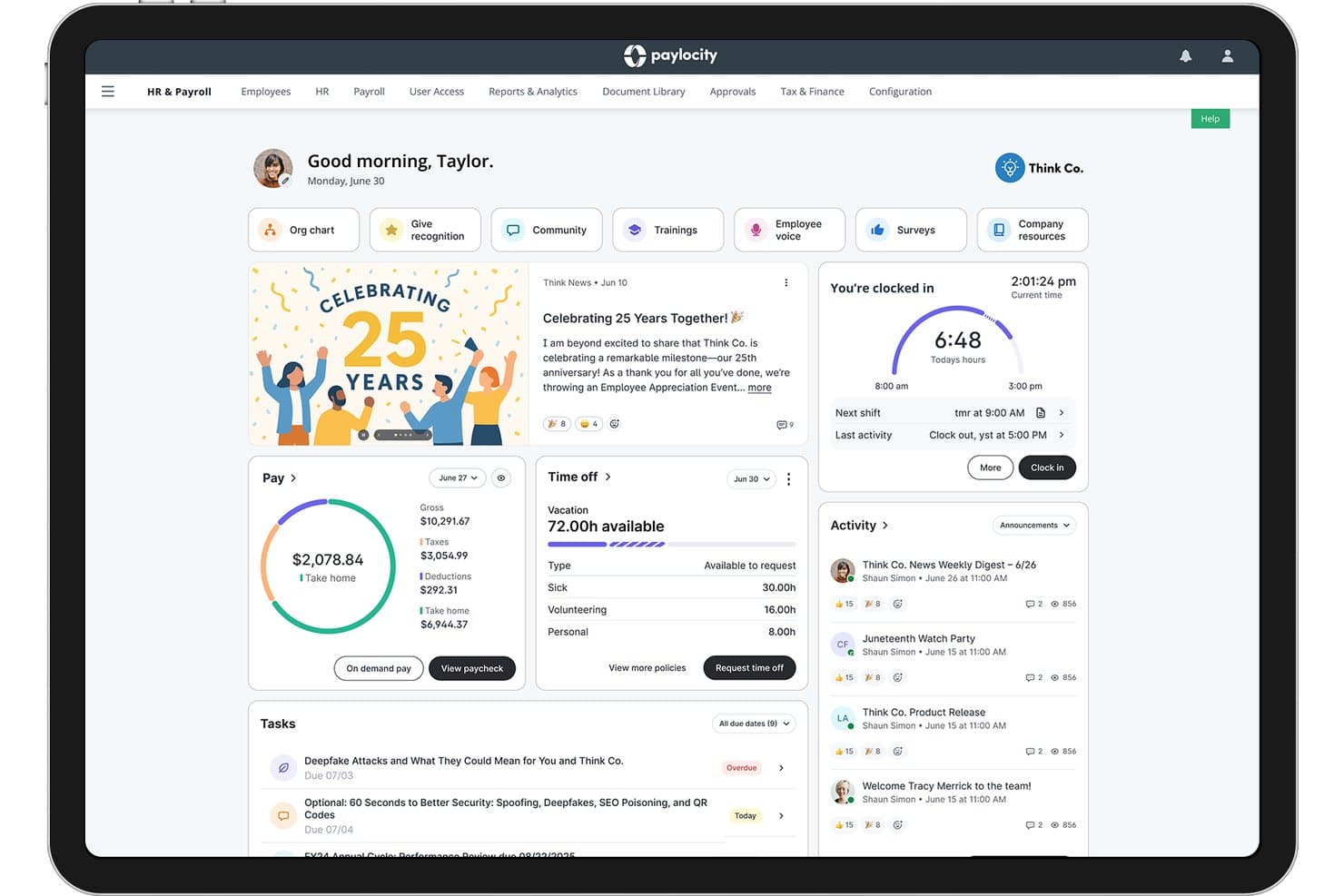
Paylocity centralizes HR tasks, pay, time off, and team updates in one dashboard. Paylocity is a cloud-based HCM platform that consolidates payroll, workforce management, talent acquisition, benefits administration, and employee engagement into a single system.
Who Is Paylocity Best For?
Paylocity is a strong fit for mid-market HR teams that need a single platform to manage payroll, workforce operations, and employee engagement at scale.
Why I Picked Paylocity
Paylocity earns its spot on my list because it handles automated HCM and workforce management at a level most platforms don't match. I'm particularly impressed by how its onboarding module auto-routes role-specific checklists, triggers 30-, 60-, and 90-day pulse surveys, and flows new hire data directly into payroll without manual re-entry. Its Workforce Analytics also surfaces at-risk employee signals using commute and compensation data, which is the kind of proactive insight that makes a real operational difference.
Paylocity Key Features
- AI Assistant: Query HR data and surface workforce insights using a built-in AI tool, without manually building reports.
- Benefits administration: Employees can enroll in benefits, view spending account balances, and submit claims directly through the self-service portal.
- Peer benchmarking: Compare your workforce data against similar-sized companies across Paylocity's 35,000+ client base.
- Custom approval workflows: Build multi-step approval chains for expenses, PTO, and document processes without developer involvement.
Paylocity Integrations
Paylocity offers hundreds of marketplace integrations, including Microsoft Entra, Google Workspace, Okta, Checkr, Ashby, Toast, Square, and ClockShark. Its REST API, WebLink API, EDI, and SFTP support custom integrations.
Pros and Cons
Pros:
- AI assistant surfaces actionable workforce insights
- Mobile app covers full HR functions
- Automated onboarding checklists with pulse surveys
Cons:
- Custom quotes required to access the platform
- No free plan or free trial
 Best for automated payroll and benefits
- Free trial + free demo available
- From $49/month
Visit WebsiteCustomer Rating:4.6/5
For small to medium-sized businesses seeking a reliable HR software solution, Gusto offers an appealing option that addresses the multifaceted challenges of human resource management. Whether you're managing payroll, benefits, or onboarding, Gusto caters to a diverse range of industries and professionals who need a streamlined approach to HR tasks. By automating complexities such as compliance and employee benefits, Gusto helps you focus on what truly matters: supporting your team and growing your business.
Why I Picked Gusto
I picked Gusto for its comprehensive payroll management capabilities, which are crucial for any HR software list. Gusto's automated payroll processing, including tax filing and compliance reminders, ensures that your team gets paid accurately and on time, reducing administrative burdens. Additionally, its benefits administration feature allows you to offer health, dental, and retirement plans, providing your employees with the support they need without the hassle. These features make Gusto a valuable tool for businesses looking to simplify HR operations while maintaining high standards of employee care.
Gusto Key Features
In addition to its standout payroll and benefits features, Gusto offers a range of additional tools to enhance your HR management experience.
- Onboarding Tools: Streamline the new hire process with customizable onboarding checklists and digital document management.
- Time Tracking: Integrated time tracking helps you monitor employee hours and manage overtime effectively.
- Employee Self-Service: Empower your team with access to their own payroll and benefits information through a user-friendly portal.
- Compliance Alerts: Stay informed with automatic updates and alerts regarding changes in labor laws and tax regulations.
Gusto Integrations
Integrations include QuickBooks, Xero, FreshBooks, Clover, ZipRecruiter, BambooHR, TSheets, When I Work, Deputy, and JazzHR.
 Best with full-service PEO and risk mitigation
- Free demo available
- Pricing upon request
Visit WebsiteCustomer Rating:4/5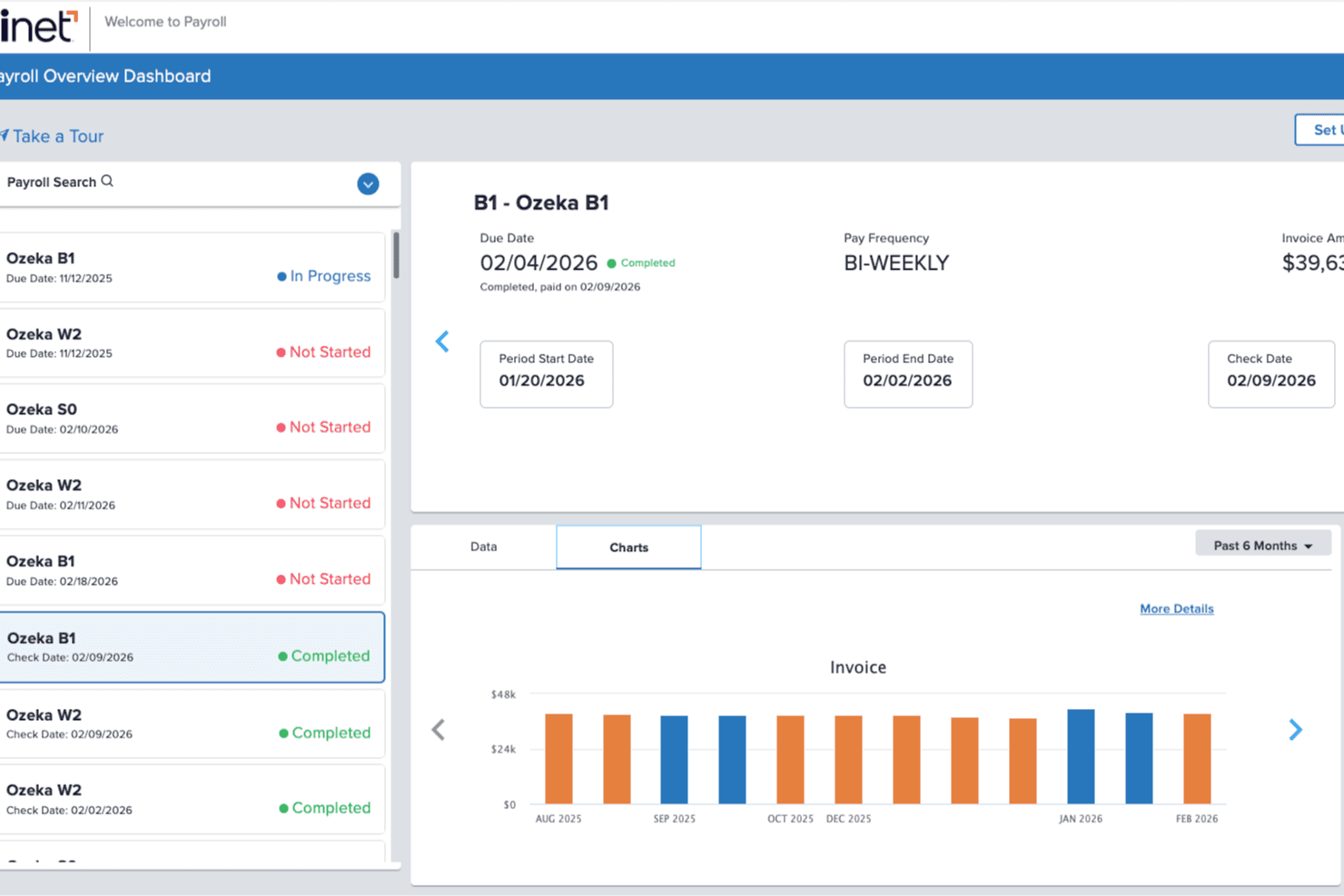
TriNet provides a payroll dashboard that lets you track pay runs, due dates, and payroll costs in one place. TriNet is a full-service PEO and HR platform that combines payroll, benefits administration, compliance support, onboarding, time-off management, and workforce analytics in a single system built for small and mid-sized businesses.
Who Is TriNet Best For?
TriNet is a strong fit for small and mid-sized businesses that want to offload compliance risk, payroll tax administration, and benefits management to a dedicated PEO partner.
Why I Picked TriNet
TriNet earns its spot on my list because it's one of the few IRS-certified, ESAC-accredited PEOs built specifically to absorb compliance risk on behalf of small and mid-sized businesses. Under its co-employment model, TriNet assumes shared employer responsibilities, including workers' compensation management and EPLI coverage, so your team isn't carrying that exposure alone. I also like that it pools employees across its entire client base to unlock large-group health insurance rates that most SMBs could never access independently.
TriNet Key Features
- AI-powered adaptive dashboard: An intelligent interface with smart search, context transfer, and quick links that updates based on your activity and role.
- Configurable time-off policies: Supports accrual-based, lump sum, unlimited, and tenure-based PTO policies with carryover rules, blackout dates, and direct payroll sync.
- Box-powered document management: Centralized, cloud-native document storage with role-based access, eSignature via Box Sign, and proactive expiration alerts.
- Accounting system integration: Connects directly with QuickBooks Online, NetSuite, Xero, and Sage Intacct to auto-generate payroll journal entries.
TriNet Integrations
TriNet offers 30+ marketplace integrations, including QuickBooks Online, NetSuite, Xero, Sage Intacct, Slack, Zoom, Salesforce, Google Workspace, Greenhouse Recruiting, and Employee Navigator. Open APIs support custom integrations.
Pros and Cons
Pros:
- Enables centralized onboarding and document management
- Includes adaptive AI dashboard and workflow tools
- Offloads compliance risk with PEO partnership
Cons:
- Requires annual contracts and custom pricing
- No free plan or self-serve trial
 10Best with end-to-end HCM and HR analytics
Paycor
- Free demo available
- From $99/month
Visit WebsiteCustomer Rating:4.3/5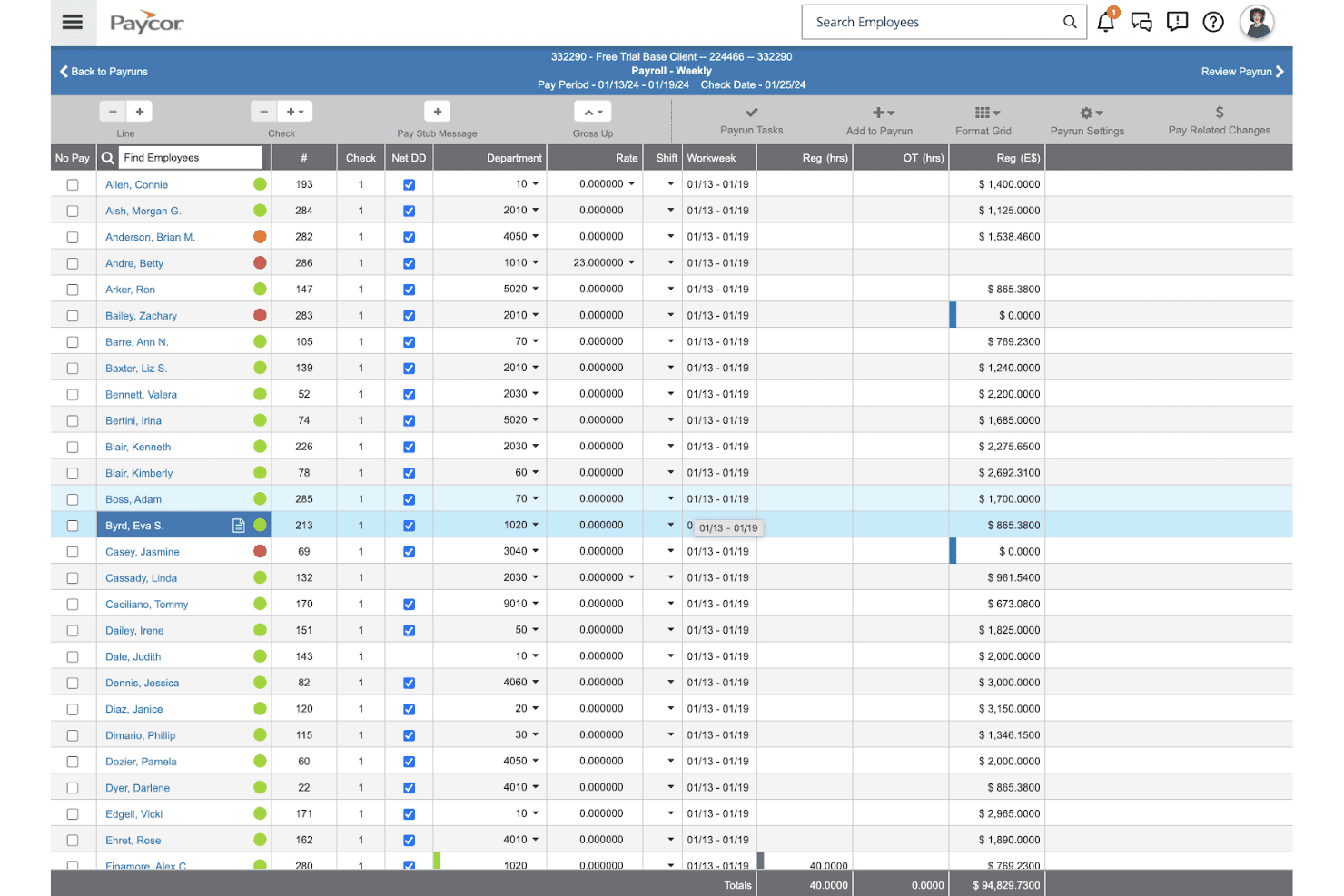
Paycor lets users manage and review weekly payroll runs for all employees. Paycor is an HCM platform that brings together payroll, HR recordkeeping, onboarding, time-off management, talent management, and workforce analytics in one system.
Who Is Paycor Best For?
Paycor is a strong fit for mid-market HR teams that need a unified HCM platform with deep workforce analytics built in.
Why I Picked Paycor
Paycor earns its spot on my shortlist because its workforce analytics go well beyond standard HR reporting. I'm particularly impressed by the AI-powered predictive resignation tool, which flags employees likely to leave within 12 months so you can act before it's too late. Pair that with pay equity tracking and EEOC benchmarking pulled from a 7-year historical dataset, and you get a genuinely complete picture of your workforce that most standalone HR tools can't match.
Paycor Key Features
- AI analytics assistant: Query your workforce data using plain-language questions and get instant dashboard results without any technical setup.
- Bulk onboarding automation: Send automated invites and assign onboarding task lists to large groups of new hires simultaneously.
- Configurable approval workflows: Set up multi-level time-off and HR process approvals tailored to your team structure and policy rules.
- Employee self-service portal: Employees can update personal details, view pay stubs, access documents, and request leave directly from the platform or mobile app.
Paycor Integrations
Paycor offers 320+ marketplace integrations, including OrgChart, Procore, JazzHR, Greenhouse, ZipRecruiter, and QuickBooks. It also provides 140+ open APIs for custom integrations, plus SSO support for Microsoft, Google, OneLogin, and Okta.
Pros and Cons
Pros:
- Bulk onboarding saves time for HR teams
- AI-powered dashboards offer instant HR insights
- Predictive resignation analytics highlight turnover risk
Cons:
- Advanced features often gated to higher tiers
- No free plan or free trial
Diğer İK Yazılımı Listeleri
Kısa listeme girmeyen ancak yine de göz atmaya değer bazı ek İK yazılımı listesi seçenekleri şunlardır:
- 11Oracle HCM CloudBest for full-lifecycle talent and payroll management
- 12Workday HCMBest for enterprise-wide HR and workforce analytics
- 13TalentHRBest for intuitive AI tools for HR tasks
- 14HR AcuityBest for compliant employee relations management
- 15Workable HRBest for AI recruitment and applicant tracking
- 16SixFiftyBest for automated employment law compliance
- 17iSpring LMSBest for cloud training and pre-made courses
- 18factoHRBest for hybrid workforces needing mobile HCM
- 19SAP SuccessFactorsBest for enterprise employee & talent management
- 20InsperityFull-service HR outsourcing and technology combining payroll, compliance, benefits administration, and workforce analytics.
How I Evaluate HR Software Lists
I split my evaluation into what a tool must do to qualify and what sets it apart—covering everything from day-one onboarding to ongoing people analytics.
Core Functionality (Table Stakes For This List)
When I'm selecting tools for my list, I rank each one on a scale from 0 (does not offer the functionality) to 5 (excels in this area) for each core functionality listed below. I then calculate the tool's total score into a percentage, using 75% as a benchmark to help assess its overall fit for the list.
- Employee Database: I evaluate how each tool stores and organizes employee profiles, looking for custom fields, self-service updates, and bulk import options that keep records accurate as headcount grows.
- Time-Off Management: Leave workflows should include approval routing, balance tracking, and team visibility so managers can spot coverage gaps before approving requests.
- Onboarding Workflows: I check whether a platform offers structured task sequences with document collection, e-signatures, and automated reminders that guide new hires through their first days.
- Document Management: Secure, organized file storage matters. I look for role-based permissions and version history so teams can locate the right contract or policy without digging through email.
- Org Chart & Directory: A searchable directory paired with an auto-generated org chart helps employees understand reporting lines and find the right contact quickly across departments.
- Reporting & Analytics: I look for configurable reports on headcount, turnover, and time-off usage with export options, since canned reports alone rarely answer the questions HR leaders actually ask.
Once I have a list of tools that meet the criteria, I consider what sets each platform apart.
Differentiating Factors (What Sets Vendors Apart)
Here's how I compare and contrast different vendors:
Standout Features
I look for employee self-service portals that let people update their own info, request time off, and pull pay stubs without filing a ticket with HR. That alone cuts a surprising amount of back-and-forth. Custom workflow builders matter just as much—I check whether approval chains for PTO or expenses can mirror your actual org structure without needing a developer. Built-in reporting dashboards round things out; I want headcount, turnover, and diversity metrics I can slice without exporting to a spreadsheet.
Beyond Features
I check whether a platform offers native connectors to payroll providers, communication tools like Slack or Microsoft Teams, and calendars—plus an open API or Zapier support for filling gaps. Integration depth matters because a disconnected HR system creates duplicate data entry. I also evaluate data security posture, looking for SOC 2 Type II certification, role-based permissions, and audit logs that control access to sensitive employee records. Vendor stability rounds things out; I want confidence that my workforce data won't be stranded by a shutdown, so I look at data export options and product update frequency.
İK Yazılımı Listesi Nasıl Seçilir?
Doğru İK yazılımını bulmak şu soruyu sormayı gerektirir: Hangi veri, iş akışı ve analitik ihtiyaçlarından ödün veremezsiniz ve ekibinizin çalışma tarzı için hangi ödünleri vermeye hazırsınız?
| Önceliğiniz… | Şunları arayın… |
|---|---|
| Önceliğiniz…Birleşik iş gücü görünürlüğü | Şunları arayın…Gerçek zamanlı erişim sunan merkezî çalışan veritabanı |
| Önceliğiniz…Veriye dayalı planlama | Şunları arayın…Dahili analitik panoları ve özel raporlama |
| Önceliğiniz…Verimli işe alıştırma ve iş akışları | Şunları arayın…Görev tabanlı işe alıştırma dizileri ve otomatik uyarılar |
| Önceliğiniz…Çalışanların kendi işlemlerini yapabilmesi | Şunları arayın…Kayıtları güncellemek ve izin talep etmek için portallar |
| Önceliğiniz…Veri güvenliği ve uyumluluk | Şunları arayın…SOC 2 Type II sertifikası ve denetim günlüğü özellikleri |
Kısa Listeniz Nasıl Değerlendirilir?
- Çalışan aramasını ve kayıt güncellemelerini test edin: Veritabanı hızını ve veri değişikliği geçmişini doğrulamak için beş çalışan profili arayın ve bir iş unvanını düzenleyin.
- Bir iş akışı denemesi gerçekleştirin: Eksik otomasyonları veya anlaşılmayan adımları kontrol etmek için deneme kullanıcısı için bir işe alıştırma iş akışı oluşturup tamamlayın.
- Bir güvenlik belgesi talep edin: Satıcıdan, son 12 ay içinde düzenlenmiş bir SOC 2 Type II raporu veya eşdeğer veri güvenliği sertifikası isteyin.
- Analitik özelleştirmesini kontrol edin: Departman düzeyinde filtreleme içeren bir çalışan sayısı ve çalışan devir oranı raporu oluşturun ve esnekliği test etmek için sonuçları dışa aktarın.
- Geniş platform kapsamı ile iş akışı derinliği filtresi: Geniş kapsamlı, hepsi bir arada bir çözüm mü yoksa derin iş akışı özelleştirmesi mi gerektiğine karar verin; çünkü çok az satıcı, büyük ödünler vermeden her ikisini de sunar.
İK Yazılımı Listeleri Nedir?
İK yazılımı listesi; işe alım, çalışan kayıtlarının yönetimi, izin takibi ve çalışan analitiği gibi görevlerde İK ekiplerini destekleyen platformların derlenmiş bir koleksiyonudur. Bu listeler, özellikleri hızlıca karşılaştırmanıza, kuruluşunuzun ihtiyaçlarına yönelik seçenekleri değerlendirmenize ve işletmeniz büyürken iş gücü yönetimi gereksinimlerinize uygun ürünleri daraltmanıza yardımcı olur.
İK Yazılımı Listelerinin Özellikleri
İK yazılımı listelerini seçerken aşağıdaki temel özelliklere dikkat edin:
- Çalışan veritabanı: Çalışan kayıtlarını merkezileştirerek kuruluşunuz büyürken kişisel bilgileri, iş geçmişini ve özel alanları kolayca takip etmenizi sağlar.
- İzin yönetimi: İzin taleplerini, onaylarını ve bakiye takibini otomatikleştirerek ekiplerin tatil, hastalık izni ve diğer devamsızlıkları manuel çaba harcamadan yönetmesine yardımcı olur.
- İşe alıştırma iş akışları: Yeni işe alınanlar için belge toplama, elektronik imza ve görev hatırlatıcıları içeren adım adım süreçler sunarak hiçbir adımın atlanmamasını sağlar.
- Belge yönetimi: Sözleşmeler, politikalar ve formlar için rol tabanlı izinler ve kolay erişim ile uyumluluk sağlayan sürüm denetimine sahip güvenli depolama alanı sunar.
- Kuruluş şeması ve dizin: Kuruluşunuzun aranabilir yapısını otomatik olarak oluşturarak çalışanların iş arkadaşlarını ve raporlama ilişkilerini hızlıca bulmasını sağlar.
- Raporlama ve analitik: Çalışan sayısı, çalışan devir oranı ve diğer ölçümleri takip etmek için yapılandırılabilir panolar sunar; verileri dışa aktarma veya filtreleme seçenekleri sağlar.
- Çalışan self servis portalı: Personelin her işlem için İK'ya başvurmasına gerek kalmadan kişisel bilgilerini güncellemesine, izin talep etmesine ve maaş bordrolarına erişmesine olanak tanır.
- Özel iş akışı oluşturucu: Gerçek dünyadaki yapılar ve politikalarla uyumlu olacak şekilde kuruluşunuza göre özelleştirilmiş onay süreçleri ve görev dizileri tasarlamanıza olanak tanır.
- Entegrasyon özellikleri: Çift veri girişini azaltmak ve birleşik bir İK ekosistemi oluşturmak için bordro sistemlerine, iletişim araçlarına ve takvimlere bağlanır.
- Güvenlik ve uyumluluk denetimleri: Hassas çalışan bilgilerini korumaya ve düzenleyici gereksinimleri karşılamaya yardımcı olmak için denetim günlükleri, veri dışa aktarma seçenekleri ve sertifika desteği (SOC 2 Type II gibi) içerir.
İK Yazılımı Listelerinde Yaygın Yapay Zekâ Özellikleri
Yukarıda listelenen standart İK yazılımı listesi özelliklerinin ötesinde, bu çözümlerin çoğu aşağıdaki gibi özelliklerle yapay zekâyı bünyesine katıyor:
- Yapay zekâ destekli aday eleme: Özgeçmişleri ve başvuruları analiz etmek için makine öğreniminden yararlanır; iş gereksinimlerine ve geçmiş işe alım verilerine göre en uygun adayları otomatik olarak öne çıkarır. Bu, işe alım uzmanlarının en uygun eşleşmelere odaklanmasına ve manuel inceleme süresinin azalmasına yardımcı olur.
- Öngörücü çalışan devir analitiği: Ayrılma riski taşıyan çalışanları belirlemek için iş gücü verilerine yapay zekâ modelleri uygular; çalışan bağlılığı puanlarını, kıdemi ve performans eğilimlerini dikkate alır. İK ekipleri bu içgörüleri erken müdahale etmek ve çalışanları elde tutmayı iyileştirmek için kullanabilir.
- Otomatik duygu analizi: Ruh hâli değişimlerini ve ortaya çıkan endişeleri tespit etmek için doğal dil işlemeyi kullanarak anketlerden, e-postalardan ve sohbet kanallarından çalışan geri bildirimlerini izler. Bu, İK liderlerine çalışan morali ve iş yeri kültürü hakkında gerçek zamanlı bir görünüm sunar.
- Yapay zekâ destekli planlama asistanları: Uygunluk, tercihler ve iş yükü verilerini analiz ederek en uygun vardiya düzenlerini, toplantı saatlerini veya mülakat zamanlarını önerir. Bu, planlama çakışmalarını ve idari yazışma trafiğini azaltır.
- Kişiselleştirilmiş öğrenme önerileri: Çalışanları becerilerine, hedeflerine ve performans eksiklerine göre ilgili eğitim modülleri veya kariyer gelişimi kaynaklarıyla eşleştirmek için yapay zekâdan yararlanır. Bu, hedefli beceri geliştirmeyi ve ilerlemeyi destekler.
İK Yazılımı Listelerinin Faydaları
İK yazılımı listelerini uygulamak, ekibiniz ve işletmeniz için çeşitli faydalar sağlar. İşte yararlanmayı bekleyebileceğiniz birkaç fayda:
- Merkezi çalışan kayıtları: Toplu içe aktarma, özel alanlar ve self servis profil güncellemeleri gibi özelliklerle tüm çalışan verilerini düzenli ve kolayca erişilebilir tutun.
- Otomatik izin takibi: Planlama çakışmalarını önlemek için onay iş akışları, bakiye takibi ve ekip takvimlerini kullanarak manuel izin yönetimini ortadan kaldırın.
- Yapılandırılmış işe alıştırma süreçleri: Hiçbir şeyin gözden kaçmamasını sağlamak için yeni çalışanları otomatik iş akışları, belge toplama ve görev hatırlatıcılarıyla adım adım işe alıştırma sürecinden geçirin.
- Güvenli belge yönetimi: Hassas dosyaları ve İK politikalarını rol tabanlı izinlerle ve güvenilir erişim ile denetlenebilirlik sağlayan sürüm geçmişiyle saklayarak koruyun.
- Yapılandırılabilir raporlama ve analiz: Ekibinizin en önemli sorularına göre içgörüleri özelleştirmenize yardımcı olan filtreler ve dışa aktarma seçenekleriyle çalışan sayısı, çalışan devir oranı veya izinler hakkında ayrıntılı raporlar oluşturun.
- Çalışan self servis seçenekleri: İK ekibine ek yük getirmeden çalışanların kendi bilgilerini güncellemesine, izin talep etmesine veya maaş bordrolarına erişmesine olanak tanıyın.
- Temel sistemlerle entegrasyon: Yinelenen veri girişini önlemek ve İK iş akışlarını senkronize tutmak için maaş bordrosu, iletişim ve takvim araçlarına bağlanın veya açık API ve Zapier desteğini kullanın.
İK Yazılımı Listelerinin Maliyetleri ve Fiyatlandırması
İK yazılımı listelerini seçmek, mevcut çeşitli fiyatlandırma modellerinin ve planların anlaşılmasını gerektirir. Maliyetler özelliklere, ekip büyüklüğüne, eklentilere ve daha fazlasına göre değişir. Aşağıdaki tablo, İK yazılımı listesi çözümlerinde yaygın planları, ortalama fiyatlarını ve genellikle sunulan özellikleri özetlemektedir:
İK Yazılımı Listeleri için Plan Karşılaştırma Tablosu
| Plan Türü | Ortalama Fiyat | Yaygın Özellikler |
|---|---|---|
| Plan TürüÜcretsiz Plan | Ortalama Fiyat$0 | Yaygın ÖzelliklerTemel çalışan dizini, sınırlı self servis özellikleri, basit izin takibi ve temel raporlama. |
| Plan TürüKişisel Plan | Ortalama Fiyat$5-$10/kullanıcı/ay | Yaygın ÖzelliklerTemel çalışan kayıtları, işe alıştırma kontrol listeleri, temel belge depolama ve temel analiz. |
| Plan Türüİşletme Planı | Ortalama Fiyat$10-$25/kullanıcı/ay | Yaygın ÖzelliklerTam çalışan veritabanı, otomatik işe alıştırma iş akışları, gelişmiş belge yönetimi, organizasyon şeması ve raporlar. |
| Plan TürüKurumsal Plan | Ortalama Fiyat$25-$50/kullanıcı/ay | Yaygın ÖzelliklerÖzel iş akışı oluşturucuları, API ve entegrasyonlar, kapsamlı analiz, geliştirilmiş güvenlik denetimleri ve özel destek. |
İK Yazılımı Listeleri SSS
İK yazılımı listeleri hakkında sık sorulan bazı soruların yanıtlarını burada bulabilirsiniz:
Bir İK yazılımı listesinin güncel olup olmadığını nasıl anlayabilirim?
Sayfada yayınlanma veya “son güncelleme” tarihini arayın. Böyle bir tarih yoksa araçların ve ekran görüntülerinin güncel marka kimliğini, özellikleri veya fiyatlandırmayı yansıtıp yansıtmadığını kontrol edin. Güncel uyumluluk ayrıntılarını, yeni entegrasyonları veya yapay zeka özelliklerini içeren listelerin güncel olma olasılığı daha yüksektir.
İK yazılımı listelerinde incelemeler mi yer alır, yoksa yalnızca özellikler mi?
İK yazılımı listelerinin çoğunda her platformun özelliklerinin yanı sıra kullanıcı incelemelerinden seçilmiş bölümler veya öne çıkan noktalar da yer alır. Bu incelemeler, yalnızca özellik listesine bakıldığında fark edilmeyen olası sorunları veya benzersiz güçlü yönleri belirlemenize yardımcı olabilir.
İK yazılımı sağlayıcılarını kısa listeye alırken neleri göz önünde bulundurmalıyım?
Platformun çalışan arama özelliğini denemeniz, kullanıcı kayıtlarını güncellemeniz, işe alıştırma iş akışlarını test etmeniz ve güncel güvenlik sertifikalarını talep etmeniz gerekir. Bu gerçek dünya testi, anlaşmayı bozabilecek unsurları fark etmenize ve ürünün İK ekibinizin gerçek süreçlerine ve uyumluluk gereksinimlerine uygun olduğundan emin olmanıza yardımcı olur.
Küçük işletmeler büyük kuruluşlarla aynı İK yazılımını kullanabilir mi?
Evet, birçok İK yazılımı aracı her büyüklükteki şirket için farklı kademeler veya fiyatlandırma planları sunar. Girişimler ve küçük ekipler genellikle ücretsiz veya temel bir planla başlayabilir ve çalışan sayısı arttıkça daha kapsamlı analiz, entegrasyonlar veya iş akışı oluşturucuları gibi işletme ya da kurumsal özelliklere geçebilir.
Bir İK yazılımı listesi seçerken entegrasyonlar ne kadar önemlidir?
İK platformunuzun dışında maaş bordrosu, iletişim veya takvim araçları kullanıyorsanız entegrasyonlar en önemli öncelikler arasında olmalıdır. Kapsamlı entegrasyonlar yinelenen veri girişini önlemenize, onayları kolaylaştırmanıza ve çalışan kayıtlarını sistemleriniz arasında senkronize tutmanıza yardımcı olur. Emin değilseniz API erişimi veya Zapier desteği hakkında bilgi isteyin.