En iyi HRIS platformları, küçük işletmelerin İK görevlerini kolaylaştırmasına, hataları azaltmasına ve çalışan verilerini merkezi bir yerde düzenli tutmasına yardımcı olurken, daha stratejik çalışmalar için değerli zaman kazandırır.
Manuel süreçler elektronik tablolara, e-postalara ve birbiriyle bağlantısız araçlara dayandığında İK hızla kaotik ve zaman alıcı bir hâle gelir. Doğru sistem rutin görevleri otomatikleştirir, doğruluğu artırır ve gerçekten önemli olan şeye, yani ekibinizi desteklemeye ve büyütmeye odaklanmanız için size zaman kazandırır.
Yüksek miktarda çalışan verisini yönetme konusundaki uygulamalı deneyimime dayanarak, sezgisel, ölçeklenebilir, uygun fiyatlı ve küçük işletmeler düşünülerek tasarlanmış en iyi HRIS çözümlerinin bir listesini hazırladım.
Bu kılavuzda, işe alım ve bordrodan performans yönetimine kadar her şeyi kolaylaştıracak araçlar bulacaksınız; böylece yönetsel işlere daha az, başarılı bir iş yeri oluşturmaya daha fazla zaman ayırabilirsiniz.
Why Trust Our Software Recommendations
6,700+
Reviews
20
Industry experts
16+
Evaluation factors
14
Years
Our team has been testing and reviewing software since 2012. As HR experts ourselves, we know how difficult—and important—it is to choose the right software.
For this guide, we evaluated tools using hands-on testing and independent research, scoring tools using our selection criteria. We also draw on insights from industry thought leaders and practicing HR experts.
Our reviews reflect our human editorial judgment, not a sales pitch.
Expert reviewers:
- Phil GrayCOO
 Kim BehnkeHR Tech Editor & Analyst
 Josh BarkerPeople Ops Manager

Karşılaştırma Tablosu: Küçük İşletmeler için HRIS
Bu karşılaştırma tablosu, küçük işletme sahipleri için en iyi HRIS seçimlerimin fiyatlandırma ayrıntılarını özetler.
Sorted by: Default
| Tool | Starting Price | Website | |
|---|---|---|---|
Best HRIS for small teams hiring globally | 4.8 out of 5 | $5/user/month Free demo available | Website |
Best with integrated time tracking tools | 4.6 out of 5 | $79/user/month Free demo available | Book Demo |
Best for a platform-plus-service approach | 4.0 out of 5 | Pricing upon request Free demo available | Website |
Best for small businesses with global teams | 4.5 out of 5 | $199/user/month Free plan + free demo available | Website |
Best for integrating payroll and HR | 4.6 out of 5 | $49/month Free trial + free demo available | Book Demo |
Best for employee self-service | 3.9 out of 5 | $10.25/user/month 7-day free trial + demo available | Website |
Best as AI for business | 4.4 out of 5 | $8/user/month Free trial + Free demo available | Website |
Best for payroll automation and integrations | 4.3 out of 5 | Pricing upon request Free demo available | Website |
Best for onboarding automation | 4.5 out of 5 | Pricing upon request Free demo available | Website |
Best for aligned HRIS-to-performance flow | 4.8 out of 5 | €4/user/month 14-day free trial + demo available | Website |


Küçük İşletmeler için En İyi HRIS İncelemeleri
Her bir HRIS’in en uygun kullanım alanını, dikkat çekici bazı özelliklerini ve kullanıcı arayüzü hakkında genel bir fikir vermek için ekran görüntülerini göstermek amacıyla her araç hakkında kısa bir açıklama aşağıda yer alıyor.
 Best HRIS for small teams hiring globally
- Free demo available
- From $5/user/month
Visit WebsiteCustomer Rating:4.8/5
Easily set up your team's contracts, payments, and benefits from one place. Deel HR gives small businesses a single platform to manage employee records, payroll, compliance, and onboarding for both local and global teams, helping HR teams handle complex processes without juggling multiple systems.
Who Is Deel HR Best For?
Deel HR is a great fit for small businesses that hire across multiple countries and need one platform to manage HR, payroll, and compliance without a dedicated HR team.
Why I Picked Deel HR
Deel HR earns its spot as one of the best on my shortlist because it fully covers the HR lifecycle in one place—something most small business HRIS tools only partially deliver. I particularly like the modular setup: you can start with core HRIS features like people data, time off, and approvals, then layer on workforce planning, performance reviews, or an ATS as your team grows. Every module runs on the same underlying data, so when I update a worker's record, the change flows through to payroll, compliance, and reporting without manual syncing. Built-in country-specific compliance rules across 150+ countries mean small teams don't have to scramble to figure out local labor laws each time they make a new hire.
Deel HR Key Features
- Workforce planning: Forecast headcount, roles, and costs using live workforce and hiring data instead of spreadsheets.
- Anonymous reporting: A built-in whistleblowing tool that lets employees submit concerns securely without revealing their identity.
- Applicant tracking system (ATS): Source candidates automatically, manage interviews and offers, and move new hires directly into onboarding.
- Performance and engagement tools: Run review cycles, set goals, build learning paths, and measure employee engagement in one system.
Deel HR Integrations
Integrations include FaceUp, Snowflake, DefensX, Microsoft Finance, Kintsugi, ReFresh OS, Revo.ai, Keeper, Human Interest, and Everyminute.
Pros and Cons
Pros:
- Reports and analytics could be more detailed
- Strong compliance features for hiring internationally
- Expense and equity management built into the same system
- Self-service tools cut down administrative workload
Cons:
- Limited customization for advanced HR workflows
 Best with integrated time tracking tools
- Free demo available
- From $79/user/month
Visit WebsiteCustomer Rating:4.6/5
Combined payroll, benefits, PTO requests, company directory, and employee self-service features displayed across desktop and mobile app interfaces. Justworks is an HRIS platform for small businesses that combines payroll, benefits administration, compliance management, time tracking, and HR support in one system.
Who Is Justworks Best For?
Justworks is a fit for small businesses and startups that need a unified HRIS for payroll, benefits, and compliance across multiple states.
Why I Picked Justworks
I picked Justworks as one of the best because I like how it brings time tracking directly into its HRIS platform. My team uses the integrated time tracking tools to capture hours worked and sync them with payroll automatically. I also appreciate that employees can clock in and out from the same system they use for benefits and HR tasks.
Justworks Key Services
- Multi-state payroll: Run payroll for employees in multiple states from a single dashboard.
- Benefits administration: Manage health insurance, 401(k), and other employee benefits in one place.
- HR document storage: Store and organize important HR documents securely within the platform.
- Compliance support: Access built-in tools and resources to help meet federal, state, and local employment regulations.
Justworks Integrations
Native integrations are not clearly documented. Justworks offers an API for custom integrations.
Pros and Cons
Pros:
- Automated tax filings and W-2 generation
- Digital onboarding and benefits enrollment
- Integrated time tracking for hourly staff
Cons:
- PTO tracking lacks granular accrual settings
- Reporting features lack advanced customization
Learn more about Justworks: Best for a platform-plus-service approach
- Free demo available
- Pricing upon request
Visit WebsiteCustomer Rating:4/5
TriNet provides a centralized dashboard to access all HR functions. TriNet gives small businesses a way to manage HR, payroll, benefits, and compliance with a single platform that includes expert support for complex people operations.
Who Is TriNet Best For?
TriNet is a strong fit for small and medium-sized businesses that need full-service HR support but don't have a large in-house HR team to manage it.
Why I Picked TriNet
TriNet earns its spot on my shortlist because it combines a full HRIS platform with dedicated HR service teams, which is rare at the small business price point. I like that you get access to HR specialists who can step in on things like compliance questions, employee relations issues, or benefits guidance—not just a knowledge base or chatbot. TriNet's benefits administration is a particular highlight, since small businesses get access to large-group health insurance rates that they couldn't negotiate independently. That combination of software and human support distinguishes TriNet.
TriNet Key Features
- Payroll processing: Run payroll with direct deposit, e-pay stubs, and electronic W-2 preparation, all integrated with time tracking and benefits administration.
- Time and attendance tracking: Log employee hours and manage schedules with a time tracking system that syncs directly with payroll.
- Digital onboarding and e-signatures: Manage new hire paperwork and approvals digitally, reducing manual data entry from day one.
- Employee self-service portal: Employees can view pay stubs, update personal information, and request time off from a desktop or mobile device.
TriNet Integrations
Integrations are available through an API for custom connections.
Pros and Cons
Pros:
- Offers combined HR software and human expertise support.
- Provides access to benefits typically available only to larger companies.
- Helps manage payroll tax filings and multi-state payroll.
Cons:
- Less flexibility for highly customized HR and payroll policies.
- Platform interface may feel clunky or dated to some users.
 Best for small businesses with global teams
- Free plan + free demo available
- From $199/user/month
Visit WebsiteCustomer Rating:4.5/5
Remofirst provides dashboards and analytics for businesses to monitor their workforce distribution and expenses. RemoFirst is an HRIS platform designed for small businesses that need to manage HR processes, payroll, and compliance for employees and contractors across multiple countries.
Who Is RemoFirst Best For?
RemoFirst is a strong fit for small businesses hiring or managing employees and contractors across multiple countries.
Why I Picked RemoFirst
RemoFirst earns its spot on my shortlist because it's built specifically for small businesses that need to hire and manage people across borders without setting up local legal entities. I like how the employer of record (EOR) service lets my team onboard full-time employees in over 180 countries, handling local contracts, tax filings, and statutory benefits automatically. The contractor management feature is equally useful—I can generate compliant contracts, run payments in local currencies, and keep misclassification risk in check from a single dashboard. For small teams without a dedicated legal or compliance function, that kind of built-in coverage is genuinely hard to replicate.
RemoFirst Key Features
- Global payroll management: Run multi-country payroll with automatic tax filings, pension contributions, and social contributions handled across 185+ countries.
- Localized employee contracts: Generate employment contracts tailored to each country's labor laws directly through the platform.
- Compliant offboarding: Manage employee terminations in line with local notice periods, severance rules, and documentation requirements.
- Visa and immigration support: Access work permit and visa processing in 85+ countries for relocating or sponsoring international hires.
RemoFirst Integrations
Native integrations are not currently listed.
 Best for integrating payroll and HR
- Free trial + free demo available
- From $49/month
Visit WebsiteCustomer Rating:4.6/5
Use Gusto’s digital onboarding process to connect with new employees no matter where they’re logging in from. Gusto is an all-in-one HR platform designed for small businesses that want to simplify payroll, benefits, and core HR tasks without juggling multiple systems.
Who Is Gusto Best For?
Gusto is a great fit for small business owners and HR generalists who need to manage payroll, hiring, and employee benefits in one place without a dedicated HR team.
Why I Picked Gusto
I picked Gusto because it closes the gap between payroll and HR better than most small-business tools. When you run payroll in Gusto, it automatically syncs with time tracking, PTO balances, and benefits enrollment, eliminating manual reconciliation between systems. I also like that new hire onboarding feeds directly into payroll setup: employees self-onboard, enter their own details, and get enrolled in benefits before their first paycheck runs. Gusto also handles tax filing automatically across all 50 states every time payroll is processed, which reduces the compliance burden for small teams without a dedicated HR or finance function.
Gusto Key Features
- Benefits administration: Manage health, dental, vision, and 401(k) plans directly within the platform, with employee self-enrollment built in.
- HR document storage: Store offer letters, contracts, and signed policies in employee profiles for easy access and record-keeping.
- Hiring and applicant tracking: Post job openings and manage candidates through a built-in hiring workflow that connects to onboarding.
- Workforce reporting: Generate reports on headcount, compensation, and team demographics to support HR planning and audits.
Gusto Integrations
Integrations include QuickBooks, Xero, FreshBooks, 7shifts, Asana, Box, Bench, Betterment at Work, ApplicantPro, and 15Five.
Pros and Cons
Pros:
- Payroll, benefits, and HR in one unified platform.
- Handles both contractor and employee payroll, simplifying mixed workforces.
- Offers self-service onboarding and online storage of tax forms and pay stubs for contractors and employees.
Cons:
- SMBs that need advanced compliance or niche industry-specific HR modules may find Gusto limiting.
- Not customizable enough to handle large, complex orgs.
 Best for employee self-service
- 7-day free trial + demo available
- From $10.25/user/month
Visit WebsiteCustomer Rating:3.9/5
A BambooHR documents page displaying categorized folders for employee uploads, resumes, signed documents, and workflow attachments. BambooHR is an HR platform for small businesses that want to simplify HR processes like onboarding, time-off tracking, and employee data management, making it easier for teams to handle everyday HR tasks without extra complexity.
Who Is BambooHR Best For?
BambooHR is a good fit for small to mid-sized businesses that need a dedicated HR platform without the complexity of enterprise-level systems.
Why I Picked BambooHR
BambooHR earns its spot as one of the best on my shortlist because of how well it puts HR tasks directly in employees' hands. The employee self-service features let people update their own contact details, access pay stubs, request time off, and sign documents without ever needing to ping HR. I also like the Ask BambooHR AI assistant, which gives employees instant answers to questions about policies and benefits, 24/7—so HR isn't fielding the same routine questions repeatedly. That combination of self-service access and AI-powered support takes a real load off small HR teams who are already stretched thin.
BambooHR Key Features
- Applicant tracking system: Post jobs, review candidates, and manage the full hiring pipeline from within BambooHR.
- Onboarding workflows: Assign and track pre-boarding tasks, e-signatures, and new hire paperwork before day one.
- Performance management: Run review cycles, set goals, and collect peer feedback directly in the platform.
- Custom dashboards and analytics: Build real-time reports on workforce data like headcount, turnover, and compensation trends.
BambooHR Integrations
Integrations include Checkr, Slack, Remote, Evolia, and custom integrations can be built through the BambooHR API.
 Best as AI for business
- Free trial + Free demo available
- From $8/user/month
Visit WebsiteCustomer Rating:4.4/5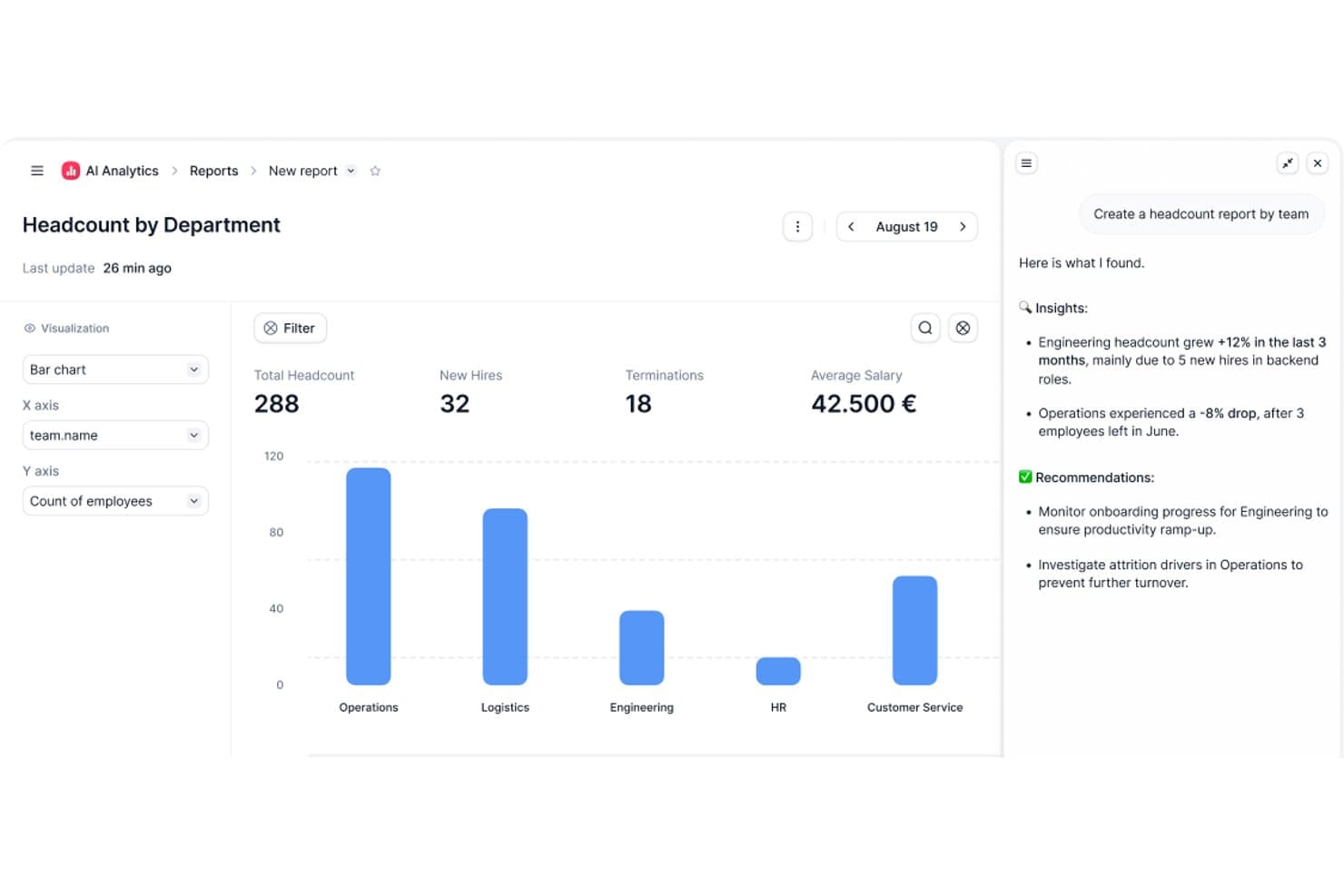
Factorial's AI Analytics generates headcount reports with insights and recommendations. Factorial is an AI-powered HR platform that combines employee data management, time tracking, onboarding workflows, scheduling, and reporting to help small businesses manage their day-to-day HR operations in one place.
Who Is Factorial Best For?
Factorial suits small businesses that want AI to handle day-to-day HR operations—from scheduling and reporting to answering employee policy questions—without juggling multiple tools.
Why I Picked Factorial
I picked Factorial as one of the best because it's built around an AI that actively assists with day-to-day operations, from planning timetables and generating reports to answering employee questions about company policies. Factorial One, its AI agent, draws on real business data inside the platform to surface answers on the spot, which cuts down on the back-and-forth that typically lands in an HR inbox. I also like that shift scheduling and time-off approvals are handled in the same place, so small teams aren't juggling separate tools to keep operations running.
Factorial Key Features
- Employee directory: A centralized hub for storing and managing employee records, contracts, and documents with permission-based access controls.
- Onboarding and offboarding workflows: Configurable task sequences that guide new hires and departing employees through each step of the process.
- Time-off calendar: A shared view of team absences, upcoming leave, and balances that managers and employees can access from desktop or mobile.
- Org chart visualization: An auto-generated chart that maps reporting lines, team structure, and vacant roles based on current employee data.
Factorial Integrations
Factorial lists marketplace integrations with a3innuva Nómina, DATEV LODAS, Sage 200, Microsoft Business Central, Google Workspace, Slack, Microsoft Power BI, Okta, and Recruitee. It also offers an API, webhooks, SDKs, an MCP server, and access to hundreds of tools through Zapier.
Pros and Cons
Pros:
- AI assists with schedules, reports, policy questions
- Leave approvals and onboarding reduce admin
- Employee self-service cuts routine HR emails
Cons:
- No documented labor-law compliance tracking
- Payroll still needs external tools and checks
 Best for payroll automation and integrations
- Free demo available
- Pricing upon request
Visit WebsiteCustomer Rating:4.3/5
Paylocity gives employees and HR teams a centralized hub to manage time tracking, pay, benefits, and communication. Paylocity gives small businesses a cloud-based HRIS platform that simplifies payroll, benefits, and core HR tasks, letting teams manage people operations in one place.
Who Is Paylocity Best For?
Paylocity is a good fit for small to mid-sized businesses that need a unified platform to handle payroll, HR, and benefits without a large HR team.
Why I Picked Paylocity
Paylocity earns its spot on my shortlist because of how well its payroll automation handles the details that trip up small HR teams. I particularly like the Payroll Readiness Dashboard, which surfaces critical tasks before processing day and runs audits to flag issues like unexpected pay spikes before you submit. In practice, that means my team can catch errors proactively rather than scrambling to fix them after the fact. On the integrations side, Paylocity connects directly to 401(k) and benefits providers, ERP systems, and general ledger platforms, so hours and labor allocations flow into payroll automatically without manual data entry.
Paylocity Key Features
- Benefits decision support: Provides employees with personalized plan recommendations during open enrollment based on their individual preferences and situations.
- On-Demand Payment: Lets employees access earned wages before payday, giving your team an early wage access option without disrupting your payroll cycle.
- Tax geolocation: Audits each employee's location to verify they're paying the correct taxes, with Paylocity acting as a Registered Reporting Agent with the IRS across all 50 states.
- Employee self-service portal: Gives employees direct access to pay stubs, time-off requests, benefits enrollment, and spending account balances from any device.
Paylocity Integrations
Integrations include QuickBooks, NetSuite, Xero, ADP, SAP Concur, Indeed, Slack, Microsoft Teams, Google Workspace, and Airbase.
 Best for onboarding automation
- Free demo available
- Pricing upon request
Visit WebsiteCustomer Rating:4.5/5
HiBob's HRMS homepage provides quick access to employee engagement features, workforce statuses, and more. HiBob is a modern HR platform for small businesses looking to centralize HR processes, automate workflows, and improve employee engagement across the entire employee lifecycle.
Who Is HiBob Best For?
HiBob is a great fit for small to mid-sized businesses that need a people-first HR platform to manage a growing workforce without overcomplicating their HR stack.
Why I Picked HiBob
HiBob earns its spot as one of the best on my shortlist because of how thoughtfully its onboarding automation is built. I love that you can set up unlimited onboarding flows and tailor each one by team, department, or location. The preboarding feature is especially useful: new hires can complete their profile, upload documents, and review company materials before day one, which means their first day is about meeting people rather than filling out forms. I also like that tasks can be automatically assigned to managers, IT, and peers, so nothing falls through the cracks and HR doesn't have to chase people down.
HiBob Key Features
- People analytics dashboard: Track headcount, retention, absenteeism, and growth KPIs using real-time data, then schedule and share reports directly with leadership.
- 360-degree performance reviews: Run structured review cycles that include peer, manager, and self-assessments, with goal alignment at the team and company level.
- Time off management: Employees can request, and managers can approve PTO, sick days, and holidays directly within the platform.
- Employee surveys: Run lifecycle or engagement surveys at key milestones and view results in a built-in analytics dashboard.
HiBob Integrations
Integrations include ADP, Breezy HR, Globalization Partners, Paylocity, Trinet, Xero, Sequoia, Greenhouse, Slack, Deel, and NetSuite.
Pros and Cons
Pros:
- Good native integrations for payroll, ATS, and collaboration tools
- Strong engagement tools like surveys and eNPS tracking
- Customizable onboarding flows fit different roles or locations
Cons:
- Performance module lacks calibration features larger teams may expect
- Reporting customization can take time to configure
 10Best for aligned HRIS-to-performance flow
Leapsome
- 14-day free trial + demo available
- From €4/user/month
Visit WebsiteCustomer Rating:4.8/5
Leapsome’s employee profile view shows centralized records, updates, and change logs in one organized workspace. Leapsome gives small businesses a unified HR platform that connects employee data, performance management, and engagement tools to help HR teams manage people processes and drive development in one place.
Who Is Leapsome Best For?
Leapsome is a strong fit for small and mid-sized businesses that want HR and performance management in a single connected system.
Why I Picked Leapsome
Leapsome earns its spot on my shortlist because of how tightly it connects HRIS data to performance workflows—something most small business HR tools treat as two separate systems. I like that when a new hire is added to the HRIS, they can be automatically enrolled in onboarding learning paths and assigned to team goals without any manual setup. The Reviews + Goals connection is particularly useful: my team can link OKR progress directly into performance review cycles, so managers aren't writing feedback in a vacuum. The AI Review Assistant also pulls in context from past feedback, goal data, and meeting notes to help build more consistent, evidence-backed reviews.
Leapsome Key Features
- Employee profiles and org chart: Store and manage employee data, reporting lines, and team structures in a centralized directory.
- Engagement surveys: Run pulse surveys and track sentiment trends across teams using customizable templates.
- Compensation management: Plan and document salary cycles with built-in approval workflows tied to employee records.
- Meeting management: Structure 1-on-1s and team meetings with shared agendas, talking points, and action items.
Leapsome Integrations
Integrations include Slack, Microsoft Teams, Jira, BambooHR, Workday, Greenhouse, ADP Workforce Now, DATEV, Gusto, and Okta.
Pros and Cons
Pros:
- Connects HRIS data directly with goals, reviews, and development workflows
- Automates onboarding, time tracking, and payroll syncs to reduce manual tasks
- Engagement surveys include benchmarks and actionable recommended next steps
Cons:
- Mobile experience is less polished than the desktop environment
- Limited customization for niche business requirements
Küçük İşletmeler için HRIS Ne Zaman Kullanılmalı?
Bir HRIS, çalışan verilerinizi, bordroyu ve İK iş akışlarınızı tek bir sistemde bir araya getirerek hiçbir şeyin gözden kaçmamasını sağlar. Küçük işletmeler için bu, elektronik tabloların peşinden koşmak ile ekibinize odaklanacak zamana gerçekten sahip olmak arasındaki farktır. İşte ne zaman mantıklı olduğu:
- Birbiriyle bağlantısız araçlar arasında boğuluyorsunuz: İzinleri bir elektronik tabloda takip ettiğinizi, bordroyu QuickBooks'ta hazırladığınızı ve işe alım sürecini e-posta üzerinden yürüttüğünüzü düşünün. BambooHR veya Gusto gibi bir HRIS tüm bunları merkezi hâle getirerek her hafta sistemler arasında geçiş yaparken kaybettiğiniz yönetsel zamanı azaltır.
- Hızlı işe alım yapıyorsunuz ve işe alım süreci karmaşık bir hâl aldı: Birkaç ay içinde 10'dan fazla çalışan işe aldıysanız ve yeni çalışanlar hâlâ evrak işleri arasında kayboluyorsa bu bir işarettir. İyi bir HRIS, işe alım kontrol listelerini ve belge toplama süreçlerini otomatikleştirerek her yeni çalışanın ilk günden itibaren tutarlı bir deneyim yaşamasını sağlar.
- Uyumluluk konusunda aksaklıklar yaşanmasından endişeleniyorsunuz: Ücret yasalarını, izin kurallarını veya vergi bildirimlerini manuel olarak yönetirken hataların olup olmayacağı değil, ne zaman olacağı önemlidir. Bir HRIS vergi hesaplamalarını otomatikleştirir ve uyumluluk risklerini maliyetli cezalara dönüşmeden önce bildirir.
- Her bordro döneminde saatlerinizi harcıyorsunuz: Bordroyu hazırlamak sizin veya ofis yöneticinizin iki haftada bir yarım gününü alıyorsa, bu süre hızla birikir. Gusto veya Rippling gibi platformlar, doğrudan para yatırma ve vergi bildirimleri de dâhil olmak üzere tüm süreci otomatikleştirir; böylece işlemi dakikalar içinde tamamlayabilirsiniz.
- Sonunda gerçek verilere ihtiyaç duyacak kadar büyüdünüz: Çalışan sayınız 15 ila 20'yi aştığında, çalışan sayısı, çalışan devir oranı veya ücretlendirme hakkında içgüdüsel kararlar işe yaramamaya başlar. Bir HRIS, işletmeniz büyüdükçe çalışanlarla ilgili daha akıllı kararlar alabilmeniz için raporlama ve analiz araçları sunar.
Küçük İşletmeler için Diğer HRIS'ler
Küçük işletmeler için en iyi HRIS yazılımları listesine giremeyen ancak yine de göz atmaya değer birkaç seçenek daha aşağıda yer alıyor:
- 11TalentHRBest for first-time HR teams
- 12Workable HRBest for managing employee records
- 13Folks HRBest for small and mid-sized Canadian businesses
- 14PaycorBest for small businesses needing scalability
- 15AgendrixBest for automatic scheduling
- 16OnPayBest for entrepreneurs and startups
- 17LatticeBest for employee record change workflows
- 18GoCoBest for compliance management
- 19HiBobBest for fostering employee engagement
- 20IntelliHRBest for employee engagement and wellness
- 21ChartHopBest for visual workforce planning
- 22Kallidus SaplingBest for standardizing processes
- 23Collage HRBest for Canadian SMBs
- 24TrinetBest for its robust mobile app
- 25InsperityBest comprehensive HR data management
- 26RipplingBest for time-saving workflow automations
- 27monday AI WorkspaceBest for data visualization dashboards
- 28JustworksBest for small businesses starting an HR team
- 29HomebaseBest for managing hourly employees
- 30Employment HeroBest for Canadian startups
İlgili İK Yazılımı İncelemeleri
Aradığınızı burada hâlâ bulamadıysanız, test edip değerlendirdiğimiz diğer ilgili araçlara göz atın:
- İK Yazılımı
- Bordro Yazılımı
- İşe Alım Yazılımı
- Kayıtlı İşveren Hizmetleri
- Aday Takip Sistemleri
- İşgücü Yönetimi Yazılımı
How I Evaluate HRIS for Small Businesses
I evaluate small business HRIS tools in two layers: the baseline features a growing team can't operate without—like onboarding flows and payroll sync—and the differentiators worth paying attention to.
Core Functionality (Table Stakes For This List)
When I'm selecting tools for my list, I rank each one on a scale from 0 (does not offer the functionality) to 5 (excels in this area) for each core functionality listed below. Then, I calculate the tool's total score into a percentage. Each tool needs to achieve a minimum total score of 65% to be considered for inclusion.
- Employee Records Management: I check whether the platform centralizes profiles, documents, and org data in one place—so you're not digging through shared drives to find an employment contract.
- Onboarding & Offboarding: Each tool should offer structured workflows for new hires, including e-signatures and task assignments, rather than relying on manual email chains and paper forms.
- PTO & Time Tracking: I look for built-in leave requests, approval routing, and accrual tracking that replace the spreadsheet-based systems most small teams start with.
- Payroll Connection: Whether it's native payroll or a deep integration with providers like Gusto or QuickBooks, I evaluate how smoothly HR data flows into pay runs without manual re-entry.
- Benefits Administration: Small teams still need digital enrollment and plan management, so I look at whether the tool handles open enrollment periods and carrier connections.
- Compliance Management: I evaluate whether the platform provides labor law alerts, required reporting templates, and audit-ready documentation to help small HR teams stay current.
Once I have a list of tools that meet the criteria, I consider what sets each platform apart.
Differentiating Factors (What Sets Vendors Apart)
Here's how I compare and contrast different vendors:
Standout Features
Employee self-service portals matter a lot for small teams. When staff can update their own addresses, download pay stubs, and submit PTO requests from their phones, it takes routine admin work off your plate. I also look at whether a tool includes performance management features like review cycles and goal tracking—small businesses that skip these early on usually scramble to retrofit them later. Reporting is another area I evaluate closely, especially prebuilt dashboards for turnover and headcount that give you real insights without building queries from scratch.
Beyond Features
Pricing transparency is one of the first things I check. Small businesses need clear per-employee-per-month costs without hidden fees that balloon as headcount grows. Implementation speed matters just as much—I look for platforms that let a solo HR generalist or office manager migrate data and go live in days, not months. Integration fit rounds out the picture. Your HRIS needs to connect with the tools you already use, whether that's QuickBooks for accounting, Google Workspace for productivity, or Slack for day-to-day communication.
Küçük İşletmeler için HRIS Nasıl Seçilir?
Bir HRIS, İK departmanının ve genel çalışan kitlesinin hayatını kolaylaştırabilir.
Hangi HRIS'in küçük işletmenizin ihtiyaçlarına en uygun olduğunu belirlemenize yardımcı olmak için ilk adım, temel kullanıcılarınızı belirlemek ve onların karşılaştığı özel zorlukları belgelemektir.
Kendinize özgü yazılım seçim sürecinizi yürütürken aşağıdaki noktaları göz önünde bulundurun:
- Hangi sorunları çözmeye çalışıyorsunuz: Aşmaya çalıştığınız zorlukları belirleyerek başlayın; örneğin çalışan verilerini manuel olarak güncellemek ve izin taleplerini işlemek. Bu, HRIS'in sunması gereken temel özellikleri ve işlevleri netleştirmenize yardımcı olur. Bu konu netleştikten sonra, tüm ihtiyaçların karşılandığından emin olmak için uzman kullanıcılarınız, yöneticileriniz ve çalışanlarınız açısından temel öncelikleri belirlemek üzere farklı kullanıcılarınızın ihtiyaçlarını önem sırasına koymak da yararlı olacaktır.
- Kimlerin kullanması gerekecek: Maliyeti ve gereksinimleri değerlendirmek için yazılımı kimlerin kullanacağını ve kaç lisansa ihtiyaç duyacağınızı göz önünde bulundurun. Bir HRIS için muhtemelen tüm iş gücünüzün çalışan düzeyinde erişime, İK yöneticilerinizin ve yöneticilerinizin ise özel erişime sahip olmasını isteyeceksiniz.
- Hangi diğer araçlarla birlikte çalışması gerekiyor: Hangi araçları değiştirdiğinizi, hangi araçları kullanmaya devam edeceğinizi ve bordro yazılımı, eğitim yönetimi yazılımı, tek oturum açma uygulamaları veya Microsoft 365 ya da Google Workspace gibi iş işletim sistemleri gibi hangi araçlarla entegrasyon kurmanız gerektiğini netleştirin. Araçların birbiriyle entegre olması gerekip gerekmediğine veya birden fazla aracı hepsi bir arada bir İK yazılımı çözümüyle değiştirip değiştiremeyeceğinize karar vermeniz gerekecek.
- Kuruluşunuz içinde nasıl çalışacağı: Yazılım seçimini mevcut iş akışlarınız ve sistemlerinizle birlikte değerlendirin. Nelerin iyi çalıştığını ve ele alınması gereken sorunlu alanları inceleyin.

Author's Tip
Her işletmenin farklı olduğunu unutmayın; sırf popüler diye bir HRIS’in kuruluşunuz için uygun olacağını varsaymayın. Gerçekte hepsi aşağı yukarı aynı işi yapar; önemli olan, hangi şirketin sizin özel ihtiyaçlarınızı en iyi şekilde karşılayabileceğidir.
Unutulmaması gereken bir diğer önemli nokta da bu çözümlerin hiçbirinin mükemmel olmadığıdır; istediğiniz veya ihtiyaç duyduğunuz her şeyi yapan tek bir çözüm bulmanız pek olası değildir.
2025'te Küçük İşletmeler için HRIS Trendleri
İK yazılımı çözümleri, küçük işletmelerin değişen ihtiyaçlarını desteklemek için sürekli olarak gelişiyor.
HRIS alanında takip ettiğim ve özellikle küçük işletmeler için faydalı olan birkaç trend şunlardır:
- Yapay Zekâ ve Makine Öğrenimiyle Artan Entegrasyon: Daha karmaşık görevleri otomatikleştirmek, öngörücü analizler sunmak ve karar alma süreçlerini geliştirmek için yapay zekâ ve makine öğreniminden yararlanmaya yönelik belirgin bir eğilim var. Bu teknoloji, daha kişiselleştirilmiş çalışan deneyimleri sunmak ve İK operasyonlarını kolaylaştırmak amacıyla HRIS platformlarında hızla gelişiyor.
- Yapay Zekâ Destekli Uyumluluk Yönetimi: Modern yapay zekâ destekli HRIS'ler, iş kanunları ve düzenlemelerini otomatik olarak güncellemek ve bunlara uyumu sağlamak için araçlarla donatılmıştır. Ayrıca vergi beyannamesi verme veya iş hukuku hükümleriyle ilgili uyumluluk sorunlarını önlemek için gerçek zamanlı uyarılar ve raporlama özellikleri sunarlar.
- Mobil Erişilebilirlik ve Esneklik: Uzaktan çalışmanın yaygınlığı devam ederken, mobil erişilebilirlik ve esneklik sunan HRIS özelliklerine olan talep artıyor. Buna, çalışanların ve yöneticilerin İK işlevlerine her yerden ve her zaman erişmesine olanak tanıyan mobil uygulamalar ve bulut tabanlı sistemler de dahildir.
- Gelişmiş Analiz ve Raporlama: Gelişmiş analiz ve özelleştirilebilir raporlama özelliklerine olan talep artıyor. HRIS platformları, duygu analizi gibi daha gelişmiş veri analizi araçlarını içerecek şekilde gelişiyor; bu da İK profesyonellerinin eyleme dönüştürülebilir içgörüler elde etmesini ve veriye dayalı kararlar almasını sağlıyor.
- Entegre Performans Yönetimi Sistemleri: Günümüzde birçok HRIS sistemi performans yönetimi yazılımlarıyla entegre oluyor veya performans araçlarını kendi bünyesinde sunuyor. Bu araçlar, çalışanların beceri eksikliklerini ve eğitim fırsatlarını belirlemeye yardımcı olarak sürekli gelişim kültürünü teşvik ediyor. HRIS platformlarında ortaya çıktığını gördüğüm bazı performans yönetimi özellikleri şunlardır:
- Performans değerlendirme şablonları
- OKR özellikleri gibi hedef belirleme çerçeveleri
- Yedekleme planlaması.
HRIS nedir?
HRIS; çalışan verilerini yönetmek ve işe alım, bordro ve performans değerlendirmeleri gibi İK süreçlerini otomatikleştirmek için kullanılan dijital bir çözümdür. Bir HRIS'in temel amacı, dijital otomasyon ve veri düzenleme yoluyla insan kaynakları yönetimini kolaylaştırmak ve optimize etmektir.
Küçük İşletmeler İçin Temel HRIS Özellikleri
Küçük işletmeler için bir HRIS seçerken aşağıdaki temel özelliklere dikkat edin:
- Temel İK veri yönetimi: HRIS, özünde tüm çalışan verileriniz için tek ve güvenilir bilgi kaynağı görevi görür. Kişisel bilgiler, iş unvanları, ücret geçmişi ve belgeler gibi bilgilerin merkezileştirilmesi güncellemeleri kolaylaştırır, yönetim hatalarını azaltır ve genel veri doğruluğunu artırır.
- Bordro yönetimi: Entegre bordro araçları maaş hesaplamalarını, vergi kesintilerini ve ödemelerin dağıtımını otomatikleştirir. Bu, çalışanlara doğru ve zamanında ödeme yapılmasını sağlarken manuel veri girişini ve uyumluluk risklerini azaltır.
- İzin ve devam takibi: HRIS platformları çalışanların çalışma saatlerini, geç kalmalarını, fazla mesailerini, tatil günlerini ve izin taleplerini takip etmeye yönelik araçlar içerir. Bu özellikler iş kanunlarına uyumu korumaya ve planlama doğruluğunu sağlamaya yardımcı olur.
- Yan haklar yönetimi: Sağlık sigortası, emeklilik planları, ödenekler ve izin politikaları gibi çalışan yan haklarını doğrudan HRIS'iniz üzerinden yönetmek, her şeyin hem çalışanlar hem de yöneticiler için tutarlı ve kolayca erişilebilir olmasını sağlar.
- Performans yönetimi: Yerleşik performans değerlendirme araçları düzenli görüşmeleri, sürekli geri bildirimi ve hedef belirlemeyi destekleyerek bireysel gelişim planlarını daha geniş kurumsal hedeflerle uyumlu hâle getirmenize yardımcı olur.
- İşe alım: Birçok HRIS sistemi, iş ilanları yayınlamanıza, adayları değerlendirmenize, mülakatları yönetmenize ve adayları işe alım sürecinde sorunsuz bir şekilde ilerletmenize yardımcı olan aday takip özellikleri sunar.
- İşe alıştırma: Güçlü bir HRIS; otomatik iş akışları, dijital belge toplama, eğitim atamaları ve yeni işe alınanların daha hızlı uyum sağlamasına yardımcı olacak adım adım süreçlerle işe alıştırmayı sorunsuz hâle getirir.
- Eğitim ve öğrenme yönetimi: Sistemler; sertifika takibi, kurum içi eğitim modülleri, kurs dağıtımı ve süresi dolan yeterlilikler için hatırlatıcılar içerebilir. Böylece ekibiniz gerekli beceriler konusunda güncel kalır.
- Çalışan self servis portalı: Çalışanlar kişisel bilgilerini bağımsız olarak güncelleyebilir, izin talep edebilir, maaş bordrolarını görüntüleyebilir, belgeleri imzalayabilir ve İK bilgilerine erişebilir. Bu da tekrarlanan idari talepleri azaltır.
- Raporlama ve analiz: HRIS yazılımları; çalışan devir hızı, devam eğilimleri, bordro içgörüleri, performans sonuçları ve daha fazlasını analiz etmek için güçlü raporlama araçları sunar. Bu analizler daha iyi karar alma süreçlerine ve uzun vadeli İK stratejisine yön vermeye yardımcı olur.
Küçük İşletmeler İçin Yaygın HRIS Yapay Zekâ Özellikleri
Birçok HRIS platformu, çalışan ve İK deneyimini geliştirmek için yapay zekâ özelliklerini bünyesine katıyor. Örneğin:
- Otomatik veri doğrulama: Yapay zekâ, çalışan verilerini tutarsızlıklar, eksik alanlar veya güncel olmayan bilgiler açısından kontrol eder; böylece idari düzeltme işlemlerini azaltır ve kayıtların doğruluğunu artırır.
- Akıllı aday eşleştirme: Yapay zekâ, en uygun adayları önermek için iş tanımlarını ve başvuru profillerini analiz eder; küçük ekiplerin işe alımı hızlandırmasına ve özgeçmişleri manuel olarak tarama ihtiyacını azaltmasına yardımcı olur.
- Öngörücü çalışan devri içgörüleri: Yapay zekâ, bağlılığın azalması veya düzensiz devam durumu gibi çalışan devri riskinin erken göstergelerini belirleyerek İK ekiplerinin proaktif şekilde müdahale etmesine yardımcı olur.
- Yapay zekâ destekli işe alıştırma iş akışları: Sistemler, işe alıştırma görevlerini otomatik olarak atayabilir, eğitim modülleri önerebilir ve yeni çalışanların süreçlerini role ve departmana göre kişiselleştirebilir.
- Performans analizi: Yapay zekâ; performans eğilimleri, hedeflerdeki ilerleme ve beceri eksiklikleri hakkında içgörüler sunarak adil değerlendirmeleri ve hedefli gelişim planlarını destekler.
- Otomatik programlama ve devam durumu uyarıları: Yapay zekâ; tekrarlanan geç kalmalar, plansız devamsızlıklar veya fazla mesai artışları gibi olağandışı devam durumu eğilimlerini tespit ederek yöneticilerin hızlıca yanıt vermesine yardımcı olur.
- Akıllı yan hak önerileri: Yapay zekâ, değeri en üst düzeye çıkaran ve gereksiz maliyetleri azaltan yan hak seçeneklerini önermek için iş gücü demografisini ve kullanım eğilimlerini analiz edebilir.
- Doğal dil araması: Çalışanlar sorular sorabilir (“İzin talebinde nasıl bulunabilirim?”) ve HRIS içindeki yapay zekâ destekli İK asistanlarından anında doğru yanıtlar alabilir.
- Yapay zekâ destekli çalışan destek sohbet botları: Sohbet botları; izin bakiyeleri, politika soruları ve işe alıştırma görevleri gibi yaygın İK taleplerini ele alarak İK personeline olan bağımlılığı azaltır ve 7/24 destek sağlar.
- Otomatik uyumluluk izleme: Yapay zekâ, bölgenizle ilgili iş yasalarındaki, vergi düzenlemelerindeki ve İK politikalarındaki değişiklikleri takip ederek güncellemelerin işlem yapılmasını veya belgelerde değişiklik yapılmasını gerektirdiği durumlarda sizi uyarır.
HRIS Yazılımının Faydaları
İşletmeniz için yeni bir HRIS uygulamak; İK personeliniz, çalışanlarınız ve genel olarak kuruluşunuz için çok sayıda avantaj sağlayabilir. Elde etmeyi bekleyebileceğiniz bazı önemli faydalar şunlardır:
- Geliştirilmiş Veri Yönetimi: Çalışan verilerinizi merkezileştirmek, çalışan bilgilerinin doğruluğunu ve tutarlılığını artırır, raporlama ve analizleri kolaylaştırır ve daha iyi karar almayı mümkün kılar.
- Artırılmış Verimlilik: Bordro işlemleri, zaman takibi ve yan hakların yönetimi gibi görevleri otomatikleştiren bir HRIS, bu süreçleri yönetmek için gereken zaman ve çabayı önemli ölçüde azaltarak İK personelinin daha stratejik faaliyetlere odaklanmasını sağlar.
- Sadeleştirilmiş Çalışan İşe Alıştırma Süreci: Güçlü bir işe alıştırma modülü, yeni çalışanların kuruma ve ekibe uyumunu kolaylaştırarak kısa sürede verimli ekip üyeleri olmalarını sağlar.
- Geliştirilmiş Çalışan Programlama: HRIS, çalışma programlarını oluşturmak, yönetmek ve iletmek için araçlar sunar; bu da program çakışmalarının önlenmesine ve yeterli personel bulunmasına yardımcı olur.
- Geliştirilmiş Uyumluluk: Bir HRIS, kuruluşların iş yasaları ve uyumluluk gereklilikleri konusunda güncel kalmasına yardımcı olarak uyumsuzlukla ilişkili ceza ve yasal sorun riskini azaltır.
Gördüğünüz gibi, bir HRIS uygulamak çalışan verilerinizi ve ilgili İK görevlerini yönetme biçiminizi önemli ölçüde dönüştürebilir.
Daha kapsamlı bir analiz için HRIS'in işletmenize sağlayabileceği farklı faydaları özetleyen yazımızı okuyun.
HRIS Yazılımı Maliyetleri ve Fiyatlandırması
Küçük işletmeniz için en iyi HRIS sistemini seçmek, planların ve fiyatlandırma seçeneklerinin tamamını anlamayı gerektirir. Bilinçli bir karar vermenize yardımcı olmak için yaygın plan seçeneklerine ve bunlarla ilişkili maliyetlere genel bir bakış aşağıda sunulmuştur.
HRIS için Plan Karşılaştırma Tablosu
| Plan | Ortalama Fiyat | Yaygın Özellikler |
|---|---|---|
| PlanÜcretsiz | Ortalama Fiyat$0 | Yaygın ÖzelliklerTemel çalışan veritabanı, sınırlı raporlama ve basit zaman ve devam takibi |
| PlanTemel | Ortalama Fiyat$5 kullanıcı/ay başına | Yaygın ÖzelliklerÇalışan kayıtları, bordro yönetimi, zaman ve devam durumu, temel programlama ve sınırlı destek |
| PlanStandart | Ortalama Fiyat$10 kullanıcı/ay başına | Yaygın ÖzelliklerGelişmiş bordro, yan hak yönetimi, performans değerlendirmeleri, uyumluluk yönetimi ve destek |
| PlanÜst Düzey | Ortalama Fiyat$20 kullanıcı/ay başına | Yaygın ÖzelliklerÖzelleştirilebilir iş akışları, gelişmiş analizler, işe alıştırma araçları, öncelikli destek ve mobil erişim |
| PlanKurumsal | Ortalama FiyatÖzel fiyatlandırma | Yaygın ÖzelliklerTam İK paketi, özel hesap yöneticisi, gelişmiş entegrasyonlar, sınırsız kullanıcı ve 7/24 destek |
HRIS için plan türlerinin, maliyetlerin ve özelliklerin dökümü.
Doğru planı seçmek işletmenizin büyüklüğüne, bütçesine ve özel İK ihtiyaçlarına bağlıdır. Ücretsiz veya temel bir planla başlamayı ve işletmeniz büyüdükçe, İK gereksinimleriniz daha karmaşık hâle geldikçe yükseltme yapmayı değerlendirin.
Taahhütte bulunmadan önce sistemin kullanım kolaylığı hakkında uygulamalı bir fikir edinebilmeniz için ücretsiz deneme sürümleri veya demolar talep etmenizi öneririm. En önemli etken maliyetse, bu makale İK yazılımı maliyetlerini ve şirketiniz için en iyi seçeneğin hangisi olduğuna nasıl karar verebileceğinizi ayrıntılı olarak ele alıyor.
Küçük İşletme Sahipleri İçin Diğer Kaynaklar
Buraya kadar geldiyseniz, doğru İKYS'nin tipik şirket içi süreçleriniz için nasıl güçlü bir İK çözümü olarak işlev görebileceğine dair daha kapsamlı bir bakışa sahip olduğunuzu umuyorum. Ancak yolculuğunuzun burada sona ermesine izin vermeyin.
Küçük işletmelerin kalbimde özel bir yeri olduğundan, size daha da fazla yardımcı olmak için en önemli kaynaklarımın tümünü bir araya getirdim. Şu diğer en iyi 10 listelerine de göz atın:
- Daha İyi İşe Alım Yapmak İçin Küçük İşletmelere Yönelik Aday Takip Sistemleri
- Küçük İşletmeler İçin Çalışan Çizelgeleme Yazılımı
- Bütçesi Kısıtlı Küçük İşletmeler İçin ERP Sistemleri
- Bütçesi Kısıtlı KOBİ'ler İçin Ücretsiz İK Yazılımı
- Kısıtlı Bütçeler İçin Ücretsiz Bordro Yazılımı
- Küçük İşletmeler İçin İKYS
- Küçük İşletmeler İçin İK Yazılımı
- Küçük İşletmeler İçin Öğrenme Yönetim Sistemleri (LMS)
- Küçük İşletmeler İçin Bordro Hizmetleri
- Küçük İşletmeler İçin Bordro Yazılımı
- Küçük İşletmeler İçin İşe Alım Yazılımı
Diğer İK Yazılımı İncelemeleri
Hızla büyüyor ve kolayca ölçeklenebilen bir İK yazılımı mı arıyorsunuz? Diğer en iyi 10 listelerinden biri sizin için daha uygun olabilir:
- İK Yazılımı: İncelendi ve Karşılaştırıldı
- En İyi HCM Yazılımı Tedarikçileri
- İnsan Kaynakları Yönetimi için HRMS Yazılımı
- Çalışan Yönetim Sistemleri
- İK Yönetim Yazılımı
- Bulut Tabanlı İK Yazılım Sistemleri
- İK Sorunlarını ve Risklerini Yönetmek için İK Vaka Yönetimi Yazılımı
- Bordro Yazılımı: İncelendi ve Karşılaştırıldı