
30 Best Employee Recognition Platforms of 2025: Compared

10 Best Employee Recognition Platform Shortlist
Here's my pick of the 10 best software from the 30 tools reviewed.
Talk through what you’re looking for. Get a custom shortlist based on your needs. No fees.


If your current recognition efforts feel ad hoc, impersonal, or impossible to scale, the best employee recognition platforms can help you fix that—fast. These tools automate shoutouts, reward milestones, and create a culture of appreciation that boosts morale, improves retention, and helps employees feel seen—no matter where they work.
But finding the right solution isn’t easy. You might be stuck using spreadsheets, juggling manual reward processes, or disappointed by clunky tools that your team barely uses. This guide helps you cut through the noise by highlighting the top platforms that are easy to use, and deliver measurable results.
With years of experience analyzing HR solutions, I know what separates a good product from a great one. In this article, I’ll walk you through the best employee recognition platforms available today, so you can spend less time chasing engagement and more time building a team that thrives.
Why Trust Our Software Reviews
We've been testing and reviewing HR software since 2019. As HR professionals ourselves, we know how critical and difficult it is to make the right decision when selecting software.
We invest in deep research to help our audience make better software purchasing decisions. We've tested more than 2,000 tools for different HR use cases and written over 1,000 comprehensive software reviews. Learn how we stay transparent, and take a look at our software review methodology.
Best Employee Recognition Platforms: Comparison Chart
This comparison chart summarizes pricing, trial, and demo details for my top employee recognition platform selections to help you find the best platform for your budget and business needs.
| Tool | Best For | Trial Info | Price | ||
|---|---|---|---|---|---|
|
1
|
Best for employee engagement and measuring impact |
Free demo available |
From $2 to $5/user/month ($3,000/year minimum) | Website | |
|
2
|
Best for its SHRM partnership |
Free demo available |
From $3/user/month | Website | |
|
3
|
Best for automated recognition and retention |
14-day free trial |
Pricing upon request | Website | |
|
4
|
Best for building culture and behavior |
Free demo available |
Pricing upon request | Website | |
|
5
|
Best for developing a recognition strategy |
Free demo available |
Pricing upon request | Website | |
|
6
|
Best for incentivizing key behaviors |
Free demo available |
Pricing upon request | Website | |
|
7
|
Best for integrating with Workday |
Free demo available |
Pricing upon request | Website | |
|
8
|
Best for frontline worker recognition |
Free plan + demo available |
From $40/month | Website | |
|
9
|
Best for productivity, engagement, and recognition |
Free trial available |
From $2/user/month | Website | |
|
10
|
Best for strengthening corporate culture |
Free demo available |
Pricing upon request | Website |
-

ChartHop
Visit WebsiteThis is an aggregated rating for this tool including ratings from Crozdesk users and ratings from other sites.4.3 -

Willo
Visit WebsiteThis is an aggregated rating for this tool including ratings from Crozdesk users and ratings from other sites.4.8 -

Boon
Visit WebsiteThis is an aggregated rating for this tool including ratings from Crozdesk users and ratings from other sites.4.7


Best Employee Recognition Platform Reviews
Here’s my breakdown of the top employee recognition platforms that can help you build a stronger, more connected workplace culture—without the manual hassle. For each tool, I’ve called out what makes it stand out, what it integrates with, and why it earned a spot on this list.


Motivosity is an employee recognition and engagement platform that addresses work culture through a research-backed approach to building gratitude and rapport among different teams. Using Motivosity, employees can be recognized by each other and by their superiors, with top achievements celebrated publicly in a social-media-like interface.
Why I picked Motivosity: Motivosity’s Recognize product empowers employees to celebrate each other's everyday wins publicly. Each month, employees are given a set amount of 'influence currency' (aka recognition dollars) that they can reward their colleagues with as they see fit.
Motivosity also has a ThanksMatters Card, which is a Visa card that's accepted worldwide. Each time employees are recognized by their staff or management, real dollars accumulate on their ThanksMatters Card - not points, like with most other systems.
These dollars can be redeemed at any location that accepts Visa, whenever your employee chooses, giving them a lot more flexibility than with many typical rewards and recognition platforms.
Motivosity Standout Features & Integrations:
Features include a social media-like public activity feed, public achievements and celebrations, public comments, influence currency (recognition dollars), a dollar-based accrual system, customizable rewards, bonus 'sweeteners', spot bonuses, highlights & announcements, personal profiles, organizational charts, interest groups, and financial reporting tools.
Their Milestone Tracker ensures that milestones like birthdays and anniversary dates are easily accessible by date so people can plan celebrations in advance too.
Motivosity also includes tools to monitor employee engagement and measure impact, including pulse surveys, eNPS ratings, sentiment analysis, and insightful engagement analytics to help HR teams take action to address weak points.
Integrations are available with 20+ popular software systems, including ADP Workforce Now, BambooHR, Microsoft Azure, Microsoft SharePoint, Microsoft Teams, Okta, Paylocity, Paychex, Rippling, SAP SuccessFactors, Slack, UKG Pro, Workday, Zenefits, and others.


Nectar is an employee recognition platform that helps team members feel valued, connected, and engaged no matter where they work. It works well for small to medium-sized businesses with 50 to 500 employees.
Why I picked Nectar: I included Nectar because their recognition and rewards platform offers a 360-degree set of culture-building tools that enables staff at all levels (peer-to-peer, manager-to-employees, and vice versa) to send meaningful recognition shoutouts rooted in your company's core values.
Their platform was designed around 6 key pillars (Connection, Recognition, Empathy, Alignment, Trust, and Elevation = CREATE) that help organizations build a solid company culture.
They also partnered with the Society for Human Resource Management (SHRM) to further strengthen employee recognition and rewards programs across the globe.
Nectar Standout Features & Integrations:
Features include public shoutout tools, core value hashtags, automatic milestone celebrations (e.g., birthdays and work anniversaries), and incentive points that are redeemable for rewards like gift cards, entertainment discounts, custom rewards, company-branded swag, or items your employees can choose for themselves through Amazon.com.
Platform admins can also use Nectar to create custom challenges, such as health and wellness initiatives, and recognize employees internally for their participation by gifting them Nectar points.
Plus, Nectar recently added a new Communication Hub to help internal teams understand which posts resonate with employees the most.
On top of all that, Nectar includes useful analytics that help HR teams spot any trends in how individual managers are recognizing their employees, identify which core values are recognized the most, and uncover examples of employees who aren't being recognized to help them find out why.
Integrations are available with 20+ popular HR software systems, including ADP, BambooHR, Gusto, Microsoft Teams, Namely, NetSuite, Paycor, Rippling, Slack, Workday, and Zenefits.
To make system access smoother for your workforce, Nectar integrates with many single sign-on (SSO) providers too, including Azure, G Suite, Okta, OneLogin, Ping Identity, VMware, and others.


Bucketlist Rewards is an employee rewards and recognition platform that inspires results through meaningful peer and manager recognition, personalized rewards, and expert program support. It’s ideal for automated recognition and retention, helping companies consistently celebrate employee efforts without manual tracking.
This innovative platform allows companies of any size to quickly and easily recognize their employees for a job well done. Employers can reward their employees with points when they go the extra mile or achieve success in the workplace. Team members can choose from over 2,576 rewards or make requests for new rewards.
Why I picked Bucketlist Rewards: Their rewards system helps engage employees and reduce turnover rates by providing them with tangible benefits, such as merchandise, discounts, vouchers, and more. Companies can also customize their own employee rewards programs that best fit the company culture and values.
With Bucketlist Rewards, employers can show appreciation for hard work while increasing motivation among team members in a meaningful way. In addition, employees have access to an engaging leaderboard where they can compare results with one another and strive towards becoming top performers in their organization.
Rewards don't have to just be performance-based, they can celebrate events and milestones like employee events, including anniversaries, birthdays, and welcome messages. You can automate correlating rewards, such as 100 bonus points for 1-year anniversary or a $50 gift card on birthdays.
Bucketlist Rewards Standout Features & Integrations:
Features include peer-to-peer and manager recognition, employee awards, automatic milestone anniversary workflows, customizable rewards & badges, company-wide announcements, weekly newsletter templates, retention tools, and unlimited support by email or phone.
Integrations include 60+ popular systems, such as ADP Workforce Now, BambooHR, Cezanne HR, ChartHop, Humi, Kallidus, Keka, Namely, Rippling, SAP, SageHR, UKG Pro, Workday, and many others.


Awardco is an all-in-one employee rewards and recognition platform that helps companies deal with high turnover in ultra-competitive labor markets. Best for organizations with over 100 employees, Awardco helps build world-class employee rewards programs that make a big impact on the bottom line.
Why I picked Awardco: Awardco brings everything you love about Amazon into a platform for rewards, recognition, and incentives. Having an official partnership with Amazon Business, Awardco provides millions of reward choices, lower vendor fees, and dollar-for-dollar spending to your organization.
With Awardco, companies cut down on expensive vendor costs, admins save time on manual tasks, and teams feel more connected. Essentially, they offer more choice, more capability, and less spending in an all-in-one total rewards platform.
Awardco Standout Features & Integrations:
Features include peer-to-peer shoutouts and social recognition tools, automated anniversary celebrations, celebration kits, wellness program templates, customizable employee service awards, automation tools, curated bonus boxes, and incentive programs that motivate your workforce to earn reward points for top performance.
Integrations are available with many popular HR management systems and collaboration tools, including ADP, BambooHR, Ceridian Dayforce, Infor, Microsoft Outlook, Microsoft Teams, Paycor, SAP SuccessFactors, Slack, Workplace by Meta, and UKG Pro.
They also have an open API to support additional custom integrations, as well as native integrations with many SAML 2 and single sign-on applications.


With Cooleaf, you can shout-out your workplace heroes—both managers and peers—for everyday wins, and reward them with employee incentives they'll be excited about.
You can design your own global rewards catalog to include charitable giving options, team swag, gift cards, experiences, and more. Your team members can then choose to redeem their points for rewards, or even use them to send gifts internally or externally.
Why I picked Cooleaf: Cooleaf helps companies empower and celebrate their employees through a meaningful recognition strategy. To help you get set up, their engagement experts partner with you to create meaningful experiences that will drive your team recognition.
Cooleaf also helps organizations reinforce their core values and incentivize the right behaviors at the right time through ongoing communications, recognition challenges, and virtual team-building activities.
Their customizable engagement calendar also makes it easy to maintain a positive, fun culture for both remote and in-person teams.
Cooleaf Standout Features & Integrations:
Features include automatic work anniversary rewards, personalized milestones, digital cards, a gifting budget, core value tags, performance measurement tools, and a large catalog of rewards to choose from.
Their platform also includes tools to capture employee sentiment through pulse surveys and monitor their employee experience through powerful dashboards and analytics.
Employees will also appreciate how easy it is to recognize their co-workers' achievements thanks to their popular integrations with Slack and Microsoft Teams.
Integrations are available with 20+ popular HRIS providers, single sign-on platforms, and learning & development systems, including Microsoft Teams, Slack, Litmos, Lessonly, Okta, and others, with more integrations available through Zapier.


WorkTango (formerly Kazoo) revolutionizes how the world's most forward-thinking companies engage and inspire their people.
Why I picked WorkTango: Their Employee Experience Platform enables meaningful recognition and rewards, offers actionable insights through employee surveys, and supports alignment through goal-setting and feedback. It’s designed for the modern workplace where priorities are clear, achievements are celebrated, and employees have a voice.
Their platform strives to amplify and incentivize key values and behaviors that strengthen company culture, create better alignment, and ensure employees feel more appreciated and engaged.
For example, by volunteering to be an Onboarding Buddy for a new hire, employees can earn extra reward points while helping their new team member settle in.
WorkTango Standout Features & Integrations:
Features include public and private recognition that can flow in any direction (with or without rewards), the ability to create customizable peer-nominated awards, automated milestone celebrations so no key dates are missed, and a comprehensive catalog of rewards that work for a global workforce.
Other features include pulse surveys, a social activity feed, goals and OKR tracking, and continuous feedback tools for 1:1 discussions and Sync-Ups.
Integrations are available with many HRIS and HCM programs including ADP Workforce Now, BambooHR, and Workday, and with popular productivity tools like Microsoft Outlook, Microsoft Teams, and Slack.
Their platform also includes an API for additional custom integrations, as well as multiple single sign-on (SSO) integrations too.


Achievers is an employee recognition platform designed to help your team build a culture of appreciation and connection. It lets employees recognize each other in real-time and turn that recognition into meaningful rewards.
Why I picked Achievers: I picked Achievers since it’s a certified Workday Select Partner, making it easy to sync recognition data with your existing Workday HCM tools.
Recognitions flow into modules like Anytime Feedback and One Time Payments, helping HR and payroll teams manage reviews and rewards, get a more complete picture of employee contributions, and apply reward tax rules automatically. This integration ultimately keeps recognition aligned with broader HR goals and cuts down on admin work.
I also liked how the platform encourages company-wide visibility through a social recognition feed. Employees can publicly recognize each other, while a points-based system lets them earn and redeem rewards tied to meaningful contributions. These features promote frequent, peer-driven appreciation that’s easy to tie back to performance.
Whether employees are in the office, working remotely, or on the go, they can send and receive recognitions through various applications they already use, such as Outlook, Teams, and Slack. This builds recognition into a daily part of your company's workflows, increasing participation and engagement across the board.
Achievers Standout Features & Integrations
Other features include the Inclusion Coach, which helps remove biased language from recognitions in real-time by suggesting more inclusive phrasing. There's also a global rewards marketplace with options across nearly 190 countries, including gift cards, merchandise, experiences, and charitable donations.
You also get reporting tools that show how recognition activity connects to business outcomes like employee retention, giving your HR team insight into what’s working.
Integrations include Workday, Slack, Microsoft Teams, Google Workspace, Zoom, UKG Pro, and ADP.


Guusto is an employee recognition platform that modernizes employee milestone and performance recognition rewards and helps organizations build powerful peer-to-peer rewards and recognition programs.
Guusto is used by many notable organizations to consistently reward great work and shape their workplace culture, including Harvard University, The Body Shop, Carlton Cards, Arc'Teryx, Canada Life, Marriott, Levi's, Fairmont Hotels, and Harry Rosen.
Why I picked Guusto: I appreciate how Guusto takes a different approach to their recognition and rewards platform than most other providers in this list.
For example, instead of starting out with a costly, company-wide program, Guusto will work with you to develop a pilot employee reward program as a test run, before you roll out their platform to everyone in your organization. This lets you get a feel for how it will work for your company, before making a bigger commitment.
Another unique feature that sets Guusto apart is the fact that they'll donate a day's worth of clean water via the One Drop Foundation for every gift users send within the platform. Knowing this will help incentivize your employees to support your internal employee recognition program, while also making a positive impact outside your organization too.
Guusto Standout Features & Integrations:
Features include a long list of ready-to-use recognition programs such as milestone, anniversary, and years-of-service awards, onboarding programs, real-time recognition (spot bonuses), performance programs, learning and development incentives, quarterly and annual rewards, birthday and holiday rewards, wellness programs, and peer-to-peer shoutouts and nominations.
Platform admins can reward recipients with digital Mastercards that work in 160+ countries, and make bulk purchases of up to 1,000 reward cards at once. Guusto also supports custom rewards, charity donation gifts, and other gift cards that can be used at over 60,000 global merchants in-person or online.
Other features include advanced budgeting tools, unlimited non-monetary recognition, and a whole host of actionable reports analyzing every aspect of your employee recognition program from the number of rewards sent to taxable benefits and core value assessments.
Integrations are available with many HRIS, communication, and SSO systems, including ADP, BambooHR, Dayforce, Google Suite, Microsoft Teams, Okta, UKG Pro, Workday, Zenefits, and others.


Assembly is an employee recognition platform that gives you the ability to track and achieve goals and automate incentives.
Why I picked Assembly: Their employee recognition tool makes it easy to put employee appreciation at the heart of your company culture through peer-to-peer recognition and incentives. Their system also shows people that their contributions are valued, while boosting performance and retaining your best talent.
Assembly lets you gather nominations from your whole team to make sure everyone’s accomplishments are celebrated. To further reward good work, employees are rewarded points that they can redeem for a gift that makes them feel valued.
You can also use their platform to keep track of other key dates, like birthdays and work anniversaries as well.
Assembly Standout Features and Integrations:
Features include peer-to-peer recognition, milestone celebrations, an extensive rewards catalog, and tools to run hundreds of different in-house engagement initiatives.
In addition to their recognition module, Assembly also offers separately priced modules for employee engagement, communication and collaboration, and an AI-powered workplace assistant to help your staff surface answers to organization information quickly.
Integrations are available with many popular including BambooHR, Google G Suite, Office 365, and Slack, among others.


Workvivo is an employee experience app designed to foster engagement and emotional connection between employees and your company culture, no matter where they're located.
Why I picked Workvivo: Their platform functions as a modern intranet, communications hub, and engagement and employee recognition tool, blended into a single social network experience.
Their system incorporates a familiar social media-like feel that maximizes engagement and makes it easy for leadership members to communicate across the platform through multimedia messages.
The system also supports employee surveys and provides engagement analytics so you can keep tabs on your team morale.
Workvivo Standout Features & Integrations:
Standout features for Workvivo include public shout-outs to recognize a job well done, tools to celebrate individual and team achievements, and peer-driven nominations for company awards.
They also have a badge feature that enables organizations to further recognize employee achievements, which can be customized to mesh with your corporate culture.
By giving employees the tools to amplify their own voice, Workvivo aims to foster a deeper connection between your workforce and your company culture, goals, and values.
Integrations are available with many commonly used HR tools, including payroll software, Slack, and Microsoft Teams.
Other Employee Recognition Platforms
Here are a few more worthwhile options that didn’t make the best employee recognition platforms list but are still worth taking a look at:
-
Kudos
For meaningful recognition with automation
-
Vantage Circle
For automated corporate gifting
-
Xoxoday Plum
For customized incentives
-
Empuls
For a centralized social intranet with recognition
-
Profit.co
For personalized appreciation messages
-
Xoxoday Compass
For employee lifecycle recognition
-
Recognize
For employee challenges
-
Mo
For promoting engagement
-
Workmates
For gathering engagement feedback
-
Workhuman
For aligning with company values
-
Fond
For offering corporate discounts
-
Know Your Team
For encouraging employee feedback
-
SnackNation
For personalized prize boxes
-
Espresa
For gamified public recognition
-
Leapsome
For feedback, engagement, and performance
-
Deel
For global workforces
-
Bonusly
For evolving beyond basic recognition
-
Lattice
For connecting praise, performance, and goals
-
ClearCompany
For analyzing engagement program impact
-
Paylocity
For customizable peer-to-peer recognition


Related HR Software Reviews
If you still haven't found what you're looking for here, check out these other related tools that we've tested and evaluated:
- HR Software
- Payroll Software
- Recruiting Software
- Employer of Record Services
- Applicant Tracking Systems
- Workforce Management Software
Selection Criteria for Employee Recognition Platforms
Choosing the right employee recognition software starts with understanding what truly drives engagement and culture. I focused on platforms that help employees feel seen, strengthen team connection, and take the burden off HR with smart, scalable tools.
Here's a summary of the selection criteria I used to curate this top 10 list:
Core Employee Recognition Platform Functionalities (25% of total score): To be considered for inclusion in this list, each solution had to offer the following basic functionalities first:
- Employee profiles that cover the basics (e.g., role, department, location, and contact info) with the ability to add custom details according to user preferences
- Peer recognition tools that allow your staff to praise their peers frequently and openly, for all other employees to see (a great way to boost employee morale)
- Notification features that ensure key stakeholders will see a recognized milestone as soon as it pops up in an activity feed (including @mentions)
- Analytics that track the impact of recognition programs on employee engagement and satisfaction
- Integrations with existing HR and communication tools for ease of use and to reduce manual data entry for administrative staff
Additional Standout Features (25% of total score): To help me narrow in on the best employee recognition platforms out of the numerous options available, I also took note of any unique features, including:
- Advanced customization options that allow businesses to align the platform with their unique company values and culture
- Innovative reward systems that offer a variety of redemption options, catering to diverse employee preferences
- Automatic prompts that remind managers to recognize their employees regularly or for special achievements and occasions
- Comprehensive analytics and reporting features that provide deep insights into the effectiveness of recognition programs, including actionable insights
- Exceptional security features that protect sensitive employee data
Usability (10% of total score): To evaluate the usability of each employee recognition tool, I considered the following:
- An intuitive design and user-friendly interface that requires minimal training to master
- A good balance between powerful features and ease of use to accommodate all skill levels and create a positive user experience
- Dedicated mobile apps or a mobile-friendly user interface that supports use on both Android and iOS mobile devices
- Role-based access controls that are straightforward to configure
Onboarding (10% of total score): To get a sense of each software provider's customer onboarding process, I considered the following factors:
- A streamlined setup process and clear configuration guidelines
- The availability of training materials such as videos or interactive tutorials
- Customizable templates to speed up the onboarding process
- Support for migrating employee data into the new platform
Customer Support (10% of total score): To evaluate the level of customer support each vendor offered, I considered the following:
- The availability of multiple support channels, including email, phone, and chat
- The existence of a self-service knowledge base or other self-help resources to speed up troubleshooting
- The overall quality, responsiveness, and helpfulness of the support team during customer onboarding and post-purchase, as inferred from customer reviews
Value for Price (10% of total score): To gauge the value of each software, I considered the following factors:
- The availability of free trials or demos to test the software before purchasing
- Competitive and transparent pricing models that reflect the software's feature depth and explain which features are included at each level
- Tiered pricing plans that cater to different business sizes, from small to medium-sized businesses (SMBs) up to enterprise-level organizations
Customer Reviews (10% of total score): Evaluating customer reviews is the final element of my selection process, which helps me understand how well a product performs in the hands of real users. Here are the factors I considered:
- Whether a product has consistently high ratings across multiple review platforms, indicating a broad level of user satisfaction
- Specific praises, criticisms, or trends in customer feedback that indicate the software's strengths or areas for improvement
- Whether customer feedback specifically mentions issues with ease of use, customer support responsiveness, or lacking features
Using this assessment framework helped me identify the employee recognition platforms that go beyond basic requirements to offer additional value through unique features, intuitive usability, smooth onboarding, effective support, and overall value for price.
How to Choose an Employee Recognition Platform
Employee recognition platforms can help you celebrate your internal achievements, boost morale and retention, and strengthen your company culture. To help you figure out which employee recognition platform best fits your needs, keep the following points in mind:
What employee recognition problems are you trying to solve? Identifying your current challenges will help guide your selection process by highlighting the specific features and functionalities you need. These challenges may include:
- Low employee engagement and morale due to inconsistent recognition,
- Difficulty recognizing achievements regularly and visibly across large or remote teams,
- Inconsistent feedback across teams due to a lacking or nonexistent recognition program structure, or
- Insufficient data regarding key engagement metrics like employee retention and the impact of recognition on employee performance.
By identifying these challenges and aligning them with specific platform features, you'll set a strong foundation for defining your engagement KPIs (e.g., eNPS levels, turnover rates, etc.), making it easier to track the long-term success of your recognition program.
What outcomes are important and how will you measure success? Being clear on your desired outcomes upfront is crucial to avoid wasting valuable time. Key outcomes you may want to measure include:
- A reduced turnover rate and other improved retention statistics,
- Indications of an improved employee experience (such as a better quarterly eNPS score (employee net promoter score), or
- Increased productivity and morale following the introduction of physical employee incentives based on performance.
Who are your main users? Consider your different user groups — power users, administrators, managers, employees, etc. — and their unique needs, to ensure they're all met.
- For an employee recognition platform, you'll need access for your entire workforce, with special role-based access for your HR administrators and managers.
What is your budget? Determining a realistic budget for your new employee recognition software up-front is crucial, so you don't waste time considering software that's too expensive.
- To evaluate cost, do a headcount of your existing workforce, plus your projections for the next few years. Since most employee recognition software charges a monthly fee per employee, this will help you proactively estimate your monthly costs.
Do you require specific software integrations? Clarify whether your new recognition software will replace existing tools or need to integrate with them. Can you reduce your monthly SaaS costs by replacing multiple tools with an all-in-one employee experience platform?
- Key systems to integrate with include HR management systems, performance management systems, and communication tools like Slack and Microsoft Teams.
- Are all the integrations you need available, or can they be custom-configured using an API?
Does the recognition platform satisfy your technical requirements? Consider the software selection alongside your existing workflows and systems.
- Does the software allow users to connect with other employees via mobile devices or through a dedicated mobile app?
- Does the new system offer security features that meet your needs (e.g., two-factor authentication (2FA), etc.)?
- Does the new system integrate with your corporate workspace (Microsoft SharePoint, Google Workspace, etc.)?
Remember, every business is different — don’t assume that an employee recognition platform will work for your organization just because it's popular.
In addition, our podcast with Tom Short, Chief Customer Officer at Kudos, is also full of advice on how to pull off employee recognition, including advice like this:
A lot of folks concentrate too much on why people leave, what they should be concentrating on is why would someone stay.
How to Implement an Employee Recognition Platform
Once you've chosen the winning employee recognition system for your needs, you'll need to develop an implementation plan to integrate the software into your employee recognition program.
To do this right, I recommend using the following approach:
- Develop an implementation strategy and timeline that defines the who, what, when, where, and why related to the new software implementation.
- Gather feedback from managers on their current challenges with employee recognition and how it could be improved.
- Gather feedback from employees regarding their experience of employee morale and motivation and how these could be improved.
- Form an internal implementation team that includes key stakeholders from all your user groups (i.e., your HR team, managers, employees, IT dept., etc.).
- Review your existing employee recognition and engagement data and decide whether you need to migrate this information into the new system or not.
- If you do decide to migrate a lot of data, reach out to your software provider for assistance with this portion. They can often upload historical data in bulk as part of the customer onboarding process.
- Note: You will need to import employee start dates and birthdates at a bare minimum (or integrate with your HR management software to access these details).
- Run some tests to help you understand how all the features work. This includes building workflow automations and setting up software integrations to pull data from other sources.
- This step is very important, and shouldn't be rushed. Run as many test scenarios as you can think of using different feedback structures, milestones, and rewards. This will help you ensure the software covers all your needs once it's fully launched.
- Train your users on how to use the software. This should include role-specific training for managers and team leads who will start posting shout-outs for their staff and separate training for employees who will give and receive feedback.
- I recommend creating an internal wiki or repository for frequently asked questions. Doing so will proactively reduce the volume of administrative requests your HR staff will receive going forward as everyone adjusts to using the new system.
- Launch the software and celebrate! This may sound a little cheesy, but it's actually really important. Celebrating the benefits of the new software can positively impact user adoption rates. If people are excited about the new software, they will be more likely to use it and have a positive association with it.
By following this plan, you'll overcome the most common challenges faced when implementing new software internally.
Trends in Employee Recognition Platforms for 2025
As businesses seek innovative ways to honor employee achievements and foster a culture of staff appreciation, employee recognition platforms are introducing new features and functionalities to match those demands.
Here are some key trends impacting the employee recognition software currently:
- Advanced Automation for Recognition Activities: Platforms are increasingly automating the recognition process, from awarding badges for specific achievements to scheduling regular recognition events. This automation ensures consistent recognition and saves time for managers and HR professionals.
- Customizable Recognition Programs: There's a growing trend toward allowing companies to fully customize their recognition programs, including personalized messages, employee awards, and recognition criteria that reflect the company's values and the individual's contributions.
- Enhanced Employee Engagement through Gamification: Gamification features, such as points, leaderboards, and challenges, are also rapidly evolving. These elements make recognition fun and engaging, increasing participation across the organization.
- Predictive Analytics for Employee Recognition: The use of advanced analytics to predict when employees might need a boost in recognition is a new and novel approach, helping to proactively prevent disengagement and burnout.
By leveraging automation, analytics, and enhanced gamification features, these platforms are making recognition more efficient and impactful.
The most successful platforms are those that can adapt to the evolving needs of both businesses and their employees, creating a culture of recognition that resonates across the modern workplace.
What is an Employee Recognition Platform?
An employee recognition platform is a digital tool that helps organizations celebrate employee achievements through automated shoutouts, rewards, and milestone tracking.
HR teams and managers use this software to boost morale, reduce turnover, and streamline recognition workflows. It replaces manual processes with scalable systems that make employees feel seen, valued, and connected—especially in remote or hybrid environments.
Features of Employee Recognition Platforms
Here are the most important features to analyze when researching employee recognition software:
- Customizable Recognition Programs: This feature is vital as it ensures that the recognition program you host aligns with the unique culture and values of your workplace, making the recognition more meaningful to employees.
- Peer-to-Peer Recognition: This feature allows employees to recognize each other's contributions. This is crucial as it encourages a collaborative culture where appreciation is not just top-down but is a shared responsibility, enhancing the sense of community and belonging among team members.
- Social Recognition & Gamification: Features like leaderboards, a public recognition wall, and employee nominations make recognition fun and engaging, and boost morale. They can also incentivize higher performance because people will want to achieve that top employee standing.
- Private Feedback Tools: In addition to public-facing feedback that all team members can see, systems should also give managers the option to provide private feedback when appropriate too.
- Simple Reward System: The platform should enable your managers and HR professionals to reward top team members with something meaningful. This may be custom recognition awards or badges that are displayed on their profiles for bragging rights. Or, it could be a point-based system where employees use points to select rewards from a global prize catalog or reward gateway.
- Automation: The software should leverage automation to help your managers reward high-performing employees, and also mark key dates like birthdays and work anniversaries, so nothing slips through the cracks unnoticed.
- Performance Tracking: From an HR and management perspective, you’ll want a platform that can track multiple key performance indicators (KPIs) or objective and key results (OKRs) so you can pinpoint your top performers easily.
- Customization and Branding: In order to create a strong tie between your organization and your recognition system of choice, the ability to incorporate your company brand is key. That includes customizing elements of the platform's appearance to align with your corporate identity, logos, and fonts.
- Mobile Accessibility: Ensures the platform is accessible on various devices. Mobile accessibility is essential for modern workplaces, allowing employees to engage with recognition programs anytime and anywhere, increasing participation and engagement.
- Reporting: The platform should organize your employee recognition data into well-defined metrics and reports. This will help your HR team ensure your program is on track, and make it easier to present the data to management.
By focusing on a platform that offers these key features, you'll be on your way to nurturing a culture of recognition that contributes to a positive and productive work environment, while getting the administrative hassles of executing the recognition program off your desk.

Benefits of Employee Recognition Platforms
Employee recognition platforms can play a critical role in creating a positive workplace culture, giving teams the tools they need to recognize achievements and improve job satisfaction and morale.
Here are several benefits of investing in an employee recognition platform:
- Streamlined Recognition Processes: Automating the recognition process eliminates manual tracking and administration, making it easier and more efficient to reward and acknowledge employees. This saves time and resources, allowing HR teams to focus on more strategic initiatives, and also ensures that no key milestones or anniversaries are accidentally skipped.
- Increased Employee Engagement: These platforms make recognizing effort and achievements an easy, regular part of the workday, directly boosting morale and engagement. Also, it's well-known that when employees feel valued, organizations see a significant uptick in overall job satisfaction and retention.
- Improved Company Culture: Recognition software fosters a culture of appreciation and respect, strengthens team bonds, and reinforces positive behaviors and values. This creates a more cohesive and positive work environment, attracting and retaining top talent.
- Enhanced Feedback and Communication: These platforms facilitate instant feedback and acknowledgment, bridging communication gaps between teams and management. This real-time interaction helps to quickly address concerns and celebrate successes, promoting a more agile and responsive company culture.
- Better Data-Driven Insights: Recognition platforms offer valuable analytics and insights into employee performance and engagement. This data aids leaders in making informed decisions, recognizing trends, and identifying areas for future improvement or additional support.
Integrating an employee recognition platform into your company can transform your work environment, driving engagement, productivity, and satisfaction.
By acknowledging and appreciating each team member's contributions, these platforms can help you boost morale and reinforce your corporate values and behaviors that lead to success.
Costs & Pricing for Employee Recognition Platforms
Often, it all comes down to cost. That's why it's important to get a realistic understanding of your budget before you spend too much time researching employee recognition platforms.
Also, many platforms in this list offer a free trial period so you can test it out before committing. This will give you a first-hand experience of how well the platform will satisfy your needs before you introduce it to the rest of your staff.
To give you basic understanding of the pricing landscape for employee recognition platforms, I've compiled the average price ranges for each plan into the comparison table below.
Plan Comparison Table for Employee Recognition Platforms
| Plan Type | Average Price | Common Features |
|---|---|---|
| Free | $0 | Basic recognition features, peer-to-peer kudos, limited reporting and analytics, and access to a community forum |
| Basic | $2 - $5 per user/month | Customizable recognition badges, enhanced reporting, mobile app access, and email support |
| Professional | $5 - $10 per user/month | Integration with other HR systems, advanced analytics and reporting, employee award nomination capabilities, and priority support |
| Enterprise | $10 - $20+ per user/month | Full customization of your engagement strategy to maximize your ROI, a dedicated account manager, advanced security features, and tailored implementation support |
As you evaluate the best plan for your organization, consider both your immediate and long-term needs. It's important to balance the total cost against the benefits the software offers to ensure it will satisfy your business objectives.
If you're running a small business with only a handful of employees, a freemium plan might work for your needs. However, paid plans will always give you a better return on your investment, if you can afford one.
While it's understandable that you may want to start with a free or basic plan initially, there are several reasons why you may want to opt for a more advanced plan, including:
- Integration with Other Systems: The most common reason to upgrade your existing plan is to access integrations with other tools in your HR tech stack, such as your HR management system. By pulling your employee data directly from your HR software, you can easily automate milestone announcements like staff birthdays and work anniversary dates, letting the system do the work for you.
- Customizable Engagement Strategies: Free and Basic plans often limit customization options whereas advanced plans allow you to tailor engagement initiatives to fit your unique company culture, making your recognition program more meaningful to staff.
- Advanced Communication Tools: If your company requires more sophisticated communication channels, such as custom newsletters or targeted messaging, an upgrade may be necessary to unlock these advanced features.
- Employee Feedback and Surveys: To access more detailed and frequent employee feedback, many advanced plans offer integrated employee survey tools to conduct surveys or eNPS check-ins, including sentiment analysis. These features, though a little more costly, will help you gather comprehensive insights and respond more effectively to employee concerns.
- Enhanced Analytics and Reporting: If you want more in-depth insights into your employee engagement trends, upgrading your plan may be necessary. Advanced plans typically offer more robust analytics to help you make data-driven decisions to improve workplace satisfaction.
Ultimately, it's important to secure a plan that offers the features you require to satisfy your current needs and solve your challenges without exceeding your budget.
New & Noteworthy Product Updates
Below, I've summarized the most recent release notes and product updates for my top employee recognition platform recommendations. Discover what’s now possible through new feature releases, improvements, and updates for web, desktop, and mobile apps, and how it can support your employee recognition programs.
2025 Q2: Staff Recognition Software Updates
Nectar Update Notes
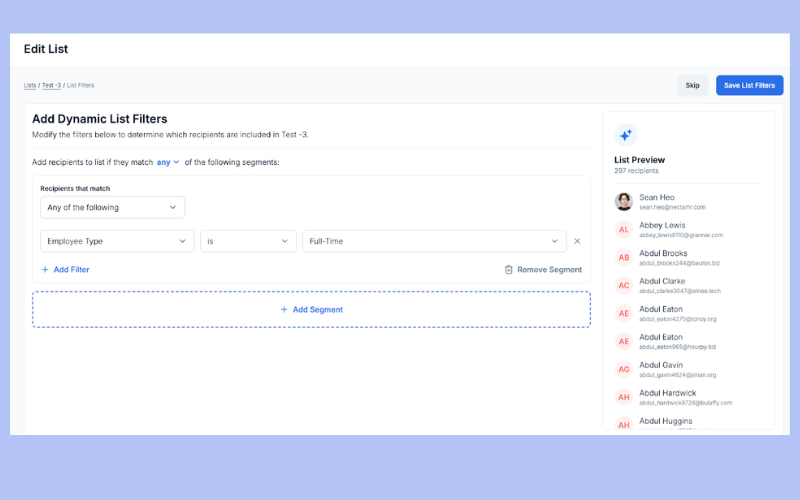
Nectar has added several new features to enhance employee recognition and internal communication. With a focus on personalization, automation, and improved analytics, the update helps HR teams create more engaging and inclusive experiences.
The release introduces new analytics pages—Reward Spend, Point Distribution, and Shoutouts—to provide clearer insights into recognition trends. It also adds custom properties for targeted rewards, Dynamic Lists for automated group updates, and new communication tools like Slack integrations and mobile push notifications.
These updates help teams better understand recognition habits, personalize experiences, and improve message reach. The result is a more connected, data-driven approach to employee engagement.
Verdict: These new features will simplify internal communication process across the Nectar platform, reducing manual work.
Workvivo Update Notes
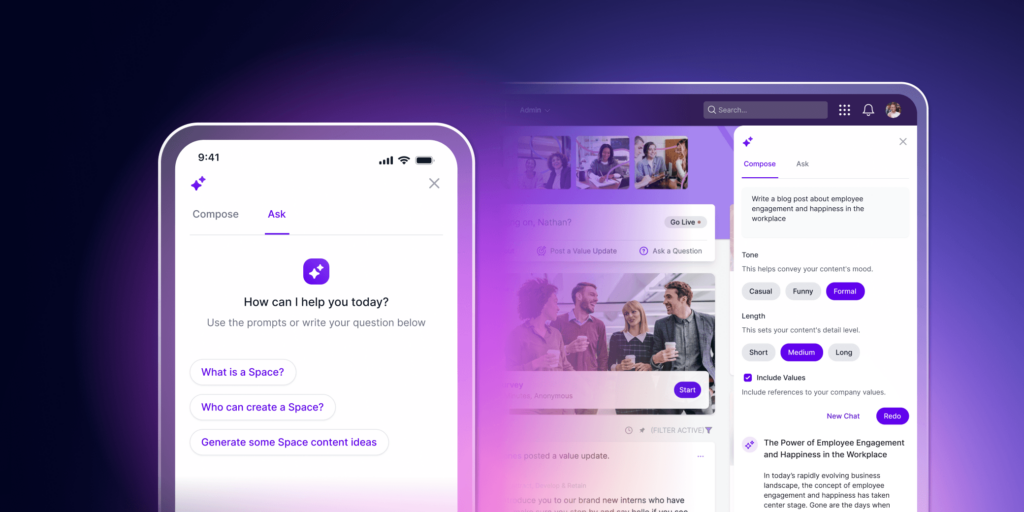
Workvivo has launched Workvivo AI, a new intelligent assistant powered by Zoom AI Companion, to enhance employee communication and productivity. The update is available at no extra cost for existing Workvivo customers and is designed to streamline internal communication while supporting more efficient workflows.
Workvivo AI helps users generate platform content like updates, shout-outs, and employee surveys based on simple prompts. Organizations can also upload their own documents—such as HR policies or event details—to personalize responses in the AI-powered Help Center. Admins can control access to features based on employee roles for a tailored experience.
By automating routine tasks and improving access to key information, Workvivo AI allows internal comms and HR teams to focus on higher-impact work. Built on Zoom’s secure AI infrastructure, it brings scalability and ease of use while reinforcing Workvivo’s goal of strengthening human connection in the workplace.
Verdict: This new AI assistant will help internal teams generate communications faster and easier, and for no additional cost too!
Kudos Update Notes
Kudos recently earned ISO/IEC 27001:2022 certification, underscoring its commitment to top-tier information security. This global standard recognizes organizations that meet strict requirements for managing and protecting data, reinforcing Kudos’ credibility as a secure employee recognition and rewards platform.
The certification confirms that Kudos has implemented a rigorous Information Security Management System (ISMS). This includes robust practices for risk management, data protection, and continuous improvement, all verified through an independent audit by BSI, a leading standards body.
For users, this means greater confidence in how their data is protected. With this certification, Kudos provides not just a meaningful recognition experience, but also the assurance that sensitive information is managed securely and in line with global best practices.
Verdict: This new security certification will give existing clients greater peace of mind regarding the safekeeping of their employee data.
Employee Recognition Platforms: Frequently Asked Questions
Here are some answers to frequently asked questions you may have about employee recognition programs and platforms and how they work:
Why is employee recognition important?
Employee recognition is crucial for fostering a motivated, productive workforce. Here are several reasons why it matters:
- Employee recognition boosts morale, engagement, and retention.
- It drives productivity, with recognized employees performing up to 14% better (according to research by Deloitte).
- It creates a positive work culture and fosters trust between employees and management.
- Recognition helps reduce absenteeism and increases loyalty.
- Businesses with strong recognition programs attract top talent and encourage continuous improvement.
- It enhances the company’s reputation and turns your employees into brand ambassadors.
Basically, employee recognition leads to happier, more productive teams and a stronger overall company culture. This deepens employee loyalty to the company and turns your staff into brand ambassadors, making them less likely to leave.
What are the benefits of employee recognition platforms?
Employee recognition platforms help you:
-
Give employees a voice with peer-to-peer shoutouts and public praise
-
Celebrate milestones like birthdays, work anniversaries, and big wins
-
Spot top performers and surface achievements that may otherwise go unnoticed
-
Build a culture of appreciation that boosts morale and reduces turnover
-
Automate recognition workflows, so no moment of recognition slips through the cracks
-
Gamify engagement through points, rewards, and friendly competition
By making recognition visible, consistent, and easy to deliver, these tools help you create a happier, more connected team.
What is an employee recognition program?
An employee recognition program is a structured way for employers to celebrate staff who go above and beyond, hit key milestones, or embody company values.
While traditional programs might include things like birthday cards or years of service awards, modern recognition platforms elevate the experience. They help you engage employees with timely, meaningful, and public recognition—often automated—so you can boost morale without adding to your workload.
You can also essentially set them to run on autopilot, so they don’t take up a lot of your time.
Are there different types of employee recognition platforms?
Yes—and the right platform for your organization depends on what you want to prioritize. Here are the main types:
-
Social Recognition Platforms
These tools focus on peer-to-peer praise through public shoutouts, comment threads, and emoji reactions.
Examples: Nectar, Awardco, Motivosity -
Performance-Based Platforms
These tools link recognition to goals, OKRs, and performance reviews—often with private 360-degree feedback tied to formal evaluations.
Examples: Lattice, Bonusly, Cooleaf -
Blended Platforms with Rewards Systems
These offer the best of both worlds: social recognition plus point-based incentives. Employees can earn rewards for giving or receiving recognition, which they can redeem for perks or gifts.
Also known as: employee incentive software or reward gateways
Ultimately, the best platform is the one that aligns with your goals—whether that’s strengthening team camaraderie, rewarding performance, or combining both into one unified experience.
Do employee recognition programs work?
Yes—when done right, employee recognition programs have a measurable impact on morale, engagement, and retention. Here’s what the research shows:
-
Recognized employees are 63% more likely to stay in their jobs for the next 3–6 months.
-
44% of employees have cited lack of recognition as the reason they quit or disengaged (quiet quitting).
-
80% of employees say they’d work harder if they felt more appreciated.
-
92% would repeat a positive action if it was properly recognized.
Whether it’s a bonus, a thank-you card, or public praise, recognition reinforces good behavior, boosts job satisfaction, and helps keep top performers engaged.
Sources: Apollo Technical Engineered Talent Solutions and Zippia
How do employee recognition platforms support team recognition?
Employee recognition platforms make it easy for teams to celebrate wins together and build a stronger sense of connection. Here’s how they support team recognition:
-
Peer-to-peer shoutouts and team awards let employees publicly praise each other for great work and collaboration.
-
Recognition feeds or digital boards spotlight achievements across the organization, boosting visibility and reinforcing shared values.
-
Integrated rewards systems align team recognition with company goals, turning appreciation into lasting motivation.
By making recognition more consistent and transparent, these platforms help create a culture where everyone feels seen—and teams thrive together.
Are there other ways to reward and recognize employees?
There is no limit to the ways you can recognize and reward your employees, and it pays to get creative. There are simple approaches that won’t cost you anything, such as adding all your staff to your company website’s About Us page, mentioning their achievements in a company newsletter, or giving them a special shout-out in a group staff meeting.
On the other end of the spectrum, you could offer top performers financial incentives, such as establishing profit-sharing incentives, stock options, or an ownership stake in the business.
What are experiential rewards?
Experiential rewards are a type of incentive that provides employees with a real life experience instead of a physical or monetary reward.
Sometimes called experience-based rewards, this type of employee reward is often highly valued because they create long lasting memories and deepen emotional connections between your staff and your company.
Due to this fact, offering experiential corporate rewards can help you improve your employee morale and motivate your employees to strive for top notch performance.
Here are some examples of experiential rewards you could consider offering your employees:
- Special event tickets
- A weekend trip or hotel voucher
- A spa day or wellness retreat
- A gourmet dining experience (e.g., a cooking class or private chef tasting)
- Outdoor adventure activities
- Exclusive access to a company event
- A chance to meet a celebrity or influencer (if your company has connections to one)
As you can see, any one of these items would create more positive memories than a gift card or some free company swag. Definitely some food for thought!
What is Employee Appreciation Day?
Employee Appreciation Day is an unofficial holiday that’s celebrated on the first Friday of March each year to recognize and thank employees for their hard work and contributions.
It’s a day for companies to express gratitude and foster a positive workplace culture by showing employees they are valued. Whether through small tokens of appreciation, team lunches, or special events, the goal is to boost morale, strengthen team bonds, and enhance overall engagement.
Other Software Reviews
Looking for other ways to develop a culture of recognition at work? Here are some other types of software that'll point you in the right direction:
- Employee Engagement Software
- Employee Perks Programs
- Employee Evaluation Software
- 360-Degree Feedback Software
- Employee Survey Tools
- Employee Wellness Platforms
Improve Your Company’s Culture With Employee Recognition Platforms
Consistent recognition is key to boosting employee morale and keeping your staff engaged. Employee recognition platforms make the recognition process easy and transparent, ensuring your employees feel appreciated regularly. They bring your employee recognition program to life and motivate your team to provide feedback, praise co-workers, and respect company values.
By implementing an employee recognition platform that automates processes and increases visibility across teams, you'll reduce your turnover and foster a better company culture.
The best employee recognition system for your needs is one that addresses your current pain points, uses automation to simplify the process, makes recognition more visible, and ultimately, works within your budget. By aligning your software selection with your needs and challenges, your new software will help you create a thriving, motivated, and loyal team.
Stay in Touch
I hope this article got you one step closer to finding the best employee recognition platform for you. If you found it helpful, don't forget to subscribe to our weekly People Managing People newsletter. We'll keep you in the loop regarding industry trends in human resources best practices.