

10 Best Automated Payroll Software To Save Time in 2026

10 Best Automated Payroll Software Shortlist


With so many automated payroll tools on the market, narrowing down the best options for your business can be challenging. The right software should handle essential tasks like calculating employee wages, deducting taxes, processing payments, and ensuring compliance—all while saving time and reducing errors.
In payroll, strange things happen all the time, and that’s where reliable automation and customer service becomes crucial.
As an HR specialist with hands-on experience implementing and managing payroll systems for teams of all sizes, I understand how critical it is to find a reliable solution that fits your company’s unique needs. In this guide, I’ve drawn from my extensive experience to curate a list of the best automated payroll software, making it easier for you to streamline payroll and stay focused on growing your business.
Why Trust Our Software Reviews
We’ve been testing and reviewing HR software systems since 2019. As HR experts ourselves, we know how critical and difficult it is to make the right decision when selecting software.
We invest in deep research to help our audience make better software purchasing decisions. We’ve tested more than 2,000 tools for different HR management use cases and written over 1,000 comprehensive software reviews. Learn how we stay transparent & our software review methodology.
Best Automated Payroll Software: Pricing Comparison Chart
This comparison chart summarizes basic pricing details for my top automated payroll software selections to help you find the best software for your budget and business needs.
| Tool | Best For | Trial Info | Price | ||
|---|---|---|---|---|---|
| 1 | Best for automated multi-country payroll | Free demo available | From $29/employee/month | Website | |
| 2 | Best for automating payroll tax payments | Free demo available | From $8/user/month | Website | |
| 3 | Best for scaling midsize or large companies | Free demo available | Pricing upon request | Website | |
| 4 | Best for multiple countries and currencies | Free plan available | From $199/user/month | Website | |
| 5 | Best with automated tax filing | Free demo available | From $49/month | Website | |
| 6 | Best for pre-scheduling payroll cycles | Free demo available | Pricing upon request | Website | |
| 7 | Best for combined payroll and HR support | Free demo available | Pricing upon request | Website | |
| 8 | Best for mobile-first hourly teams | 14-day free trial + free demo available | From $24/location/month | Website | |
| 9 | Best for small businesses | Free demo available | Pricing upon request | Website | |
| 10 | Best for incorporating tips and commissions | Free trial available | From $55/month | Website |


-

Justworks
Visit WebsiteThis is an aggregated rating for this tool including ratings from Crozdesk users and ratings from other sites.4.6 -
Paycom
Visit WebsiteThis is an aggregated rating for this tool including ratings from Crozdesk users and ratings from other sites.4.3 -
HiBob
Visit WebsiteThis is an aggregated rating for this tool including ratings from Crozdesk users and ratings from other sites.4.5




Best Automated Payroll Software Reviews
Here’s a brief description of each automated payroll software that showcases each system’s best use case and noteworthy features. I’ve also included a screenshot for each to show you their user interface too.

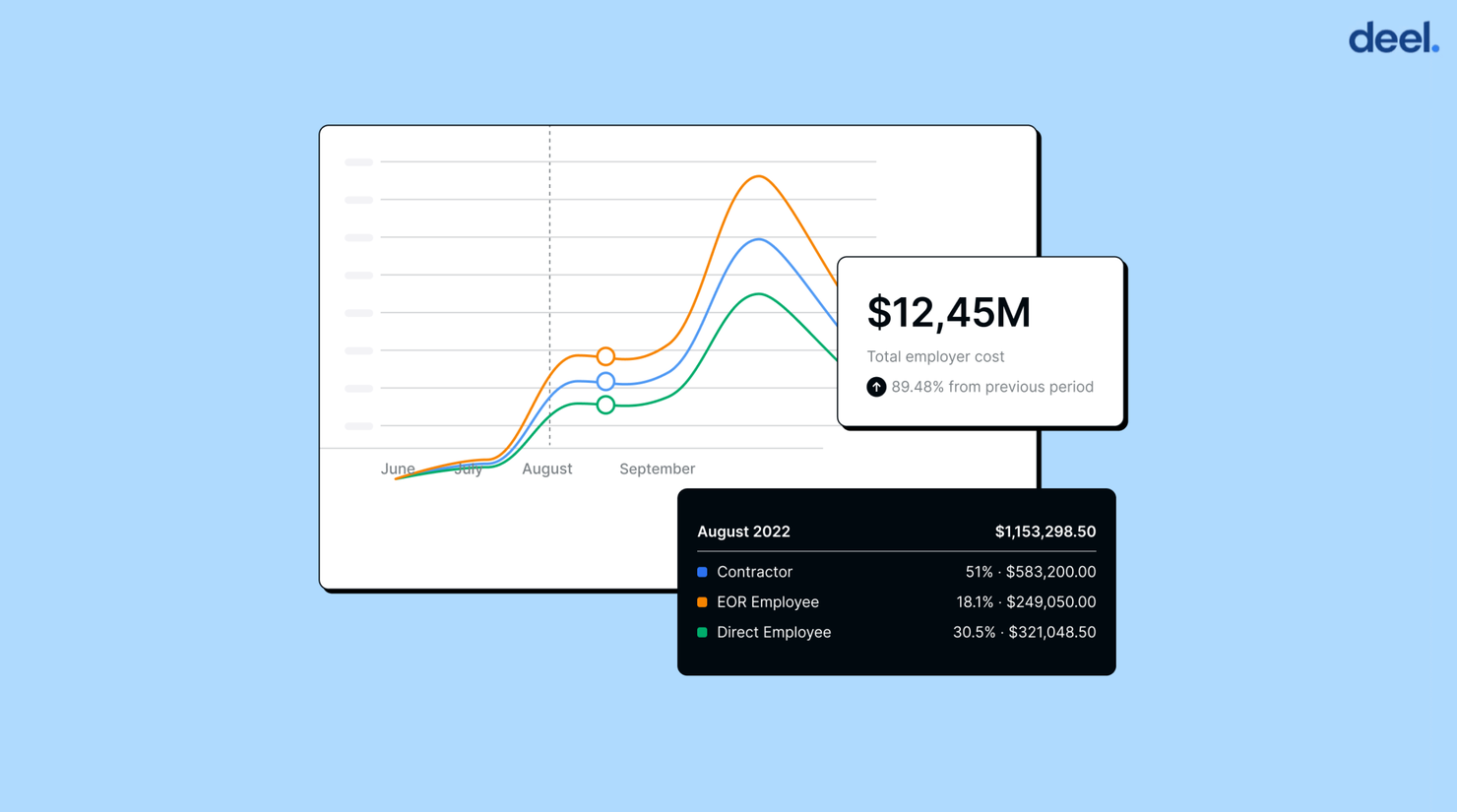
Deel is a comprehensive automated payroll software that lets you take care of multi-country payroll processes in one central platform. This modern solution takes the guesswork out of calculating taxes, deductions, and other pay-related information. With Deel, employers can save time and money while ensuring their employees are paid on time and accurately.
Deel’s employer of record service uses their in-house payroll team to take care of local payroll details like 13th month pay or accrued vacation. Through its intuitive dashboard, companies can make one single mass payment, with Deel automatically initiating direct deposits and payslips. Deel also includes automated tax filing features that help streamline the entire process from beginning to end.
To pay contractors, Deel supports many contract types and offers a number of withdrawal services like Wise and Payoneer. Moreover, this automated payroll platform offers security features such as two-factor authentication for added peace of mind when processing payments.
You can integrate Deel with your accounting and reporting software with pre-built integrations or by connecting through the Deel Open API to automate and sync data across your HR tech stack. Key native integrations include Ashby, BambooHR, Expensify, Greenhouse, Hibob, Netsuite, Okta, OneLogin, Quickbooks, SCIM, Xero, Workday, and Workable.
Overall, Deel is an ideal choice for businesses looking for an efficient way to manage their payroll process without dealing with manual entry or working with multiple platforms.
Deel offers flat pricing upon request, as well as a free demo.
Pros and Cons
Pros:
- Also offers employer of record (EOR) services
- Covers up to $25,000 if a misclassification/legal case arises
- Choose from 150+ currencies, including crypto
Cons:
- No free trial is available
- No mobile app available

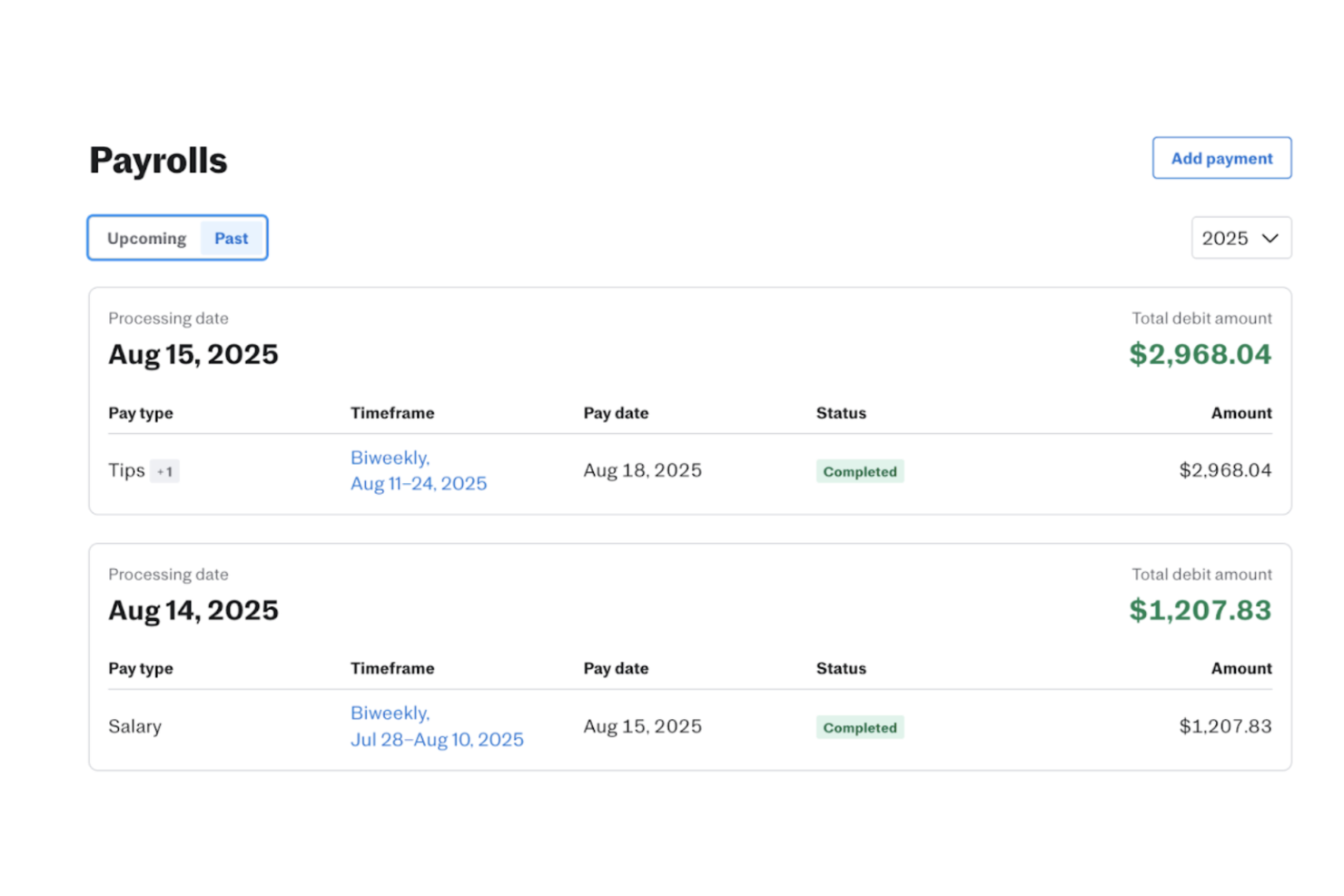
For small businesses seeking an efficient solution to manage payroll, Justworks offers a streamlined platform that automates payroll tax payments and supports compliance with tax regulations. This tool is particularly appealing to startups and small enterprises looking to automate payroll processes and reduce administrative burdens. By integrating payroll with HR functions, Justworks helps handle payroll calculations and benefits management, making it a useful option for businesses that want payroll and HR in one place.
Why I Picked Justworks
I picked Justworks because it’s best for automating payroll tax payments, helping businesses handle tax calculations, filings, and deposits with less manual work. It also supports direct deposit and common payroll deductions, including benefits-related deductions, to keep pay runs accurate. On top of that, its compliance support helps businesses stay aligned with tax and payroll rules, reducing errors and missed deadlines.
Justworks Key Features
In addition to automating payroll tax payments, Justworks offers:
- Employee Self-Service Portal: Allows employees to access their payroll information, pay stubs, and benefits details independently.
- Time Tracking Integration: Connects seamlessly with time-tracking tools to ensure accurate payroll calculations based on employees' hours worked.
- Flexible Payment Schedules: Supports various pay schedules, accommodating the diverse needs of different businesses.
Justworks Integrations
Integrations include QuickBooks, Xero, BambooHR, JazzHR, Guideline, and Mineral. An API is also available for custom integrations.
Pros and Cons
Pros:
- Mobile app lets employees view paystubs, benefits, PTO, time tracking
- Transparent pricing options for Payroll or PEO plans, add-ons available
- Clear employee dashboard for benefits and pay information
Cons:
- Many of the supported countries are contractor-only
- Reporting tools offer limited in-depth business insights

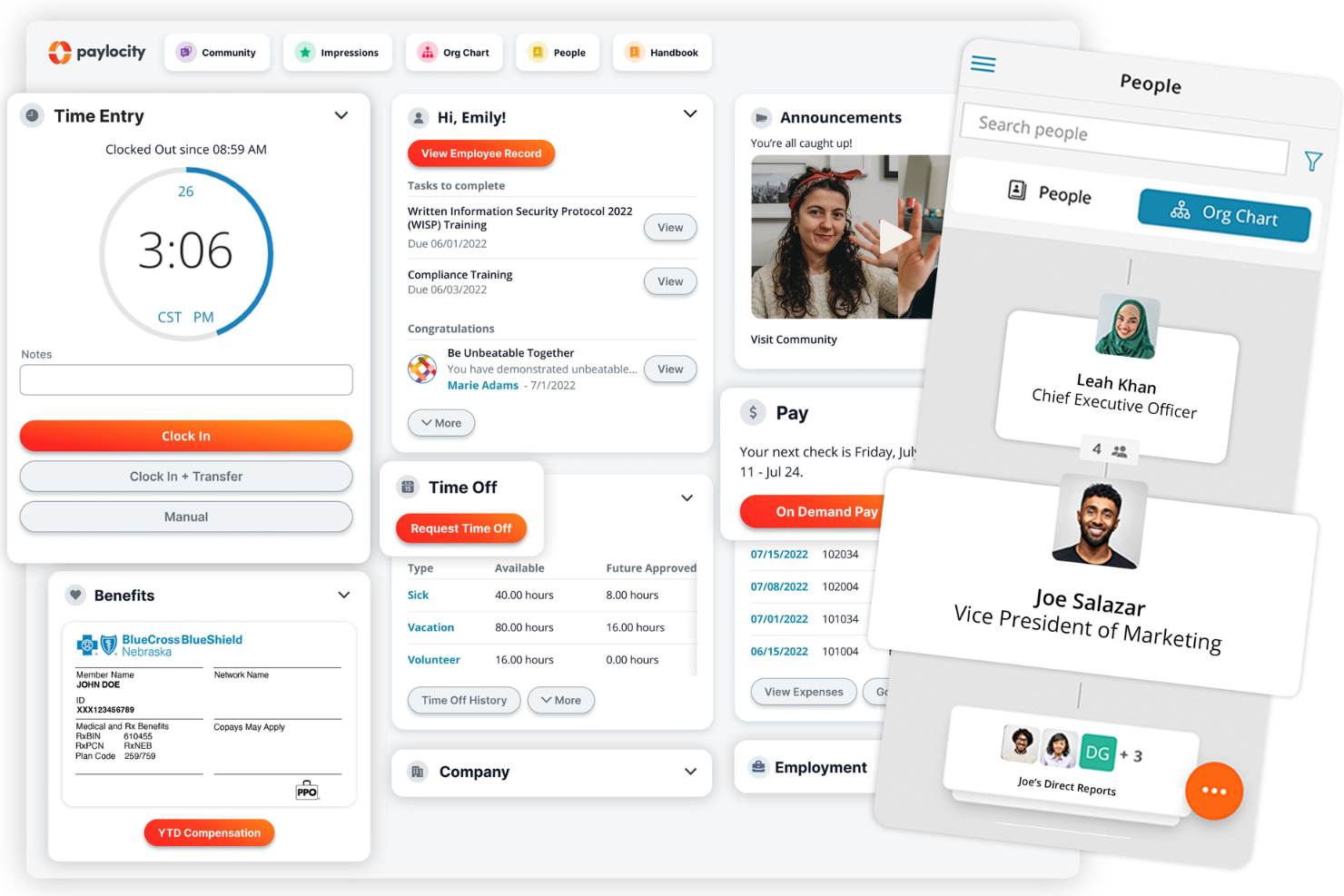
Paylocity is a cloud-based platform that offers payroll and human capital management solutions. Designed to meet the needs of scaling midsize and large companies, it automates payroll processes, ensuring accuracy and compliance. With Paylocity, you can manage employee compensation efficiently, freeing up time for other critical tasks.
One standout feature is the software's ability to handle wage garnishment. This means you don't have to worry about manually calculating and deducting garnishments from employees' paychecks. Another helpful feature is the global payroll capability, which is invaluable if your team operates across different countries. It allows you to manage foreign currencies and comply with international payroll regulations.
Additionally, I like that the on-demand payment feature provides a good option for employees who might need early access to their earned wages, giving them flexibility and financial peace of mind.
Other features include automated tax filing, customizable payroll reports, compliance management, payroll calendar, benefits administration, time and attendance tracking, and scheduling tools.
New Product Updates from Paylocity

Paylocity Introduces Ignite AI Across Its Platform
Paylocity introduced Ignite AI with purpose-built automation for recruiting, payroll, time, finance, reporting, and employee support. These capabilities reduce repetitive work, catch errors earlier, speed up hiring and financial processes, and give teams faster access to answers and analysis across the platform. For more information, visit Paylocity's official site.
 .
.
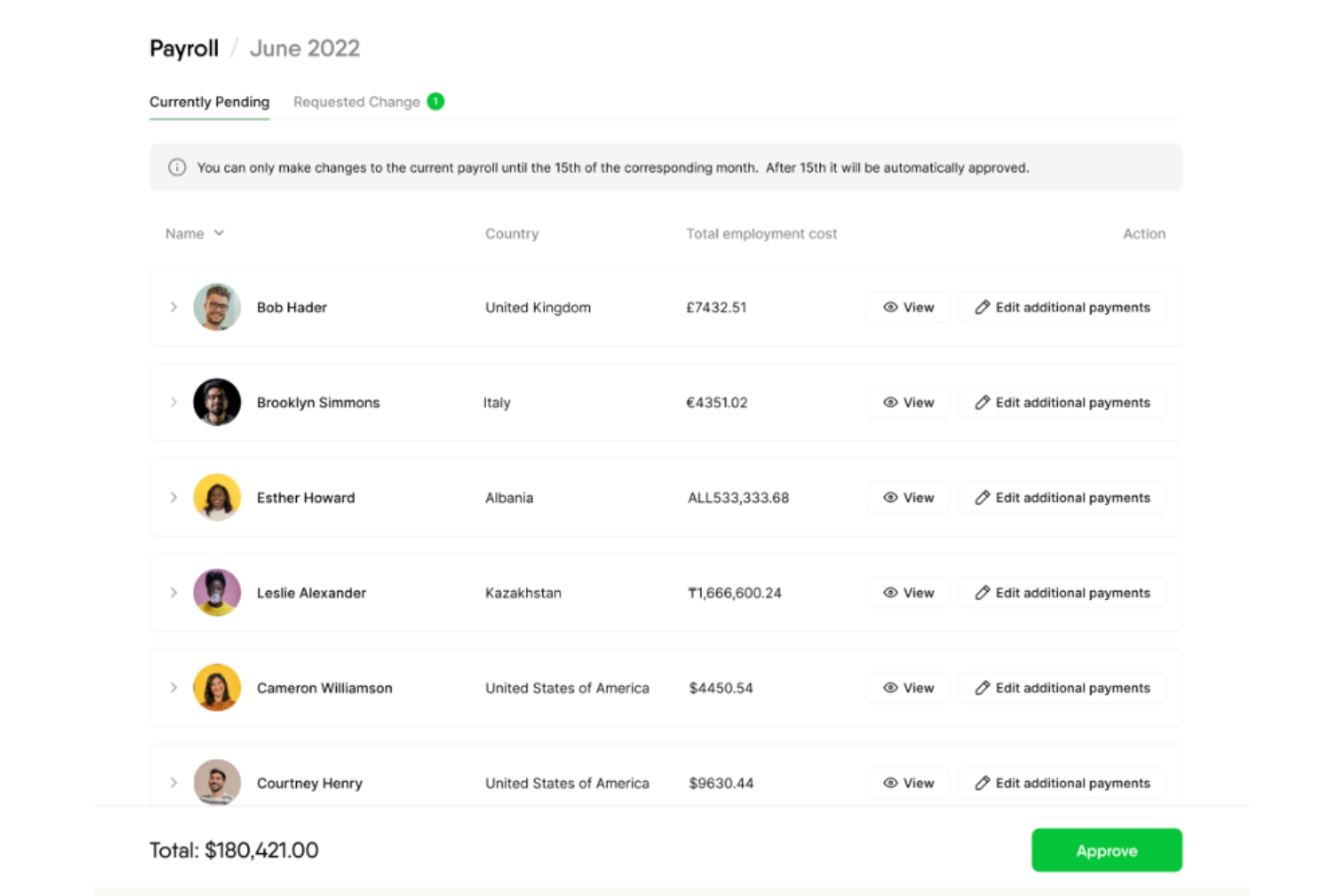
Remofirst is a global employment platform that enables companies to hire and manage remote teams across the world without the need to establish local legal entities.The platform is designed to assist HR departments, finance teams, and legal professionals in navigating the complexities of international employment, making it easier for companies to access and manage a global workforce.
Remofirst's automated payroll software is designed to handle the complexities of international payroll processing for finance teams. The software supports payroll operations in over 170 countries, allowing businesses to process payroll in multiple currencies while ensuring compliance with local tax regulations. You can summarize your invoices to aggregate them into one payment, rather than paying each international employee individually. Your global employees will be paid in their country's local currency.
Remofirst, acting as an Employer of Record (EOR), also assumes the legal responsibility for employment and payroll compliance, reducing the administrative burden on companies. It provides a solution for managing payroll for international contractors, ensuring compliance with local employment laws, visas, and work permits, and conducting necessary background checks.
Remofirst integrates with ADP.
Pros and Cons
Pros:
- Helps in managing remote teams
- Offers excellent customer support services for users
- Easy-to-use interface
Cons:
- Limited integration options
- May require additional training for full utilization
New Product Updates from RemoFirst

RemoFirst Launches BambooHR Integration
RemoFirst has launched a BambooHR integration for enhanced global hiring and HR management. For more details, visit RemoFirst's official site.
 .
.

Gusto offers a versatile solution for businesses seeking automated payroll software that caters to diverse needs and industries. Whether you're a solo entrepreneur or managing a mid-sized company, Gusto's platform simplifies payroll processing with features like automated deductions, direct deposit, and tax filing. It effectively addresses the complexities of payroll management, allowing you to focus more on your team and business growth.
Why I Picked Gusto
I picked Gusto for its ability to automate complex payroll tasks for small and medium-sized businesses. One feature that stands out is its automated tax filing, which ensures compliance with federal, state, and local regulations, saving you from costly errors. I also like the direct deposit functionality that expedites payroll processing, allowing your team to receive their pay on time without the hassle of paper checks. These features make Gusto a reliable choice for businesses looking to enhance their payroll operations and reduce administrative workload.
Gusto Key Features
In addition to its core payroll functionalities, Gusto offers several other features that enhance its utility for businesses:
- Time Tracking: This feature allows your team to log hours worked directly into the payroll system, ensuring accurate pay calculations.
- Employee Benefits Management: Gusto provides an integrated platform to manage employee benefits such as health insurance, 401(k) plans, and more.
- Hiring and Onboarding Tools: These tools assist in managing new hires, from offer letters to onboarding checklists, streamlining the recruitment process.
- PTO Tracking: The platform includes capabilities to track paid time off, sick days, and holidays, automating accruals and requests.
Gusto Integrations
Integrations include QuickBooks, Xero, FreshBooks, TSheets, Clover, Deputy, Homebase, When I Work, ThinkHR, and Trainual.
Pros and Cons
Pros:
- Employee self-service portal empowers staff to access pay and forms.
- Payroll, benefits, and HR in one unified platform.
- Automatic tax filings and direct deposit simplify payroll compliance.
Cons:
- SMBs that need advanced compliance or niche industry-specific HR modules may find Gusto limiting.
- Great for simple pay and HR management but not customizable enough to handle large, complex orgs.
New Product Updates from Gusto
Gusto Expands 401(k), Life, and Disability Benefits
Gusto expands its Benefits dashboard with built-in 401(k) management and employee-paid voluntary life and disability coverage, helping employers offer and manage more benefits without separate platforms or additional logins. For more information, visit Gusto’s official site.

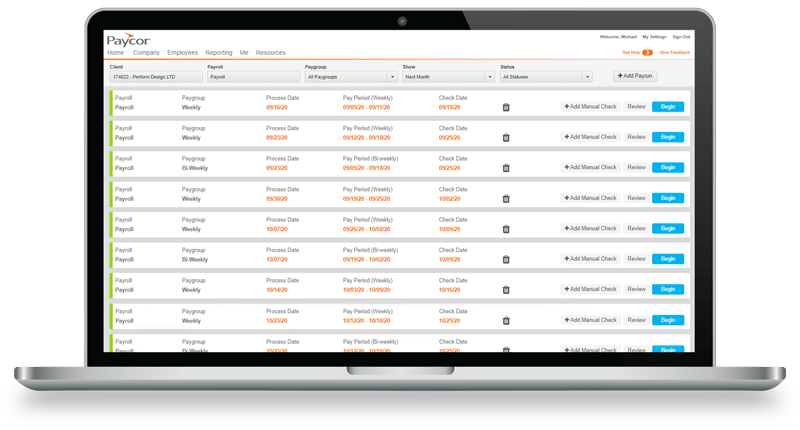
Using Paycor, you can transform the way you process payroll. Features include general ledger integration, OnDemand Pay, AutoRun functionality, employee self-service, and management reporting tools.
The system guides users through the process, helping them make real-time calculations before payroll runs. Admins can schedule payroll for a specific day and time without further manual intervention.
Paycor is regularly updated to keep you in step with local, state, and federal laws. You can engage and retain your workforce with flexible pay options like direct deposit and pay cards. In addition, earned wage access gives employees access to a portion of their earnings after each shift.
Paycor integrates with software applications such as Benefit Allocation Systems, Boss Insights, GoCo, MyEnroll360, SwipeClock, and WorkforceHub.
Paycor offers customized pricing on request. A free consultation is also available.
Pros and Cons
Pros:
- Saves you time, and money
- Offers customizable reports
- Well known for ease of use
Cons:
- The interface is outdated
- The software occasionally freezes
- The time card process is not robust
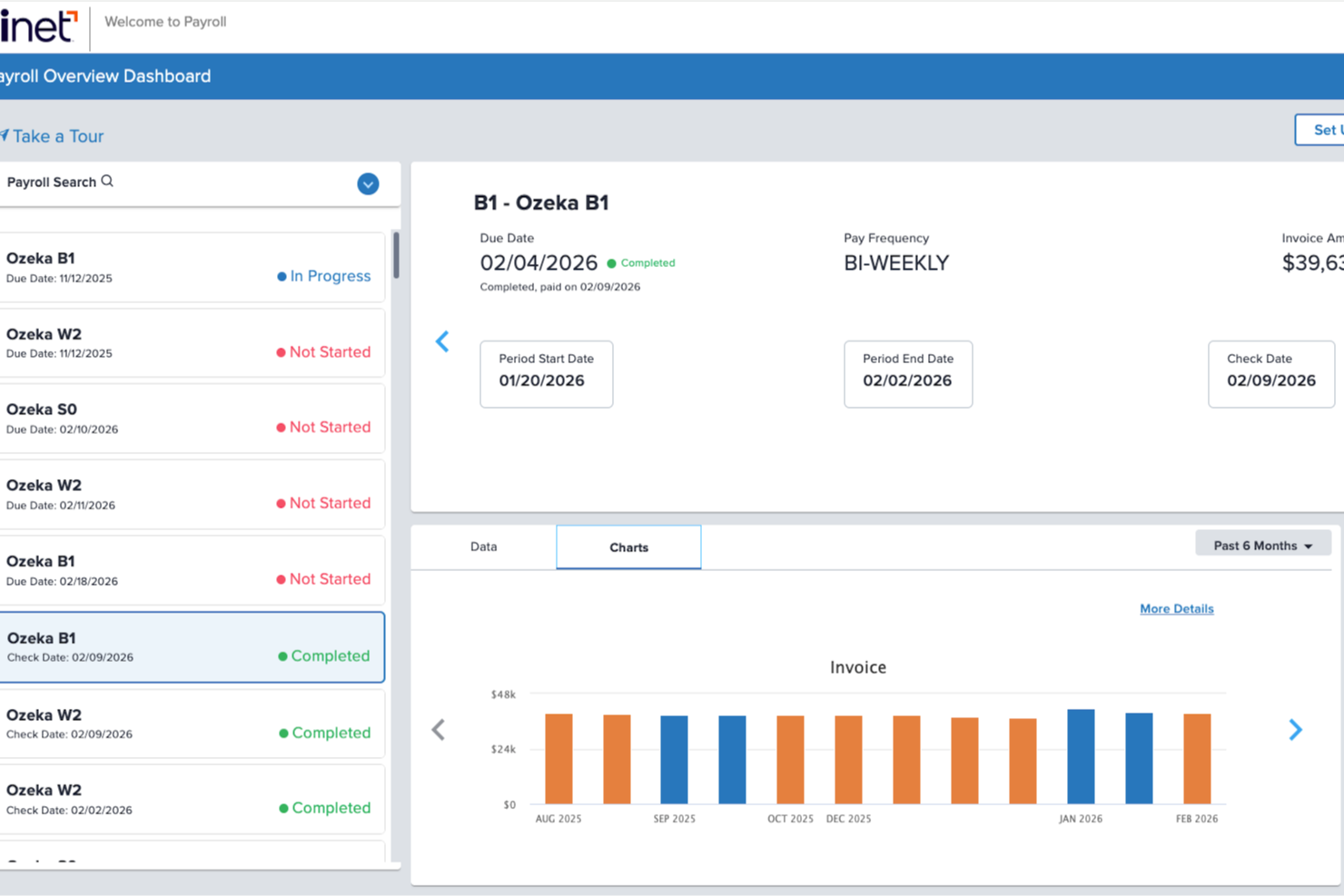
Trinet brings automated payroll together with HR and benefits administration, which makes sense if you want payroll to connect directly to the policies and people data behind it. If you’re running a small to mid-sized company and need payroll that reflects changing regulations and multi-state teams, it’s built to take that weight off your plate.
Why I Picked TriNet
I picked TriNet for its unique ability to offer automated payroll processing combined with HR support, making it ideal for businesses looking to streamline these functions. The platform's automated payroll features include real-time tax calculations and compliance alerts, which help ensure accuracy and adherence to regulations. Additionally, TriNet’s dedicated HR experts provide personalized support, helping you navigate complex HR challenges. This combination of automation and expert guidance makes TriNet a compelling choice for businesses aiming to optimize their payroll operations.
TriNet Key Features
In addition to its automated payroll capabilities, TriNet offers several other features that enhance its value for your team:
- Real-Time Tax Calculations: This feature ensures that all payroll tax calculations are accurate and up-to-date, reducing the risk of errors.
- Compliance Alerts: TriNet provides alerts for compliance-related updates, helping you stay informed about changes in regulations.
- Time and Attendance Tracking: Built-in time tracking feeds approved hours directly into payroll for hourly and non-exempt staff.
- Employee Self-Service Portal: Your employees can access pay stubs, W-2s, and update personal information directly within their accounts.
TriNet Integrations
Integrations include QuickBooks, NetSuite, Workday, BambooHR, Xero, Gusto, ADP, Paychex, Sage, and Kronos.
Pros and Cons
Pros:
- The PEO model simplifies compliance and risk mitigation.
- It provides access to premium employee benefits packages.
- Offers comprehensive HR and payroll solutions for businesses.
Cons:
- Less flexibility for highly customized HR and payroll policies.
- Platform interface may feel clunky or dated to some users.
New Product Updates from TriNet
TriNet HR Plus Adds Vestwell 401(k) Connect Integration
TriNet integrates with Vestwell for 401(k) Connect, streamlining deferrals and contributions via TriNet Payroll to Vestwell. For more information, visit TriNet's official site.
 .
.
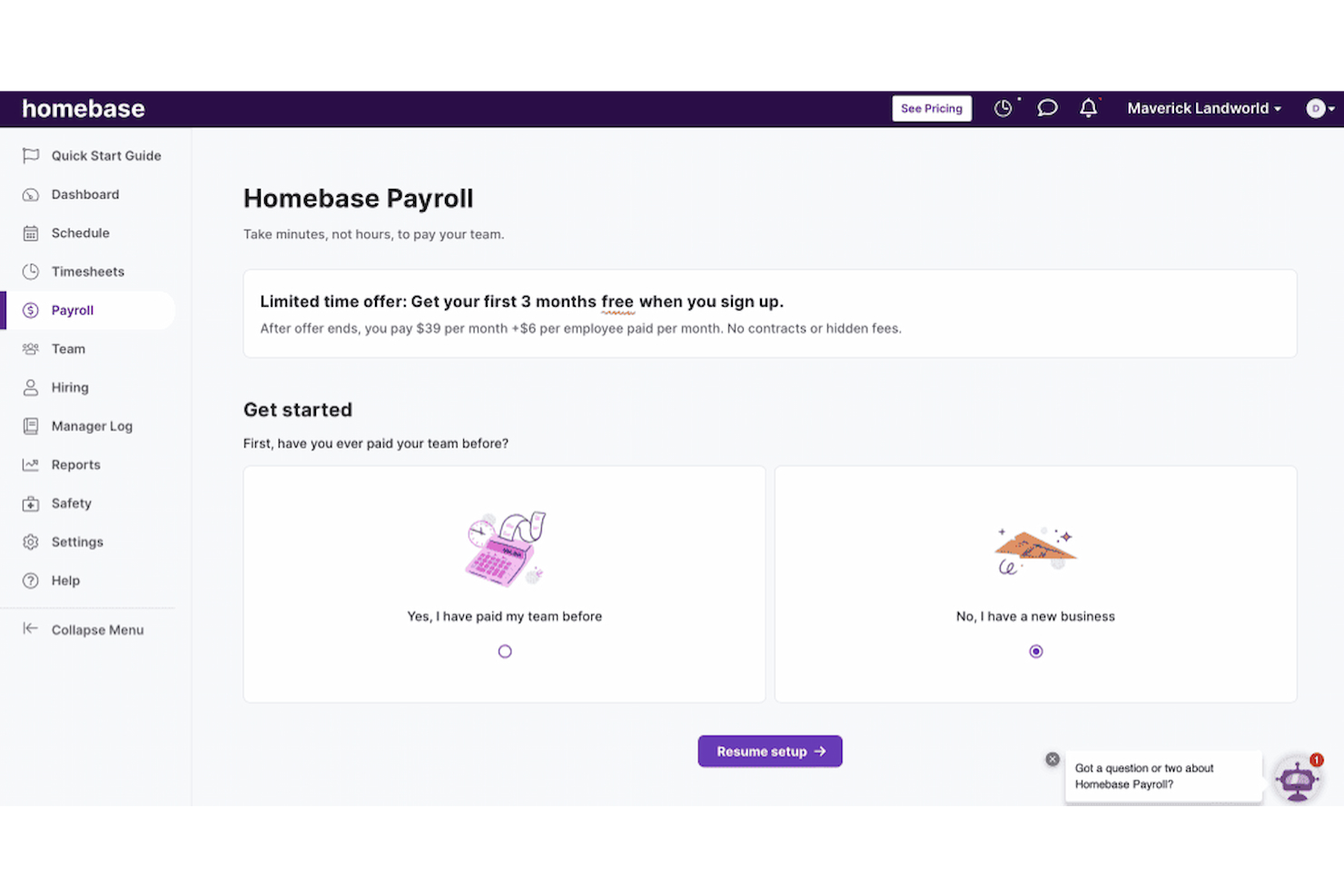
Homebase is a comprehensive automated payroll software designed to simplify payroll, time tracking, and scheduling for small businesses with hourly teams. It eliminates manual entry by automatically calculating hours, breaks, wages, and taxes in real time—helping businesses stay compliant and efficient without spreadsheets or paperwork.
Homebase offers built-in time clocks, employee self-onboarding, and PTO tracking, while its auto-payroll feature lets you run payroll without lifting a finger. With next-day payroll and tax filing automation for all 50 US states, Homebase helps businesses save time while ensuring accurate and timely payments.
To support a growing workforce, Homebase allows unlimited payroll runs, handles direct deposit or check payments, and automates compliance tasks like new hire reporting and W-2/1099 generation. Its mobile-first design enables managers to run payroll from anywhere—even on the go.
You can integrate Homebase with your accounting, POS, and HR tools through pre-built connections. Key integrations include Square, Gusto, QuickBooks, Shopify, Toast POS, Paychex, Clover, Stripe, Lightspeed, and ADP.
Overall, Homebase is an ideal choice for small businesses seeking an all-in-one payroll solution that combines scheduling, time tracking, and compliance in one intuitive platform.
Pros and Cons
Pros:
- Automated payroll and tax processes
- Offers direct deposit into bank accounts or printable checks
- Time tracking for accurate payroll
Cons:
- Payroll functions are only available as an add-on
- No details on customization for specific business needs
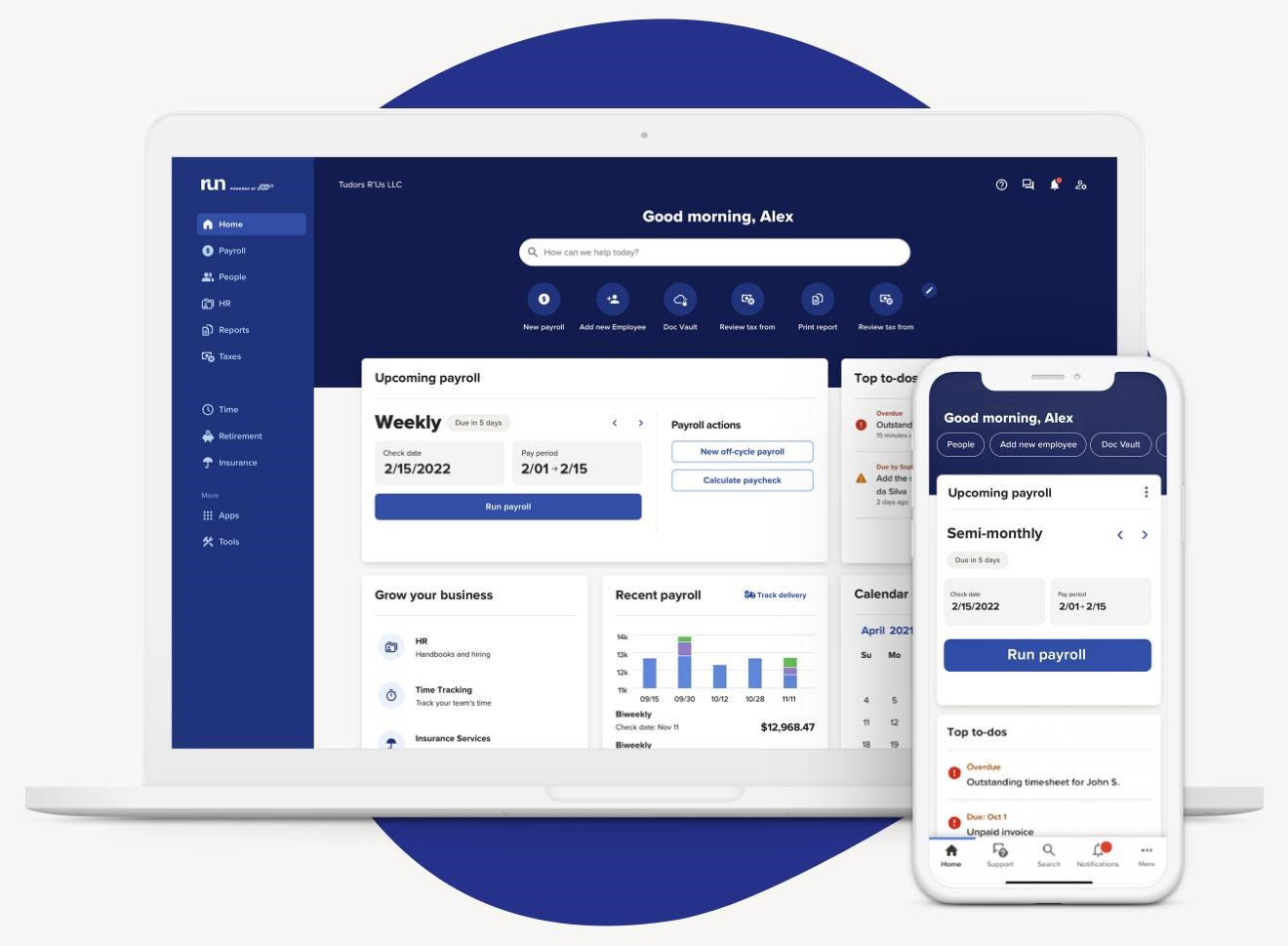
RUN Powered by ADP is an automated payroll solution designed primarily for small business owners. You can choose from a basic payroll system to a full suite of HR tools and services, according to the needs of your organization.
Payroll features include automatic tax calculations and deductions, submission of quarterly or annual reports, and automatic compliance updates. You can also integrate time tracking with the payroll system to manage payments to remote or hourly employees.
You can access everything from a personalized dashboard, including the next payroll, priority to-dos, payroll history, and quick navigation. Step-by-step instructions make it easy to organize payroll tasks, with clear guidance provided.
RUN integrates with software such as ClockShark, Ease, JazzHR, JobScore, and QuickBooks Time.
RUN Powered by ADP offers customized pricing on request, and a 90-day free trial is available.
Pros and Cons
Pros:
- Easy to use
- Clear navigation
- Integrated time tracking
Cons:
- Payroll cannot be changed after posting
- The Employee Access Hub can be glitchy
- Customer service can be slow
OnPay is a small business payroll solution designed to do the heavy lifting for small businesses. Payroll can be run on any schedule, including multiple payroll schedules for different employees.
The software withholds all payroll taxes on each pay run, makes tax payments, and files the appropriate tax forms. Both W-2 and 1099 contractors can be paid from the same dashboard by direct deposit, debit card, or cheque.
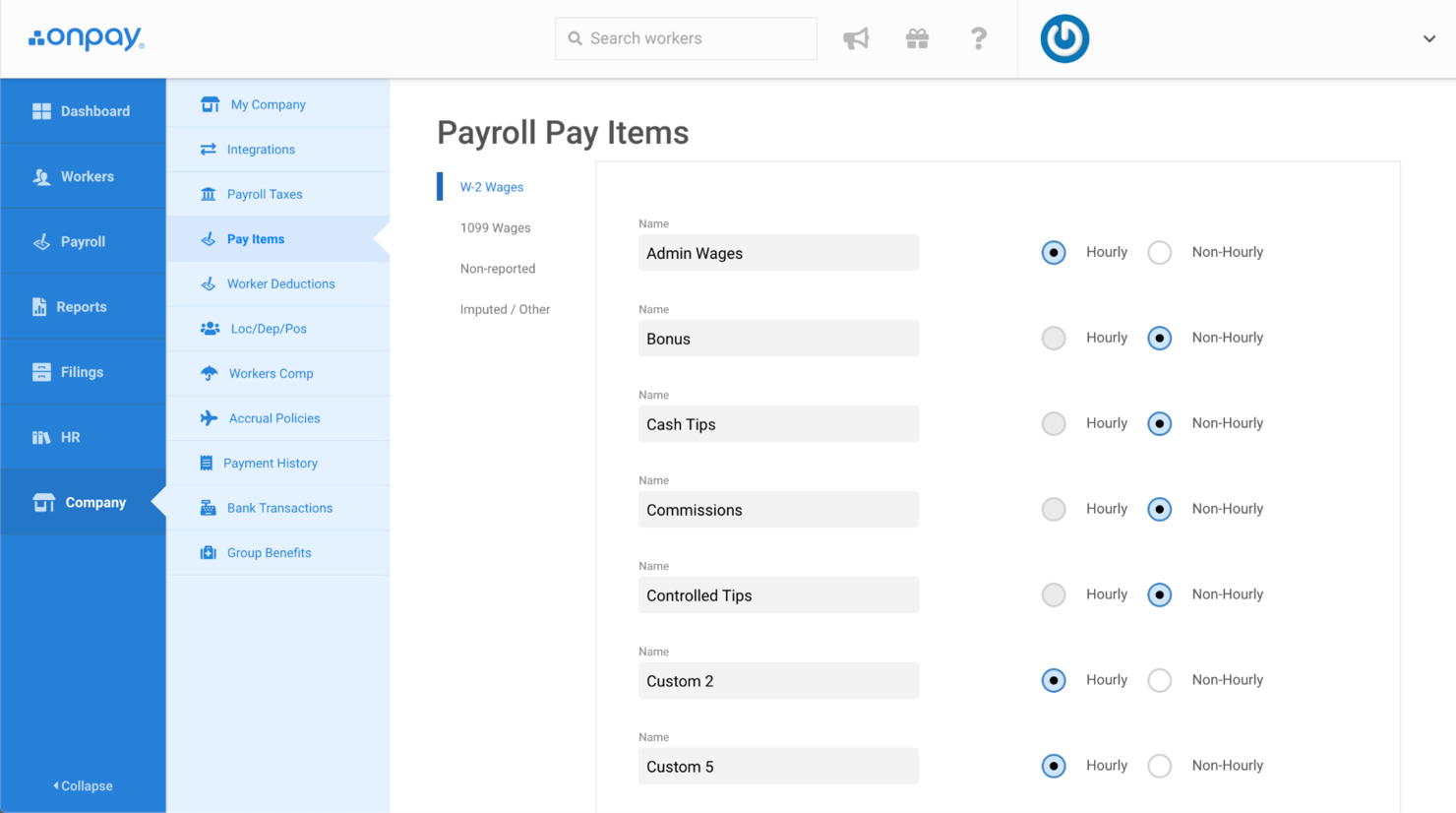
Garnishments can be set up with a couple of clicks, with details automatically reported in paystubs and expense reports. OnPay also allows you to easily incorporate extra payments such as tips or commissions. The system includes advanced reporting, with the option to filter by employee type, location, or department.
OnPay integrates with popular platforms such as Deputy, PosterElite, QuickBooks Desktop, QuickBooks Online, QuickBooks Time, Xero, and When I Work.
Pros and Cons
Pros:
- Unlimited payroll runs at no extra cost
- Affordable on a small budget
- Includes a wide range of HR features
Cons:
- Limited benefits enrollment features
- Limited tier plans
- No live phone support on weekends
Other Automated Payroll Software
Here are a few more worthwhile options that didn’t make the best payroll software solutions list but are still worth checking out:
- TimeTrex
For integrating time and attendance tracking
- Patriot Payroll
For US-based businesses
- Square Payroll
For built-in time tracking
- SurePayroll
For paying household staff
- Insperity
For SMBs
- Wagepoint
For flexible deposit schedules
- UKG Pro Payment Service
For scalable payroll technology
- Rippling
For one-click payroll runs
- Papaya Global
For payroll auditing with AI
- Paychex Flex
For a hands-free payroll experience


Related HR Software Reviews
If you still haven't found what you're looking for here, check out these other related tools that we've tested and evaluated:
- HR Software
- Payroll Software
- Recruiting Software
- Employer of Record Services
- Applicant Tracking Systems
- Workforce Management Software
How I Evaluate Automated Payroll Software
I evaluate payroll tools on two layers: core requirements like automated tax filing and direct deposit, then the differentiators that reveal whether a tool fits your team's size and complexity.
Core Functionality (Table Stakes For This List)
When I'm selecting tools for my list, I rank each one on a scale from 0 (does not offer the functionality) to 5 (excels in this area) for each core functionality listed below. Then, I calculate the tool's total score into a percentage. Each tool needs to achieve a minimum total score of 75% to be considered for inclusion.
- Automated Payroll Processing: I check whether the platform can handle scheduled pay runs end-to-end, including variable pay types like bonuses, commissions, and shift differentials.
- Tax Compliance & Filing: Each tool should calculate, file, and remit payroll taxes across relevant jurisdictions and generate year-end forms like W-2s or 1099s automatically.
- Direct Deposit & Payment Methods: I look for multiple disbursement options beyond standard ACH, such as pay cards or same-day deposit, to accommodate diverse workforce needs.
- Time & Benefits Data Integration: The payroll tool should sync hours, PTO balances, and benefits deductions from connected systems so data flows into pay runs without manual re-entry.
- Employee Self-Service Portal: I evaluate whether employees can independently access pay stubs, download tax documents, and update their own withholding or banking details.
- Payroll Reporting & Audit Trails: Strong tools let you pull custom reports, export general ledger entries, and trace every change made to a pay run back to a specific user and timestamp.
Once I have a list of tools that meet this criteria, I consider what sets each platform apart.
Differentiating Factors (What Sets Vendors Apart)
Here's how I compare and contrast different vendors:
Standout Features
Global payroll support matters if your team spans multiple countries—I look for localized tax handling and multi-currency payments built into the platform. Contractor management is another differentiator, especially for teams juggling W-2 employees and 1099 workers in the same system. Earned wage access is worth evaluating too, since it gives employees flexibility to draw pay before the scheduled payday and can make a real difference in retention.
Beyond Features
Tax filing accuracy guarantees are a big one—I check whether the vendor covers penalty costs if their system makes an error, because a missed filing deadline can get expensive fast. Integration depth also matters. A payroll tool that connects natively with your accounting platform and benefits carriers saves hours of reconciliation each pay cycle. I also evaluate implementation support, particularly whether the vendor helps migrate historical payroll data and offers access to payroll specialists during setup.
How to Choose Automated Payroll Software
Automated payroll software can help you streamline your payroll processes to remove the need for labor-intensive manual oversight. To help you figure out which automated payroll software best fits your needs, you need to pinpoint your key users and document their specific challenges first.
As you work through your own unique software selection process, keep the following points in mind:
- What problem are you trying to solve - Start by identifying the challenges you're trying to overcome. This will help you clarify the key features and functionalities the payroll software needs to provide.
- Who will need to use it - To evaluate cost and requirements, consider who will use the software and how many licenses you'll need. You'll need to evaluate if it'll just be your HR professionals, select accounting staff, or entire departments that will require access. Once that's clear, it's also useful to rank the needs of your different users to identify your key priorities for your payroll power users to ensure they're met.
- What other tools it needs to work with - Clarify what tools you're replacing, what tools are staying, and the tools you'll need to integrate with, such as accounting, time-tracking, or HR software. You'll need to decide if the tools will need to integrate together, or alternatively, if you can replace multiple tools with one consolidated payroll software.
- What outcomes are important - Review the capabilities you want to gain or improve, and how you will measure success. For example, you may want to provide more flexible payment options for your employees, such as on-demand pay. You could compare payroll software features until you’re blue in the face but if you aren’t thinking about the outcomes you want to achieve, you'll waste a lot of valuable time.
- How it would work within your organization - Consider the software selection alongside your existing workflows and systems. Evaluate what's working well, and any problem areas that need to be addressed.
Remember every business is different — don’t assume that an automated payroll system will work for your organization just because it's popular.
What is Automated Payroll Software?
Automated payroll software is a digital system that efficiently handles employee salary calculations, tax deductions, and payment disbursements, ensuring accuracy and compliance. Features include wage calculation, tax withholding, direct deposit processing, compliance with tax laws, benefits management, and generating payroll reports.
What does payroll software do? A company might invest in automated payroll software for accurate, efficient payroll processing, time-saving, compliance with tax laws, error reduction, and better financial record-keeping.
Features of Automated Payroll Software
Investing in a solid payroll platform can transform a traditionally complex and time-consuming task into a streamlined and efficient workflow. Here’s a list of the key payroll software features you should pay attention to as you continue your search:
- Payroll automation: This feature refers to full automation of the payroll process, from calculating pay to distributing wages. By minimizing manual intervention, this feature reduces the chance of human error and frees up time for other tasks.
- Payment options: You might be able to pay employees via direct deposit into their bank account, pay in multiple currencies, or offer same-day and next-day payments for contractors.
- Payroll tax filing: Many solutions will support your tax filing for federal or local taxes with the IRS, CRA, and state or provincial tax-collecting bodies.
- Payroll reports: Tools should offer some basic payroll reporting and analytics capabilities to help you with records keeping and basic payroll tracking.
- Employee benefits administration: The ability to provide employees with health insurance and health benefits, wage garnishments, workers' compensation, and other employee benefits management features.
- Time management: Many platforms offer employee time tracking, PTO management, and scheduling to connect hours directly with payroll processing, ensuring accurate paychecks.
- Employee self-service: Some payroll solutions provide an employee portal or mobile app where staff can access their paystubs, tax forms, and other pay-related documentation.
- HR features and add-ons: Additional HR tools might also be available, like an employee database or customizable employee profiles.
- Security features: Strong security protocols protect sensitive payroll and personal data against breaches. This builds trust among employees and safeguards against potential data theft.
- Mobile accessibility: Mobile app availability allows both managers and employees to access payroll functions on the go. This flexibility improves user engagement and accessibility.
Selecting an automated payroll system with these features will both simplify your payroll processing and ensure compliance and security, paving the way for a more streamlined, error-free payroll workflow. This, in turn, allows you to focus more on core business activities and less on administrative tasks.
Benefits of Automated Payroll Software
Automated payroll software offers numerous advantages for businesses looking to enhance the efficiency and accuracy of running payroll. Here are several benefits you can expect to gain by investing in the best automated payroll software for your business needs:
- Increased Accuracy: Automated payroll software significantly reduces human errors in calculations, especially when integrations with other key systems like time tracking and benefits management platforms are available. This ensures that employees are paid correctly and on time, increasing trust and satisfaction within the workforce.
- Time Savings: Automation speeds up all aspects of the payroll process, from entering hours to processing payments. This frees up your HR staff to focus on more strategic tasks that will benefit your business.
- Cost Efficiency: By automating payroll, organizations may be able to reduce the need for numerous payroll staff, or at least support those staff to use their time more effectively, thus lowering operational costs. It also minimizes losses associated with errors in payroll processing.
- Integrated Reporting & Analytics: Payroll software is often one module within a larger HR management system, allowing users to generate reports on more than just payroll data. For example, you may also be able to run reports to assist with financial planning, budgeting, and decision-making, or monitor details such as employee hours worked during key times to predict future demand.
- Empowered Employees: By offering employee self-service portals, employees are empowered to access their pay statements, tax documents, and personal information whenever they need to. This will reduce the administrative demands on your HR staff, freeing them up to work on other tasks, and give your staff more control over their personal details, providing a smoother experience for simple tasks such as changing addresses or updating bank account details.
As you can see, automated payroll software not only streamlines payroll processing but also brings broader organizational benefits such as improved accuracy, reduced costs, less time spent on payroll processing, and enhanced employee satisfaction.
Costs & Pricing for Automated Payroll Software
Many payroll providers offer various pricing tiers and models to meet the different business needs of startups and small businesses, midsize companies, and large businesses or enterprise organizations. Most payroll software costs follow a subscription model with a price per employee, per month, plus an additional base fee per month. Understanding these options can help you make an informed decision, ensuring you get the best value for your investment and meet your specific payroll requirements.
Plan Comparison Table for Automated Payroll Software
| Plan Type | Average Price | Common Features |
|---|---|---|
| Free | $0 | Basic payroll processing, limited reports, and access for 1 user |
| Basic | $10-20 per month | Payroll processing, tax calculations, and unlimited payroll runs |
| Professional | $25-50 per month | Enhanced reporting, multi-state payroll, and compliance features |
| Enterprise | $50+ per month | Advanced analytics, dedicated support, and custom integrations |
When evaluating different payroll software options, consider how each plan's features align with your current needs and potential future growth. Budget accordingly and look for a plan that provides the essential functions without overextending on unnecessary extras.
Remember, the right plan should offer a balance between functionality and cost, allowing your business to operate efficiently while managing payroll effectively.
Trends for Automated Payroll Software
It's crucial for HR professionals, business leaders, and managers to stay informed about emerging trends. These trends can not only streamline payroll processes but also address key challenges in talent management, compliance, and organizational efficiency.
AI-Powered Payroll Processing
Artificial Intelligence (AI) is revolutionizing payroll software by automating complex calculations and tax compliance.
It addresses the need for efficiency and compliance in organizations, particularly in tech and finance sectors, where precision is paramount. AI's ability to adapt to changing tax laws and perform real-time data analysis reduces human error, ensuring compliance and freeing up HR professionals to focus on strategic roles.
Integrated Talent Management Systems
We're seeing that integrating payroll systems with broader talent management solutions is gaining momentum. We really like this, because the approach is holistic and addresses key needs in talent retention, particularly in sectors like healthcare. Key aspects include:
- Employee Performance and Satisfaction: In industries where these are closely tied to payroll and benefits, integration is crucial.
- Unified Employee Lifecycle Management: From recruitment to retirement, these systems provide a comprehensive view.
- Enhanced Decision-Making and Engagement: Facilitates informed decisions and boosts employee engagement through streamlined processes.
This integration represents a significant shift towards more cohesive and efficient HR management, directly impacting organizational success.
Mobile Payroll Applications
Mobile payroll applications are gaining traction, directly addressing the challenges of hybrid and remote work environments. These applications offer flexibility and accessibility, allowing employees and managers to manage payroll tasks from anywhere.
Note: This is particularly useful for small businesses and startups where agility and adaptability are key to managing a distributed workforce.
Real-Time Payroll Data Analytics
The emergence of real-time analytics in payroll software is reshaping strategic decision-making. This trend is particularly significant for its role in:
- Understanding Compensation Trends: Vital for COOs and CEOs focused on optimizing financial performance.
- Insight into Workforce Costs: Provides a clear picture of financial implications in workforce management.
- Informed Compensation Strategies: Aids in making decisions that directly affect talent retention and organizational growth.
Real-time analytics offer a dynamic tool for leaders to navigate the complexities of payroll and compensation, ensuring informed and effective management strategies.
Pro tip: Dive deeper into HR metrics for successful payroll implementation with our guide that covers 40 different metrics you should be tracking.
For HR and leadership professionals, grasping automated payroll software trends is vital for addressing organizational challenges. These trends enable improved efficiency, compliance, and strategic decision-making, which are essential for organizational success. Keeping up with these developments is key to maintaining a competitive, resilient workplace.
Automated Payroll Software: FAQs
If you have questions about automated payroll software and what it has to offer, these answers to frequently asked questions are a great place to start:
What is an automated payroll system?
Payroll software has come a long way, and pretty much every payroll software provider on the block includes some sort of payroll automation. Payroll and other types of HR automation can benefit your organization by reducing manual workloads, mitigating errors, and streamlining your workflows.
Typical automations you can expect within payroll are integrated time tracking that calculates employee wages based on timesheet data, automatic calculations for taxes and other withholdings, calculations for stat holiday pay and other payroll taxes, the creation of pay statements (pay stubs), and automatic direct deposits.
If your workforce is complex and you need additional customer support, you could also consider a full-service payroll option (sometimes called managed payroll). With full-service payroll, you’re outsourcing your payroll process to a third-party to get it off your plate completely. It’s a good option to know about, especially for small businesses. Often, full-service payroll providers offer additional HR services as well.
What are the main benefits of using an automated payroll system?
There are a number of benefits that come with implementing payroll software. It’s a form of HR support that can alleviate the workload of your in-house HR specialists. An automated payroll system helps businesses manage all the complexities of processing employee salaries, leave entitlements, taxes, compensation, and employee information.
Using a good software package ensures everyone gets paid on time while mitigating risks, errors, and mistakes. It will free staff to work on other matters, manage tax filing, create reports, and allow employees to update their own records.
Are there any free automated payroll software options?
There are some free payroll software options on the market, but for the most part the free options are available as a trial period or a limited version of the tool. There are also some small business payroll software that might provide more cost-effective options. It can be tricky to figure out how to manage payroll as a small business owner, so having tools that are specifically designed for your needs can be a big help.
What software integrations are important for automated payroll software to run smoothly?
The software integrations available in a payroll management platform are super important since they’ll allow you to automate parts of the payroll process that may have to be done manually if not integrated. Automated payroll software should connect with your HRIS/HRMS system, and ideally with your time tracking software and benefits management system. Some also have integrations with employee onboarding tools, ensuring new hires fill out all the paperwork needed to get paid.
How to Choose Automated Payroll Software
Automated payroll software can help you streamline your payroll processes to remove the need for labor-intensive manual oversight. To help you figure out which automated payroll software best fits your needs, you need to pinpoint your key users and document their specific challenges first.
As you work through your own unique software selection process, keep the following points in mind:
-
- What problem are you trying to solve – Start by identifying the challenges you’re trying to overcome. This will help you clarify the key features and functionalities the payroll software needs to provide.
-
- Who will need to use it – To evaluate cost and requirements, consider who will use the software and how many licenses you’ll need. You’ll need to evaluate if it’ll just be your HR professionals, select accounting staff, or entire departments that will require access. Once that’s clear, it’s also useful to rank the needs of your different users to identify your key priorities for your payroll power users to ensure they’re met.
-
- What other tools it needs to work with – Clarify what tools you’re replacing, what tools are staying, and the tools you’ll need to integrate with, such as accounting, time-tracking, or HR software. You’ll need to decide if the tools will need to integrate together, or alternatively, if you can replace multiple tools with one consolidated payroll software.
-
- What outcomes are important – Review the capabilities you want to gain or improve, and how you will measure success. For example, you may want to provide more flexible payment options for your employees, such as on-demand pay. You could compare payroll software features until you’re blue in the face but if you aren’t thinking about the outcomes you want to achieve, you’ll waste a lot of valuable time.
-
- How it would work within your organization – Consider the software selection alongside your existing workflows and systems. Evaluate what’s working well, and any problem areas that need to be addressed.
Remember every business is different — don’t assume that an automated payroll system will work for your organization just because it’s popular.
What's Next?
If you're in the process of researching automated payroll software, connect with a SoftwareSelect advisor for free recommendations.
You fill out a form and have a quick chat where they get into the specifics of your needs. Then you'll get a shortlist of software to review. They'll even support you through the entire buying process, including price negotiations.