
20 Best Employee Experience Software of 2026

10 Best Employee Experience Software Shortlist
Here's my pick of the 10 best software from the 20 tools reviewed.


The best employee experience tools help HR professionals go beyond spreadsheets and gut feelings by giving you data-driven insights into engagement, recognition, and retention. Whether you’re struggling with disengaged employees, high turnover, or clunky manual processes, the right software makes it easier to capture real-time feedback, recognize contributions, and create a culture where people want to stay and perform their best.
These tools help you do the jobs that matter most: measure satisfaction, track performance, manage recognition programs, and turn survey results into meaningful action. They also take the guesswork out of choosing priorities by surfacing trends you might otherwise miss.
As an HR software reviewer with 3+ years of experience at People Managing People, I’ve analyzed hundreds of platforms to find the best employee experience tools available today. In this guide, I’ll cut through the noise so you can find a solution that truly fits your team and helps you build a thriving workplace culture.
Why Trust Our Software Reviews
Best Employee Experience Software: Comparison Chart
This comparison chart summarizes pricing, trial, and demo details for my top employee experience software selections to help you find the best software for your budget and business needs.
| Tool | Best For | Trial Info | Price | ||
|---|---|---|---|---|---|
| 1 | Best for data-driven employee engagement and performance insights | Free trial + free plan + free demo available | From $39/month (billed annually) | Website | |
| 2 | Best for peer-to-peer recognition | Free demo available | From $2 to $5/user/month ($3,000/year minimum) | Website | |
| 3 | Best for continuous performance management | Free consultation available | Pricing upon request | Website | |
| 4 | Best for AI-driven employee experience management | Free 14-day trial + free demo available | Pricing upon request | Website | |
| 5 | Best for evaluating individual competencies to target future skill development | Free demo available | From $2 to $7/employee/month | Website | |
| 6 | Best employee experience tool for customizable challenges and rewards | Free demo available | From $3/user/month | Website | |
| 7 | Best employee experience software for developing high-performance teams | Free demo available | From $11/seat/month | Website | |
| 8 | Best for competitive employee benefits | Free demo available | Pricing upon request | Website | |
| 9 | Best employee experience software for a point-based reward system | Free demo available | Pricing upon request | Website | |
| 10 | Best data-driven tool for measuring engagement and driving performance | Free 14-day trial + free plan available | From $5/user/month (billed annually) | Website |


-

Checkr
Visit WebsiteThis is an aggregated rating for this tool including ratings from Crozdesk users and ratings from other sites.4.5 -
Kudoboard
Visit WebsiteThis is an aggregated rating for this tool including ratings from Crozdesk users and ratings from other sites.4.8 -
Native Teams
Visit WebsiteThis is an aggregated rating for this tool including ratings from Crozdesk users and ratings from other sites.4.9





Best Employee Experience Software Reviews
Below are brief descriptions of each employee experience software system that highlights each system’s best use cases and noteworthy features. I’ve also included screenshots to give you a snapshot of their user interface too.

Best for data-driven employee engagement and performance insights

Sogolytics gives HR teams and business leaders a platform to gather, analyze, and act on employee feedback, helping organizations uncover engagement drivers and address performance challenges with data-backed insights.
Who Is Sogolytics Best For?
Sogolytics is a strong fit for mid-size to large organizations where HR teams need detailed analytics to understand and improve employee engagement across departments.
Why I Picked Sogolytics
I picked Sogolytics as one of the best because of how deeply it connects feedback collection to actionable analytics. What I find most compelling is the Key Driver Analysis feature, which goes beyond surface-level scores to identify the specific factors actually driving engagement or disengagement across teams. I also like the AI Reports capability, which automatically surfaces prioritized action plans from open-ended responses—so instead of spending hours reading through qualitative data, my team gets clear next steps. The dedicated EX dashboard pulls together eNPS, ESAT, and well-being trends in a single real-time view, which makes it much easier to spot patterns and bring data-backed recommendations to leadership.
Sogolytics Key Features
- Employee pulse surveys: Send automated, scheduled pulse surveys to track sentiment shifts across teams over time.
- Employee journey automation: Trigger lifecycle surveys at key milestones—onboarding, stay interviews, and exit—using date-linked Directories.
- Experience Navigator: An AI co-pilot that generates a complete EX program, including lifecycle surveys, pulse checks, and manager playbooks, based on your defined goals.
- Employee wellbeing tracking: Monitor well-being indicators alongside engagement and satisfaction metrics within the EX dashboard.
Sogolytics Integrations
Integrations include Microsoft Teams, Slack, Google Workspace, Salesforce, Zapier, ADP, BambooHR, Workday, Okta, and Microsoft Azure Active Directory.
New Product Updates from Sogolytics

Sogolytics Launches AI-Powered Experience Navigator
Sogolytics introduces Experience Navigator, an AI-powered tool for building strategy and action plans. This update helps teams turn goals into tailored execution plans with relevant metrics and projects in minutes. For more information, visit Sogolytics’ official site.
 .
.

Motivosity helps HR teams and business leaders boost employee engagement and performance by making it easy to recognize achievements, gather feedback, and track workplace sentiment in real time.
Who Is Motivosity Best For?
Motivosity is a good fit for mid-sized companies that want to build a culture of recognition and connection across teams and departments.
Why I Picked Motivosity
Motivosity is on my shortlist because it makes peer-to-peer recognition feel natural rather than performative. I love the values-based recognition model—every appreciation an employee sends is tied to one of your company's core values, so you're not just logging a "nice job" moment, you're actively reinforcing the behaviors that matter. Each employee also gets a monthly monetary allowance to give to peers alongside their thanks, which adds real weight to recognition without putting budget control solely in managers' hands. The company-wide social feed then surfaces all of that activity publicly, so recognition isn't buried in a one-on-one message—it's visible, commentable, and genuinely contagious across the org.
Motivosity Key Features
- Employee engagement surveys: Send pulse surveys to measure team sentiment and track engagement trends over time.
- Manager tools: Give managers a dedicated space to log 1-on-1 notes, set goals, and track direct report milestones.
- Rewards catalog: Let employees redeem their earned funds through a built-in catalog of gift cards and branded merchandise.
- People analytics dashboard: View org-wide engagement data, recognition activity, and participation rates in one reporting view.
Motivosity Integrations
Native integrations are not currently listed.
New Product Updates from Motivosity
Motivosity Introduces Streamlined Notification Controls
Motivosity introduces company-level notification controls for system alerts. This update helps admins reduce noise and improve communication flow. For more information, visit Motivosity's official site.
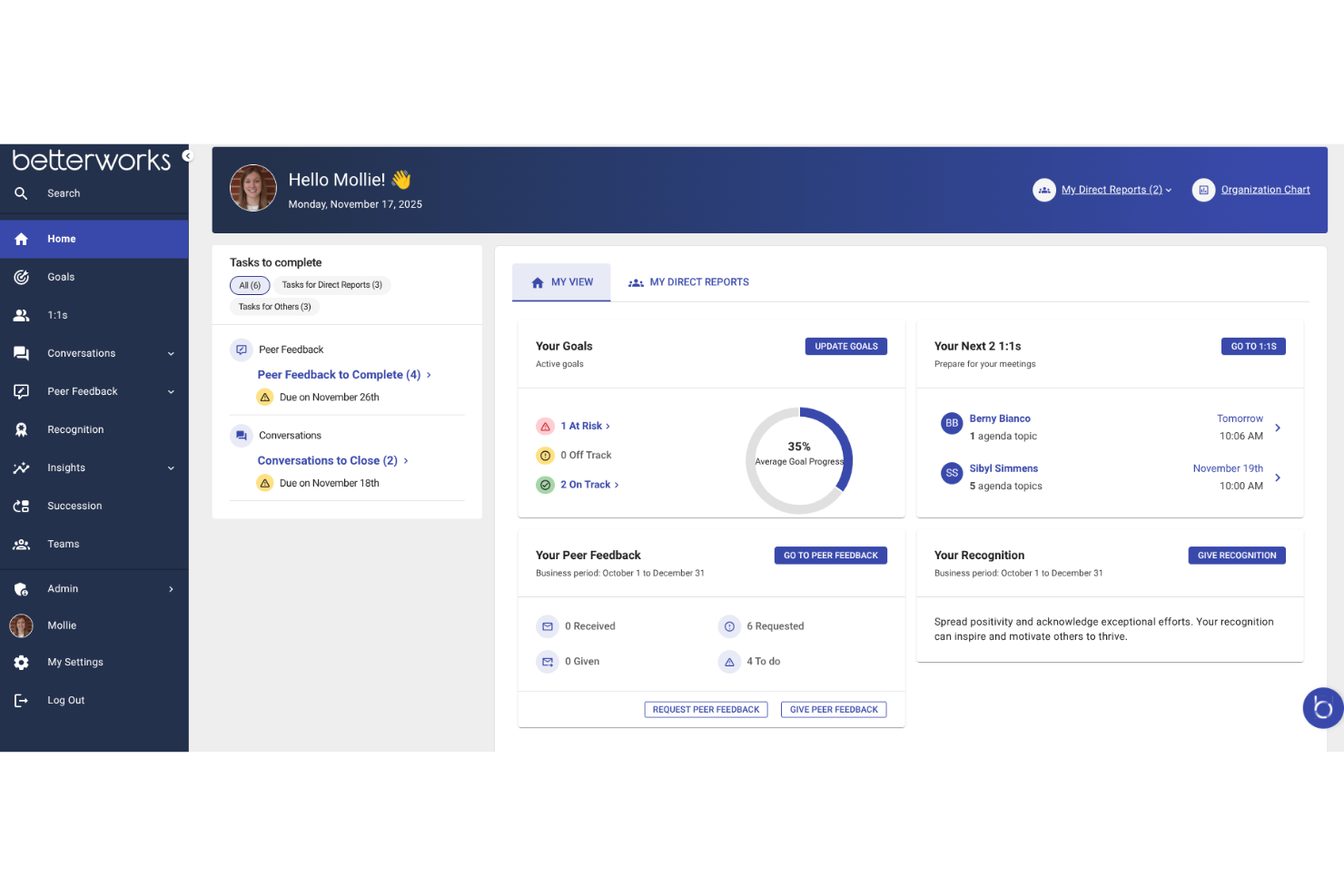
Betterworks helps HR teams and business leaders drive employee engagement and performance by connecting goals, feedback, and development conversations in one platform designed for ongoing growth.
Who Is Betterworks Best For?
Betterworks is a strong fit for mid-size to enterprise organizations that want to replace annual review cycles with ongoing performance conversations and goal tracking.
Why I Picked Betterworks
Betterworks earns its spot on my shortlist because it replaces the annual review cycle with something that reflects how work happens day to day. I like that the Conversations feature lets managers and employees launch check-ins at any point in the cycle, not just at year-end, and that those conversations are automatically tied to live goal progress. During a 1:1, managers aren't relying on memory—they're looking at real data. The AI-powered Goal Assist reviews an employee's job title, past goals, and team priorities to suggest specific, aligned goals, which cuts down on the vague, hard-to-measure objectives that make performance conversations frustrating for everyone.
Betterworks Key Features
- Performance calibration: Run structured calibration sessions that compare employee performance across teams using consistent criteria, reducing bias in evaluation outcomes.
- Pulse surveys: Send short, recurring engagement surveys via email, Slack, or Microsoft Teams, with anonymity thresholds and trend charts to track sentiment over time.
- 360-degree feedback: Collect structured input from peers, direct reports, and external stakeholders like clients or partners, all stored and tied to performance reviews.
- External feedback collection: Let clients, partners, or suppliers submit structured feedback securely without needing a Betterworks account, giving managers a fuller view of employee impact.
Betterworks Integrations
Integrations include Workday, ADP, BambooHR, SuccessFactors, UKG Pro, Jira, Asana, Slack, Microsoft Teams, and Salesforce.
Pros and Cons
Pros:
- Performance tracking monitors employee progress
- User-friendly interface easy to navigate
- Real-time feedback enables recognition
Cons:
- Pricing is high for small businesses
- Mobile app is less functional than web

ThriveSparrow helps HR teams and business leaders in growing organizations measure engagement, gather feedback, and drive performance with data-driven insights and customizable surveys that improve the employee experience.
Who Is ThriveSparrow Best For?
ThriveSparrow is a strong fit for mid-sized companies that want a dedicated platform for employee engagement, performance reviews, and recognition.
Why I Picked ThriveSparrow
ThriveSparrow earns its spot on my shortlist because of how its AI layer, Infer AI, turns raw survey data into decisions rather than just reports. Instead of handing you a dashboard full of charts to interpret yourself, Infer AI reads your engagement and performance data, surfaces themes and sentiment patterns, and generates ready-to-use action plans. I also like the AI sentiment analysis, which digs into open-text responses and maps employee feedback across topics and subtopics—so if career development is quietly driving disengagement in one team, you'll see it clearly rather than buried in a comment thread. The combination of AI-generated summaries and auto-suggested action plans means my team can move from survey close to manager briefing without spending hours decoding results.
ThriveSparrow Key Features
- 360-degree feedback: Collect multi-rater feedback from peers, managers, and direct reports to build a full picture of each employee's performance.
- Pulse surveys: Run automated, recurring surveys to track team sentiment and catch morale shifts before they escalate.
- Goals and OKRs: Set, cascade, and track objectives across teams with live progress visibility and blocker identification.
- Recognition and rewards (Vault): Send peer-to-peer recognition tied to company values and redeem points for global gift cards.
ThriveSparrow Integrations
Integrations include Google Workspace, Microsoft 365, Slack, BambooHR, Workday, ADP, Rippling, Gusto, Zoho People, and SAP SuccessFactors.
New Product Updates from ThriveSparrow

ThriveSparrow Introduces Awards for Formal Recognition
ThriveSparrow introduces Awards, a new feature designed for company-wide recognition of meaningful achievements beyond everyday kudos. Teams can now acknowledge major wins with structured awards that carry visibility, points, and optional approvals. For more information, visit ThriveSparrow's official site.
 .
.
Best for evaluating individual competencies to target future skill development

Performance Pro is a performance management platform designed for HR teams and managers who want to drive employee engagement, support ongoing feedback, and align individual goals with organizational objectives.
Who Is Performance Pro Best For?
Performance Pro is a strong fit for mid-sized organizations where HR teams need a structured, customizable approach to employee performance reviews and development planning.
Why I Picked Performance Pro
Performance Pro earns its spot on my shortlist because of how it handles competency-based development. I like that it links identified competency gaps directly to learning activities through its integrated learning management system, so employees aren't just evaluated and left to figure out next steps on their own. The plans for developing current and desired position competencies mean I can map where someone is today against where they need to be, then automatically assign relevant courses to close that gap. I also find the centralized tracking useful for monitoring development progress and surfacing internal candidates for open roles.
Performance Pro Key Features
- Goal alignment tools: Set individual goals and link them directly to corporate strategies using a configurable goal library with progress tracking.
- Pay for performance: Automate merit increases and manage merit budget allocation tied to employee goal achievement.
- 360-degree reviews: Run multi-rater and 360 review processes alongside standard evaluations to gather feedback from multiple perspectives.
- Real-time engagement analytics: Monitor employee engagement data through the integrated Microsoft Teams app add-on.
Performance Pro Integrations
Integrations include Microsoft Teams, and core payroll or HRIS systems via API or SFTP.
Nectar
Best employee experience tool for customizable challenges and rewards
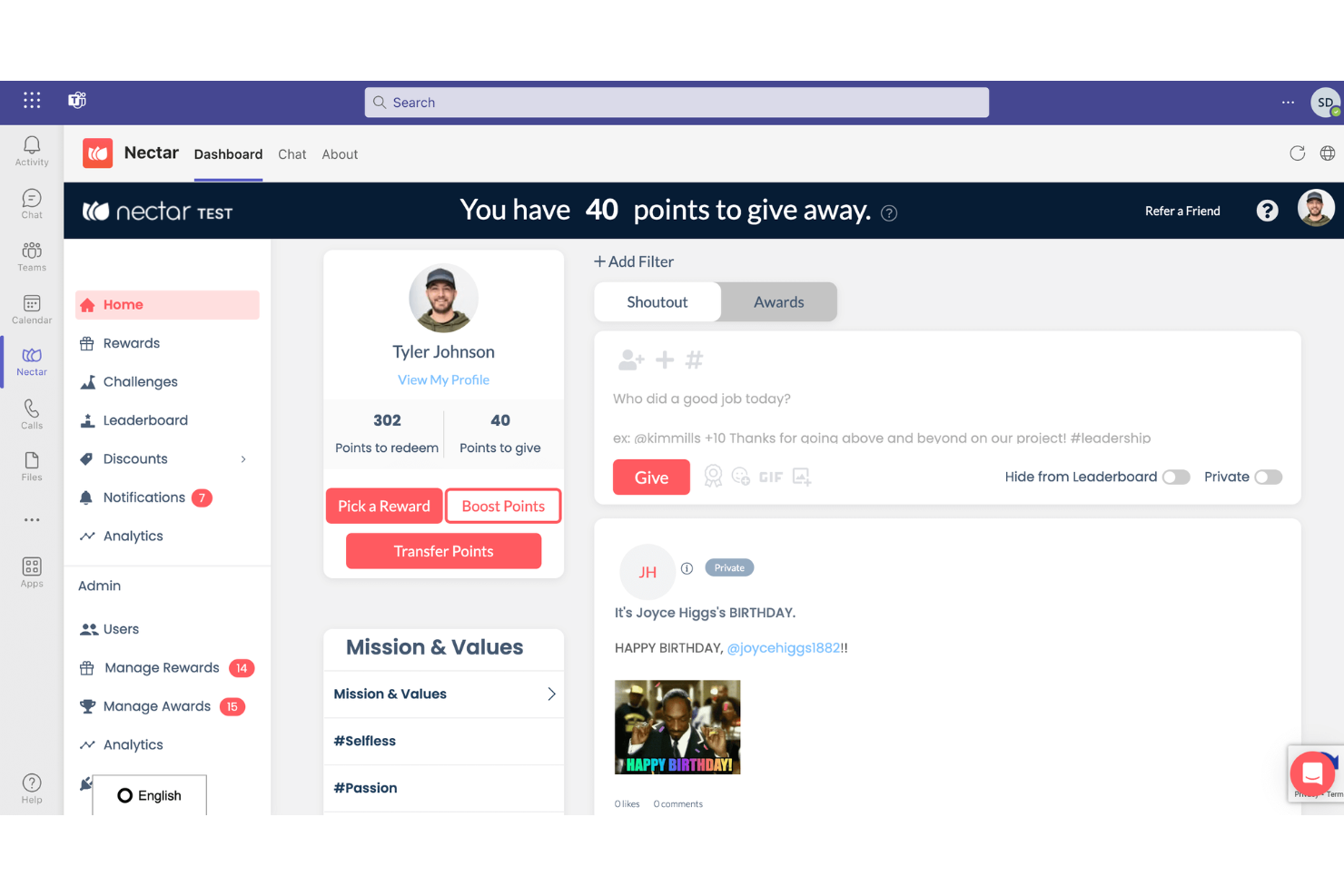
Nectar is an employee recognition and rewards platform designed to boost workplace morale and engagement by simplifying the recognition process. It offers a user-friendly interface, customizable rewards, and robust reporting capabilities, making it suitable for a wide range of businesses.
Why I picked Nectar: Its recognition and rewards platform allows employees to recognize each other's efforts and achievements, promoting a culture of appreciation and teamwork. The platform's robust rewards suite includes options such as Amazon items, branded swag, digital gift cards, and the ability to create custom rewards, providing employees with a variety of incentives that can be tailored to their preferences. This flexibility in rewards helps to keep employees motivated and engaged, as they can choose rewards that are meaningful to them.
Additionally, Nectar offers features such as automated birthday and work anniversary bonuses, exclusive employee discounts, and customizable challenges that align with organizational goals. These features not only help to streamline the recognition process but also contribute to a more cohesive and supportive work environment.
Integrations include BambooHR, ADP, Namely, Paylocity, Zenefits, Workday, Rippling, Gusto, Netsuite, G Suite, Okta, OneLogin, and Azure AD.
New Product Updates from Nectar

Nectar Releases Culture Suite And Engage
Nectar launched two major updates this week to help you build a stronger culture and capture employee insights more effectively. The Culture Suite brings recognition, feedback, and communications together, while Nectar Engage adds AI-powered listening, surveys, and dashboards. For more information, visit Nectar's official site.
Lattice
Best employee experience software for developing high-performance teams

Lattice is a people management platform designed for HR teams and business leaders who want to drive employee engagement, performance, and growth through structured feedback, goal tracking, and development tools.
Who Is Lattice Best For?
Lattice is a strong fit for mid-size to enterprise HR teams that need a structured, scalable approach to performance management and employee development.
Why I Picked Lattice
Lattice earns its spot as one of the best on my shortlist because it connects performance management and employee development in a way that actually builds high-performing teams over time. I particularly like how individual development plans (IDPs) link directly to 1:1 meetings and performance reviews, so development conversations don't get siloed from day-to-day work. The competency matrices are another feature I find genuinely useful—they give employees a clear picture of what's expected at each level, which takes a lot of guesswork out of growth conversations. Lattice's AI-powered growth area recommendations also surface personalized development opportunities based on performance data, goals, and feedback, which helps managers coach with more precision.
Lattice Key Features
- Pulse surveys: Send short, recurring surveys to track employee sentiment in real time and spot engagement trends before they become retention issues.
- Goals & OKRs: Set and track individual, team, and company-level goals with cascading alignment and visual progress dashboards.
- Engagement benchmarking: Compare your engagement scores against similar industries, regions, and company sizes using Mercer-powered benchmark data.
- eNPS tracking: Measure employee advocacy with a single-question Employee Net Promoter Score survey tied directly to your broader engagement data.
Lattice Integrations
Integrations include ADP, BambooHR, Greenhouse, Gusto, HiBob, Jira, Lever, Microsoft Teams, Slack, and Workday.
New Product Updates from Lattice

Lattice Enables Custom Naming Across the Platform
Lattice enables custom naming flexibility, allowing admins to rename key platform terms to match internal language and workflows. This update helps organizations improve adoption and align the platform with company terminology. For more information, visit Lattice’s official site.
 .
.
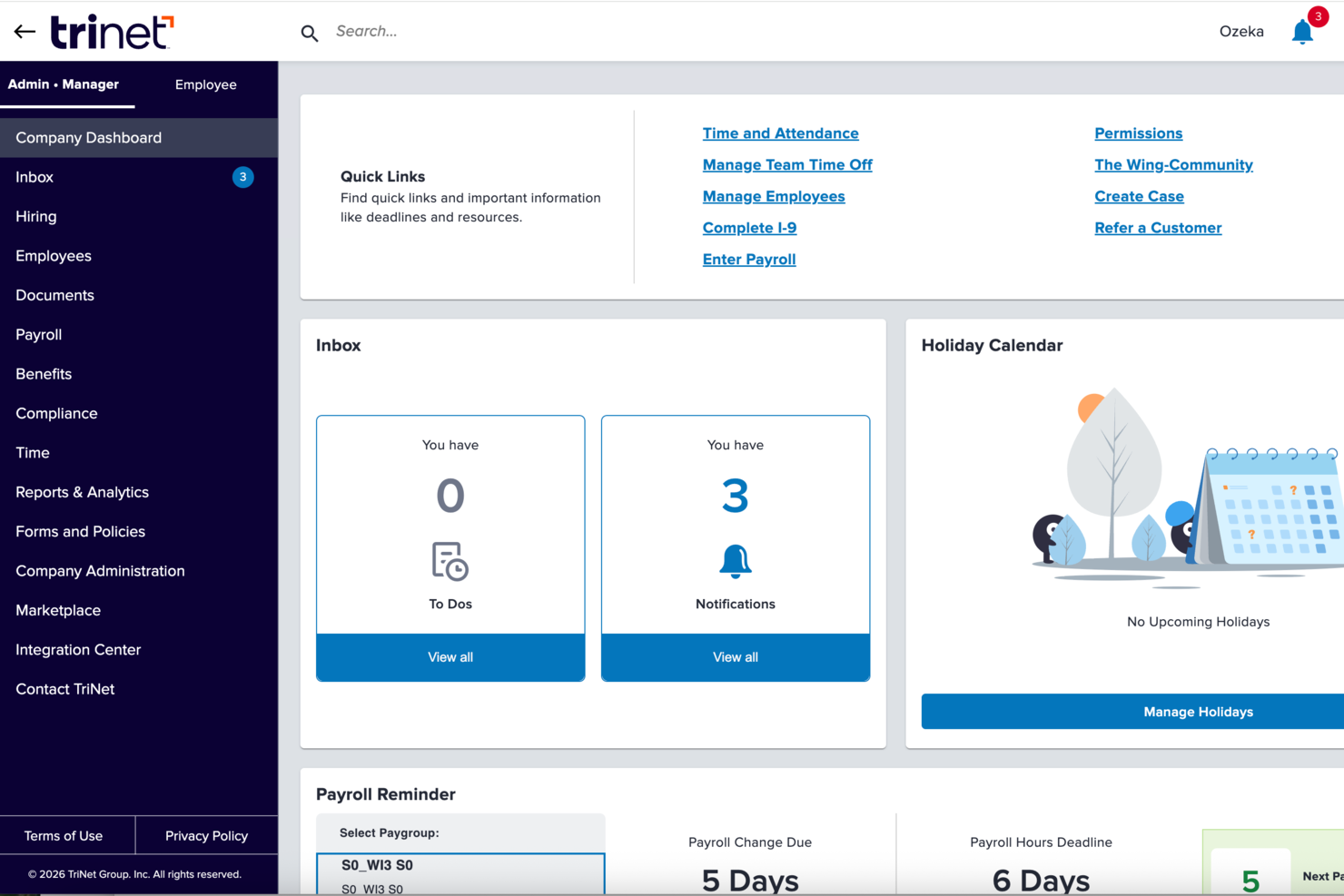
TriNet is a full-service HR platform designed for small and midsize businesses that want to improve employee engagement, streamline HR processes, and offer a modern employee experience with integrated payroll, benefits, and performance management tools.
Who Is TriNet Best For?
TriNet is a strong fit for small and midsize businesses that need enterprise-level HR infrastructure without building a large in-house HR team.
Why I Picked TriNet
TriNet is among the best because it gives small and midsize businesses access to benefits usually reserved for large enterprises. I particularly like that TriNet pools employees across its client companies to negotiate group rates on health, dental, vision, and life insurance—so even a 20-person team can offer coverage that competes with a Fortune 500 employer. The employee self-service portal is useful: employees can review and manage benefit elections without routing every question through HR.
TriNet Key Features
- Performance management tools: Set goals, run performance reviews, and track employee progress directly within the TriNet platform.
- Digital onboarding and e-signatures: Complete new hire paperwork, collect e-signatures, and get employees set up without printing a single form.
- Time off and time tracking automation: Track hours, breaks, and PTO in real time, with automated workflows that feed directly into payroll.
- Multi-state compliance monitoring: Track regulatory changes across all 50 states, with HR expert guidance on location-specific employment laws.
TriNet Integrations
Integrations are offered through the TriNet Marketplace. Specific native integrations aren't listed.
Pros and Cons
Pros:
- ASO model maintains employer status
- Dedicated HR support professionals available
- Access to competitive large group benefits
Cons:
- Interface can feel outdated
- Limited control under PEO model
New Product Updates from TriNet
TriNet HR Plus Adds Vestwell 401(k) Connect Integration
TriNet integrates with Vestwell for 401(k) Connect, streamlining deferrals and contributions via TriNet Payroll to Vestwell. For more information, visit TriNet's official site.
 .
.
Awardco
Best employee experience software for a point-based reward system

Awardco helps HR teams and business leaders create engaging employee recognition programs with customizable rewards, making it easier to boost motivation, celebrate achievements, and drive performance across organizations of any size.
Who Is Awardco Best For?
Awardco is a strong fit for mid-size to enterprise HR teams looking to build structured, scalable recognition programs tied to measurable engagement outcomes.
Why I Picked Awardco
I included Awardco on my shortlist because its point-based reward system is one of the most flexible I've seen. When my team recognizes an employee, those points don't just sit in a closed catalog—they can be redeemed across Amazon's full product range, thousands of gift cards, travel bookings through Priceline, and experiences via Viator, all without extra fees eating into the reward value. I also like the micro incentives feature, which lets you tie point awards to specific behaviors like completing safety training or hitting a wellness goal, so recognition connects directly to performance outcomes. The A-Pay® card lets employees load points onto a physical or digital Visa card and spend them at many retailers, reducing the friction of a limited redemption catalog.
Awardco Key Features
- Peer-to-peer recognition: Send recognition messages to colleagues directly within the platform, with visibility across the team feed.
- Nominations: Run structured employee award nomination programs with customizable criteria and approval workflows.
- Lifestyle spending accounts: Give employees flexible, pre-loaded benefit budgets they can spend on wellness, remote work, or personal development.
- Awardco Engage™: Collect employee feedback and listening data within the same platform used for recognition and rewards.
Awardco Integrations
Integrations include Slack, Microsoft Teams, Outlook, Okta, Workday, ADP, BambooHR, UKG, and SAP SuccessFactors.

Workleap
Best data-driven tool for measuring engagement and driving performance
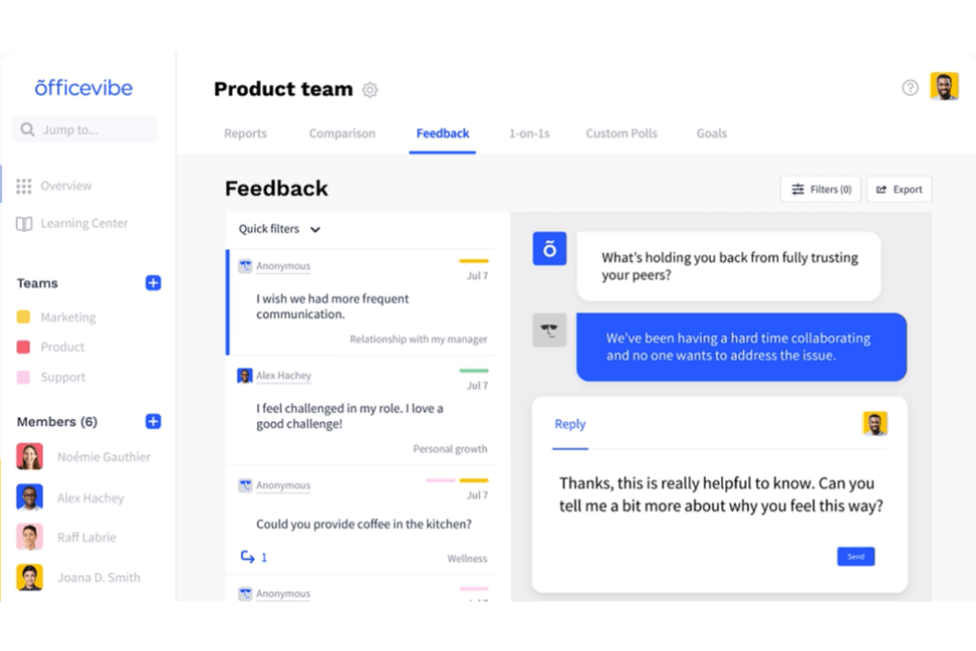
Workleap Officevibe gives HR teams and people managers in growing organizations a way to measure employee engagement, gather feedback, and support performance conversations with actionable insights.
Who Is Workleap Best For?
Workleap Officevibe is a strong fit for mid-sized companies where people managers need structured tools to run regular check-ins and track team engagement over time.
Why I Picked Workleap
Workleap Officevibe earns its spot on my shortlist because of how it turns pulse survey data into something managers can actually act on. I like that every weekly pulse survey feeds into an engagement score broken down by metrics like recognition, personal growth, and relationship with manager—so I can pinpoint exactly where a team is struggling rather than guessing. I also use the custom polls feature to dig deeper into specific issues when the pulse data flags something worth investigating. The anonymous feedback channel adds another layer, giving employees a way to share concerns they might not raise in a 1-on-1.
Workleap Key Features
- 1-on-1 meeting tools: Structure recurring check-ins with agenda templates, talking points, and shared notes between managers and employees.
- Goal tracking: Set, align, and monitor individual and team goals directly within the platform to keep performance conversations grounded in progress.
- Manager insights: Get team-level engagement data surfaced specifically for managers, with suggested actions tied to low-scoring metrics.
- Onboarding surveys: Collect feedback from new hires at key milestones to track early engagement and flag retention risks.
Workleap Integrations
Integrations include Slack, Microsoft 365, Google Workspace, BambooHR, HiBob, ADP Workforce Now, Dayforce, SAP SuccessFactors, Workday, and Zoho People.
Other Employee Experience Tools
Here are a few more worthwhile options that didn’t make the best employee experience software shortlist but are still worth considering:
- Mitratech Perform
For linking employee engagement and performance
- Connecteam
For internal updates and announcements
- PerformYard
Employee experience software for fostering continuous feedback
- Kudoboard
For collaborative employee celebrations
- Sloneek
For 360 degree feedback
- Effy AI
For AI-first employee experience in SMBs
- Confetti
For live-hosted team-building events
- Workvivo
For creating a social environment to foster employee recognition
- Vantage Circle
For automated employee recognition
- Enboarder
For experience driven communication workflows


Related HR Software Reviews
If you still haven't found what you're looking for here, check out these other related tools that we've tested and evaluated:
- HR Software
- Payroll Software
- Recruiting Software
- Employer of Record Services
- Applicant Tracking Systems
- Workforce Management Software
Selection Criteria for Employee Experience Software
Wondering what I looked for when selecting the best employee experience platforms for this list? Here’s a summary of my evaluation and selection criteria:
Core Functionalities (25% of total score): To be considered for inclusion in this list, each solution had to fulfill these common use cases first:
- Deliver real-time employee feedback and sentiment analysis
- Provide automated employee engagement tools and pulse surveys
- Enable robust performance management systems
- Integrate seamlessly with existing HR software ecosystems
- Offer intuitive dashboards for tracking engagement and performance
Additional Standout Features (25% of total score): To help me find the best software out of numerous available options, I also kept a keen eye out for unique features, including the following:
- Advanced AI-driven analytics for predictive insights on turnover and satisfaction
- Sentiment tracking tools that integrate with chat platforms like Slack or Teams
- Customizable workflows to align recognition programs with company values
- Gamified engagement systems to drive participation in surveys or initiatives
- Employee listening tools that allow nuanced feedback through multimedia submissions
Usability (10% of total score): To evaluate the usability of each system, I considered the following:
- Intuitive navigation for non-technical users
- Drag-and-drop interfaces for performance reviews and survey design
- Mobile-friendly apps for deskless and remote workers
- Role-based access controls for administrators, managers, and employees
- Simple integrations setup with third-party platforms
Onboarding (10% of total score): To get a sense of each software provider's customer onboarding process, I considered the following factors:
- Interactive product tours to guide new users through key features
- Extensive libraries of training videos and help documentation
- Pre-built templates for surveys and recognition programs
- Webinars and live chat support for onboarding sessions
- Migration tools for importing existing employee data efficiently
Customer Support (10% of total score): To evaluate the level of customer support each vendor offered, I considered the following:
- 24/7 customer service availability through chat, email, or phone
- Dedicated account managers for enterprise clients
- Knowledge base and FAQs addressing common user questions
- Community forums for peer-to-peer support and best practices
- Proactive follow-ups to ensure user satisfaction post-deployment
Value for Price (10% of total score): To gauge the value of each software, I considered the following factors:
- Transparent pricing structures without hidden fees
- Scalable plans for small businesses to enterprise-level organizations
- Discounts or incentives for long-term contracts
- Flexible subscription models with add-on feature options
- Features offered in free trials or freemium versions
Customer Reviews (10% of total score): Evaluating customer reviews is the final element of my selection process, which helps me understand how well a product performs in the hands of real users. Here are the factors I considered:
- Consistent praise for ease of use and impact on employee engagement
- Positive reviews on customer service responsiveness and expertise
- High ratings for reliability and system uptime
- Detailed reviews highlighting unique features users found valuable
- Evidence of widespread adoption across industries and company sizes
Using this assessment framework helped me identify the software that goes beyond basic requirements to offer additional value through unique features, intuitive usability, smooth onboarding, effective support, and overall value for price.
What is Employee Experience Software?
Employee experience software is a digital tool that helps HR teams and managers improve employee engagement, satisfaction, and retention. It centralizes feedback, recognition, and performance insights so organizations can understand employee needs and act on them quickly.
These tools replace manual processes and scattered surveys with a streamlined system for tracking morale, collecting feedback, and addressing workplace challenges. By making employees feel heard and supported, they help reduce turnover, boost productivity, and build a stronger workplace culture.
Features of Employee Experience Tools
Employee experience software is still an emerging category on the market, so these platforms vary a bit in their core functionality. Keeping that in mind, here are the most important features to look for, which kept coming up in my research:
- Employee surveys: Engagement survey tools to collect employee feedback and measure employee engagement metrics like wellbeing and peer relationships.
- Real-time feedback: Rapid two-way communication to dig deeper into feedback and derive actionable insights for improving company culture.
- 360-degree feedback: The ability to collect feedback about employee performance from peers, to help inform performance reviews and goal-setting.
- Performance management: Some platforms offer goal tracking tools, performance evaluation structures, and other performance-related features.
- Recognition tools: Forums to facilitate peer recognition, kudos boards, and automated anniversary and milestone recognition are sometimes available.
- Employee rewards: The ability to distribute rewards like cash bonuses, gift cards, company swag, and other incentives.
- Employee lifecycle management: Some tools help you manage things like pre-employment testing, new hire onboarding, and offboarding. This includes tracking employee retention and turnover.
- Reporting tools: Analytics dashboards are typically included to help you measure and track engagement levels, employee satisfaction rates, eNPS scores, and other key employee experience metrics. Some AI employee-engagement tools might even include sentiment analysis.
- Software integrations: It’s important that your employee experience solution connects with your other HR tools, including human resource information systems (HRIS), employee engagement software, employee management systems, and other common HR and communication tools. Many employee experience and engagement platforms also integrate with project management platforms like Jira and Asana, and intranet tools like Confluence and Notion.
By choosing a platform with these features, you'll gain a comprehensive set of tools to manage all aspects of your employee's experience, including feedback collection tools, rewards, and performance management.
Related read: Reviews of the Best Employee Incentive Software
Costs & Pricing for Employee Experience Software
Employee experience software offers tiered pricing plans designed for different business sizes and needs. HR software pricing often depends on the number of employees, the level of customization required, and the depth of features included.
Below is an overview of common plan options and their pricing, to help you identify which option best suits your organization.
Plan Comparison Table for Employee Experience Software
| Plan | Average Price | Common Features |
|---|---|---|
| Free Plan | $0 | Basic surveys, limited analytics, employee feedback collection, and up to 10 users. |
| Basic Plan | $2-$5 per user/month | Employee pulse surveys, engagement tracking, performance reviews, and email support. |
| Standard Plan | $6-$10 per user/month | Customizable dashboards, sentiment analysis, manager insights, and priority support. |
| Premium Plan | $12-$15 per user/month | Advanced reporting, integrations with HR systems, recognition programs, and API access. |
| Enterprise Plan | Custom pricing (varies) | Dedicated account manager, advanced AI-driven analytics, multilingual support, and tailored onboarding. |
When selecting a plan, consider your organization's size, budget, and specific feature needs. You may want to start with a free or basic plan to test functionality, then scale up as your requirements grow. However, while free plans can be a good starting point, paid plans offer advanced functionality to better meet the needs of growing organizations.
FAQ: Answering Questions About Employee Experience (EX)
Here are some questions that often come up when it comes to employee experience:
What are the benefits of an employee experience software?
Employee experience software helps you capture feedback through surveys, monitor engagement in real time, and pinpoint areas of improvement using analytics. It centralizes employee sentiment data, making it easier to identify patterns that affect morale, productivity, and retention. Many platforms also automate recognition programs and streamline communication, creating a more responsive and engaged workplace for teams of any size.
Depending on the type of solution you opt for, here are some benefits you might see:
- Measuring, understanding, and tracking employee experience KPIs with pulse surveys.
- Analyzing employee feedback and spotting trends in employee sentiments over time.
- Having data to back new HR initiatives like policy updates, workspace improvements, company events, and more.
- Automating tasks like data collection and management for your HR professionals.
- Setting up smart notifications for when core engagement metrics fluctuate so you can take action swiftly.
- Structuring clear performance evaluation structures, guiding managers on how to conduct performance reviews effectively.
How can employee experience software help reduce turnover?
By using employee experience software, you can detect early signs of disengagement and address them proactively. The software gathers frequent feedback and uncovers issues driving turnover, such as poor management or lack of growth opportunities. Real-time alerts, sentiment analysis, and anonymous survey results empower you to make timely changes–whether that’s offering new development programs or addressing workplace concerns–leading to higher retention.
How do I measure the ROI of employee experience software?
To measure ROI, compare turnover rates, engagement survey results, and productivity metrics from before and after implementation. Calculate the savings from reduced attrition costs and improved employee satisfaction. You can use software analytics to track these KPIs over time, combining quantitative data like retention or survey scores with qualitative feedback from employees to demonstrate value to leadership.
How does employee experience play into employee evaluations and performance?
Employee experience shapes how employees view their growth, support, and opportunities at work. With dedicated software, you can gather regular feedback, helping managers address issues or recognize achievements before formal evaluations. This ongoing input allows you to create more targeted development plans, improve performance conversations, and ensure evaluations are fair and comprehensive.
When employees have positive experiences at work—like feeling valued, having clear communication, and getting the support they need—they’re more likely to be engaged, motivated, and productive. This can lead to better performance reviews because they are more focused and committed to their job. On the other hand, poor experiences, such as a lack of feedback or feeling unappreciated, can hurt performance and show up in evaluations.
What features should I look for in employee experience platforms for a distributed workforce?
Prioritize platforms with mobile compatibility, customizable survey tools, and integrations with daily communication apps like Slack or Microsoft Teams. Look for multilingual support, user-friendly dashboards, and real-time pulse surveys. For international or remote teams, features like anonymous feedback, asynchronous check-ins, and automated reporting help you understand and act on engagement no matter where your employees are.
What integrations should employee experience platforms support?
Seek out platforms that connect seamlessly with your HRIS, payroll, performance management, and communication tools. Integrations with onboarding, learning management systems, and rewards platforms enable data to flow easily and reduce manual admin work. This ensures your organization has a unified view of employee data and can automate processes like surveying or recognizing employees, boosting efficiency and user adoption.
How do you drive consistent adoption of employee experience tools across departments?
Consistent adoption starts with educating both leaders and staff on the tool’s benefits and practical uses. Launch the platform with clear training sessions, ongoing support, and easily accessible resources. Share early wins—like improved engagement scores or positive feedback—to build momentum. Encourage department-specific customization and regularly collect feedback about the tool’s usability, so you can adapt implementation and maximize engagement over time.
Creating an Exceptional Employee Experience
Crafting the experience employees will have with your organization takes time. Using software can help you understand what kind of employee experience you’re currently offering. From there, you can double down on what’s working really well — and address what isn’t.
Hopefully you now have a better understanding of what kind of employee experience software you’re looking for, and how you’ll use it.
What’s Next:
If you're in the process of researching employee experience software, connect with a SoftwareSelect advisor for free recommendations.
You fill out a form and have a quick chat where they get into the specifics of your needs. Then you'll get a shortlist of software to review. They'll even support you through the entire buying process, including price negotiations.