
33 Best Payroll Software for Small Businesses in 2026

20 Best Payroll Software for Small Businesses Shortlist
Here's my pick of the 20 best software from the 33 tools reviewed.


Managing payroll can be a headache for small business owners. You face challenges like staying compliant with tax laws, ensuring timely payments, and handling employee records. Payroll software steps in to ease these burdens, offering a way to automate tedious tasks and minimize errors.
I've spent years testing and reviewing software to help you make informed decisions. My goal is to share unbiased insights into the best payroll solutions that can simplify your operations.
In this article, I'll guide you through my top picks, focusing on their unique features and benefits. Whether you're looking for affordability, ease of use, or specific functionalities, you'll find a solution that fits your needs. Let's dive into the options that can make payroll management less of a chore for you and your team.
Why Trust Our Software Reviews
We’ve been testing and reviewing HR software systems since 2019. As HR experts ourselves, we know how critical and difficult it is to make the right decision when selecting software.
We invest in deep research to help our audience make better software purchasing decisions. We’ve tested more than 2,000 tools for different HR management use cases and written over 1,000 comprehensive software reviews. Learn how we stay transparent & our software review methodology.
Best Payroll Software for Small Businesses Summary
This comparison chart summarizes pricing details for my top payroll software for small businesses selection to help you find the best one for your budget and business needs.
| Tool | Best For | Trial Info | Price | ||
|---|---|---|---|---|---|
| 1 | Best for global payments and compliance | Free demo available | From $5/employee/month | Website | |
| 2 | Best for unlimited payroll runs | Free demo available | From $49/month + $6/user/month (billed annually) | Website | |
| 3 | Best for payroll management without HR staff | Free demo available | Pricing upon request | Website | |
| 4 | Best for multiple payment options | Free demo available | Pricing upon request | Website | |
| 5 | Best for bundled payroll and HR support | Free demo available | Pricing upon request | Website | |
| 6 | Best for automatically calculating deductions | 90-day free trial available | Pricing upon request | Website | |
| 7 | Best for 24/5 dedicated support | Free demo available | Pricing upon request | Website | |
| 8 | Best for small businesses in 170+ countries | Free plan + free demo available | From $199/person/month | Website | |
| 9 | Best full-service payroll software | 30-day free trial available | From $49/base/month + $6/worker/month | Website | |
| 10 | Best for automated tax calculations | Free demo available | Pricing upon request | Website | |
| 11 | Best for real-time payroll updates | Free demo available | Pricing upon request | Website | |
| 12 | Best for personalized HR guidance | Free demo available | From $99/month | Website | |
| 13 | Best for a secure online portal | 30-day free trial | From $30/user/month | Website | |
| 14 | Best for automating complex payroll processes | 30-day free trial | From $50/month | Website | |
| 15 | Best for US companies | 30-day free trial available | From $8.50/month + $2 per employee/month | Website | |
| 16 | Best for local and international payments | Free demo available | Pricing upon request | Website | |
| 17 | Best for flexible payroll solutions | Free demo available | Pricing upon request | Website | |
| 18 | Best for Canadian small businesses | Free demo available | Pricing upon request | Website | |
| 19 | Best for tax filing documentation | 14-day free trial | From $10/user/month | Website | |
| 20 | Best for scalable payroll | Up to 6 months free | Flat user pricing, upon request | Website |


-

Checkr
Visit WebsiteThis is an aggregated rating for this tool including ratings from Crozdesk users and ratings from other sites.4.5 -
Kudoboard
Visit WebsiteThis is an aggregated rating for this tool including ratings from Crozdesk users and ratings from other sites.4.8 -
Native Teams
Visit WebsiteThis is an aggregated rating for this tool including ratings from Crozdesk users and ratings from other sites.4.9





Best Payroll Software for Small Businesses Reviews
Below are my detailed summaries of the best payroll software for small businesses that made it onto my shortlist. My reviews offer a detailed look at the key features, pros & cons, integrations, and ideal use cases of each tool to help you find the best one for you.


Deel is built for companies hiring across multiple countries that need help managing payroll, compliance, and contractor payments in one place. It’s a strong fit for small businesses expanding internationally or working with distributed teams that need consistent, compliant pay practices.
Why I Picked Deel
I picked Deel because it gives you an easy way to manage payroll and compliance for global employees and contractors without relying on multiple local vendors. You can handle country-specific taxes, mandatory documents, and localized contract terms through prebuilt templates and automated checks.
Deel also helps your team pay people in their local currency through its built-in payments infrastructure, reducing manual work and conversion errors. I like that you can store, update, and sign required documents directly in the platform, which lowers compliance risk. For smaller businesses scaling into new markets, these tools remove much of the admin typically handled by in-country experts.
Deel Key Features
Here are some key features worth highlighting:
- Localized Contract Templates: Prebuilt, country-specific agreements with automatic updates for regulatory changes.
- Global Payments Infrastructure: Pay employees and contractors in 100+ currencies through Deel’s internal payment network.
- Document Collection & Compliance Checks: Automatically request, track, and store required compliance documents.
- Employee Payroll Profiles: Centralized records for taxes, deductions, benefits, and pay history across countries.
Deel Integrations
Integrations include QuickBooks, Xero, Netsuite, BambooHR, Workday, Greenhouse, Lever, Gusto, Expensify, and Zapier.
Pros and Cons
Pros:
- Handles cross-border payroll with built-in compliance checks
- Localized contract templates reduce legal review needs
- In-house experts available for country-specific guidance
Cons:
- Limited native benefits options in certain countries
- Reporting customization is more constrained than HRIS suites


Gusto is built for small to mid-sized U.S. businesses that want simpler, more frequent payroll processing without surprise fees. It gives you full-service payroll plus contractor support and makes it easier to stay tax-compliant across states.
Why I Picked Gusto
I picked Gusto because it lets you run unlimited payrolls each cycle—and you won’t pay for extra runs since every plan includes unlimited payroll runs. It also automatically calculates, withholds, and files federal, state and local payroll taxes for you, which is a huge relief if you don’t have a dedicated payroll team.
I like that it supports both employees and contractors across all 50 states, giving you flexibility as your hiring footprint grows, and the mobile-friendly setup and employee self-service tools make it easy for team members to view paystubs or update info without your intervention.
Finally, because it hooks into your accounting, time-tracking and benefits systems, you can avoid duplicate data entry when payroll touches other parts of your workflow.
Gusto Key Features
Here are some key features worth highlighting:
- Unlimited Payroll Runs: Run payroll as often as you like—regular cycle or off-cycle—without extra fees.
- Automatic Tax Filing: Calculates and files W-2s, 1099s, and taxes for all 50 states, reducing risk of penalties.
- Employee Self-Service Portal: Team members can view payslips, tax documents, and update personal info via the app or web.
- Native Integrations: Sync payroll with your accounting, time-tracking and HR tools to reduce manual work and improve accuracy.
Gusto Integrations
Integrations include QuickBooks Online, Xero, Expensify, Breezy HR, Greenhouse, When I Work, Sapling and Trainual.
Pros and Cons
Pros:
- Broad native integrations
- Unlimited payroll runs included in all plans
- Automatic federal, state and local tax filing
Cons:
- Per-person pricing becomes costly as your team grows
- Limited workflow automations compared to some competitors.
New Product Updates from Gusto

Gusto Enhances Benefits Renewals with Personalized Insights
Gusto introduces a smarter benefits renewal process with personalized insights and benchmarking. This update helps businesses make more informed decisions when renewing coverage. For more information, visit Gusto’s official site.


Paylocity is designed for small businesses that want accurate payroll without needing a full HR team. It centralizes payroll, employee data, and workforce insights so you can manage day-to-day tasks while keeping everything compliant.
Why I Picked Paylocity
I picked Paylocity because it helps you handle payroll with fewer manual steps by pairing automation with built-in compliance checks. For example, you can review pay runs using customizable dashboards that show the metrics that matter most to your team.
I also like that employees can manage their own information—such as pay stubs or time-off requests—through a self-service portal, and its mobile access makes it easy for managers and employees to take action from anywhere.
For small businesses without dedicated HR staff, these tools make payroll more manageable and consistently accurate.
Paylocity Key Features
Here are some key features worth highlighting:
- Employee Self-Service: Lets employees update personal information, access pay stubs, and request time off.
- Performance Management: Provides tools for tracking goals and employee progress throughout the year.
- Workforce Insights: Offers dashboards that surface patterns in attendance, overtime, and workforce trends.
- Mobile Access: Allows your team to complete payroll-related tasks from the Paylocity mobile app.
Paylocity Integrations
Integrations include QuickBooks, Xero, ADP, BambooHR, Kronos, Salesforce, Microsoft Dynamics, Workday, Greenhouse, and Slack.
Pros and Cons
Pros:
- Mobile app supports on-the-go approvals and updates
- Employee self-service cuts down on admin requests
- Automated tax calculations reduce manual prep work
Cons:
- Requires training for new users
- Complex initial setup


Paycor is designed for small and midsize businesses that want flexible payroll tools with multiple payout options. It helps your team run payroll accurately while managing compliance obligations, making it a strong fit for companies that need reliable tax handling and clear visibility into payroll activity.
Why I Picked Paycor
I picked Paycor because it gives your team a dependable way to manage payroll while staying compliant with federal, state, and local tax rules. You can automate key tasks—like calculating wages, deductions, and filings—so payroll runs stay consistent even as your team grows.
I also like that it supports multiple payment formats, including direct deposit, pay cards, and on-demand pay, which helps you meet different employee preferences, and its reporting tools give you quick insights into labor costs, letting you make timely decisions without digging through spreadsheets.
For small businesses without a full HR department, these built-in safeguards and flexible payment choices make a meaningful difference.
Paycor Key Features
Here are some key features worth highlighting:
- Multiple pay options: Offer direct deposit, pay cards, and earned-wage access to fit employee needs.
- Automated tax filing: Calculates, files, and pays payroll taxes on your behalf to reduce compliance risks.
- Custom reporting: Build payroll and labor-cost reports to track trends and support financial planning.
- Employee self-service: Let staff update personal info, view pay stubs, and access tax forms without admin involvement.
Paycor Integrations
Integrations include QuickBooks, Xero, BambooHR, Workday, Gusto, Expensify, Kronos, Salesforce, and NetSuite.
Pros and Cons
Pros:
- Customizable payroll options
- Detailed analytics and reports
- Comprehensive compliance tools
Cons:
- Occasional slow system updates
- Limited mobile app features
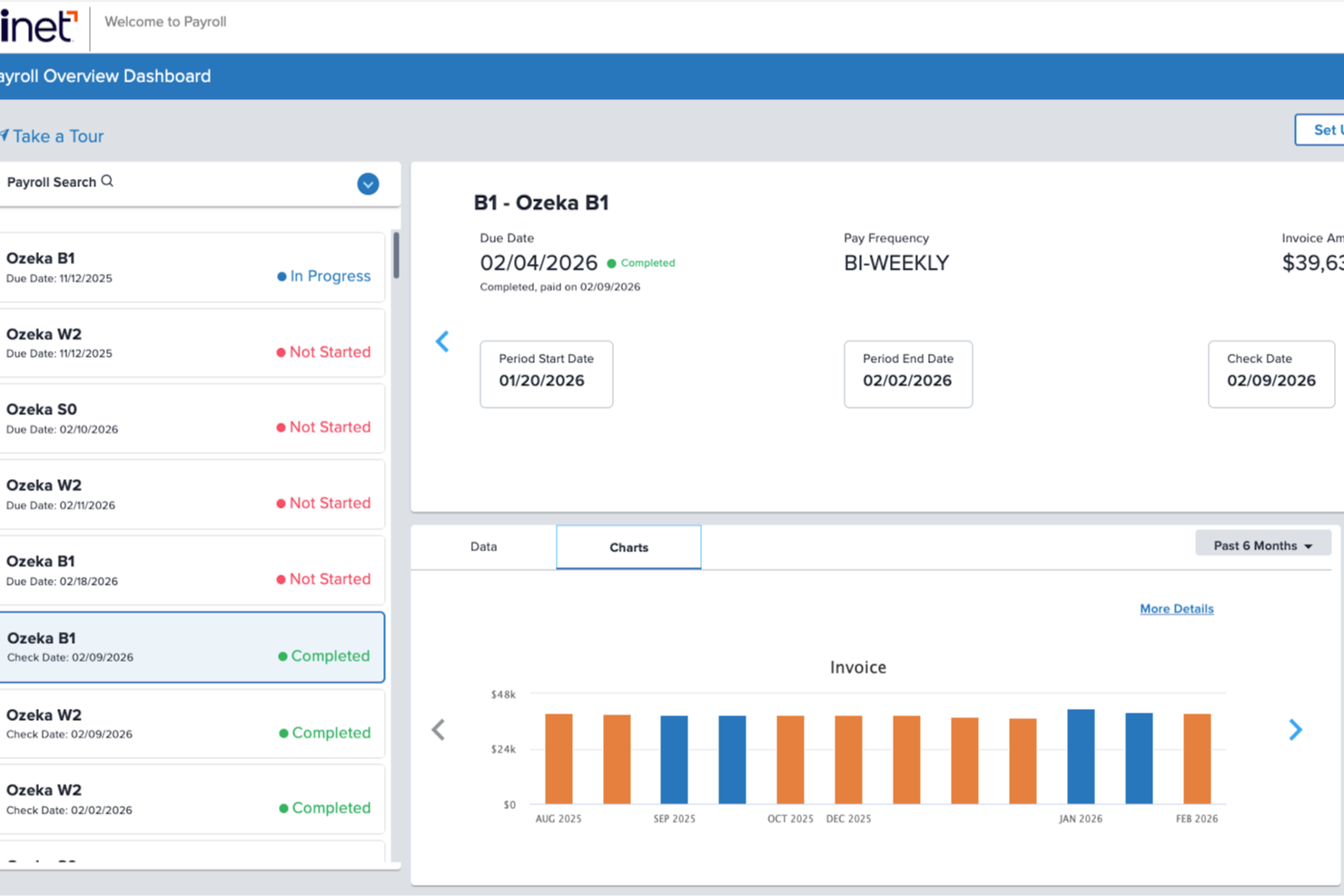
Keeping payroll accurate while juggling compliance, benefits, and hiring can pull your focus away from growing your business. TriNet brings payroll software for small businesses together with built-in HR and benefits support, making it a strong fit if you’re managing a lean team without in-house HR expertise. If you want payroll tied closely to compliance guidance and employee benefits, it offers a more hands-on structure than many basic payroll tools.
Why I Picked TriNet
I picked TriNet because it combines small business payroll with a PEO model that helps you handle tax filings, compliance, and benefits administration under one umbrella. Instead of just calculating wages, TriNet manages payroll tax processing, multi-state filings, and year-end forms while also giving you access to large-group health benefits for your team.
You also get built-in risk mitigation and HR guidance, which matters if you’re hiring across states or navigating complex labor laws. For small businesses that want payroll software plus structured HR support, I find this bundled approach more aligned with real-world operational needs than standalone payroll systems.
TriNet Key Features
In addition to its combined payroll and HR structure, you’ll find several tools that support your day-to-day payroll operations.
- Mobile App: Allows employees to access pay information and manage benefits on-the-go.
- Employee Self-Service Portal: Your employees can view pay stubs, access tax documents, update personal information, and enroll in benefits through their own online accounts.
- Comprehensive Payroll Reporting: Enables detailed payroll analysis and data visualization for better decision-making.
- Real-Time Tracking: Facilitates real-time monitoring of hours worked and expenses, improving payroll accuracy.
TriNet Integrations
Integrations include QuickBooks Online, Xero, NetSuite, Sage, Microsoft Dynamics, ADP, BambooHR, Workday, Salesforce, and SAP.
Pros and Cons
Pros:
- Built-in risk mitigation support for labor law issues.
- Provides dedicated HR guidance through PEO structure.
- Helps manage payroll tax filings and multi-state payroll.
Cons:
- Platform interface may feel clunky or dated to some users.
- Less flexibility for highly customized HR and payroll policies.
New Product Updates from TriNet
TriNet HR Plus Adds Vestwell 401(k) Connect Integration
TriNet integrates with Vestwell for 401(k) Connect, streamlining deferrals and contributions via TriNet Payroll to Vestwell. For more information, visit TriNet's official site.
 .
.

RUN Powered by ADP® is built for small businesses that want reliable payroll with automatic tax handling. It’s especially useful if you manage a growing team and need help keeping up with changing payroll rules and filing deadlines.
Why I Picked RUN Powered by ADP®
I picked RUN Powered by ADP® because it takes the burden of payroll accuracy off your team by handling complex tax calculations for you. Its automated tax filing ensures your forms and payments are submitted on time, reducing the risk of penalties.
You also get compliance alerts that keep you updated as federal, state, or local regulations shift—something many small businesses struggle to monitor. Lastly, employees can access their pay information on their own through self-service tools, and the mobile app lets you run payroll from anywhere.
RUN Powered by ADP® Key Features
Here are some key features worth highlighting:
- Employee Self-Service: Gives staff access to pay stubs and tax documents without involving your admin team.
- Mobile Payroll Processing: Lets you run payroll, approve hours, and manage changes directly from the ADP mobile app.
- Compliance Notifications: Alerts you when labor or tax regulations change so you can stay compliant.
- HR Resource Library: Provides templates, guides, and support tools to help you manage day-to-day HR tasks.
RUN Powered by ADP® Integrations
Integrations include QuickBooks, Xero, Wave, FreshBooks, Sage, ZipRecruiter, Slack, BambooHR, Expensify, and TSheets.
Pros and Cons
Pros:
- Comprehensive HR resources
- Mobile app for payroll access
- Automatic tax form filing
Cons:
- Limited to U.S. payroll only
- Complexity for new users

TopSource is designed for small and midsize businesses that manage employees across multiple countries and need reliable payroll compliance. It brings together global payroll processing, localized compliance expertise, and workforce visibility to help teams stay compliant without building internal country-specific knowledge.
Why I Picked TopSource
I picked TopSource because it gives you structured global payroll support backed by in-country compliance expertise. Instead of juggling multiple vendors, you can manage all your international payroll tasks through one platform with country-specific rules applied automatically.
It also helps you track regulatory changes so you don’t miss new filing requirements or documentation updates, and I like that it combines payroll processing with employee data management, making it easier to oversee distributed teams. For businesses expanding into new markets, TopSource provides 24/5 dedicated support and tailored services that adapt to each country’s laws and workforce needs.
TopSource Key Features
Here are some key features worth highlighting:
- Localized Compliance Monitoring: Tracks country-specific tax and labor-law updates to keep your filings accurate.
- Multi-Country Payroll Engine: Processes payroll across different currencies, pay cycles, and statutory requirements.
- Employee Data Management: Stores contracts, documents, and HR details in one place for distributed teams.
- Payroll Insights & Reports: Delivers clear summaries of pay runs, liabilities, and compliance actions.
TopSource Integrations
Integrations include SAP, Oracle, Workday, BambooHR, ADP, QuickBooks, Xero, Gusto, Paychex, and NetSuite.
Pros and Cons
Pros:
- Supports multiple currencies and pay schedules
- Country-specific compliance guidance
- Accurate multi-country payroll calculations for global teams
Cons:
- Complexity for non-global users
- High initial setup requirements


RemoFirst is a global payroll platform tailored for businesses with remote teams. It simplifies payroll processing and compliance for companies hiring internationally, providing valuable support for managing remote employees.
Why I picked RemoFirst: It offers specialized solutions for remote team management, ensuring compliance across different countries. Features like automated payroll and tax calculations help streamline your operations.
The platform supports multi-currency payments, making it easier to handle international transactions. With a focus on remote work, it provides tools that cater specifically to distributed teams.
Standout features & integrations:
Features include automated payroll processing, compliance management, and multi-currency support. RemoFirst also offers tools for managing contracts and legal documents. Its platform provides an intuitive dashboard for monitoring payroll activities.
Integrations include QuickBooks, Xero, BambooHR, Gusto, ADP, Expensify, Slack, Zoom, Microsoft Teams, and Workday.
Pros and Cons
Pros:
- Easy to manage legal documents
- Compliance with international laws
- Supports multi-currency transactions
Cons:
- Requires initial setup effort
- Limited offline access
New Product Updates from RemoFirst

RemoFirst Launches BambooHR Integration
RemoFirst has launched a BambooHR integration for enhanced global hiring and HR management. For more details, visit RemoFirst's official site.
 .
.

OnPay is a payroll and HR software solution designed for small to medium-sized businesses. It focuses on payroll processing, benefits management, and HR tasks, providing value to teams looking for a comprehensive tool.
Why I picked OnPay: It integrates smoothly with popular accounting tools, making it a great choice for businesses that need seamless financial management. OnPay offers automated tax filings, reducing the burden on your team.
The software also provides employee self-service options, empowering your staff to manage their own information. Its user-friendly interface and flexibility make it ideal for growing businesses.
Standout features & integrations:
Features include automated payroll processing, tax filing, and benefits management. OnPay also supports employee self-service, allowing your staff to access their pay stubs and tax forms online. The platform offers compliance management to help your team stay updated with regulations.
Integrations include QuickBooks, Xero, TSheets, QuickBooks Online, Gusto, Expensify, FreshBooks, Deputy, Mineral, and PosterElite.
Pros and Cons
Pros:
- Easy employee self-service access
- Comprehensive benefits management
- Flexible payroll scheduling
Cons:
- No mobile app support
- Occasional reports delay

Paychex Flex is a payroll and HR software solution aimed at small to medium-sized businesses. It offers payroll processing, HR management, and benefits administration, providing essential tools for managing your workforce.
Why I picked Paychex Flex: It offers customizable payroll solutions, allowing you to tailor the platform to fit your business needs. Features like flexible payroll entry and comprehensive reporting help you manage payroll efficiently.
The software also provides mobile access, making it easy for your team to handle tasks on the go. With dedicated support, Paychex Flex ensures you have the resources you need to succeed.
Standout features & integrations:
Features include payroll processing, benefits administration, and time and attendance tracking. Paychex Flex also offers employee self-service, letting your team access their pay information easily. The platform provides detailed analytics to help you make informed decisions.
Integrations include QuickBooks, Xero, NetSuite, BambooHR, Sage Intacct, TSheets, Kronos, Salesforce, Microsoft Dynamics, and Workday.
Pros and Cons
Pros:
- Flexible scheduling features
- Detailed reporting capabilities
- Mobile app for payroll management
Cons:
- Requires regular system maintenance
- Limited international payroll features

HiBob is a human resources and payroll software designed for modern businesses. It focuses on HR management, payroll processing, and employee engagement, offering a fresh approach to managing your team.
Why I picked HiBob: It features a modern user interface that enhances the user experience, making it intuitive for your team. HiBob offers dynamic reporting, allowing you to track employee performance with ease.
Its social media-inspired features promote engagement and collaboration among team members. The platform also supports global payroll, catering to businesses with international operations.
Standout features & integrations:
Features include advanced reporting tools, customizable dashboards, and employee engagement features. HiBob offers performance management tools to help you track and improve employee performance. The platform provides compliance support to ensure your team adheres to regulations.
Integrations include QuickBooks, Xero, BambooHR, Workday, Slack, Microsoft Teams, G Suite, Okta, Greenhouse, and Lever.
Pros and Cons
Pros:
- Customizable dashboards
- Supports global payroll operations
- Strong employee engagement tools
Cons:
- Limited advanced analytics features
- Some features need improvement


Bambee is an HR service platform designed for small businesses seeking professional HR guidance. It focuses on HR compliance, policy creation, and employee management, giving your team access to dedicated HR support.
Why I picked Bambee: It provides personalized HR support services, making it unique for small businesses needing expert advice. Bambee offers a dedicated HR manager to help you navigate complex HR issues.
The platform assists in creating customized HR policies tailored to your business needs. With compliance tracking and regular audits, it helps ensure your team stays aligned with regulations.
Standout features & integrations:
Features include dedicated HR managers, compliance tracking, and HR policy creation. Bambee also offers employee training resources to help your team stay informed. The platform provides audit support to ensure compliance with labor laws.
Integrations include QuickBooks, Xero, Gusto, ADP, BambooHR, Zenefits, Paychex, Paycor, Rippling, and Workday.
Pros and Cons
Pros:
- Personalized HR guidance
- Regular compliance audits
- Customizable HR policy creation
Cons:
- Not a full HRIS solution
- Requires onboarding time

QuickBooks Online is an accounting software designed for small businesses. It helps with financial management, invoicing, and payroll processing, offering essential tools for your business operations.
Why I picked QuickBooks Online: It integrates accounting and payroll functions, making it ideal for small businesses needing a unified financial solution. Features like invoicing and expense tracking help you manage your finances efficiently.
QuickBooks Online offers customizable reports, giving you insights into your business performance. Its cloud-based platform allows you to access your data anytime, anywhere.
Standout features & integrations:
Features include invoicing, expense tracking, and financial reporting. QuickBooks Online also provides bank reconciliation to keep your accounts accurate. The platform offers tax management tools to simplify your tax season.
Integrations include Shopify, Square, PayPal, Stripe, HubSpot, TSheets, Expensify, Bill.com, Salesforce, and Amazon.
Pros and Cons
Pros:
- Effective bank reconciliation
- Cloud-based access to data
- Customizable financial reports
Cons:
- Limited inventory management
- Occasional syncing issues


TimeTrex is a workforce management software designed for businesses of all sizes. It focuses on time tracking, payroll processing, and employee scheduling, providing tools to manage workforce attendance effectively.
Why I picked TimeTrex: It excels in scheduling and attendance, offering features that simplify workforce management. TimeTrex provides automated scheduling, helping you optimize your team's shifts and reduce conflicts.
The platform offers detailed attendance tracking, ensuring your records are accurate and up-to-date. With its focus on scheduling, TimeTrex helps keep your operations running smoothly by efficiently managing employee time.
Standout features & integrations:
Features include time tracking, automated scheduling, and payroll processing. TimeTrex also offers biometric time clocks, ensuring accurate employee check-ins. The platform provides compliance management tools to help your team adhere to labor laws.
Integrations include QuickBooks, ADP, Paychex, BambooHR, Sage, Xero, Gusto, NetSuite, Microsoft Dynamics, and Slack.
Pros and Cons
Pros:
- Compliance management tools
- Biometric time clock support
- Automated scheduling features
Cons:
- Occasional system lag
- Limited mobile functionality


Patriot Payroll is a payroll software designed for small businesses looking for a cost-effective solution. It handles payroll processing and tax filing, providing essential tools to manage employee payments and compliance.
Why I picked Patriot Payroll: It offers affordable pricing, making it accessible for small businesses on a budget. The software provides easy payroll setup and straightforward tax filing options.
Patriot Payroll also includes direct deposit and printable checks, giving flexibility in how you pay your team. Its simple interface ensures that you can manage payroll tasks without unnecessary complications.
Standout features & integrations:
Features include time and attendance tracking, customizable payroll reports, and employee self-service. Patriot Payroll also offers automated tax calculations, reducing the risk of errors. The platform provides a comprehensive payroll history, allowing you to review past payments easily.
Integrations include QuickBooks, Xero, TSheets, Expensify, FreshBooks, Gusto, Sage, BambooHR, Zoho Books, and ADP.
Pros and Cons
Pros:
- Automated tax calculations
- Comprehensive payroll history access
- Customizable reporting options
Cons:
- Requires manual data entry
- Basic user interface design

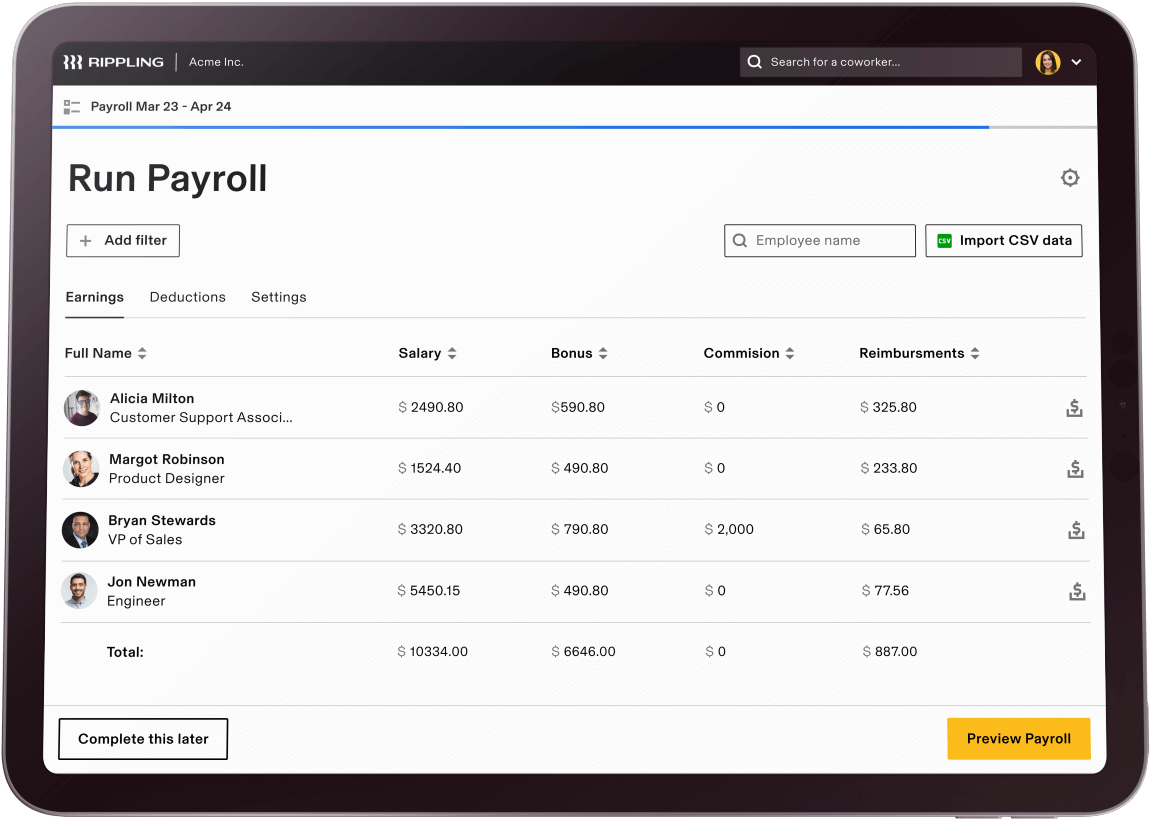
Rippling is a comprehensive platform that combines HR, IT, and payroll management for small to medium-sized businesses. It simplifies tasks such as employee onboarding, payroll processing, and benefits administration, enhancing operational efficiency.
Why I picked Rippling: It excels in employee onboarding, providing automated workflows that make it easy to get new hires up and running. Rippling integrates HR and IT functions, allowing you to manage devices, apps, and payroll from a single platform.
Its intuitive design helps reduce the time spent on manual tasks. The platform offers flexibility to customize workflows, making it adaptable to your team’s specific needs.
Standout features & integrations:
Features include automated onboarding processes, device management, and benefits administration. Rippling offers payroll automation, ensuring timely and accurate payments. The platform also provides compliance management tools to help your team stay updated with regulations.
Integrations include QuickBooks, Xero, Gusto, Slack, Zoom, Microsoft Teams, Google Workspace, Okta, BambooHR, and Salesforce.
Pros and Cons
Pros:
- Integrated HR and IT management
- Customizable workflow automation
- Comprehensive device management
Cons:
- Complexity for non-tech users
- Limited offline functionality

GoCo is a cloud-based HR and payroll platform tailored for small to medium-sized businesses. It focuses on payroll processing, benefits administration, and HR management, providing a streamlined way to handle employee-related tasks.
Why I picked GoCo: It offers a user-friendly interface, making it easy for you and your team to navigate and manage HR tasks. GoCo provides customizable workflows that adapt to your specific business needs.
The platform also supports benefits administration, helping you manage employee benefits efficiently. With automated payroll processing, you can ensure accuracy and compliance without hassle.
Standout features & integrations:
Features include time tracking, performance management, and document management. GoCo offers employee self-service, allowing your team to access and update their information. The platform provides compliance tools to help your business adhere to regulations.
Integrations include QuickBooks, Xero, BambooHR, Gusto, ADP, TSheets, Expensify, Slack, Google Workspace, and Microsoft Teams.
Pros and Cons
Pros:
- Supports employee self-service
- Automated payroll processes
- Efficient benefits administration
Cons:
- Basic reporting capabilities
- Limited advanced features

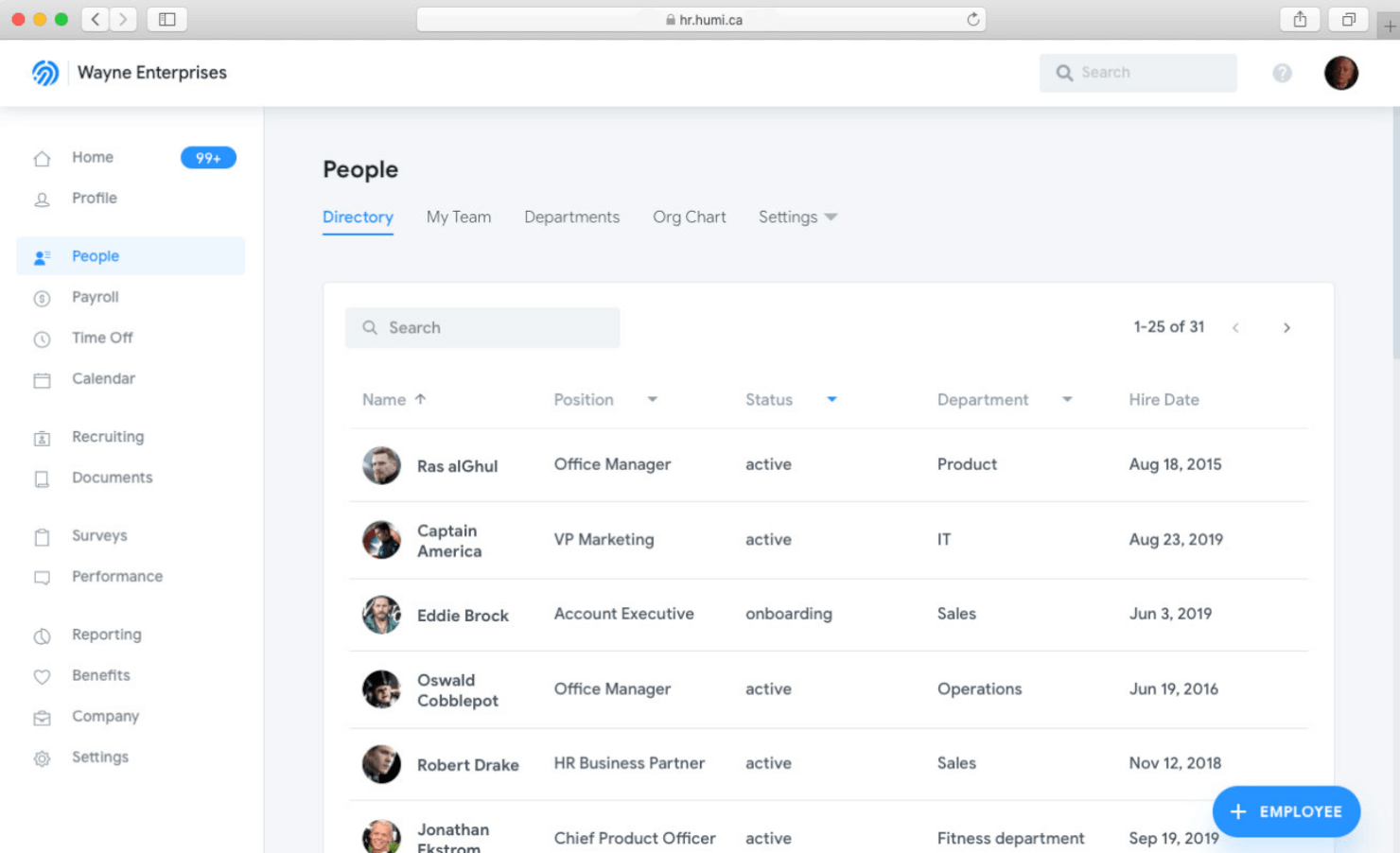
Employment Hero is an HR and payroll platform designed for small to medium-sized businesses. It focuses on payroll management, HR functions, and employee engagement, offering tools to enhance your team's work experience.
Why I picked Employment Hero: It excels in improving employee engagement with features that promote communication and recognition. Employment Hero provides tools for managing payroll efficiently, ensuring timely and accurate payments.
The platform also offers performance management features, helping you track and improve employee productivity. With its focus on engagement, Employment Hero creates a positive work environment for your team.
Standout features & integrations:
Features include performance management, employee recognition, and payroll processing. Employment Hero also offers compliance management, ensuring your team adheres to local laws. The platform provides a mobile app, allowing employees to manage tasks on the go.
Integrations include QuickBooks, Xero, MYOB, Deputy, Tanda, KeyPay, NetSuite, SAP Concur, Go1, and Slack.
Pros and Cons
Pros:
- Promotes employee recognition
- Effective performance management
- Strong employee engagement tools
Cons:
- Limited advanced features
- Initial setup complexity


Zenefits is a comprehensive HR platform designed for small to medium-sized businesses. It offers a range of services including payroll processing, benefits administration, and HR management, catering to the diverse needs of your team.
Why I picked Zenefits: It excels in benefits management, providing tools that simplify the administration of employee benefits. Zenefits offers an intuitive dashboard that makes it easy to manage benefits, payroll, and compliance in one place.
The platform provides automated onboarding features, helping you get new hires up to speed quickly. With its focus on efficiency, Zenefits ensures that you can handle HR tasks with minimal hassle.
Standout features & integrations:
Features include automated compliance management, time tracking, and performance reviews. Zenefits also offers mobile access, allowing your team to manage HR tasks from anywhere. The platform provides employee self-service options to update personal information and benefits.
Integrations include QuickBooks, Salesforce, Slack, G Suite, Microsoft Office 365, Xero, Expensify, Asana, Deputy, and Greenhouse.
Pros and Cons
Pros:
- Intuitive user dashboard
- Mobile access for HR tasks
- Automated compliance features
Cons:
- Some features need improvement
- Limited customization options

PrimePay is a payroll and HR software solution tailored for small to medium-sized businesses. It focuses on payroll processing, benefits administration, and compliance management, offering essential tools to keep your business running smoothly.
Why I picked PrimePay: It provides strong compliance support, ensuring your team adheres to the latest regulations. PrimePay offers automated tax filing, reducing the risk of errors and penalties.
The software also provides benefits management, allowing you to easily administer employee benefits. With its emphasis on compliance, PrimePay helps you navigate the complexities of payroll and HR requirements.
Standout features & integrations:
Features include automated payroll processing, tax filing, and benefits administration. PrimePay offers time and attendance tracking, helping you manage employee hours accurately. The platform also provides HR support tools to assist with employee management tasks.
Integrations include QuickBooks, Xero, Sage, Microsoft Dynamics, ADP, BambooHR, NetSuite, Kronos, Salesforce, and Workday.
Pros and Cons
Pros:
- Reliable HR support tools
- Accurate time tracking features
- Automated tax filing processes
Cons:
- Limited mobile functionality
- Complex initial setup
Other Payroll Software for Small Businesses
Here are some additional payroll software for small businesses options that didn’t make it onto my shortlist, but are still worth checking out:
- Wave Payroll
For paying employees and contractors
- FinancePal
For payroll management outsourcing
- Knit People
For startups
- Buddy Punch
With time-tracking
- BambooHR®
For employee self-service
- Papaya Global
For expanding globally
- Oyster HR
Combined global payroll and benefits
- QuickBooks Payroll
For accounting and payroll in one
- Ceridian Dayforce
Payroll software for a user-friendly payroll dashboard
- APS
Payroll system that uses automations to reduce payroll errors
- Eddy
Full-service payroll software for local, US businesses
- SurePayroll
Online payroll solution for unlimited payroll
- Heartland
Employee management solution for a speedy payroll process and accessing business loans


Payroll Software for Small Business Selection Criteria
When selecting the best payroll software for small businesses to include in this list, I considered common buyer needs and pain points like managing tax compliance and simplifying payroll processing. I also used the following framework to keep my evaluation structured and fair:
Core Functionality (25% of total score)
To be considered for inclusion in this list, each solution had to fulfill these common use cases:
- Process payroll accurately
- Calculate and file taxes
- Manage employee benefits
- Generate payroll reports
- Support direct deposit
Additional Standout Features (25% of total score)
To help further narrow down the competition, I also looked for unique features, such as:
- Customizable payroll workflows
- Multi-currency support
- Advanced analytics tools
- Integration with HR systems
- Automated compliance updates
Usability (10% of total score)
To get a sense of the usability of each system, I considered the following:
- Intuitive user interface
- Simple navigation
- Quick access to key features
- Consistency in design
- Minimal learning curve
Onboarding (10% of total score)
To evaluate the onboarding experience for each platform, I considered the following:
- Availability of training videos
- Step-by-step setup guides
- Interactive product tours
- Access to webinars
- Supportive chatbots for guidance
Customer Support (10% of total score)
To assess each software provider’s customer support services, I considered the following:
- 24/7 support availability
- Access to live chat
- Comprehensive help center
- Responsive email support
- Availability of phone support
Value For Money (10% of total score)
To evaluate the value for money of each platform, I considered the following:
- Competitive pricing
- Range of features offered
- Flexibility in pricing plans
- Transparency in billing
- Return on investment
Customer Reviews (10% of total score)
To get a sense of overall customer satisfaction, I considered the following when reading customer reviews:
- Positive feedback on reliability
- Consistent praise for ease of use
- Comments on customer service quality
- Feedback on feature effectiveness
- General satisfaction with pricing
How to Choose Payroll Software for Small Businesses
It’s easy to get bogged down in long feature lists and complex pricing structures. To help you stay focused as you work through your unique software selection process, here’s a checklist of factors to keep in mind:
| Factor | What to Consider |
|---|---|
| Scalability | Will the software grow with your business? Consider if it can handle more employees or branches without a hitch. |
| Integrations | Does it connect with your existing tools? Ensure it syncs with your accounting and HR systems for smooth data flow. |
| Customizability | Can you tailor the software to fit your workflows? Look for options to adjust settings to your specific needs. |
| Ease of use | Is it user-friendly for your team? Test the interface to see if it's intuitive and easy to navigate. |
| Implementation and onboarding | How long will it take to get up and running? Check for setup guides, training materials, and support options to ease the transition. |
| Cost | Is it within your budget? Compare pricing plans and watch for hidden fees. Ensure the cost aligns with the value it provides. |
| Security safeguards | Are your data and transactions protected? Look for encryption, regular updates, and compliance with security standards like GDPR or CCPA. |
| Support availability | Can you get help when needed? Consider if support is available 24/7 and through multiple channels like chat, email, or phone. |
What Is Payroll Software for Small Businesses?
Payroll software for small businesses is a tool that automates employee payment processes, including salary calculation, tax withholdings, and compliance management. It's typically used by HR professionals, accountants, and small business owners to ease payroll management. Automated calculations, tax filing, and direct deposit capabilities help with accuracy, efficiency, and compliance. These tools save time and reduce errors, allowing users to focus on other business tasks.
Features
When selecting payroll software for small businesses, keep an eye out for the following key features:
- Automated tax filing: Automatically calculates and files taxes to ensure compliance and reduce errors.
- Direct deposit: Allows electronic payment of salaries directly to employees' bank accounts, saving time and resources.
- Employee self-service: Enables employees to access their pay stubs and tax forms, reducing administrative workload.
- Time tracking integration: Connects with time-tracking tools to ensure accurate payroll calculations based on hours worked.
- Compliance management: Keeps your business aligned with labor laws and regulations, minimizing legal risks.
- Customizable reports: Generates tailored reports to provide insights into payroll data and financial health.
- Mobile access: Offers the ability to manage payroll tasks on the go, enhancing flexibility and convenience.
- Multi-currency support: Handles payroll in different currencies, ideal for businesses with international employees.
- Performance management: Tracks and evaluates employee performance, aiding in decision-making and development.
- Biometric time clocks: Ensures accurate employee check-ins and time tracking through biometric verification.
Benefits
Implementing payroll software for small businesses provides several benefits for your team and your business. Here are a few you can look forward to:
- Time savings: Automates payroll calculations and tax filings, freeing up time for more strategic tasks.
- Error reduction: Minimizes manual data entry, reducing the risk of costly payroll errors and ensuring accuracy.
- Improved compliance: Keeps your business up-to-date with changing tax laws and regulations, reducing legal risks.
- Employee satisfaction: Provides quick and accurate payments through direct deposit, boosting employee trust and morale.
- Data accessibility: Offers easy access to payroll information and reports, enhancing transparency and decision-making.
- Flexibility: Supports mobile access and multi-currency transactions, accommodating diverse business needs.
- Enhanced productivity: Allows employees to manage their own information through self-service features, reducing administrative burdens.
Costs & Pricing
Selecting payroll software for small businesses requires an understanding of the various pricing models and plans available. Costs vary based on features, team size, add-ons, and more. The table below summarizes common plans, their average prices, and typical features included in payroll software for small businesses solutions:
Plan Comparison Table for Payroll Software for Small Businesses
| Plan Type | Average Price | Common Features |
|---|---|---|
| Free Plan | $0 | Basic payroll processing, limited support, and employee self-service. |
| Personal Plan | $5-$25/user/month | Payroll processing, tax filing, direct deposit, and basic reporting. |
| Business Plan | $30-$50/user/month | Advanced reporting, compliance management, integrations, and multi-currency support. |
| Enterprise Plan | $55-$100/user/month | Customizable workflows, dedicated support, advanced analytics, and global payroll capabilities. |
Payroll Software for Small Businesses FAQs
Here are some answers to popular questions we often receive about payroll software for small businesses:
Is it difficult to switch from one payroll software to another?
Switching payroll software can be challenging, but many providers offer migration support to ease the transition. Before switching, back up all your data and confirm the new software can import it seamlessly. Some vendors offer data migration services or step-by-step guides to help you transfer information. Plan the switch during a less busy period to minimize disruptions, and ensure your team is trained on the new system.
Can payroll software integrate with my current accounting tools?
Yes, many payroll software solutions integrate with popular accounting tools like QuickBooks or Xero. This integration helps streamline your financial operations by automatically syncing payroll data with your accounting software. Before purchasing, check the list of available integrations to ensure compatibility with your existing tools. If your accounting software isn’t listed, reach out to the vendor to see if custom integrations are possible.
How secure is payroll software?
Payroll software is generally secure, but it’s essential to ensure the provider uses encryption and complies with data protection regulations like GDPR or CCPA. Look for features like two-factor authentication and regular security updates. It’s also wise to read reviews or request information on past security incidents. Always choose a provider that prioritizes data security to protect your team’s sensitive information.
What’s Next:
If you're in the process of researching payroll software for small businesses, connect with a SoftwareSelect advisor for free recommendations.
You fill out a form and have a quick chat where they get into the specifics of your needs. Then you'll get a shortlist of software to review. They'll even support you through the entire buying process, including price negotiations.