
50 Best Recruiting Software of 2026: Reviewed & Compared

20 Best Recruiting Software List
Here's my pick of the 20 best software from the 50 tools reviewed.


The best recruiting software helps you attract, engage, and hire top talent faster—while delivering a seamless experience for both candidates and hiring teams.
When roles sit open for too long or processes rely on manual tracking, you risk losing great candidates to faster-moving competitors. The right platform centralizes applications, streamlines communication, and automates repetitive tasks, giving you more time to focus on building strong relationships with candidates.
Based on my hands-on experience with various recruiting tools, I’ve curated a list of the top solutions that are intuitive, scalable, and designed to give organizations of all sizes a hiring advantage.
In this guide, you’ll find options to improve efficiency at every stage of the recruitment process—from sourcing to offer acceptance.
Why Trust Our Software Reviews
We’ve been testing and reviewing HR software systems since 2019. As HR experts ourselves, we know how critical and difficult it is to make the right decision when selecting software.
We invest in deep research to help our audience make better software purchasing decisions. We’ve tested more than 2,000 tools for different HR management use cases and written over 1,000 comprehensive software reviews. Learn how we stay transparent & our software review methodology.
Best Recruiting Software: Pricing Comparison Chart
This comparison chart summarizes pricing details for my top recruitment software selections to help you find the best software for your budget and business needs.
| Tool | Best For | Trial Info | Price | ||
|---|---|---|---|---|---|
| 1 | Best for sourcing qualified passive candidates using AI | 15-day free trial + free demo | Starting at $299/month | Website | |
| 2 | Best for in-house talent acquisition and HR teams | Free demo available | Pricing upon request | Website | |
| 3 | Best for large-volume candidate sourcing | Free demo available | Pricing upon request | Website | |
| 4 | Best for data-driven hiring accuracy | Free demo available | Pricing upon request | Website | |
| 5 | Best for AI-powered background checks | Free demo available | From $29.99/report | Website | |
| 6 | Best for global agency-sourced hiring | Not available | Pricing upon request | Website | |
| 7 | Best for modern, text-based recruiting | Free demo available | Pricing upon request | Website | |
| 8 | Best for recruiting tools within a full HRIS suite | Free 7-day trial | From $10/user/month | Website | |
| 9 | Best recruitment software for staffing agencies | 15-day free trial + free plan available | From $25/user/month (billed annually) | Website | |
| 10 | Best for multi-tiered video interviewing | Free demo available | Price upon request | Website | |
| 11 | Best software for scaling referrals | Free demo available | Pricing upon request | Website | |
| 12 | Best for AI recruitment automation | 14-day free trial | From $15/user/month | Website | |
| 13 | Best all-in-one solution for recruitment agencies | Free trial + free demo available | From $85/user/month (billed annually) | Website | |
| 14 | Best for customizable pre-employment assessments | Free demo available | Pricing upon request | Website | |
| 15 | Best for inclusive hiring | Free demo available | From $295/month | Website | |
| 16 | Best for automated candidate engagement | 7-day free trial + free demo available | From $99/month (billed annually) | Website | |
| 17 | Best for integrating applicant tracking | Free demo available | Pricing upon request | Website | |
| 18 | Best for nurturing candidates through the recruitment process | Free demo available | From $270/month (billed annually) | Website | |
| 19 | Best for a focus on diversity and inclusion | Free demo available | Pricing upon request | Website | |
| 20 | Best recruitment software for ease of use | 15-day free trial + free demo | From $99/month (10 users, 10 job postings) | Website |


-

Checkr
Visit WebsiteThis is an aggregated rating for this tool including ratings from Crozdesk users and ratings from other sites.4.5 -
Kudoboard
Visit WebsiteThis is an aggregated rating for this tool including ratings from Crozdesk users and ratings from other sites.4.8 -
Native Teams
Visit WebsiteThis is an aggregated rating for this tool including ratings from Crozdesk users and ratings from other sites.4.9




Best Recruiting Software Reviews
Here are my summaries of the best recruiting software that made it into my top 10 list, including notes on why I picked them. Each review offers a detailed look at the key features, pros & cons, software integrations, and ideal use cases of each system to help you simplify your selection process and find the best tool for you.

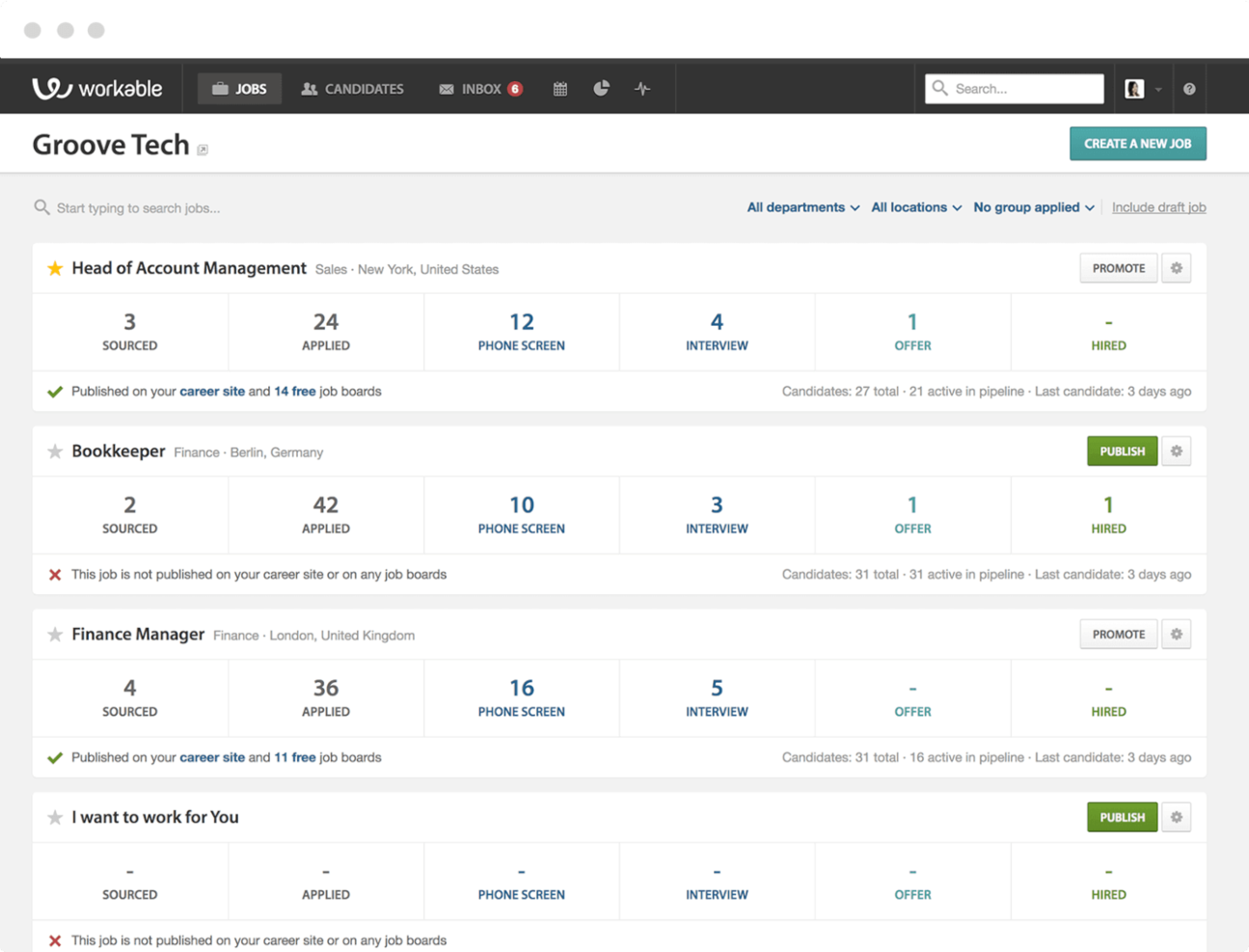
Workable is a recruiting platform built for HR teams and hiring managers who want to attract, evaluate, and hire talent faster with collaborative tools and automated workflows.
Who Is Workable Best For?
Workable is a good fit for growing mid-sized companies that need a structured, scalable hiring process across multiple roles and departments.
Why I Picked Workable
Workable earns its spot on my shortlist because of how well its AI sourcing tools work for finding passive candidates who aren't actively job hunting. I particularly like the AI candidate sourcing feature, which scans a database of over 400 million profiles to surface qualified matches before you've even started manually searching. Additionally, the intelligent social targeting feature lets me identify 1,000+ relevant passive candidates with a single click and automatically serves your job ad in their social media feeds. That combination makes Workable one of the more proactive options I've seen for filling hard-to-hire roles.
Workable Key Features
- Anonymized screening: Hide candidate identifying details during resume review to support fair, bias-reduced evaluation based on qualifications alone.
- Candidate self-scheduling: Let candidates book their own interview slots with automatic calendar syncing and time zone detection to reduce back-and-forth scheduling.
- Custom hiring pipelines: Build tailored hiring workflows for different roles, departments, or hiring stages to match your team's specific process.
- One-way video interviews: Screen candidates at scale by replacing phone screens with asynchronous video interviews that candidates complete on their own time.
Workable Integrations
Integrations include LinkedIn, Indeed, ADP Workforce Now, Xero, Slack, Google Calendar, Microsoft Outlook, Zoom, DocuSign, and BambooHR.
Pros and Cons
Pros:
- Includes robust onboarding features including workflows, an org chart, and an employee directory
- Custom workflows are easy to set up
- Includes thousands of hiring templates to save you time
Cons:
- Requisition forms could be more customizable for different types of hiring needs
- Job requisition forms require location field data - a potential issue for wholly remote organizations
New Product Updates from Workable
Workable Syncs Past Work Schedules to Ergani
Workable introduces past work schedule synchronization with Ergani. This update automates data syncing using actual clock-in and clock-out records to improve compliance and accuracy. For more information, visit Workable’s official site.
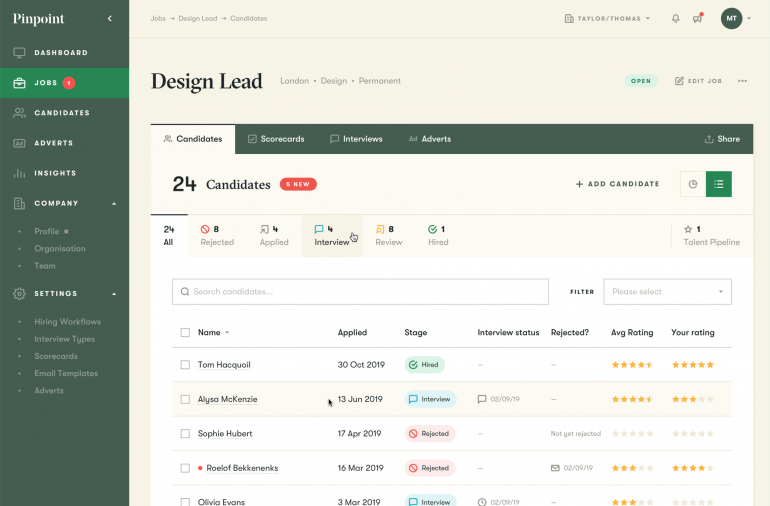
Pinpoint is a recruiting platform built for HR teams and internal recruiters who want to manage hiring, automate workflows, and deliver a better candidate experience from one place.
Who Is Pinpoint Best For?
Pinpoint is a strong fit for mid-sized companies with dedicated in-house recruiting or HR teams who need a structured, scalable hiring process.
Why I Picked Pinpoint
Pinpoint earns its spot on my shortlist because it's purpose-built for in-house talent acquisition teams managing multiple hiring processes at once. I particularly like the hiring workflow management feature, which lets you build role-specific pipelines so a high-volume retail hire and a senior executive search can run side-by-side without one process bleeding into the other. The AI Candidate Match Score is another feature I find genuinely useful—it scores applicants against job requirements transparently, so hiring managers can prioritize the strongest candidates without overriding recruiter judgment. Blind recruitment tools automatically anonymize applications, letting internal teams reduce bias without adding manual steps.
Pinpoint Key Features
- Branded careers website: Build a custom, branded careers site that reflects your employer brand and converts visitors into applicants.
- Candidate scorecards: Standardize hiring team feedback on candidates using structured scorecards to support consistent, fair decisions.
- Interview scheduling software: Schedule and manage interviews directly within the platform, without switching between tools.
- Talent pool software: Build and manage a pipeline of past and future candidates so you can fill roles faster when new positions open up.
Pinpoint Integrations
Integrations include BambooHR, ADP Workforce Now, UKG, Sage People, LinkedIn, Microsoft Teams, Google Meet, Slack, HubSpot, and Salesforce.
Pros and Cons
Pros:
- Hired candidates can sign their offer letters with digital e-signatures
- Multilingual capabilities are available in their top-tier plan
- Blind recruitment tools available in every plan
Cons:
- Onboarding tools are an optional add-on
- May be too expensive for small recruiting teams
New Product Updates from Pinpoint

Pinpoint Streamlines Reference Checks and Enhances Onboarding
Pinpoint now offers an integrated solution for reference checks and enhanced onboarding features to help your HR team work faster and hire smarter. For more information, visit Pinpoint's official site.


Greenhouse is a recruiting platform built for growing organizations that need to manage complex hiring processes, streamline candidate pipelines, and support collaborative decision-making across HR and hiring teams.
Who Is Greenhouse Best For?
Greenhouse is a strong fit for mid-size to enterprise companies with dedicated HR teams managing structured, high-volume hiring across multiple departments or locations.
Why I Picked Greenhouse
Greenhouse earns its spot on my shortlist because of how well it handles large-volume candidate sourcing without letting quality slip. I really like the CRM-style candidate sourcing tools that let my team build talent pools, track outreach, and re-engage past applicants—so we're not starting from scratch every time a role opens. Greenhouse also lets us run structured sourcing campaigns with attribution tracking, so I can see exactly which channels are producing qualified candidates.
Greenhouse Key Features
- Structured interview kits: Build role-specific prep kits and candidate scorecards so every interviewer evaluates candidates against the same criteria.
- Candidate self-scheduling: Let candidates book their own interview slots directly, reducing back-and-forth coordination for your recruiting team.
- 40+ pre-built reports: Access ready-made dashboards covering pipeline health, sourcing ROI, and DE&I metrics without building reports from scratch.
- Bulk candidate management: Review, approve, and action multiple candidates at once to keep high-volume hiring pipelines moving without bottlenecks.
Greenhouse Integrations
Integrations include Checkr, Criteria Corp, Findem, HireRight, BrightHire, Grayscale, AmazingHiring, Alva Labs, and Pave.
Pros and Cons
Pros:
- Rich analytics help spot process bottlenecks
- Strong ecosystem of 400+ pre-built integrations
- All packages include a robust customer onboarding implementation plan
Cons:
- Business intelligence tools are only available in their top-tier paid plan
- Pricing details are not transparent

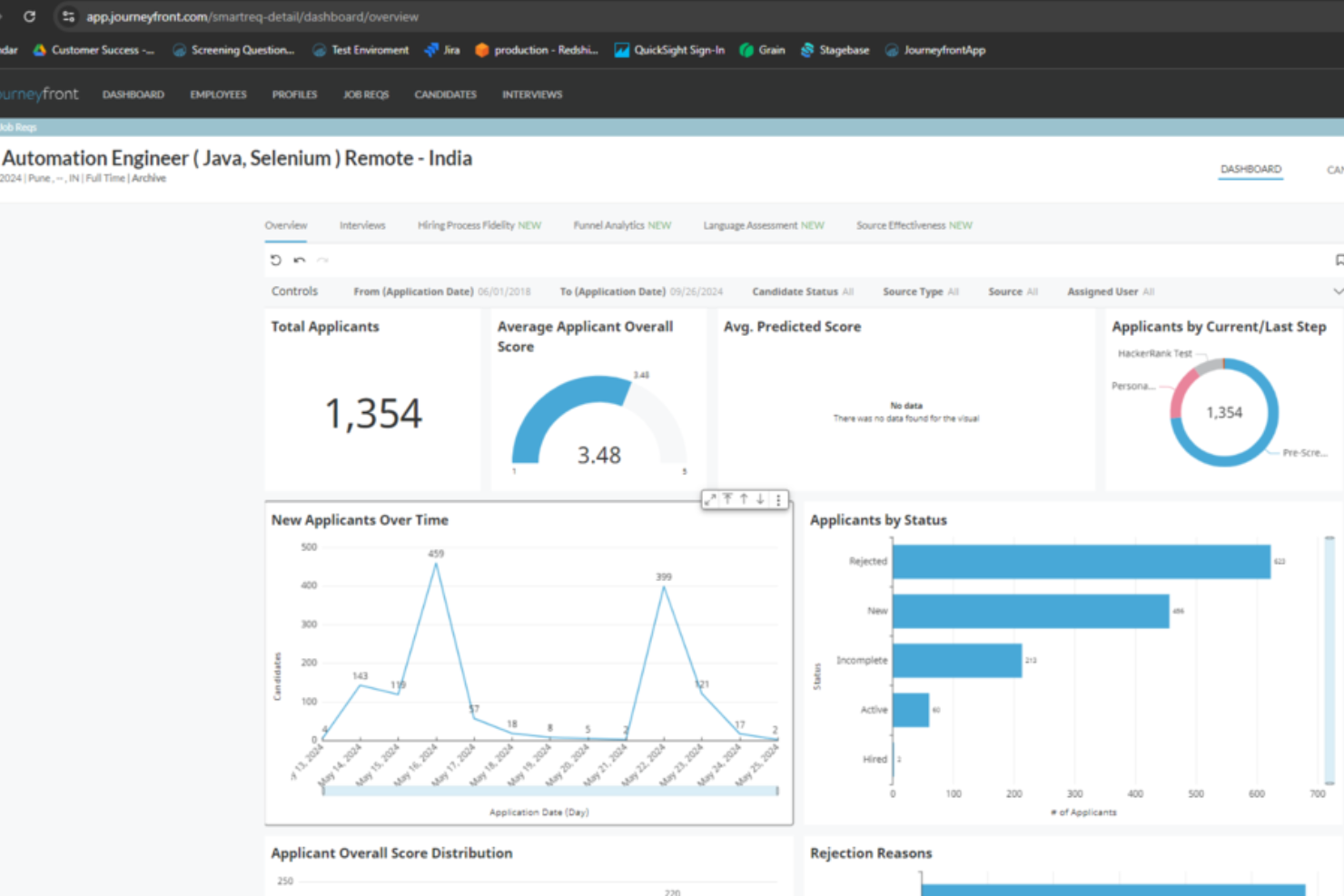
Journeyfront helps recruiters and HR teams make smarter hiring decisions by using predictive analytics and customizable assessments to match candidates to roles based on data, reducing guesswork and improving hiring outcomes.
Who Is Journeyfront Best For?
Journeyfront is a strong fit for mid-sized to enterprise organizations that want to reduce hiring bias and improve quality of hire through structured, data-backed candidate evaluation.
Why I Picked Journeyfront
Journeyfront earns its spot on my shortlist because it's one of the few recruiting platforms that connects hiring decisions directly to post-hire outcomes. I particularly like the assessment performance reporting feature, which links candidate assessment scores to real retention and performance data after someone is hired—so you can see whether your screening criteria predict success and adjust them if they don't. I also use the behavioral assessments, which are calibrated against your own employee data rather than generic industry benchmarks, making the predictions more relevant to your specific roles. The on-the-fly re-ranking feature lets me update scoring criteria at any point and re-rank every candidate in the pipeline without starting over.
Journeyfront Key Features
- Job board broadcasting: Publish open roles across 200+ job boards simultaneously from a single interface.
- Structured interview guides: Provide every interviewer with the same questions, scoring rubrics, and instructions to keep evaluations consistent.
- Source ROI reporting: Track which job boards and sourcing channels are delivering quality hires so you can allocate budget accordingly.
- Realistic job previews: Show candidates what a role involves before they accept an offer, helping reduce early attrition.
Journeyfront Integrations
Integrations include ADP, Workday, Rippling, BambooHR, HiBob, LinkedIn, and Zoho People.
Pros and Cons
Pros:
- Behavioral competency mapping
- Predictive analysis for long-term fit
- Customizable solutions
Cons:
- Steep learning curve
- Dependent on data

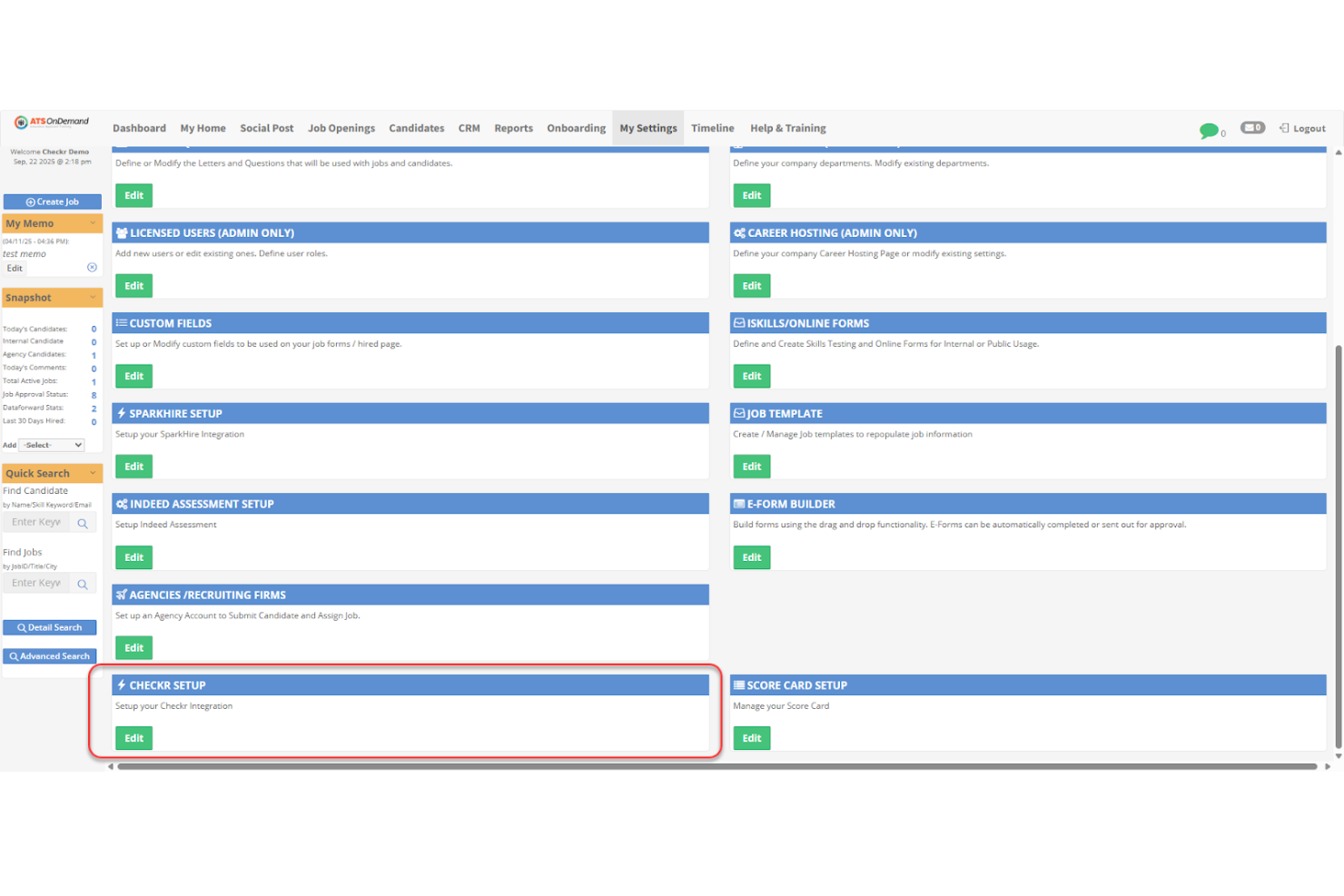
Checkr helps recruiters and HR teams automate background checks, helping businesses of all sizes verify candidate histories faster and support compliant hiring decisions.
Who Is Checkr Best For?
Checkr is a strong fit for high-volume hiring teams in industries like gig economy, healthcare, and retail that need fast, scalable background screening.
Why I Picked Checkr
I picked Checkr as one of the best because of how deeply AI is woven into the actual screening process—not just bolted on as a feature. The charge classifier automatically interprets criminal charge language across different counties and states, normalizing inconsistent legal terminology so your team sees clean, consistent records instead of confusing raw court data. I also like the doc inspector, which scans uploaded diplomas and pay stubs for signs of forgery at a level a human reviewer can't match. The AI-powered report ETA reduces inbound candidate status questions, saving time when you're managing a high volume of open roles.
Checkr Key Features
- Continuous checks: Monitor candidates and employees on an ongoing basis for new criminal records after the initial hire.
- Candidate portal: Give candidates a self-service portal to submit information, track their screening status, and dispute results.
- Adjudication tools: Apply customizable hiring rules to automatically flag or clear candidates based on your company's criteria.
- Drug and health screening: Order drug tests and occupational health screenings directly alongside background checks in one workflow.
Checkr Integrations
Integrations include Greenhouse, iCIMS, Workday, BambooHR, Rippling, Lever, JazzHR, ADP Workforce Now, Gusto, and Paylocity.
Pros and Cons
Pros:
- Supports integration with most major ATS and HR platforms
- Built-in compliance tools help reduce hiring risks and errors
- Mobile optimization enhances candidate experience and accessibility
Cons:
- Occasional delays or inaccuracies in background check reports
- Not an ATS or recruiting platform on its own, requires integration for full functionality
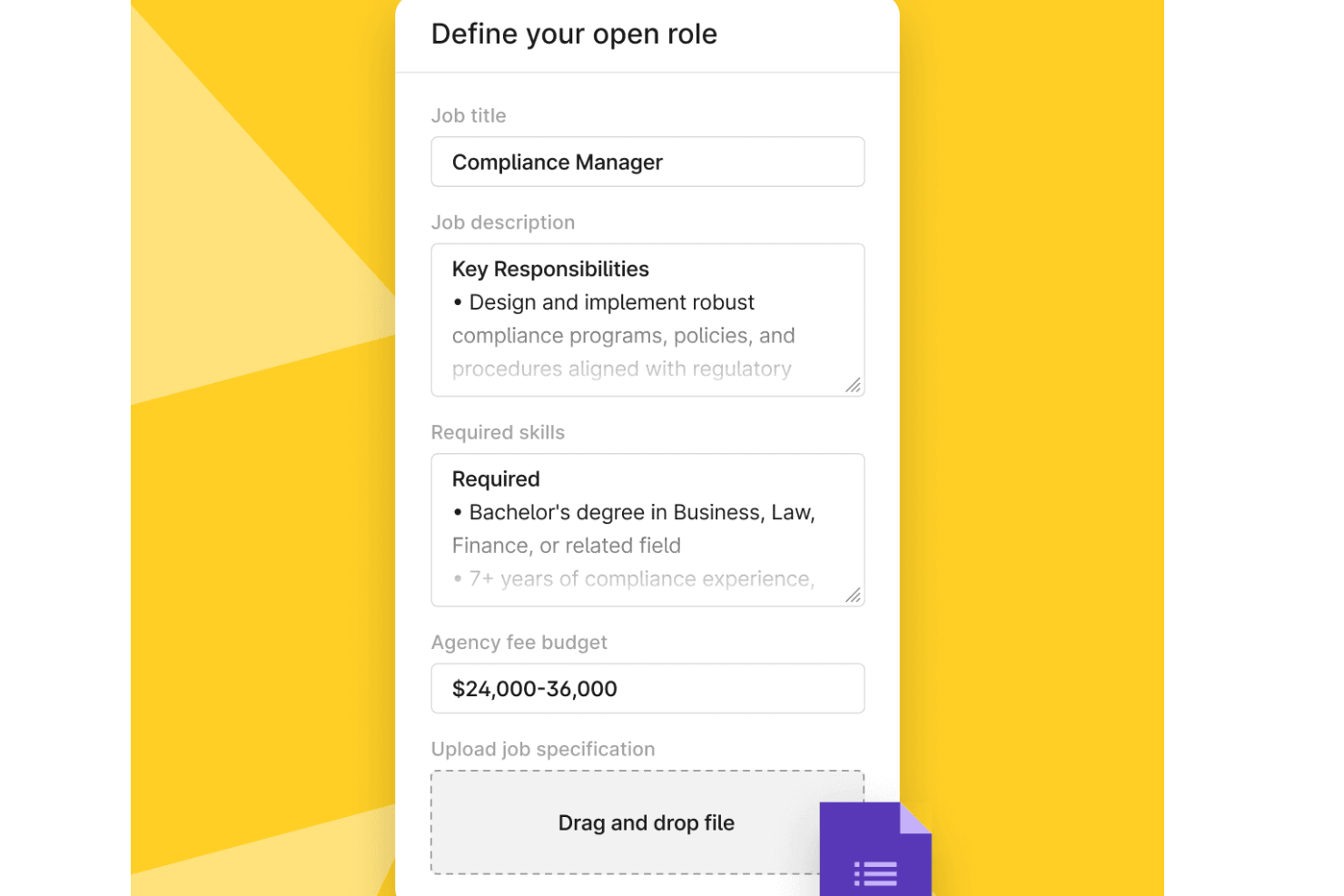
Deel Hire is a recruiting platform designed for businesses that need to source, hire, and onboard talent while managing compliance and payroll across multiple countries.
Who Is Deel Hire Best For?
Deel Hire is a strong fit for mid-size to enterprise companies hiring international talent across multiple regions who need built-in compliance and payroll support.
Why I Picked Deel Hire
I picked Deel Hire as one of the best because of how it handles agency-sourced hiring at a global scale. Through Deel Talent, I can match with pre-vetted staffing and recruitment agencies by country, role, or industry—or invite existing partners directly into the platform. From there, I submit a structured job request, sign the agency work order, and generate a compliant employment contract all in one place. I also like the live dashboards that track agency performance metrics like applicant volume, submission quality, and offer acceptance rates, which makes it easy to hold partners accountable without chasing them down.
Deel Hire Key Features
- Candidate pipeline tracking: Monitor candidates across hiring stages with status updates, notes, and activity logs in a centralized view.
- Automated compliance checks: Deel Hire runs background checks and verifies right-to-work documentation based on the candidate's country of hire.
- Localized contract generation: Create employment contracts that reflect local labor laws, currency, and benefits requirements for each hire's jurisdiction.
- Onboarding task management: Assign and track pre-boarding and onboarding tasks for new hires, managers, and HR teams across multiple locations.
Deel Hire Integrations
Integrations include FaceUp, Snowflake, DefensX, Microsoft Finance, Kintsugi, ReFresh OS, Revo.ai, Keeper, Human Interest, and Everyminute.
Pros and Cons
Pros:
- Strong compliance support built in
- Helps hire quickly across multiple countries
- Great visibility into recruiter performance
Cons:
- You need to rely entirely on partner agencies
- No internal candidate database feature

ClearCompany is a talent management platform built for HR teams and recruiters who want to centralize hiring, automate workflows, and improve candidate engagement throughout the recruiting process.
Who Is ClearCompany Best For?
ClearCompany is a good fit for mid-sized to enterprise HR teams that need a structured, end-to-end hiring process with strong candidate communication tools.
Why I Picked ClearCompany
I picked ClearCompany as one of the best because of how it handles candidate communication through two-way text messaging. Most ATS platforms still rely heavily on email, but ClearCompany lets my team send and receive texts directly within the platform, with full message tracking and context preserved. I also like the virtual recruiter chatbot, which gives candidates instant answers on the career site without my team having to manually respond to every inquiry. Pair that with AI-assisted interview capture, and my team can stay focused on the conversation rather than scrambling to take notes.
ClearCompany Key Features
- Hiring workflows: Track candidates, manage stages, and automate approvals across a single coordinated pipeline with clear ownership at every step.
- Structured evaluation: Score and compare candidates using interview guides and scorecards built around consistent, standardized criteria.
- Liveboards: Monitor real-time recruiting metrics across roles, teams, and pipeline stages as hiring activity unfolds.
- Offer management: Move from interview to signed offer using built-in approvals, offer creation, and e-signatures in one flow.
ClearCompany Integrations
Integrations include Indeed, UKG, LinkedIn, ADP, 3rd Degree Screening, Accusource HR, Alliance 2020, Asurint, Backgrounds Online, and BambooHR.
Pros and Cons
Pros:
- Integration with LinkedIn Recruiter allows candidates to apply without leaving LinkedIn
- Referral Management feature supports and tracks internal employee referrals
- Easy to build talent pools and stay connected with potential candidates long term
Cons:
- Geared towards sourcing candidates within North America
- Pricing details are not transparent


BambooHR is an HR platform designed for small and midsize businesses that want to manage recruiting, onboarding, and employee data in one place, so HR teams can manage hiring and integrate recruiting with other HR functions.
Who Is BambooHR Best For?
BambooHR is a strong fit for small to midsize businesses that need recruiting tools built into a broader HR system, rather than a standalone ATS.
Why I Picked BambooHR
BambooHR earns its spot on my shortlist because it's one of the few recruiting tools that sits natively inside a full HRIS—not bolted on as an afterthought. I like that when a candidate accepts an offer, their data transfers automatically into employee records, eliminating re-entry or system switching. The ATS connects to onboarding, so I can set up new-hire packets and first-day tasks before a hire starts. The recruiting-to-onboarding handoff is where many standalone ATSs fail; BambooHR performs this transfer without extra configuration.
BambooHR Key Features
- Job posting management: Post open roles to multiple job boards directly from BambooHR without leaving the platform.
- Candidate pipeline tracking: Move candidates through customizable hiring stages and track their status in a single view.
- Collaborative hiring tools: Add hiring managers to the review process with structured interview scorecards and shared candidate notes.
- Reporting and analytics: Pull pre-built reports on hiring activity, time-to-fill, and pipeline status to track recruiting performance.
BambooHR Integrations
Integrations include Checkr, Slack, Remote, Evolia, Greenhouse, Indeed, Lattice, Okta, Lever, and Bonusly.
Pros and Cons
Pros:
- Offer letters with e-signature signing capabilities
- Affordable for small businesses
- Smooth workflow between hiring and onboarding
Cons:
- Doesn’t focus on high-volume or global recruitment pipelines
- Only for North American businesses
New Product Updates from BambooHR®

BambooHR Adds Cost Capping for Age-Banded Medical Plans
BambooHR introduces cost capping for age-banded medical plans. This update ensures employees are not charged for more than three dependent children under 21. For more information, visit BambooHR’s official site.
 .
.
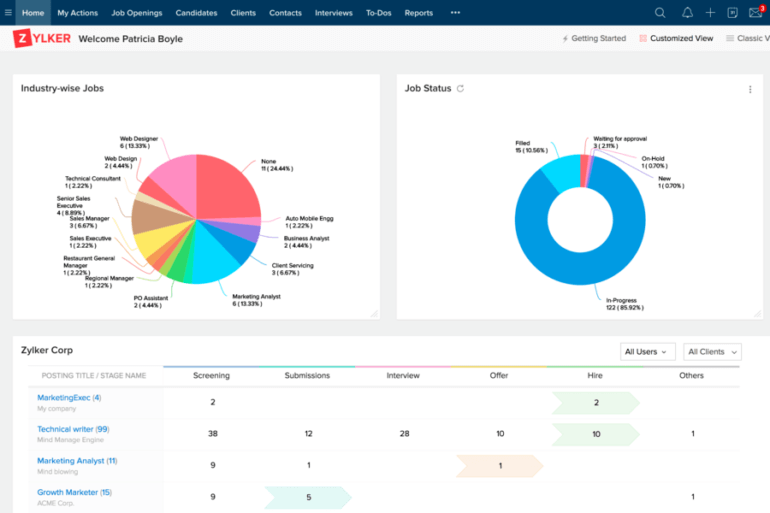
Zoho Recruit is a cloud-based recruiting platform built for HR teams and staffing professionals who need to manage high-volume hiring, automate workflows, and source candidates from multiple channels in one place.
Who Is Zoho Recruit Best For?
Zoho Recruit is a strong fit for staffing agencies and in-house HR teams that manage recruiting across multiple clients, roles, or locations simultaneously.
Why I Picked Zoho Recruit
I picked Zoho Recruit because it has a dedicated Staffing Agency Edition with features that go beyond a standard ATS. I particularly like the client portal, which lets clients create job openings, review submitted candidates, and share interview feedback directly in the platform—so my team doesn't have to chase approvals over email. The formatted resume feature is another useful tool: it lets you share candidate profiles with clients while automatically removing personally identifiable information, which is important for agencies that manage candidate privacy across multiple client accounts. Combined with Zia's AI-powered candidate matching, which scores and ranks candidates against specific job requirements, the platform is built with the day-to-day realities of agency recruiting in mind.
Zoho Recruit Key Features
- Job board posting: Publish open roles to multiple job boards simultaneously from a single interface.
- Resume parser: Automatically extract and populate candidate data from uploaded resumes into structured profile fields.
- Interview scheduling: Coordinate and schedule interviews directly within the platform, with calendar sync for interviewers.
- Recruitment analytics: Access pre-built dashboards that track pipeline metrics, source performance, and time-to-hire.
Zoho Recruit Integrations
Integrations include Zoho CRM, LinkedIn, Google Drive, DocuSign, Slack, Mailchimp, Indeed, Checkr, Microsoft Teams, and HackerRank.
Pros and Cons
Pros:
- An add-on is available for live and one-way video interviewing capabilities
- Includes comprehensive sourcing reports so you can evaluate your recruitment KPIs
- You can post new positions on 75+ job boards with one click
Cons:
- Customer support is only available during standard business hours (8 am to 5 pm, Monday to Friday)
- Duplicating candidate assessments requires a lot of copying and pasting
New Product Updates from Zoho Recruit

Zoho Recruit Introduces Block Candidates
Zoho Recruit now allows recruiters to block specific candidates from applying to future jobs, ensuring a compliant hiring process. For more information, visit Zoho Recruit's official site.
 .
.
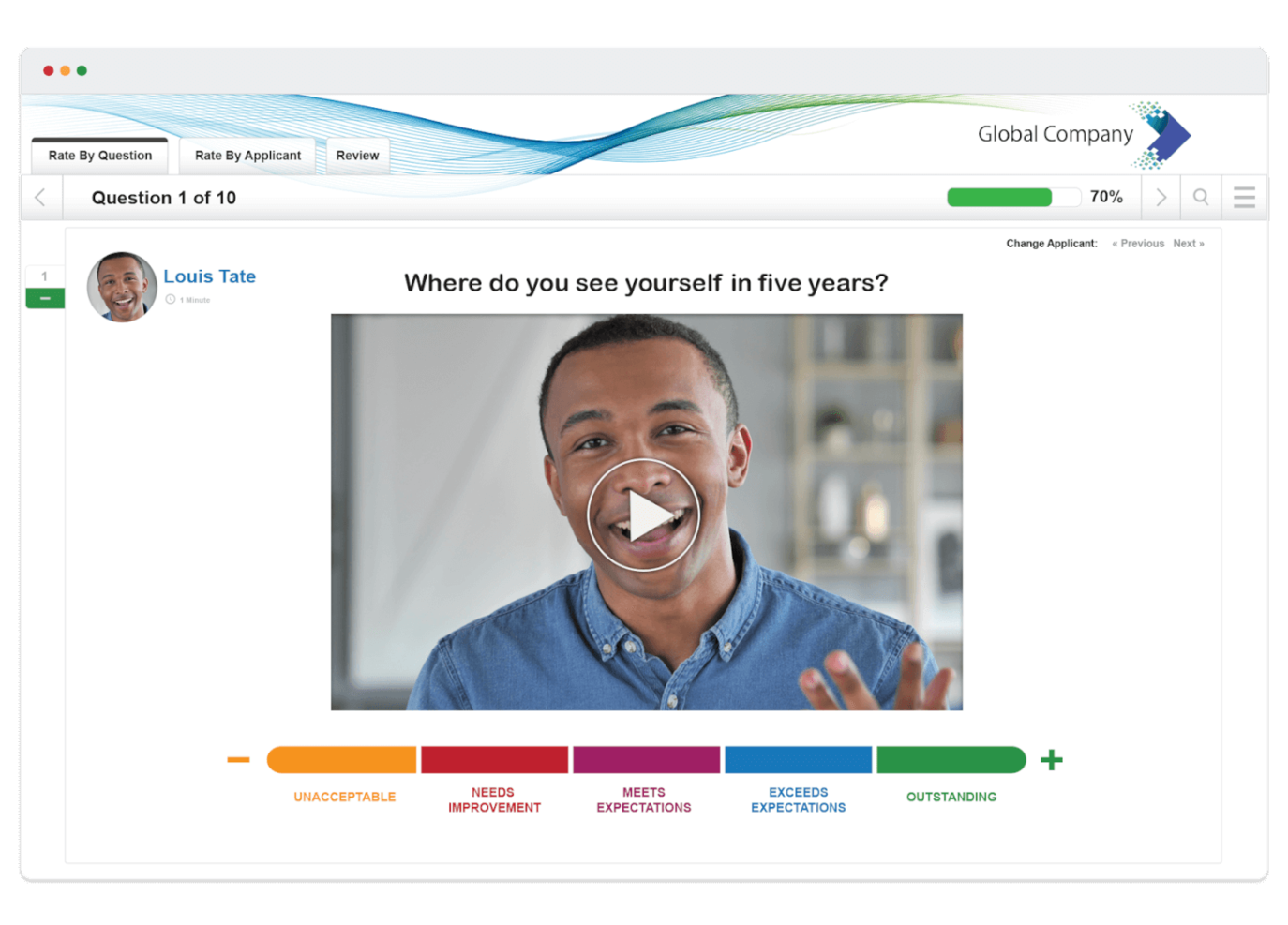
VidCruiter is a recruitment platform designed for HR teams and talent acquisition professionals who need to streamline complex hiring processes with structured video interviews, automated scheduling, and customizable workflows.
Who Is VidCruiter Best For?
VidCruiter is a strong fit for mid-to-large organizations with high-volume hiring needs that require structured, multi-stage interview processes across multiple stakeholders.
Why I Picked VidCruiter
VidCruiter earns its spot on my shortlist because it's one of the few recruiting platforms built specifically around multi-tiered video interviewing—not just as a feature, but as the core of the entire hiring workflow. I like that you can layer pre-recorded screening interviews before live video interviews, creating a structured, sequential process where only the strongest candidates advance to each stage. The built-in competency-based rating guides are embedded directly in the interview window, so my team can score candidates in real time without switching between tools. AI-generated interview notes and transcripts keep evaluations focused on job-related competencies rather than subjective impressions.
VidCruiter Key Features
- Automated reference checking: Send reference questionnaires automatically to candidates and their referees, with weighted scoring and anti-fraud IP tracking built in.
- Skills testing: Build custom pre-employment assessments using video, audio, and text-based questions, or pull from a library of pre-built tests with automated candidate scoring.
- Interview scheduling automation: Let candidates self-schedule using personalized links, with automated calendar sync and time zone management to cut out back-and-forth coordination.
- Candidate pipeline management: Track applicants across every stage of the hiring process with a centralized ATS that supports job posting, resume parsing, and automated workflow progression.
VidCruiter Integrations
Integrations include Workday, Dayforce, ADP, Oracle, UKG, Certn, SAP SuccessFactors, SmartRecruiters, Icims, and PageUp.
Pros and Cons
Pros:
- Customizable interview templates
- Candidate self-scheduling
- Thorough customer support
Cons:
- No free trial
- Tool commands can be complicated
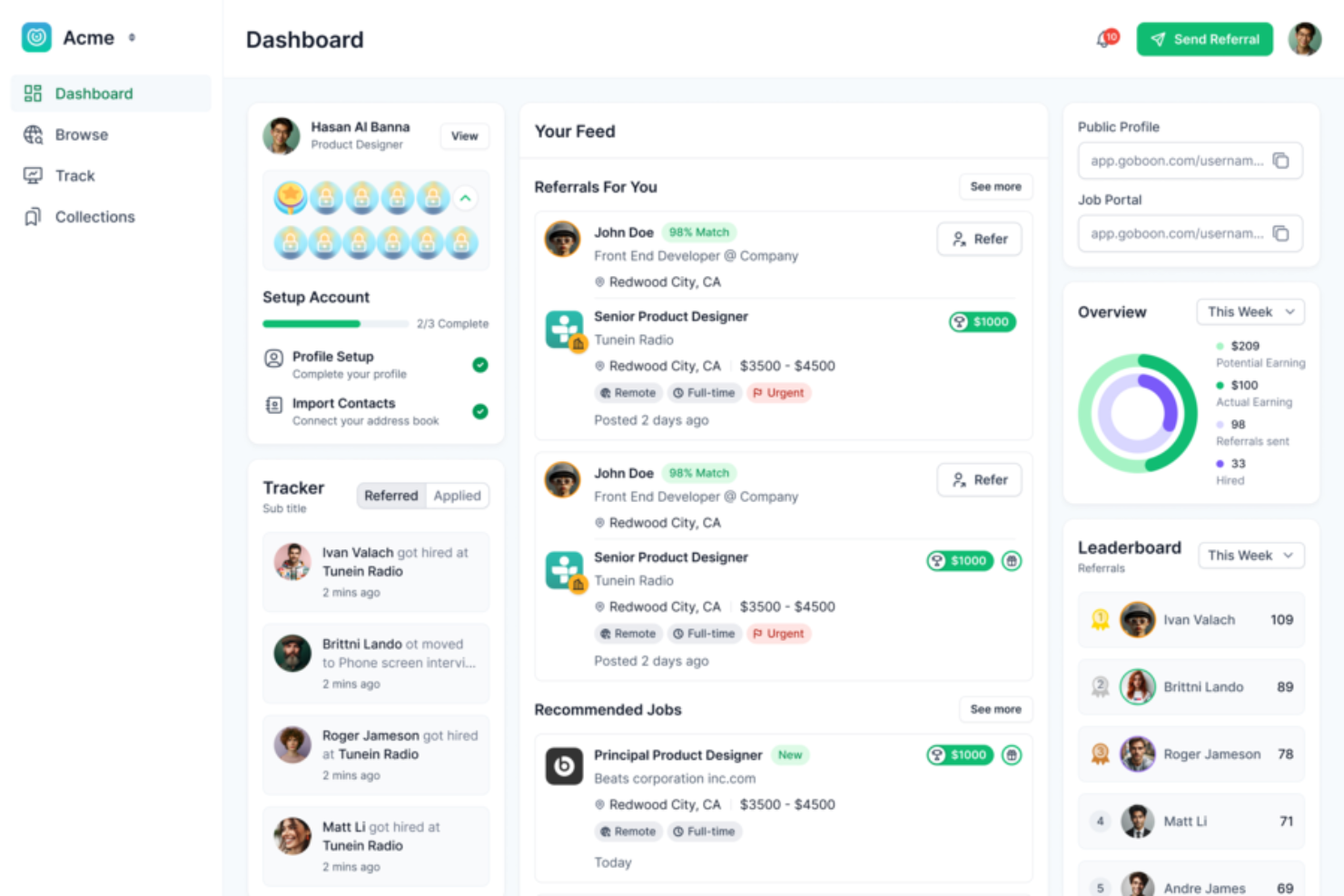
Boon is a recruiting platform designed for HR teams and talent acquisition professionals who want to automate and expand employee referral programs to attract high-quality candidates and fill roles faster.
Who Is Boon Best For?
Boon is a strong fit for mid-sized to large companies that rely heavily on employee referrals as a sourcing channel and need a dedicated tool to manage and scale that process.
Why I Picked Boon
Boon is one of my top picks because it's purpose-built to scale employee referral programs, which most general recruiting tools don't support. I like how Boon uses AI to automatically match open roles with the right employees to ask for referrals, so my team isn't manually nudging people or guessing who has the right network. The platform also lets us run targeted referral campaigns with automated reminders, which keeps participation high without adding to anyone's workload.
Boon Key Features
- Gamification tools: Boon includes challenges, badges, and leaderboards to drive employee participation in referral programs.
- Instant referral links: Employees can submit referrals without logging in, using a shareable link that works outside any portal or dashboard.
- Reward management: Set up cash, gift cards, or custom badges by role or team, with Boon Pay handling payments, taxes, and paperwork.
- White-label customization: Personalize the domain and system-triggered communications to match your employer brand.
Boon Integrations
Integrations include Workday, Greenhouse, Lever, Slack, Microsoft Teams, BambooHR, JazzHR, Jobvite, Bullhorn, and SmartRecruiters.
Pros and Cons
Pros:
- AI automation helps recruiters identify better candidates faster
- Gamification features help increase employee engagement
- Referral tracking is efficient and easy to manage
Cons:
- Incentive tracking lacks deeper customization options
- Uploading data manually can be difficult or time-consuming
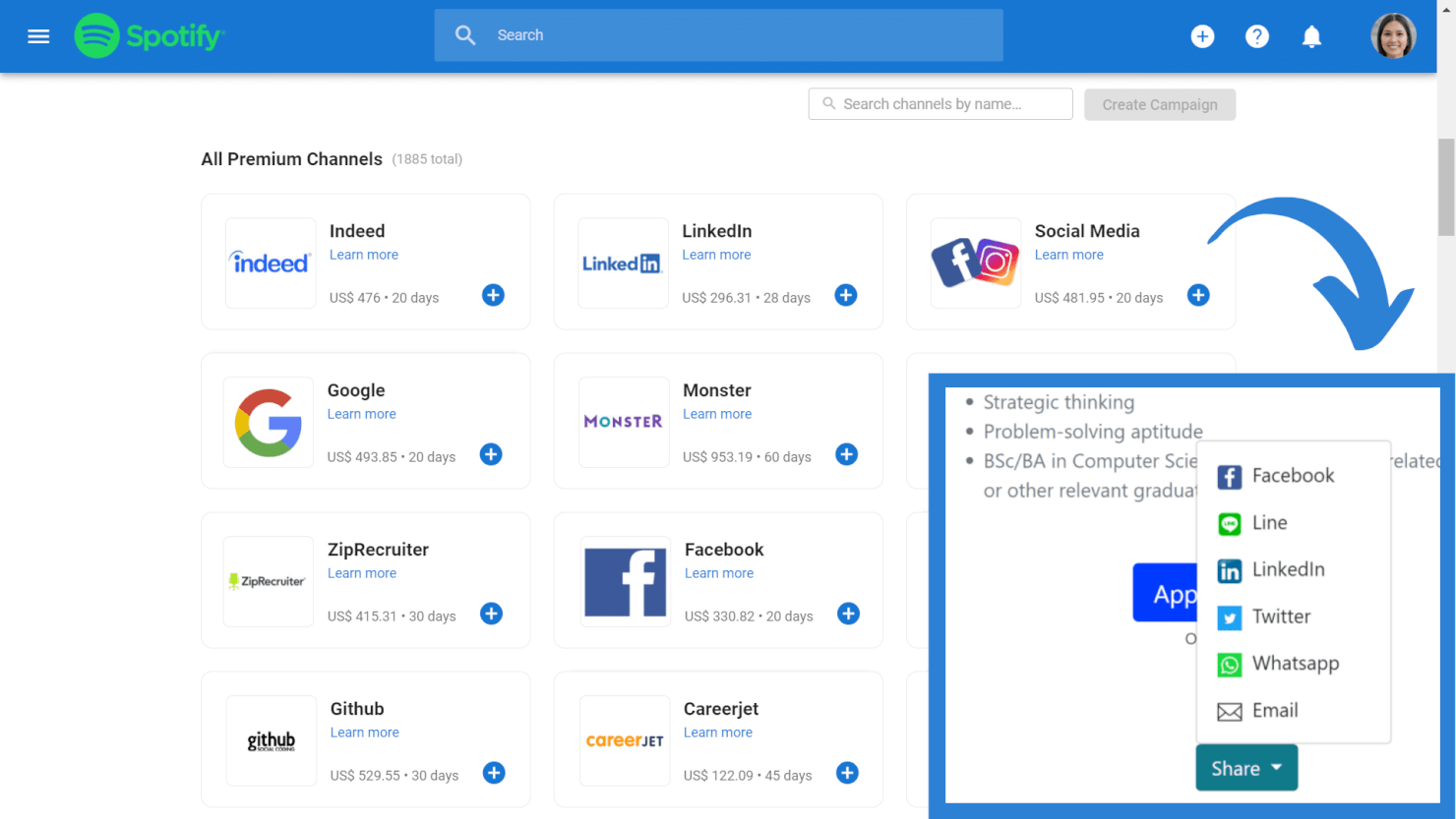
Manatal is a cloud-based recruiting platform built for HR teams and agencies who want to simplify candidate sourcing, automate workflows, and collaborate on hiring decisions in one place.
Who Is Manatal Best For?
Manatal is a good fit for in-house HR teams and staffing agencies at small to mid-sized companies that need a structured, scalable hiring process without a heavy IT lift.
Why I Picked Manatal
Manatal earns its spot as one of the best on my shortlist because of how deeply AI is woven into the actual recruiting workflow—not just bolted on as a feature. I particularly like the AI candidate scoring and matching, which automatically extracts requirements from a job description and ranks candidates in your database against them. That means when I'm working a high-volume role, I'm not manually sifting through hundreds of profiles to find the best fits. The AI Interviewer is another standout—it conducts video interviews autonomously, around the clock, so my team can screen candidates at scale without scheduling bottlenecks.
Manatal Key Features
- Job board multiposting: Distribute job listings to 2,500+ job boards and social media platforms from a single posting interface.
- Recruitment CRM: Manage client relationships, track deals, and link candidates to client pipelines alongside your ATS workflows.
- Candidate scorecards: Evaluate and compare candidates using structured scorecards that hiring team members fill out independently.
- Analytics and reporting dashboard: Track recruitment metrics like time-to-hire, pipeline activity, and source performance across all open roles.
Manatal Integrations
Integrations include Indeed, Codility, Mailchimp, Google Workspace, Microsoft 365, LinkedIn, ZipRecruiter, Monster, Talent.com, and Google for Jobs.
Pros and Cons
Pros:
- Candidate sourcing tool draws from 2,500+ job platforms
- Includes task tracking and team collaboration tools
- You can create customizable career landing pages with embedded application forms
Cons:
- Text messaging & SMS recruitment features only available in their top-level plan
- No option to pay month-by-month
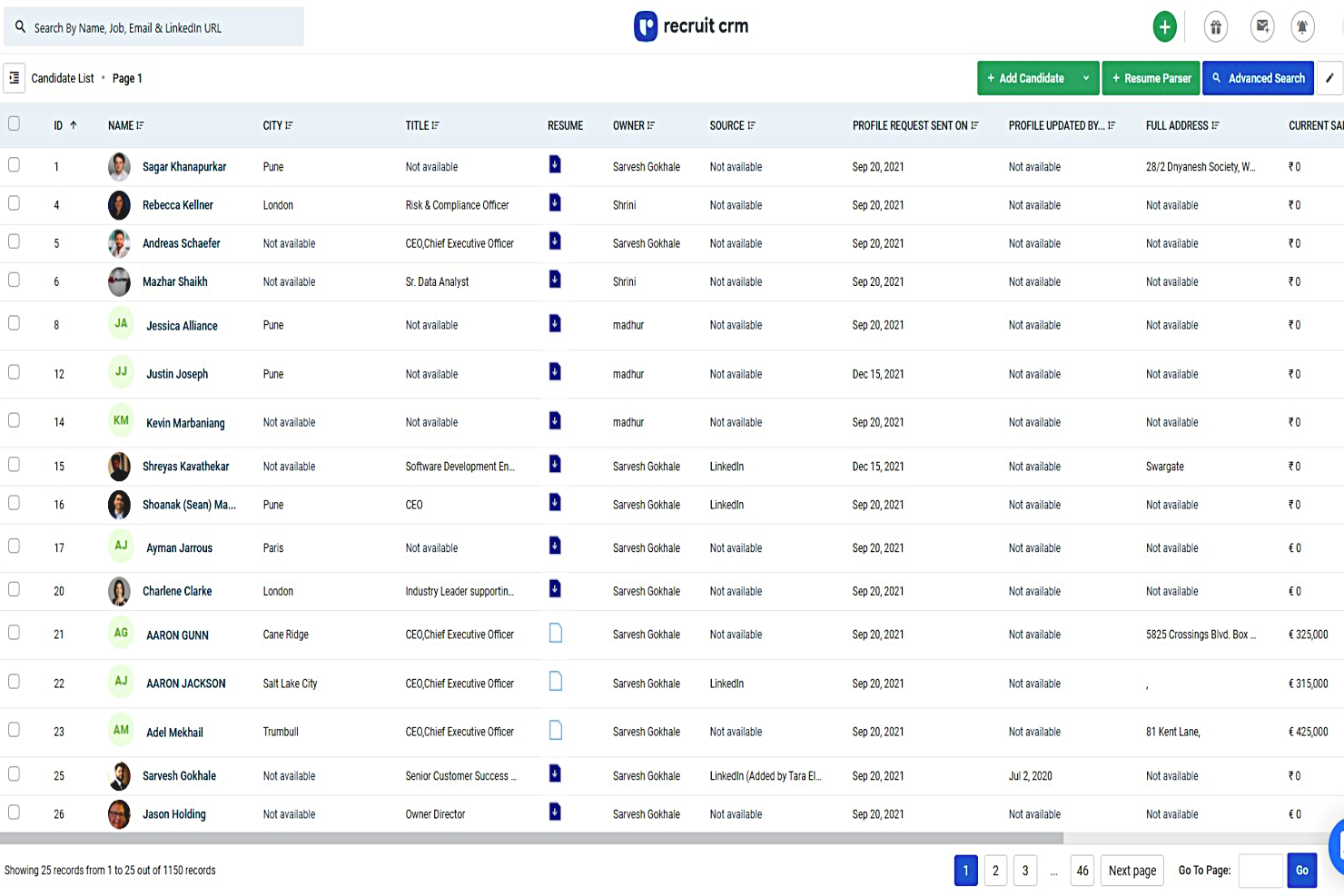
Recruit CRM is a platform for staffing and recruitment agencies that need to manage candidates, clients, and jobs in one place, helping teams automate workflows and streamline the hiring process.
Who Is Recruit CRM Best For?
Recruit CRM is a great fit for independent recruitment agencies and staffing firms that need a single platform to manage both candidate pipelines and client relationships.
Why I Picked Recruit CRM
Recruit CRM is on my list because it combines ATS and CRM functionality in a single, agency-focused tool. I like that my team can manage candidate pipelines and client relationships without switching between systems. The AI candidate sourcing lets us describe an ideal candidate in plain language and pull enriched LinkedIn profiles, reducing sourcing time. The candidate submission feature lets us send shortlists to clients with a built-in yes/no feedback system, keeping hiring managers aligned without back-and-forth emails.
Recruit CRM Key Features
- Resume parser: Automatically extracts candidate details from uploaded resumes and populates candidate profiles in the system.
- Kanban pipeline view: Visualizes job openings and candidate stages on a drag-and-drop board for easy pipeline management.
- Email sequencing: Sends automated, multi-step email campaigns to candidates or clients directly from within the platform.
- Custom report builder: Generates tailored reports on recruiter activity, placements, and revenue to track agency performance.
Recruit CRM Integrations
Integrations include Zapier, Integrately, and Pabbly, and an API supports custom connections.
Pros and Cons
Pros:
- Includes a robust reporting & analytics suite
- Includes powerful AI features like resume parsing, email sequencing, and candidate matching
- Provides a powerful Chrome extension
- Dashboards are easy to customize
- Designed to simplify the process of recruiting for multiple clients
Cons:
- Service Level Agreement (SLA) feature is limited to their Enterprise plan
- You need to purchase calling credits separately to make calls within the system (and access call recording)
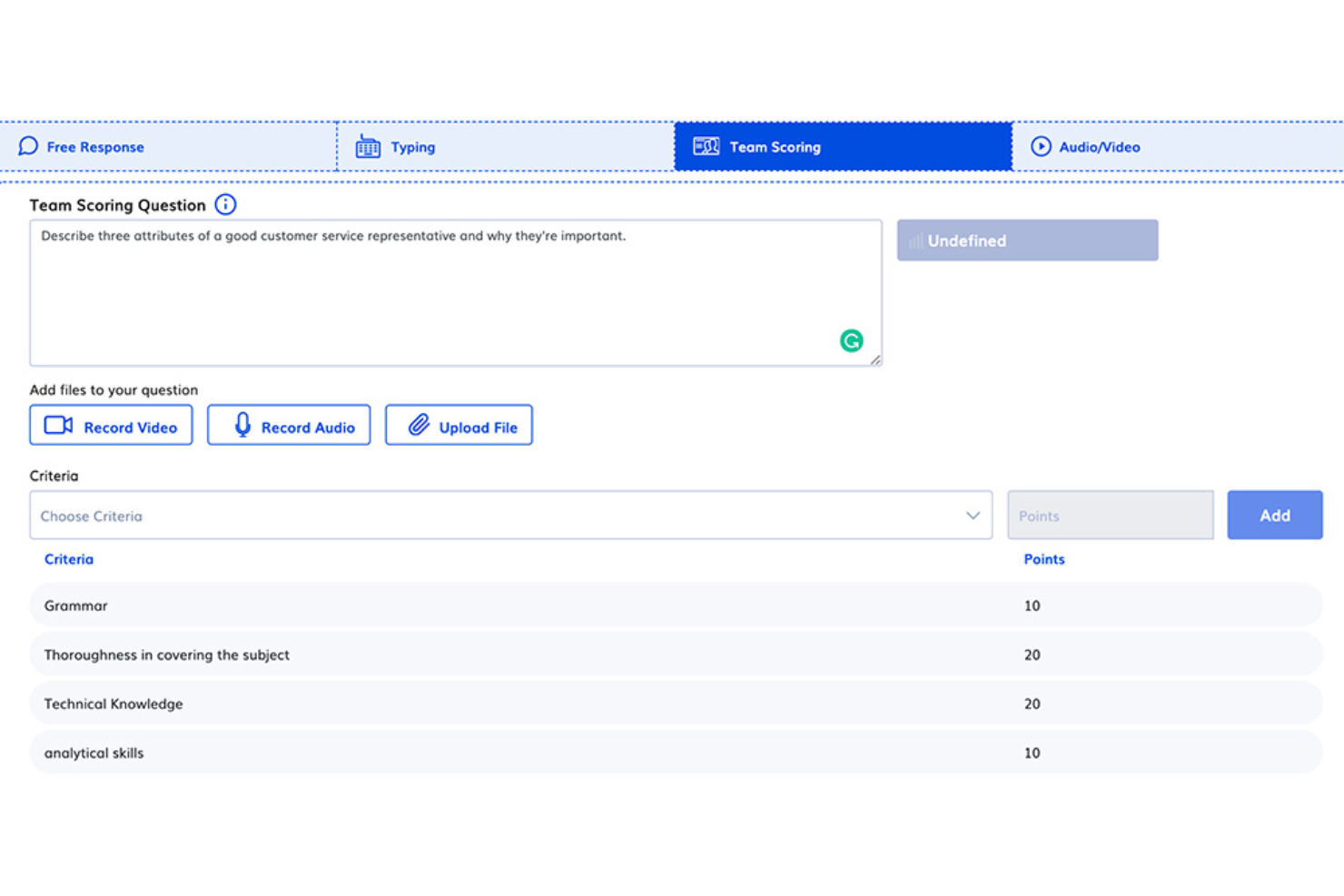
eSkill helps HR teams and recruiters in all industries screen candidates with job-specific skills tests, behavioral assessments, and video interviews to make more informed hiring decisions.
Who Is eSkill Best For?
eSkill is a strong fit for mid-size to enterprise organizations that need to assess large volumes of candidates across a wide range of roles and departments.
Why I Picked eSkill
eSkill earns its spot on my shortlist because of how far you can go with assessment customization. I like that you can build tests from scratch by mixing questions from eSkill's library across different subjects—so a single assessment can cover Excel skills, situational judgment, and role-specific knowledge all at once. I've also found the subject matter expert (SME) tool useful for adding proprietary questions that reflect your company's actual workflows. That level of specificity is hard to replicate with off-the-shelf testing tools.
eSkill Key Features
- AI-powered proctoring: Automatically detects suspicious candidate behavior during assessments, generating suspicion scores based on video, audio, and screen recordings.
- Candidate ID verification: Confirms a test taker's identity with photo ID checks before an assessment begins to validate results.
- Question-level reporting: Breaks down candidate performance by individual question, subject, and skill type so you can compare applicants in detail.
- Time-to-complete tracking: Measures how long each candidate takes to finish an assessment, giving you a fuller picture of both skill and pace.
eSkill Integrations
Integrations include Greenhouse, Lever, SmartRecruiters, and Workday.
Pros and Cons
Pros:
- Detailed reporting and analytics
- Flexible test customizations
- Comprehensive assessment library
Cons:
- Assessment experts may only be available for higher-tier subscriptions
- Not all assessments are relevant to specific user needs

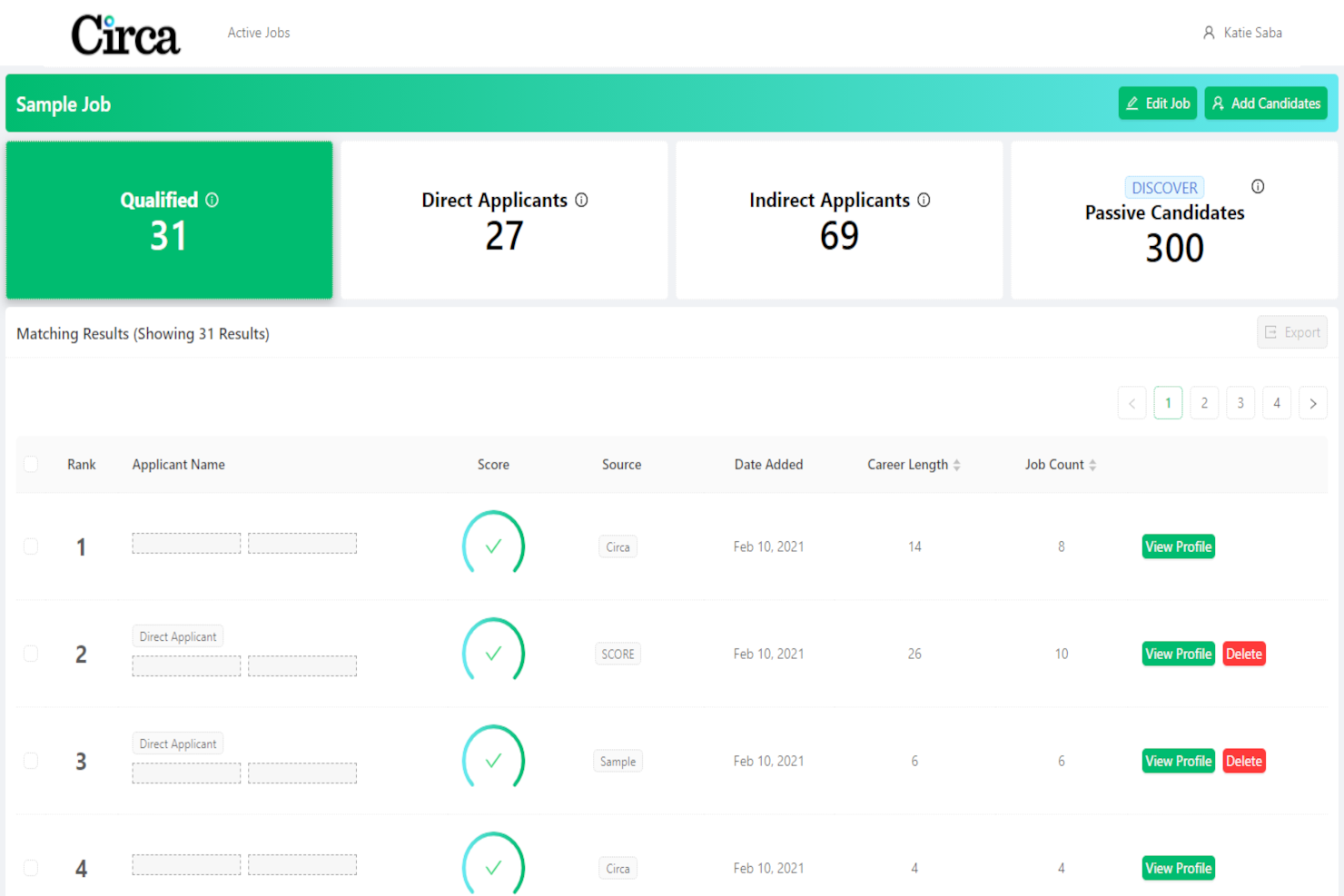
Mitratech Circa helps businesses amplify diversity and inclusion efforts in their hiring processes.
Why I picked Mitratech Circa: The software uses extensive data sources to enable organizations to identify and nurture a more diverse pipeline of candidates for open roles. It also provides access to a network of diverse job boards, helping you reach a wider pool of candidates and promote a more inclusive hiring process.
Mitratech Circa Standout Features and Integrations
Features include Office of Federal Contract Compliance Programs (OFCCP) compliance management. This is a built-in safeguard to ensure your business is meeting nondiscrimination regulations, giving you peace of mind that you’re remaining compliant in your efforts to diversify your staff.
Integrations are not currently listed by the software provider
Pros and Cons
Pros:
- Promotes diverse and inclusive hiring practices
- Vast database available for candidate sourcing
- Responsive and helpful customer support team
Cons:
- Comes with a learning curve
- Resume searching could be more dynamic

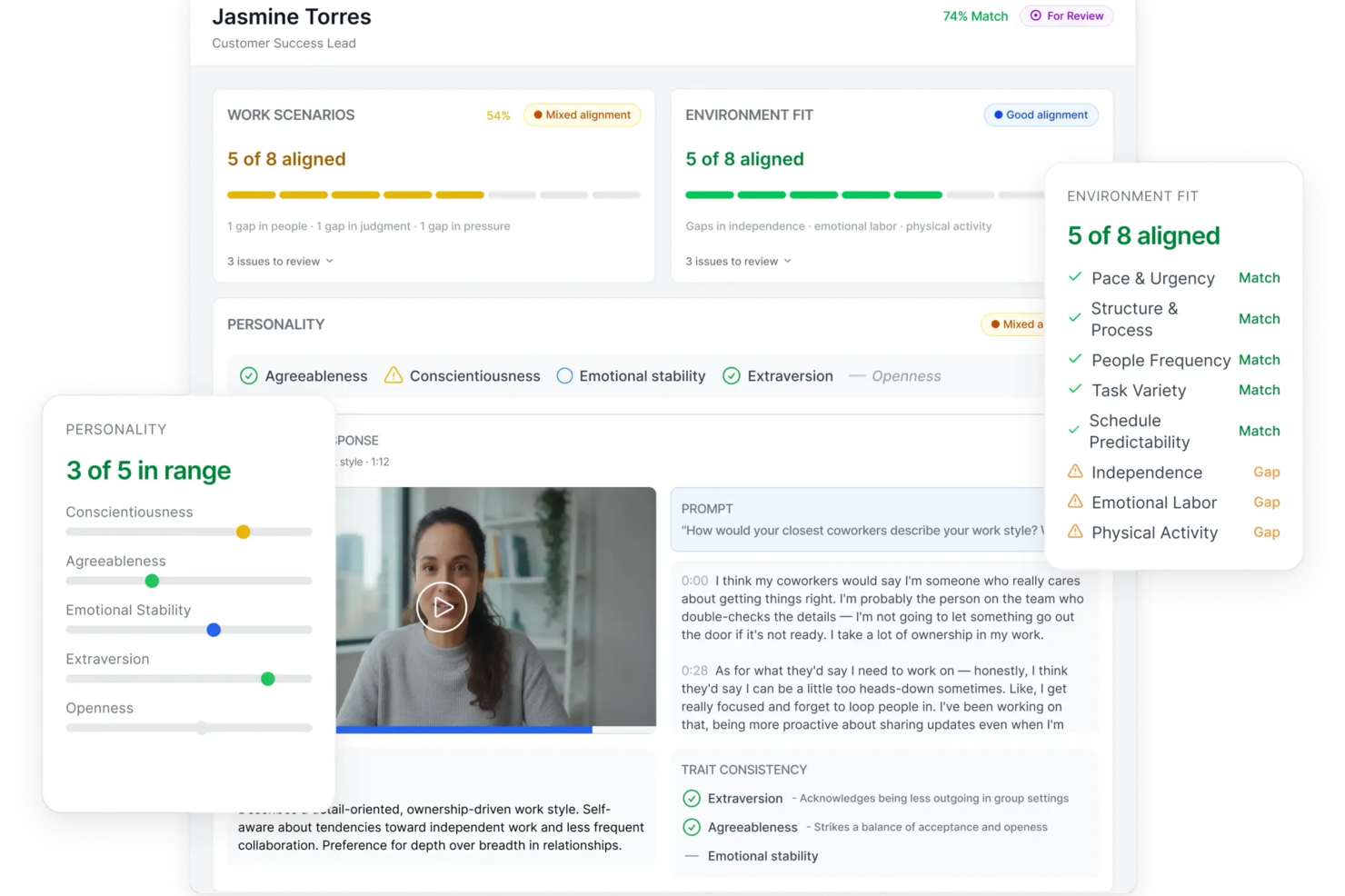
Truffle is a recruiting software solution that leverages AI to transform your hiring process. Designed for industries ranging from healthcare to tech, it's perfect for businesses dealing with high-volume or seasonal hiring. By automating tasks like resume screening and offering features such as asynchronous video interviews, Truffle helps you focus on finding the right talent without the usual administrative burdens.
Why I Picked Truffle
I picked Truffle for its AI-driven automation that revolutionizes candidate screening. The platform's standout feature is its asynchronous video interviews, allowing candidates to record responses at their convenience, which you can review on your schedule. Additionally, its AI-powered talent assessments provide match scores and detailed summaries, ensuring you make data-backed hiring decisions. These features align perfectly with the needs of recruiting professionals looking to save time and increase efficiency.
Truffle Key Features
In addition to its AI-driven automation, Truffle offers several other features that cater to your recruiting needs:
- ATS/HRIS Integration: Connects with your existing systems to simplify the recruitment workflow.
- Mobile Compatibility: Ensures candidates can participate in interviews and assessments from any device.
- Automatic Reminders: Keeps candidates engaged with automated follow-ups and reminders.
- Unlimited User Access: Allows your entire team to collaborate without any additional cost.
Truffle Integrations
Integrations include Ashby, Breezy HR, Indeed, Zapier, Teamtailor, Bullhorn, JazzHR, and more.
Pros and Cons
Pros:
- Customizable workflows for different job roles
- Centralized dashboard for all candidate data
- Automated scheduling for interviews and calls
Cons:
- Unclear support for high-volume recruiting
- Reporting features may lack advanced analytics


Rippling is an all-in-one HR platform designed for businesses that want to connect recruiting, onboarding, and employee management in a single system, helping HR teams and hiring managers streamline hiring and automate manual tasks.
Who Is Rippling Best For?
Rippling is a strong fit for mid-sized and scaling businesses that need recruiting tools tightly connected to HR, payroll, and IT management in one place.
Why I Picked Rippling
I picked Rippling as one of the best because of how tightly its ATS connects to the rest of the HR platform. When a candidate signs an offer, Rippling automatically triggers onboarding—enrolling them in benefits, assigning training, and provisioning apps like Slack and Zoom—without any manual handoff. I also like the headcount planning integration: once a role is approved with a comp band, it flows directly into the ATS so recruiters can kick off searches immediately. That kind of end-to-end connection between recruiting and HR data is something standalone ATS tools simply can't replicate.
Rippling Key Features
- Customizable job pipeline stages: Build and adjust hiring stages to match your team's recruiting process for each role.
- Candidate scorecards: Standardize interviewer feedback with structured scorecards tied directly to each job requisition.
- Job board posting: Publish open roles to multiple job boards simultaneously from within the Rippling platform.
- Role-based hiring permissions: Control which hiring managers, recruiters, and interviewers can view or act on candidate data.
Rippling Integrations
Integrations include Slack, Zoom, Google Workspace, Microsoft 365, Salesforce, Asana, Jira, HubSpot, Checkr, and PayPal.
Pros and Cons
Pros:
- Supports global hiring and payroll
- Automates onboarding payroll and compliance
- Applicant tracking integrated with HR
Cons:
- Advanced features restricted for nonadmins
- Costs increase with added modules

Gem is an AI recruiting platform designed to assist talent acquisition teams in managing their hiring processes efficiently.
Why I picked Gem: I like that Gem caters to every stage of the recruitment process. It has a powerful candidate relationship management (CRM) system, which allows recruiters to manage and nurture candidate relationships over time. This CRM integrates seamlessly with popular ATS platforms, ensuring that candidate information is always up-to-date and accessible.
Additionally, Gem's sourcing and recruiting tools leverage AI to identify and engage with potential candidates across various platforms, making it easier for recruiters to find the right talent quickly.
Gem Standout Features & Integrations:
Standout features include its branded email campaigns, which enable recruiters to create personalized and professional communication with candidates. Furthermore, Gem's diversity recruiting tools help companies build more inclusive pipelines by tracking and promoting diversity metrics, while its comprehensive candidate sourcing analytics give recruiters detailed information about where the best candidates are coming from.
Integrations include LinkedIn, Greenhouse, Lever, SmartRecruiters, Jobvite, Workday, SAP SuccessFactors, Taleo, Ashby, BambooHR, and iCIMS.
Pros and Cons
Pros:
- Automates follow-up sequences and email campaigns
- Can manage large volumes of applications
- Detailed metrics for tracking applicant pipelines
Cons:
- Some emails sent from Gem can end up in spam folders
- Recruitment insights could be more flexibile

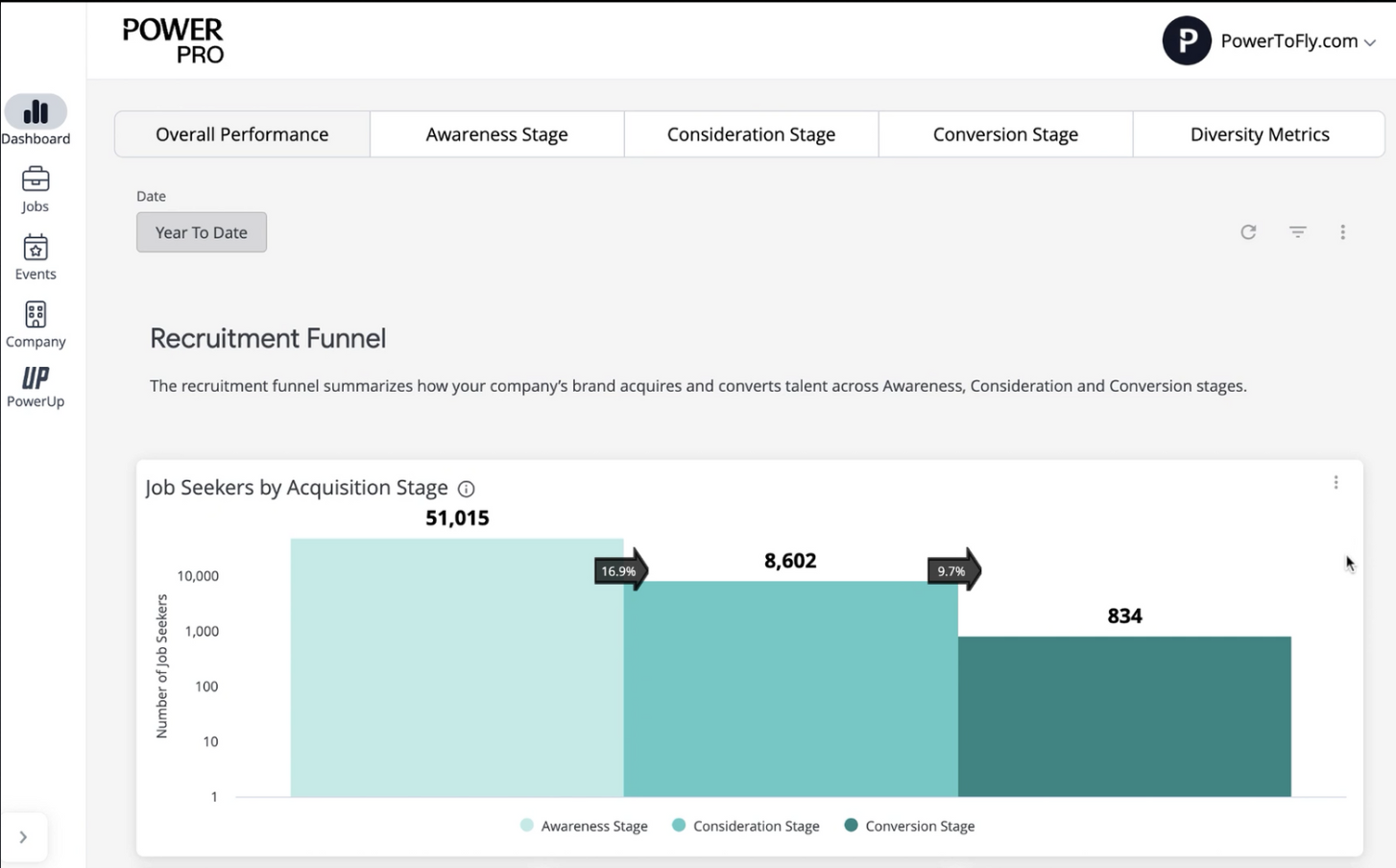
PowerToFly offers software, services, and a community to support the recruitment efforts of businesses and promote diversity, equity, inclusion, and belonging (DEIB) in the hiring process.
Why I picked PowerToFly: The platform helps you build your company page, craft job postings, and track your recruitment efforts. All of its functionalities are built around inclusivity and equity. You can seek out diverse candidates from a global talent pool, and search using various filters.
A learning hub and news feed are also included in the software's interface. These provide courses, resources, and tools created by subject matter experts on DEIB topics. The system's dashboard lets you track job posting performance, company page analytics, and talent database analytics.
PowerToFly Standout Features & Integrations
Standout features include the software's 'job posting wizard', which guides you through writing a job posting that's inclusive and showcases your company culture. It's also worth noting that the company provides services to support your recruitment efforts and reduce bias in your hiring process. They also have an exclusive community where you can learn from other DEIB leaders and connect with potential candidates.
Integrations are not listed by the provider.
Pros and Cons
Pros:
- Analyze your job postings and careers page
- Ability to search global talent pool with advanced diversity filters
- Access to DEIB resources created by subject matter experts
Cons:
- Software integrations aren't listed
- Pricing is not transparent
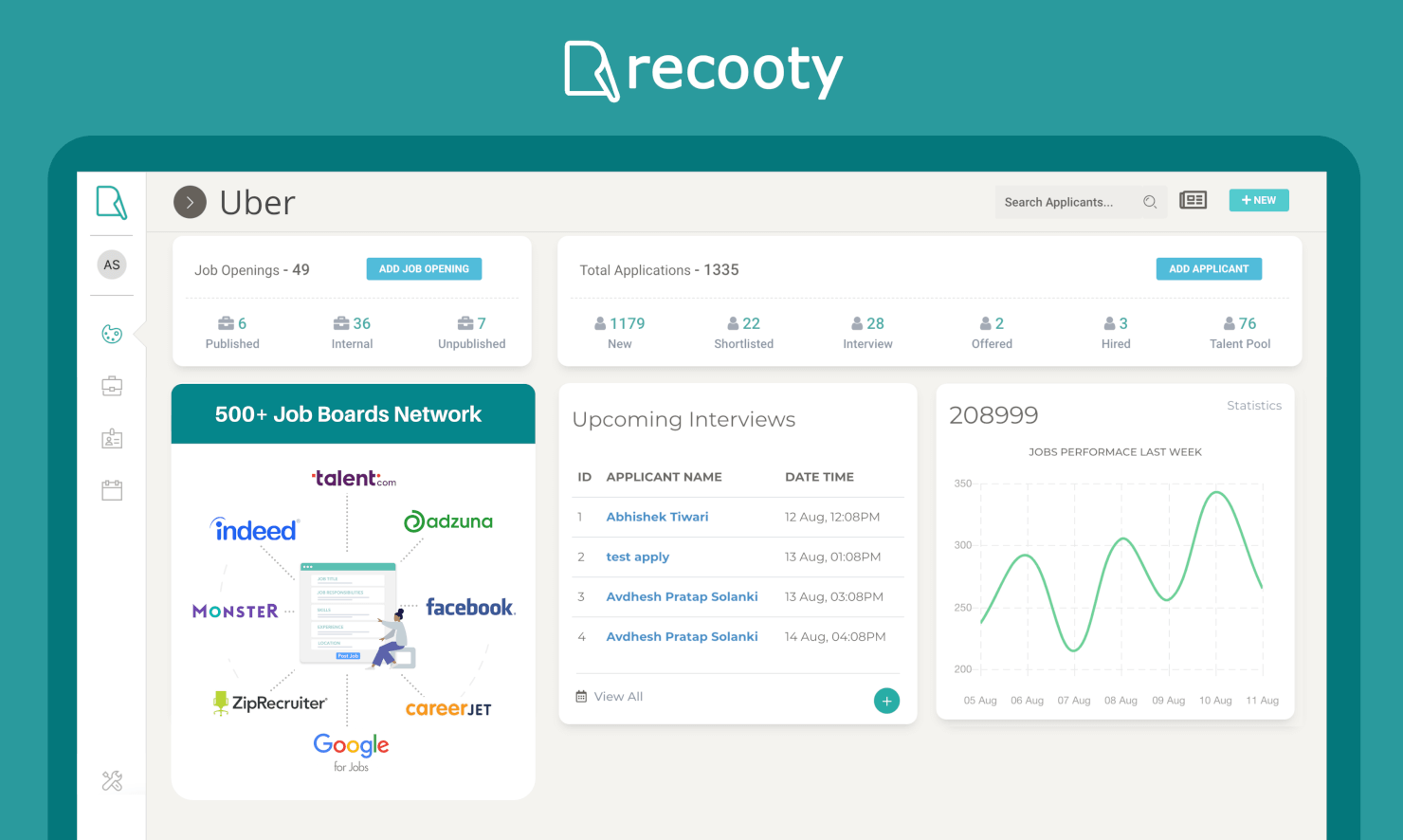
Recooty is a modern recruiting software that makes it easy to attract, engage, and hire talent easily. They are used by over 5,000 businesses to source and track talent, including Uber, American Hospital, Sendlane, and Trello.
Recooty lets you post jobs, review applications, schedule interviews, and hire all within one platform. You can leverage job board integration, a branded careers page, and social media hiring to reach qualified candidates across the web. Recooty works with popular job boards like Indeed, ZipRecruiter, Monster, Facebook, Glassdoor, Google for Jobs, and others.
Recooty offers API support for integrations at the Max level plan.
Other Recruitment Software Options
Here are a few more worthwhile options that didn’t make the best recruitment software list. If you need additional suggestions for a recruitment management system, these are also worth checking out:
- myInterview
For AI-powered candidate screening
- Recruitee
For collaborative hiring
- JazzHR
For small businesses and startups
- SmartRecruiters
For full recruiting workflows
- Lever
For relationship-focused candidate pipelines
- Factorial
For customizable recruitment processes
- Sage HR
For custom application scorecards
- Mitratech TalentReef
For hiring and retaining hourly workers
- Zappyhire
For agentic predictive hiring
- iCIMS
For automated talent engagement
- Bullhorn
For automated candidate outreach
- Jobvite
For AI-powered workflow automations
- Arcoro
For construction companies
- Wild Noodle
For assessing and hiring programming professionals
- Unnanu Hire
For access to a pre-populated talent database
- Skima.ai
For AI-driven candidate matching
- LinkedIn Talent Solutions
For LinkedIn recruiting
- TestGorilla
For pre-employment testing and skill-based assessments
- Vincere
Recruiting agency software with integrated CRM features
- PeopleStrong Alt Recruit
Recruiting software for enterprise organizations
- Klimb.io
For building a career site with a chatbot
- Transformify
For flexible payment options
- Haystack Pro
For video-forward recruitment strategies
- AvaHR
Recruiting software for service-based small businesses
- monday.com
For customizability and scalability
- Teamtailor
For end-to-end process management
- hireEZ
For outbound recruiting with access to 800+ million candidates
- Tracker
ATS & CRM for staffing and recruiting firms
- Canditech
For skill-based, auto-scored assessments
- WorkBright
For intelligent talent spotting


Selection Criteria for Recruiting Software
Selecting the right recruiting software involves carefully evaluating how well the software will meet your specific needs to help you improve your recruiting process.
My approach to choosing the best recruiting software is based on my personal experience and extensive research into how these software systems address the needs, pain points, and goals of recruiters and hiring teams in real, day-to-day scenarios.
My Expertise and Experience in Recruiting Tech
In the past, I spent years sorting through stacks of candidate data and organizing applications to help hiring managers decide who to interview. As a team, we hired easily 100+ candidates per year, for numerous technical positions.
To create this list, I put myself back into my old recruiting shoes, to add more expertise to my assessment.
Using my experience as a guide, I was able to recall all the key features I found useful back when I was dealing with large volumes of job applications myself.
My Evaluation Process for Recruiting Tools
To create this list, I started by reviewing recent recruitment software market data to compile a long list of the most popular recruitment software systems out there.
Next, drawing on my personal recruiting experience, I dug into each recruiting software system further, evaluating the core functionalities and key features of each in detail.
To make my final selections, I then compared my top choices using the specific criteria below to see how each recruiting platform compared to the next one.
Here's a summary of the main points I assessed:
Core Recruiting Software Functionalities (25% of total score): For a recruitment system to land a place in my initial list, it needed to fulfill the following basic functionalities to start:
- Job posting tools to help you with candidate sourcing across multiple platforms
- Either an integrated applicant tracking system (ATS), a candidate relationship management (CRM) database, or a customizable dashboard where you can track job applications for your open positions
- Candidate screening tools, including side-by-side comparisons, skill-based comparisons, diversity recruiting, and resume screening to speed up candidate selection
- Interview scheduling tools to automate the booking process
- Collaboration tools to make it easier for internal teams to discuss hiring decisions as a group
- Tools to help you develop and host a career site on your company website
Additional Standout Features (25% of total score): This portion of my evaluation focuses on innovative and unique features that set a tool apart from its competitors. Talent Acquisition Software that offers cutting-edge technology or solves specific challenges scores higher.
- Workflow Automation Tools: Workflow automation tools help you work more efficiently by reducing tedious and time-consuming tasks such as sending out personalized emails in bulk, scheduling interviews, requesting reference check details, or following up on incomplete tasks such as skill tests or assignments. They are a crucial feature for teams managing high-volume hiring needs.
- Time-saving Software Integrations: Integrations with other software systems will improve your overall productivity and help you work more efficiently. That's why I selected recruitment software that offers native integrations with many popular software systems. Key integrations to verify are email providers, digital calendars, human resources information systems (HRIS), and skill assessment platforms.
- Mobile-optimized Recruiting Features: Since 89% of job seekers use their mobile devices to search for open positions, it's crucial to make your job openings mobile-friendly. Mobile accessibility is even more important if you're sourcing candidates for an industry with workers who are often mobile, field-based, or deskless. Key features to look for include:
- apps for Android and iOS mobile devices
- mobile-friendly job postings
- the option to communicate directly with candidates via text messages
- text-based communication templates
- mobile-friendly interview packets and skill assessment tests
Usability (10% of total score): Usability testing focuses on the software’s interface design, ease of navigation, and overall user experience, including mobile app usability. Tools that provide intuitive, clean interfaces with minimal learning curves will be used more and score higher here.
- The software should have a user interface that simplifies complex processes like interview scheduling using drag-and-drop tools.
- Customizable dashboards and other visualization aids such as color-coding, status flags, and recruiting pipelines in a Kanban-style format are also helpful.
These simple features help you quickly digest your candidate data at a glance, without needing to open each record to see the status.
Onboarding (10% of total score): This criteria evaluates how quick and efficient the customer onboarding process is for new users. Factors that influence this include the availability and quality of training materials, the simplity of the setup process, and any other available resources for new users.
- It should be quick and easy for recruiters to start using the software. This includes how easy it is to import existing candidate data into the new system to minimize transition time.
- The software provider should offer comprehensive onboarding resources, including training videos, product tours, and interactive tutorials.
- Evaluating whether or not the software provider offers a dedicated customer success representative for a more personalized onboarding process.
Customer Support (10% of total score): This assessment criteria considers the availability of customer support, as well as their responsiveness. Software with multiple support channels (such as email, phone, and live chat) are favored here.
- An assessment of post-implementation customer support availability.
- Reviewing what self-service support resources are available, such as a customer-facing knowledge base, wiki, or FAQs page to help troubleshoot issues.
- Considering whether the software vendor has an active user community or forum for peer-level assistance and advice.
Value for Price (10% of total score): To score the value of each software, we compare the tool's pricing structure to its feature set, considering different team sizes and needs. Software that offers transparent, flexible pricing models with a strong feature-to-cost ratio if rated favorably.
- The availability of free trials or demo versions to do a test run on the software before purchasing.
- Transparent pricing models that clearly explain which features are included.
- Pricing plans that cater to different business sizes, from small businesses up to enterprise-level needs.
Customer Reviews (10% of total score): We review customer feedback from various sources to analyze user satisfaction, usability, and customer support. Software with positive testimonials and consistently high ratings score higher in this category.
- We analyze feedback from current and past users to identify common issues or points of praise and gauge user satisfaction levels.
- We consider overall rating trends to gain a consensus on each software's reliability and performance over time.
Using this comprehensive criteria framework helped me identify recruiting platforms that stand out against others in the market thanks to their innovative features, user-friendly design, effective support, and overall value.
How to Choose Recruiting Software
Recruiting software can solve many different challenges and improve numerous workflows. To help you figure out which recruiting software best fits your needs, you need to pinpoint your key users and document their specific challenges first.
As you work through your own unique recruiting software selection process, keep the following factors in mind:
| Factor | What to Consider |
|---|---|
| Company Size & Hiring Volume | Choose software that matches your hiring frequency—some tools are better for high-volume hiring, while others are tailored for startups or small teams. |
| Ease of Use | Look for an intuitive interface for recruiters, hiring managers, and candidates to minimize training time and improve adoption. |
| Core Features | Ensure the platform covers key functions you need—job posting, applicant tracking, resume parsing, scheduling, and communication. |
| Candidate Experience | Consider features like a branded career page, mobile-friendly applications, and automated updates to keep candidates engaged. |
| Collaboration Tools | Check for features that make it easy for hiring managers and team members to share feedback and make decisions together. |
| Integrations | Look for compatibility with your existing HRIS, payroll, job boards, and communication tools. |
| Analytics & Reporting | Evaluate whether the software provides metrics on time-to-fill, source of hire, and candidate pipeline health. |
| Scalability | Pick a solution that can grow with your company, offering add-on features or advanced tiers as your needs expand. |
| Automation | Assess whether the platform automates repetitive tasks like screening, interview scheduling, and follow-up emails. |
| Pricing Model | Understand whether pricing is per user, per job post, or subscription-based—and whether it fits your hiring budget. |
| Customer Support | Consider the level of onboarding, training, and ongoing support provided, especially if your team is new to using recruiting software. |
How to Implement Recruiting Software
Once you've chosen the winning recruitment software for your needs, now comes the hard part.
You need to develop an implementation plan to integrate the software into your organization.
Step 1: Clean Up Your Data
As you know, the recruiting process produces a hefty amount of data, so a big part of getting ready to implement a new recruiting system is cleaning up your data for eventual migration. You'll need to decide which candidate records, job postings, hiring templates, and other details you want to transfer to your new system.
Be selective, so you don't bog down your new system with information you don't need!
Step 2: Consider the Timing
Most businesses have fluctuations in their recruiting needs and volume throughout the year. It's important to keep this in mind so you can plan to implement the new system during a slower period rather than when your staff are already working at their peak capacity.

Step 3: Vet the Integrations Carefully
Integrating the recruitment software with your existing systems, such as your HRIS, payroll software, and background checking systems, is vital for smooth operations. You'll need to address all technical aspects such as data mapping and API connections to information flows smoothly between systems.
“We learned the hard way during our last software implementation that just because a program integrates with your ATS or other tools like Office 365, LinkedIn, etc. doesn’t mean it offers the full range of capabilities you’re looking for.”—Matt Erhard, Managing Partner at Summit Search Group
Step 4: Set up the Software
Most recruiting platforms are cloud-based, meaning they have low IT requirements since you simply log in through a web interface. However, an on-premise recruitment software implementation would involve setting up a server to run it from (this is why most platforms are cloud-based now).
Step 5: Train Your Users
Effective training is key to user adoption. You should offer role-specific training in a variety of formats, including a blend of in-person sessions, online courses, and detailed support documentation.
Step 6: Run Test Scenarios
Thorough testing of all software features and integrations is essential. Create test scenarios that reflect real-world use cases you've already encountered. This will help you identify and resolve any issues before full deployment.
Step 7: Celebrate the Launch to Promote User Adoption
Once you've ironed out all the wrinkles, you're ready to unleash your new recruiting software for widespread use. That's worth celebrating! To encourage adoption, highlight the software's benefits and provide ongoing support to your different user groups based on their unique needs.
Step 8: Monitor and Evaluate Performance
Set up regular reporting to track key metrics such as time-to-hire, cost-per-hire, and candidate satisfaction. This will help you understand the software's performance and measure your long-term ROI.
Trends in Recruiting Software
I don’t think this will surprise you, but currently one of the biggest trends impacting recruiting is the explosion of artificial intelligence (AI) and machine learning (ML) capabilities. Software developers are quickly integrating many AI capabilities into their tech to help modernize their systems.
For recruiting software, specifically, here are some of the key features that now use AI and ML:
- Candidates Sourcing and Screening: Since AI models are able to handle large volumes of data very quickly, they can be used to quickly scour, categorize, and compare candidate data at scale. This can help recruiting teams immensely by narrowing the number of candidates in their talent pools to only those that are truly the best fit, based on the exact criteria in each job requisition.
- Focus on Diversity and Inclusion: AI models don’t come with any unconscious bias the way human brains, unintentionally, do. This is helpful for recruiting software because a system that’s built on AI will compare candidates based on their skills and other relevant details (e.g., credentials, years of experience, etc.) and will not give any significant weight to other characteristics such as their perceived gender/pronouns, perceived ethnicity based upon their name, or anything else that could lead to discrimination. Most diversity recruiting platforms do run off of AI models for exactly this reason.
- Candidate Engagement: Conversational AI chatbots can help talent acquisition teams significantly by communicating back and forth with candidates to answer basic job-related questions.
- Predictive Models: Sophisticated AI and ML models can help recruiters with candidate sourcing and predict how successful they might be in any given role, based on all the candidate data you have for them in your recruiting system (e.g., previous job history, skills, qualifications, etc.). This allows recruiting teams to make better data-driven decisions, without relying on their gut feeling or intuition, which is the way it’s traditionally been done until now.
It's also important to regularly audit any hiring software using AI to rank your candidates to ensure there are no biases within the system itself.

What is Recruiting Software?
Recruiting software covers a broad category of tools designed to help optimize all phases of the hiring process, including posting jobs, screening candidates, tracking applicants, conducting skill assessments, creating offer letters, and onboarding.
This category of HR software is often referred to as an applicant tracking system (ATS) or talent acquisition software, but more sub categories do exist.
In addition to standalone recruiting software, you can often find similar features within HRIS tools too.
Recruiting software can help optimize your hiring process using automation and other tools like resume parsing, skill matching, side-by-side candidate comparisons, and reports.
These features work together to reduce manual work, making your hiring team more efficient and improving your time-to-hire.
Recruiting software can also improve the quality of your hires and support better data-driven decision-making thanks to advanced screening and filtering capabilities and reporting dashboards.
Features of Recruiting Software
When selecting recruiting software, keep an eye out for the following key features:
- Applicant tracking system: This feature allows you to organize and manage every application as it comes in. You can see where each candidate is in the process, filter resumes, and keep messy spreadsheets at bay. It's like a central hub for all your hiring activity, so you never lose track of someone promising.
- Job posting management: With this, you can create job listings and publish them across multiple job boards with just a few clicks. Instead of copy-pasting to a dozen sites, you post once and the software handles the distribution, saving you lots of time and ensuring your openings get seen by more potential candidates.
- Resume parsing: Let the software do the heavy lifting by extracting key details from resumes automatically. This feature scans each document, pulls out essentials like education and experience, and presents it in an easy-to-read format. It turns that intimidating stack of resumes into something manageable.
- Interview scheduling: Coordinating calendars can feel like its own part-time job. This handy feature automates the process—candidates pick from available slots and the software sends out invites and reminders, cutting down on endless back-and-forth emails.
- Candidate communication tools: Keeping candidates in the loop is a breeze with built-in messaging and email templates. You can send updates, feedback, or notifications in bulk or individually, so nobody feels ghosted and your hiring brand stays strong.
- Collaboration and feedback: Hiring isn’t a solo sport. These features let your team share notes, rate candidates, and discuss prospects right in the platform. It makes group decisions smooth, with everyone’s opinions recorded and visible.
- Reporting and analytics: Want to know if your hiring process is working? Built-in dashboards and customizable reports show you time-to-hire, source effectiveness, and other key metrics. This helps you spot bottlenecks and improve your process with real data.
- Compliance management: With ever-changing regulations, this feature helps you track mandatory documentation and follow best practices for hiring. It keeps things legally sound and reduces your risk of compliance slip-ups.
Common Recruiting Software AI Features
Beyond the standard recruiting software features listed above, many of these solutions are incorporating AI with features like:
- AI-powered candidate matching: The software uses algorithms to compare candidates’ resumes to job requirements, suggesting the best fits automatically. This speeds up initial screening and helps you spend more time with the right people.
- Predictive analytics: AI assesses data from your hiring process to forecast which candidates are most likely to accept offers or succeed in the role. You can prioritize candidates who are not just qualified, but also more likely to stay.
- Automated candidate sourcing: Instead of relying on posted jobs alone, AI searches public databases, social profiles, and niche sites to find passive candidates who match your requirements, expanding your talent pool far beyond active job seekers.
- Intelligent chatbots: These bots engage with candidates on your site or during the application process, answering FAQs, providing updates, and even pre-screening applicants, all without tying up your team’s time.
- Sentiment analysis: AI can analyze communication from candidates, such as emails or interview responses, to detect engagement levels, motivation, or even a possible mismatch early on, helping you tailor your outreach and improve hiring outcomes.
Benefits of Recruiting Software
Depending on the size of your recruitment outreach, you're likely dealing with a handful of positions that you’re scouting for simultaneously, all with distinct candidate skills and requirements.
On top of that, you have candidates submitting their applications around the clock, vying for your attention and time.
Without the right tools, juggling all that information can be overwhelming. With a good business case for new software and leadership buy-in, you can expect the following benefits once you implement it:
- Increased Efficiency: Talent acquisition software automates many of the time-consuming tasks associated with hiring, such as posting job openings and sorting through applications, significantly reducing the time to hire and increasing overall recruitment efficiency.
- Improved Candidate Quality: Advanced screening and matching algorithms help identify the most suitable candidates for a position and referral tools help encourage current employees to refer people they think would be a good fit.
- Enhanced Collaboration: Many recruiting platforms offer communication and collaboration tools to support collaborative hiring, ensuring all stakeholders can easily share feedback and make cohesive hiring decisions together.
- Better Candidate Experience: With modern features like automated communications and mobile-friendly application processes, recruiting software provides a smoother experience for candidates. This is worth investing in since a positive application experience can enhance a company's employer brand and attract more top talent to open positions.
- Data-Driven Decision Making: Comprehensive reporting and analytics tools give organizations valuable insights into their talent acquisition processes. This data can be used to identify bottlenecks, assess the effectiveness of recruitment channels, and make informed decisions to optimize hiring strategies.
By leveraging the right recruiting software, your talent acquisition staff can save time and resources, improve internal hiring processes, provide a better candidate experience, and gain a competitive edge in the talent marketplace.
Costs & Pricing for Recruiting Software
Recruiting software pricing varies depending on the size and scope of your outreach efforts. Some recruiting software also includes a price per number of job postings, which can work well for smaller teams with lower hiring needs.
In general, the best recruiting tools tend to cost between $15 to $150 per user, per month. Some systems do include a one-time set-up fee too.
However, most recruiting software providers are happy to offer you a free demo or free trial so you can get a first-hand feel for their system before signing up.
In addition, some talent acquisition tools, like Zoho Recruit or Recooty, are available for free with limited features such as restrictions on the number of users or active job postings you can have simultaneously.
Plan Comparison Table for Recruiting Software
| Plan Type | Average Price | Common Features Included |
|---|---|---|
| Free | $0 | Limited job postings, basic applicant tracking, email alerts, and limited reporting |
| Basic | $15 - $100 per user, per month | Job posting and distribution, basic applicant tracking, email integration, and simple reporting |
| Professional | $100 - $250 per user, per month | Enhanced ATS features, CRM capabilities, interview scheduling, advanced reporting, and access to a larger job board network |
| Enterprise | $250 - $600+ per user, per month | Customizable workflows, advanced analytics, dedicated support, integration with HR systems, and unlimited job postings |
When considering which plan to choose, you should weigh the complexity of your hiring needs against the cost and features of each plan.
The trick is to find the sweet spot where the software provides all the essential features you need to overhaul your recruitment process while still realizing a positive return on your investment.
If your hiring needs are minimal, you may be able to start with a free or basic plan initially. However, there are many reasons why you may want to opt for a more advanced plan, including:
- Increased Hiring Volume: If your company is experiencing rapid growth, handling numerous applications and candidates manually becomes impractical. Advanced recruiting software can streamline this process with automated workflows and bulk processing features.
- Need for Enhanced Analytics: Basic plans often lack comprehensive reporting tools. Upgrading allows you to access detailed analytics and insights, helping you make data-driven decisions to improve your hiring process.
- Improved Candidate Experience: To attract top talent, providing a seamless and professional application process is crucial. Advanced plans offer customizable career pages, automated communication, and a better user interface for applicants.
- Branding and Customization: If you want your recruitment process to reflect your company's brand, basic plans may be too limited. Upgraded plans often offer extensive customization options to align with your brand identity.
- Better Support and Training: When you need more personalized support and training, basic plans will fall short. Advanced plans typically offer dedicated support, onboarding assistance, and comprehensive training resources.
Ultimately, it's important to secure a plan that offers the features you require to satisfy your current needs and solve your challenges without exceeding your budget.
Recruiting Software FAQs
Here are some answers to frequently asked questions about recruiting software, to get you on the right track. Keep reading to find out more about the different types of recruiting software, and the main features and benefits they have to offer.
Are there any industry-specific recruiting solutions?
Yes, many recruiting software providers offer industry-specific solutions designed for sectors like healthcare, education, tech, or retail. These tools often include custom workflows, compliance features, and integrations unique to each industry. If you work in a highly regulated field, look for vendors with proven experience and specialized features for your sector to save setup time and ensure compliance.
Many staffing software solutions cater to specific industries by addressing unique challenges and requirements. For example, healthcare, technology, and construction sectors often use specialized platforms that provide features tailored to their hiring processes, such as compliance checks, skill-specific assessments, and integration with industry-specific job boards. These solutions help streamline the recruitment process by focusing on the nuances of each industry’s workforce needs.
What applicant-facing features provide the best candidate experience?
Creating a positive candidate experience is a crucial component of a successful recruitment process, and it will set your organization apart from your competitors. There are many features that can create a smooth application process for your candidates. Here’s a summary of some key points to consider:
- Mobile-friendly applications processes: Many candidates will apply directly from their mobile devices, so it’s important that your career page or job posting portal is mobile friendly for smartphones (both iOS and Android) and tablets. Another related features is a “one-click apply” capability that allows candidates to use their existing LinkedIn profile to apply without needing to rehash their personal details in a digital form.
- Personalized communications: No one wants to receive an obvious templated email, or even worse, and email that says “Thank you for your application, Sir/Madame.” Instead, get yourself set up with templates and automations to make your candidate communications more personalized.
- Video interviews: Offering the option to provide pre-recorded or live videos helps candidates demonstrate their personalities and feel more engaged in the application process. This is also a must for anyone hiring for remote positions, since you will most likely only interact with your chosen candidates virtually anyway.
- Digital offer letters: Once you’ve decided on your winning candidate, sending them a digital offer is the way to go. And by digital offer, I don’t just mean an email or a PDF. Many recruiting systems now include document management capabilities (or integrations with document management systems) that allow you to send candidates an electronic document which they can sign using e-signature software. This avoids the need for candidates to print, sign, and scan documents, which absolutely provides a better candidate experience.
How do recruiting platforms handle diversity and inclusion?
Most leading recruiting platforms have features to support diversity and inclusion, such as anonymized resume screening, bias detection tools, and structured interview guides. Look for systems that help you track diversity metrics and enable blind recruitment, so you can minimize unconscious bias and meet your company’s DEI goals.
If diversity, equity, and inclusion (DEI) is a big part of your hiring process, take a closer look at our in-depth review of Pinpoint, which offers numerous features in this area. Or, to cast your net a little wider, we also have a list of the best diversity recruiting software as well.
How can I measure the ROI of recruiting software?
To measure ROI, track cost and time savings, quality of hire, and improvements in key metrics like time-to-fill or candidate satisfaction scores. Compare your team’s performance before and after implementation. Many platforms provide dashboards that make it easy to monitor these data points over time.
Can recruiting software integrate with other HR tools I use?
Yes, most modern recruiting platforms offer integrations with HRIS, payroll, assessment, and onboarding systems. Before you choose a solution, check for pre-built integrations and see if there’s an open API. Integrations cut down manual data entry and ensures your HR stack works together smoothly.
How can automation in recruiting software save my team time?
Recruiting software automation can save you hours each week by automating repetitive tasks like resume screening, interview scheduling, and candidate follow-ups. For example, automated emails keep candidates updated, and AI-driven ranking surfaces top applicants instantly. This lets your team focus on building relationships, not admin.
What security features should I look for in recruiting software?
Look for features like data encryption, secure user authentication, regular security audits, and compliance with regulations such as GDPR or CCPA. Make sure the vendor offers role-based permissions and provides clear documentation on how they protect both candidate and company data.
Additional Recruiting Software Reviews
As you can see, there are a lot of different options to consider when it comes to recruiting solutions. However, your journey doesn't have to end here. In case you're looking for a different style of recruiting software, one of these other lists is sure to have what you're looking for:
- AI Recruiting Software for High-Volume Sourcing
- Recruitment Automation Software for Hiring
- Recruiting Software for Small Businesses
- Enterprise Recruitment Software for High Volume Hiring
- Recruitment Marketing Software for Hiring
- Diversity Recruiting Software for DEI Hiring
- Cloud Recruitment Software for Hiring Teams
- Talent Acquisition Software for Recruitment Pros
- Candidate Sourcing Software
- Applicant Tracking Systems for Small Businesses
- Talent Management Systems
What's Next?
If you're in the process of researching talent acquisition software, connect with a SoftwareSelect advisor for free recommendations.
You fill out a form and have a quick chat where they get into the specifics of your needs. Then you'll get a shortlist of software to review. They'll even support you through the entire buying process, including price negotiations.