

I’ve spent 19+ years building operations teams, dashboards, and CRM processes, and the pattern is always the same: when employee data lives in five places, HR spends its time reconciling records instead of supporting people. The right HR software fixes that.
Most tools fall into four types: all-in-one HRIS platforms, payroll-first tools, PEOs that handle payroll, benefits, and compliance for you, and specialist tools for areas like recruiting or performance. The right one depends on your headcount, how you run payroll, and how many systems you want to manage.
For this list, “best” doesn’t mean the most features. I prioritized tools that keep one accurate employee record, run payroll and compliance reliably, offer real employee self-service, integrate with the systems you already use, and price clearly enough to forecast as you grow. I evaluated 30 tools against those criteria. Here's the shortlist.
Why Trust Our Software Recommendations
6,700+
Reviews
20
Industry experts
16+
Evaluation factors
14
Years reviewing software
Our team has been testing and reviewing software since 2012. As HR experts ourselves, we know how difficult—and important—it is to choose the right software.
For this guide, we evaluated tools using hands-on testing and independent research, scoring tools using our selection criteria. We also draw on insights from industry thought leaders and practicing HR experts.
Our reviews reflect our human editorial judgment, not a sales pitch.
Expert reviewers:
- Phil GrayCOO
 Kim BehnkeHR Tech Editor & Analyst
 Josh BarkerPeople Ops Manager

Comparison Table: HR Software
Compare price and specs side-by-side for my top HR Software picks to find the best fit.
Score legend (out of 5)
- Excellent4.5–5
- Good4–4.4
- Average3–3.9
- Below average2–2.9
- Poor1–1.9
Sorted by: Default
| Tool | Starting Price | Website | |||||||
|---|---|---|---|---|---|---|---|---|---|
Best for employee self-onboarding tools | 3.5 out of 5 | 5 | 1 | 4 | 3 | 4 | 4 | Pricing upon request Free demo available | Book Demo |
Best for AI-powered workforce insights | 3.3 out of 5 | 4 | 3 | 3 | 3 | 3 | 4 | Pricing upon request Free demo available | Website |
Best for payroll across niche industries | 3.7 out of 5 | 5 | 3 | 4 | 3 | 3 | 4 | $99/month Free demo available | Website |
Best for governing people and AI agents | 3.5 out of 5 | 4 | 3 | 4 | 3 | 3 | 4 | Pricing upon request Trial not available | Website |
Best for automated payroll and compliance | 3.7 out of 5 | 4 | 3 | 4 | 3 | 5 | 3 | $2/user/month Free demo available | Book Demo |
Best for combining HRIS payroll and compliance | 3.8 out of 5 | 3 | 3 | 5 | 4 | 4 | 4 | $5/user/month Free demo available | Website |
Best for employee experience and integrations | 3.2 out of 5 | 5 | 4 | 3 | 3 | 2 | 2 | Pricing upon request Free demo available | Website |
Best for fast-growing companies | 3.3 out of 5 | 3 | 4 | 3 | 3 | 3 | 4 | Pricing upon request Free demo available | Website |
Best for advanced reporting and analytics | 3.8 out of 5 | 4 | 3 | 4 | 3 | 5 | 4 | $10/employee/month Free trial + free demo available | Website |
Best for outsourcing employment administration | 3.7 out of 5 | 5 | 3 | 4 | 3 | 3 | 4 | $50 USD/month + $8/employee/month Free demo available | Website |


Best HR Software Reviews
Below are my detailed summaries of the best HR software list that made it onto my shortlist. My reviews offer a detailed look at the features, best use cases, and integrations of each platform to help you find the best one for you.
 Best for employee self-onboarding tools
- Free demo available
- Pricing upon request
Customer Rating:4.5/5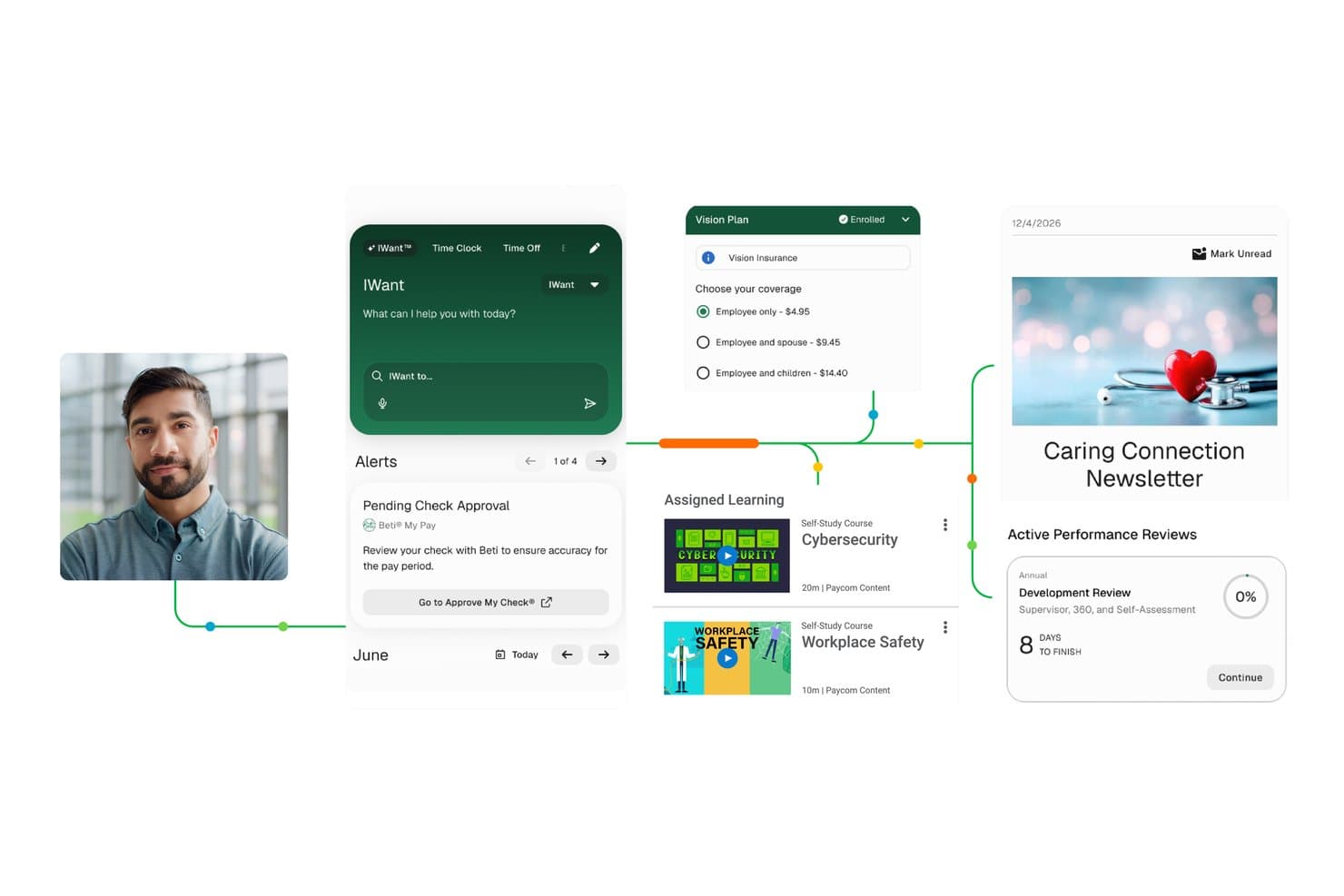
Paycom's employee self-service app brings pay alerts, benefits enrollment, learning, and reviews into one mobile view. Paycom is a cloud-based HR and payroll platform that runs on a single database, covering recruiting, onboarding, payroll, time and labor, benefits, talent management, and reporting without needing third-party integrations.
Who Is Paycom Best For?
Paycom suits mid-sized to large HR teams that want hiring, payroll, time tracking, and benefits in one system, with a dedicated specialist guiding setup.
Why I Picked Paycom
I picked Paycom as one of the best because its self-onboarding checklist lets new hires finish the paperwork before Day 1. In the mobile app, they enter personal details, set up direct deposit, take intro training, enroll in benefits, and preview deductions. Completed documents file themselves into personnel records, and applicant data flows into the employee record at hire. That saves my team from re-keying data.
Paycom Key Features
- Beti automated payroll: Starts payroll each pay period, flags errors, and notifies employees so they can correct them.
- Report Center: Builds customizable cross-HR reports and sends recurring ones to authorized users through Push Reporting.
- IWant command-driven AI: Searches employee data and company policies, and supports manager review of punch changes and time-off requests.
- Retention Dashboard: Uses more than 30 employee data points to show predictive retention scores and turnover-risk views.
Paycom Integrations
Paycom doesn't have any native integrations. GL Concierge generates mapped general-ledger reports for direct import into accounting software, but no public API or named third-party integrations are documented.
Pros and Cons
Pros:
- Dedicated specialists support setup and training
- Payroll, time, and benefits share workflows
- New hires complete onboarding before Day One
Cons:
- Routine tasks can take several navigation steps
- Initial setup can involve avoidable mistakes
 2Best for AI-powered workforce insights
UKG
- Free demo available
- Pricing upon request
Visit WebsiteCustomer Rating:4.3/5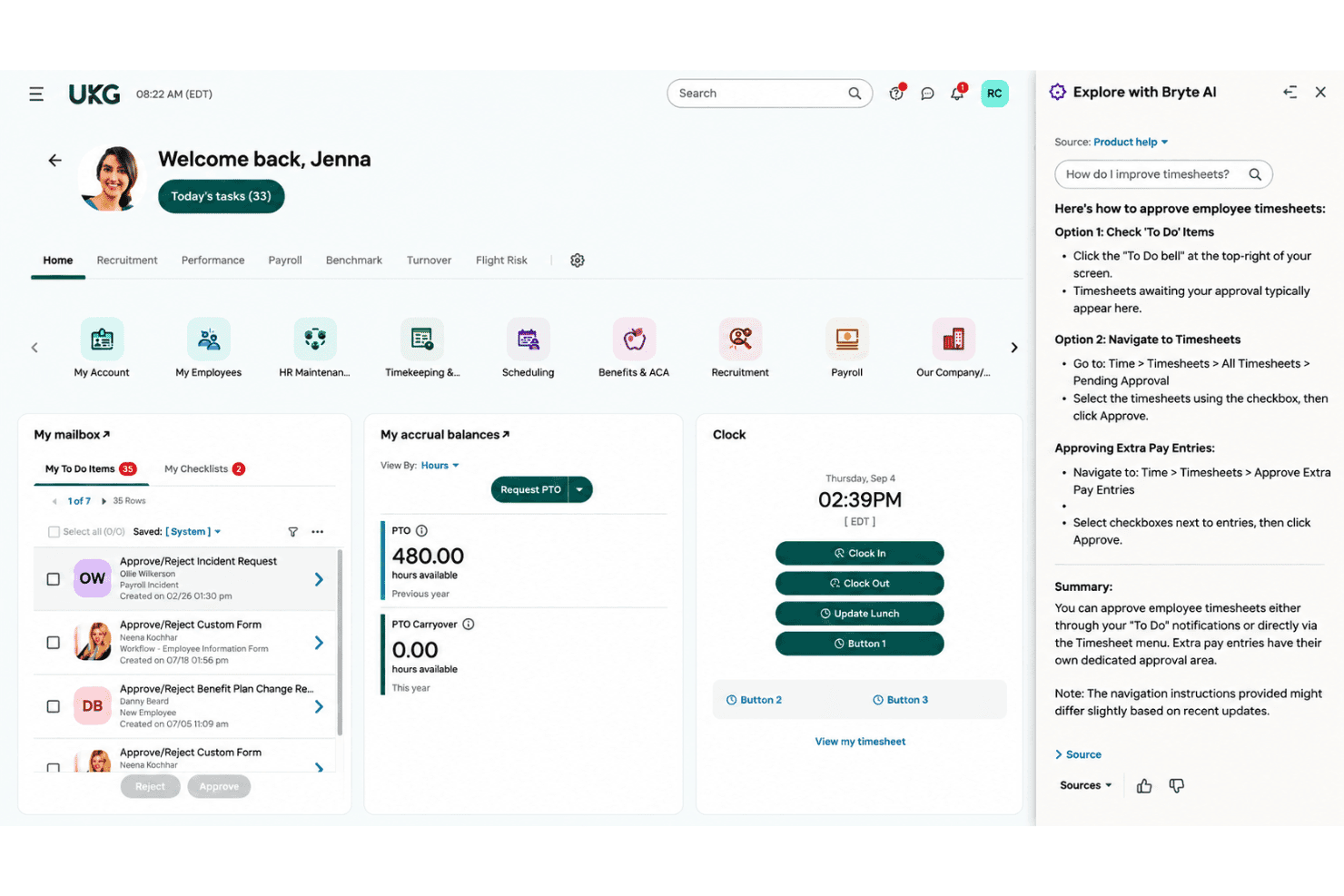
UKG dashboard showing to-do approvals, PTO balances, clock-in controls, and Bryte AI timesheet help. UKG is a cloud-based HR and workforce management suite that unites core HR, payroll, time and attendance, scheduling, and benefits in one system, with optional talent modules and a built-in AI assistant.
Who Is UKG Best For?
UKG suits growing HR teams at small and mid-sized organizations, especially those with hourly or shift-based staff, that want payroll, time, scheduling, and core HR in one system.
Why I Picked UKG
I picked UKG because its AI work goes beyond chat. The Learning & Development agent reads a person's skills profile, recommends courses from your catalog, and adds one to their learning plan once they confirm. Fatigue analysis flags employees at risk of burnout, and People Insights adds flight-risk alerts. Every agent is admin-enabled with an audit trail, so I can control what it touches.
UKG Key Features
- Flexible pay rules: Payroll handles shift differentials and multiple positions, with rules updated as regulations change.
- ACA manager: Configurable measurement periods and thresholds flag employees approaching or losing full-time status.
- Demand-based scheduling: Managers build schedules around demand, skills, compliance rules, and employee preferences.
- Integration Hub: REST and XML APIs, file exchange, and scheduled integration processes connect payroll and HR data to other systems.
UKG Integrations
UKG Ready offers integrations with Indeed, NetSuite, QuickBooks, and TurboTax, plus marketplace apps through UKG Marketplace. It supports REST and XML APIs and file exchange through Integration Hub for custom data connections.
Pros and Cons
Pros:
- Self-service handles schedules, time off, and pay
- Shift differentials and multiple positions fit payroll
- Payroll, HR, and time share employee records
Cons:
- Mobile users report login and clock-in issues
- Detailed reports can take effort to navigate
Learn more about UKG: Best for payroll across niche industries
- Free demo available
- From $99/month
Visit WebsiteCustomer Rating:4.3/5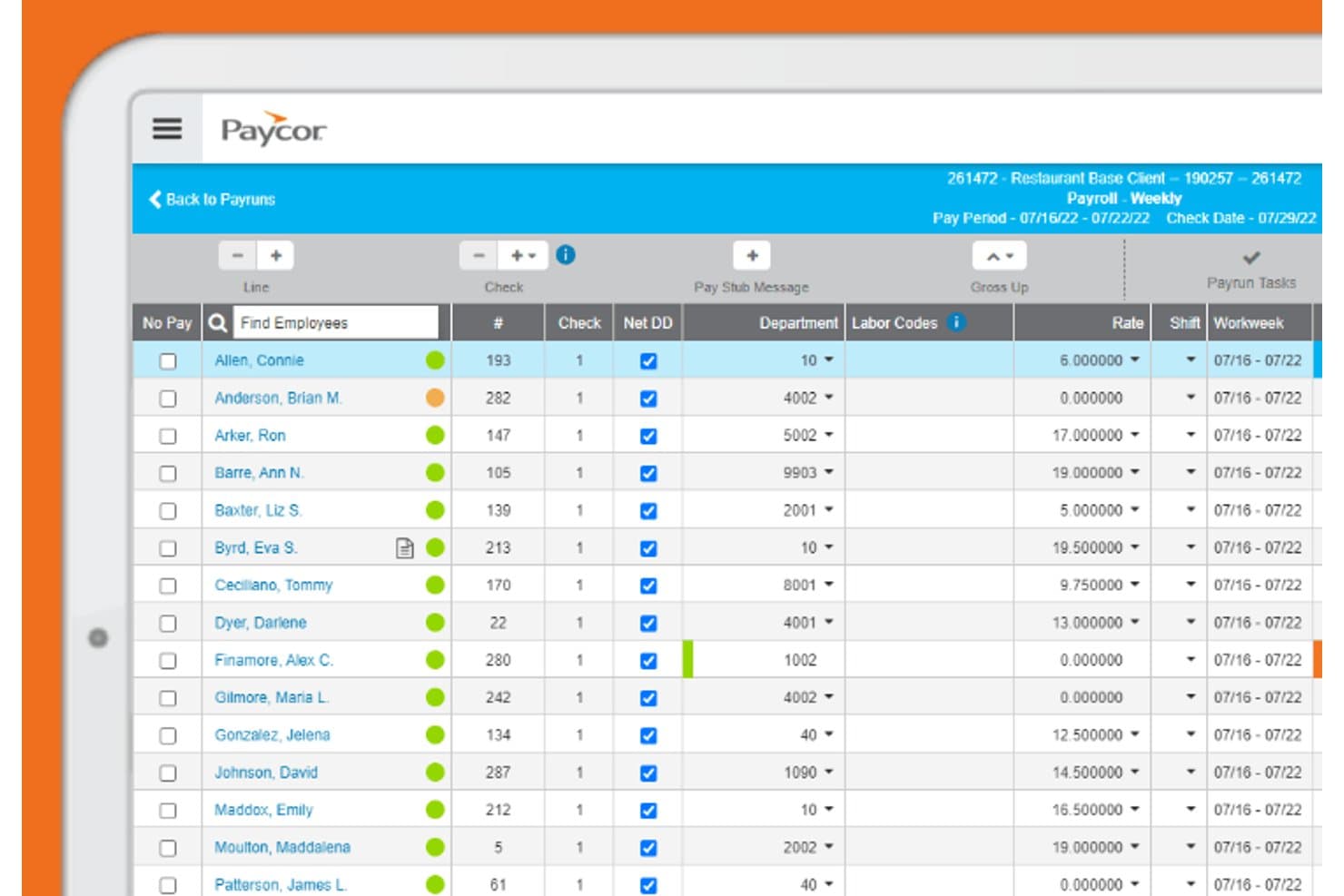
Paycor's weekly payroll screen lets teams review employee pay rates, departments and check details in one grid. Paycor is a cloud-based human capital management platform that combines payroll, HR administration, recruiting, onboarding, scheduling, and benefits tools with WISE, an AI advisor.
Who Is Paycor Best For?
Paycor suits small and mid-sized employers with hourly or shift-based teams, such as healthcare, restaurants, and retail, that want payroll, scheduling, and HR in one system.
Why I Picked Paycor
I picked Paycor because it handles payroll for hourly industries like healthcare and restaurants without forcing you to bolt on separate tools. Smart Scheduler builds shifts around availability, skills, certifications, and labor rules, so minimum rest times and hour limits are baked in. Labor budget caps alert managers to overages before payroll runs. I also like that WISE flags an approaching overtime threshold and suggests a schedule adjustment.
Paycor Key Features
- Paycor Smart sourcing: Searches a database of more than 1.5 billion profiles for passive candidates and can message them.
- Onboarding and E-Verify: Collects new-hire paperwork and verifies work eligibility inside the same system as payroll.
- OnDemand Pay: Lets employees access earned wages before payday through Paycor Mobile.
- Paycor Marketplace: Offers pre-built connectors to apps like QuickBooks, NetSuite, and Sage Intacct.
Paycor Integrations
Paycor offers hundreds of marketplace integrations, including QuickBooks, Wizehire, NetSuite, Sage Intacct, Google Calendar, and Outlook. Its public API provides 140+ APIs for custom integrations, with event notifications for employee changes, payroll, time, onboarding, and time-off data.
Pros and Cons
Pros:
- Employees manage pay and shifts by phone
- Schedules account for skills and labor rules
- Payroll, hiring, and onboarding share workflows
Cons:
- Support cases can take weeks to resolve
- Custom reports can need manual cleanup
 Best for governing people and AI agents
- Trial not available
- Pricing upon request
Visit WebsiteCustomer Rating:3.4/5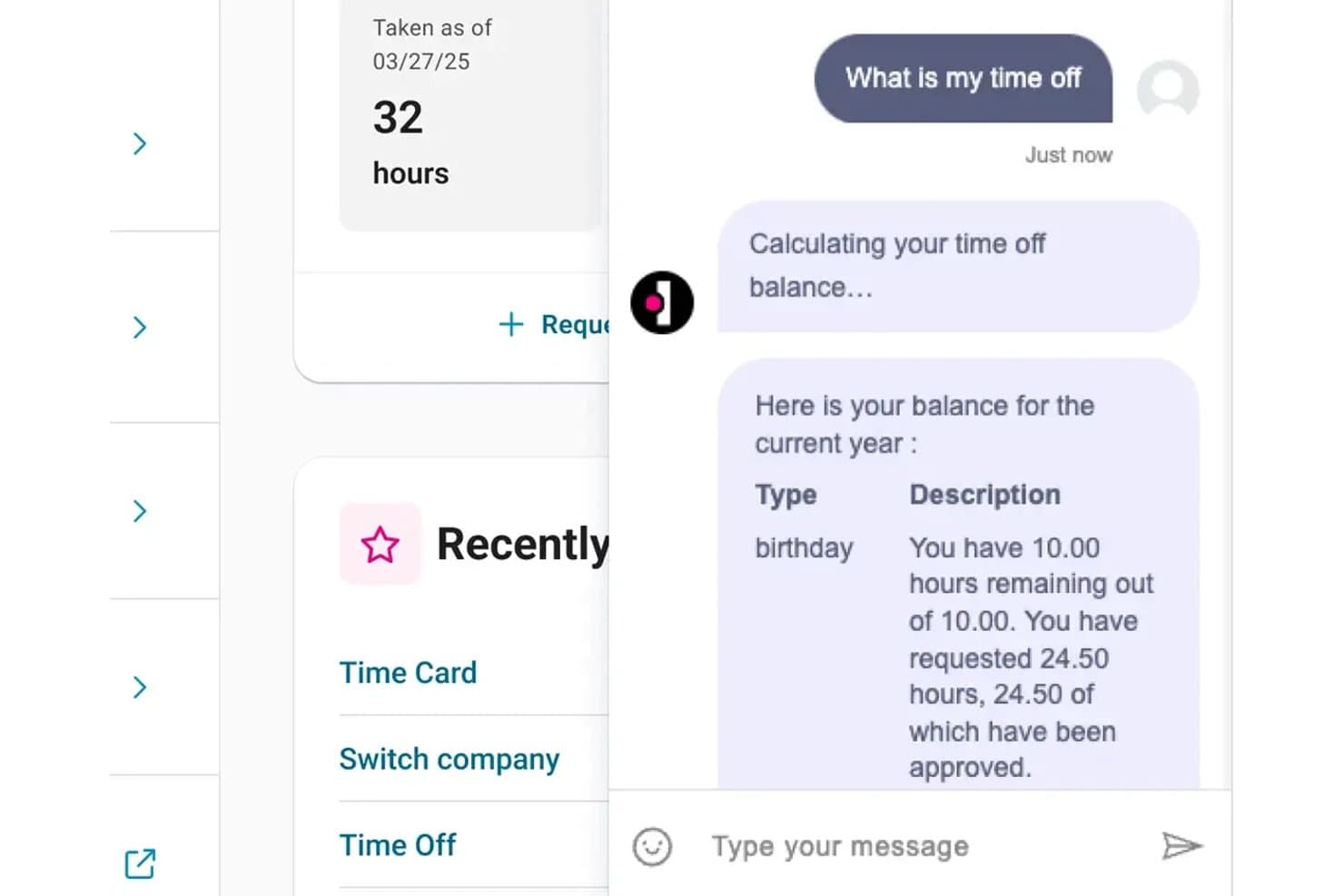
isolved's AI assistant reports an employee's time off balance and pending requests in a chat. isolved is a modular HCM platform that combines core HR, payroll, benefits, time and scheduling, and talent management, with AI agents like The Guardian for payroll and mobile employee self-service.
Who Is isolved Best For?
isolved suits HR teams at growing mid-sized employers that want payroll, benefits, time, and hiring in one platform and need oversight of AI agents.
Why I Picked isolved
isolved earns its spot on my shortlist because it treats AI agents as part of the workforce you manage. Agent View places each agent in the People Cloud org chart with a named human manager, role, and access scope. The Guardian, its payroll agent, ranks likely errors, like new hires missing from the new-hire file, and prepares fixes. Those fixes go through an approval path, and an audit log records who authorized each one.
isolved Key Features
- Benefits eligibility rules: Automates dependent, waiting period, and qualifying event rules during enrollment, with reminders and completion tracking.
- Mobile employee app: Lets employees view pay stubs, request time off, update direct deposit, and manage benefits, with biometric sign-in.
- Applicant tracking: Covers sourcing, screening, and job-specific hiring workflows, and passes candidate data into onboarding and payroll.
- Reporting library: Offers 600+ payroll report templates, plus configurable HR reports you can export to PDF or Excel.
isolved Integrations
isolved offers marketplace integrations with QuickBooks Online, HCMConnect for Sage Intacct, Fidelity, PlanSource, Attendance on Demand, Harri, and Relias. It also provides a REST API for custom integrations.
Pros and Cons
Pros:
- Mobile self-service covers pay, benefits, and PTO
- Guardian flags payroll errors for review
- Connected HR and payroll reduce duplicate work
Cons:
- Time and leave rules need careful setup
- Reports can take extra effort to combine
Learn more about isolved: Best for automated payroll and compliance
- Free demo available
- From $2/user/month
Customer Rating:4.4/5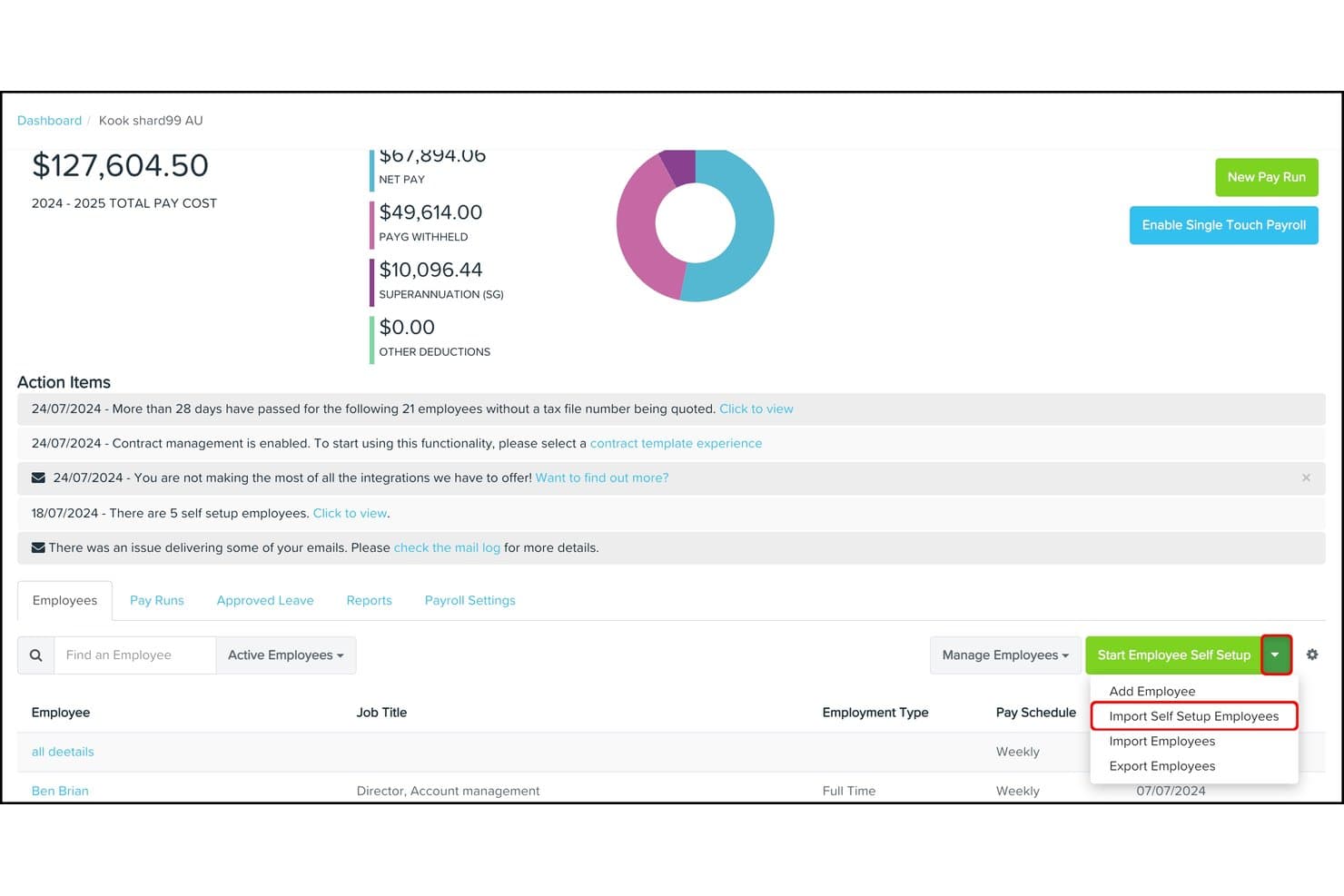
Employment Hero payroll dashboard with employee self setup and bulk import options. Employment Hero is a Canadian HRIS that combines employee records, onboarding, time off, recruiting, and payroll workflows, with built-in provincial compliance templates and Hero AI for HR questions and actions.
Who Is Employment Hero Best For?
Employment Hero fits Canadian small and mid-sized businesses that want HR administration and payroll in one system, with provincial employment standards and CRA obligations supported.
Why I Picked Employment Hero
I picked Employment Hero because approved timesheets, leave requests, and salary updates flow straight into the payroll cycle, so I'm not re-keying data before pay day. Its Canadian templates reflect provincial rules like Ontario's Employment Standards Act and Alberta's Employment Standards Code, and payroll generates and submits T4s and T4As. I also like that the employee-file audit trail shows who changed bank details or salary versions, and when.
Employment Hero Key Features
- Hero AI Insights: Flags patterns like incomplete induction content or repeated extended working hours and routes them to the primary manager.
- Custom HR reporting: Build filterable reports by province or location and export them to PDF or CSV.
- Certification tracking: Sends reminders before employee certifications expire so you can stay ahead of compliance gaps.
- Benefits+ add-on: Connects with supported carriers to automate plan changes, enrolment, and life-event updates.
Employment Hero Integrations
Employment Hero lists integrations with Xero, QuickBooks, Google Workspace, Microsoft 365, Indeed, LinkedIn, Go1, and Slack. A documented REST API supports custom integrations.
Pros and Cons
Pros:
- Provincial templates support Canadian compliance
- Employees access payslips and leave in-app
- HR and payroll workflows stay connected
Cons:
- Leave request details may stay hidden pending approval
- Custom reports can require Excel workarounds
Learn more about Employment Hero: Best for combining HRIS payroll and compliance
- Free demo available
- From $5/user/month
Visit WebsiteCustomer Rating:4.8/5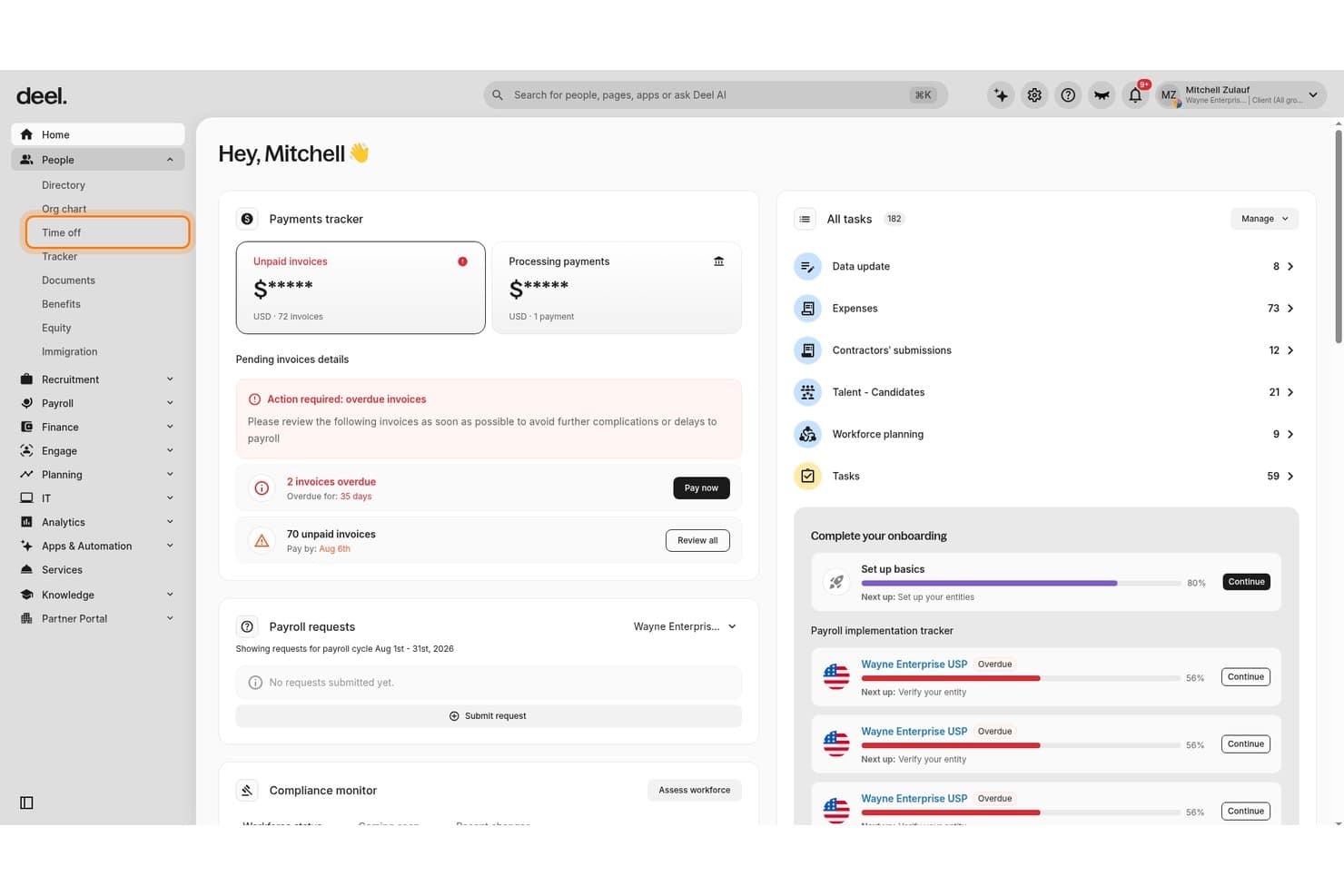
Deel's home dashboard, with the Time off section highlighted in the People menu. Deel is a global HRIS that manages worker records for employees, contractors, and EOR workers, with workflow automation, time off, people analytics, and add-on modules for performance, workforce planning, and compensation.
Who Is Deel Best For?
Deel suits HR teams at growing companies that manage employees, contractors, and EOR workers across several countries and want one system for worker records and workflows.
Why I Picked Deel
I picked Deel because its HRIS handles employees, contractors, and EOR workers in one record set, with local policy templates for 150+ countries. The workflow builder is where I see the value: a first contract or termination can trigger tasks, document requests, and onboarding journeys, with human review steps built in. I also like that worker changes carry through to connected payroll data, and the change log records before-and-after values.
Deel Key Features
- Analytics 2.0 reports: Build saved reports with custom fields, filters, grouping, and chart views, then add them to shared dashboards.
- Plain-language AI reporting: Ask workforce questions in everyday words and get reports on headcount, cost, attrition, or time off.
- Slack and Teams approvals: Managers approve time off and other HR requests from Slack, Microsoft Teams, or mobile.
- Anonymous reporting: Workers submit whistleblowing concerns that HR compliance teams can audit.
Deel Integrations
Deel offers documented integrations with Slack, Microsoft Teams, Google Workspace, and Ashby. It also provides an API and real-time webhooks for custom worker, contract, and workforce-lifecycle data exchanges.
Pros and Cons
Pros:
- Custom reports cover headcount, cost, attrition
- Auditable worker changes show before-and-after values
- One HRIS for employees, contractors, EORs
Cons:
- Performance tools sit in a separate tier
- Mobile app loading can feel slow
 Best for employee experience and integrations
- Free demo available
- Pricing upon request
Visit WebsiteCustomer Rating:4.3/5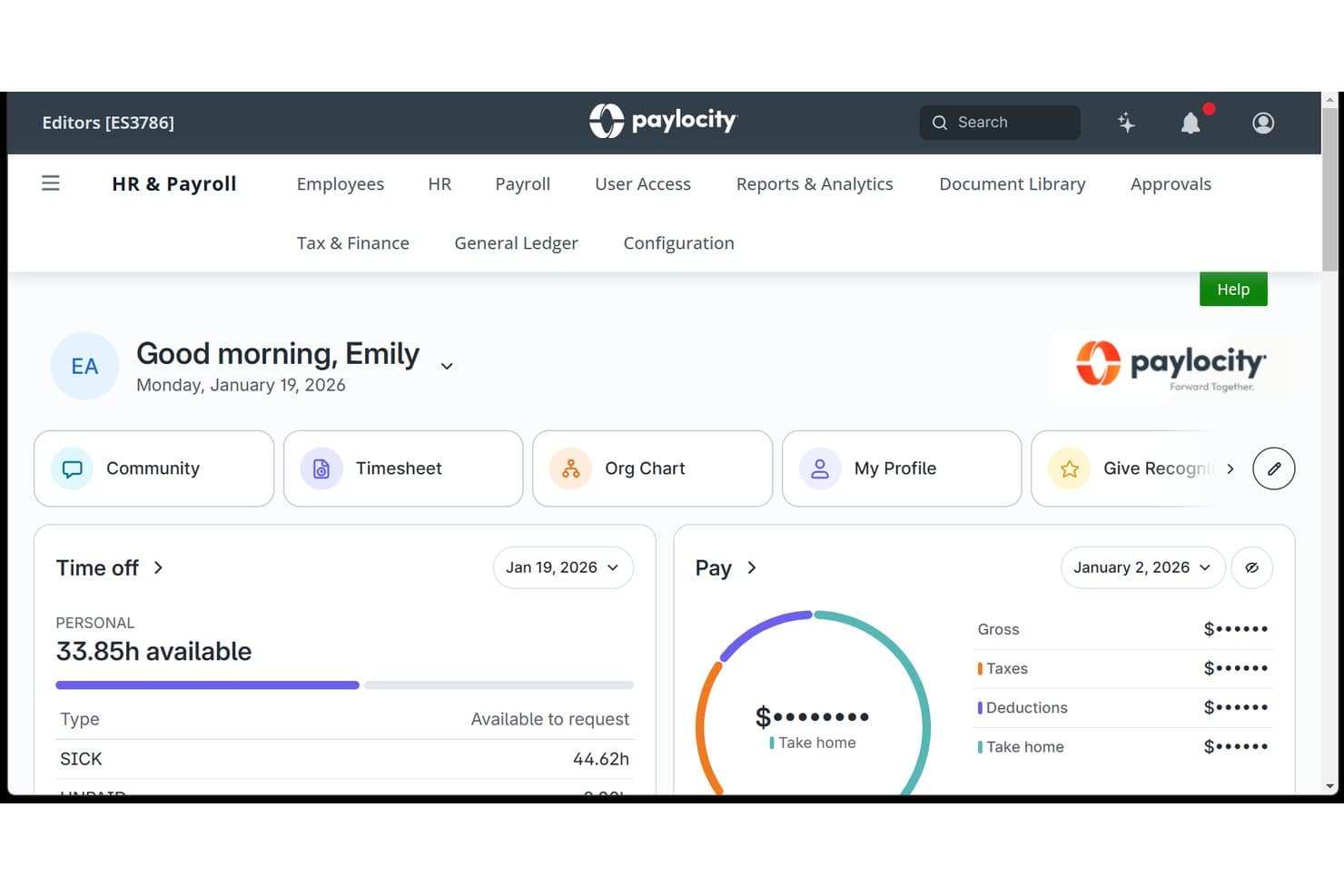
Paylocity's HR & Payroll dashboard offers time-off balances, pay summaries and quick access to core employee tools. Paylocity is an all-in-one HR and HCM platform that combines payroll, benefits administration, talent management, time and attendance, workflow automation, and AI-assisted HR tasks in a single cloud-based system.
Who Is Paylocity Best For?
Paylocity suits HR teams at mid-sized, multi-location employers that want payroll, benefits, time, and employee engagement tools in one connected system.
Why I Picked Paylocity
Paylocity earns its spot on my shortlist because it ties employee experience to real HR work. Employees check PTO balances and request time off through the AI Assistant, while managers see open headcount with a link straight to staffing workflows. I also like the peer recognition, pulse surveys, and engagement dashboards that sit inside the same system as payroll and benefits. Webhooks push hires and terminations to connected tools in real time.
Paylocity Key Features
- Global payroll: Run payroll across 100+ countries with 30+ built-in audits and automatic alerts.
- Workflow automation: Use templates or custom rules to route offboarding, pay changes, and leave tasks.
- HR compliance dashboard: Track I-9 work authorizations, EEO and FLSA data, and ACA status in one view.
- Workforce analytics: Build custom dashboards that show staffing levels, turnover patterns, and demographic data.
Paylocity Integrations
Paylocity offers 350+ marketplace integrations, including Microsoft Dynamics 365, Microsoft Azure, and FaceUp. APIs and webhooks support custom integrations and real-time updates for payroll processing, hires, transfers, and terminations.
Pros and Cons
Pros:
- Employee self-service reduces routine HR requests
- Payroll approvals and timecard audit trails
- Connected payroll, benefits, onboarding, and records
Cons:
- Support replies can be slow and inconsistent
- Building and extracting tailored reports takes effort
 Best for fast-growing companies
- Free demo available
- Pricing upon request
Visit WebsiteCustomer Rating:4.5/5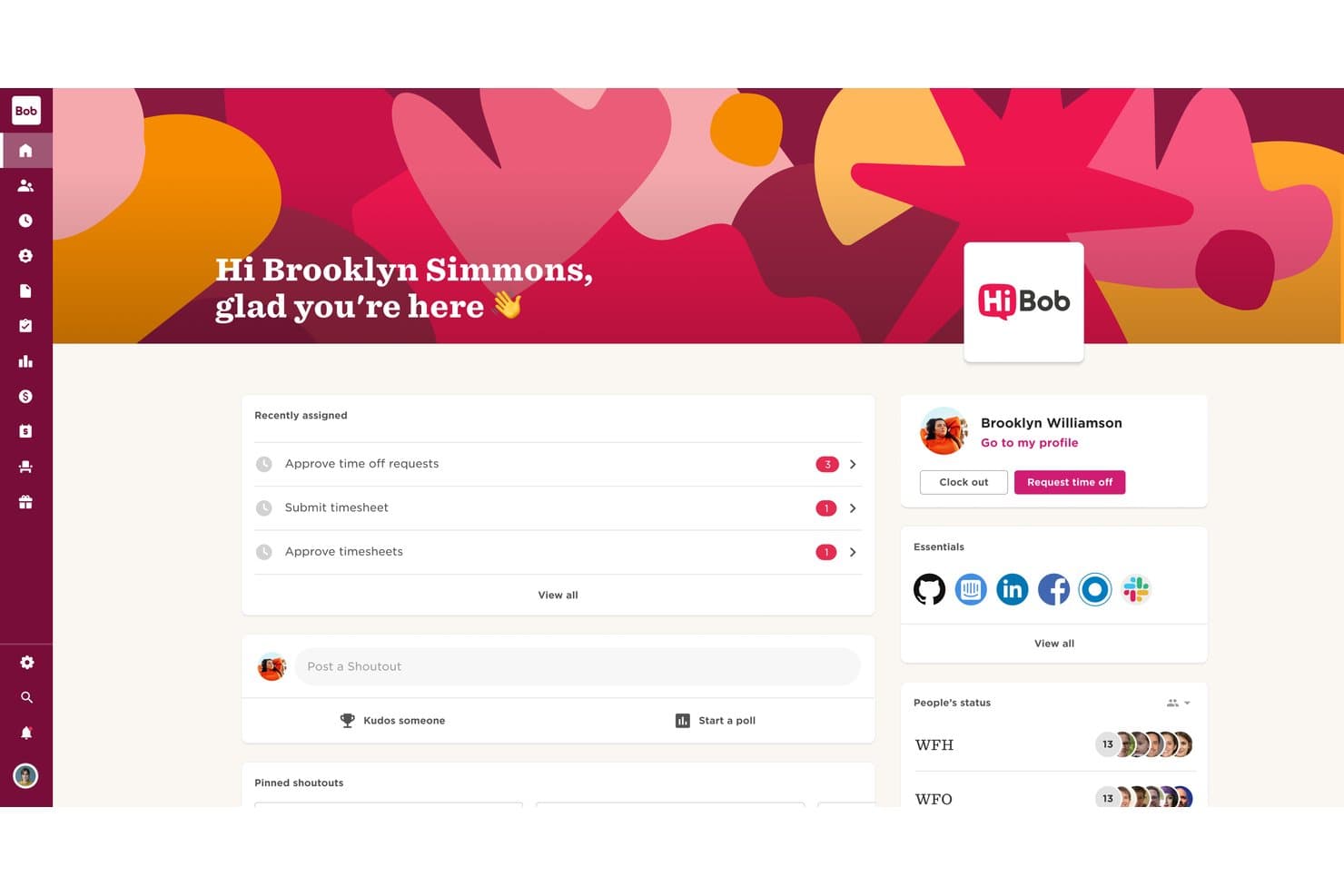
The HiBob home dashboard showing pending approvals, timesheets, team status and quick access to essential apps. HiBob is a cloud-based HRIS that centralizes employee records, lifecycle workflows, time off, attendance, reporting, and integrations, with a built-in AI companion that can answer questions and trigger actions.
Who Is HiBob Best For?
HiBob suits mid-market HR teams scaling across multiple countries that need configurable lifecycle workflows, mobile self-service for managers and employees, and a modern HRIS.
Why I Picked HiBob
I picked HiBob because its lifecycle workflows suit fast-growing companies that hire in new countries every quarter. I can build a joiner workflow with role- and location-based logic, so a new hire in Lisbon gets different tasks and documents than one in Austin. Employees can also ask the Bob AI Companion to submit a time-off request, with explicit confirmation before it writes any data. That keeps HR out of routine admin as headcount climbs.
HiBob Key Features
- Custom report builder: Drag-and-drop reports filter by team, site, or department and can be scheduled to managers' inboxes.
- Document generation and eSign: Create, send, and track signed employee documents inside live workflows.
- Public API and webhooks: Sync employee, time off, task, and document data with your other systems.
- Time and attendance: Track hours and absences alongside time off in the same employee record.
HiBob Integrations
HiBob offers integrations with over 100 platforms, including Google Workspace, Okta, Slack, ADP Workforce Now (US), and Zalaris Payroll. Its public API, webhooks, and marketplace integrations support custom data exchanges and lifecycle-triggered provisioning.
Pros and Cons
Pros:
- Employee records and documents share one system
- Mobile requests show approval status
- Lifecycle workflows replace spreadsheet follow-ups
Cons:
- Complex country-specific leave rules may fall short
- Custom-field reporting can take time
 Best for advanced reporting and analytics
- Free trial + free demo available
- From $10/employee/month
Visit WebsiteCustomer Rating:4.5/5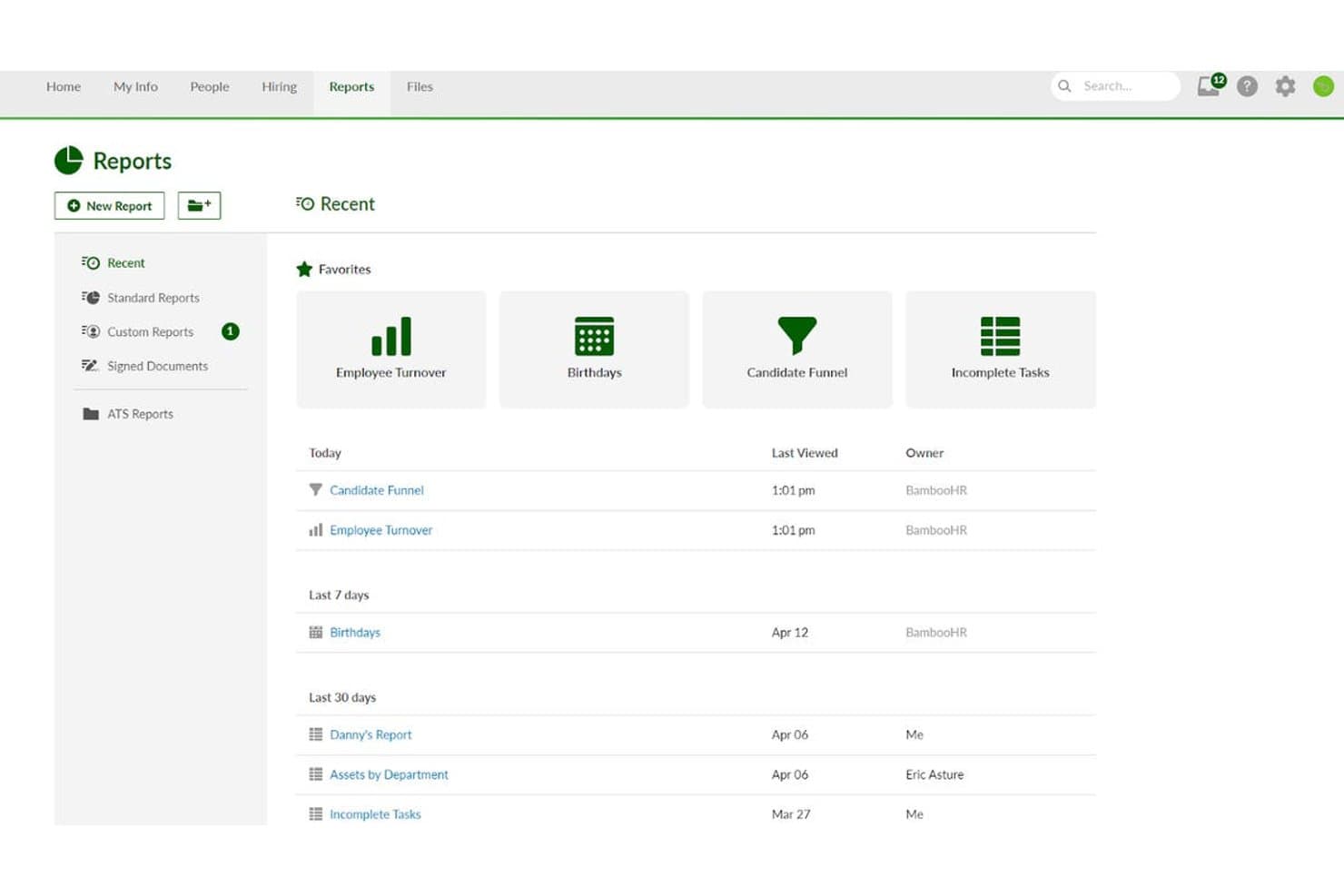
BambooHR's Reports dashboard, with favorite reports and recently viewed reports for quick access. BambooHR is a cloud-based HR platform that brings employee records, applicant tracking, onboarding, time-off management, performance reviews, and an AI assistant together, with optional payroll, benefits administration, and global employment add-ons.
Who Is BambooHR Best For?
BambooHR suits small and midsize HR teams that want one easy-to-use system for records, hiring, onboarding, and time off without heavy customization.
Why I Picked BambooHR
I picked BambooHR for advanced reporting and analytics because the Core plan gives me a custom report builder with real-time previews, so I can pull headcount or turnover numbers without exporting to spreadsheets. On Elite, I build custom dashboards with advanced visualizations on compensation, diversity, and hiring. I also ask Bamboo AI plain-language questions about workforce data and get charts back, plus flags for burnout risk.
BambooHR Key Features
- Applicant tracking: Post jobs to boards, track candidate stages, and send offer letters with e-signatures.
- Onboarding checklists: Assign new-hire tasks, request documents, and track progress through a dashboard.
- Time-off policies: Set custom accrual schedules, waiting periods, carryover limits, and multi-approver workflows.
- Mobile app: View HR information, submit requests, and approve time off from iOS or Android.
BambooHR Integrations
BambooHR offers 150+ marketplace integrations, including QuickBooks Online, Xero, NetSuite, Sage Intacct, Indeed, ZipRecruiter, and Slack. It also supports REST API integrations, webhooks, and Zapier.
Pros and Cons
Pros:
- Custom report builder previews workforce data live
- Mobile leave requests reduce approval back-and-forth
- Centralizes employee records, documents, and onboarding
Cons:
- Complex workflows and edge cases need workarounds
- Advanced dashboards require the elite plan
 Best for outsourcing employment administration
- Free demo available
- From $50 USD/month + $8/employee/month
Customer Rating:4.6/5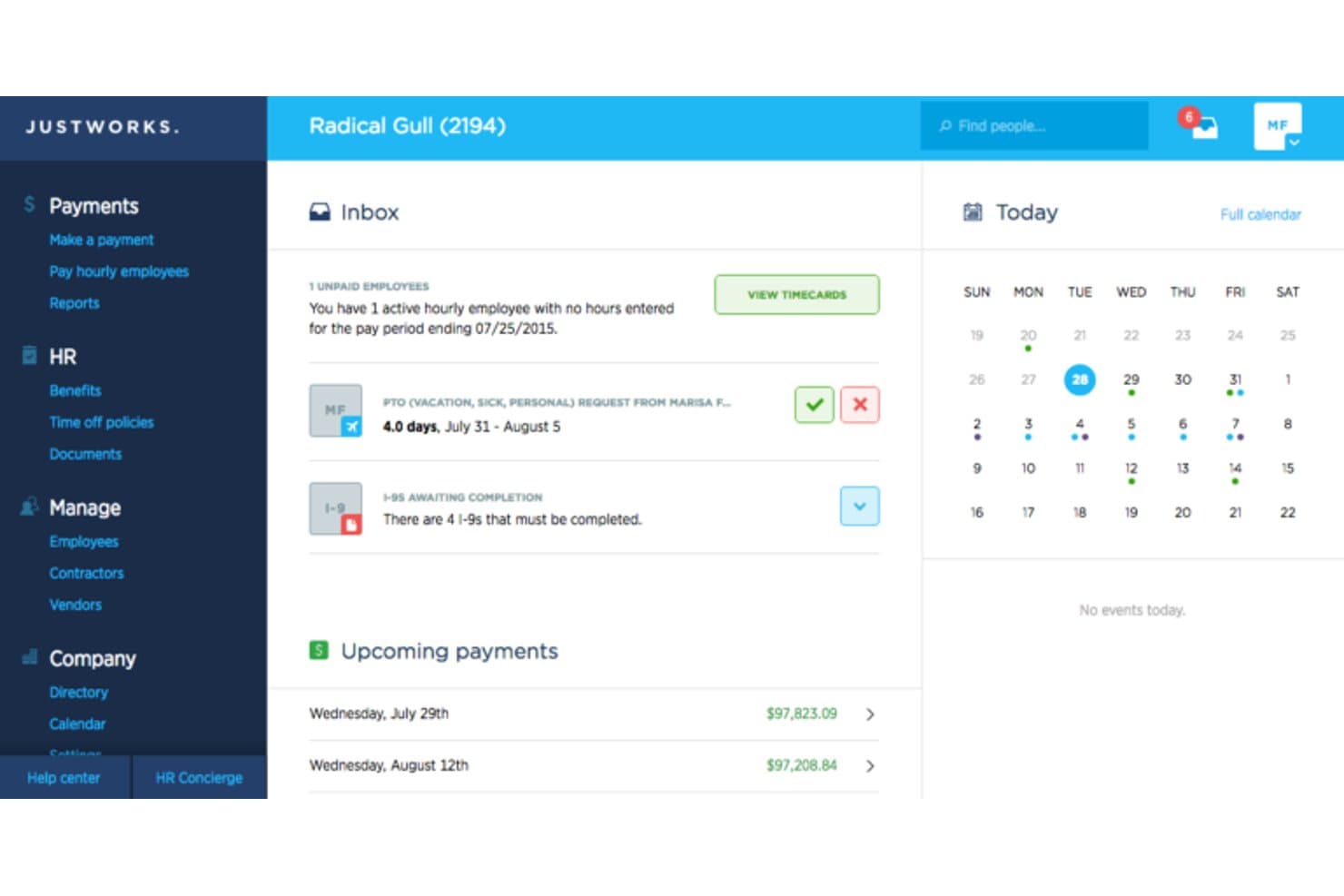
Justworks dashboard with inbox tasks, upcoming payments, and calendar in one view. Justworks is a professional employer organization (PEO) platform that bundles payroll, tax filings, benefits administration, compliance support, onboarding, PTO tracking, and HR consulting into one service.
Who Is Justworks Best For?
Justworks suits small and mid-sized US employers who want a PEO to take on payroll, benefits, and compliance without building an in-house HR team.
Why I Picked Justworks
I picked Justworks because it takes payroll, tax filings, and compliance off your plate in one PEO service. It runs multi-state payroll automatically once timecards are submitted and employee records are complete. It also handles W-2 and 1099 filings and sends federal and state compliance alerts. New hires get prompts to sign documents, and I can track progress in the Onboarding Status Report.
Justworks Key Features
- AI Report Builder: Turns plain-language requests into payroll or workforce reports you can adjust and download.
- Mobile self-service app: Lets employees view pay statements, request time off, and submit expense reimbursements.
- Applicant tracking system: Tracks candidates and hiring within PEO Basic, with Greenhouse, Lever, and JazzHR integrations.
- Checkr background checks: Starts checks from a member profile and shows pass, fail, or pending results there.
Justworks Integrations
Justworks lists 30 integrations, including marketplace integrations with Greenhouse, Lever, JazzHR, Checkr, QuickBooks, and Xero, plus a native Electric connection for employee updates and IT provisioning. It also offers a Partner API for custom integrations.
Pros and Cons
Pros:
- Employees manage routine tasks through the app
- Multi-state payroll support earns praise
- Payroll, benefits, and compliance work together
Cons:
- Support follow-through can lag on complex issues
- Reporting detail can limit workforce analysis
Learn more about Justworks: Best for payroll in 170+ countries
- Free plan + demo available
- From $199/user/month
Visit WebsiteCustomer Rating:4.5/5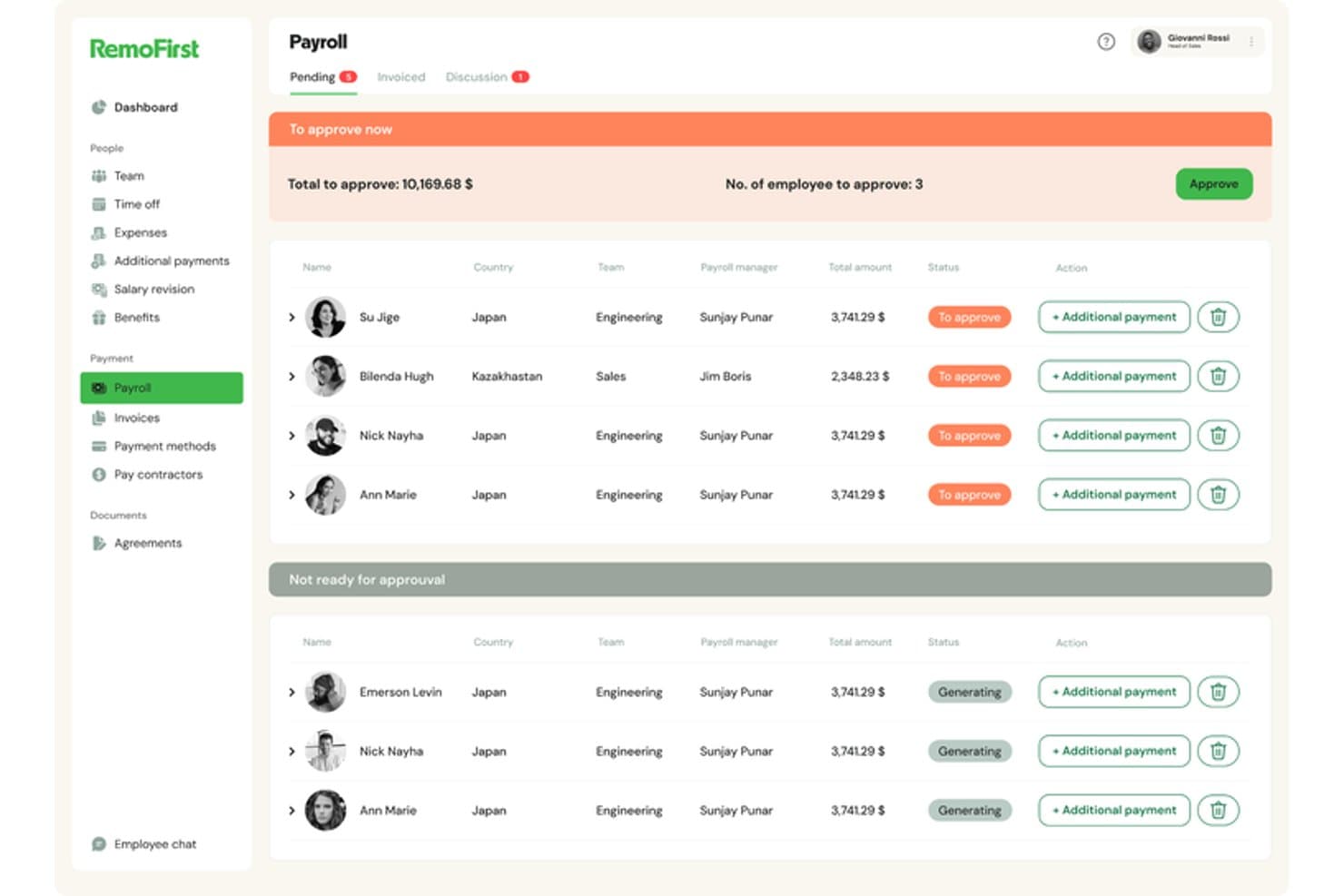
RemoFirst's payroll dashboard lets HR teams review, approve, and adjust employee pay across countries. RemoFirst is an employer of record platform that lets you hire international employees without a local entity, handling localized contracts, payroll, tax filings, benefits access, and compliance support across 185+ countries.
Who Is RemoFirst Best For?
RemoFirst suits HR teams at growing companies that want to hire full-time employees abroad without opening local entities, and that need compliant payroll and contracts handled for them.
Why I Picked RemoFirst
I picked RemoFirst because its payroll covers 170+ countries, and it works for teams hiring abroad without local entities. Hours, time off, holidays, bonuses, and commissions feed into payroll automatically, and global payroll lands as one consolidated payment. I also like the Payroll Agent, which flags discrepancies for the finance team to review before they hit your books.
RemoFirst Key Features
- Localized contract creation: Generate employment contracts that align with local labor laws in each country you hire.
- Country employment guides: Check statutory benefits, minimum wage, paid leave, and termination rules, which RemoFirst reviews monthly.
- Employee portal: Let employees upload documents, request leave, submit expenses, and view their employment agreements.
- Native integrations: Sync workforce data with Workday, BambooHR, and ADP Workforce Now, and fund payroll through GoCardless.
RemoFirst Integrations
RemoFirst offers four documented native integrations: Workday, BambooHR, GoCardless, and ADP Workforce Now. These connect workforce data and help fund payroll and contractor payments.
Pros and Cons
Pros:
- Routine onboarding questions get helpful support
- Employees find payslips and leave balances
- Hire abroad without local entities
Cons:
- Complex termination issues can lack clear ownership
- Onboarding status can require email follow-ups
 12Best for payroll migration from common systems
Gusto
- Free trial + free demo available
- From $49 USD/month + $6/payroll recipient/month
Customer Rating:4.6/5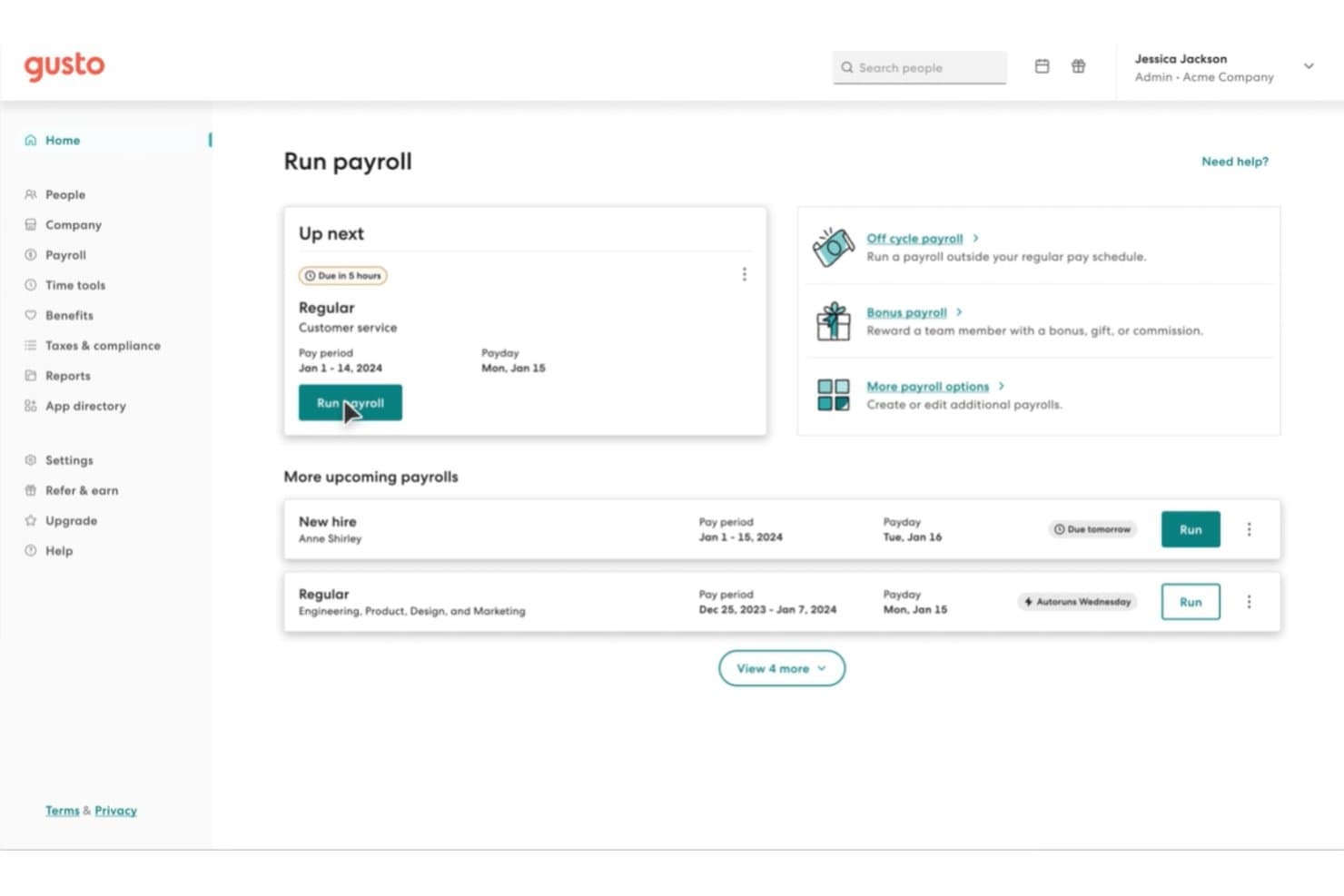
Gusto's Run payroll dashboard showing upcoming regular and new-hire payrolls with pay periods and payday dates. Gusto is a cloud-based payroll and HR platform that combines payroll runs and tax filings with onboarding, benefits administration, time tracking, scheduling, and compliance tools for small businesses.
Who Is Gusto Best For?
Gusto suits small US businesses that want payroll, benefits, and core HR in one place, especially teams switching from QuickBooks, ADP Run, or Paychex.
Why I Picked Gusto
I picked Gusto because its payroll transfer automation takes the pain out of switching providers. It imports employee records and prior payroll history from QuickBooks Online, QuickBooks Desktop, ADP Run, or Paychex. In practice, I review the imported data, edit payroll cells, and check flagged tax discrepancies before I submit. Remember that deductions and contributions still need separate setup.
Gusto Key Features
- Custom report builder: Build reports by choosing columns, filters, and time periods, then schedule email delivery.
- Time tracking and scheduling: Employees clock in by browser, app, or kiosk, and managers publish shifts around availability.
- Time-off policy automation: Set accrual rules, carryover, and auto-approval conditions for PTO requests.
- Onboarding and offboarding checklists: Assign tasks with due dates to admins or employees and collect e-signatures.
Gusto Integrations
Gusto lists 156 marketplace integrations, including QuickBooks Online, Xero, Checkr, and Betterment at Work. Its App Integrations API supports OAuth2 and webhooks for custom connections, with production access subject to approval.
Pros and Cons
Pros:
- Payroll migration imports prior provider records
- Employees access pay stubs and benefits easily
- Automated payroll and tax filing earn praise
Cons:
- Complex, larger operations can outgrow workflows
- Support response times frustrate some reviewers
 Best for small businesses
- Up to 15-day free trial + demo available
- From $8/user/month
Visit WebsiteCustomer Rating:4.3/5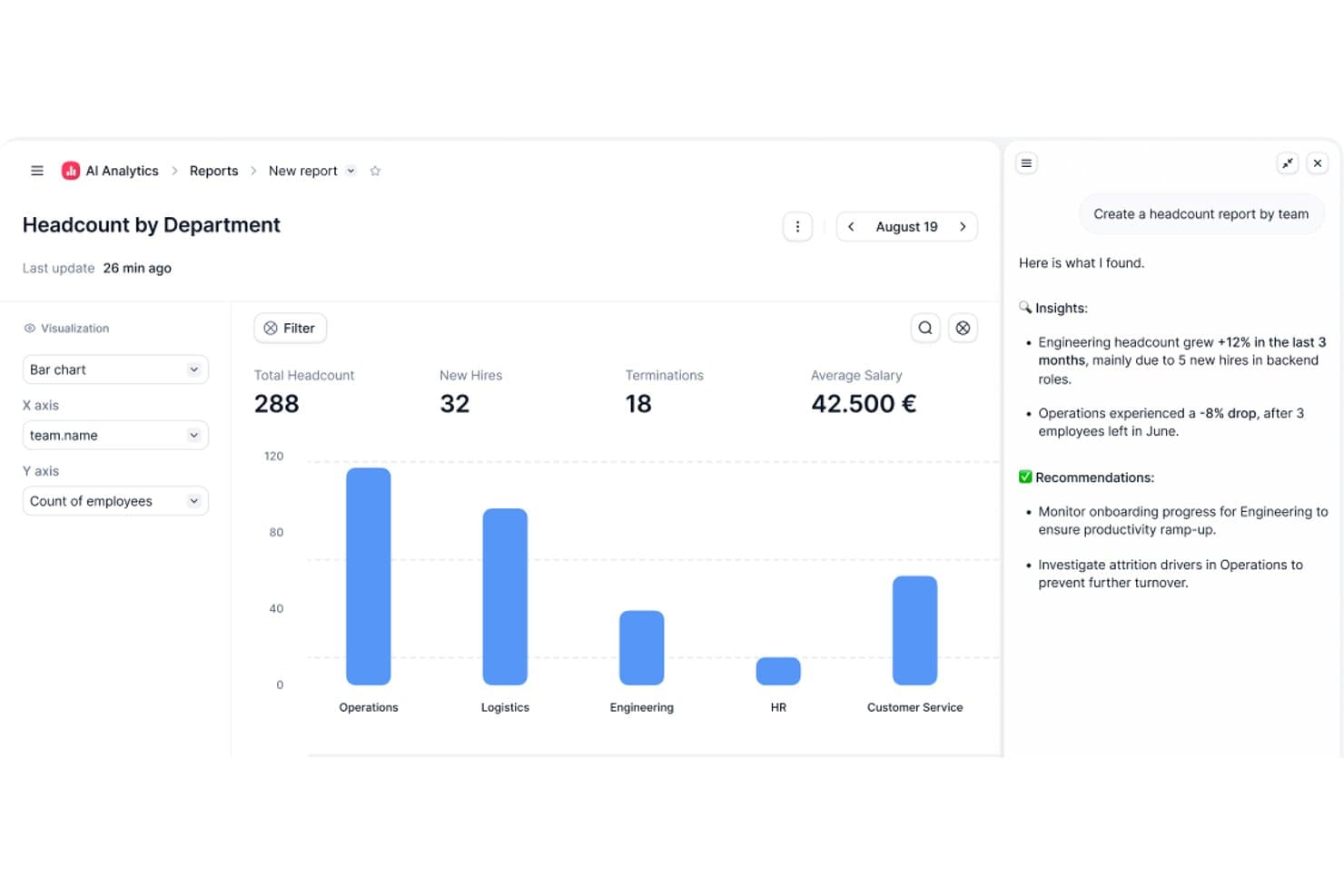
Factorial's AI analytics generates headcount reports with insights. Factorial is an AI for business that assists with day-to-day operations, including planning timetables, creating reports, and answering employee questions on policies, alongside HR tools for records, time tracking, recruiting, and performance.
Who Is Factorial Best For?
Factorial suits small and growing HR teams that want employee records, time-off, time tracking, and recruiting in one platform without managing separate tools.
Why I Picked Factorial
I picked Factorial for small businesses because one platform covers the HR work a lean team handles daily. The onboarding workflow turns a new hire into a task sequence, so nothing lives in a spreadsheet. Time-off requests follow a custom approval flow, and employees clock in by scanning a QR code on their phone. I also like that Factorial Core includes e-signatures and bulk document sending.
Factorial Key Features
- Applicant tracking system: Manage candidates, filter CVs automatically, and publish job ads and career pages from one place.
- Shift scheduling: Plan, bulk-edit, and rotate employee shifts, then communicate them to your team.
- Performance reviews: Run 360-degree reviews, track competencies, and view AI-generated insights from review answers.
- Open API and webhooks: Connect Factorial to payroll, accounting, and other tools with OAuth 2.0 and webhook support.
Factorial Integrations
Factorial offers marketplace integrations with Microsoft Power BI, Okta, Slack, LinkedIn, Recruitee, and payroll and accounting tools such as Sage and SAP Business One. It supports API keys, OAuth 2.0, webhooks, SDKs, an MCP server, and Zapier for custom integrations.
Pros and Cons
Pros:
- Mobile leave requests and QR clock-ins
- Onboarding tasks replace spreadsheet-based handoffs
- Employee records, payslips, and documents stay together
Cons:
- Complex payroll needs may need workarounds
- Timekeeping errors can require manual corrections
 Best for building customizable HR forms
- Free plan + 14-day free trial available
- From $9/user/month (billed annually)
Customer Rating:4.6/5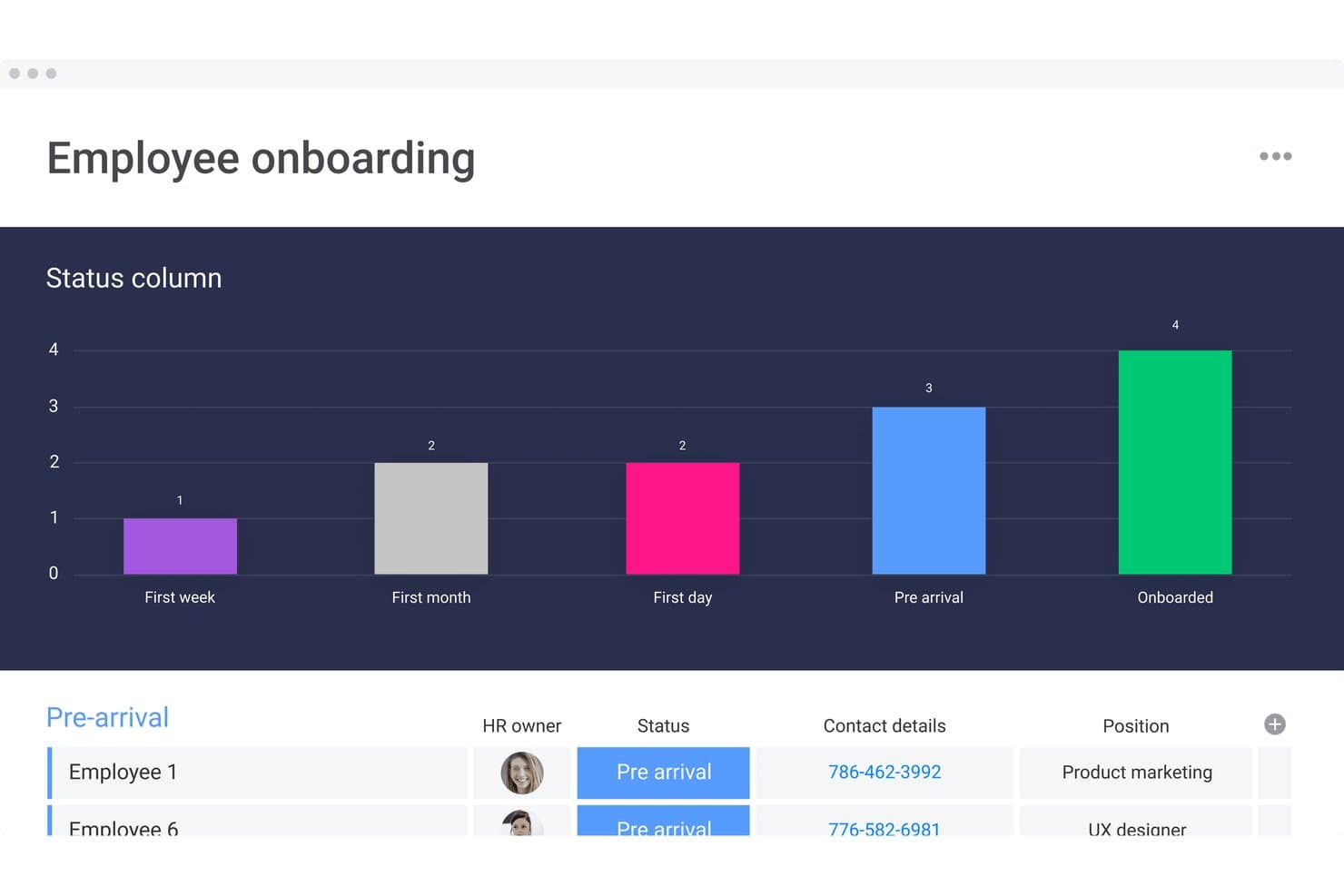
monday.com's employee onboarding board tracks new hires' status across each stage, from pre-arrival to onboarded. monday AI Workspace is a work management platform with configurable boards, forms, automations, dashboards, and AI agents that HR teams can adapt for recruiting, onboarding, leave requests, and performance reviews.
Who Is monday AI Workspace Best For?
monday AI Workspace suits HR generalists and small to mid-sized people teams that want to build their own request forms, onboarding checklists, and approval workflows without a dedicated HR system.
Why I Picked monday AI Workspace
I picked monday AI Workspace because it lets me build HR forms around how my team actually works. WorkForms collect submissions straight into a connected board, so a leave request or job application becomes a trackable item right away. Conditional questions and approval routing send each request to the right manager. When a candidate is hired, an automation can create their onboarding board a week before their start date.
monday AI Workspace Key Features
- Recruiting AI agents: Screening and scheduling agents score applications, filter non-fits, and handle interview scheduling and rescheduling.
- Cross-board dashboards: Dashboards pull item and column data from connected boards into widgets you can filter and share.
- Agent activity log: A real-time log shows each action your AI agents take, so you can review and undo them.
- API and integrations: GraphQL API, SDK, and 850+ integrations connect your HR boards to other tools.
monday AI Workspace Integrations
monday AI Workspace offers 850+ integrations and apps, including Slack, Google Calendar, Outlook, Microsoft Teams, and Salesforce. It also provides GraphQL, SDK, Platform API, and MCP server options for custom HR data connections.
Pros and Cons
Pros:
- Conditional HR forms route requests for approval
- Automations cut reminders and status follow-ups
- Visual boards clarify candidate and onboarding status
Cons:
- No established payroll or benefits administration
- HR teams must build workflows themselves
Learn more about monday AI Workspace: Best for large recruitment pools
- Free demo available
- Pricing upon request
Visit WebsiteCustomer Rating:4.4/5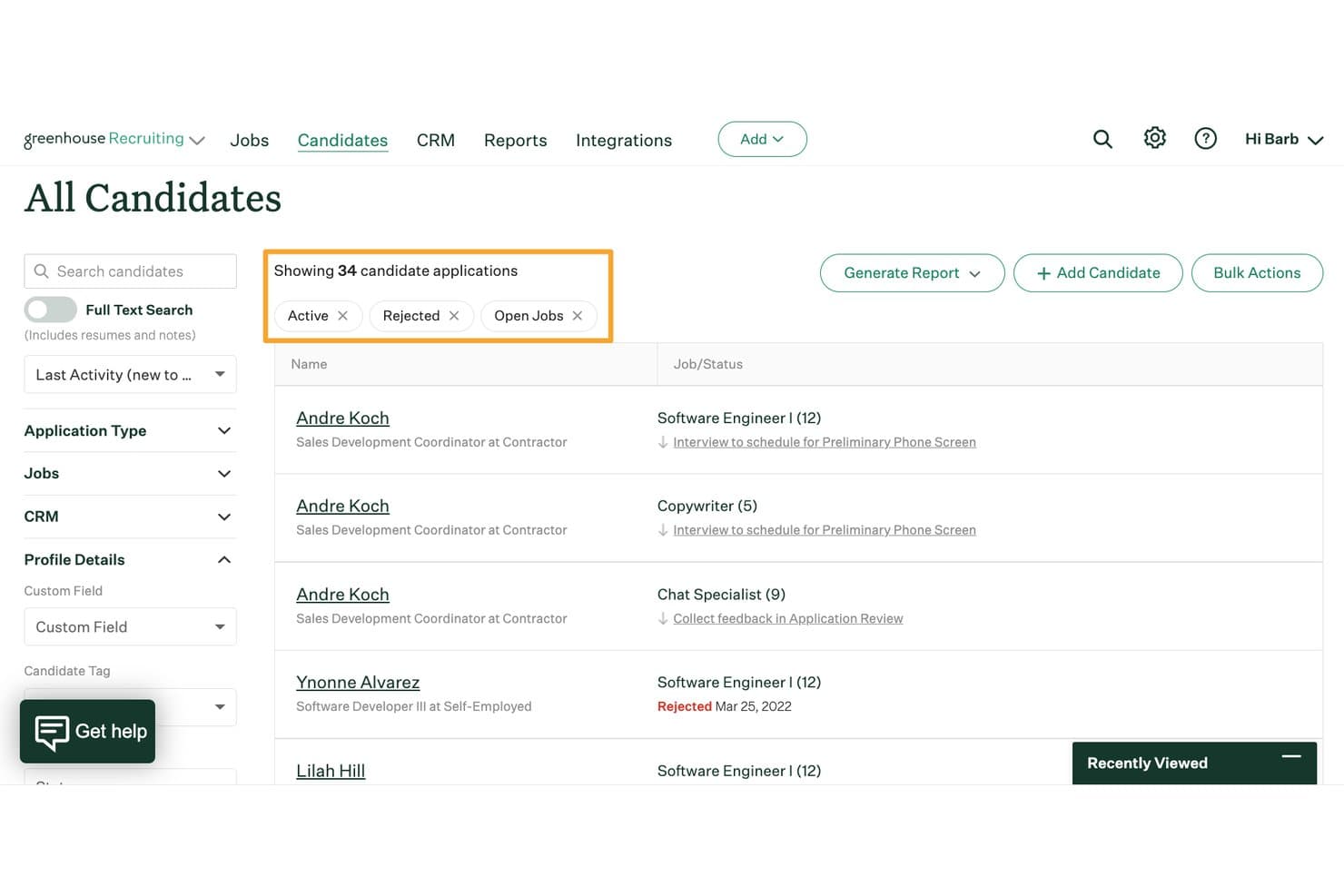
Greenhouse Recruiting's All Candidates view, filtered by application status and open jobs. Greenhouse is an applicant tracking system that covers sourcing, structured interviews, scheduling, offers, reporting, and onboarding, with built-in AI tools for interview notes, voice interviews, and fraud detection.
Who Is Greenhouse Best For?
Greenhouse suits in-house recruiting teams at growing mid-size and enterprise companies that hire across many roles and locations and want structured, consistent interviews.
Why I Picked Greenhouse
I picked Greenhouse because it keeps high-volume hiring consistent. Stage-transition rules send self-scheduling requests, take-home tests, and forms the moment a candidate moves stages, so my team doesn't chase each applicant by hand. Application rules auto-advance candidates based on their answers. AI Notetaker also drafts interview summaries around scorecard questions, so feedback stays comparable across hundreds of candidates.
Greenhouse Key Features
- Voice AI interviews: Conducts two-way voice interviews from your questions and rubric, then returns scores, transcripts, and recordings.
- Sourcing and CRM: Organizes prospects into pools and tracks outreach history in one place.
- Report Builder: Builds custom hiring reports with filters, Excel exports, and scheduled email delivery.
- MCP connections: Links hiring data to AI tools like Claude and Copilot within user permissions.
Greenhouse Integrations
Greenhouse reports over 400 pre-built integrations, including Workday, iCIMS, Lever, and Teamtailor. Its Harvest, Job Board, and Onboarding APIs support custom data exchange, while MCP connects hiring data with Claude, Gemini, Copilot, and ChatGPT.
Pros and Cons
Pros:
- Stage rules automate repetitive candidate follow-ups
- Centralized pipelines clarify progress across open roles
- Consistent scorecards support comparable candidate reviews
Cons:
- Routine updates and rescheduling involve extra clicks
- Tailored pipeline reports can require manual assembly
Other HR Software
- 11RemoFirstBest for payroll in 170+ countries
- 12GustoBest for payroll migration from common systems
- 13FactorialBest for small businesses
- 14monday AI WorkspaceBest for building customizable HR forms
- 15GreenhouseBest for large recruitment pools
- 16Workable HRBest for integrated onboarding and recruiting
- 17LeapsomeBest for built-in feedback loops
- 18ThatchBest for personalized healthcare benefits
- 19HR AcuityBest for structured case management
- 20Paychex FlexBest for regulatory support
- 21BambeeBest a dedicated HR manager
- 22SloneekBest for end-to-end employee lifecycle tracking
- 23PeblBest for multi-country payroll compliance
- 24RipplingBest for integrated IT functions
- 25Breezy HRBest for hiring without per-seat or job fees
- 26JazzHRBest for customizable recruiting workflows
- 27ADP Workforce NowBest for complex multi-state payroll
- 28DayforceBest for payroll-linked earned-wage access
- 29Oracle HCM CloudBest for multi-location HR operations
- 30eloomiBest for an all-in-one L&D platform
HR Software Reviews by Category
- Company size: Startups, HRIS for small businesses, Enterprise
- Budget: Affordable HR software, Open source HR software
- Type of software: Core HR software, PEO services, Global PEO services
- Industry: Healthcare, Nonprofits, Manufacturing, Law firms
- Location: Canada, UK, Australia
- Features: AI HR software, Cloud HR software, HR software that integrates with QuickBooks
My Selection Criteria for HR Software
HR software helps HR teams and managers run people processes, from hiring to pay. These tools cover a lot of ground, so I judge each one on how well it does its own HR job, not how many functions it covers. Every product goes through the same review, and only the ones that hold up make my list.
Must-Haves (25% of the score)
A tool has to show it meets this before I consider it at all, and strengths elsewhere don't make up for missing it. How fully it meets this requirement also counts toward its score.
- Dedicated HR Function: I check that the vendor ships a real HR product or module that does the core job of at least one HR function, such as payroll or recruiting and applicant tracking.
Core Capabilities (45%)
Passing the must-haves only gets a tool considered; here I score how well it actually handles its HR job day to day. I score each capability from 0 (not offered) to 5 (excels).
- Depth of HR Function Support: I look at how completely a tool carries its function from start to finish, including automation of repeated steps and compliance rule handling. The best also run multiple states, countries, or entities in one workflow.
- People Records and Documents: I evaluate how well you can create, search, update, and retrieve structured people records, with attached documents and a tracked history of changes.
- Task and Process Workflow: I look at how well a tool routes people-related work through defined steps, with assigned tasks, approvals, and reminders. I give extra credit when admins build workflows that start automatically and span teams.
- Employee and Manager Self-Service: I evaluate what employees, managers, candidates, or learners can do for themselves, whether that's through a web portal, a mobile app, or manager approvals.
- Reporting and Workforce Visibility: I check how easily you can view, filter, configure, and export reports on current workforce data, such as headcount, turnover, or training completion.
- Integrations and Data Exchange: I look at how well a tool shares employee and workflow data with your other business systems, through prebuilt integrations, an API, or import and export.
Standout Features (15%)
Some tools go past the basics, so I check separately for the capabilities that set the strongest HR software apart.
- AI That Advances HR Work: I look at whether AI completes or moves forward a specific task inside the product, like updating an employee record or preparing a job requisition.
- Rule-Aware Automation: I evaluate how well automation applies conditions, exceptions, and dependencies to complex processes, such as eligibility rules, pay rules, or candidate routing.
- Actionable People Insights: I look at whether reporting surfaces patterns, risks, or forecasts, with a visible basis and drill-down to the underlying records.
- Governed AI Controls: I check for clear limits and oversight on AI used for HR tasks, such as permission limits, human review of employment decisions, or traceable AI actions.
Beyond Features (15%)
HR tools hold sensitive pay and personal data, so I also look at the practical side of owning one: protection, setup, cost, and support.
- Security and Data Privacy: I check how well a tool protects sensitive employee, candidate, and payroll data through access controls, encryption, or cross-border data handling.
- Implementation and Migration: I look at the help a vendor or partner gives with getting live, including configuration support, record migration, and user training, along with clear timelines.
- Pricing Transparency: I evaluate how clearly the vendor explains what you pay and what's included, from subscription costs to add-on modules and implementation fees.
- Support and Service Model: I look at how available and responsive support is, including channels, escalation paths, and access to payroll or workforce specialists.
How to Choose HR Software
Start by deciding what kind of tool you need. If you want one system for employee records, payroll, benefits, and time off, look at all-in-one HRIS platforms. If payroll is your main problem, a payroll-first tool may be enough. If you already have a core HRIS and only need help with one area, like recruiting or performance, a specialist tool is usually the better buy. Few vendors offer both broad coverage and deep workflow customization, so decide which matters more before you book demos.
Then use this table to check the features that matter most:
| What you need | What to look for |
|---|---|
| What you needOne accurate employee record | What to look forA central employee database with real-time updates and a change history |
| What you needReliable payroll and compliance | What to look forAutomatic tax filing, support for every state or country you operate in, and audit logs |
| What you needEmployee self-service | What to look forPortals or mobile apps where employees update their details, request time off, and view pay stubs |
| What you needOnboarding and workflows | What to look forTask-based onboarding sequences, approvals, and automated reminders |
| What you needReporting and planning | What to look forBuilt-in dashboards, plus custom reports you can filter by department, location, or role |
| What you needIntegrations | What to look forNative connections to your accounting, recruiting, and benefits tools, plus an open API |
| What you needData security | What to look forSOC 2 Type II certification, role-based permissions, and single sign-on |
| What you needPredictable pricing | What to look forClear per-employee pricing, with implementation fees and add-ons listed up front |
How to Vet Your Shortlist
- Test employee search and record updates: Search for five employee profiles and edit a job title to confirm database speed and data change history.
- Run a workflow trial: Set up and complete an onboarding workflow for a test user to check for missing automation or unclear steps.
- Request a security artifact: Ask the vendor for a SOC 2 Type II report or equivalent data security certification dated within the last 12 months.
- Check analytics customization: Build a headcount turnover report with department-level filtering and export the results to test flexibility.
- Big-platform breadth vs. workflow depth filter: Decide if you need broad all-in-one coverage or deep workflow customization, as few vendors allow both without major tradeoffs.
What is HR Software?
HR software is a digital platform that helps organizations manage employee information and people processes. Depending on its features, it can support payroll, employee records, HR workflows, and workforce reporting, including measures such as turnover. The right platform helps your team manage these tasks in ways that fit its policies and processes.
Features of HR Software
The features you need depend on the type of HR software you’re buying. Every tool on this list should cover the core basics, and each type adds its own strengths on top.
Core features every HR tool should have
- Employee database: One record per employee, with custom fields, job history, and a log of who changed what.
- Employee self-service: Employees update their own details, request time off, and find documents without contacting HR.
- Time-off management: Accrual rules, approval workflows, and a shared view of who’s out.
- Document management: Secure storage with role-based permissions and built-in e-signatures.
- Reporting: Standard reports on headcount, turnover, and absences that you can filter and export.
- Integrations and security: Native connections to your accounting, recruiting, and identity tools, an open API, and SOC 2 Type II certification.
Features by type of HR software
| Type | What to look for | Examples |
|---|---|---|
| TypeAll-in-one HRIS | What to look forOnboarding and offboarding workflows, performance reviews, benefits administration, auto-updating org charts, and workforce planning | ExamplesBambooHR, HiBob, Workday HCM |
| TypePayroll-first | What to look forAutomated payroll and tax filing, time and attendance, benefits enrollment, general ledger sync, and compliance reports like EEO-1. Global platforms add multi-country payroll and localized contracts | ExamplesPaycom, Paylocity, Paycor, Gusto, Deel HR |
| TypePEO | What to look forCo-employment, so the provider handles payroll taxes and compliance, plus access to large-group health insurance rates and HR support | ExamplesJustworks, TriNet, Insperity |
| TypeSpecialist tools | What to look forDepth in one area, like recruiting, performance and engagement, employee relations cases, or training | ExamplesWorkable HR, Leapsome, HR Acuity, iSpring LMS |
AI Features
AI in HR software is moving beyond chat add-ons toward features that do real work. Here’s what tools on this list offer today:
- Plain-language reporting: Ask a question like “What was turnover in sales last quarter?” and get a report back without building it yourself.
- Workflow agents: AI that completes routine tasks within limits you set, like chasing unsigned documents or triggering onboarding steps.
- Compliance risk alerts: Flags issues like contractor misclassification before they become legal problems.
- Recruiting assistants: Writes job descriptions, scores how well applicants match a role, and sources passive candidates.
- Attrition risk signals: Spots patterns that suggest an employee may leave, so managers can step in earlier.
- Connections to AI assistants: Some vendors now let you query HR data from general AI tools.
Benefits of HR Software
Implementing HR software provides several benefits for your team and your business. Here are a few you can look forward to:
- Centralized employee records: Keep all employee data organized and easily accessible with features like bulk import, custom fields, and self-service profile updates.
- Automated time-off tracking: Eliminate manual leave management by using approval workflows, balance tracking, and team calendars to avoid scheduling conflicts.
- Structured onboarding processes: Guide new hires through step-by-step onboarding with automated workflows, document collection, and task reminders to ensure nothing falls through the cracks.
- Secure document management: Protect sensitive files and HR policies by storing them with role-based permissions and version history for reliable access and auditability.
- Configurable reporting and analytics: Generate detailed reports on headcount, turnover, or time-off with filters and export options that help tailor insights to your team's biggest questions.
- Employee self-service options: Empower employees to update their own information, request absences, or access pay slips without burdening the HR team.
- Integration with key systems: Connect with payroll, communication, and calendar tools—or use open API and Zapier support—to avoid duplicate data entry and keep HR workflows in sync.
Costs & Pricing of HR Software
What you’ll pay for HR software depends mostly on its type. HRIS and specialist tools usually charge per employee per month. Payroll-first platforms often add a monthly base fee. PEOs charge much more per employee because the price includes payroll taxes, compliance, and access to group benefits. Many mid-market and enterprise platforms only share pricing after a demo.
Pricing by Type of HR Software
| Type | How it’s usually priced | Typical starting price |
|---|---|---|
| TypeAll-in-one HRIS | How it’s usually pricedPer employee per month, with higher tiers for performance, benefits, or advanced reporting | Typical starting priceFrom $5–$10 per employee per month. Enterprise platforms are quote-based |
| TypePayroll-first | How it’s usually pricedA monthly base fee plus a per-employee fee, or a custom quote for larger teams | Typical starting priceFrom $49–$99 per month as a base fee, plus a per-employee fee. Larger platforms are quote-based |
| TypePEO | How it’s usually pricedPer employee per month, often on an annual contract | Typical starting priceFrom about $79 per employee per month. Most providers give custom quotes |
| TypeSpecialist tools | How it’s usually pricedPer employee per month, or a flat monthly fee | Typical starting priceFrom $7 per employee per month, or flat fees from around $299 per month |
Costs to Ask About Before You Sign
The listed price is rarely the full cost. Ask each vendor about:
- Implementation and setup fees: These are common with payroll and HCM platforms.
- Minimum fees or headcounts: Some tools charge a monthly minimum regardless of team size.
- Paid add-ons: Features like performance reviews, benefits administration, or advanced reporting are often sold as separate modules.
- Contract length: Some vendors require annual contracts, and many only offer discounts on them.
- Price increases at renewal: Ask how much prices have gone up for existing customers.
How to Implement HR Software
Most HR software rollouts stall because of messy data or low employee adoption, not missing features. How long it takes depends on the type. A simple HRIS for a small team can be running in a few weeks. A full platform with payroll, benefits, and data migration can take several months. PEO onboarding is often timed to start with your next benefits enrollment period.
Whichever type you choose, these steps will keep the switch on track:
- Clean your data first: Export employee records, job history, time-off balances, and documents from your current system. Fix duplicates and missing fields before you import them, not after.
- Pick your go-live date around payroll: Switching at the start of a quarter or calendar year makes tax filings much simpler.
- Run payroll in parallel: Process at least one pay cycle in both systems and compare the results before you switch off the old one.
- Set permissions before you invite anyone: Decide who can see salaries, performance notes, and personal details, and test those settings with a few accounts.
- Launch self-service with a deadline: Send employees a short guide and ask them to check their personal and banking details by a set date.
- Keep access to your old system: Don’t cancel it on day one. You may need old records for audits, disputes, or year-end reporting.
FAQs
Here are answers to common questions about HR software:
What’s the difference between HRIS, HRMS, and HCM software?
The terms overlap, and vendors use them loosely. An HRIS (human resources information system) usually means core HR: employee records, time off, and documents. An HRMS adds operational features like payroll and time tracking. HCM (human capital management) software covers the full lifecycle, including recruiting, performance, learning, and workforce planning. Compare tools by the features they include, not by the label.
What’s the difference between HR software and a PEO?
HR software is a tool your team uses to run HR and payroll yourself. A PEO (professional employer organization) becomes a co-employer of your staff. It takes on payroll taxes, compliance, and benefits administration, and gives you access to large-group health insurance rates. PEOs cost more per employee but suit small businesses without an HR team. Many companies move from a PEO to standalone HR software as they grow.
Do I need HR software if I already have a payroll provider?
Not always. Many payroll-first platforms include basic HR features like onboarding, time off, and employee self-service. You’ll likely need a separate HRIS once you want performance reviews, custom workflows, or deeper reporting. If you add one, check that it integrates with your payroll so you’re not entering employee data twice.
How long does it take to implement HR software?
It depends on the type and your company’s size. A simple HRIS for a small team can be running in a few weeks. A full HCM platform with payroll, benefits, and data migration from an old system can take several months. Ask vendors for a realistic timeline based on your headcount, and whether implementation support costs extra.
Is there free HR software?
Yes, but free plans are usually limited to small teams and basic features like employee records and time-off tracking. Payroll, benefits, and advanced reporting almost always cost extra. See our list of the best free HR software for options.
Can I switch HR software later?
Yes, but plan for it. Before you sign, confirm you can export all employee data, documents, and history in a standard format. Check whether the contract has early termination fees. Switching payroll mid-year also means reconciling tax filings, so many companies switch at the start of a calendar year.