
10 Best Applicant Tracking Systems (ATS) of 2026

10 Best Applicant Tracking Systems Shortlist
Here’s my shortlist of the 15 best applicant tracking systems out of the 35 ATS tools I reviewed:


The best applicant tracking systems help you attract top talent, streamline the hiring process, and stay organized and efficient from job posting to offer letter.
If you're overwhelmed by scattered resumes, disjointed communication, or slow hiring cycles, the right ATS can centralize your recruitment workflow and help your team move faster with fewer errors.
From automating candidate screening and interview scheduling, to tracking applicants across multiple roles and improving team collaboration, these systems take the guesswork and chaos out of hiring. And, if you're trying to scale your recruiting efforts without expanding your headcount, choosing the right platform becomes even more critical.
With 10+ years supporting HR teams and recruiters, I have firsthand experience evaluating dozens of ATS platforms. I created this guide to help you find a solution that fits your current hiring needs and grows with you.
You’ll find clear comparisons of key features, pricing, and differentiators—plus tips to help you narrow your shortlist with confidence.
You Can Trust Our Software Reviews
We've been testing and reviewing HR software since 2019. We've tested more than 2,000 tools for different HR use causes and written over 1,000 comprehensive software reviews.
As HR professionals ourselves, we know how critical and difficult it is to make the right decision when selecting software. We invest in deep research to help our audience make better software purchasing decisions.
Learn how we stay transparent, and take a look at our software review methodology.
Best Applicant Tracking Systems: Pricing Comparison Chart
This ATS comparison chart summarizes pricing details for my top applicant tracking systems to help you find the best software for your budget and business needs.
| Tool | Best For | Trial Info | Price | ||
|---|---|---|---|---|---|
| 1 | Best for sourcing many qualified candidates | Free demo available | Pricing upon request | Website | |
| 2 | Best with built-in immigration support | Free demo available | From $5/employee/month | Website | |
| 3 | Best for in-house talent acquisition teams | Free demo available | Pricing upon request | Website | |
| 4 | Best for automated offers and analytics | Free 7-day trial | From $10/user/month | Website | |
| 5 | Best for ease of use | 15-day free trial + free demo | Starting at $299/month | Website | |
| 6 | Best for combined ATS and CRM | Free demo available | Pricing starts at $95/user/month | Website | |
| 7 | Best for integrating hiring with team management | 14-day free trial + free plan + free demo available | From $30/location/month (billed annually) | Website | |
| 8 | Best for small businesses | 7-day free trial | From $89/month | Website | |
| 9 | Best for AI recruitment and candidate sourcing | 14-day free trial | From $15/user/month | Website | |
| 10 | Best for staffing agencies | 15-day free trial + free plan available | From $25/user/month (billed annually) | Website |


-

Checkr
Visit WebsiteThis is an aggregated rating for this tool including ratings from Crozdesk users and ratings from other sites.4.5 -
Kudoboard
Visit WebsiteThis is an aggregated rating for this tool including ratings from Crozdesk users and ratings from other sites.4.8 -
Native Teams
Visit WebsiteThis is an aggregated rating for this tool including ratings from Crozdesk users and ratings from other sites.4.9





Best Applicant Tracking System Reviews
Below are my detailed reviews of each applicant tracking system that made it into my top 15 list, including notes on why I picked them. Each review offers a detailed look at the key features, pros & cons, integrations, and ideal use cases for each ATS system to help you find the best option for you.

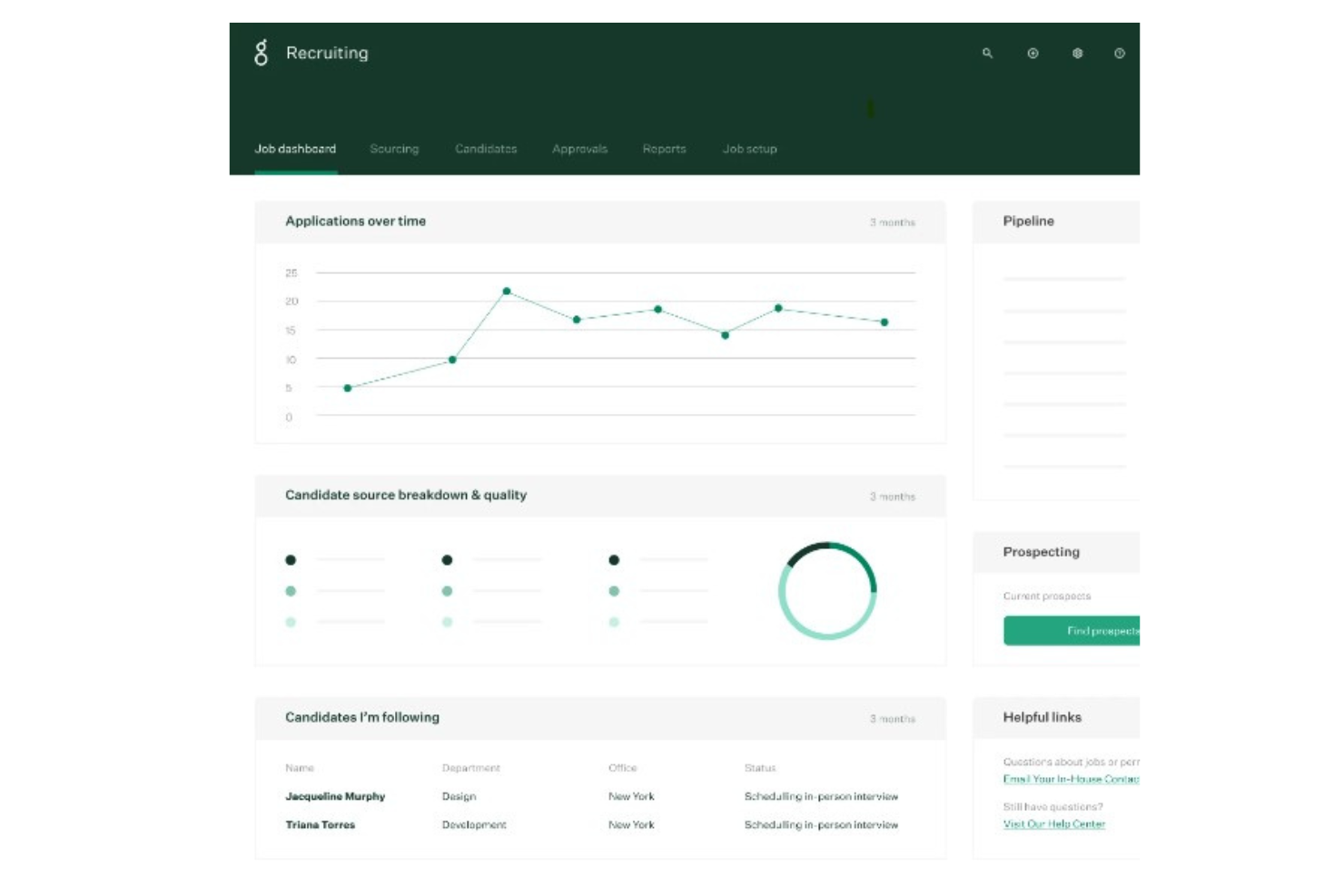
If you’re looking for a hiring tool that helps you build a strong candidate pipeline and promotes fair decision-making across your process, then Greenhouse is a smart choice.
Who Is Greenhouse Best For?
Talent acquisition leaders and recruiting teams in mid-sized to enterprise organizations across technology and professional services. It suits companies that manage high application volumes and need structured processes to source and evaluate qualified candidates.
Why I Picked Greenhouse
I picked Greenhouse because it helps your team reach a wide pool of candidates and evaluate them consistently. You can post jobs on over 1,000 job boards and niche sites, which means you’re casting a wide net from the start.
It also supports structured hiring by letting you define scorecards and workflows ahead of time, so you’re comparing apples with apples rather than relying on gut instinct.
The platform tracks all candidate data and automates outreach, which means your team spends less time on administrative tasks and more time talking to people. Finally, with integrations across calendars, assessment tools, and background check platforms, Greenhouse supports the whole pipeline from sourcing to offer.
Greenhouse Key Features
Here are some standout features worth highlighting:
- Multi-job-board posting: Post to 1,000+ boards at once to boost candidate reach.
- Scorecards & structured interviews: Use templated scorecards to ensure every candidate is evaluated against the same criteria.
- Candidate pipeline tracking: Visual dashboards and reports help you see where candidates are and what’s slowing things down.
- Automated outreach & reminders: Automate candidate communications and interviewer reminders so fewer things fall through the cracks.
Greenhouse Integrations
Integrations include Google Calendar, Microsoft Outlook/Teams, DocuSign, Checkr, HackerRank, LinkedIn Recruiter, Namely, and Calendly.
Pros and Cons
Pros:
- Structured hiring tools help reduce interviewer bias
- Great for sourcing many candidates from diverse channels
- "Essential" (basic) plan offers good value for small businesses
Cons:
- Phone support isn’t always available for every tier
- BI tools only included in top-tier paid plan


Deel HR offers a global-first approach for teams managing international hiring and onboarding. If your organization recruits across borders or needs to navigate complex employment regulations, this platform brings together hiring, compliance, and workforce management in one place. Deel HR is especially useful for HR professionals and businesses looking to simplify the challenges of scaling teams worldwide.
Who Is Deel HR Best For?
Deel HR is a strong fit for HR teams and businesses that hire, onboard, and manage employees or contractors across multiple countries.
Why I Picked Deel HR
For organizations that need to manage international hiring and mobility, Deel HR stands out with its built-in immigration support. The platform offers immigration case tracking, document management, and visa sponsorship tools directly within the applicant tracking workflow. I like that HR teams can monitor visa status and deadlines for candidates and employees, reducing the risk of compliance issues. This makes Deel HR especially valuable for companies that regularly relocate talent or hire from countries with complex immigration requirements.
Deel HR Key Features
Some other features in Deel HR that stand out for applicant tracking and global hiring teams include:
- Automated offer letter generation: Create and send compliant offer letters tailored to local employment laws directly from the platform.
- E-signature workflows: Collect legally binding electronic signatures from candidates and new hires without leaving Deel HR.
- Custom onboarding checklists: Build and assign onboarding tasks to new hires and internal stakeholders to ensure a smooth start.
- Role-based access controls: Set permissions for recruiters, hiring managers, and HR admins to manage sensitive candidate and employee data securely.
Deel HR Integrations
Integrations include FaceUp, Snowflake, Microsoft Finance, Kintsugi, ReFresh OS, Revo.ai, Keeper, Human Interest, Everyminute, and Acumatica. An API is also available for custom integrations.
Pros and Cons
Pros:
- Integrates onboarding with applicant tracking workflows
- Visualizes candidate pipelines for multiple regions
- Offers automated document collection and reminders
Cons:
- Reporting features are less granular than peers
- Lacks advanced candidate sourcing tools
New Product Updates from Deel HR

Deel HR Introduces AI-Powered ATS for Hiring
Deel HR introduces an AI-powered ATS built into its platform. This update enhances hiring efficiency by automating sourcing, screening, and workflows across the recruitment process. For more information, visit Deel HR’s official site.
 .
.
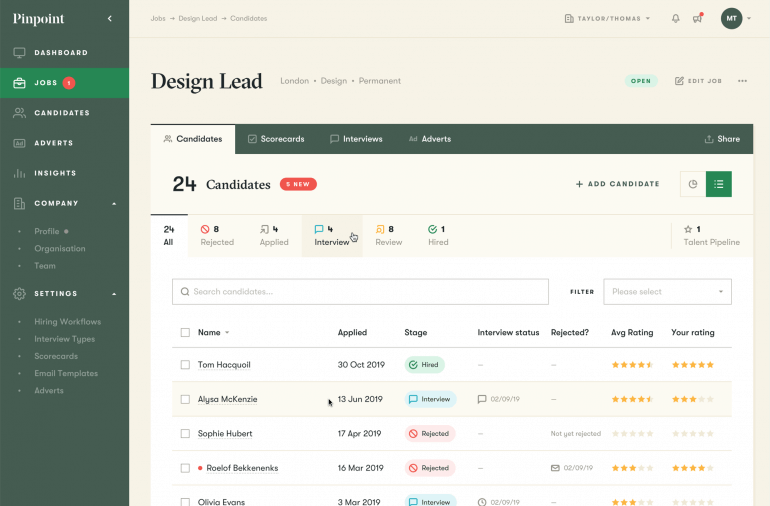
Pinpoint is designed for in-house recruiting teams that want to attract and manage top talent efficiently without relying on external agencies. It combines an intuitive interface with deep configurability, giving hiring teams the control to design their own workflows, build strong employer brands, and deliver a better candidate experience.
Who Is Pinpoint Best For?
Talent acquisition leaders and internal recruiters in mid-sized to enterprise organizations across multiple industries. It fits in-house teams that manage end-to-end hiring processes without relying on external agencies.
Why I Picked Pinpoint
I picked Pinpoint because it empowers in-house talent teams to run hiring like a high-performing operation. You can create unlimited custom workflows that match your company’s hiring stages, post to multiple job boards with one click, and automate interview scheduling to save hours of coordination time.
I also like that Pinpoint isn’t priced per user, so larger organizations can give every hiring manager access without worrying about cost creep. Beyond the core ATS, its blind screening and candidate scorecards help your team make more objective, data-driven decisions—key for maintaining fairness in internal hiring processes.
Pinpoint Key Features
Here are some standout features that make Pinpoint effective for in-house teams:
- Custom Report Builder: Track hiring metrics that matter most to your organization.
- Employer Branding Tools: Build branded career pages and personalized candidate communications.
- Automated Interview Scheduling: Reduce manual back-and-forth by syncing directly with hiring managers’ calendars.
- Unlimited Users: Give full access to your entire recruiting and HR team at no extra cost.
Pinpoint Integrations
Integrations include ADP, BambooHR, DocuSign, Google Meet, Gusto, Microsoft Teams, Rippling, Sage People, SAP, Workday, UKG Pro, and Zoom.
Pros and Cons
Pros:
- Customizable workflows for any department or role type
- Unlimited users—ideal for large in-house recruiting teams
- Exceptional customer success and support
Cons:
- Reporting setup can take time to customize
- Some features only available in the Enterprise tier
New Product Updates from Pinpoint

Pinpoint Streamlines Reference Checks and Enhances Onboarding
Pinpoint now offers an integrated solution for reference checks and enhanced onboarding features to help your HR team work faster and hire smarter. For more information, visit Pinpoint's official site.


BambooHR is ideal for small and mid-sized businesses that want to move quickly from candidate selection to signed offer. Its applicant tracking system (ATS) pairs automation with insights—helping you send digital offers, track responses, and analyze where your best applicants come from—all within one connected HR suite.
Who Is BambooHR Best For?
HR managers and people operations teams in small to mid-sized organizations across professional services, technology, and nonprofit sectors. It suits companies that want applicant tracking connected to offer management and hiring analytics within a broader HR system.
Why I Picked BambooHR
I picked BambooHR because it automates key parts of the hiring process, saving your team time while keeping candidates engaged.
For example, you can send branded digital offer letters that automatically fill in candidate details and include e-signature fields, removing the need for manual edits or external tools, and built-in reminders help recruiters follow up with applicants promptly, ensuring no one slips through the cracks.
I also like that BambooHR’s analytics reports—like the Applicant Sources and Funnel Reports—reveal exactly where your recruiting bottlenecks are and which job boards deliver the best results. Together, these tools help you hire faster and smarter.
BambooHR Key Features
Here are some standout features worth noting:
- Automated Offer Letters: Generate personalized offers with e-signatures in just a few clicks.
- Applicant Funnel Report: Identify which hiring stages take longest and improve process efficiency.
- Applicant Sources Report: Track which job boards or campaigns bring in top candidates.
- Mobile Recruiting App: Manage applications, message candidates, and approve offers on the go.
BambooHR Integrations
Integrations include Indeed, Glassdoor, ZipRecruiter, LinkedIn, Twitter, Facebook, Checkr, Okta, Slack, Google Workspace, and Microsoft 365.
Pros and Cons
Pros:
- Clear analytics on candidate sources and hiring funnel
- Automated offer letters with built-in e-signature tools
- ATS is connected to onboarding tools for hired candidates
Cons:
- Some analytics features require higher pricing tier
- Reporting dashboards could use more export options
New Product Updates from BambooHR®

BambooHR Adds Cost Capping for Age-Banded Medical Plans
BambooHR introduces cost capping for age-banded medical plans. This update ensures employees are not charged for more than three dependent children under 21. For more information, visit BambooHR’s official site.
 .
.
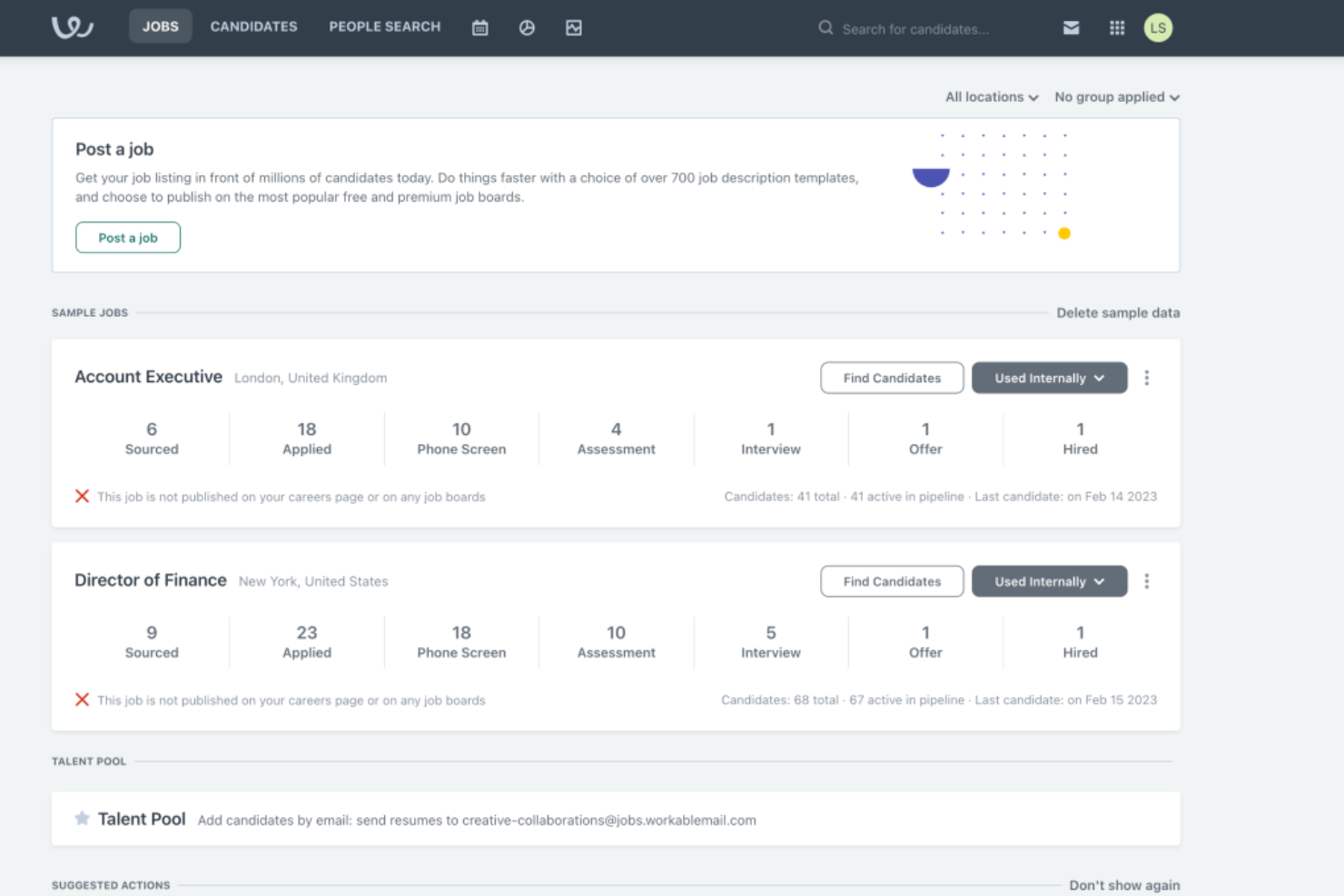
Workable is designed for hiring teams that want to fill roles faster and with less manual fuss. Its one-click job distribution to 200+ boards and built-in candidate scoring make it a strong fit for SMBs and growing companies who need to act quickly and consistently.
Who Is Workable Best For?
Hiring managers and HR generalists in small to mid-sized businesses across diverse sectors. It supports organizations that need a straightforward applicant tracking system that is easy to adopt across distributed hiring teams.
Why I Picked Workable
I picked Workable because it helps your team post jobs broadly and then move promising candidates through each stage with fewer bottlenecks.
For example, you can post one job and get it live on over 200 job boards and the platform’s AI-screening tools analyse resumes and matches them to your job requirements.
It can also automate interview scheduling and use one-way video interviewing, which speeds things up and avoids back-and-forth scheduling headaches, and you’ll also get built-in workflows and approval flows for offers, helping ensure your team is aligned and moves fast without tracking multiple spreadsheets.
Because all this is packed in an ATS that’s friendly for busy teams, Workable is especially suitable when you don’t have large HR teams and you need something that gives you real recruiting lift.
Workable Key Features
Here are some standout features worth highlighting:
- Multi-board job distribution: Post once and push your job live on 200+ job boards and social platforms.
- AI-powered candidate matching: Use a database of 400 million+ profiles and let the system surface candidates based on your role’s criteria.
- Self-scheduling & video interviewing: Candidates pick interview slots themselves; you can conduct one-way video interviews to eliminate scheduling bottlenecks.
- Offer & pipeline automation: Send offer letters with e-signatures, set approval flows, and track each candidate’s journey through stages you configure.
Workable Integrations
Integrations include LinkedIn Recruiter, Indeed, Zoom, Google Calendar, Microsoft Outlook, Slack, BambooHR, and DocuSign.
Pros and Cons
Pros:
- Offer-letter templates + e-signatures means fewer manual docs
- Candidates can schedule interviews themselves
- Built-in AI screening cuts time spent reviewing unqualified resumes
Cons:
- Some users report limited customisation on deep search filters
- Premium features (e.g., texting, advanced assessments) cost extra
New Product Updates from Workable
Workable Syncs Past Work Schedules to Ergani
Workable introduces past work schedule synchronization with Ergani. This update automates data syncing using actual clock-in and clock-out records to improve compliance and accuracy. For more information, visit Workable’s official site.

Tracker is ideal for staffing firms and recruiters who need one platform to manage both their candidate pipeline and client relationships. It brings your ATS and CRM together in a single system to help your team source, nurture, and place talent while keeping client workflows and sales in the same place.
Who Is Tracker Best For?
Recruitment leaders and agency principals in small to mid-sized staffing and executive search firms. It works well for organizations that require both applicant tracking and candidate relationship management within a single platform.
Why I Picked Tracker
I picked Tracker because it combines recruitment and client-relationship workflows into one system, so your team doesn’t have to switch between separate platforms.
For example, its AI-based ranking engine takes engagement data and candidate profile data to surface the best fits for open roles. It also supports matching and parsing of resumes, job-board integration, and campaign tools that let you reach both candidates and clients without leaving the system.
I also like that you can set up custom workflows, dashboards, and reports to tailor the tool to how your team works, and the built-in job board integrations and VMS support help your agency fill more jobs faster.
Tracker Key Features
Here are some standout features worth highlighting:
- Resume Parsing & Candidate Matching: Automatically extracts skills and experience from CVs and matches them to jobs using semantic search.
- Job Board Integration & Search: Post to and search across job boards and your database in one place, including Boolean and semantic filters.
- Custom Dashboards & Reporting: Build your own KPI dashboards and generate scheduled reports on placements, performance, and pipeline health.
- Back Office & Onboarding Support: Manage timesheets, expenses, assignments, and compliance workflows for contract placements all inside the platform.
Tracker Integrations
Integrations include Outlook, Gmail, Microsoft 365, LinkedIn Chrome extension, Xero, QuickBooks, Broadbean job-board integration, JobRobotix VMS.
Pros and Cons
Pros:
- Candidate database search handles “millions” of records
- Suitable for both recruiting and sales/client workflows
- Flexible workflows and customization for staffing agencies
Cons:
- No built-in payroll, but integration with QuickBooks and others
- No background check integration

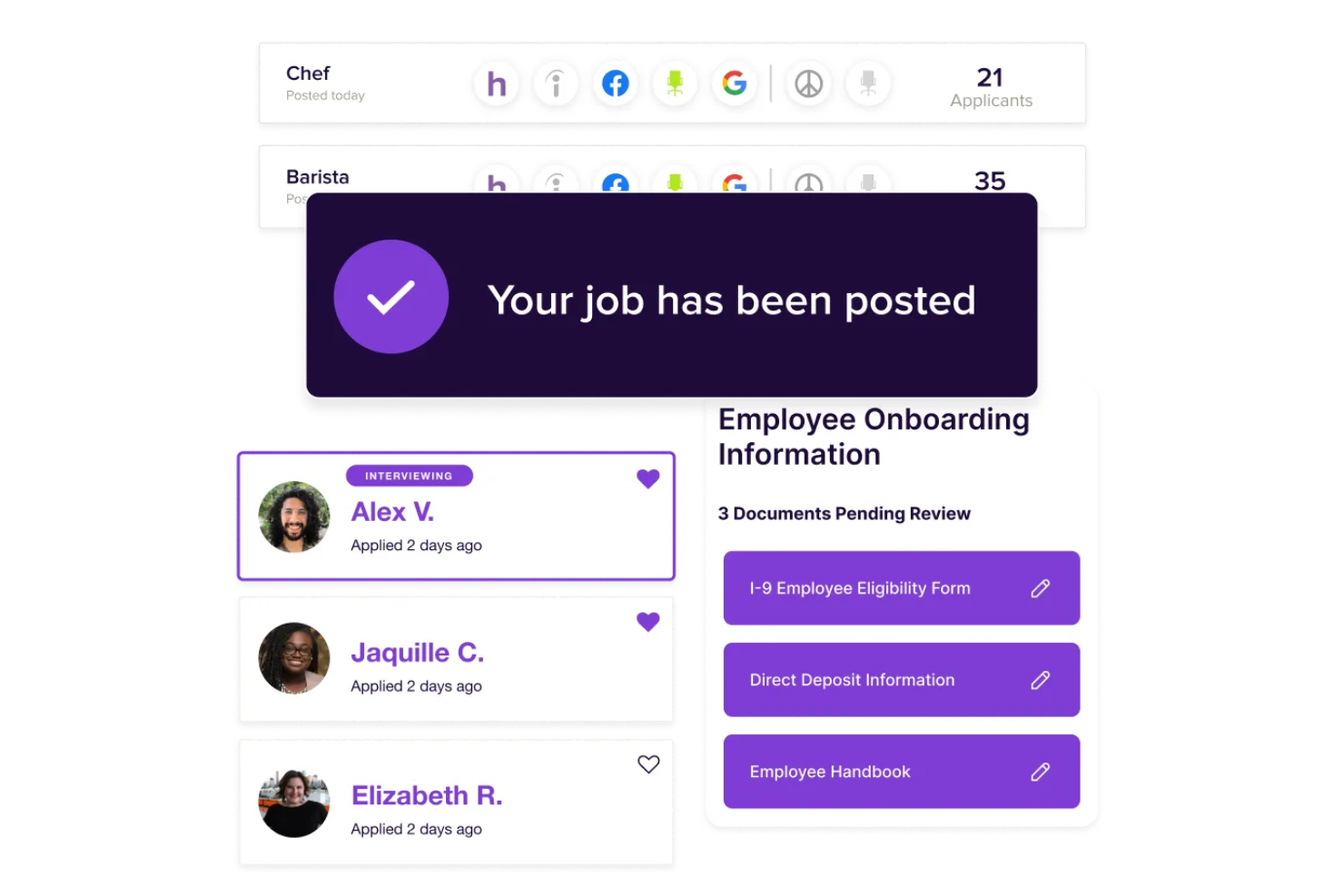
For small business owners seeking a user-friendly solution to streamline hiring processes, Homebase offers a versatile tool that caters to your needs. This platform is particularly appealing to those in retail, hospitality, and service industries who need to manage both hiring and daily operations efficiently. By integrating applicant tracking capabilities with team management features, Homebase addresses challenges like time-consuming recruitment and disorganized onboarding, helping you maintain a seamless flow from hiring to daily team management.
Who Is Homebase Best For?
Small business owners and hiring managers in retail, hospitality, and service-based organizations. It suits companies that want to connect hiring activities with day-to-day team scheduling and workforce management.
Why I Picked Homebase
I picked Homebase for its unique integration of applicant tracking with team management functionalities, making it a standout choice for small businesses. The platform's ability to post jobs on multiple boards and track applicants in a centralized system directly addresses the needs of businesses that frequently hire. Additionally, Homebase's built-in communication tools ensure that you can schedule interviews and communicate with candidates effortlessly, saving valuable time during the hiring process. These features collectively aid in reducing the complexity and inefficiencies often associated with recruitment.
Homebase Key Features
In addition to its applicant tracking capabilities, I also found several features beneficial for managing your team effectively:
- Smart Time Clocks: Notify employees of schedule changes and shift reminders, ensuring everyone is on the same page.
- Automated Scheduling: Create and optimize schedules based on labour costs and team availability, simplifying workforce management.
- Team Messaging: Facilitate communication within your team to coordinate shifts and share important updates.
- Integration with POS Systems: Enhance scheduling accuracy by aligning labor needs with sales data, optimizing resource allocation.
Homebase Integrations
Integrations include Square, Restaurant365, Wells Fargo, Indeed, Paychex, ADP, Gusto, QuickBooks, Toast, and Shopify.
Pros and Cons
Pros:
- Hiring tied to scheduling
- Simple applicant tracking workflows
- Multi-board job posting support
Cons:
- Limited resume management tools
- Lacks advanced ATS analytics
New Product Updates from Homebase

Homebase Adds AI Scheduling Assistant for Faster Shift Planning
Homebase introduces Scheduling Assistant, AI-optimized shift creation, and automated conflict resolution. These updates reduce manual scheduling work while keeping teams aligned and shifts fully staffed. For more information, visit Homebase's official site.
 .
.

AvaHR is designed for small and growing businesses that need to hire talent quickly without the enterprise price tag. The tool helps you post a job once and reach 50+ job boards, track candidates in one place, and manage your team’s hiring workflow in one dashboard.
Who Is AvaHR Best For?
Small business owners and HR generalists in startups and early-stage companies. It supports organizations that require a straightforward applicant tracking system aligned with limited internal recruiting resources.
Why I Picked AvaHR
I picked AvaHR because it gives your hiring team the tools more commonly seen in larger companies, but at a pace and cost suited for SMBs.
For example, with just one click, you can distribute your job to dozens of job boards, meaning you spend less time posting and more time reviewing top candidates.
You can also involve your whole team in candidate review through shared pipelines and ratings, helping your team stay aligned on who should move forward, and the built-in analytics dashboard gives insights into your hiring pipeline to help you refine it.
Lastly, you’ll find over 860 integrations available so your ATS can connect to your CRM, HRIS, and communication tools.
AvaHR Key Features
Here are some standout features worth highlighting:
- One-Click Job Distribution: Post a job once and publish it to 50+ job boards simultaneously.
- Custom Hiring Pipelines: Build and track stages that reflect your specific recruiting workflow and team collaboration.
- Candidate Ranking and Notes: Collect team feedback, rank candidates, and surface top prospects all in one unified view.
- Dashboard Reporting & Analytics: View metrics on job performance, candidate sources, and pipeline progress to support data-driven hiring.
AvaHR Integrations
Integrations include HubSpot, Salesforce, Pipedrive, Twilio, Google Docs, Microsoft Excel, Docusign, and LinkedIn.
Pros and Cons
Pros:
- Over 800 app integrations allow you to plug into your tech stack
- Built-in dashboards give visibility into hiring performance
- Shared pipelines let your team collaborate on candidate review.
Cons:
- Some job board integrations may require additional setup or fees
- Feature set may lag more complex enterprise ATS
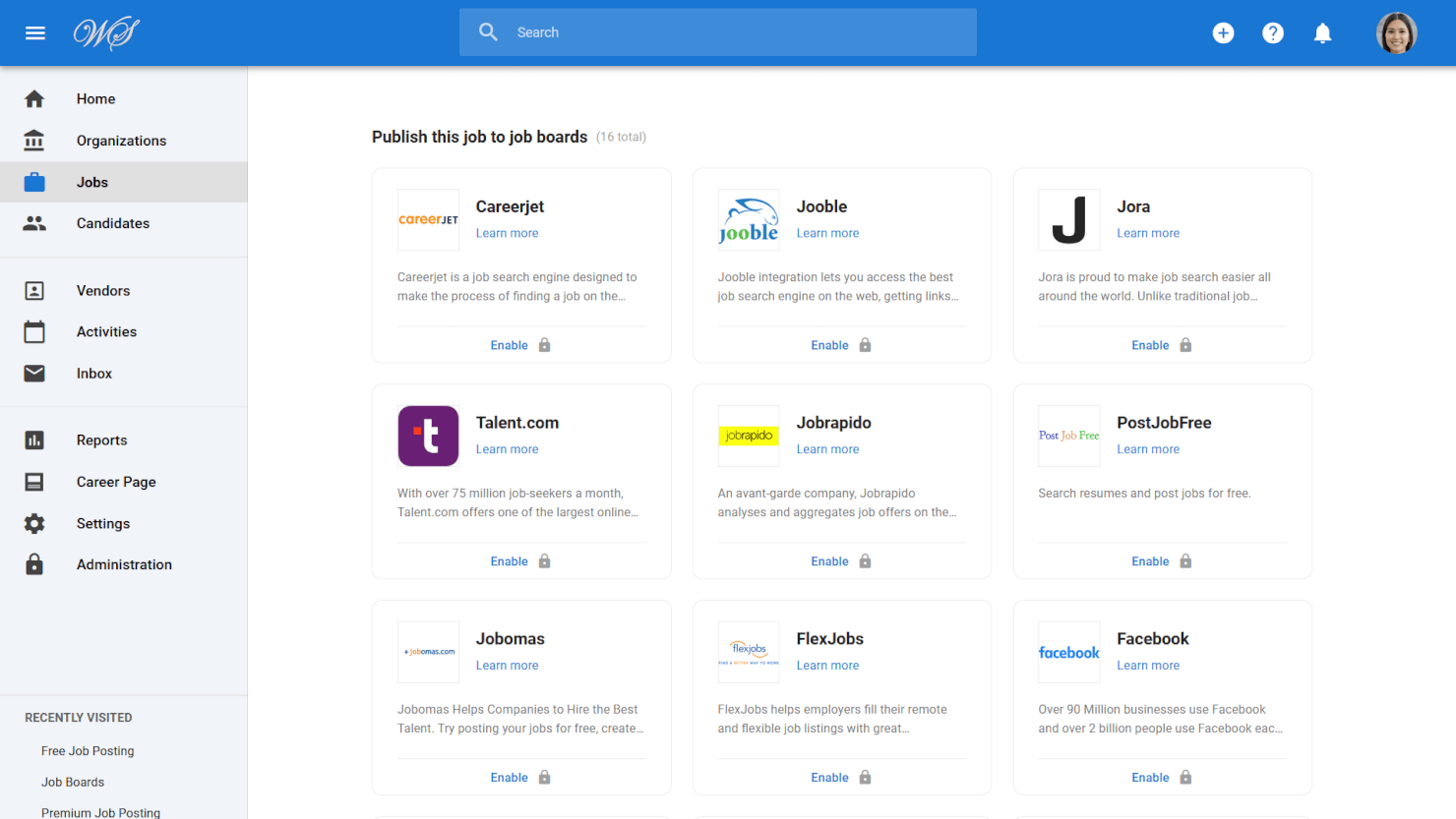
Manatal is ideal for companies and recruitment agencies that want to use AI to make sourcing and screening faster and more accurate. It automatically enriches candidate profiles with social and professional data, helping your team identify quality talent from thousands of applicants.
Who Is Manatal Best For?
Recruiters and talent acquisition teams in small to mid-sized agencies and growing companies. It supports organizations that want AI-assisted candidate sourcing and structured pipeline management.
Why I Picked Manatal
I picked Manatal because it brings AI directly into your hiring workflow, turning candidate sourcing and evaluation into a data-driven process.
For example, its recommendation engine scores applicants based on job fit, helping your team focus only on the most relevant profiles. You can also pull social data from LinkedIn, GitHub, and other platforms to enrich profiles automatically—a big time-saver for recruiters handling high volumes.
I also like how the drag-and-drop Kanban pipeline makes it easy to track progress across hiring stages, while the built-in CRM helps agencies manage clients and placements in one place. Lastly, you can build branded career pages without technical support, keeping your employer branding consistent across roles.
Manatal Key Features
Here are some standout features worth highlighting:
- AI Candidate Recommendations: Uses machine learning to score and rank candidates by relevance to open roles.
- Social Data Enrichment: Aggregates information from LinkedIn and 20+ sources to create detailed candidate profiles.
- Kanban-Style Pipeline: Visual drag-and-drop interface that lets your team move candidates smoothly through each hiring stage.
- Branded Career Pages: Build custom, fully branded career sites—no coding needed—to attract candidates directly to your jobs.
Manatal Integrations
Integrations include LinkedIn, Indeed, Gmail, Outlook, Mailchimp, Microsoft 365, Google Suite, Zapier, BambooHR®, and Codility.
Pros and Cons
Pros:
- AI-based recommendation of candidates and social media recruitment
- Custom career page builder enhances employer branding
- Drag-and-drop pipelines simplify tracking candidate progress
Cons:
- No mobile app for hiring managers
- Reporting customization options are somewhat limited
New Product Updates from Manatal

Manatal Launches AI Interviewer
Manatal introduces AI Interviewer, an AI-powered agent for automating first-round candidate screenings. Recruiters get standardized assessments to focus on top candidates. For more information, visit Manatal's official site.
 .
.
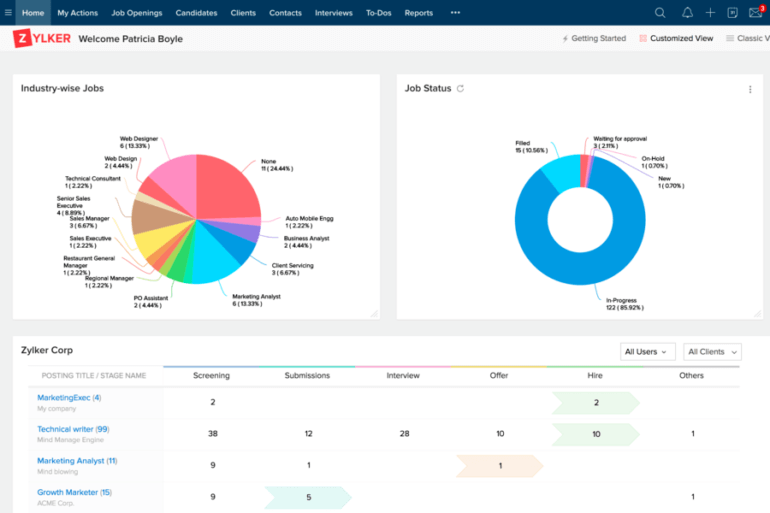
Zoho Recruit is tailored for recruiters and staffing agencies who manage high-volume hiring and need an applicant-tracking system that covers sourcing through to hire. It excels at posting jobs broadly, managing candidate workflows, and converting hires into employees in one platform.
Who Is Zoho Recruit Best For?
Agency recruiters and HR teams in small to mid-sized staffing firms and corporate environments. It fits organizations that need configurable workflows to manage candidate pipelines across multiple clients or departments.
Why I Picked Zoho Recruit
I picked Zoho Recruit because it aligns sharply with the demands of recruitment teams who must move candidates through multiple stages efficiently and without switching tools.
For example, you can post an open role across 150+ job boards in a few clicks, and you also get built-in resume parsing and a skill-matching engine (Zia) that scores applicants based on your defined criteria.
If you operate as a staffing agency, you’ll appreciate features like a client portal to let clients review candidates directly. Plus, when you fill a role, you can convert the candidate into a full employee profile within the same system, cutting down data entry.
Overall, it gives you the kind of targeted hiring workflow support that staffing firms and corporate recruiting teams value most.
Zoho Recruit Key Features
Here are some standout features worth highlighting:
- Multi-channel job posting: Publish a job to dozens of job boards with one submission.
- Resume parsing & skill matching: Automatically extract candidate details and score them against job requirements.
- Blueprint workflows & approvals: Create defined hiring stages with required actions and approvals for each step.
- Customizable dashboards & analytics: Track recruiting KPIs like time-to-hire, cost-per-hire, and activity sources in visual reports.
Zoho Recruit Integrations
Integrations include Zoho CRM, Zoho People, Zoho Mail, LinkedIn, Indeed, DocuSign, Adobe Sign, Slack, Google Drive.
Pros and Cons
Pros:
- Offers detailed analytics to track recruiting performance
- Supports client portals, ideal for staffing agencies
- Parses resumes and matches candidates based on skills
Cons:
- Some recruiters report steep configuration effort
- Native integrations strong for Zoho ecosystem, fewer options outside it
New Product Updates from Zoho Recruit

Zoho Recruit Introduces Block Candidates
Zoho Recruit now allows recruiters to block specific candidates from applying to future jobs, ensuring a compliant hiring process. For more information, visit Zoho Recruit's official site.
 .
.Other Applicant Tracking Systems
Here are a few more recruitment ATS tools that didn’t make the top 15 applicant tracking systems list:
- Folks HR
For automated job postings & sourcing
- Recruit CRM
For recruiting firms and enterprises
- Boon
For community-driven recruiting
- Gem
For unified recruitment pipeline views
- Freshteam
For growing businesses
- Eddy
For those with little technical expertise
- Recruitee
For automated candidate reminders
- JazzHR
For customizable recruiting solutions
- PCRecruiter
For detailed recruitment analytics
- Bullhorn
For integrations
- Mitratech TalentReef
For recruiting, hiring, and onboarding
- Recooty
For resume parsing
- SAP SuccessFactors
For data analytics and reporting
- GoHire
For industry-specific customizations to help businesses scale
- Oracle Taleo
For large enterprises
- JobAdder
For built-in job posting
- Avionté
For attracting quality candidates
- Unnanu Hire
For its free plan
- Transformify
For mission-driven organizations
- Rippling
For pre-built pipeline templates
- VidCruiter
For high-volume recruiting
- monday.com
For creating customized workflows
- ClearCompany
For streamlined hiring automation
- Teamtailor
For advanced candidate search
- Mitratech Perform
For collaborative hiring tools
- Recruiterflow
For executive search firms
- Paycor
With an all-in-one HCM platform
- Journeyfront
For BPO hiring
- Mitratech Circa
For hiring diverse talent
- Breezy HR
ATS for diversity & inclusion recruitment


Related HR Software Reviews
If you still haven't found what you're looking for here, check out these other tools that are related to payroll software, that we've tested and evaluated.
- HR Software
- Payroll Software
- Employer of Record Services
- Workforce Management Software
- Learning Management Systems
Selection Criteria for Applicant Tracking Systems
My approach to choosing the best applicant tracking software is based on my personal experience managing hiring processes and extensive research into how these software systems address the needs, pain points, and goals of recruiters and hiring teams in real, day-to-day scenarios.
Core ATS Functionalities (25% of total score): For an applicant tracking system to land a place in my initial list, it needed to fulfill the following basic functionalities:
- Job posting tools to help you advertise positions across multiple platforms
- A customizable dashboard where you can track job applications for each open position
- Tools to streamline communication with candidates through automated emails and notifications
- Candidate screening tools, including side-by-side comparisons, skill-based comparisons, and resume screening to speed up candidate selection
- Interview scheduling tools to automate the booking process
- Collaboration tools to make it easier for internal teams to discuss hiring decisions as a group
Additional Standout Features (25% of total score): To help me hone in on the best applicant tracking software on the market, I also took note of any unique features, including:
- AI-driven analytics tools that offer deeper insights into the recruitment process
- Innovative candidate engagement tools like video interviewing or AI-driven chatbots for pre-screening
- Enhanced mobile applications or dedicated ATS apps that provide a full range of ATS functionalities for recruiters communicating with candidates on the go
Ease of Use (10% of total score): To evaluate the usability of each applicant tracking system, I considered the following:
- An intuitive user interface that minimizes the learning curve
- Clear and logical menu structures that lend quick access to essential features
- Visual recruiting pipelines, color-coding, or visual status flags that make it easy to digest information at a glance
- Drag-and-drop functionalities for ease of scheduling interviews and organizing candidate profiles
- Role-based access controls that are straightforward to configure
Customer Onboarding and Customer Support (10% of total score): To get a sense of each software provider's customer onboarding process and the level of customer support each vendor offered, I considered the following factors:
- Quick setup processes with clear guidelines for new users
- Comprehensive ATS training materials such as videos, templates, and interactive product tours
- Data migration support for transferring existing candidate information into the new system
- Availability of customer support during the onboarding phase to address any issues
- The availability of multiple support channels, including email, phone, and chat
- The existence of a self-service knowledge base or other self-help resources to speed up troubleshooting
- The overall quality, responsiveness, and helpfulness of the support team during customer onboarding and post-purchase, as inferred from customer reviews
- Regular updates regarding new features of system-wide changes
Value for Price (10% of total score): To gauge the value of each software, I considered the following factors:
- The availability of free trials or demos to test the software before purchasing
- Transparent pricing models that clearly explain which features are included at each level, without hidden fees
- Tiered pricing plans that cater to different business sizes, from small to medium-sized businesses (SMBs) up to enterprise-level organizations
- Comparable pricing to other applicant tracking system examples
Integration capability (10% of total score): Evaluating the integration capabilities of applicant tracking systems (ATS) is crucial for understanding their usability and functionality. Here are the factors I considered:
- Advanced integration capabilities with social media for a broader reach in sourcing candidates
- Seamless integration with internal HR tools such as HR Information Systems (HRIS), payroll systems, and onboarding platforms that are essential for efficient HR operations
- The system's ability to connect with external resources like recruiting platforms and job boards to enhance the recruiting reach and efficiency
- Assessing integration with advanced tools such as assessment platforms and video interviewing capabilities, which are critical for a comprehensive evaluation of applicants
- Whether the ATS system offers direct, first-party integrations or relies on third-party APIs, with a preference for systems that provide more reliable, easy, and smooth direct integration options
- A high score is given to systems that offer a wide range of robust integration options that improve overall system usability and performance
Customer Reviews (10% of total score): Evaluating customer reviews is the final element of my selection process, which helps me understand how well a product performs in the hands of real users. Here are the factors I considered:
- Whether a product has consistently high ratings across multiple review platforms, indicating a broad level of user satisfaction
- Specific praises, criticisms, or trends in customer feedback that indicate the software's strengths or areas for improvement
- Whether customer feedback specifically mentions issues with ease of use, customer support responsiveness, or lacking features
- Testimonials that highlight specific features that users found beneficial for their recruitment needs
By using this assessment framework, I was able to identify applicant tracking systems that go beyond basic requirements to offer additional value through unique features, intuitive usability, smooth onboarding, effective support, and overall value for price.
Use your ATS and sourcing tools strategically. Leverage AI to help with baseline screening, but always make room for the human touch to evaluate culture fit and adaptability.
How to Choose an Applicant Tracking System
Applicant tracking systems can help you find better candidates faster, move them through your process more efficiently, and create a better hiring experience for everyone involved.
But as you can see, there are lot of vendors to choose from. To help you figure out which applicant tracking system software is the best fit for your needs, keep the following points in mind:
| Factor | What to Consider |
|---|---|
| Hiring Challenges | - Identify current recruiting pain points - If interview scheduling is a bottleneck, prioritize ATSs with calendar integrations and scheduling tools |
| User Access & Roles | - How many users will access the system? - Is pricing based on per-user, per-job, or flat rate? - Look for role- and/or location-based permissions for recruiters, hiring managers, and collaborators - Ensure proper access controls and data security compliance |
| Integration Needs | - Does it integrate with your HRIS, onboarding tools, or background check platforms? - Can it replace multiple tools with one consolidated system? |
| Scalability | - Will the ATS support long-term hiring growth? - Does it offer flexible pricing plans? - If hiring globally, does it support multi-country compliance, language localization, and international job postings? |
| Workflow Compatibility | - Does the ATS align with your current recruiting workflows and delivery models? - Consider what’s working, what isn’t, and tailor your selection accordingly - Don’t rely solely on popularity—focus on what matches your specific needs and processes |
Trends in Applicant Tracking Systems for 2025
The race for top talent is fast-paced, and recruitment software is evolving just as quickly. Here are several key trends shaping applicant tracking systems to meet the needs of modern recruiters.
Most Important Evolving Features
AI-driven screening and skill matching
Managing large volumes of applications efficiently is a major challenge for many recruiters.
AI integration into ATS software is streamlining this process by using machine learning to quickly scan resumes and identify candidates with the best skill matches for your job requirements.
This significantly speeds up screening and adopts a skills-first approach, reducing potential hiring biases. AI also helps automate tasks like writing job descriptions and creating email templates, cutting down time-to-hire.
If this resonates with you, check out our best AI recruiting software for some cherry-picked options.
Hiring Bias Reduction Tools
As diversity, equity, and inclusion (DEI) continue to grow in importance, many ATS tools are adding features to reduce unconscious bias.
These tools can anonymize applications by removing personal details like names, gender, age, and ethnicity, allowing recruiters to focus solely on skills and qualifications, fostering a more equitable hiring process.
Mobile accessibility and optimization
With mobile usage continuing to rise, ATS systems are increasingly optimized for mobile recruiting.
According to Appcast's 2022 Recruitment Marketing Benchmark Report, 67% of job applications are now completed on mobile devices. Key mobile-friendly features include:
- Mobile-friendly job applications
- Career pages with SMS alerts or notifications for new postings
- Applications via text
- Texting candidates directly from your ATS
- Dedicated mobile ATS apps to speed up recruiting from anywhere.
Unique and Unusual Functionality
- Virtual Reality (VR) and Augmented Reality (AR) Integrations: Some ATS companies are experimenting with VR and AR for immersive job previews and interviews, offering a novel way to engage candidates and provide a realistic job preview.
- Blockchain for Candidate Verification: The use of blockchain technology for verifying candidate credentials and work history is emerging as a novel application, ensuring authenticity and transparency in the recruitment process.
What Is An Applicant Tracking System?
Applicant tracking systems are a type of HR software that helps you organize all aspects of your recruiting process, from sourcing candidates to comparing their skill sets to making them an offer.
The main aim is to help make your hiring process more efficient by reducing manual work and improving your time-to-hire.
Applicant tracking systems can also improve the quality of your hires and support better data-driven decision-making due to their advanced filtering and screening capabilities.
They're designed for both professional recruiters and in-house talent acquisition specialists.
Features of Applicant Tracking Systems
When selecting an applicant tracking system, keep an eye out for the following key features:
- Job posting management: This lets you create, schedule, and publish job openings across multiple job boards in just a few clicks. It cuts down your manual posting time and helps you reach a wider pool of candidates.
- Resume parsing: This feature automatically extracts information from resumes and organizes it into standardized profiles. You can quickly scan critical details—like skills, experience, or education—without having to dig through each document by hand.
- Candidate database: Store all applicant records in one organized, searchable hub. With this, you can easily revisit past candidates, build talent pipelines, and avoid losing track of promising applicants.
- Communication tools: Send emails, texts, or interview invites directly from the platform. These tools keep all communications streamlined and help you stay in sync with your team and applicants.
- Interview scheduling: Coordinate and book interviews without endless email chains. Candidates and interviewers can select slots based on real-time calendar availability, saving headaches and double-bookings.
- Collaboration and feedback: Team members can add notes, share ratings, and comment on candidates in one place. This encourages faster decision-making and helps you avoid miscommunication.
- Workflow automation: Standardize repetitive steps like sending acknowledgment emails or moving candidates through hiring stages. You get more time for the important stuff—like actually talking to people.
- Compliance and reporting: Keep your recruitment process above board with tools to ensure you’re meeting legal standards, like EEO tracking, and generate reports to identify possible bottlenecks or bias.
Common Applicant Tracking System AI Features
Beyond the standard applicant tracking system features listed above, many of these solutions are incorporating AI with features like:
- Automated candidate screening: AI helps narrow your applicant pool by analyzing resumes and ranking candidates based on job requirements, so you spend less time sorting and more time engaging.
- Intelligent matching: The system uses AI to match applicants with job descriptions by analyzing both skills and culture fit, surfacing candidates you might have missed.
- Predictive analytics: AI-powered insights forecast which candidates are most likely to succeed or accept an offer, letting you focus your efforts where they’ll have the most impact.
- Chatbots for candidate engagement: These AI bots answer candidate questions, schedule interviews, and provide status updates, ensuring applicants get quick responses any time of day.
- Bias reduction tools: AI can help flag biased language in job postings or provide anonymized candidate profiles, promoting a fairer hiring process.
Strong ATS tools should track metrics like offer acceptance rates, scorecard completion rates, and salary averages to provide actionable insights.
Benefits of Applicant Tracking Systems
"Once hiring gets over a certain threshold, an ATS will help you create a more efficient hiring process and provide a better candidate experience."—Mariya Hristova, People and Operations Lead.
Depending on the size of your hiring volume, you're likely dealing with a handful of positions that you’re scouting for simultaneously, all with distinct candidate skills and requirements.
On top of that, you have candidates submitting their applications around the clock, vying for your attention and time.
Without the right tools, juggling all that information can be overwhelming. Here are the key benefits of using an applicant tracking system:
- Improved recruitment efficiency: Since an ATS automates many time consuming activities, recruiters can focus more on value add activities like providing interview feedback.
- Enhanced candidate experience: By streamlining the application process and providing timely communication, an ATS helps create a positive experience for applicants and a favorable brand perception among potential new employees.
- Increased quality of hires: With advanced filtering and matching algorithms, an ATS can help identify the most suitable candidates based on the job requirements and organizational fit. This leads to a higher quality of hires, directly impacting your company's success.
- Improved scalability: An ATS allows organizations to easily scale their recruitment efforts up or down based on their current needs without compromising the quality of the hiring process. This adaptability is crucial for businesses experiencing rapid growth or seasonal fluctuations in hiring.
- Data-driven insights: By offering detailed analytics on various aspects of the recruitment process, an ATS enables organizations to make better data-driven decisions. Insights on performance metrics and hiring trends can help in refining recruitment strategies and improving future outcomes.
In short, by automating routine tasks, enhancing the candidate experience, and providing valuable insights, the best ATS platforms not only save time and resources but also empower more informed hiring decisions.
Costs & Pricing for Applicant Tracking Systems
ATS platforms typically offer a range of plans to suit different organizational sizes and hiring needs, from free versions designed for small businesses or startups to more comprehensive, feature-rich packages for large enterprises.
Understanding these options will help you select a plan that aligns with your recruitment goals, budget, and the scale of your hiring operations.
In general, applicant tracking systems tend to cost between $10 to $100 per user, per month, though some systems do operate on a flat fee model instead. Some systems do include a one-time set-up fee too.
However, most recruiting software providers are happy to offer you a free demo or free trial so you can get a first-hand feel for their ATS system before signing up.
Pricing & Plan Comparison Table for Applicant Tracking Systems
| Plan Type | Average Per User Fee | Average Flat Fee | Common Features |
|---|---|---|---|
| Free | $0 | $0 | Basic job posting, limited candidate tracking, email notifications, and simple reporting |
| Basic | $10 to $20 per user, per month | $50 - $100/month | Enhanced job posting on multiple platforms, resume parsing, basic CRM, email integration, and basic analytics |
| Professional | $50 to $100 per user, per month | $200 - $500/month | Advanced CRM features, bulk email sending, advanced analytics, integration with HR systems, and customizable workflows |
| Enterprise | Custom Pricing | Custom Pricing | Full suite of features including AI-driven analytics, dedicated support, enhanced security, and unlimited job postings |
Note that the free option typically offers a taste of the system's capabilities, making it ideal for very small businesses or those in the initial stages of scaling their operations.
As I mentioned above, when considering an ATS platform, it's important to assess not just the current size of your recruitment team but also anticipate future growth. This approach ensures that the selected plan not only meets your current needs but is also scalable to adapt to your organization's evolving requirements.
If your organization is larger and more complex, you may also need to write an ATS RFP and other documentation to confirm the features and costs required.
If your hiring needs are minimal, you may be able to start with a free or basic plan initially. However, there are many reasons why you may want to opt for a more advanced plan, including:
- Increased hiring volume: If your company experiences a surge in job openings, a more advanced plan can help you handle the higher volume of applicants through advanced features like AI resume screening.
- Advanced analytics: If you need deeper insights into your recruitment metrics, advanced plans provide robust analytics tools to track and optimize your hiring strategies.
- Employer branding: To help you stand out in a competitive job market, advanced plans often include recruitment marketing features that enhance your company's visibility and attractiveness to top talent.
- Integration capabilities: Basic plans often lack integration abilities, so you'll need to scale up to unlock this feature. Advanced plans generally offer seamless integration with other HR tools and systems, allowing for a unified workflow.
Ultimately, it's important to secure a plan that offers the features you require to satisfy your current needs and solve your challenges without exceeding your budget.
Frequently Asked Questions About Applicant Tracking Systems
Here are some answers to frequently asked questions you may have about applicant tracking software and how it works:
How do applicant tracking systems work?
Are there different types of ATS I should consider?
How do ATS platforms handle data privacy and security?
How customizable are ATS solutions for different industries?
What kind of customer support do ATS providers offer?
What's the difference between an ATS and a CRM?
How does resume scoring work in an ATS?
Do applicant tracking systems filter candidates?
Is it true that an ATS might automatically reject qualified candidates?
What integrations should I prioritize when choosing an ATS?
Can ATS systems help reduce bias in hiring?
Yes, many ATS solutions offer features to reduce bias, such as anonymized resume screening and standardized interview scorecards. While no system removes bias completely, configuring your ATS thoughtfully and including structured criteria help create a more equitable hiring process.
Are there tricks candidates can use to beat an ATS?
There are some strategies candidates can use to improve their chances of passing an ATS screening, often referred to as “beating the ATS.”
The most effective approach is tailoring their resume to match the job description by incorporating relevant keywords and phrases that reflect the required skills and qualifications.
Using a clean, standard resume format without complex designs, graphics, or columns also helps ensure the ATS can accurately parse the information.
While these tricks can optimize a resume for ATS screening, they work best when paired with genuine qualifications and experience.
Recruiters should be cautious of resumes that appear keyword-stuffed or overly generic, as they might signal candidates focusing more on passing the system than being a good fit for the role. A well-configured ATS can help identify resumes that balance both keyword relevance and substance.
Other Software Reviews
As you can see, there are a lot of options to consider when it comes to the best ATS systems to source candidates for your open positions.
And, the fact that 98.9% of Fortune 500 companies use an ATS is also a strong indication of just how important these software systems are.
However, your journey doesn't have to stop here. If you're looking for a different type of application tracking system or specialty recruiting software, please take a look at these other lists too:
- Cloud Recruitment Software for Hiring Teams
- Enterprise Recruitment Software for High Volume Hiring
- Recruitment Automating Software for Hiring
- Recruiting Database Software for Hiring Teams
- Recruitment Software for Small Businesses
- Recruiting Agency Software for Recruitment Firms
- Video Interviewing Software for Virtual Interviews
- Background Check Software
Stay in Touch
I hope this article got you one step closer to finding the best application tracking system for your business. Before you go, make sure to subscribe to our People Managing People newsletter too. You'll stay up-to-date on all our latest articles, podcasts, tool recommendations, and best practices related to talent acquisition and management.