
40 Best HRMS: Reviewed & Compared in 2026

20 Best HRMS Software Shortlist
Here's my pick of the 20 best software from the 40 tools reviewed.


The best HRMS (human resource management system) software brings every aspect of people management into one integrated platform.
Managing HR manually or across disconnected tools creates inefficiencies and errors that drain valuable time and energy. The right HRMS automates repetitive tasks, centralizes employee data, and gives you real-time insights to support smarter, more strategic decision-making.
After reviewing dozens of platforms, I’ve narrowed down the top HRMS solutions for 2025 that are intuitive, scalable, and built to fit teams of all sizes.
Use this guide to easily compare pricing, features, pros + cons and use cases so you can make the best decision for your organization.
You Can Trust Our HR Software Reviews
We've been testing and reviewing HR software since 2019. As HR professionals ourselves, we know how critical and difficult it is to make the right decision when selecting software.
We invest in deep research to help our audience make better software purchasing decisions. We've tested more than 2,000 tools for different HR use cases and written over 1,000 comprehensive software reviews. Learn how we stay transparent, and take a look at our software review methodology.
Table of Contents
Best HRMS Software: Pricing Comparison Chart
This comparison chart summarizes pricing details for my top human resource management system selections to help you find the best HR system for your budget and business needs.
| Tool | Best For | Trial Info | Price | ||
|---|---|---|---|---|---|
| 1 | Best for international teams | Free demo available | From $5/employee/month | Website | |
| 2 | Best for people analytics | Free demo available | Pricing upon request | Website | |
| 3 | Best for enterprise organizations | Free demo available | Pricing upon request | Website | |
| 4 | Best for customizable reporting | Free demo available | Pricing upon request | Website | |
| 5 | Best for performance management integration | Free 14-day trial | From $199/month (billed annually) | Website | |
| 6 | Best for intuitive employee self-service | Free 7-day trial | From $10/user/month | Website | |
| 7 | Best for international contractor management | Free plan + free demo available | From $199/person/month | Website | |
| 8 | Best for UK small business needs | 14-day free trial | From $22/user/month | Website | |
| 9 | Best for compliance-driven organizations | Free demo available | Pricing upon request | Website | |
| 10 | Best for dedicated HR guidance | Free demo available | From $99/month | Website | |
| 11 | Best for time tracking and attendance | 14-day free trial | Pricing upon request | Website | |
| 12 | Best for payroll and benefits integration | Free demo available | From $49/month + $6/user/month (billed annually) | Website | |
| 13 | Best for workflow customization | Free demo available | Pricing upon request | Website | |
| 14 | Best for enterprise-scale analytics | Free demo available | From $13/user/month, with a minimum of 1000 employees | Website | |
| 15 | Best for automating repeatable workflows | Free demo available | Pricing upon request | Website | |
| 16 | Best for document management automation | Free demo available | From $8/user/month | Website | |
| 17 | Best for shift scheduling flexibility | Free 30-day trial + free demo available | From £4.60/employee/month | Website | |
| 18 | Best for unified finance and workforce data | Free demo available | Pricing upon request | Website | |
| 19 | Best for rapid implementation | 14-day free trial | From $5/user/month | Website | |
| 20 | Best for PEO and compliance support | Free demo available | Pricing upon request | Website |

-

Checkr
Visit WebsiteThis is an aggregated rating for this tool including ratings from Crozdesk users and ratings from other sites.4.5 -
Kudoboard
Visit WebsiteThis is an aggregated rating for this tool including ratings from Crozdesk users and ratings from other sites.4.8 -
Native Teams
Visit WebsiteThis is an aggregated rating for this tool including ratings from Crozdesk users and ratings from other sites.4.9





Best HRMS Software Reviews
To help you find the best human resource management system for you, I’ve summarized my top 10 choices in detail. Any one of these systems will help you manage your employee data with ease. Plus, there are 20 more HRMS options below if you want a few more options to vet.

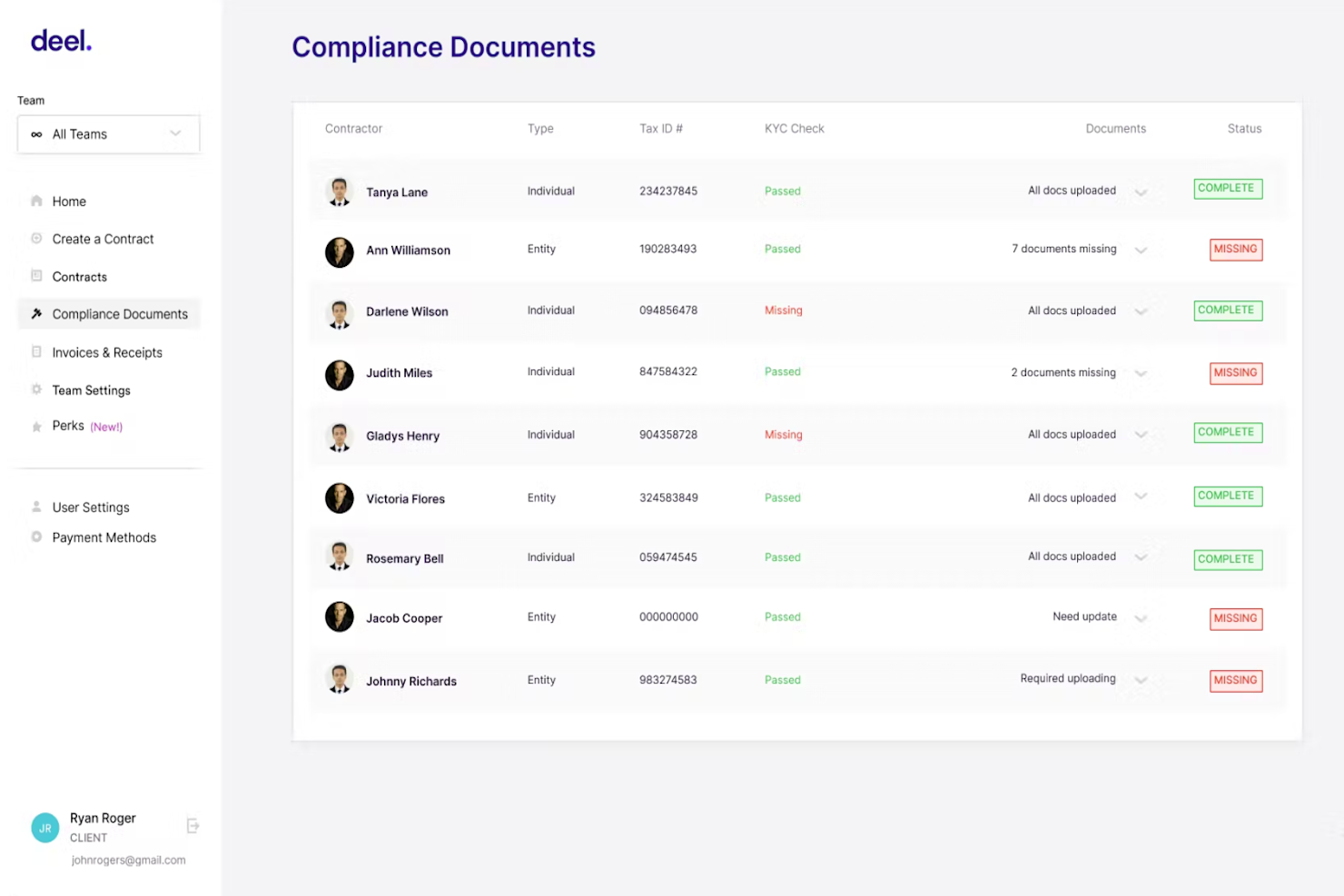
Deel HR is a cloud-based HRMS designed for companies managing employees and contractors across multiple countries, helping HR teams handle global payroll, compliance, onboarding, and document management from a single platform.
Who Is Deel HR Best For?
Deel HR is a strong fit for HR teams at mid-size to enterprise companies that hire across borders and need a single system to manage a globally distributed workforce.
Why I Picked Deel HR
Deel HR earns its spot on my shortlist because it's purpose-built for managing people across borders, which most HRMS platforms treat as an afterthought. I like how it centralizes employee profiles, contracts, and compliance documentation for workers in 150+ countries, so my team isn't juggling separate tools for different regions. The localized onboarding workflows automatically adjust to country-specific requirements, which means new hires in Germany get different documentation flows than those in Brazil. I also rely on the built-in global org chart and workforce analytics to keep visibility across a distributed headcount.
Deel HR Key Features
- Time off management: Track and approve employee leave requests with country-specific public holiday calendars built in.
- Employee self-service portal: Let employees update personal details, access pay stubs, and manage their own documents directly.
- Performance management: Set goals, run review cycles, and collect structured feedback across your entire workforce.
- HR reporting and analytics: Generate headcount, turnover, and workforce composition reports from a centralized dashboard.
Deel HR Integrations
Integrations include FaceUp, Snowflake, DefensX, Microsoft Finance, Kintsugi, ReFresh OS, Revo.ai, Keeper, Human Interest, and Everyminute.
Pros and Cons
Pros:
- Simplifies employee management in 150+ countries
- Centralises compliance tracking for dozens of jurisdictions
- Handles multiple currencies and pays via major withdrawal networks
Cons:
- No free trial available
- Overlapping plan features require custom pricing
New Product Updates from Deel HR

Deel HR Introduces AI-Powered ATS for Hiring
Deel HR introduces an AI-powered ATS built into its platform. This update enhances hiring efficiency by automating sourcing, screening, and workflows across the recruitment process. For more information, visit Deel HR’s official site.
 .
.
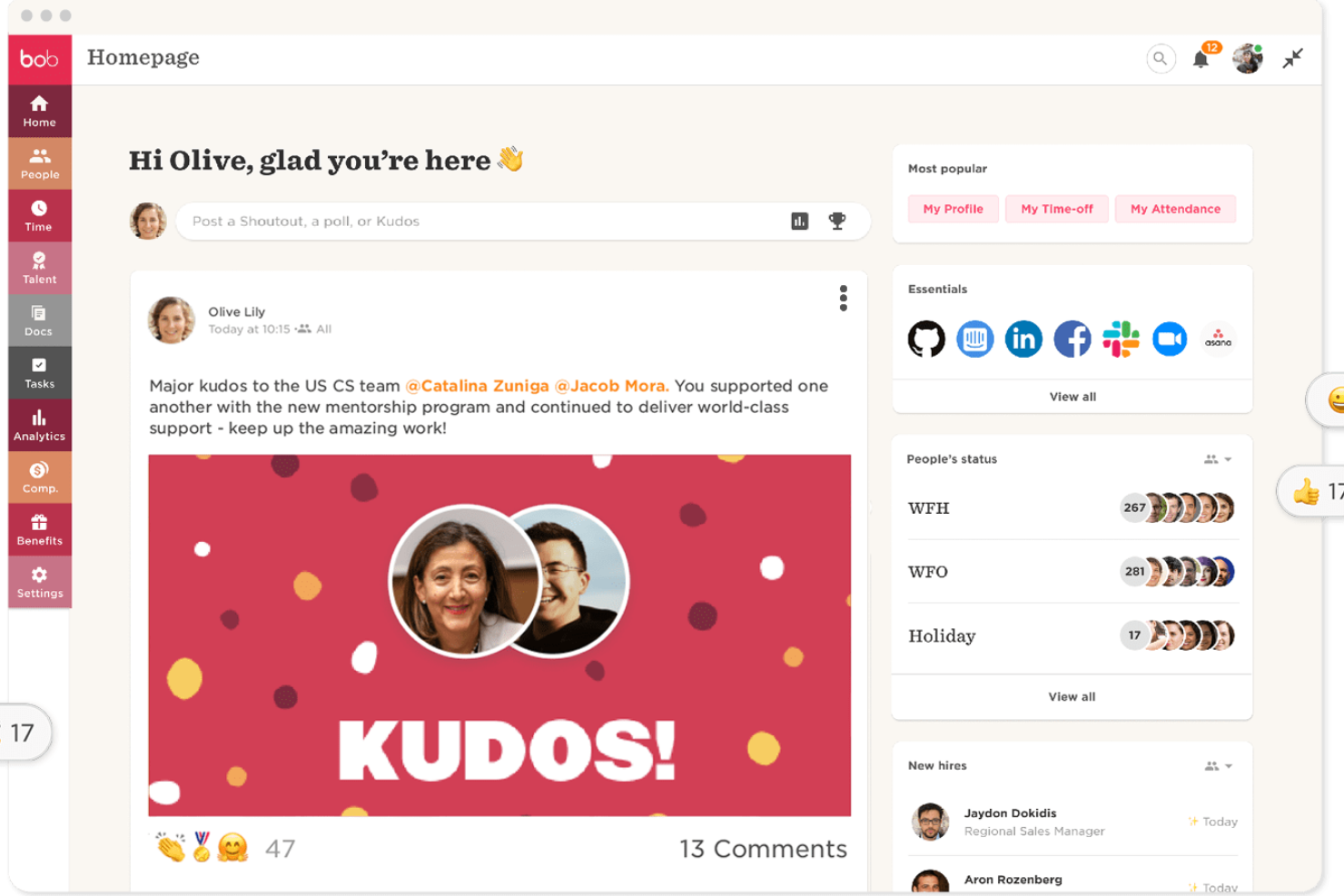
HiBob is a modern HR platform designed for mid-sized and fast-growing companies that want to centralize HR processes, manage employee data, and support people-focused decision making.
Who Is HiBob Best For?
HiBob is a great fit for HR teams at mid-sized, scaling companies that need a modern people management platform with strong analytics capabilities.
Why I Picked HiBob
HiBob earns its spot as one of the best on my shortlist because of how deeply people analytics is built into the platform—not bolted on as an add-on. I love that the KPI dashboards let me slice headcount, retention, and absenteeism data by department, manager, tenure, or site, so I can surface patterns that a standard HR report would completely miss. The attrition risk indicators are especially useful: Bob flags individual employees as "Low risk," "Some risk," or "At risk" based on factors like tenure and career development, which means I can act before someone hands in their notice. The Proactive Insights engine also surfaces trends automatically, without me having to build a custom query every time.
HiBob Key Features
- Onboarding workflows: Build automated, multi-step onboarding sequences with task assignments, welcome messages, and document collection for new hires.
- Time off management: Configure custom leave policies, approval chains, and accrual rules, with a shared calendar view for team visibility.
- Performance reviews: Run structured review cycles with self-assessments, manager feedback, and goal tracking in a single flow.
- Employee self-service: Let employees update personal details, view pay stubs, request time off, and access company documents directly from their profile.
HiBob Integrations
Pros and Cons
Pros:
- Detailed and exportable reporting for audits and planning
- Clean data capture through structured onboarding and workflows
- Strong analytics for engagement, turnover, and workforce trends
Cons:
- Could offer more configuration options
- End-to-end payroll only offered for UK businesses

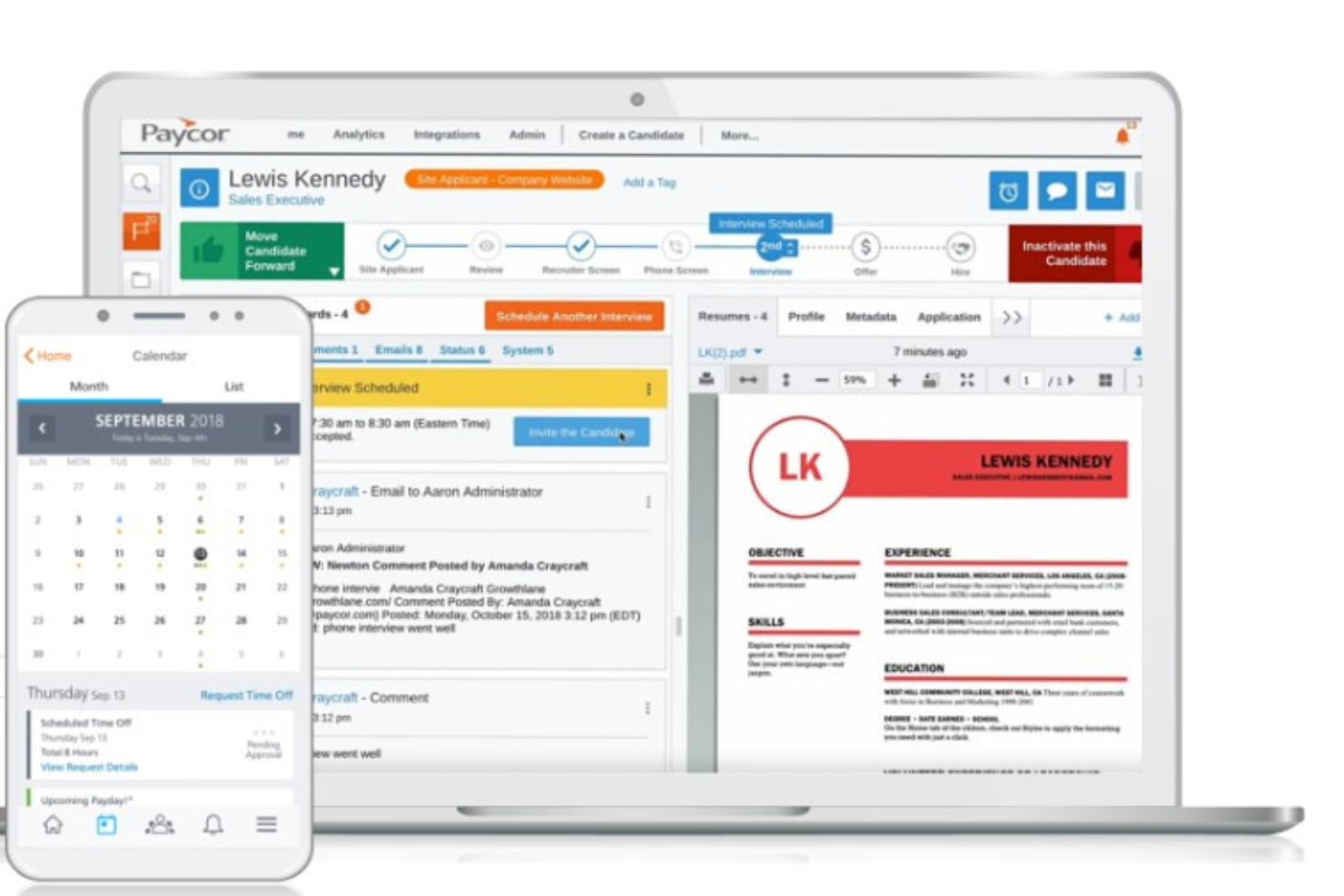
Paycor is a cloud-based HRMS designed for organizations that need to manage complex HR, payroll, and talent processes, helping HR teams streamline workforce management, improve compliance, and support employee development at scale.
Who Is Paycor Best For?
Paycor is a strong fit for mid-sized to enterprise organizations that need a unified platform to manage HR, payroll, and workforce operations across large or distributed teams.
Why I Picked Paycor
Paycor earns its spot as one of the best on my shortlist because of how well it handles the scale and complexity that enterprise HR teams deal with every day. I particularly like the workforce analytics suite—it pulls data from payroll, time tracking, talent, and benefits into a single view, and the AI-powered predictive resignation feature is useful for flagging at-risk employees before they walk out the door. I also appreciate that the platform is purpose-built for leaders, not just HR admins—the COR Leadership Framework gives frontline managers structured development activities to build leadership skills, which larger organizations with hundreds of managers need. Additionally, the pre-built marketplace connectors mean enterprise IT teams can connect Paycor to existing systems without building everything from scratch.
Paycor Key Features
- Compensation management: Plan, manage, and execute pay increases and rewards across your workforce from a single module.
- Learning management system: Deliver self-paced training and certification programs tailored to individual employee development needs.
- Pulse surveys: Collect employee feedback through configurable surveys and surface actionable insights directly within the platform.
- Smart Scheduler: Automatically generate team schedules based on predefined criteria like role, availability, and coverage requirements.
Paycor Integrations
Integrations include QuickBooks, JazzHR, 15Five, DailyPay, OrgChart, Mitratech AssureHire, Spark Hire, Procurify, and Timeero.
Pros and Cons
Pros:
- Strong payroll and time-clock functionality
- Marketplace with hundreds of connectors for third-party apps
- Modular nature allows for easy customizations
Cons:
- Wellness program features are relatively weak
- Depth of reporting and analytics may lag specialised tools


Paylocity is an HRMS platform designed for HR teams and business leaders who need a unified system to manage payroll, benefits, talent, and workforce data while supporting compliance and employee engagement.
Who Is Paylocity Best For?
Paylocity is a strong fit for mid-sized businesses that need an all-in-one HR and payroll platform with the flexibility to scale as their workforce grows.
Why I Picked Paylocity
I picked Paylocity as one of the best for customizable reporting because the depth of its analytics tools goes well beyond what most HRMS platforms offer out of the box. I like that my team can build custom dashboards that pull from HR, finance, and operations data simultaneously—so when I need to present turnover trends alongside department spend, it's all in one view. The Modern Workforce Index (MWI) dashboard is particularly useful: it's built on Paylocity's proprietary AI and surfaces engagement scores, peer benchmarks against similar-sized companies, and step-by-step recommendations to act on the data. I also use the position-level workforce planning data regularly to model staffing changes and analyze active vs. terminated employee counts over time.
Paylocity Key Features
- Payroll processing: Run payroll with automated tax calculations, garnishments, and direct deposit management built into the platform.
- Benefits administration: Manage open enrollment, carrier connections, and employee benefits elections directly within the HR system.
- Talent management: Handle the full employee lifecycle from recruiting and onboarding through performance reviews and succession planning.
- Employee self-service portal: Let employees access pay stubs, request time off, update personal information, and complete onboarding tasks independently.
Paylocity Integrations
Integrations include Microsoft Entra, Google Workspace, and Okta.
Pros and Cons
Pros:
- Includes tax compliance services
- On demand payment options
- Includes performance management features
Cons:
- Setup can be time consuming
- Lacks support for independent contractor payments

Leapsome is an HR platform designed for organizations that want to connect performance management, employee engagement, and learning in one place to support people operations and drive continuous improvement.
Who Is Leapsome Best For?
Leapsome is a strong fit for mid-sized to enterprise companies that want HR and people managers working from a single, connected platform.
Why I Picked Leapsome
Leapsome earns its spot on my shortlist because of how well it connects performance management to the rest of the HR workflow. I like that performance reviews don't sit in isolation—they feed directly into goal tracking and development plans, so managers and employees are always working from the same picture. I've found the calibration tools especially useful for keeping review cycles fair and consistent across teams. The OKR tracking also ties individual goals to company-level objectives, which makes it easier to have meaningful performance conversations grounded in real data.
Leapsome Key Features
- Employee engagement surveys: Run pulse surveys and gather structured feedback to track engagement trends across teams over time.
- Learning paths: Build and assign onboarding or development courses directly within the platform.
- Compensation management: Review and manage salary cycles with built-in compensation bands and approval workflows.
- Meeting templates: Structure 1-on-1s and team meetings with shared agendas and talking points tied to employee goals.
Leapsome Integrations
Integrations include Slack, Microsoft Teams, Workday, BambooHR, Greenhouse, ADP Workforce Now, DATEV, Jira, and Okta.
Pros and Cons
Pros:
- AI insights enhance HR efficiency
- Strong performance review management tools
- Extensive HRIS and onboarding features
Cons:
- Below-average goal rating performance
- Limited advanced payroll management functionality
New Product Updates from Leapsome

Leapsome Adds ADP Workforce Now Integration
Leapsome introduces ADP Workforce Now integration for payroll data synchronization. This update helps organizations keep employee data aligned between HR and payroll systems while reducing manual data transfers. For more information, visit Leapsome’s official site.
 .
.

BambooHR is an HRMS platform built for small and midsize businesses that want to centralize employee data, automate HR tasks, and improve the employee experience with modern, easy-to-use tools.
Who Is BambooHR Best For?
BambooHR is a great fit for HR teams at small to midsize companies that need a centralized, easy-to-manage system for core HR without heavy IT involvement.
Why I Picked BambooHR®
BambooHR earns its spot on my shortlist because of how well it handles employee self-service without requiring any hand-holding. I particularly like the Ask BambooHR AI assistant, which lets employees get instant answers to questions about policies and benefits on their own, 24/7, without routing every query through HR. On top of that, the mobile app gives employees direct access to their own records, time off requests, and approvals from anywhere. I've found that when employees can manage these tasks themselves, HR spends far less time fielding routine requests and more time on work that actually moves the needle.
BambooHR® Key Features
- Applicant tracking system: Post jobs, manage candidates, and coordinate with hiring team members from a dedicated hiring pipeline inside the platform.
- Onboarding workflows: Assign and track pre-boarding tasks for new hires before their first day, so nothing falls through the cracks.
- Performance management: Run performance reviews, set goals, and collect peer feedback directly within the platform.
- Custom dashboards and analytics: Build real-time dashboards using workforce data, including HR benchmarks, to support people decisions.
BambooHR® Integrations
Integrations include Checkr, Slack, Remote, Greenhouse, Lever, Okta, Indeed, Lattice, 15Five, and Zapier.
Pros and Cons
Pros:
- Lots of integrations available
- Track engagement levels and eNPS
- Verify that announcements are read
Cons:
- Some features come as paid add-ons
- Pricing is not transparent
New Product Updates from BambooHR®

BambooHR Adds Cost Capping for Age-Banded Medical Plans
BambooHR introduces cost capping for age-banded medical plans. This update ensures employees are not charged for more than three dependent children under 21. For more information, visit BambooHR’s official site.
 .
.
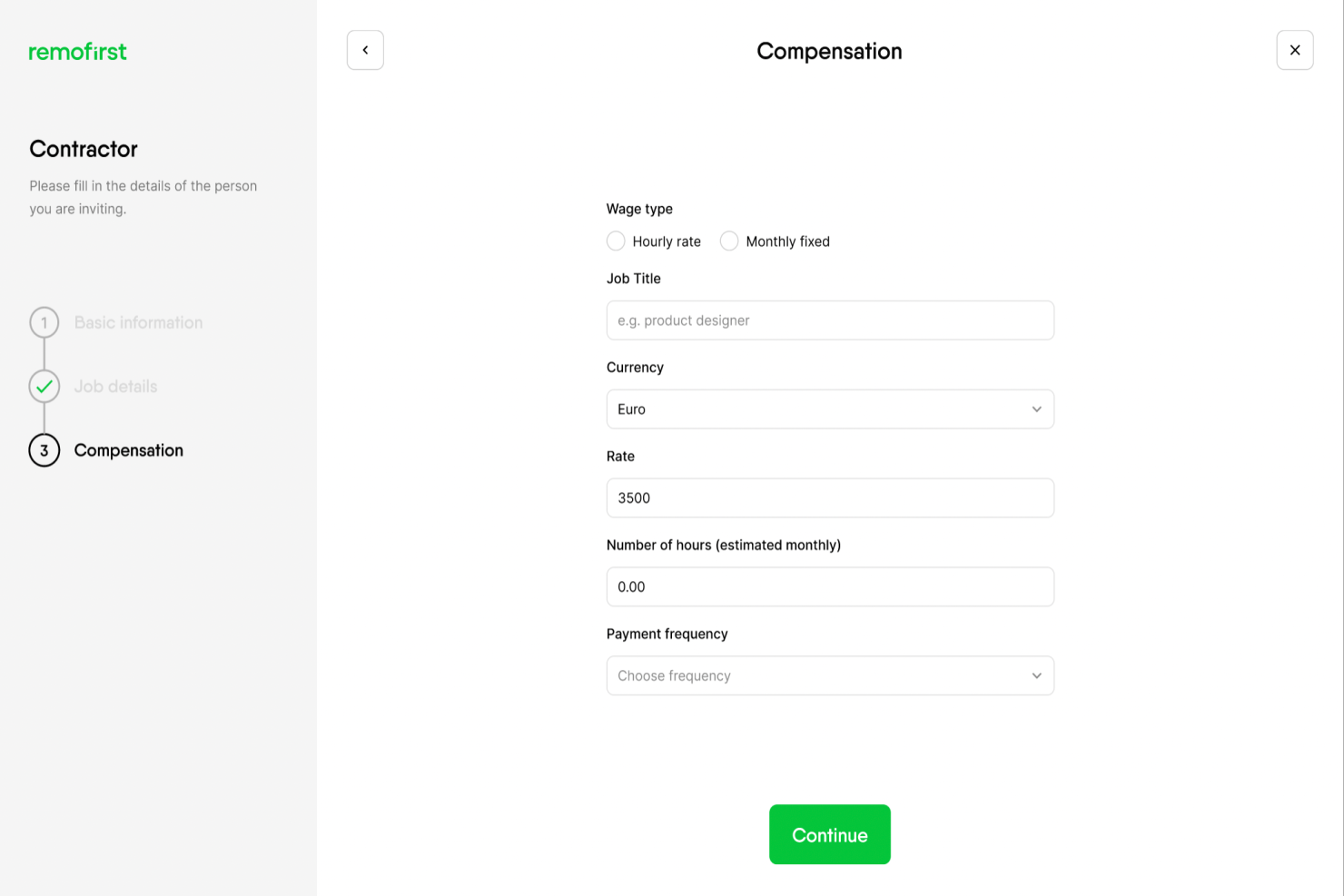
RemoFirst is a global HRMS platform for companies managing remote teams and international talent, helping HR professionals handle onboarding, payroll, and compliance across multiple countries.
Who Is RemoFirst Best For?
RemoFirst is a strong fit for HR teams at small to mid-sized companies that are scaling internationally and need a single platform to manage global payroll and compliance.
Why I Picked RemoFirst
I picked RemoFirst as one of the best because it handles international contractor management and reduces legal guesswork. I like how it generates locally compliant contractor agreements tailored to each country, so my team isn't piecing together contracts from scratch for every new hire. RemoFirst also centralizes contractor onboarding documents and tracks signing status in one place, helping my team manage contractors across different time zones. The built-in multi-currency payment processing means I can pay contractors in their local currency without routing through a separate tool.
RemoFirst Key Features
- Time-tracking and timesheet management: Contractors log hours directly in the platform, and you approve them with one click before payments are processed automatically.
- Contractor-to-employee conversion: Convert international contractors into full-time employees within the same platform, with RemoFirst handling the employment contract and EOR enrollment.
- Time off management: Track and manage contractor time off requests directly within the platform, in line with local labor law requirements.
- Background checks: Run free background checks on international contractors during the onboarding process to verify identity and support compliant hiring decisions.
RemoFirst Integrations
Native integrations are not currently listed.
Pros and Cons
Pros:
- Employee misclassification tool is helpful for international hiring
- Compliance issues are handled by local experts around the world
- Their EOR services are available in 150+ countries
Cons:
- Lacks extensive integrations
- No free trial available
New Product Updates from RemoFirst

RemoFirst Launches BambooHR Integration
RemoFirst has launched a BambooHR integration for enhanced global hiring and HR management. For more details, visit RemoFirst's official site.
 .
.
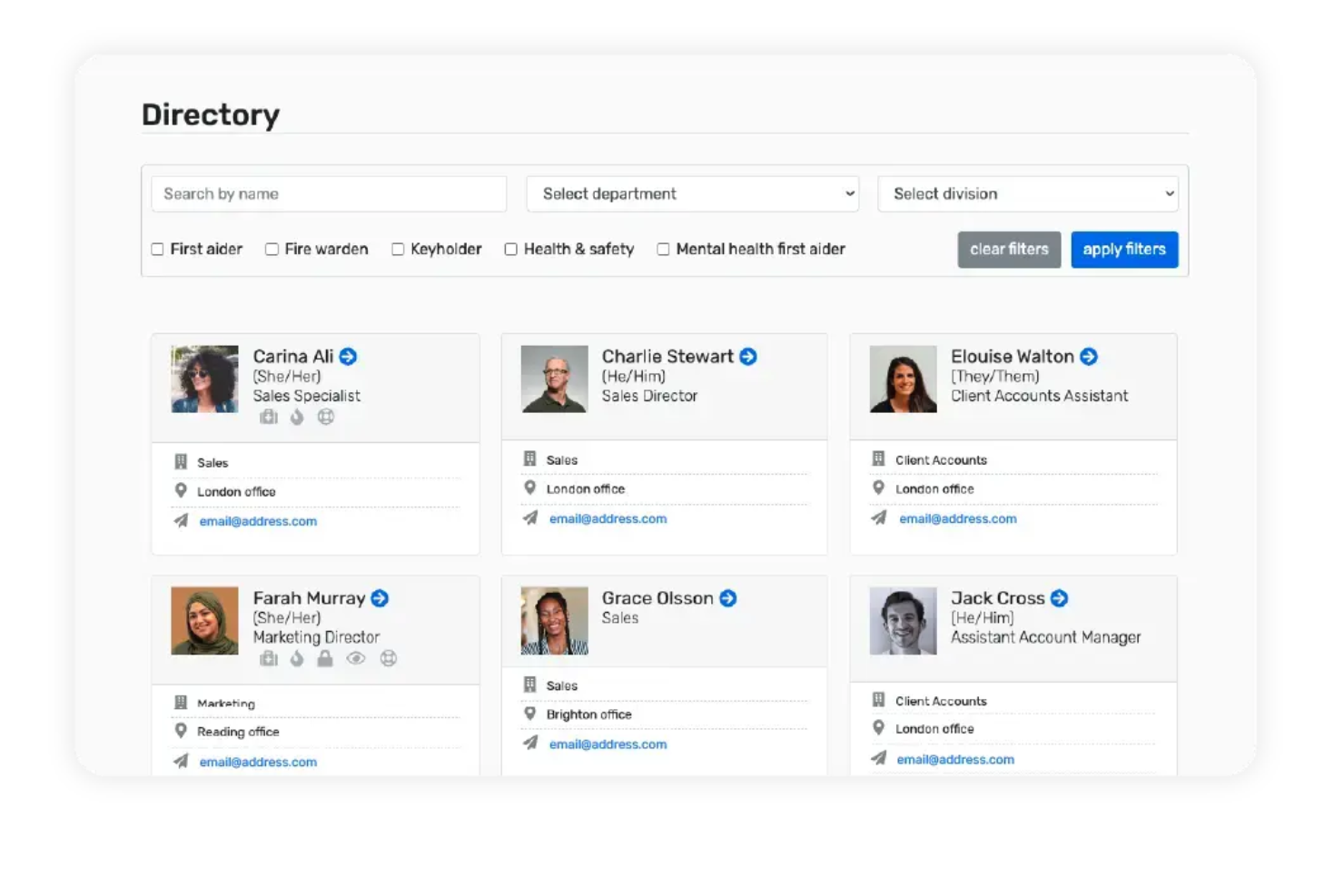
Breathe HR is a cloud-based HRMS designed for small businesses that need simple tools for managing employee records, tracking absences, and handling performance reviews in one place.
Who Is Breathe HR Best For?
Breathe HR is a strong fit for UK-based small businesses looking for a straightforward HR system that handles day-to-day people management without the complexity of enterprise platforms.
Why I Picked Breathe HR
I've included Breathe HR in my top picks because it's one of the few HRMS platforms built specifically for UK small businesses, and that focus shows up in the details. I like that it handles absence tracking with Bradford Factor scoring built in—something UK HR teams rely on to flag and manage short-term sickness patterns without needing a separate tool. The GDPR-compliant employee database lets my team store contracts, performance notes, and sensitive records securely, and the system meets UK data standards. The e-signature feature lets you send and sign employment contracts and offer letters directly within the platform, which cuts out a lot of back-and-forth for small HR teams managing onboarding without dedicated admin support.
Breathe HR Key Features
- Employee self-service portal: Employees can view and update their own records, request leave, and log sickness directly from the platform or mobile app.
- Onboarding and document management: Send contracts for e-signature, store unlimited HR documents, and share key materials with new starters in one place.
- Reporting and analytics: Generate HR reports to track trends, monitor engagement, and export payroll-ready data for compliance and decision-making.
- Recruitment tracking: Publish vacancies, collect applications, and assign candidates to recruiters without leaving the platform.
Breathe HR Integrations
Integrations include Xero and Breathe Rota, and an API is available for custom connections.
Pros and Cons
Pros:
- Modular marketplace with learning, payroll, AI, expenses, and benefits add-ons
- GDPR-compliant employee data management
- Built for UK SMEs with local holiday and employment law support
Cons:
- May lack deeper enterprise-grade customization
- Limited advanced analytics and reporting capabilities

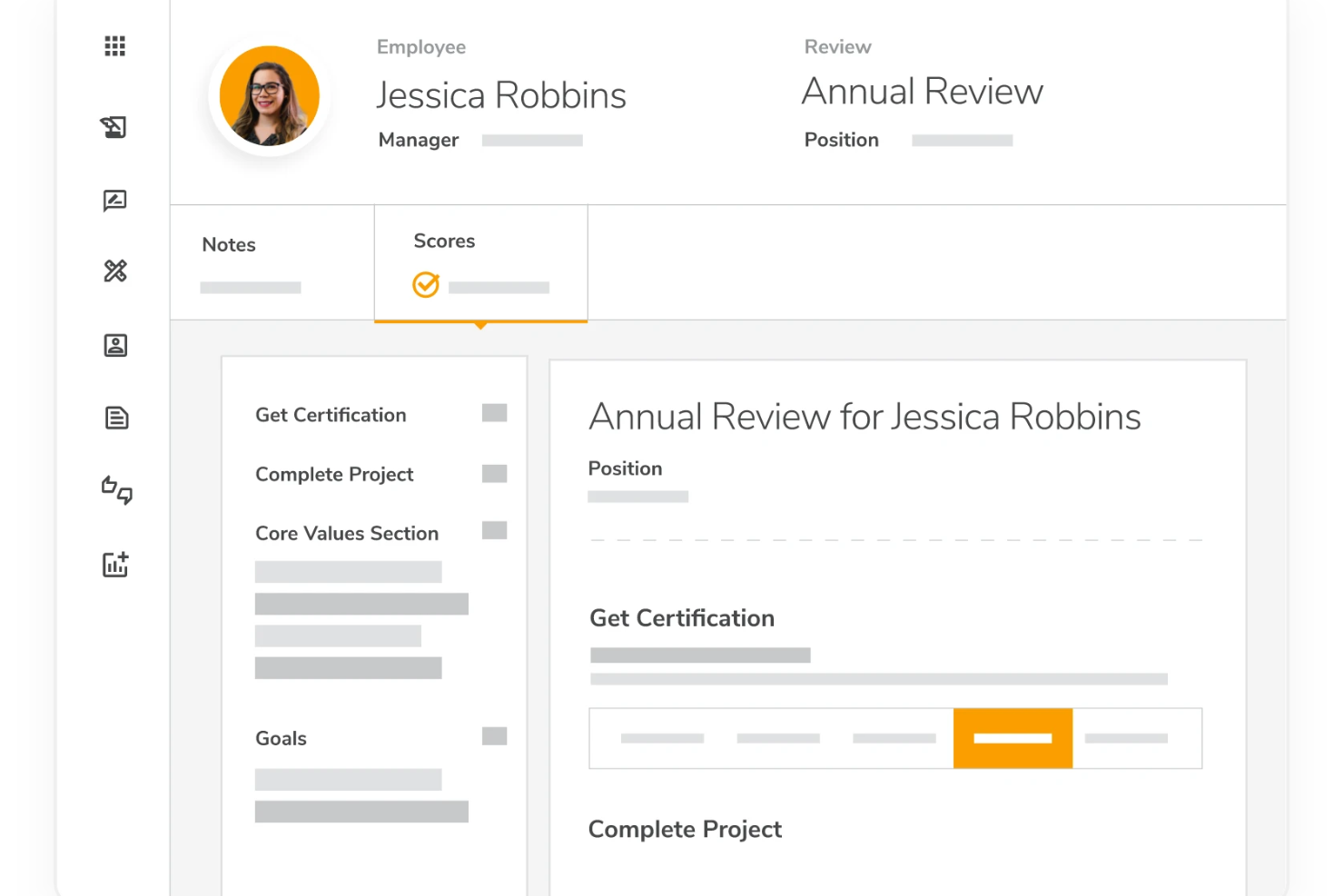
Mitratech Perform is an HRMS platform for organizations that manage employee performance, compliance, and HR processes in highly regulated industries.
Who Is Mitratech Perform Best For?
Mitratech Perform is a strong fit for HR teams in regulated industries like healthcare, finance, and legal that need structured performance and compliance workflows.
Why I Picked Mitratech Perform
Mitratech Perform earns its spot on my shortlist because it's one of the few talent management platforms that builds compliance directly into the hiring and performance workflows rather than treating it as an afterthought. I particularly like the reporting and compliance features in Trakstar Hire, which generate easy-to-download reports to help HR teams stay aligned with EEOC requirements and state and federal hiring laws. On the performance side, I use the automated approval workflows in Trakstar Perform to create a documented, auditable trail from review completion through manager sign-off and employee acknowledgment. For organizations in regulated industries, that kind of structured, traceable process is exactly what you need when documentation gets scrutinized.
Mitratech Perform Key Features
- 360-degree reviews: Collect performance feedback from peers, managers, and external contacts, with configurable anonymity and visibility settings.
- Engagement surveys: Send pulse surveys to your workforce and break down results by department, question, or time period.
- SMART goal setting: Build individual employee goals using a structured template, with tracking tied directly to performance review cycles.
- Compensation management: Identify and reward top performers by linking appraisal data to raise and bonus decisions.
Mitratech Perform Integrations
Native integrations are not currently listed.
Pros and Cons
Pros:
- Benchmarking gives external performance context
- Real-time feedback journaling supports continuous input
- Competency library enhances role specificity
Cons:
- Multi-step workflows might seem complex initially
- Reporting can feel rigid for advanced needs
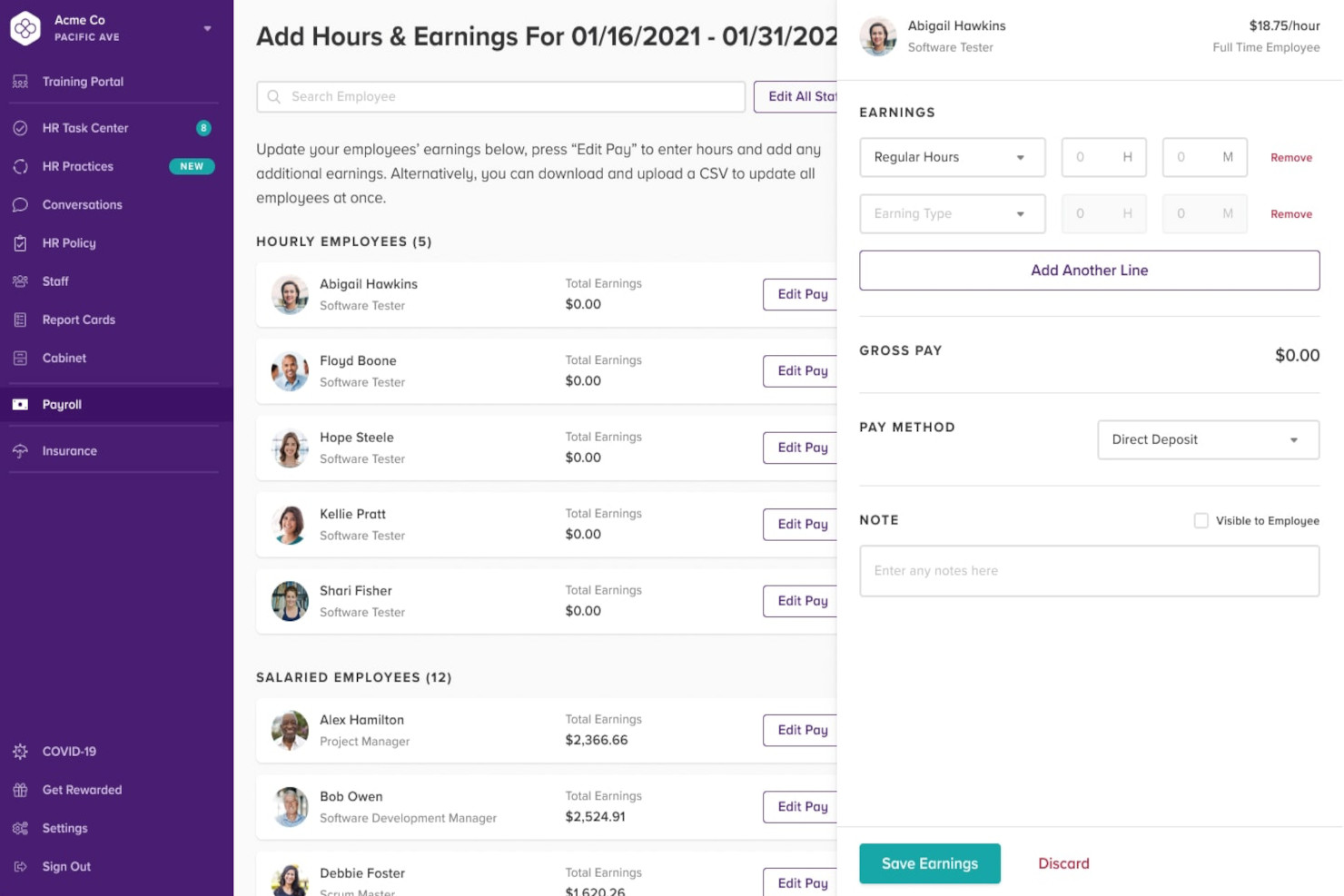
Bambee gives small and midsize businesses direct access to HR expertise and tools for managing compliance, employee relations, and HR policies without the need for an in-house HR department.
Who Is Bambee Best For?
Bambee is a strong fit for small businesses with fewer than 500 employees that don't have a dedicated HR team on staff.
Why I Picked Bambee
Bambee earns a spot on my shortlist because it pairs HR software with a dedicated HR manager—a feature most HRMS platforms lack. I selected it for that dedicated HR guidance model, where an assigned HR manager helps build compliant HR policies, handle employee-relations issues, and monitor federal and state labor law changes. The HR Autopilot feature automates policy acknowledgments and keeps a documented trail of employee sign-offs. For small businesses without in-house HR expertise, that combination of human support and automated compliance tracking is difficult to replicate with software alone.
Bambee Key Features
- HR audits: Bambee runs annual HR audits to identify compliance gaps and generates an action plan to bring your practices up to date with federal and state regulations.
- Employee Voices: A built-in channel where employees can share concerns, flag issues, or express feedback directly with your HR manager, anonymously or publicly.
- Smart Cabinet: A document storage system that organizes staff files and meets EEOC retention requirements, so you always know where signed documents are.
- Mandatory training and certifications: Bambee delivers in-app training on topics like sexual harassment and workplace safety, and tracks completion progress across your team.
Bambee Integrations
Native integrations are not currently listed.
Pros and Cons
Pros:
- Great mobile experience
- Easy to setup
- Personalized support
Cons:
- Limited functionality for larger teams
- No in-built payroll

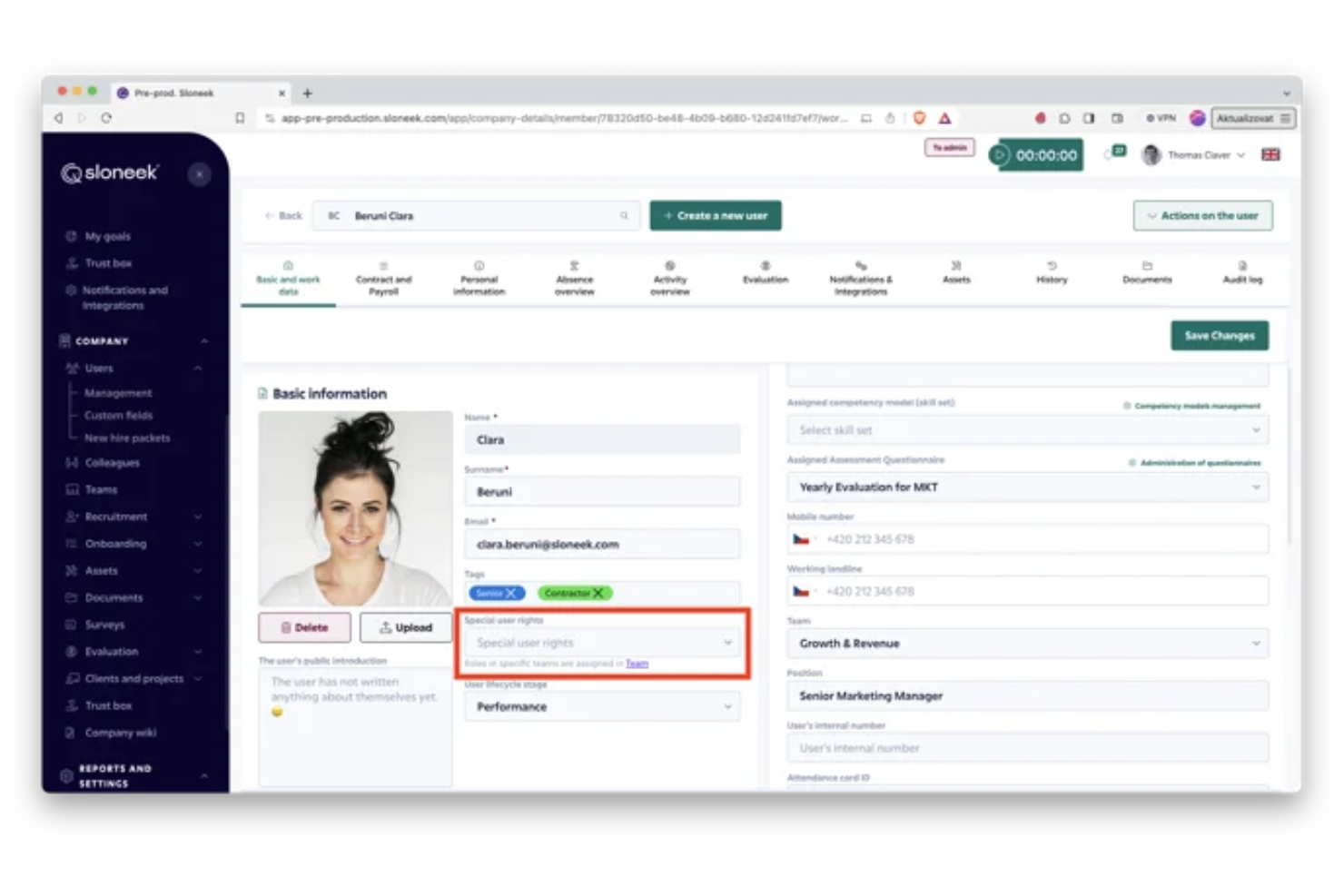
Sloneek is an HRMS platform designed for small and midsize businesses that want to centralize employee records, manage leave, automate onboarding, and handle HR documentation in one place.
Who Is Sloneek Best For?
Sloneek is a good fit for HR teams at small and midsize companies that need a straightforward, all-in-one system to manage people operations without enterprise-level complexity.
Why I Picked Sloneek
Sloneek earns its spot on my shortlist because of how well it handles time tracking and attendance as part of a broader HR workflow. I like that employees can clock in and out directly through the platform, and managers get a real-time view of who's working, who's absent, and how hours are accumulating across the team. The attendance data feeds directly into leave management, so when someone logs time off, it's reflected immediately without manual reconciliation. I also find the timesheet reporting genuinely useful for spotting patterns in absences or overtime before they become bigger issues.
Sloneek Key Features
- Digital onboarding checklists: Build and assign onboarding task lists from ready-made templates, so every new hire goes through the same structured process without anything slipping through the cracks.
- Employee document storage and e-signing: Store contracts, amendments, and HR documents in a central cloud repository, with built-in electronic signature support so nothing needs to be printed or emailed separately.
- People analytics dashboard: Access pre-built charts covering headcount, turnover, absenteeism, and skills distribution, all pulled from live HR data without needing to export anything to a spreadsheet.
- Skills tracking and gap analysis: Map individual skill levels against team averages and identify the least-covered skills across the organization to support workforce planning decisions.
Sloneek Integrations
Integrations include Google Workspace, Microsoft 365, Slack, Asana, Trello, MS Teams, Okta, Personio, Zapier, and an open API for custom integrations.
Pros and Cons
Pros:
- AI-driven employee engagement tools
- Strong focus on performance reviews
- Wide coverage of HR tasks
Cons:
- Limited payroll support in some regions
- May overwhelm small businesses


Gusto is an all-in-one HR platform designed for small and midsize businesses that need to manage payroll, benefits, onboarding, and compliance from a single, easy-to-use system.
Who Is Gusto Best For?
Gusto is a great fit for small and midsize business owners and HR teams who want to handle payroll, benefits, and people management without juggling multiple tools.
Why I Picked Gusto
Gusto earns its spot on my shortlist because of how tightly it connects payroll and benefits into a single workflow. I like that when a new hire completes onboarding, they can enroll in health, dental, and vision benefits directly in the same platform—no separate benefits portal needed. Gusto also handles automated tax filings across federal, state, and local levels, which means my team isn't manually tracking compliance deadlines. The contractor and employee payment tools work side by side, so mixed-workforce payroll runs don't require switching between systems.
Gusto Key Features
- Employee onboarding: New hires can complete offer letters, tax forms, and direct deposit setup digitally before their first day.
- Time tracking: Employees log hours directly in Gusto, which syncs automatically to payroll at the end of each pay period.
- PTO management: Teams can set custom time-off policies, and employees can submit and track requests from their self-service dashboard.
- HR reporting: Generate headcount, compensation, and workforce reports using built-in templates without exporting data to a separate tool.
Gusto Integrations
Integrations include QuickBooks, Xero, FreshBooks, 15Five, 7Shifts, Asana, Bench, Box, Betterment at Work, and ApplicantPro.
Pros and Cons
Pros:
- Employee self-service portal empowers staff to access pay and forms.
- Automatic tax filings and direct deposit simplify payroll compliance.
- Payroll, benefits, and HR in one unified platform.
Cons:
- SMBs that need advanced compliance or niche industry-specific HR modules may find Gusto limiting.
- Per-person pricing can get expensive as team grows.
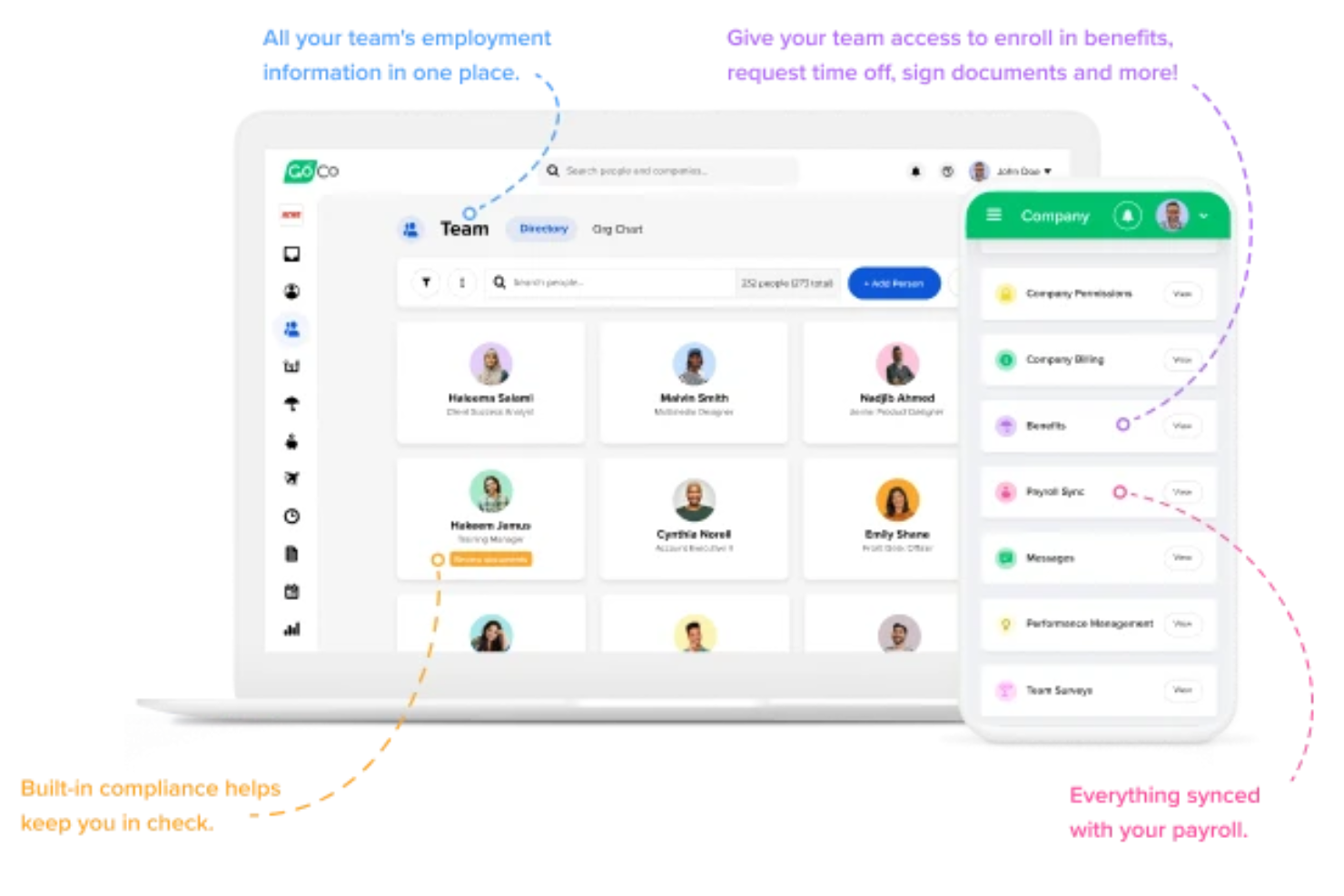
GoCo is an HRMS platform built for HR teams and small to midsize businesses that want to centralize onboarding, benefits, time tracking, and compliance while adapting HR processes to their unique needs.
Who Is GoCo Best For?
GoCo is a strong fit for small to midsize businesses that need a flexible HRMS they can configure around their existing processes rather than rebuilding processes around the software.
Why I Picked GoCo
GoCo earns its spot on my shortlist because of how much control it gives HR teams over workflow design. I particularly like the Magic Workflows feature, which lets you build custom, automated workflows for things like onboarding, offboarding, and policy acknowledgments without needing IT support. In practice, that means my team can trigger multi-step processes based on employee actions or dates, assign tasks to specific people, and track completion in real time. I also like that GoCo lets you layer these workflows on top of benefits and document management, so everything stays connected.
GoCo Key Features
- Benefits administration: Manage employee benefits enrollment, changes, and carrier connections directly within the platform.
- Time and attendance tracking: Log hours, manage schedules, and track paid time off with built-in time tracking tools.
- Document management: Store, send, and collect e-signatures on HR documents like offer letters and policies.
- Employee self-service portal: Employees can update personal information, access pay stubs, and complete HR tasks independently.
GoCo Integrations
Integrations include QuickBooks, TurboTax, Credit Karma, Mailchimp, Gusto, and TriNet.
Pros and Cons
Pros:
- Helps in digitizing and automating HR processes
- Offers a wide range of HR functionalities
- User-friendly interface
Cons:
- May not be ideal for larger businesses
- Platform lacks advanced customization options
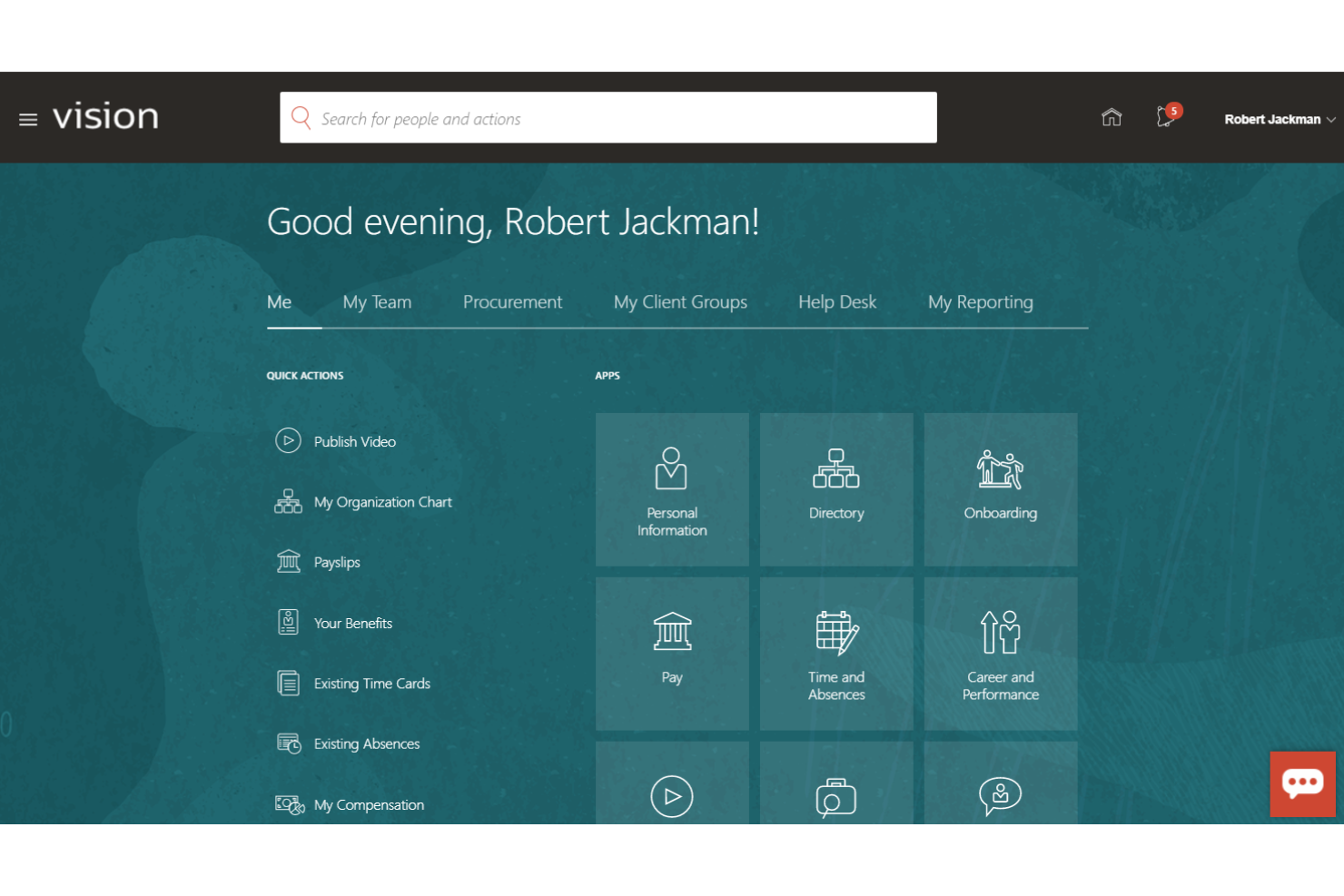
Oracle HCM Cloud is a unified HRMS platform built for large organizations that need to manage global HR, payroll, talent, and workforce processes in one place, helping HR teams handle complex requirements and scale with business growth.
Who Is Oracle HCM Cloud Best For?
Oracle HCM Cloud is a strong fit for large enterprises and multinational organizations with complex HR structures, global workforces, and high compliance demands.
Why I Picked Oracle HCM Cloud
Oracle HCM Cloud earns its spot on my shortlist because of how deeply its analytics capabilities are built into the platform itself—not bolted on as an afterthought. I particularly like the HCM Analytics module, which comes with prebuilt KPIs and dashboards that my team can use right away, without needing a data team to configure everything from scratch. It lets me layer geographic and line-of-business overlays, so when I look at turnover or headcount data I can slice it by region or business unit to reflect how a large enterprise is structured. The prebuilt data model and pipeline also mean I'm not waiting weeks to get meaningful workforce insights up and running.
Oracle HCM Cloud Key Features
- Global payroll processing: Run payroll across multiple countries from a single, unified system that connects directly to HR and workforce data.
- Talent management suite: Manage recruiting, onboarding, performance reviews, career development, and succession planning in one place.
- Absence and time management: Track employee time, labor, and leave with tools that link directly to payroll and compliance reporting.
- Oracle ME employee experience platform: Deliver personalized communications, career guidance, and HR support to employees through a single interface.
Oracle HCM Cloud Integrations
Integrations include Oracle Cloud ERP, Oracle Cloud SCM, Oracle Cloud CX, Oracle Payroll Interface, Oracle Payroll Connect, Oracle ME, Oracle HR HelpDesk, Oracle Learning, Oracle Recruiting, and Oracle Performance Management.
Pros and Cons
Pros:
- Analytics and dashboards for better decisions
- Global compliance across over 200 regions
- Talent lifecycle support from hiring to succession
Cons:
- Change management may be resource-heavy
- Complex to set up and configure
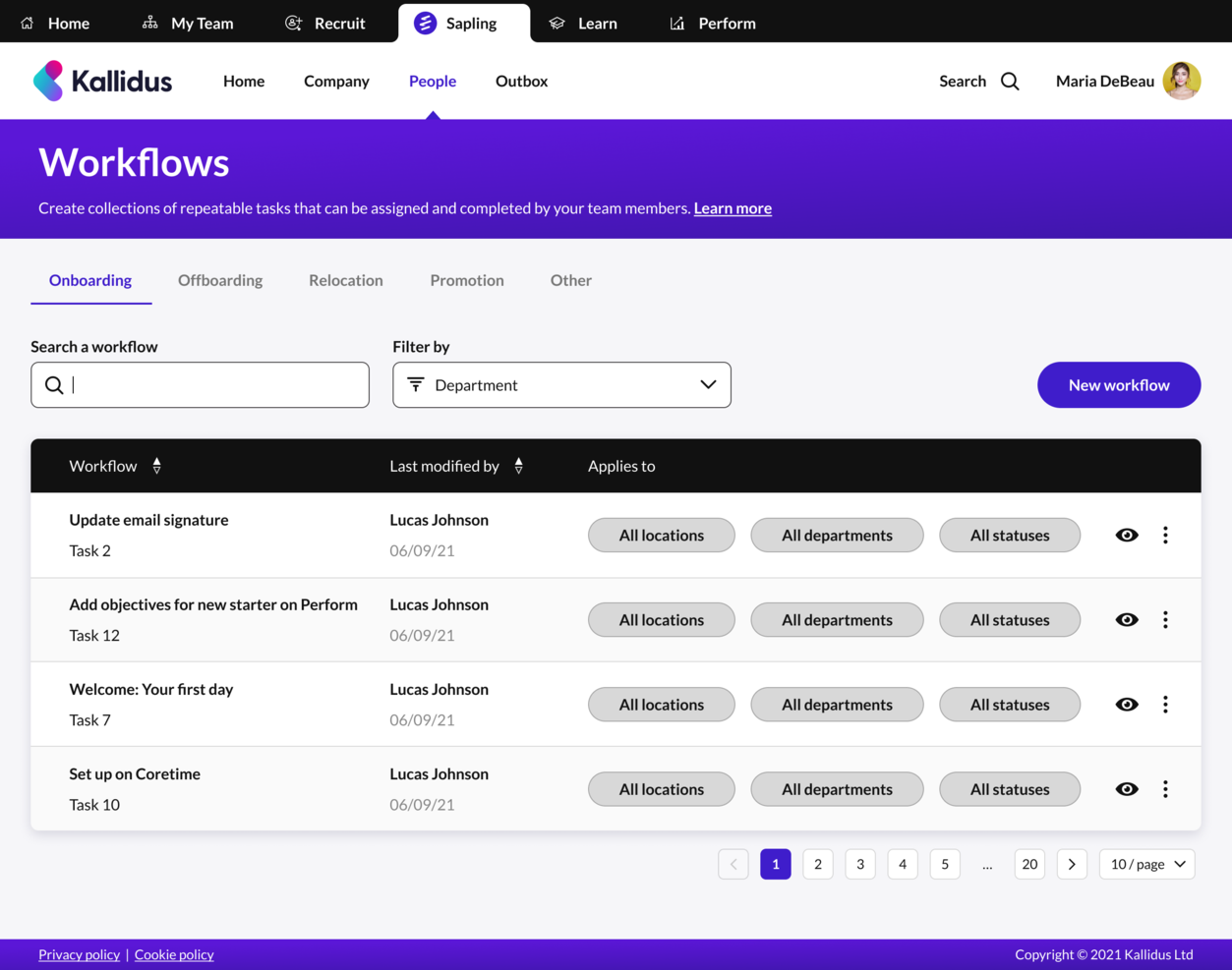
Kallidus Sapling is an HRMS platform designed for HR teams and growing businesses that want to centralize employee data, automate onboarding, and manage the entire employee lifecycle with customizable workflows.
Who Is Kallidus Sapling Best For?
Kallidus Sapling is a good fit for mid-sized companies that need a structured, scalable way to manage HR processes across the full employee lifecycle.
Why I Picked Kallidus Sapling
Kallidus Sapling earns its spot as one of the best on my shortlist because of how well it handles repeatable HR workflows across the full employee lifecycle. I particularly like the Smart Onboarding feature, which automatically recommends the right profile templates, workflows, documents, and scheduled emails based on a new hire's role and location—so my team isn't rebuilding the same process from scratch every time. The multi-workflow assignment in the "Assign activities" step also means I can stack and customize workflows for individual hires without losing the consistency of a templated process. For teams hiring at volume, the bulk onboarding option takes that same repeatable logic and applies it across multiple new hires at once.
Kallidus Sapling Key Features
- Preboarding portal: A dedicated new hire portal where employees can review company information, meet their team, complete their profile, and digitally sign HR documents before their start date.
- People directory and org chart: A searchable employee directory with filtering by team, location, and department, plus a visual org chart that maps reporting relationships across the organization.
- Time off management: A built-in time off tool that lets employees request future leave, log retroactive absences, predict future balances, and view their full request history.
- Employee profile management: A centralized record for each employee that captures personal details, role history, and key HR data across the full lifecycle.
Kallidus Sapling Integrations
Integrations include ADP, BambooHR, Workday, Greenhouse, Lever, Okta, Google Workspace, Microsoft Azure Active Directory, Slack, and Docusign.
Pros and Cons
Pros:
- Centralized location for people data
- Integrates with popular tools
- Fully customizable, automated workflows
Cons:
- Pricing details only available upon request
- No freemium version

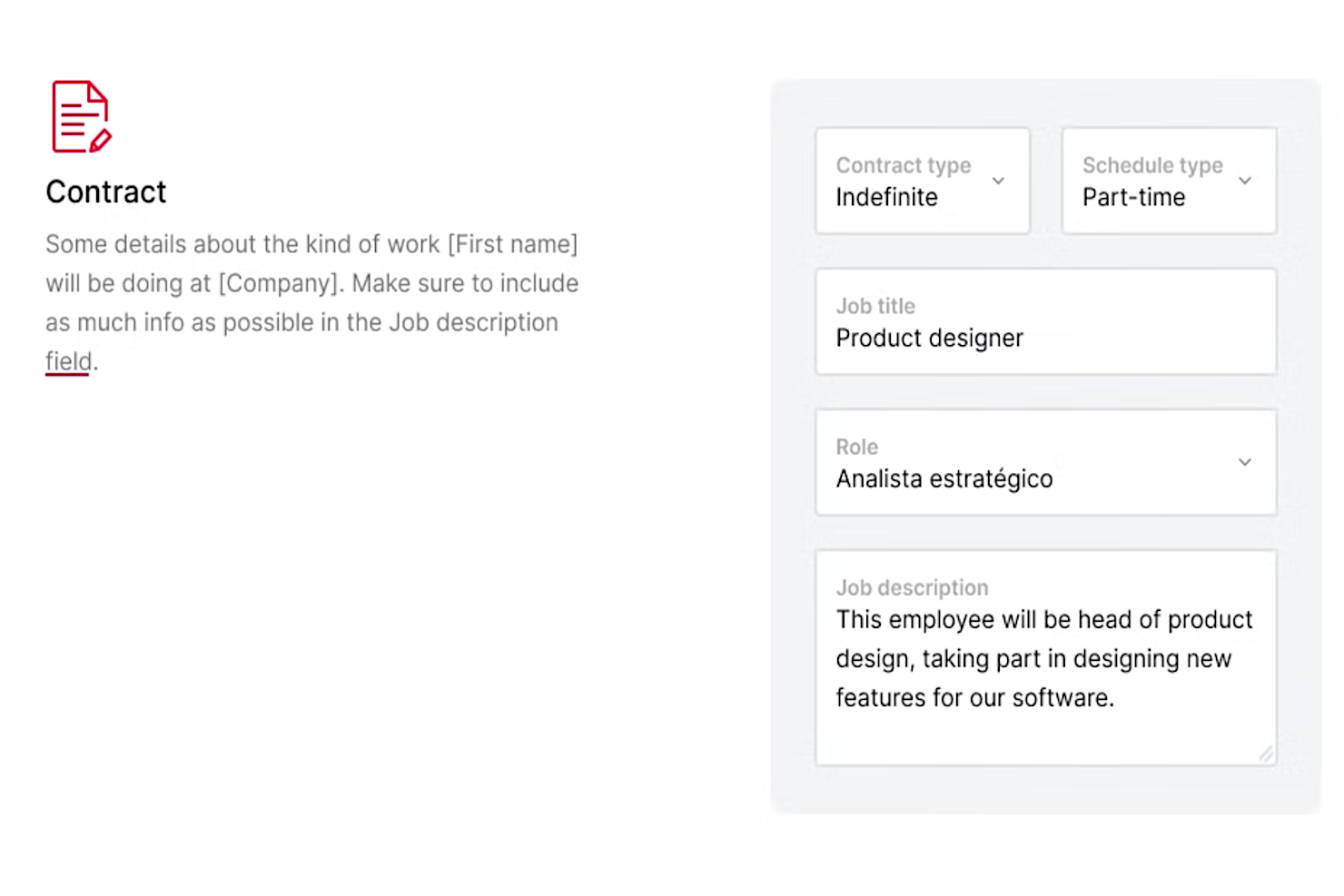
HR teams that need to automate and control document workflows often turn to Factorial. The platform is built for organizations that want to centralize employee files, manage permissions, and reduce manual paperwork. Factorial is especially useful for businesses with strict compliance needs or distributed teams handling sensitive HR documents.
Who is Factorial Best For?
Factorial is suited for HR teams in small to mid-sized businesses automating document management and core HR tasks. It supports organizations standardizing employee records and workflows.
Why I Picked Factorial
Factorial stands out for HR teams that need to automate document management and reduce manual admin work. I picked Factorial because it offers secure digital storage, automated document expiration alerts, and digital signature workflows—all in one platform. These features help HR professionals keep employee files organized, ensure compliance, and eliminate the hassle of chasing paperwork. For organizations with strict document control needs, Factorial’s automation tools are especially valuable.
Factorial Key Features
In addition to its document automation tools, Factorial offers several other features for HR teams:
- Time Tracking: Tracks employee work hours and attendance with digital timesheets.
- Shift Planning: Allows managers to create, assign, and adjust employee shifts.
- Performance Management: Includes tools for setting goals and conducting performance reviews.
- Expense Management: Lets employees submit expenses and managers approve or reject them within the platform.
Factorial Integrations
Integrations include DATEV LODAS, Sage 200, Payflow, and Slack.
Pros and Cons
Pros:
- Integrated organizational chart automatically updates based on system data
- Includes an automated payroll function
- Ability to personalize onboarding and offboarding workflows
Cons:
- Could use more integrations for advanced analytics
- Pricing structure for different plans vs modules is a bit complex
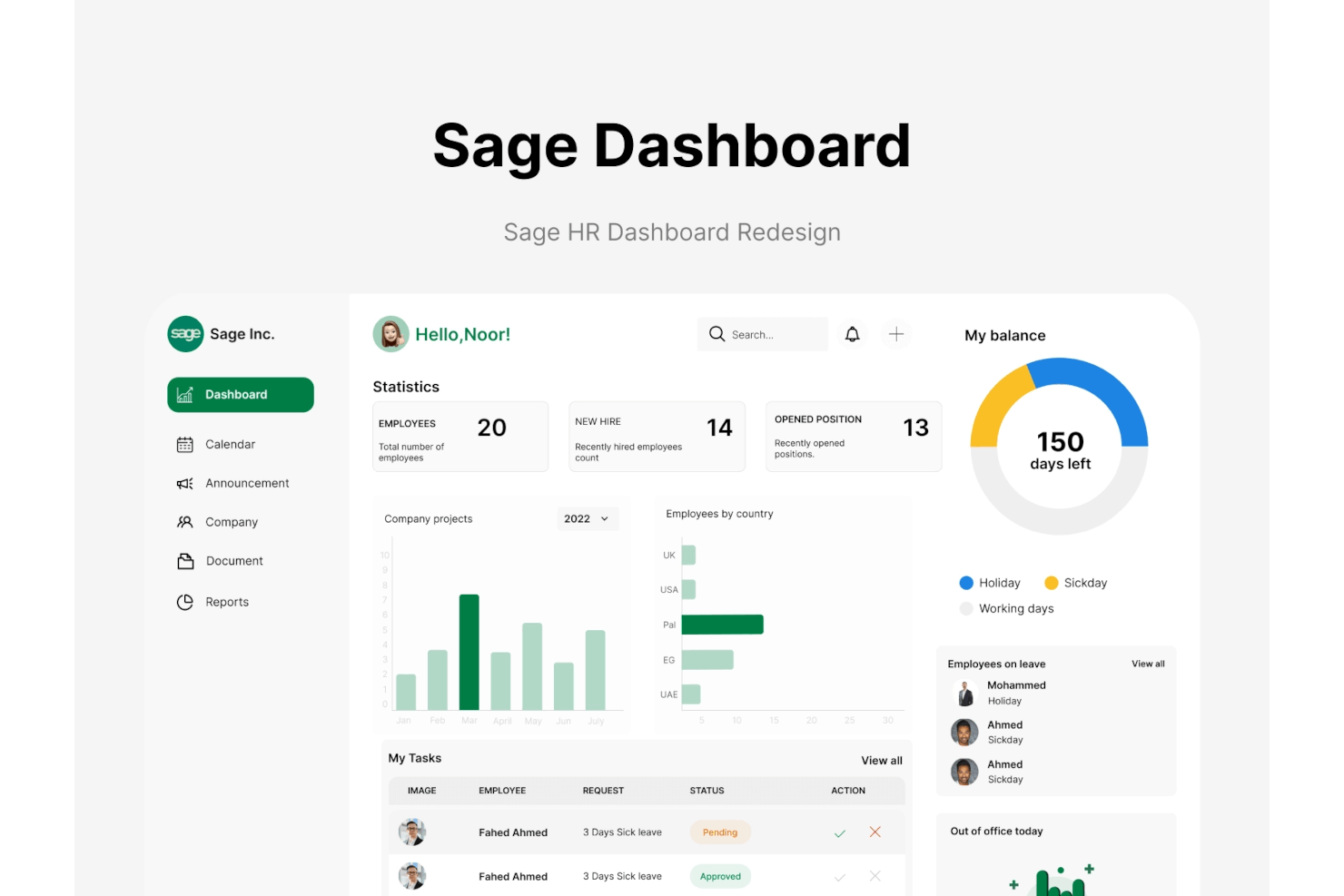
If your team manages complex or changing shift patterns, Sage HR offers a flexible approach to scheduling that adapts to your needs. This HRMS platform is designed for businesses that require dynamic workforce planning, such as retail, hospitality, or healthcare. With Sage HR, you can handle shift swaps, time-off requests, and attendance tracking in one place, helping you keep staffing organized and responsive.
Who is Sage HR Best For?
Sage HR is designed for HR managers in small to mid-sized businesses requiring flexible shift scheduling. It supports organizations managing varied work patterns and attendance needs.
Why I Picked Sage HR
What stands out about Sage HR is its focus on shift scheduling flexibility, which is a real need for businesses with variable staffing demands. I picked Sage HR for this list because its shift management tools let you create, edit, and assign shifts quickly, while also supporting shift swaps and approvals directly in the platform. The built-in time-off management and attendance tracking features work together with scheduling, so you can avoid conflicts and ensure coverage. For HR teams in industries like retail or hospitality, these features make Sage HR a practical choice for managing dynamic workforces.
Sage HR Key Features
In addition to its shift scheduling tools, Sage HR offers several other features that support HR teams:
- Employee Self-Service Portal: Employees can access their profiles, update personal information, and view their schedules from a centralized dashboard.
- Performance Management: Set objectives, track progress, and conduct performance reviews within the platform.
- Document Management: Store, organize, and share HR documents securely with permission controls.
- Mobile App: Manage HR tasks, schedules, and notifications from anywhere using the Sage HR mobile app.
Sage HR Integrations
Native integrations are not currently listed by Sage HR.
Pros and Cons
Pros:
- Robust reporting and analytics capabilities
- Automated HR processes
Cons:
- Limited mobile access

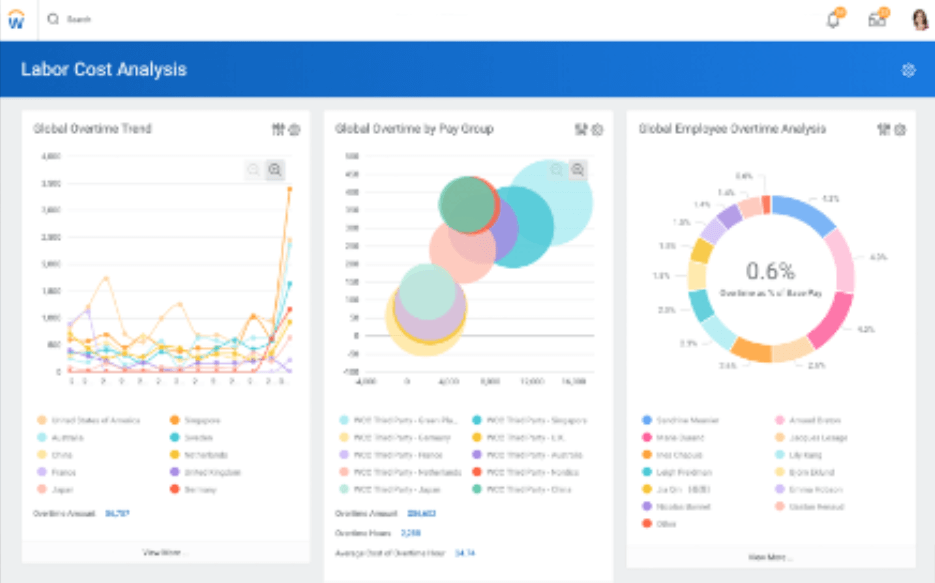
If you need a single system that connects HR, finance, and planning data, Workday is built for that purpose. It’s a strong fit for large organizations or those with complex structures that want to break down silos between people and business operations. Workday helps HR teams see the impact of workforce decisions on financial outcomes in real time.
Who is Workday Best For?
Workday is appropriate for HR, finance, and IT executives in large enterprises. It aligns with organizations unifying workforce and financial data within a single system.
Why I Picked Workday
Workday stands out for organizations that want to connect HR and finance data in one place. I picked Workday because it lets HR teams access real-time analytics that blend payroll, workforce planning, and financial performance, which is especially useful for companies with complex structures. Its unified data model means you can track the impact of people decisions on business outcomes without switching systems. For HR leaders who need to align talent strategy with financial goals, Workday’s integrated approach is a clear advantage.
Workday Key Features
In addition to unified finance and workforce data, Workday offers several other features for HR teams:
- Recruiting and Onboarding: Manage job postings, candidate pipelines, and onboarding tasks in one platform.
- Learning Management: Deliver, track, and manage employee training and development programs.
- Absence Management: Automate leave requests, approvals, and accruals with configurable rules.
- Mobile Access: Allow employees and managers to complete HR tasks and approvals from any device.
Workday Integrations
Integrations include ADP, Accu-Time Systems, Achievers, Adobe, Amazon Business, and Korn Ferry.
Pros and Cons
Pros:
- Benefits and employee transactional data in the same system
- Flexible organizational structures and modeling
- Intelligent process automation from attract-to-pay
Cons:
- Pre-screening questionnaires are not customizable per job posting
- Complex goals and self-appraisal process
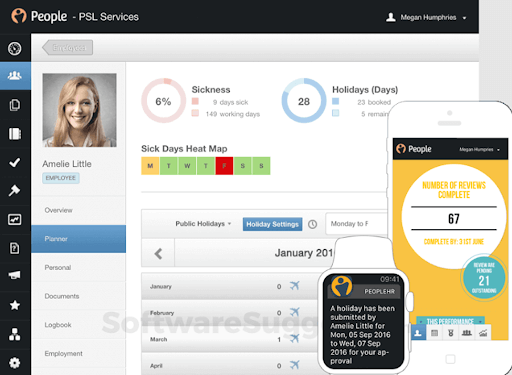
People HR is designed for organizations that want to get up and running with a new HRMS quickly. The platform appeals to small and midsize businesses looking for fast onboarding, straightforward setup, and essential HR features without a long implementation process. People HR helps HR teams centralize employee data, automate core HR tasks, and manage time off with minimal disruption.
Who is People HR Best For?
People HR is suited for HR teams in small to mid-sized UK-based organizations. It supports companies seeking rapid implementation of core HR systems.
Why I Picked People HR
For teams that need to move quickly, People HR stands out for its rapid implementation and straightforward onboarding process. I picked People HR because it offers pre-built templates for core HR processes and a guided setup that helps HR teams get started without technical delays. The platform’s employee self-service portal and automated time-off management also support a fast transition from manual to digital HR. If you’re looking to centralize HR functions with minimal downtime, People HR is built to get you there fast.
People HR Key Features
I also found several features in People HR that help HR teams manage daily operations:
- Applicant Tracking System: Manage job postings, candidate applications, and interview scheduling in one place.
- Performance Management: Set objectives, conduct reviews, and track employee progress through built-in tools.
- HR Analytics Dashboard: Access visual reports and analytics on workforce trends and HR activities.
- Document Management: Store, organize, and share HR documents securely within the platform.
People HR Integrations
Integrations include ADP, Sage Payroll, Slack, Google Docs, Greenhouse, and Power BI.
Pros and Cons
Pros:
- Supports onboarding and offboarding
- Customizable user roles
- Has an applicant tracking system
Cons:
- ATS doesn’t integrate with external job boards
- Mobile app can be laggy

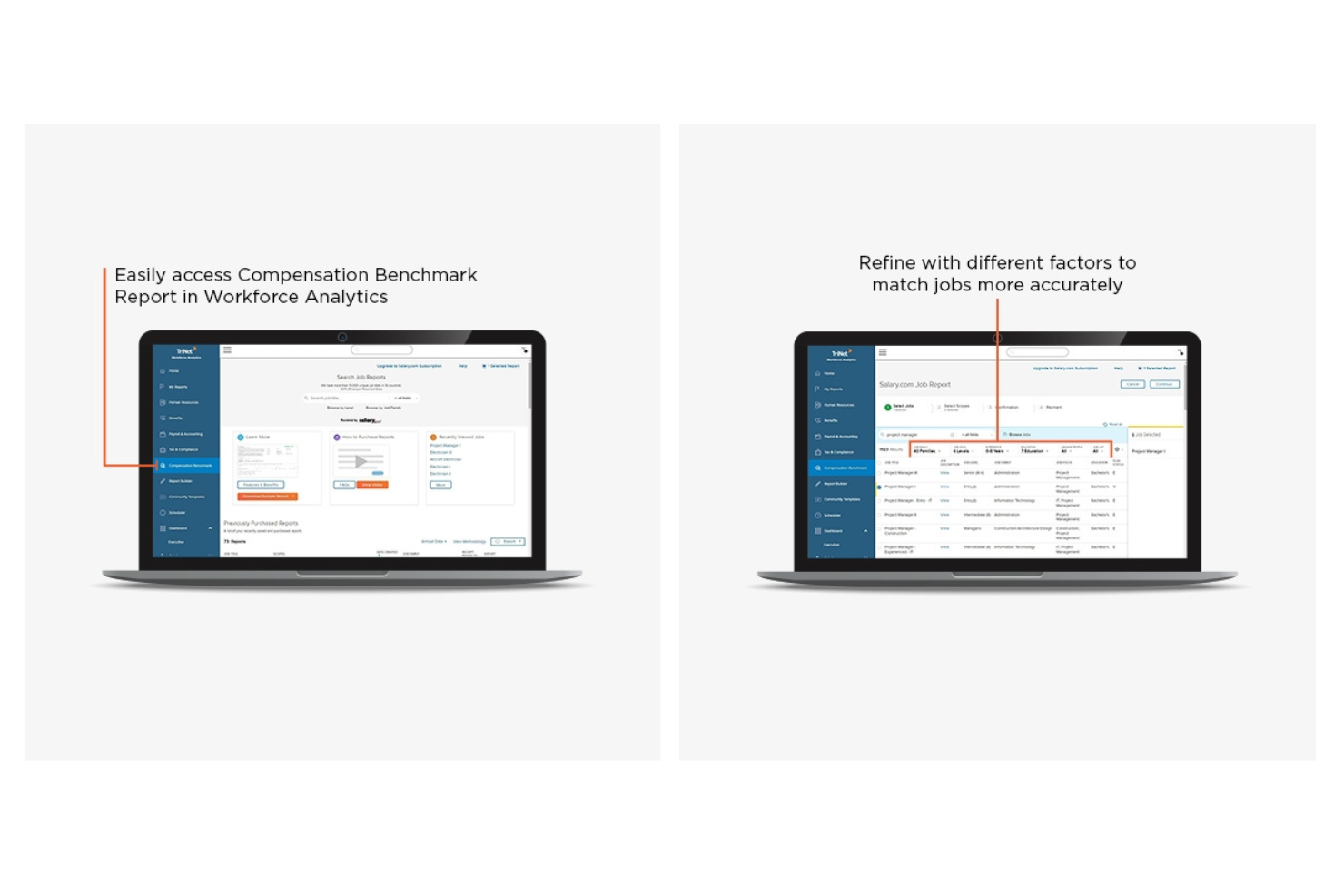
If your business needs HR, payroll, and compliance support bundled together, Trinet is worth a close look. This platform is designed for organizations that want the advantages of a professional employer organization (PEO) model, especially those navigating complex employment regulations. Trinet helps HR teams manage risk, benefits, and workforce administration with a focus on compliance across multiple states.
Who is Trinet Best For?
Trinet serves business owners and HR leaders in small to mid-sized companies seeking PEO services. It supports organizations outsourcing HR administration and compliance responsibilities.
Why I Picked Trinet
I picked Trinet because it stands out for businesses that need strong PEO and compliance support built into their HRMS. Trinet’s platform handles payroll, benefits administration, and risk management while keeping up with changing employment laws across states. I appreciate how it centralizes compliance documentation and offers expert guidance for HR teams facing regulatory complexity. For organizations that want to reduce compliance risk and offload employer responsibilities, Trinet’s PEO model is a practical fit.
Trinet Key Features
Some other features in Trinet that HR teams may find useful include:
- Employee Onboarding Portal: New hires can complete forms, enroll in benefits, and access company policies online.
- Time and Attendance Tracking: Track employee hours, manage schedules, and monitor overtime within the platform.
- Performance Management Tools: Set goals, conduct reviews, and document feedback for employees in one place.
- HR Document Storage: Securely store and organize employee records, handbooks, and compliance documents digitally.
Trinet Integrations
Integrations include QuickBooks, Xero, NetSuite, Expensify, Slack, Microsoft Teams, ADP, Greenhouse, Lever, and BambooHR.
Pros and Cons
Pros:
- Global payroll management for multi-national businesses
- Company provides HR consulting as well as software
- Centralizes all of your HR processes in one platform
Cons:
- Full functionality may not be needed
- Robust system, comes with a learning curve
Other HRMS Systems
Here are a few more options that didn't make the best HRMS list. If you need additional suggestions for human resource software, check these out:
- SAP SuccessFactors
For multinational workforce management
- Arcoro
For construction industry compliance
- HR Cloud
For employee engagement tools
- Keka HR
For payroll in India
- Insperity
For scalable HR outsourcing
- Dayforce HCM
For real-time payroll processing
- Collage HR
For Canadian businesses
- Built For Teams
For organizational charting
- Transformify
For remote workforce management
- PeopleGuru
For mid-market organizations
- VAIRKKO
For training and certification tracking
- Rippling
For unified app and device management
- monday.com
For workflow automation flexibility
- Justworks
For benefits administration
- Connecteam
For deskless workforce operations
- ADP Workforce Now
For large business scalability
- UKG
For workforce forecasting
- TriNet HR Plus
HRMS system for employee turnover prevention
- Zoho People
HR management system with a freemium version
- Namely
For mid-sized company personalization


Related HR Software Reviews
If you still haven't found what you're looking for here, check out these other related tools that we've tested and evaluated:
- HR Software
- Payroll Software
- Recruiting Software
- Employer of Record Services
- Workforce Management Software
- HR Services
Selection Criteria for Human Resources Management Systems
Selecting the right HRMS requires a thorough understanding of how this software can alleviate common pain points within HR administration. My approach to choosing the best HRMS for this list is based on my personal experience and extensive research into how these software systems address the needs, pain points, and goals of HR professionals in real, day-to-day scenarios.
My Expertise and Experience
To develop this list, I drew on my years of personal experience as an HR administrator and HR software power user to add more expertise to my assessment. When I started in that role, we had no HRMS in place, but we implemented one within my first year.
As a key member of our implementation team, I spent a lot of time entering data from paper-based forms into our HRMS to keep our employee records up-to-date. That's why I know how important a well-chosen HRMS is, and how much time it can save you when you set it up correctly.
My Methodology
To build this top 10 list, I started by reviewing the most up-to-date market data on HRMS systems. I then evaluated and compared a wide range of human resources management systems with positive user ratings, including some HRIS and HCM platforms.
After determining my long list of top choices, I further honed my list by using the selection criteria below to see how each HR system compared to the rest.
Here's a summary of the main features I evaluated to create this list:
Core HRMS Functionalities (25% of score): For an HRMS system to land a spot in this list, it needed to offer the following core HR functionalities at a bare minimum:
- The ability to store employee data electronically, with updates linked across all integrated modules
- Employee self-service and/or manager self-service functions to cut down on the amount of questions your HR staff have to deal with
- The ability to track employee working hours and/or attendance management within the system (with bonus points awarded for systems that automatically sync time-tracking data with their payroll module)
- Tools to facilitate performance reviews and create continuous feedback loops
- Features that cover all key phases of the employee lifecycle, from recruiting and hiring to onboarding, employee development, and offboarding
- Integrated compliance monitoring features to monitor regulatory requirements
- Automations to streamline common yet time-consuming administrative processes and improve the system's ease of use
We’re finding that automation is key… Whether it’s automating referral bonuses or tracking time off, HR teams are looking for platforms that reduce manual work.
Additional Standout Features (25% of total score): To help me narrow in on the best HRMS out of the numerous options available, I also took note of any unique features, including:
- Advanced analytics and reporting tools that provide deeper insights into workforce management
- Innovative learning and development platforms that support personalized employee growth paths
- Comprehensive mobile apps that offer full HRMS functionality for on-the-go access via Android and iOS mobile devices
- Enhanced self-service portals that include AI-driven chatbots for immediate employee assistance
- Robust integration capabilities with other business systems for seamless data flow
- Unique customization options, including data dashboards, custom workflows, and company branding abilities
Usability (10% of total score): To evaluate the usability of each HRMS, I considered the following:
- An intuitive design and user interface that are straightforward to master and create a positive user experience
- Clear and concise on-screen instructions and tips to improve ease of use and create a positive user experience
- A user-friendly mobile experience or dedicated mobile apps for Android and iOS mobile devices to support remote and on-the-go HR management
- Role-based access controls that are straightforward to configure
Onboarding (10% of total score): To get a sense of each software provider's customer onboarding process, I considered the following factors:
- A streamlined setup process and clear configuration guidelines for new users
- The availability of training materials such as videos or interactive tutorials
- The availability of live support or chatbots for real-time assistance during setup
- Customizable templates to speed up the onboarding process
- Support for migrating historical employee data into the new HR platform
Customer Support (10% of total score): To evaluate the level of customer support each vendor offered, I considered the following:
- The availability of multiple support channels, including email, phone, and chat
- Whether a dedicated account manager is provided for personalized support
- The existence of a self-service knowledge base, an FAQ repository, or other self-help resources to speed up troubleshooting
- The overall quality, responsiveness, and helpfulness of the support team during customer onboarding and post-purchase, as inferred from customer reviews
Value for Price (10% of total score): To gauge the value of each software, I considered the following factors:
- The availability of free trials or demos to test the software before purchasing
- Competitive and transparent pricing models that reflect the software's feature depth and explain which features are included at each level
- Tiered pricing plans that cater to different business sizes, from small to medium-sized businesses (SMBs) up to enterprise-level organizations
- A clearly demonstrated positive ROI through efficiency gains and cost savings
Customer Reviews (10% of total score): Evaluating customer reviews is the final element of my selection process, which helps me understand how well a product performs in the hands of real users. Here are the factors I considered:
- Whether a product has consistently high ratings across multiple review platforms, indicating a broad level of user satisfaction
- Specific praises, criticisms, or trends in customer feedback that indicate the software's strengths or areas for improvement
- Whether customer feedback specifically mentions issues with ease of use, customer support responsiveness, or lacking features
- Any testimonials that highlight significant improvements in HR processes or employee management capabilities
By using this assessment framework, I was able to identify the HRMS that goes beyond basic requirements to offer additional value through unique features, intuitive usability, smooth onboarding, effective support, and overall value for price.

How to Choose an HRMS
An HRMS can help you streamline all your core HR functions into one system, for maximum efficiency. To help you figure out which HRMS best fits your needs, you need to pinpoint your key users and document their specific challenges first.
As you work through your own unique software selection process, keep the following points in mind:
- What HR challenges are you trying to solve? Identifying your challenges can help you clarify the right type of HR management system for your needs. These challenges may include:
- lots of repetitive HR tasks that require manual data entry in multiple places,
- fragmented HR processes that are siloed in multiple internal HR systems,
- no employee self-service abilities, creating large administrative burdens on your HR staff for simple requests, or
- software limitations that make it hard to support remote and global teams.
- What outcomes are important and how will you measure success? Being clear on your desired outcomes upfront is crucial to avoid wasting valuable time. Key outcomes for implementing your new human resource system may include:
- improved efficiency and productivity following full digitization of your employee data and new workforce automation processes to automate tasks,
- eliminated data silos thanks to a more comprehensive HRMS with interconnected modules and integrations with other crucial HR platforms,
- an improved HR and employee experience thanks to added self-service capabilities for straightforward HR requests,
- enhanced software features to support diverse team structures, including better communication tools and more advanced payroll functions, such as global payroll features.
- Who are your main users? Consider who will use the software and how many licenses you'll need. For an HRMS, you'll need employee-level access for your entire workforce, plus special access for your HR administrators and managers.
- Next, you should rank the needs of your different user groups (i.e., your power users, managers, and employees) to ensure they're all met.
- Do you require specific software integrations? Clarify whether your new HRMS software will replace existing tools, or need to integrate with them.
- Key integrations to note include single sign-on applications or work operating systems like Microsoft 365 or Google Workspace.
- Does the new software satisfy your technical requirements? Consider the software selection alongside your existing workflows and systems.
- Is the new HRMS system cloud-based or on-premise?
- Does the new HRMS system offer the security features you want (e.g., two-factor authentication (2FA), biometric IDs, etc.)?
- Does the HRMS software offer a complimentary employee app for connecting via mobile devices?
Remember, every business is different — don’t assume that an HRMS will work for your organization just because it's popular.
HR has access to enough personal information to duplicate an employee three times over… It’s a lot of trust, and companies need to take data security seriously. You can’t sacrifice security for efficiency.
How to Implement an HRMS
Once you've chosen the winning HRMS system for your needs, you'll need to develop an implementation plan to integrate the software into your organization's existing processes and train your employees on how to use it.
It's also crucial to form an implementation team that represents all your key stakeholders and user groups for your new HRMS software, to ensure all their needs are met.
During implementation, engage with other areas of the business, and don’t feel that you need to do it all on your own. Understand their needs early, involving them from the start to get them on board, and identify any ‘quick wins’ such as a useful report for your finance team or an informative, high-level dashboard for the CEO.
Key aspects to include in your implementation plan are:
- Establishing a clear strategy and timeline to guide the implementation process
- Engaging key stakeholders to ensure alignment and support
- Designing a communication plan and assigning responsibility for its execution
- Adopting a phased rollout to make the transition smoother and more manageable
- Setting up training sessions and support resources for internal teams
- Encouraging user adoption by addressing concerns and promoting the benefits of the new system
- Cleaning, preparing, and transferring your data into the new system
- Running test scenarios for critical processes, such as payroll simulations or mock performance evaluations
- Celebrating the go-live moment and remaining proactive in addressing questions, feedback, and ongoing system maintenance
For tips on this, our ultimate guide on HR software implementation is what you should read next. Plus, it also includes a handy HRMS implementation checklist!
You also don't want to over-complicate your implementation process, as that can lead to frustration.
Often, I observe people complaining about implementation while simultaneously complicating their processes by aiming for overly complex systems that may not be necessary. This approach often leads to frustration.
For more tips on how to make your HRMS implementation process a success, listen to our podcast with Andrew Swiler on How to Build and Implement an HR Tech Stack next.
Trends in HRMS Software for 2025
As of 2025, the latest trends affecting human resources management software are artificial intelligence (AI), machine learning (ML), and big data analytics.
- Artificial Intelligence and Machine Learning: Many technology analysts are predicting that AI and ML recruiting tools will help reduce workloads for HR staff by picking up the bulk of routine tasks, freeing up countless work hours for more important items.
- Employee-Facing Chatbots: Chatbots for employee self-service inquiries are increasingly sophisticated, handling complex queries about benefits, leave balances, and company policies, reflecting a push for efficiency and immediacy in employee support.
- Blockchain Technology: Another emerging trend is the integration of blockchain technology into HR software. Blockchain technology can be used to improve data security and verification, and in the near future, it may even be used to verify candidate data such as educational credentials and certifications - items that should be verified during a typical background check.
- Advanced Performance Management Features: The shift from annual reviews to more of an ongoing performance-focused dialogue is still carrying on with software developers focusing on tools to create continuous feedback loops, support goal-setting, and offer deeper analyses on performance-based metrics.
- Virtual Reality (VR) for Training and Onboarding: VR applications for immersive training experiences and virtual onboarding sessions are among the most unusual yet rapidly developing features, indicating a futuristic approach to employee development and engagement.
These trends indicate a clear move toward more integrated, intelligent, and employee-centric solutions.
If you'd like to learn more about using AI to your advantage, read our articles explaining how AI will impact human resources for a deeper look at how this technology is shaping the HR software space.
Or, press play on this podcast explaining how to use AI to empower your employees and transform your organization.
What is an HRMS System?
An HRMS (Human Resource Management System) is software that centralizes and automates core HR functions across the employee lifecycle.
It includes tools for managing employee data, payroll, benefits, hiring, onboarding, time tracking, performance reviews, and HR reporting. HR teams use HRMS software to save time, reduce errors, and improve the employee experience.
Features of HRMS
When selecting an HRMS, keep an eye out for the following key features:
- Employee data management: Handle all your employee records in one secure place. You can easily update personal information, track work history, and access important documents without shuffling through paperwork.
- Payroll processing: Automate salary calculations, tax deductions, and direct deposits so payday feels effortless for you and error-free for your team.
- Attendance and leave tracking: Monitor employee attendance, leave requests, and approvals. It gives you a real-time look into who’s in, who’s out, and keeps time-off confusion at bay.
- Performance management: Set goals, conduct evaluations, and collect feedback. This lets you nurture your team’s growth with clear metrics and personal development plans.
- Recruitment and onboarding: Streamline job postings, candidate tracking, and the onboarding journey. You can bring new team members up to speed quickly and make them feel at home from day one.
- Benefits administration: Manage employee benefits like health insurance and retirement plans without the usual headaches. Simplified enrollment and tracking save you time and help employees choose what’s best for them.
- Compliance management: Stay on the right side of labor laws and regulations by automating compliance tracking and reporting. This reduces risk and helps you avoid costly mistakes.
- Self-service portal: Give your employees direct access to their profiles, pay slips, and leave balances. It cuts down on repetitive HR requests, which gives you more time to focus elsewhere.
- Reporting and analytics: Generate custom reports and dig into workforce data to spot trends, track KPIs, and make faster, more informed decisions.
Common HRMS AI Features
Beyond the standard HRMS features listed above, many of these solutions are incorporating AI with features like:
- Automated resume screening: AI scans incoming resumes, matches them to job requirements, and serves you the best candidates. This helps you sift through hundreds of applications in minutes—not days.
- Predictive employee turnover analysis: AI monitors historical data and workplace trends to flag employees who might be at risk of leaving. That way, you can step in early and boost retention.
- Chatbots for employee queries: AI-powered virtual assistants handle routine HR questions around the clock—everything from vacation policies to how to update an address—so your team gets faster answers without waiting in line.
- Smart performance insights: AI evaluates performance data for patterns and suggests tailored development plans or training opportunities to help every team member perform at their best.
- Intelligent scheduling: AI factors in availability, workload, and past scheduling trends to automatically build shifts that work for everyone, minimizing conflicts and boosting productivity.

Benefits of an HRMS
An HRMS can increase the efficiency of your HR functions, ensuring all members of your HR department have access to the same employee information. By streamlining all your core HR processes into one system, HRMS can greatly impact the overall growth and success of your business.
Here are several primary benefits you can expect to gain by investing in the best HRMS for your unique business needs:
- Improved Data Management: An HRMS provides a single, secure database for all employee records, making it easier to manage, update, and retrieve information, which enhances decision-making and compliance with data protection regulations.
- Increased Efficiency: By automating routine tasks, HRMS significantly reduces the time and effort required for managing employee data, processing payroll, and other HR tasks, allowing staff to focus on more strategic activities.
- Cost Savings: By automating HR functions and improving resource allocation, HRMS can significantly lower administrative costs and reduce the need for manual intervention, leading to substantial financial savings over time.
- Comprehensive Reporting: With advanced analytics and reporting capabilities, HRMS helps organizations track key HR metrics, identify trends, and improve decision-making based on real-time data.
- Enhanced Communication: Through self-service portals and mobile access, HRMS enables employees to update their personal information, request time off, and access important documents, fostering a more transparent and communicative workplace culture.
As you can see, adopting an HRMS can transform the way you manage your human resources, offering a blend of operational efficiency, strategic insight, and cost-effectiveness to help you remain competitive in your industry.
Costs & Pricing for HRMS
Sometimes it all comes down to price, so keep your budget in mind when you're doing your research. Due to the modular nature of HRMS systems, many only offer pricing details upon request. But, the upside of that is that you can request a quote for only the modules you need, instead of a one-size-fits-all package that might not actually work for you.
HRMS systems come in with a variety of plan options for different business sizes, including startup or small business plans, with scalable options for mid-size and enterprise-level organizations. Your HR needs will likely grow and expand over time, so it's important to select an HRMS system that can easily scale over time.
Plan Comparison Table for HRMS
| Plan Type | Average Price | Average Base Fee Per Month | Common Features Included |
|---|---|---|---|
| Free | $0 | $0 | Basic employee tracking, limited reports, and access for a limited number of users |
| Basic | $2-8/user | $50-100 | Employee self-service, payroll integration, and time & attendance |
| Professional | $8-20/user | $100-500 | Performance management, benefits management, advanced reporting, and increased security |
| Premium | $20-40/user | $500-1,000 | Learning and development, succession planning, analytics and forecasting, and dedicated support |
| Enterprise | Custom | Custom | Custom integrations, full feature access, personalized support, and scalability options |
| HRMS + global payroll, EOR, or PEO services | $199 - $500 per employee, per month | Usually priced per employee | Software provider assumes some legal responsibilities, manages international payments & compliance monitoring, dedicated support + required Basic features or higher. |
Once you’re ready to sign up for your HR tool of choice, you can expect to sign up for a SaaS (software-as-a-service) contract, with the option of paying monthly or annually based on the number of employees you have.
To ensure the system works for you before you commit, opt for a system that allows a free trial so you can get a true feel for their software first.
While it's understandable that you may want to start with a basic plan initially, there are several reasons why you may want to opt for a more advanced plan, including:
- Growth in Employee Numbers and HR Users: Many basic plans limit the number of admin users and employee accounts you can have. However, higher-priced plans can accommodate larger volumes of users and offer better access controls.
- Enhanced Reporting & Analytics: Basic plans often offer limited reporting options and zero analytics. Advanced plans provide comprehensive reporting and analytics tools, enabling you to track performance, identify trends, and generate detailed insights for better decision-making.
- Improved Security Features: While protecting sensitive employee data is always critical, higher-priced plans tend to offer more advanced security features, such as encryption and multi-factor authentication, to safeguard your data.
- Integration with Other Systems: As your company grows, integrating HRMS with other business systems like accounting or ERP software becomes necessary. Advanced plans offer better integration options, ensuring seamless data flow between systems.
- Enhanced Support and Training: With a growing workforce and more complex HR needs, timely support and training become essential. Upgraded plans typically offer better customer support, including dedicated account managers and extensive training resources.
Ultimately, it's important to secure a plan that offers the features you require to satisfy your current needs and solve your challenges without exceeding your budget.
HRMS: Frequently Asked Questions
Here are some answers to commonly asked questions you may have about HRMS software and how it works:
Are there different types of HRMS systems?
Yes, there are many different types of HRMS software you can use to manage HR processes. There are also three main acronyms that these programs typically fall under:
- HRIS = human resource information system
- HCM = human capital management [system]
- HRMS = human resource management system
In general, HRIS systems are the most affordable and only cover the basics. HCM software is often mid-range in features and price. And lastly, true HRMS systems generally include the most features and are priced at the top of the scale.
However, all three of these system acronyms — HRIS, HCM and HRMS — are essentially just synonyms for different levels of HR software. That means it doesn’t really matter which name your system of choice goes by. What matters is that it includes the features you need to optimize your internal HR processes.
For more details on the origins of HRMS software, check out our article explaining what an HRMS system is or this comparison between HRIS vs HCM systems.
Or, for more tailored software recommendations, check out these lists:
- Best HRMS for Small Businesses
- Best HRIS for Small Businesses
- Best HR Software for Small Business
- Best HCM Software Vendors
- Best Enterprise HR Software Systems
Are there specialty features to look for when evaluating an HRMS?
More advanced HR management software systems may also include some of these more specialized features too:
- employee benefits administration
- advanced compensation assessment tools
- employee engagement (i.e., pulse survey tools, peer recognition, gamification features)
- advanced clocking in and out features
- talent acquisition tools (i.e., features to support the recruitment process, like an applicant tracking system)
- employee cost calculators
- global payroll for international employees (i.e., in multiple currencies)
- predictive analytics (e.g., could be to improve employee retention and reduce employee turnover)
- training management tools (i.e., tracking certifications and expiry dates)
- learning management tools (i.e., a learning management system or the ability to create, host and track internal courses)
- document management system (e.g., for digitally publishing your employee handbook and other corporate HR resources)
- onboarding workflows for new hires
- offboarding workflows for departing employees
- mobile app access
For more details on these features and how you can assess their depth, take a look at our article on 32 Key HRMS Features to Look for and Why.
How can I tell which HRMS is right for my business?
Luckily for you, assessing software is one of our specialties at People Managing People. Here’s an easy five-step process you can follow to help you with your buyer’s journey.
- Identify your needs: Think about your current process and brainstorm a list of the challenges or obstacles your HR team is currently facing. What are your most time-consuming processes you would like to automate? What features are you missing in the HR system you’re currently using?
- Research vendors: This is exactly what our web community was designed for, so definitely take a look at our all our specialty lists first. (I’ve added some links to our Other Resources section below to point you in the right direction.) As you’re researching, jot down a wish list of features that appeal to you. This will help you unsure that your top choices tick all the boxes you need.
- Prepare a shortlist for your team: Once you’ve got a shortlist of options in mind, share it with your other HR team members to get their input. Each person on your team will likely have a different wish list of features that relates to their own role, so it’s important to gather input from as many members of your HR department as reasonable.
- Sign up for a free trial: This is a crucial step, since a free trial will give you a real first-hand experience of how the software works. Also, a free trial is always better than a free demo. It’s important to remember that every function and feature looks fast and easy during a free demo. That’s because the person giving you the demo is already an expert at using the software. Instead, you want to get your own hands at the keyboard and mouse to get a real sense of how easy it really is.
- Implement and onboard: If you’re happy with your free trial experience and the software addresses all the needs on your wish list, then it’s time to make it official. Take advantage of any onboarding and training resources you are offered too, so you can get your team up and running in your new system quickly.
For more information on each step in this selection process, take a look at our article on How to Choose HR Software in 5 Easy Steps.
What reports or analytics can I generate with an HRMS?
You can typically generate reports on headcount, turnover, compliance, attendance, and payroll with an HRMS. Many platforms include customizable dashboards so you can track metrics that matter most to your organization. Advanced analytics help you spot trends and support better HR decision-making.
How do HRMS systems handle data migration from old systems?
Many HRMS systems provide data migration support through a structured process, ensuring seamless transfer of data from old systems. This involves mapping data fields between the old and the new system, cleaning data to remove duplicates or errors, and then importing the data securely.
By offering support services to assist with this process, HRMS providers help to minimize downtime and ensure data integrity. It’s often a collaborative effort, often involving your IT team and the HRMS vendor, to ensure a smooth transition without losing critical HR data.
How can you calculate the ROI of implementing an HRMS?
Calculating the ROI of implementing an HRMS involves comparing the gains from the investment against the costs associated with it. It’s essential to consider not only the initial setup and subscription fees but also the long-term benefits such as improved efficiency, reduced manual errors, and time savings in HR tasks. A simple formula to start with is:
ROI = (Gain from Investment – Cost of Investment) / Cost of Investment
You’d need to identify specific areas where the HRMS will bring value, like reducing time spent on manual processes, improving employee satisfaction scores, or lowering turnover rates, which all have associated cost savings or revenue increases. While this calculation can give you a basic understanding, the true ROI might include qualitative benefits, like improved organizational culture or employee engagement, which are harder to quantify.
For more details on estimating ROI, this article offers more insights into HR software purchase factors to consider, including costs.
What are HRMS data security best practices?
HRMS use several best practices to protect sensitive employee information from unauthorized access, breaches, and other security threats. Key measures typically include ensuring data encryption both at rest and in transit, implementing strong user authentication methods, regularly updating and patching the HRMS to fix any vulnerabilities, and conducting periodic security audits and compliance checks.
All of these aspects will be handled automatically by your software provider, if you’re using a cloud-based solution. However, if you’re using an on-premise, self-hosted HRMS, you’ll need to ensure you have enough in-house IT resources to manage these tasks internally.
Another important element of maintaining data security is educating HR staff and users about phishing and other social engineering attacks. Doing so promotes a greater awareness of digital security measures among your employees, and can prevent your company from becoming a victim of many types of digital scams.
Are there any hidden costs associated with implementing an HRMS?
Hidden costs in HRMS implementation are definitely something to watch out for. These can include additional fees for customizations, training beyond the basic package, ongoing support or maintenance, and future upgrades. Data migration and integration with existing systems can also add to the costs, especially if your current setup is complex.
It’s crucial to discuss these potential expenses upfront with your vendor to avoid surprises down the line. Always ask for a detailed breakdown of costs, covering both the short-term implementation phase and long-term usage.
Can HRMS tools integrate with existing payroll or recruiting software?
Yes, most HRMS tools offer API integrations or pre-built connectors with popular payroll, recruiting, and accounting programs. Ask vendors for specific examples and verify if extra fees or custom development is needed. Seamless integration will save your HR team time and reduce manual data errors.
How do HRMS platforms adapt to changing labor laws?
HRMS platforms stay current with changing labor laws through regular updates and flexible configuration settings. This involves updating tax rates, revising employment standards, and ensuring that new legal requirements are integrated into the system’s functionalities. Vendors typically monitor legal changes closely and roll out updates to their systems, sometimes offering guidance on how to apply these changes within the platform. This proactive approach helps businesses stay compliant, reducing the risk of penalties.
How can you promote user adoption of a new HRMS?
Ensuring user adoption of a new HRMS requires a comprehensive approach that includes effective change management, user training, and ongoing support. Here are the key steps you should follow:
- Start by clearly communicating the benefits and improvements the new system will bring to users' daily work.
- Engage with key stakeholders early in the selection process to get their buy-in, which can also help facilitate smoother adoption.
- Provide thorough training sessions tailored to different user roles ensures that everyone understands how to use the new system effectively.
- After launching the HRMS, offer continuous support and various methods to gather feedback for potential improvements, which are both crucial to maintaining high levels of user satisfaction and adoption.
HR software implementation should be focused on creating a positive user experience that encourages employees to embrace the new HRMS as a valuable tool in their work.
Before you create your implementation plan, read this article to find out how ready your organization is for new HR technology.
What are the benefits of using a cloud-based HRMS instead of an on-premise HRMS?
A cloud-based HRMS offers several advantages over an on-premise solution, particularly in terms of accessibility, cost efficiency, and scalability.
Unlike on-premise systems that require users to be on-site, cloud-based systems are accessible from anywhere with an internet connection, making them ideal for remote or distributed teams.
Additionally, these systems operate on a subscription model, reducing upfront costs and eliminating the need for expensive IT infrastructure or in-house maintenance.
In summary, the key benefits of a cloud-based HRMS include:
- Anywhere access: Use the system from any internet-connected device, enabling real-time collaboration and flexibility.
- Cost efficiency: Subscription-based pricing reduces upfront investment and includes software updates and support.
- Scalability: Easily adjust the system as your organization grows without additional hardware.
- Automatic updates: Providers handle updates and security patches, ensuring the system stays current.
- Lower maintenance: No need for in-house IT teams to manage hardware or software fixes.
This streamlined approach helps HR teams focus on strategic initiatives rather than IT management.
Other Software Reviews
Looking for a different type of specialty HR software? These lists may be a better fit for your needs:
- Employee management systems <a heavier focus on workforce management
- Onboarding software solutions <for welcoming and training your new hires efficiently
- Leave management software <for tracking your PTO & other leave requests
Get the Most Out of Your HR Data
Increasingly, companies have been leveraging HRMS to get greater insights into their workforce by analyzing patterns in their employee data. HRMS analysts, a relatively new role, are tasked with implementing and maintaining HRMS and making recommendations based on data.
If you're looking for more specialized or specific software, pop over to our Search field at the top. I'm sure we already have the list you need ready to go for you too.
Stay Informed of HR Best Practices
Enjoyed this article? Subscribe to the People Managing People newsletter for expert tips, actionable insights, the latest trends, and best practices to help you in HR and people management. You'll also get early access to our newest podcast episodes featuring top industry leaders.