
30 Best HRIS for Small Businesses in 2026

20 Best HRIS for Small Businesses Shortlist
Here's my pick of the 20 best software from the 30 tools reviewed.


The best HRIS platforms help small businesses streamline HR tasks, reduce errors, and keep employee data organized in one central place—while freeing up valuable time for more strategic work.
When manual processes rely on spreadsheets, emails, and disconnected tools, HR quickly becomes chaotic and time‑consuming. The right system automates routine tasks, improves accuracy, and gives you the bandwidth to focus on what really matters: supporting and growing your team.
Based on my hands‑on experience managing large volumes of employee data, I’ve curated a list of the top HRIS solutions that are intuitive, scalable, affordable, and built with small businesses in mind.
In this guide, you’ll find tools to simplify everything from onboarding and payroll to performance management—so you can spend less time on admin and more time building a thriving workplace.
Why Trust Our Software Reviews
Best HRIS for Small Businesses: Pricing Comparison Chart
This comparison chart summarizes pricing details for my top HRIS selections for small business owners to help you find the best option for your budget and business needs.
| Tool | Best For | Trial Info | Price | ||
|---|---|---|---|---|---|
| 1 | Best all-in-one HRIS | Free demo available | From $5/employee/month | Website | |
| 2 | Best for managing employee records | Free trial available | From $99/month | Website | |
| 3 | Best for small businesses needing scalability | Free demo available | Pricing upon request | Website | |
| 4 | Best for integrating payroll and HR | Free demo available | From $49/month + $6/user/month (billed annually) | Website | |
| 5 | Best for small and mid-sized Canadian businesses | Free demo available | Modular pricing, from $6/employee/month (module-dependent) | Website | |
| 6 | Best for payroll automation and integrations | Free demo available | Pricing upon request | Website | |
| 7 | Best for onboarding automation | Free demo available | Pricing upon request | Website | |
| 8 | Best for visual workforce planning | Free demo + free plan available | From $8/user/month | Website | |
| 9 | Best for automatic scheduling | Free 21-day trial + free demo available | From $2.93/user/month (billed annually) | Website | |
| 10 | Best for aligned HRIS-to-performance flow | Free 14-day trial | From $199/month (billed annually) | Website | |
| 11 | Best for employee self-service | Free 7-day trial | From $10/user/month | Website | |
| 12 | Best for a platform-plus-service approach | Free demo available | Pricing upon request | Website | |
| 13 | Best for small businesses with global teams | Free plan + free demo available | From $199/person/month | Website | |
| 14 | Best for entrepreneurs and startups | 30-day free trial available | From $49/base/month + $6/worker/month | Website | |
| 15 | Best for compliance management | Free demo available | Pricing upon request | Website | |
| 16 | Best for employee engagement and wellness | Free demo available | From $4.50-$11.70/employee/month | Website | |
| 17 | Best for standardizing processes | Free demo available | Pricing upon request | Website | |
| 18 | Best for employee feedback | Free demo available | From $8/user/month | Website | |
| 19 | Best for Canadian startups | Free demo available | Pricing upon request | Website | |
| 20 | Best for fostering employee engagement | Free demo available | Pricing upon request | Website |


-

Checkr
Visit WebsiteThis is an aggregated rating for this tool including ratings from Crozdesk users and ratings from other sites.4.5 -
Kudoboard
Visit WebsiteThis is an aggregated rating for this tool including ratings from Crozdesk users and ratings from other sites.4.8 -
Native Teams
Visit WebsiteThis is an aggregated rating for this tool including ratings from Crozdesk users and ratings from other sites.4.9





Reviews of the Best HRIS for Small Businesses
Here’s a brief description of each HRIS to showcase each tool’s best use case, some noteworthy features, and screenshots to give you a snapshot of the user interface.


Deel HR gives small businesses a single platform to manage employee records, payroll, compliance, and onboarding for both local and global teams, helping HR teams handle complex processes without juggling multiple systems.
Who Is Deel HR Best For?
Deel HR is a great fit for small businesses that hire across multiple countries and need one platform to manage HR, payroll, and compliance without a dedicated HR team.
Why I Picked Deel HR
Deel HR earns its spot as one of the best on my shortlist because it fully covers the HR lifecycle in one place—something most small business HRIS tools only partially deliver. I particularly like the modular setup: you can start with core HRIS features like people data, time off, and approvals, then layer on workforce planning, performance reviews, or an ATS as your team grows. Every module runs on the same underlying data, so when I update a worker's record, the change flows through to payroll, compliance, and reporting without manual syncing. Built-in country-specific compliance rules across 150+ countries mean small teams don't have to scramble to figure out local labor laws each time they make a new hire.
Deel HR Key Features
- Workforce planning: Forecast headcount, roles, and costs using live workforce and hiring data instead of spreadsheets.
- Anonymous reporting: A built-in whistleblowing tool that lets employees submit concerns securely without revealing their identity.
- Applicant tracking system (ATS): Source candidates automatically, manage interviews and offers, and move new hires directly into onboarding.
- Performance and engagement tools: Run review cycles, set goals, build learning paths, and measure employee engagement in one system.
Deel HR Integrations
Integrations include FaceUp, Snowflake, DefensX, Microsoft Finance, Kintsugi, ReFresh OS, Revo.ai, Keeper, Human Interest, and Everyminute.
Pros and Cons
Pros:
- Reports and analytics could be more detailed
- Strong compliance features for hiring internationally
- Expense and equity management built into the same system
- Self-service tools cut down administrative workload
Cons:
- Limited customization for advanced HR workflows
New Product Updates from Deel HR

Deel HR Introduces AI-Powered ATS for Hiring
Deel HR introduces an AI-powered ATS built into its platform. This update enhances hiring efficiency by automating sourcing, screening, and workflows across the recruitment process. For more information, visit Deel HR’s official site.
 .
.

Workable HR gives small businesses a centralized platform to organize employee data, automate onboarding, and manage HR processes without the complexity of larger enterprise systems.
Who Is Workable HR Best For?
Workable HR is a good fit for small and mid-sized businesses that need a straightforward way to manage HR operations without a dedicated HR team.
Why I Picked Workable HR
I picked Workable HR as one of the best because its system of record for employee data is well-built for small HR teams. Every employee profile stores role history, compensation changes, and personal details in one place, with an automated org chart that updates in real time as your team changes. I like the digital document management feature—you can create, distribute, and track documents with e-signatures and automated reminders, which cuts out a lot of manual follow-up. The self-service employee portal lets people update their own information directly, so my team isn't fielding constant requests for basic data changes.
Workable HR Key Features
- Time off and PTO management: Set up multiple time off policies, customize PTO rules and work schedules, manage approval flows, and track leave balances.
- 360° performance review tools: Run self, manager, direct-report, and peer reviews using customizable templates with timeline tracking and progress reports.
- Time and attendance tracking: Record work hours with geolocation-specific clock-in/out and timesheet submission, then generate attendance reports for payroll and compliance.
- Mobile HR app: Employees and managers can handle clock-ins, time-off requests, and schedule approvals directly from iOS or Android devices.
Workable HR Integrations
Integrations include Indded, BambooHR, Xe, and Zain.
New Product Updates from Workable HR

Manage Time Off Policies Efficiently
Workable HR now allows bulk management of time-off policies via CSV import/export, enhancing control and efficiency. For more information, visit Workable HR's official site.
 .
.

Paycor is an HRIS platform for small businesses that need to manage HR, payroll, and compliance tasks while adapting to changing workforce needs.
Who Is Paycor Best For?
Paycor is a good fit for small business owners and HR generalists who need a single platform to handle payroll, compliance, and people management as their team grows.
Why I Picked Paycor
Paycor is on my shortlist because it scales well with small businesses. I picked it specifically for teams that start with basic payroll and HR needs but know they'll eventually need recruiting, performance management, or learning tools—Paycor's modular HCM platform lets you add those capabilities without switching systems. I really like the way payroll scales too: you can pre-schedule pay runs, add custom columns, and calculate gross-to-net pay, so the process stays manageable. The built-in compliance tools also adapt as you grow, with automatic tax law updates across all 50 states and proactive alerts that flag regulatory changes relevant to your region and industry.
Paycor Key Features
- Benefits administration: Manage employee benefits enrollment, plan comparisons, and carrier connections directly within the platform.
- Onboarding workflows: Set up automated onboarding checklists and document collection for new hires before their first day.
- Time and attendance tracking: Track employee hours, manage schedules, and flag overtime or missed punches in real time.
- HR reporting and analytics: Build custom reports on headcount, turnover, and compensation using built-in workforce data.
Paycor Integrations
Integrations include QuickBooks, JazzHR, 15Five, DailyPay, OrgChart, Procurify, Timeero, Spark Hire, LaborIQ, and Globalization Partners.


Gusto is an all-in-one HR platform designed for small businesses that want to simplify payroll, benefits, and core HR tasks without juggling multiple systems.
Who Is Gusto Best For?
Gusto is a great fit for small business owners and HR generalists who need to manage payroll, hiring, and employee benefits in one place without a dedicated HR team.
Why I Picked Gusto
I picked Gusto because it closes the gap between payroll and HR better than most small-business tools. When you run payroll in Gusto, it automatically syncs with time tracking, PTO balances, and benefits enrollment, eliminating manual reconciliation between systems. I also like that new hire onboarding feeds directly into payroll setup: employees self-onboard, enter their own details, and get enrolled in benefits before their first paycheck runs. Gusto also handles tax filing automatically across all 50 states every time payroll is processed, which reduces the compliance burden for small teams without a dedicated HR or finance function.
Gusto Key Features
- Benefits administration: Manage health, dental, vision, and 401(k) plans directly within the platform, with employee self-enrollment built in.
- HR document storage: Store offer letters, contracts, and signed policies in employee profiles for easy access and record-keeping.
- Hiring and applicant tracking: Post job openings and manage candidates through a built-in hiring workflow that connects to onboarding.
- Workforce reporting: Generate reports on headcount, compensation, and team demographics to support HR planning and audits.
Gusto Integrations
Integrations include QuickBooks, Xero, FreshBooks, 7shifts, Asana, Box, Bench, Betterment at Work, ApplicantPro, and 15Five.
Pros and Cons
Pros:
- Payroll, benefits, and HR in one unified platform.
- Handles both contractor and employee payroll, simplifying mixed workforces.
- Offers self-service onboarding and online storage of tax forms and pay stubs for contractors and employees.
Cons:
- SMBs that need advanced compliance or niche industry-specific HR modules may find Gusto limiting.
- Not customizable enough to handle large, complex orgs.
New Product Updates from Gusto

Gusto Enhances Benefits Renewals with Personalized Insights
Gusto introduces a smarter benefits renewal process with personalized insights and benchmarking. This update helps businesses make more informed decisions when renewing coverage. For more information, visit Gusto’s official site.
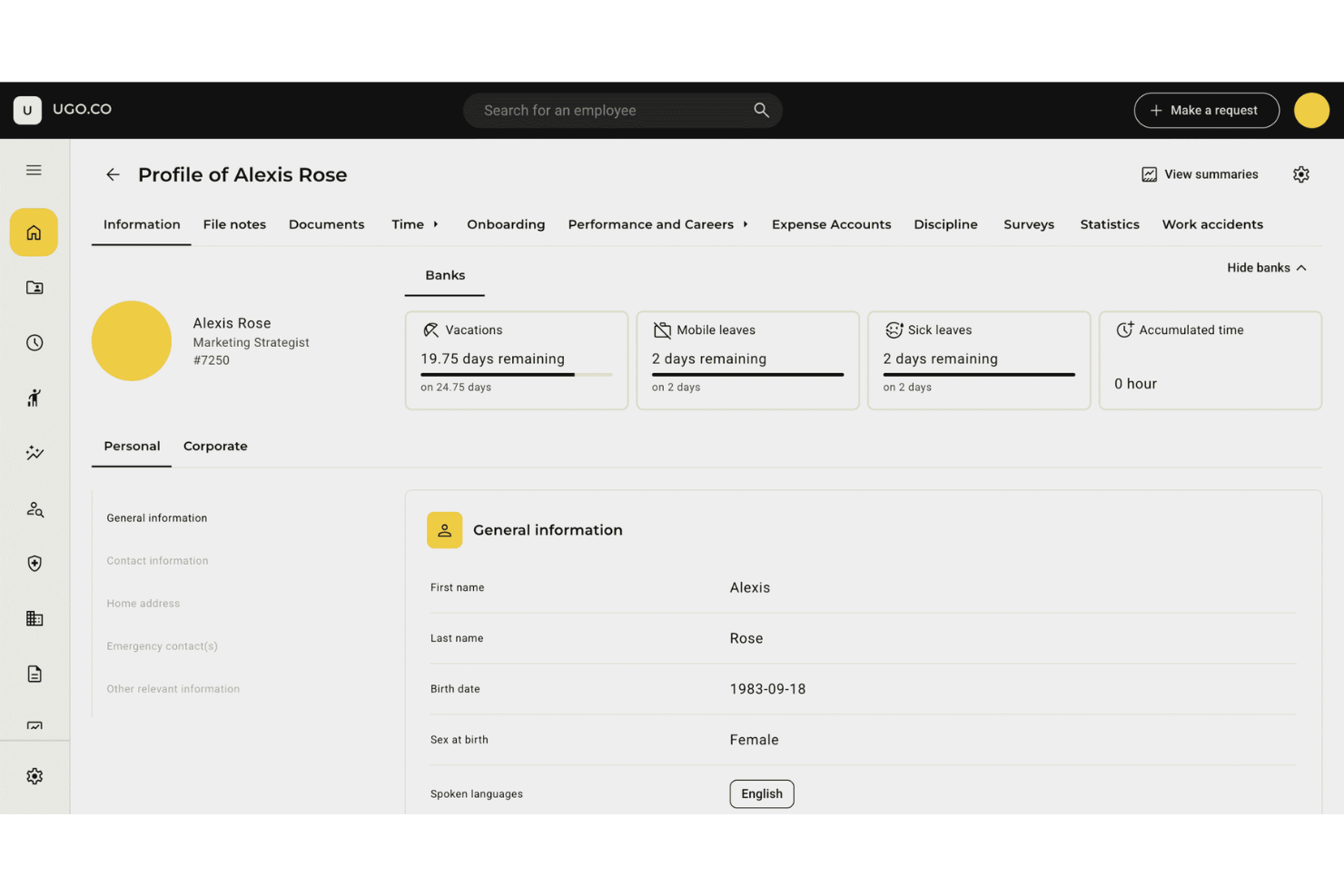
Folks HR is an HRIS platform built for small and mid-sized businesses that need to manage employee records, time off, and HR processes while staying compliant with Canadian regulations.
Who Is Folks HR Best For?
Folks HR is a strong fit for Canadian small and mid-sized businesses that need an HR platform built around local compliance requirements and French or English language support.
Why I Picked Folks HR
Folks HR earns its spot on my shortlist because it's one of the few HRIS platforms built specifically for Canadian businesses from the ground up—not adapted from a US or European product. I like that it handles federal and provincial compliance natively, including vacation entitlements in Quebec and overtime calculations in Ontario, without requiring manual workarounds. The platform is also SOC 2 Type 2 certified and stores all data on Canadian servers, outside US CLOUD Act jurisdiction—important for Canadian HR teams managing sensitive employee records. Additionally, the fully bilingual (French and English) interface supports teams operating across Quebec and the rest of Canada.
Folks HR Key Features
- Performance management: Run structured performance appraisals and track employee goals directly within the platform.
- Training and certification tracking: Monitor training hours, budgets, and certification expiry dates across your entire workforce, with automated renewal reminders.
- Onboarding and offboarding workflows: Build customized onboarding plans with assigned tasks, deadlines, and e-signature document collection for new hires.
- HR reporting and analytics: Track key HR metrics like turnover, absenteeism, and workforce demographics with built-in, real-time dashboards.
Folks HR Integrations
Integrations include Nethris, DLGL, EmployeurD, Synerion, LinkedIn, Facebook, Google, Indeed, Jobboom, and Jobillico.
Pros and Cons
Pros:
- Absence and leave management tools track employee time-off requests
- Employee records and HR data organized in one centralized system
- Performance review tools support structured employee evaluations and goal tracking
Cons:
- Certain HR features reported missing by users during early adoption
- Some HR setup steps can be confusing during initial system configuration


Paylocity gives small businesses a cloud-based HRIS platform that simplifies payroll, benefits, and core HR tasks, letting teams manage people operations in one place.
Who Is Paylocity Best For?
Paylocity is a good fit for small to mid-sized businesses that need a unified platform to handle payroll, HR, and benefits without a large HR team.
Why I Picked Paylocity
Paylocity earns its spot on my shortlist because of how well its payroll automation handles the details that trip up small HR teams. I particularly like the Payroll Readiness Dashboard, which surfaces critical tasks before processing day and runs audits to flag issues like unexpected pay spikes before you submit. In practice, that means my team can catch errors proactively rather than scrambling to fix them after the fact. On the integrations side, Paylocity connects directly to 401(k) and benefits providers, ERP systems, and general ledger platforms, so hours and labor allocations flow into payroll automatically without manual data entry.
Paylocity Key Features
- Benefits decision support: Provides employees with personalized plan recommendations during open enrollment based on their individual preferences and situations.
- On-Demand Payment: Lets employees access earned wages before payday, giving your team an early wage access option without disrupting your payroll cycle.
- Tax geolocation: Audits each employee's location to verify they're paying the correct taxes, with Paylocity acting as a Registered Reporting Agent with the IRS across all 50 states.
- Employee self-service portal: Gives employees direct access to pay stubs, time-off requests, benefits enrollment, and spending account balances from any device.
Paylocity Integrations
Integrations include QuickBooks, NetSuite, Xero, ADP, SAP Concur, Indeed, Slack, Microsoft Teams, Google Workspace, and Airbase.

HiBob is a modern HR platform for small businesses looking to centralize HR processes, automate workflows, and improve employee engagement across the entire employee lifecycle.
Who Is HiBob Best For?
HiBob is a great fit for small to mid-sized businesses that need a people-first HR platform to manage a growing workforce without overcomplicating their HR stack.
Why I Picked HiBob
HiBob earns its spot as one of the best on my shortlist because of how thoughtfully its onboarding automation is built. I love that you can set up unlimited onboarding flows and tailor each one by team, department, or location. The preboarding feature is especially useful: new hires can complete their profile, upload documents, and review company materials before day one, which means their first day is about meeting people rather than filling out forms. I also like that tasks can be automatically assigned to managers, IT, and peers, so nothing falls through the cracks and HR doesn't have to chase people down.
HiBob Key Features
- People analytics dashboard: Track headcount, retention, absenteeism, and growth KPIs using real-time data, then schedule and share reports directly with leadership.
- 360-degree performance reviews: Run structured review cycles that include peer, manager, and self-assessments, with goal alignment at the team and company level.
- Time off management: Employees can request, and managers can approve PTO, sick days, and holidays directly within the platform.
- Employee surveys: Run lifecycle or engagement surveys at key milestones and view results in a built-in analytics dashboard.
HiBob Integrations
Integrations include ADP, Breezy HR, Globalization Partners, Paylocity, Trinet, Xero, Sequoia, Greenhouse, Slack, Deel, and NetSuite.
Pros and Cons
Pros:
- Good native integrations for payroll, ATS, and collaboration tools
- Strong engagement tools like surveys and eNPS tracking
- Customizable onboarding flows fit different roles or locations
Cons:
- Performance module lacks calibration features larger teams may expect
- Reporting customization can take time to configure

ChartHop gives small businesses a centralized HRIS platform to manage employee data, org charts, and workforce planning, helping HR teams and business leaders make informed people decisions as they grow.
Who Is ChartHop Best For?
ChartHop is a strong fit for small and scaling businesses where HR teams and people leaders need a clear, visual picture of their workforce structure.
Why I Picked ChartHop
I picked ChartHop as one of the best because of how it turns your org chart into a live, interactive planning tool rather than a static diagram. The animated timeline slider on the org chart lets my team scroll back through the organization's history and forward through planned changes, which makes it easy to visualize the impact of a restructure before it happens. I also like the data sheet feature, which works like a spreadsheet but pulls live employee data directly, so I can filter, sort, and edit headcount details without ever exporting to a separate file. For small businesses that are growing fast and making frequent structural changes, that level of visual clarity is genuinely hard to replicate in a traditional HRIS.
ChartHop Key Features
- Compensation bands: Set and manage pay ranges by role or level directly within employee profiles.
- People analytics dashboards: Track headcount, attrition, and diversity metrics using built-in visual reports.
- Performance review builder: Create and launch custom review cycles with configurable questions and workflows.
- Employee self-service profiles: Let employees view and update their own information, reducing manual HR admin.
ChartHop Integrations
Integrations include ADP Workforce Now, BambooHR, Greenhouse, Gusto, Paylocity, Workday, Lever, Namely, QuickBooks, and SAP SuccessFactors.
Pros and Cons
Pros:
- Compensation tools support organized, multi-step review cycles
- Scenario planning helps teams forecast hiring needs
- Visual org charts clarify reporting lines and open roles
Cons:
- Some advanced analytics require higher-tier plans
- Limited customization for performance review templates
New Product Updates from ChartHop
ChartHop Adds Same-Day Deactivation for Departures
ChartHop now supports same-day deactivation in Okta and Google for departures. This update helps teams manage employee departures more efficiently and securely. For more information, visit ChartHop's official site.
 .
.

Agendrix is a cloud-based HR platform designed for small businesses that need to simplify employee scheduling, track attendance, and manage HR tasks in one place.
Who Is Agendrix Best For?
Agendrix is a strong fit for small businesses in shift-based industries like retail, hospitality, and healthcare that need to manage hourly workers and variable schedules.
Why I Picked Agendrix
Agendrix earns its spot as one of the best on my shortlist because of how well its automatic shift assignment feature handles the parts of scheduling that eat up the most time. I like that it automatically assigns shifts to employees while factoring in their availability, approved time off, and other set requirements—so you're not manually cross-referencing a dozen things before filling a single slot. The open shifts feature lets employees volunteer to fill gaps on a first-come, first-served basis or by seniority, reducing coordination work. I also use the AI scheduling tool, which can build an entire schedule from a photo of a paper schedule—creating employees, positions, and shifts in seconds.
Agendrix Key Features
- Time and attendance tracking: Employees can clock in and out directly from the app, with hours automatically logged against their scheduled shifts.
- Leave management: Submit, review, and approve time-off requests in one place, with balances updated automatically.
- Employee messaging: Send direct messages or group announcements to staff from within the platform.
- HR document storage: Store and share employee documents, contracts, and onboarding files in a centralized employee profile.
Agendrix Integrations
Integrations include ADP Workforce Now, Ceridian Powerpay, QuickBooks, Nethris, Payworks, Sage 50, Acomba, Easypay, and an API is available for custom integrations.
Pros and Cons
Pros:
- Mobile app supports fast schedule changes and notifications.
- Multiple clock-in methods support on-site and remote teams
- Auto-scheduling helps fill shifts quickly with fewer manual steps
Cons:
- Limited analytics depth compared to larger HR platforms
- No built-in payroll


Leapsome gives small businesses a unified HR platform that connects employee data, performance management, and engagement tools to help HR teams manage people processes and drive development in one place.
Who Is Leapsome Best For?
Leapsome is a strong fit for small and mid-sized businesses that want HR and performance management in a single connected system.
Why I Picked Leapsome
Leapsome earns its spot on my shortlist because of how tightly it connects HRIS data to performance workflows—something most small business HR tools treat as two separate systems. I like that when a new hire is added to the HRIS, they can be automatically enrolled in onboarding learning paths and assigned to team goals without any manual setup. The Reviews + Goals connection is particularly useful: my team can link OKR progress directly into performance review cycles, so managers aren't writing feedback in a vacuum. The AI Review Assistant also pulls in context from past feedback, goal data, and meeting notes to help build more consistent, evidence-backed reviews.
Leapsome Key Features
- Employee profiles and org chart: Store and manage employee data, reporting lines, and team structures in a centralized directory.
- Engagement surveys: Run pulse surveys and track sentiment trends across teams using customizable templates.
- Compensation management: Plan and document salary cycles with built-in approval workflows tied to employee records.
- Meeting management: Structure 1-on-1s and team meetings with shared agendas, talking points, and action items.
Leapsome Integrations
Integrations include Slack, Microsoft Teams, Jira, BambooHR, Workday, Greenhouse, ADP Workforce Now, DATEV, Gusto, and Okta.
Pros and Cons
Pros:
- Connects HRIS data directly with goals, reviews, and development workflows
- Automates onboarding, time tracking, and payroll syncs to reduce manual tasks
- Engagement surveys include benchmarks and actionable recommended next steps
Cons:
- Mobile experience is less polished than the desktop environment
- Limited customization for niche business requirements
New Product Updates from Leapsome

Leapsome Adds ADP Workforce Now Integration
Leapsome introduces ADP Workforce Now integration for payroll data synchronization. This update helps organizations keep employee data aligned between HR and payroll systems while reducing manual data transfers. For more information, visit Leapsome’s official site.
 .
.

BambooHR is an HR platform for small businesses that want to simplify HR processes like onboarding, time-off tracking, and employee data management, making it easier for teams to handle everyday HR tasks without extra complexity.
Who Is BambooHR Best For?
BambooHR is a good fit for small to mid-sized businesses that need a dedicated HR platform without the complexity of enterprise-level systems.
Why I Picked BambooHR
BambooHR earns its spot as one of the best on my shortlist because of how well it puts HR tasks directly in employees' hands. The employee self-service features let people update their own contact details, access pay stubs, request time off, and sign documents without ever needing to ping HR. I also like the Ask BambooHR AI assistant, which gives employees instant answers to questions about policies and benefits, 24/7—so HR isn't fielding the same routine questions repeatedly. That combination of self-service access and AI-powered support takes a real load off small HR teams who are already stretched thin.
BambooHR Key Features
- Applicant tracking system: Post jobs, review candidates, and manage the full hiring pipeline from within BambooHR.
- Onboarding workflows: Assign and track pre-boarding tasks, e-signatures, and new hire paperwork before day one.
- Performance management: Run review cycles, set goals, and collect peer feedback directly in the platform.
- Custom dashboards and analytics: Build real-time reports on workforce data like headcount, turnover, and compensation trends.
BambooHR Integrations
Integrations include Checkr, Slack, Remote, Evolia, and custom integrations can be built through the BambooHR API.
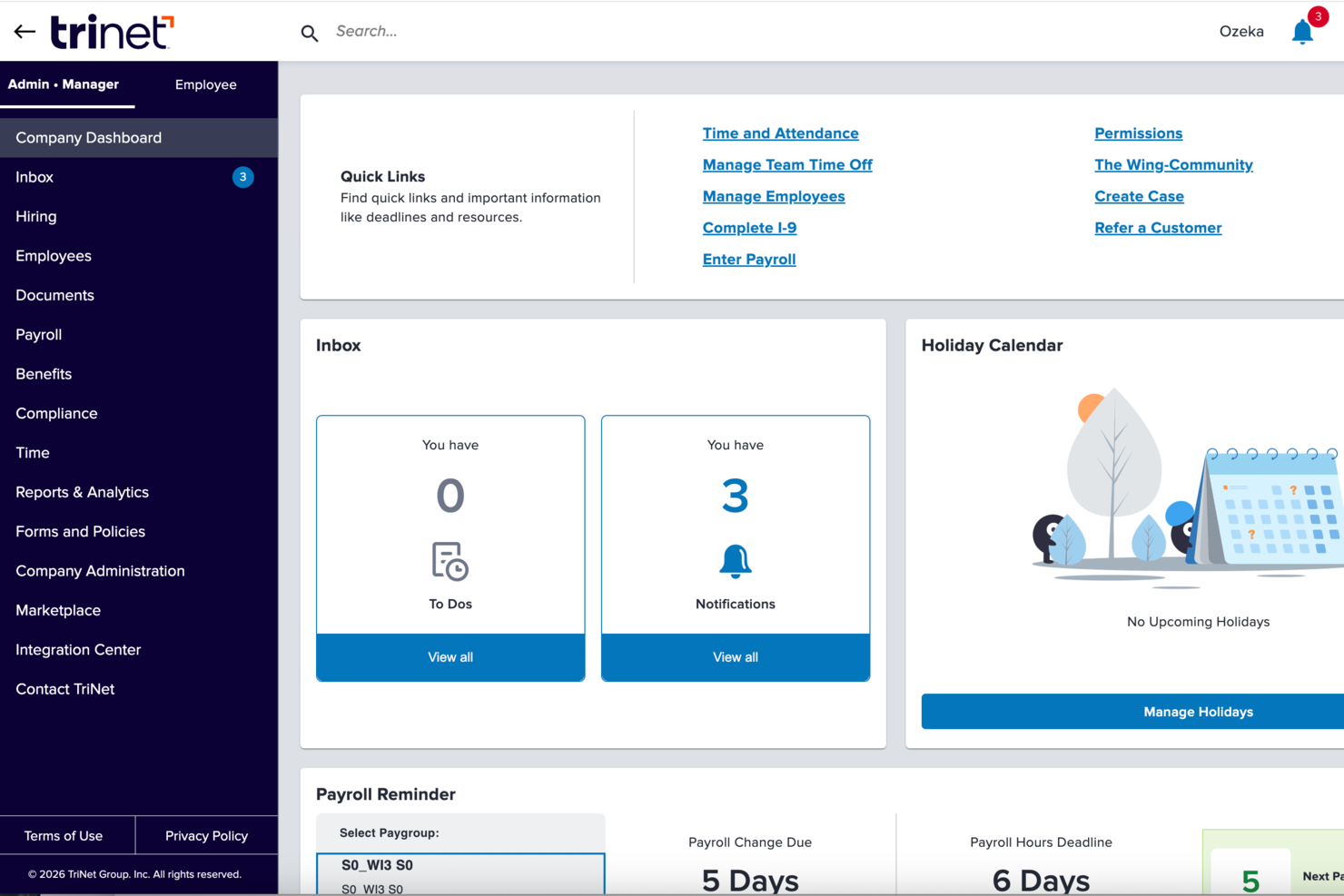
TriNet gives small businesses a way to manage HR, payroll, benefits, and compliance with a single platform that includes expert support for complex people operations.
Who Is TriNet Best For?
TriNet is a strong fit for small and medium-sized businesses that need full-service HR support but don't have a large in-house HR team to manage it.
Why I Picked TriNet
TriNet earns its spot on my shortlist because it combines a full HRIS platform with dedicated HR service teams, which is rare at the small business price point. I like that you get access to HR specialists who can step in on things like compliance questions, employee relations issues, or benefits guidance—not just a knowledge base or chatbot. TriNet's benefits administration is a particular highlight, since small businesses get access to large-group health insurance rates that they couldn't negotiate independently. That combination of software and human support distinguishes TriNet.
TriNet Key Features
- Payroll processing: Run payroll with direct deposit, e-pay stubs, and electronic W-2 preparation, all integrated with time tracking and benefits administration.
- Time and attendance tracking: Log employee hours and manage schedules with a time tracking system that syncs directly with payroll.
- Digital onboarding and e-signatures: Manage new hire paperwork and approvals digitally, reducing manual data entry from day one.
- Employee self-service portal: Employees can view pay stubs, update personal information, and request time off from a desktop or mobile device.
TriNet Integrations
Integrations are available through an API for custom connections.
Pros and Cons
Pros:
- Offers combined HR software and human expertise support.
- Provides access to benefits typically available only to larger companies.
- Helps manage payroll tax filings and multi-state payroll.
Cons:
- Less flexibility for highly customized HR and payroll policies.
- Platform interface may feel clunky or dated to some users.


RemoFirst is an HRIS platform designed for small businesses that need to manage HR processes, payroll, and compliance for employees and contractors across multiple countries.
Who Is RemoFirst Best For?
RemoFirst is a strong fit for small businesses hiring or managing employees and contractors across multiple countries.
Why I Picked RemoFirst
RemoFirst earns its spot on my shortlist because it's built specifically for small businesses that need to hire and manage people across borders without setting up local legal entities. I like how the employer of record (EOR) service lets my team onboard full-time employees in over 180 countries, handling local contracts, tax filings, and statutory benefits automatically. The contractor management feature is equally useful—I can generate compliant contracts, run payments in local currencies, and keep misclassification risk in check from a single dashboard. For small teams without a dedicated legal or compliance function, that kind of built-in coverage is genuinely hard to replicate.
RemoFirst Key Features
- Global payroll management: Run multi-country payroll with automatic tax filings, pension contributions, and social contributions handled across 185+ countries.
- Localized employee contracts: Generate employment contracts tailored to each country's labor laws directly through the platform.
- Compliant offboarding: Manage employee terminations in line with local notice periods, severance rules, and documentation requirements.
- Visa and immigration support: Access work permit and visa processing in 85+ countries for relocating or sponsoring international hires.
RemoFirst Integrations
Native integrations are not currently listed.

OnPay is an HR and payroll platform built for small businesses that need to manage payroll, benefits, onboarding, and HR tasks in one place without the complexity or cost of larger systems.
Who Is OnPay Best For?
OnPay is a strong fit for small businesses, startups, and entrepreneurs who need straightforward payroll and HR tools without enterprise-level complexity.
Why I Picked OnPay
I picked OnPay as one of the best because it's purpose-built for the realities of running a startup or early-stage business. When you're a founder wearing every hat, the last thing you need is a payroll and HR system that requires a dedicated HR team to operate. OnPay lets you process payroll for both W-2 employees and 1099 contractors in the same pay run, which is exactly how most startups hire. I also like the self-onboarding feature—new hires can e-sign offer letters, complete paperwork, and set up direct deposit themselves, so you're not chasing down documents on someone's first day. The built-in PTO tracking syncs directly to payroll, which means one less manual step as your headcount grows.
OnPay Key Features
- Multi-state payroll: Run payroll across multiple states with no extra fees, handling all federal, state, and local tax filings automatically.
- Custom personnel checklists: Build checklists for specific events or employee types to track compliance tasks, documents, and non-HR assignments.
- Health, dental, and vision benefits administration: Compare and enroll in plans from major carriers like Aetna, United Healthcare, and Blue Cross Blue Shield directly within OnPay.
- 401(k) integration: Connect employees to low-fee retirement plans through OnPay's partner providers, with contributions deducted automatically from payroll.
OnPay Integrations
Integrations include QuickBooks, Xero, When I Work, Deputy, Magnify, Mineral, and PosterElite.

GoCo is an HR platform designed for small businesses that want to automate HR tasks, manage employee data, and simplify benefits administration in one place.
Who Is GoCo Best For?
GoCo is a good fit for small businesses that need a flexible, all-in-one HR system to manage people operations without a dedicated HR team.
Why I Picked GoCo
GoCo earns its spot on my shortlist because of how seriously it takes compliance for small HR teams managing employees across multiple states. I particularly like the multi-state employee handbook builder, which flags policy updates and helps protect against employee claims without requiring a legal team to stay on top of every change. I also rely on the built-in compliance settings for things like I-9 and W-4 forms, ACA support, and PTO liability tracking—all of which are baked directly into the platform rather than bolted on as add-ons. The access to unlimited certified HR advisors is a real differentiator, especially for small businesses that don't have in-house compliance expertise.
GoCo Key Features
- Magic Docs™ document management: Transform any document into a fillable, signable digital form that stores and reports on employee data electronically.
- Customizable onboarding workflows: Build paper-free onboarding checklists that let new hires complete tasks and sign documents from any device before day one.
- Time off management: Set custom PTO policies, track balances, and approve requests in one click, with automatic syncing to timesheets and payroll.
- Real-time HR reporting: Generate reports on HR metrics, performance reviews, and employee surveys directly from your dashboard.
GoCo Integrations
Integrations include QuickBooks Online, 360Learning, Checkr, Ideon, Slack, JazzHR, Paychex, Remote, Verified First, and Human Interest.

intelliHR’s strategic HR software transforms manual processes such as onboarding and offboarding, policy sign-offs, and performance reviews into automated workflows that eliminate the need for manual administration and paper files. To streamline the employee experience, their platform offers dynamic employee profiles, a useful staff directory, and an org chart that updates in real-time as employees come and go. Their self-service employee dashboard allows employees to read policies, fill out forms, or request feedback in just a click. Their manager dashboard is also a helpful feature for consolidating team details and approvals in one place.
On top of all their core HRIS features, intelliHR’s system has a wealth of employee engagement tools built right into their basic plan, which is something you often have to pay extra for with other HR tools. Their engagement tools include 1:1 check-ins, real-time feedback surveys, a 360 degree feedback process, historical feedback summary reports, and manager diary notes that can be added directly to an employee profile for future reference.
The software also includes a quarterly eNPS (employee net promoter score) report, helping managers measure employee satisfaction and loyalty to your organization. This is a useful tool for uncovering employees at risk of separating, and it’s often only available at the top service level of most platforms. The employee wellness dashboard also compiles an insightful word cloud for managers, highlighting any team-wide trends.
Their software does not include any payroll, recruitment, or learning & development capabilities, but that can be overcome via their integrations with many other platforms in those niches.
intelliHR integrates with 45+ other software tools including the Google Suite, Microsoft Outlook, Slack, WorkJam, DocuSign, etrainu, Go1, ADP, BambooHR, DataPay, Xero, Zapier, and others.
Pricing for intelliHR starts at $3.90 USD/employee/month for their Employee Engagement package. You can also request a demo or a 30-day free trial via their website.

Sapling’s People Ops platform allows HR teams to automate common HR tasks from onboarding to offboarding and everything in between. This tool simplifies tasks using auto-assigned workflows, email scheduling, and alerts which can be customized for different locations, departments or employee types to standardize processes. This is a useful feature for companies with distributed teams as it helps HR managers regulate processes across all work locations and departments. The system also comes with pre-built reports to analyze any type of data that’s stored in the system.
Helpful features to improve your employee experience include colour-coded org charts by location, department or custom groups, an employee directory, and customizable employee profiles to help reflect your company culture and core values. HR teams will appreciate the system’s ability to track job-related data such as promotions, salary adjustments, relocations and other historical changes. The system also supports paid time-off (PTO) tracking, including customizable PTO policies for different groups.
Sapling is technically an HCM (human capital management) platform, so their main focus is improving people-centric processes like onboarding and offboarding, and enhancing internal communication through features like intranet services, shared calendars, and mobile app accessibility. The platform does not include any built-in payroll functionalities. However, their deep integrations make it easy to combine Sapling with the other tools your business is already using, such as payroll providers and applicant-tracking systems. This actually gives a lot of flexibility since you can keep any systems you’re using, and focus on upgrading your employee experience via Sapling instead.
Sapling integrates with 50+ leading HR, IT and productivity systems including JazzHR, Lever, Workday, ADP, Paylocity, 15Five, Kallidus, Lattice, OneLogin, Greenhouse, Okta, Zapier, the Google Suite, Slack, Lessonly, ChartHop, Jira, LinkedIn, and many other platforms.
Pricing for Sapling’s People Ops Platform, including their core HRIS features, starts at $6.99 USD/user/month for a team of 100 people. Add-ons are available for time-off tracking and survey tools, for an extra fee. For their All-in-One platform you can request a free quote on their website. A free demo is also available.


Factorial is a cloud-based HRIS that's designed to help small businesses manage their HR processes. It's a one-stop-shop for everything HR-related, from employee onboarding and time tracking to performance management and benefits administration. The employee portal is super useful. It allows employees to access their personal data, request time off, and view their pay slips, all from one place. The time tracking feature is also a big plus. It makes it easy to keep track of hours worked, overtime, and absences. And let's not forget about the performance management feature. It allows you to set goals, track progress, and give feedback, all in real-time.
Factorial goes beyond standard HR software by incorporating an intelligent document management feature. This feature uses advanced optical character recognition (OCR) technology to automatically scan and extract relevant information from various HR-related documents, such as contracts, resumes, and invoices. This not only reduces manual data entry but also ensures data accuracy and consistency. The system can categorize documents, extract key details, and link them to relevant employee profiles or projects.
Factorial distinguishes itself by prioritizing employee well-being through a dedicated module that allows employees to provide anonymous feedback, report concerns, and suggest improvements. This module provides a secure space for employees to express their opinions without fear of reprisal, fostering an open and transparent communication culture. It also includes sentiment analysis capabilities that help HR teams identify trends and address potential issues proactively.
Integrations include Sage, Gmail, Payflow, Dynamics 365, LinkedIn, TravelPerk, PowerBI, Indeed, Recruitee, Slack, and other.
Factorial costs From $6.50/employee/month and comes with a 14-day free trial. You can also ask for a free demo to see if the software suits your unique needs.

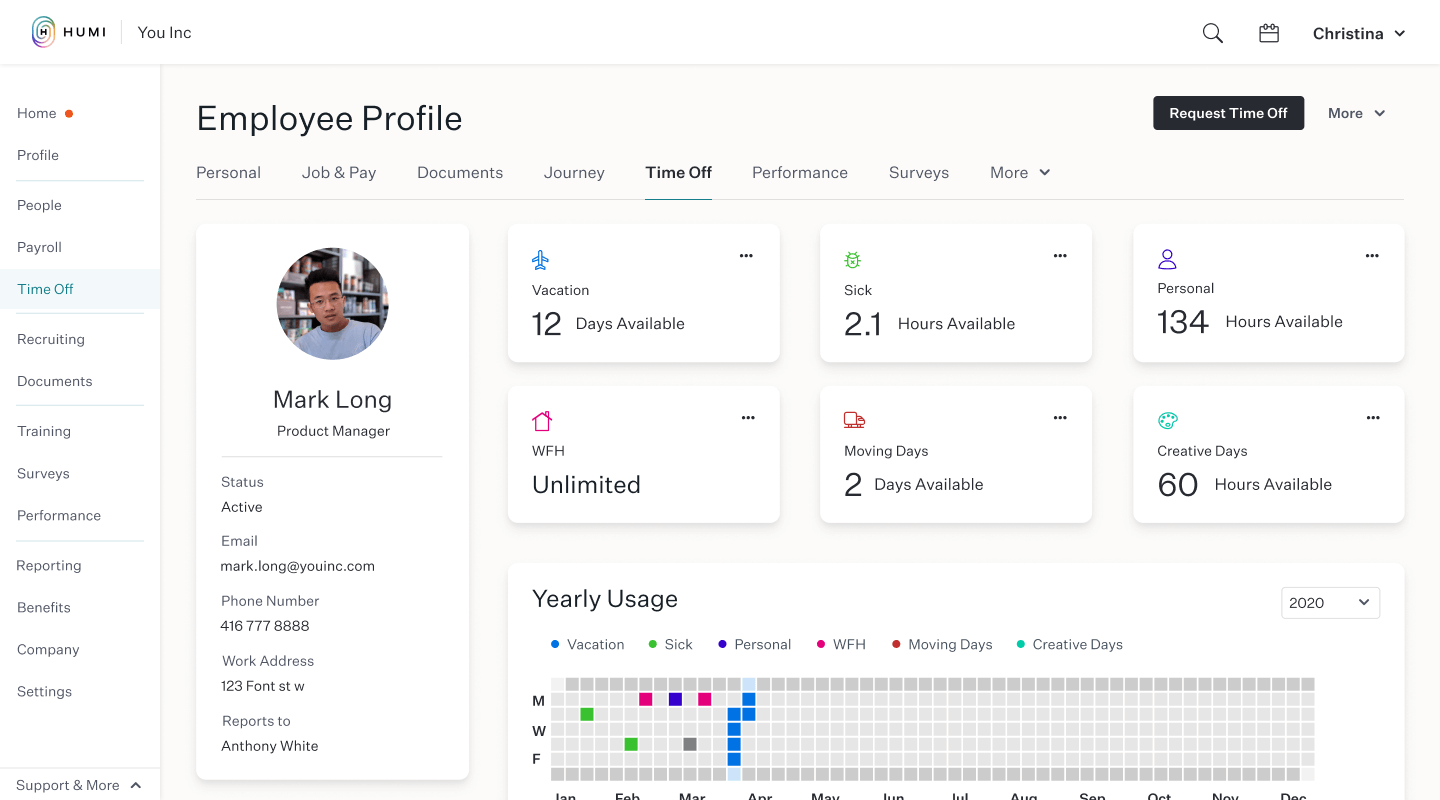
Humi is another HR software tool made by Canadians, for Canadians, and it’s available in French too. Their system includes all the classic HRIS functions you’d expect, such as employee profiles and data management, recruiting, onboarding, time-off, performance management and payroll. The features that distinguish them from the rest are how they integrate actual employee benefit plans, as well as corporate insurance support, directly into their system.
The insurance world can be very confusing - especially for startups that don’t have a lot of experienced HR or benefit professionals in-house. Humi’s platform adds a lot of value in this area since they have in-house insurance advisors that can help you find the best coverage for your business needs, including cost-effective plans that are administered directly by Humi themselves. By unifying your benefits with your payroll system, you’ll save a lot of time avoiding typical problems like manually adjusting payroll deductions for healthcare each time your benefit costs change. Humi customers can also gain access to other non-health-related benefit providers via the Humi Marketplace.
Startup companies will also be happy to hear that Humi can help with business insurance as well. Through their in-house team of experienced business insurance advisors, they can help you find insurance solutions for general liability, employment liability, product liability, data liability, and director and officer protection against lawsuits.
In today’s work-from-home world, asset management has become a new concern, as tracking things like computers, monitors and chairs can quickly balloon to a big job without a proper asset tracking system. Humi solves this problem as well, with their Asset Tracker module that links serial numbers to key assets, and tracks their historical migration between users over time.
Humi integrates with Indeed’s job board, as well as the applicant tracking systems (ATS) Workable and Greenhouse. They offer single sign-on (SSO) and their calendar can be synced to integrate with your existing Google, Apple or Outlook calendars.
Humi does not advertise prices on their website as they believe in customizing their software depending on what your company actually needs. You can contact them directly for a free demo or custom quote. They also have an interesting evaluation tool on their website that lets you determine how much money you could save by switching over to their HRIS.

Say “hi” to Bob, an HRIS platform designed to maximize the employee experience and link employees to your company culture.
Their platform includes all the core features you’d expect in a robust HR system: employee data management and HR analytics, benefits management (beyond simply healthcare coverage), culture tools, a document hub with DocuSign built right in, streamlined time and attendance tracking features, digitized onboarding, a dynamic people directory with a linked org chart, and customizable workflows and reports.
You can also add more advanced features, such as compensation management, a payroll hub, performance management, and people analytics depending on your business needs.
Their user interface is designed with a social media-like feel to get employees excited about engaging with the company. From a central homepage team members can view birthdays, work anniversaries, and interesting stats about other colleagues to help people make connections - an important feature in today’s work-from-home environment.
Their Club View further deepens engagement by sorting the staff directory by hobbies, superpowers, gender pronouns, or other custom categories. Bob also supports company announcements, shoutouts, and emoji-based reactions to help teams maintain a positive vibe. As well, the homepage keeps a log of where staff are (i.e., working remotely, in the office, sick, or on vacation), which is a useful feature for companies with remote or hybrid workforces.
Bob has a long list of 40+ integrations with commonly used programs, including many applicant tracking systems, Azure Active Directory, Google Suite, 360Learning, Jira, Microsoft Teams, Slack, Zapier and others. They also have an iOS and Android mobile app.
When to Use an HRIS for Small Businesses
An HRIS pulls your employee data, payroll, and HR workflows into one system so nothing slips through the cracks. For small businesses, it's the difference between chasing spreadsheets and actually having time to focus on your team. Here's when it makes sense:
- You're drowning in disconnected tools: Say you're tracking PTO in a spreadsheet, running payroll in QuickBooks, and onboarding in email. An HRIS like BambooHR or Gusto centralizes all of it, cutting the admin time you lose toggling between systems every week.
- You're hiring fast and onboarding is a mess: If you've brought on 10+ employees in a few months and new hires are still getting lost in paperwork, that's a sign. A good HRIS automates onboarding checklists and document collection so every new hire gets a consistent experience from day one.
- You're worried about compliance slipping: When you're managing wage laws, PTO rules, or tax filings manually, errors are a matter of when, not if. An HRIS automates tax calculations and flags compliance risks before they become costly penalties.
- You're spending hours on payroll every cycle: If payroll takes you or your office manager half a day every two weeks, that time adds up fast. Platforms like Gusto or Rippling automate the full cycle, including direct deposit and tax filing, so you can run it in minutes.
- You're finally big enough to need real data: Once you're past 15 to 20 employees, gut-feel decisions about headcount, turnover, or compensation stop working. An HRIS gives you reporting and analytics to make smarter people decisions as you grow.
Other HRIS for Small Businesses
Here are a few more worthwhile options that didn’t make the best HRIS software for small businesses list but are still worth taking a look at:
- Trinet
For its robust mobile app
- Insperity
Comprehensive HR data management
- Collage HR
For Canadian SMBs
- Rippling
For time-saving workflow automations
- Lattice
For employee record change workflows
- monday.com
For data visualization dashboards
- Justworks
For small businesses starting an HR team
- Homebase
For managing hourly employees
- Rise
For Canadian companies with lean HR teams
- TriNet HR Plus
HRIS platform for integrated payroll solutions and health insurance options


Related HR Software Reviews
If you still haven't found what you're looking for here, check out these other related tools that we've tested and evaluated:
- HR Software
- Payroll Software
- Recruiting Software
- Employer of Record Services
- Applicant Tracking Systems
- Workforce Management Software
Selection Criteria for HRIS Systems for Small Businesses
Selecting the best HRIS for small businesses requires a thorough understanding of how this software can alleviate common pain points within HR administration.
My approach to choosing the best HRIS for this list is grounded in my 9 years of experience maintaining an HRIS system, which allowed me to pinpoint the features that will truly save time and make your processes more efficient.
To create this top 10 list of the best HRIS software for small business owners, I started my selection process by reviewing recent HRIS market data to create a long list of popular HRIS systems.
I then dug into the details of each system to ensure it would cover all the basics a small business would need, without a hefty price tag.
Here's a summary of the selection criteria I used to create this list:
Core HRIS Functionalities (25% of total score): To be considered for inclusion in this list, each solution had to fulfill these common use cases first:
- Digital management of employee records
- Streamlined payroll and benefits administration modules or integrations
- Tools for recruiting & talent acquisition (e.g., an applicant tracking system)
- Employee onboarding and offboarding workflows
- Tools to enhance performance management and employee development
- A suite of tools to track employee work hours, time-off requests (including paid time-off accruals), and other leaves of absence
- An employee self-service portal to cut down on administrative requests on your HR professionals
- Integrated compliance monitoring features to monitor regulatory requirements
Additional Standout Features (25% of total score): To help me find the best software out of numerous available options, I also kept a keen eye out for unique features, including the following:
- Unique customization options, including data dashboards, custom workflows, and company branding abilities
- Advanced features that address talent management, employee retention, and performance reviews
- Advanced reporting and analytics capabilities that provide deeper insights beyond basic HR functions
- Innovative use of AI and machine learning for predictive analytics and automation
- Advanced integrations with payroll solutions (if not part of the HRIS already), single sign-on applications, and work operating systems (i.e., Microsoft 365 and Google Workspace)
- With integrated document management software, HRIS solutions for small businesses can ensure easy document retrieval and compliance.
Usability (10% of total score): To evaluate the usability of each system, I considered the following:
- An intuitive design and user interface, with a minimal learning curve to master
- Clear and concise on-screen instructions and tips to improve ease of use and create a positive user experience
- A user-friendly mobile experience or dedicated mobile apps for Android and iOS mobile devices to support remote and on-the-go HR management
- Role-based access controls that are straightforward to configure
Onboarding (10% of total score): To get a sense of each software provider's customer onboarding process, I considered the following factors:
- A streamlined setup process and clear configuration guidelines
- The availability of training materials such as videos or interactive tutorials
- The availability of live support or chatbots for real-time assistance during setup
- Customizable templates to speed up the onboarding process
- Support for migrating historical employee data into the new platform
Customer Support (10% of total score): To evaluate the level of customer support each vendor offered, I considered the following:
- The availability of multiple support channels, including email, phone, and chat
- Whether a dedicated account manager is provided for personalized support
- The existence of a self-service knowledge base, an FAQ repository, or other self-help resources to speed up troubleshooting
- The overall quality, responsiveness, and helpfulness of the support team during customer onboarding and post-purchase, as inferred from customer reviews
Value for Price (10% of total score): To gauge the value of each software, I considered the following factors:
- The availability of free trials or demos to test the software before purchasing
- Competitive and transparent pricing models that reflect the software's feature depth and explain which features are included at each level
- A subscription plan that's specifically tailored to the needs of small to medium-sized businesses (SMBs), with the option to scale up if needed later on
- A clearly demonstrated positive ROI through efficiency gains and cost savings
Customer Reviews (10% of total score): Evaluating customer reviews is the final element of my selection process, which helps me understand how well a product performs in the hands of real users. Here are the factors I considered:
- Whether a product has consistently high ratings across multiple review platforms, indicating a broad level of user satisfaction
- Specific praises, criticisms, or trends in customer feedback that indicate the software's strengths or areas for improvement
- Whether customer feedback specifically mentions issues with ease of use, customer support responsiveness, or lacking features
- Any testimonials that highlight significant improvements in HR processes or employee management capabilities
Using this assessment framework helped me identify the software that goes beyond basic requirements to offer additional value through unique features, intuitive usability, smooth onboarding, effective support, and overall value for price.
How to Choose an HRIS for Small Businesses
An HRIS can make life easier for HR and the wider employee population.
To help you figure out which HRIS best fits your small business's needs, the first step is need to pinpoint your key users and document their specific challenges.
As you work through your own unique software selection process, keep the following points in mind:
- What problems are you trying to solve: Start by identifying the challenges you're trying to overcome e.g. manually updating employee data and processing time off requests. This will help you clarify the key features and functionalities the HRIS needs to provide. Once that's clear, it's also useful to rank the needs of your different users to identify the key priorities for your power users, managers, and employees, to ensure they're all met.
- Who will need to use it: To evaluate cost and requirements, consider who will use the software and how many licenses you'll need. For an HRIS, you'll likely want employee-level access for your entire workforce, with special access for your HR administrators and managers.
- What other tools it needs to work with: Clarify what tools you're replacing, what tools are staying, and the tools you'll need to integrate with, such as payroll software, training management software, single sign-on applications, or work operating systems like Microsoft 365 or Google Workspace. You'll need to decide if the tools will need to integrate together, or alternatively, if you can replace multiple tools with an all-in-one HR software solution.
- How it would work within your organization: Consider the software selection alongside your existing workflows and systems. Evaluate what's working well, and any problem areas that need to be addressed.
HRIS Trends for Small Business in 2025
HR software solutions are continuously evolving to support the shifting needs of small businesses.
Here are several trends I'm watching in the HRIS space that are especially beneficial to small businesses:
- Increased Integration with AI and Machine Learning: There's a clear trend toward leveraging AI and machine learning to automate more complex tasks, provide predictive analytics, and enhance decision-making processes. This technology is rapidly evolving within HRIS platforms to offer more personalized employee experiences and streamline HR operations.
- AI-Powered Compliance Management: Modern AI HRISs are equipped with tools to automatically update and ensure compliance with labor laws and regulations, plus real-time alerts and reporting features to prevent compliance issues related to tax filing or labor law stipulations.
- Mobile Accessibility and Flexibility: As remote work continues to be prevalent, HRIS features that offer mobile accessibility and flexibility are in high demand. This includes mobile apps and cloud-based systems that allow employees and managers to access HR functions from anywhere, at any time.
- Advanced Analytics and Reporting: The demand for sophisticated analytics and customizable reporting capabilities is growing. HRIS platforms are evolving to include more advanced data analysis tools such as sentiment analysis, enabling HR professionals to generate actionable insights and make data-driven decisions.
- Integrated Performance Management Systems: Many HRIS systems now integrate with performance management software, or offer performance tools themselves. These tools help identify employee skill gaps and training opportunities, fostering a culture of continuous improvement. Some performance management features I see cropping up in HRIS platforms include:
- Performance review templates
- Goal-setting frameworks, such as OKR features
- Succession planning.
What is an HRIS?
A HRIS is a digital solution for managing employee data and automating HR processes like hiring, payroll, and performance evaluations. The primary purpose of an HRIS is to streamline and optimize human resource management through digital automation and data organization.
Key HRIS For Small Businesses Features
When selecting an HRIS for small businesses, keep an eye out for the following key features:
- Core HR data management: At its core, an HRIS acts as your single source of truth for all employee data. Centralizing information like personal details, job titles, compensation history, and documentation makes updates easier, reduces admin errors, and improves overall data accuracy.
- Payroll management: Integrated payroll tools automate salary calculations, tax withholdings, and payment distribution. This ensures employees are paid correctly and on time while reducing manual data entry and compliance risks.
- Time off & attendance tracking: HRIS platforms include tools to track employee work hours, lateness, overtime, vacation days, and leave requests. These features help maintain compliance with labor laws and ensure scheduling accuracy.
- Benefits administration: Managing employee benefits directly within your HRIS—such as health insurance, retirement plans, allowances, and leave policies—keeps everything consistent and easily accessible for employees and managers alike.
- Performance management: Built-in performance review tools support check-ins, continuous feedback, and goal-setting, helping you align individual development plans with broader organizational objectives.
- Recruiting: Many HRIS systems offer applicant tracking capabilities to help you post jobs, screen candidates, manage interviews, and move applicants smoothly through the hiring pipeline.
- Onboarding: A strong HRIS makes onboarding seamless with automated workflows, digital document collection, training assignments, and step-by-step processes to help new hires ramp up faster.
- Training & learning management: Systems may include certification tracking, internal training modules, course distribution, and reminders for expiring qualifications—ensuring your team stays up to date on required skills.
- Employee self-service portal: Employees can independently update personal details, request time off, view pay stubs, sign documents, and access HR information—reducing repetitive administrative requests.
- Reporting and analytics: HRIS software offers robust reporting tools to analyze turnover, attendance trends, payroll insights, performance outcomes, and more. These analytics help drive better decision-making and long-term HR strategy.
Common HRIS AI Features for Small Businesses
Many HRIS platforms are incorporating AI features to improve the employee and HR experience, for example:
- Automated data validation: AI checks employee data for inconsistencies, missing fields, or outdated information—reducing administrative cleanup and improving record accuracy.
- Smart candidate matching: AI analyzes job descriptions and applicant profiles to recommend the best-fit candidates, helping small teams speed up hiring and reduce manual resume screening.
- Predictive turnover insights: AI identifies early indicators of turnover risk—such as declining engagement or inconsistent attendance—helping HR teams intervene proactively.
- AI-powered onboarding workflows: Systems can automatically assign onboarding tasks, recommend training modules, and personalize new-hire journeys based on role and department.
- Performance analytics: AI provides insights into performance patterns, goal progress, and skill gaps, supporting fair evaluations and targeted development plans.
- Automated scheduling & attendance alerts: AI detects unusual attendance patterns such as repeated tardiness, unplanned absences, or overtime spikes, helping managers respond quickly.
- Intelligent benefits recommendations: AI can analyze workforce demographics and usage patterns to recommend benefit offerings that maximize value and reduce unnecessary costs.
- Natural language search: Employees can ask questions (“How do I request time off?”) and instantly receive accurate answers from AI-powered HR assistants within the HRIS.
- AI-driven employee support chatbots: Chatbots handle common HR inquiries—vacation balances, policy questions, onboarding tasks—reducing dependency on HR staff and providing 24/7 support.
- Automated compliance monitoring: AI tracks changes in labor laws, tax regulations, and HR policies relevant to your region, alerting you when updates require action or documentation changes.
Benefits of HRIS Software
Implementing a new HRIS for your business can offer numerous advantages for your HR staff, employees, and your organization at large. Here are several key benefits you can expect to gain:
- Improved Data Management: Centralizing your employee data will improve the accuracy and consistency of employee information, simplify reporting and analytics, and enabling better decision-making.
- Increased Efficiency: By automating tasks such as payroll processing, time tracking, and benefits administration, an HRIS significantly reduces the time and effort required to manage these processes, allowing HR staff to focus on more strategic activities.
- Simplified Employee Onboarding: A robust onboarding module simplifies the integration of new hires, making it easier for them to become productive members of the team quickly.
- Improved Employee Scheduling: HRIS provides tools for creating, managing, and communicating work schedules, which helps avoid scheduling conflicts and ensures adequate staffing.
- Enhanced Compliance: An HRIS helps organizations stay up-to-date with labor laws and compliance requirements, reducing the risk of penalties and legal issues associated with non-compliance.
As you can see, implementing an HRIS can transform the way you manage your employee data and related HR tasks significantly.
For a more in-depth analysis, read our summary of the different ways an HRIS can benefit your business next.
Costs & Pricing for HRIS Software
Selecting the best HRIS system for your small business involves understanding the full range of plans and pricing options. Here's an overview of common plan options and their associated costs to help you make an informed decision.
Plan Comparison Table for HRIS
| Plan | Average Price | Common Features |
|---|---|---|
| Free | $0 | Basic employee database, limited reporting, and simple time and attendance tracking |
| Basic | $5 per user/month | Employee records, payroll management, time and attendance, basic scheduling, and limited support |
| Standard | $10 per user/month | Advanced payroll, benefits administration, performance reviews, compliance management, and support |
| Premium | $20 per user/month | Customizable workflows, advanced analytics, onboarding tools, priority support, and mobile access |
| Enterprise | Custom pricing | Full HR suite, dedicated account manager, advanced integrations, unlimited users, and 24/7 support |
Choosing the right plan depends on your business size, budget, and specific HR needs. Consider starting with a free or basic plan and upgrading as your business grows and your HR requirements become more complex.
I recommend requesting free trials or demos, so you can get a hands-on sense of the system's ease-of-use before you commit. If cost is your biggest factor, this article digs into the costs of HR software and how you can decide what's best for your company.
HRIS For Small Businesses FAQs
How long does a new HRIS take to implement?
Most small businesses can implement a new HRIS in 4 to 12 weeks. Your timeline depends on your company size, how much data you’re migrating, integrations with payroll or other platforms, and how much training your team needs. Basic setups may take just a month, while complex rollouts with multiple integrations can push closer to three months. Good vendor support and clear planning keep things on track.
Can an HRIS integrate with my existing payroll or accounting systems?
Yes, many HRIS platforms integrate directly with popular payroll and accounting software. Ask vendors about pre-built integrations and what platforms they support. For less common tools, check if the HRIS offers API access or connectors like Zapier. Seamless integration saves you duplication and reduces errors.
How can an HRIS help with compliance for small businesses?
An HRIS makes compliance easier by automating recordkeeping, tracking mandatory documents, and storing employee data securely. Most systems include reminders for important deadlines, such as contract renewals or training requirements. Some also offer built-in reporting for audits or payroll compliance, which can save you hassle and reduce risk.
Other Resources for Small Business Owners
If you made it this far, I hope you have a more well-rounded view of how the right HRIS can act as a powerful HR solution for your typical in-house processes. Don't let your journey end here though.
Since small businesses have a special place in my heart, I've rounded up a list of all my top resources to help you even more. Take a look at these other top 10 lists too:
- Applicant Tracking Systems for Small Businesses to Recruit Better
- Employee Scheduling Software for Small Business
- ERP Systems for Small Businesses on a Budget
- Free HR Software for SMBs on a Budget
- Free Payroll Software for Tight Budgets
- HRMS for Small Business
- HR Software for Small Business
- Learning Management Systems (LMS) for Small Businesses
- Payroll Services for Small Businesses
- Payroll Software for Small Businesses
- Recruitment Software for Small Businesses
Other HR Software Reviews
Are you growing rapidly and looking for HR software that scales well? One of these other top 10 lists may be a better fit:
- HR Software: Reviewed & Compared
- Best HCM Software Vendors
- HRMS Software for Human Resource Management
- Employee Management Systems
- HR Management Software
- Cloud-Based HR Software Systems
- HR Case Management Software to Manage Issues & Risks
- Payroll Software: Reviewed and Compared
What’s Next:
If you're in the process of researching hris for small businesses, connect with a SoftwareSelect advisor for free recommendations.
You fill out a form and have a quick chat where they get into the specifics of your needs. Then you'll get a shortlist of software to review. They'll even support you through the entire buying process, including price negotiations.