

10 Best HR Software of 2026: Reviewed & Compared

10 Best HR Software Shortlist


The best HR software centralizes employee data, automates repetitive tasks, reduces manual errors, and helps you focus on strategic work.
If you're tired of juggling spreadsheets, navigating clunky interfaces, or stitching together disconnected tools, you're not alone—and you're in the right place.
Whether your current solution isn’t scaling with your team or you're still managing everything manually, this guide will help you find an HR system that fits. From recruitment and onboarding to time tracking, payroll, compliance, and performance management, the right HR software brings it all together in one streamlined platform.
As a former HR administrator for nine years, I’ve been in your shoes—managing HR manually and feeling overwhelmed by software that overpromises and underdelivers. That’s why I’ve put this guide together: to help you cut through the noise and confidently choose software that actually works for your people, your process, and your priorities.
Why Trust Our Software Reviews
Our team has been testing and reviewing software since 2012. As HR experts ourselves, we know how difficult—and important—it is to choose the right software.
For this guide, we evaluated tools using hands-on testing and independent research, scoring tools using our selection criteria. We also draw on insights from industry thought leaders and practicing HR experts.
Our reviews reflect our human editorial judgment, not a sales pitch.
Expert reviewers:
Best HR Management Software: Comparison Chart
This HR software comparison chart summarizes pricing, trial, and demo details for my top HR software selections to help you find the best HR system for your budget and business needs.
| Tool | Best For | Trial Info | Price | ||
|---|---|---|---|---|---|
| 1 | Best for employee self-onboarding tools | Not available | Pricing upon request | Website | |
| 2 | Best for combining HRIS payroll and compliance | Free demo available | From $5/employee/month | Website | |
| 3 | Best for AI-powered workforce insights | Free demo available | Pricing upon request | Website | |
| 4 | Best for payroll across niche industries | Free demo available | Pricing upon request | Website | |
| 5 | Best for fast-growing companies | Free demo available | Pricing upon request | Website | |
| 6 | Best with IRS-certified and ESAC-accredited PEO services | Not available | From $79/employee/month | Website | |
| 7 | Best for automated payroll and compliance | Free demo available | Pricing upon request | Website | |
| 8 | Best for UK small business HR automation | 14-day free trial + free demo available | From £24/month/business | Website | |
| 9 | Best for advanced reporting and analytics | Free trial available | From $10/employee/month | Website | |
| 10 | Best for employee experience and integrations | Free demo available | Pricing upon request | Website |


Best HR Software Reviews
Explore my in-depth reviews of the top HR management software solutions that earned a spot on this list. I break down why each tool stood out, highlight standout features, weigh the pros and cons, and outline ideal use cases—so you can quickly pinpoint the right fit for your team.

Paycom
Best for employee self-onboarding tools
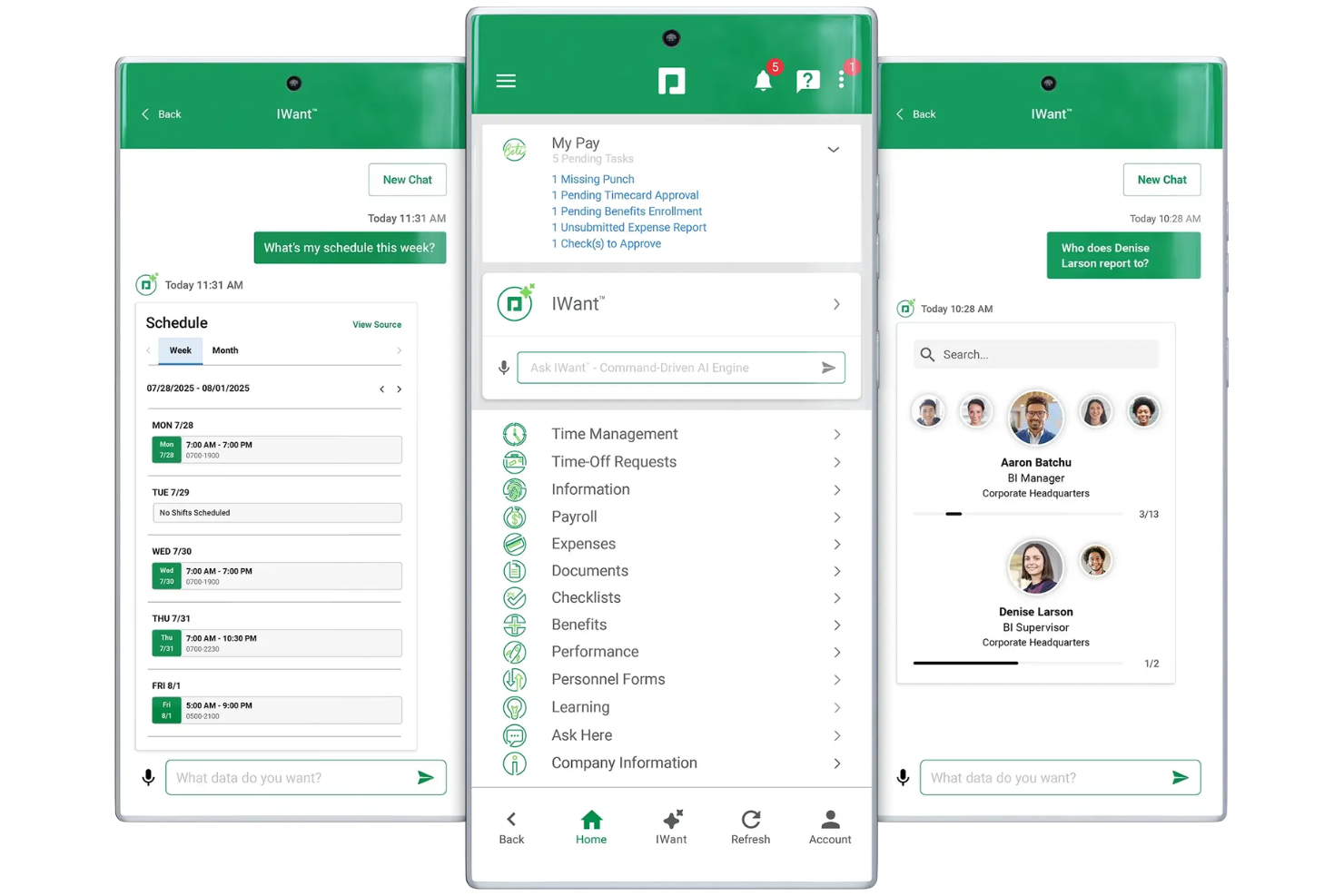
Paycom is a cloud-based HR software platform that provides payroll, talent management, benefits administration, onboarding tools, and employee self-service features in one system for midsize to large organizations.
Who Is Paycom Best For?
Paycom is a strong fit for midsize to large companies looking to consolidate HR, payroll, and workforce management into a single platform.
Why I Picked Paycom
Paycom earns its spot on my shortlist because of how well its self-onboarding feature removes HR from the middle of the new-hire process. New hires can complete paperwork, training, and digital forms before Day 1—without HR needing to walk them through anything. I also like that data entered during onboarding flows automatically into the employee record, so there's no rekeying. The Documents and Checklists tool lets managers assign role-specific onboarding tasks, which keeps the process consistent across different positions.
Paycom Key Features
- Payroll processing: Run payroll with automated tax calculations, direct deposit, and multi-state support all within the same system.
- Time and attendance tracking: Employees can clock in and out via the mobile app, with data feeding directly into payroll.
- Benefits administration: Manage open enrollment, plan configurations, and employee elections from a single interface.
- Performance management: Set goals, schedule reviews, and track employee progress using built-in evaluation tools.
Paycom Integrations
Paycom does not offer native integrations with external HR tools. The platform primarily operates as an all-in-one HR and payroll system, though API support is available for custom integrations.
Pros and Cons
Pros:
- In-depth workforce reporting and analytics
- Centralized document storage and e-signatures
- Streamlined onboarding with customizable workflows
Cons:
- Year-end tax form access sometimes delayed
- No native integrations listed

Deel HR
Best for combining HRIS payroll and compliance
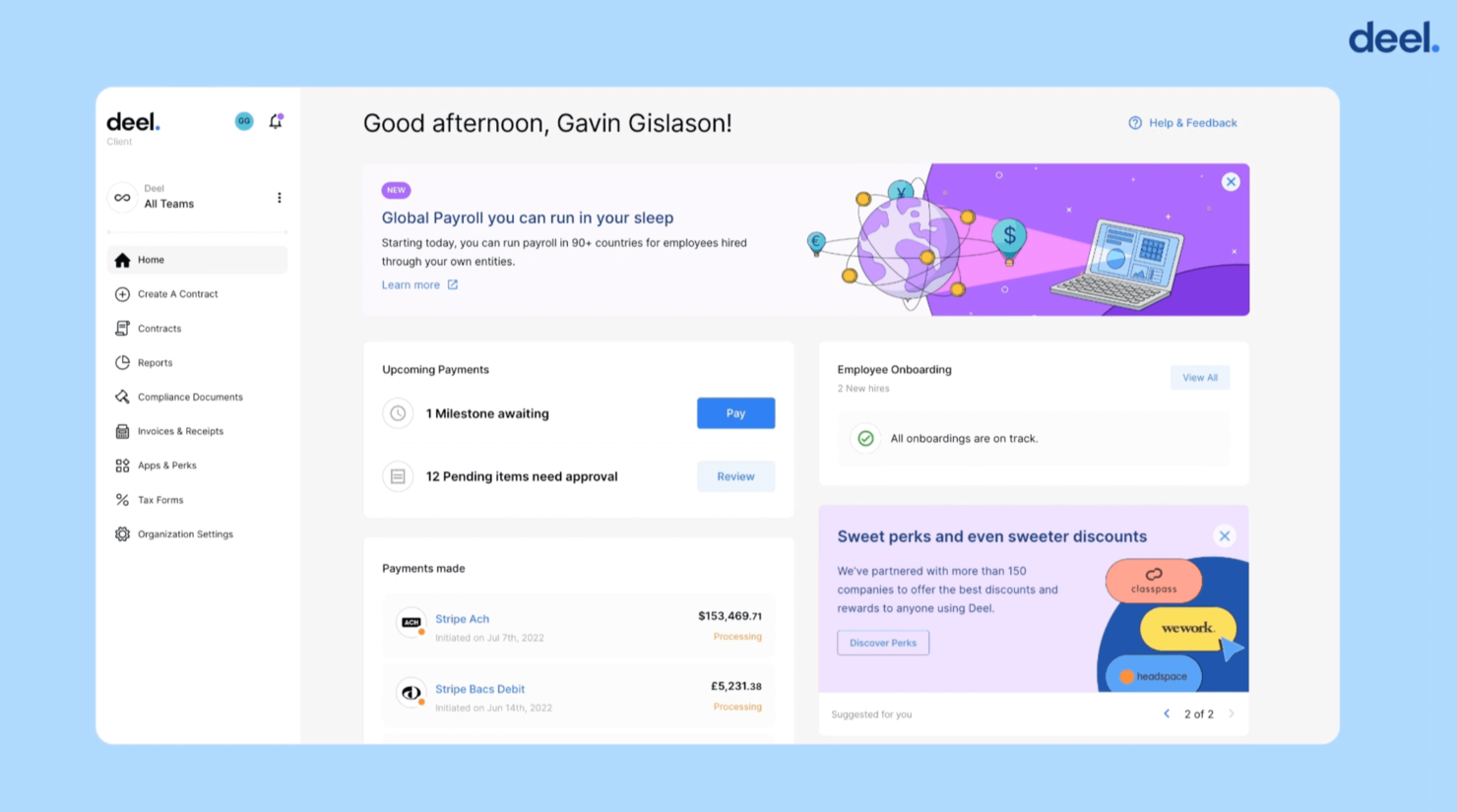
Deel is designed for companies building a global workforce and needing HR software that keeps hiring, compliance, and payroll consistent across countries. It’s a strong fit for teams managing employees and contractors in multiple regions where laws, tax rules, and documentation requirements vary.
Who Is Deel Best For?
Global HR teams and companies hiring internationally that need a platform focused on compliant payroll, contractor management, and legal adherence across multiple jurisdictions.
Why I Picked Deel
I picked Deel because it gives you a software-driven way to manage international hiring without juggling separate tools or local vendors. Its onboarding workflows pull together background checks, locally compliant contracts, signatures, and required tax forms so your team can complete every step in one place.
Deel’s payroll engine is also fully in-house across 150+ countries, reducing the delays and errors that come from relying on external providers. I like that you can make off-cycle updates—such as bonuses, reimbursements, or corrections—without waiting for the next pay period. For globally distributed teams, having compliance automation and payroll management under one system is a major advantage.
Deel Key Features
Here are a few additional features worth highlighting:
- Deel Shield: Offers compliance protection by covering contractor misclassification risks.
- Global Mobility Support: Guides you through visa applications and relocation needs with help from immigration specialists.
- Document Management: Stores contracts, IDs, tax files, and local compliance documents in a single dashboard.
- In-House Payroll Engine: Runs payroll across 150+ countries without handing work off to third-party processors.
Deel Integrations
Integrations include BambooHR, Greenhouse, Hibob, Workday, Ashby, Expensify, Netsuite, QuickBooks, Okta, and OneLogin.
Pros and Cons
Pros:
- Supports multi-country onboarding with required tax and ID collection
- Runs payroll in 150+ countries using its own engine
- Covers contractor misclassification with Deel Shield
Cons:
- Reporting flexibility is limited
- Localization settings require careful setup for accurate compliance
New Product Updates from Deel HR

Deel Expands Stablecoin Wallet to 80+ Countries
Deel expands its Stablecoin Wallet to 80+ countries with dollar-backed balances and optional rewards. This gives eligible contractors more ways to hold and manage earnings inside Deel. For more information, visit Deel’s official site.
 .
.
UKG
Best for AI-powered workforce insights
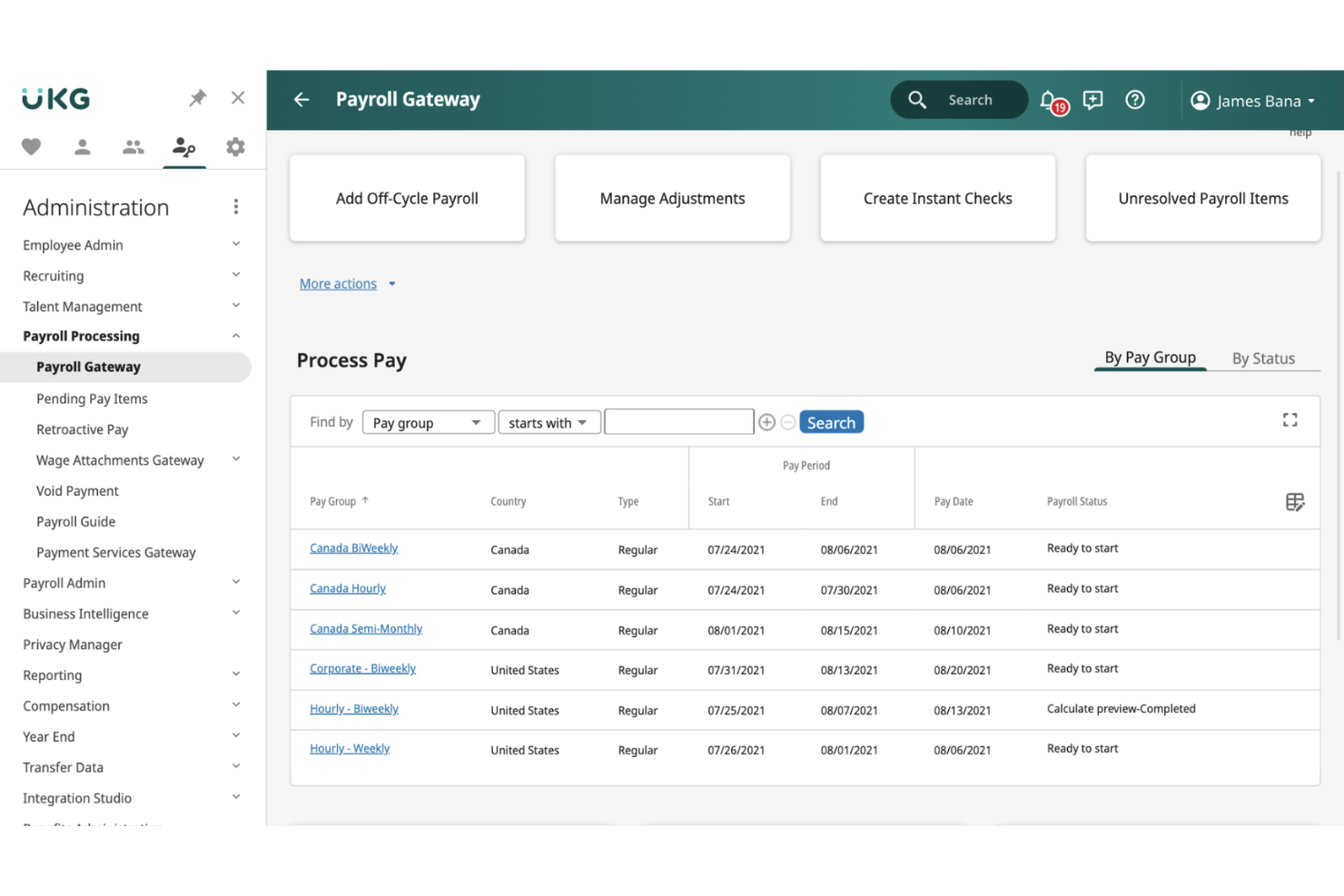
UKG Ready is built for organisations that want an all-in-one HR and payroll system with meaningful, AI-driven insights at its core. It combines HR, time, scheduling, and payroll in one place so you can make smarter workforce decisions without juggling multiple tools.
Who Is UKG Ready Best For?
Large enterprises and medium-sized organizations that want AI-powered workforce insights tied to payroll, HR, time tracking, and employee experience in a unified platform.
Why I Picked UKG Ready
I picked UKG Ready because it brings AI into everyday workforce management in a practical way. For example, its insights surface patterns in attendance, scheduling, and turnover so you can understand what’s driving engagement—not just track it.
Payroll runs are supported by continuously updated employee data, which helps you spot discrepancies early and reduce rework for your team, and you also get mobile-friendly time and scheduling tools that let employees manage shifts from anywhere, improving coverage while keeping admin effort low.
And since HR, payroll, time, and talent sit in one system, the AI models have cleaner data to work with—resulting in more accurate workforce recommendations.
UKG Ready Key Features
Here are some additional features worth highlighting:
- Scheduling Engine: Builds staffing plans using skill needs, demand patterns, and employee preferences.
- Time & Attendance Alerts: Flags missing punches, overtime risks, or accrual issues before they affect payroll.
- Great Place to Work Hub: Gathers and benchmarks employee feedback to identify culture strengths and gaps.
- Compliance Hub: Centralises rule updates and checklists to help you stay aligned with region-specific labour laws.
UKG Ready Integrations
Integrations include Indeed, NetSuite, QuickBooks, TurboTax, Voya Financial, Cornerstone, Brainier, and major job boards.
Pros and Cons
Pros:
- Strong compliance support for multi-region operations
- AI-powered insights for engagement and planning
- Wide range of HR, payroll, and workforce tools
Cons:
- No pricing mentioned
- Implementation may be complex for new teams

Paycor
Best for payroll across niche industries
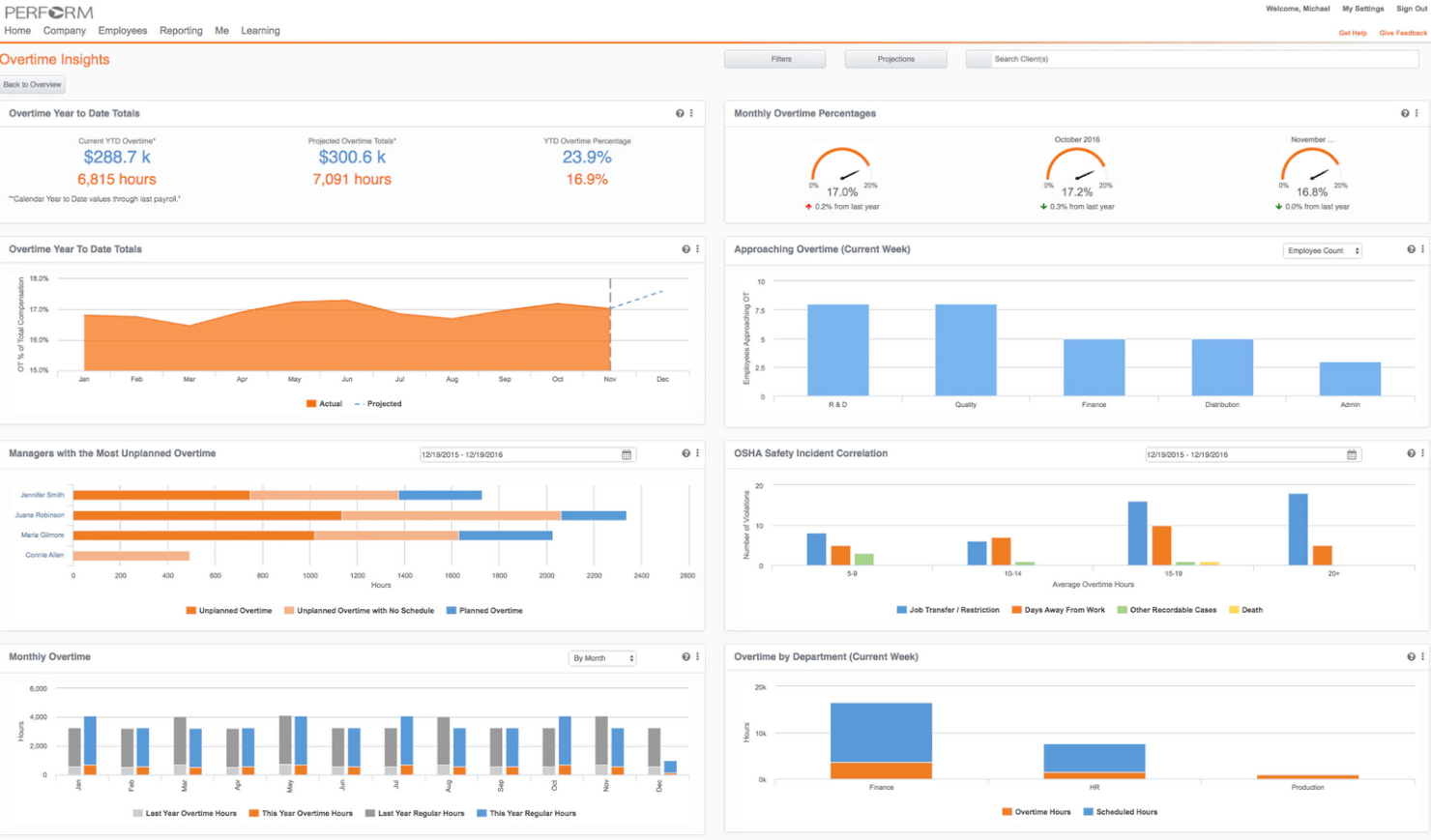
Paycor is designed for organizations that need payroll and HR solutions tailored to specialized industries like healthcare, manufacturing, and nonprofits. The platform helps HR teams manage complex pay rules, compliance requirements, and workforce scheduling unique to these sectors. If your business faces industry-specific payroll challenges, Paycor offers tools built to address those needs directly.
Who Is Paycor Best For?
Businesses in specialized industries (e.g., healthcare, construction, manufacturing) that require tailored payroll processing along with HR, time, and benefits management.
Why I Picked Paycor
What sets Paycor apart is its focus on payroll needs for niche industries with complex requirements. I picked Paycor because it offers industry-specific payroll templates and compliance tools that help HR teams manage unique pay rules and regulations. The platform also includes scheduling and timekeeping features designed for sectors like healthcare and manufacturing, where shift work and overtime tracking are critical. These capabilities make Paycor a strong fit for organizations that need more than just basic payroll processing.
Paycor Key Features
Some other features that make Paycor useful for HR teams include:
- Onboarding Workflows: Automate new hire paperwork, task assignments, and document collection.
- Employee Self-Service Portal: Let employees update personal information, view pay stubs, and manage benefits.
- Performance Management Tools: Set goals, conduct reviews, and track employee progress in one place.
- HR Analytics Dashboard: Visualize workforce data and generate reports on turnover, demographics, and more.
Paycor Integrations
Integrations include NetSuite, Microsoft Active Directory, Tilt, Uncommon Giving, report it, Procurify, 15Five, OnShift, Timeero, and Shiftlab. Additional custom integrations can be configured using their API too.
Pros and Cons
Pros:
- Good ability to customize reports
- Unlimited payroll runs
- Easy to use self-service portal
Cons:
- Time tracking only available as an add-on
- UX can feel a bit clunky at times

HiBob
Best for fast-growing companies
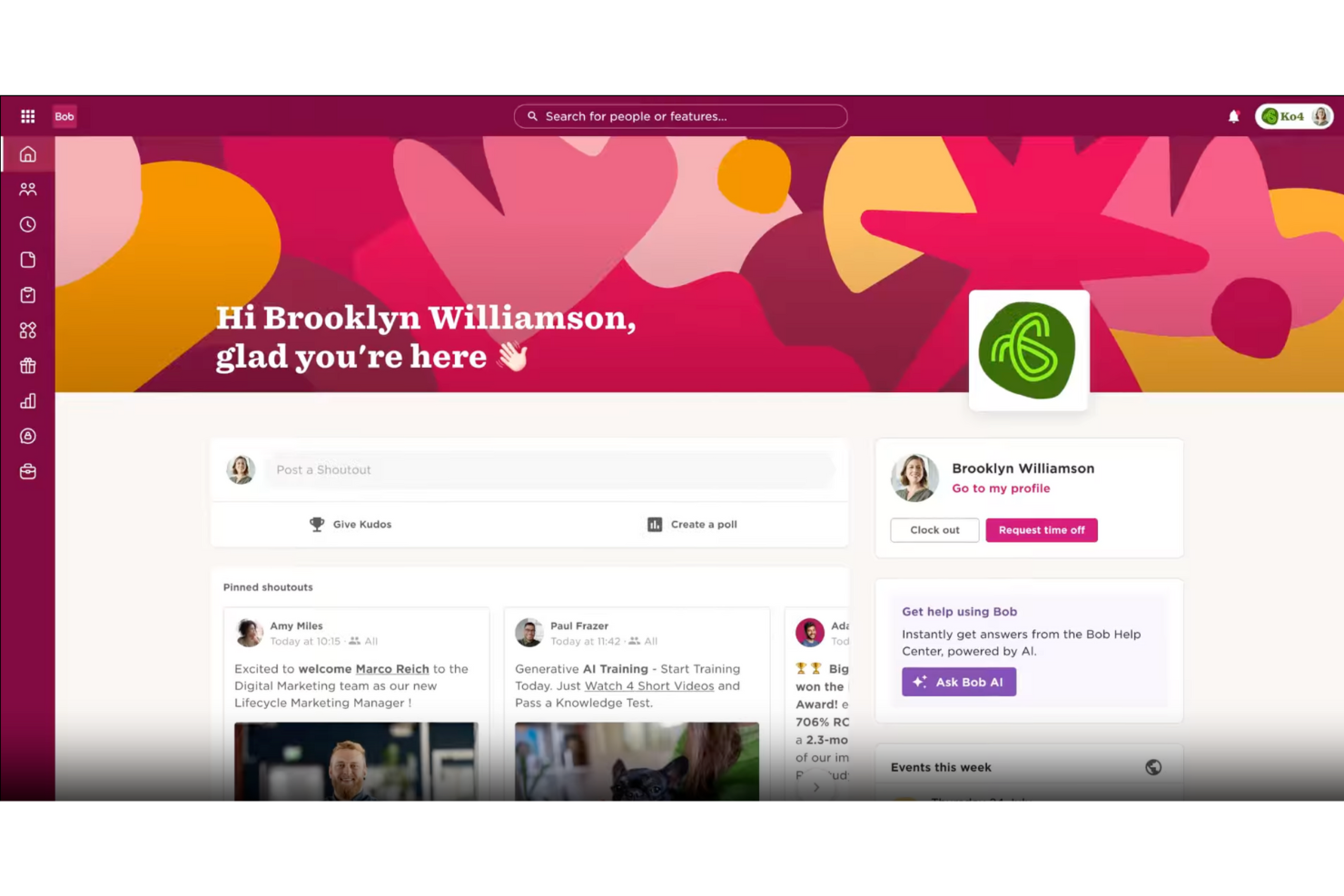
Fast-growing companies looking to automate HR processes and enhance workplace culture will find HiBob to be a fitting solution. As an all-in-one HR software platform, it offers tools such as Core HR, Talent Suite, and Payroll Suite to streamline the management of people, payroll, and finance. You can expect to tackle challenges such as onboarding automation and real-time engagement tracking, which will help you manage and support your growing team.
Who Is HiBob Best For?
Fast-growing, scaling organizations (especially in tech and modern workplaces) that need an HR platform designed for distributed teams, culture engagement, and rapid workforce evolution.
Why I Picked HiBob
I picked HiBob because its all-in-one HR software approach addresses key challenges faced by fast-growing companies. Its Talent Suite, which includes hiring and performance management features, provides a robust framework for managing employee development and engagement. Additionally, the Payroll Suite offers seamless integration for both US and UK payroll processes, ensuring your team can handle payroll needs efficiently. These features support the goal of automating HR tasks while enhancing workplace culture.
HiBob Key Features
In addition to its Talent Suite and Payroll Suite, HiBob offers:
- Onboarding Automation: Streamlines the process of integrating new hires into your company, saving your HR team time and effort.
- Time and Attendance Tracking: Enables accurate monitoring of employee hours and attendance, which is essential for payroll and productivity analysis.
- Compensation Management: Provides tools to manage and benchmark employee compensation, ensuring competitive and fair pay structures.
- People Analytics: Offers insights into workforce metrics, helping you make data-driven decisions to optimize your HR strategies.
HiBob Integrations
Integrations include Slack, Microsoft Teams, Workday, BambooHR, Xero, Okta, Greenhouse, Lever, Personio, and Namely.
Pros and Cons
Pros:
- Comprehensive HR features support core employee management needs
- Strong analytics provide useful insights into workforce data
- Clean design improves usability and employee self-service experience
Cons:
- Some configurability issues limit flexibility
- Reporting and time-off configuration lack deeper customization options

Best with IRS-certified and ESAC-accredited PEO services
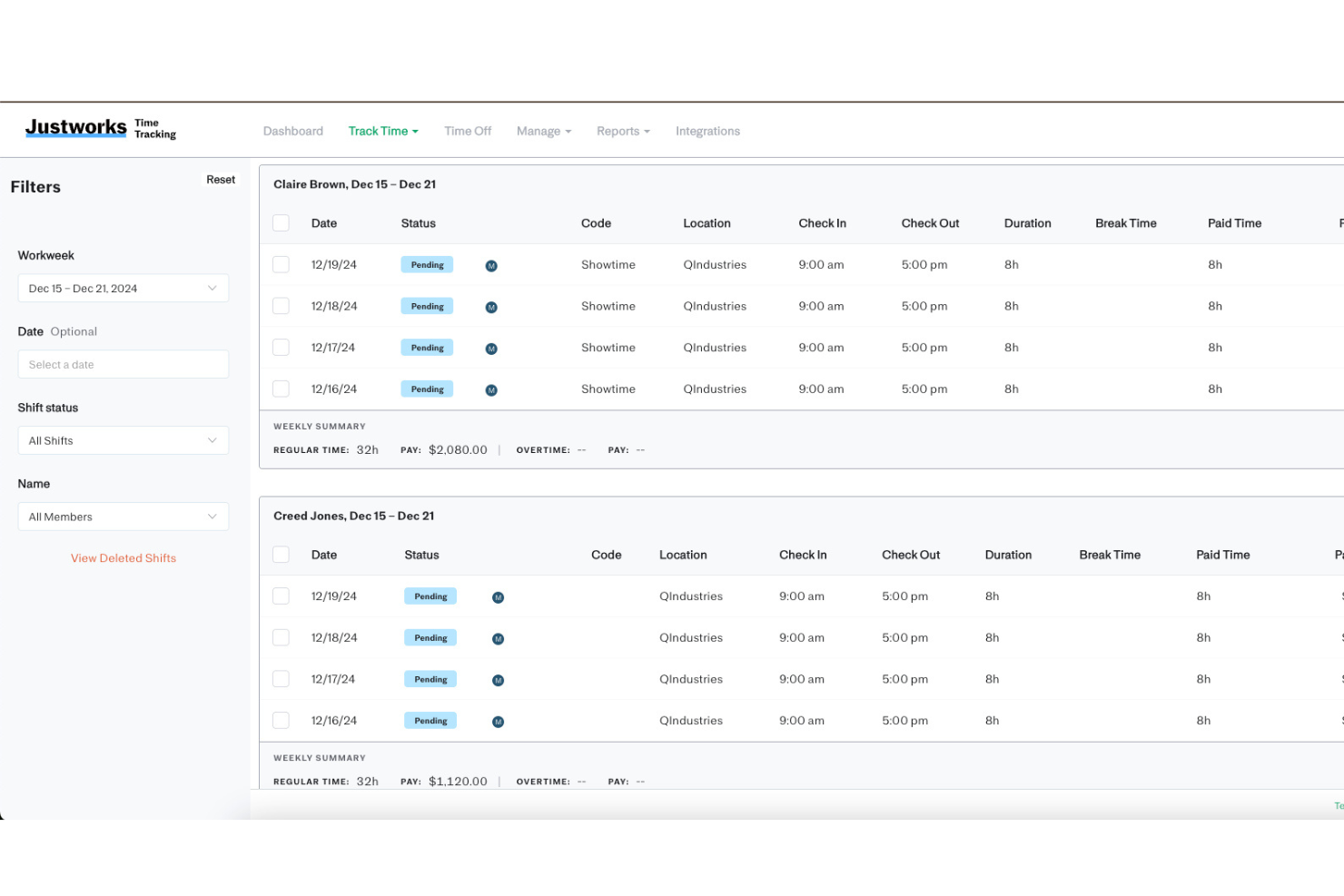
Justworks offers a cloud-based HR platform designed for small and mid-sized businesses that need to manage payroll, benefits, and compliance without building a full internal HR function. For many growing teams, these responsibilities quickly become complex—especially when navigating tax regulations, benefits administration, and evolving labor laws.
Who Is Justworks Best For?
Justworks is a good fit for small to medium-sized businesses that want to outsource HR, payroll, and benefits administration through a PEO model.
Why I Picked Justworks
For HR teams that need assurance around compliance and reliability, I picked Justworks because it is both IRS-certified and ESAC-accredited as a PEO. These accreditations signal that Justworks meets strict standards for financial responsibility and operational excellence, which is especially important when outsourcing payroll, benefits, and HR compliance.
The platform handles payroll tax filings and benefits administration under these regulatory frameworks, reducing risk for your business. This level of oversight gives me confidence in recommending Justworks to organizations that want a trusted HR partner that will meet their compliance requirements.
Justworks Key Features
Some other features that make Justworks a strong HR software option include:
- Time tracking integration: Employees can clock in and out directly within the platform, and hours flow automatically into payroll.
- Onboarding workflows: New hires can complete paperwork, enroll in benefits, and access company policies all in one place.
- Document storage: Securely store and manage important HR documents, such as employee handbooks and tax forms, within the platform.
- HR resource center: Access templates, guides, and compliance resources to support day-to-day HR management.
Justworks Integrations
Integrations include QuickBooks, NetSuite, Xero, Sage Intacct, 15Five, Brex, Carta, Trainual, Culture Amp, and more.
Pros and Cons
Pros:
- Centralized benefits administration for small teams
- Built-in compliance resources and HR guidance
- Automated payroll with integrated time tracking
Cons:
- Custom reporting options are somewhat restricted
- Fewer native integrations than some competitors

Best for automated payroll and compliance

Employment Hero simplifies your HR processes with its all-in-one platform tailored for businesses seeking to enhance employee management and streamline operations. It caters to organizations looking for efficient solutions to manage payroll, onboarding, compliance, and employee engagement. By integrating various HR functions into one cohesive system, Employment Hero addresses the complexities of HR management, providing you with tools to effectively manage your workforce.
Who Is Employment Hero Best For?
HR teams or small businesses seeking an integrated platform that automates payroll, compliance, and benefits administration while reducing manual HR processes.
Why I Picked Employment Hero
I picked Employment Hero for its automated payroll and compliance capabilities, which are essential for businesses that need accuracy and worry-free legal adherence. Its Employment Operating System (EmploymentOS) brings core HR functions together in one place, reducing manual work and minimizing errors. I also appreciate its built-in applicant tracking system, which streamlines hiring by organizing and managing candidates efficiently. These features make Employment Hero a practical choice for companies looking to simplify and strengthen their HR operations.
Employment Hero Key Features
In addition to automated payroll and compliance, Employment Hero offers:
- Automated Onboarding: Streamlines the onboarding process by automating document collection and task assignments.
- Time and Attendance Management: Allows you to track employee hours and manage schedules efficiently.
- Mobile App for Employee Engagement: Provides employees access to their information and tasks on-the-go, enhancing connectivity.
- Leave Management: Simplifies the process of requesting and approving leave, ensuring accurate record-keeping.
Employment Hero Integrations
Integrations include Xero, QuickBooks, MYOB, Reckon, Google Workspace, Microsoft 365, Slack, OFX, Wageloch, and Deputy.
Pros and Cons
Pros:
- Has employee self-service features to promote independence and efficiency
- Its detailed reporting assists in effective business decision-making
- Has a mobile app for employee accessibility
Cons:
- Users report limited customization options
- Some features lack depth compared to competitors
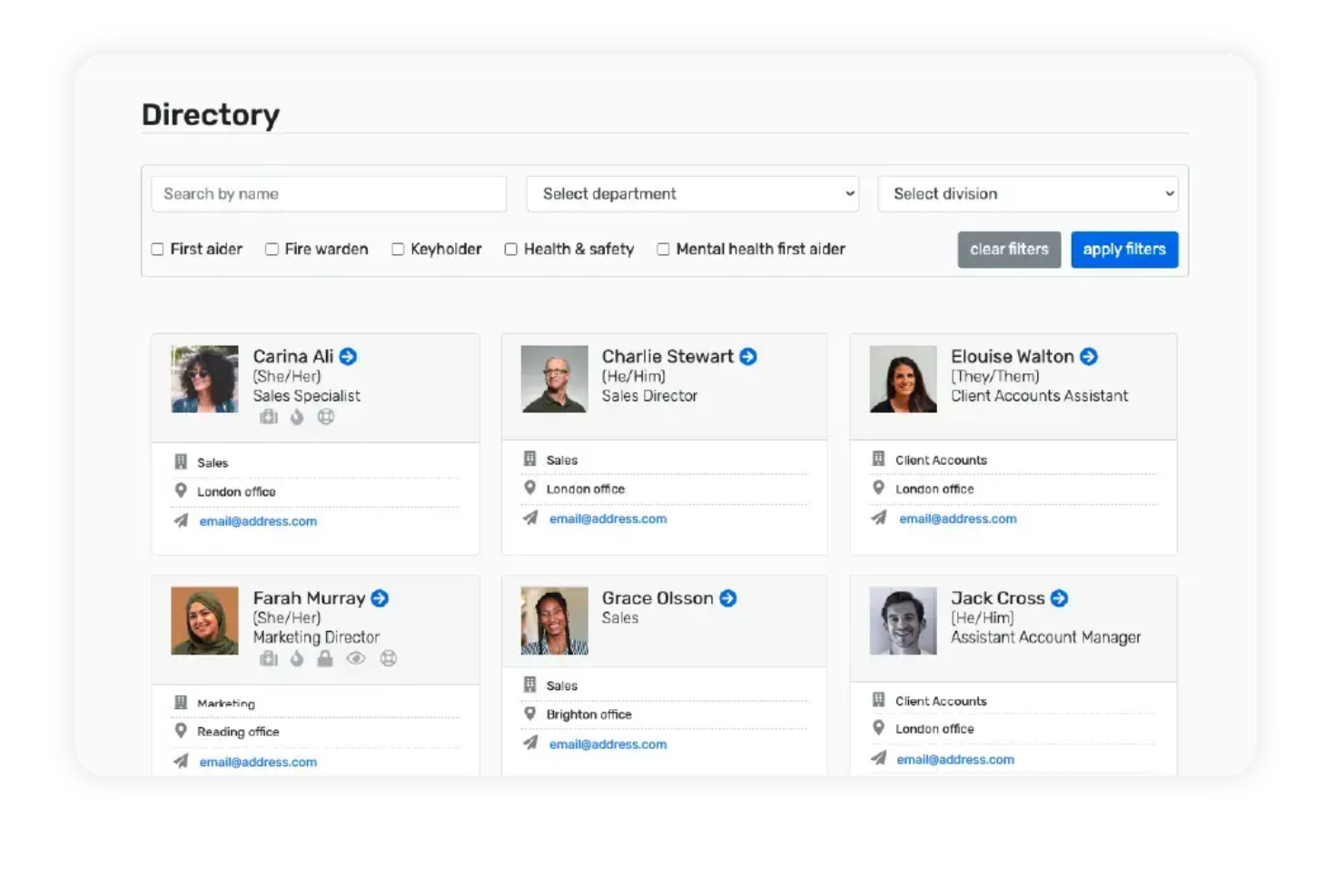
If you’re a UK small business looking to automate HR admin, Breathe HR is designed with your needs in mind. The platform helps managers and business owners handle holiday requests, absence tracking, and document management in one place. Breathe HR stands out for its focus on compliance and simplicity, making it easier to stay organized without a dedicated HR team.
Who Is Breathe HR Best For?
Small and growing UK-based businesses seeking simple HR automation, smooth employee record keeping, and compliance support tailored to the UK workforce.
Why I Picked Breathe HR
Breathe HR is purpose-built for UK small businesses that want to automate HR processes without extra complexity. I picked this tool because it offers automated holiday management and absence tracking, which are common pain points for smaller teams. The platform also includes document storage and policy management features, helping businesses stay compliant with UK employment regulations. These capabilities make Breathe HR a practical choice for organizations that need to centralize HR tasks and reduce manual admin.
Breathe HR Key Features
Some other features that caught my attention include:
- Performance Management Module: Track objectives, schedule reviews, and record feedback for each employee.
- Expense Management: Submit, approve, and track employee expenses within the platform.
- Customisable Reporting: Build and export reports on HR data, including headcount and turnover.
- E-signature Support: Collect digital signatures on HR documents and policies.
Breathe HR Integrations
Integrations include Amazon, Google, Intercom, LinkedIn, YouTube, Microsoft, Vimeo, Xero Payroll, Timelog, HubSpot, Hotjar, Feefo, Hireful, LivePay, Pleo, Mintago, Posture People, Harriet AI, WeThrive, AdviceSheet, iThink 365, and RotaCloud.
Pros and Cons
Pros:
- Built for UK SMEs with local holiday and employment law support
- GDPR-compliant employee data management
- Modular marketplace with learning, payroll, AI, expenses, and benefits add-ons
Cons:
- Limited advanced analytics and reporting capabilities
- May lack deeper enterprise-grade customization

Best for advanced reporting and analytics

BambooHR is built for small to mid-sized businesses that want a clearer view of their workforce through accurate, easy-to-use HR data. The system helps you understand turnover, headcount changes, and engagement trends.
For Josh Barker, Talent Acquisition Manager at Black & White Zebra, the platform has been especially valuable for onboarding and communication: “BambooHR made my life easier because of its automation and reminder notification functionalities that meant that we could basically automate a bunch of reminders and messages and build a proper cadence with new hires.”
Who Is BambooHR Best For?
Small to mid-sized HR teams that need robust reporting and analytics to inform workforce decisions, track HR metrics, and understand trends across recruitment, turnover, and performance.
Why I Picked BambooHR
I picked BambooHR because its reporting tools help you answer the HR questions that usually require multiple spreadsheets. You can track turnover, retention, time-off patterns, and headcount changes using built-in reports that update in real time, giving your team reliable insights for planning.
Its centralized HR database keeps all employee details, job info, and status changes linked—ensuring your reports are based on clean and consistent data. I also like how onboarding workflows feed directly into employee records, so new-hire progress and documentation automatically become part of your reporting.
Plus, the employee self-service portal means your data stays up-to-date as employees request time off, update personal details, or complete tasks.
BambooHR Key Features
Here are some standout features worth highlighting:
- Onboarding Workflows: Customizable checklists and e-signatures keep new-hire tasks consistent and trackable.
- Employee Self-Service: Staff can update personal details, request time off, and access documents without HR intervention.
- Time-Off Management: Clear accrual rules, a shared calendar, and quick approvals help managers stay aligned.
- Performance Management Tools: Goal setting, self-assessments, and manager reviews feed into employee records and reporting.
BambooHR Integrations
Integrations include Gusto, Slack, Zapier, QuickBooks, Xero, Namely, Workable, and Greenhouse.
Pros and Cons
Pros:
- Onboarding workflows connect directly to employee records
- Centralized employee database keeps analytics accurate and consistent
- Strong reporting templates
Cons:
- Some advanced modules require additional fees
- Benefits administration only available to US-based employees
New Product Updates from BambooHR®

BambooHR Adds Employee Navigator Integration
BambooHR adds an Employee Navigator integration that syncs employee demographic data and sends benefit deductions into BambooHR Payroll runs to cut duplicate entry and keep records aligned. For more information, visit BambooHR's official site.
 .
.
Paylocity
Best for employee experience and integrations
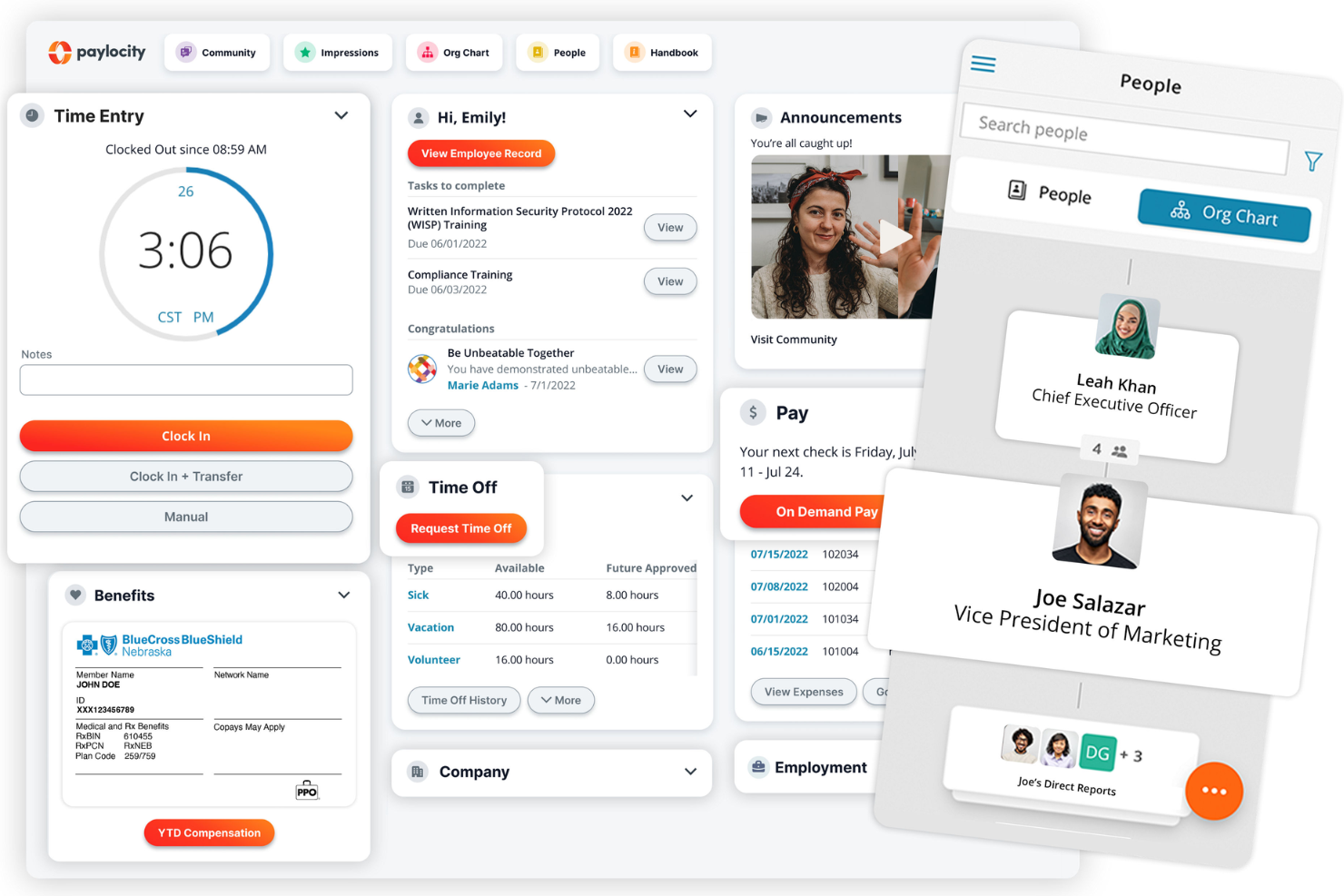
Paylocity brings together HR, payroll, and employee engagement tools in one platform, making it a strong fit for mid-sized and larger organizations. The software stands out for its focus on employee experience, offering features like social collaboration, surveys, and self-service portals. Paylocity is especially useful for teams that want to connect HR processes with a wide range of business systems through its extensive integrations.
Who Is Paylocity Best For?
Mid-sized organizations that want HR and payroll combined with a strong emphasis on employee engagement, user experience, and integrations across workforce systems.
Why I Picked Paylocity
What sets Paylocity apart is its strong emphasis on employee experience, which is central to modern HR strategies. I picked Paylocity because it offers built-in social collaboration tools, like peer recognition and company news feeds, that help foster a connected workplace. The platform also includes employee surveys and feedback features, making it easier for HR teams to measure engagement and act on insights. These capabilities, combined with Paylocity’s ability to connect with a wide range of business systems, make it a compelling choice for organizations that want to prioritize both employee engagement and integration flexibility.
Paylocity Key Features
Some other features that stand out to me include:
- Onboarding Workflows: Automate new hire paperwork, task assignments, and orientation steps.
- Time and Attendance Tracking: Capture employee hours, manage schedules, and handle time-off requests.
- Learning Management System: Assign, track, and report on employee training and development courses
- Compliance Dashboard: Monitor regulatory requirements and track compliance-related tasks in one place.
Paylocity Integrations
Integrations include ClearStar, Microsoft Dynamics 365, 7shifts, AirMason, APA Benefits, Azure, Atlassian, Asana, Box, ClearCompany, Dropbox, Freshdesk, Google Workspace, Greenhouse, HubSpot, Slack, Salesforce, Trakstar, and Zoho People.
Pros and Cons
Pros:
- Tailored workflows and reports
- On demand payment options
- Includes tax compliance services
Cons:
- Lacks support for independent contractor payments
- Setup can be time consuming
New Product Updates from Paylocity

Paylocity Expands Expense and Purchase Request Tools
Paylocity adds connected personal cards, smarter expense categorization, and a streamlined purchase request experience. This reduces manual entry and helps finance teams manage expenses and approvals more efficiently. For more information, visit Paylocity’s official site.
 .
.Other HR Software Systems
Here are 20 more worthwhile options that didn’t make my shortlist of the best HR management software, but are still worth checking out:
- Factorial
For small businesses
- monday AI Workspace
For building customizable HR forms
- Greenhouse
For large recruitment pools
- Workable HR
For integrated onboarding and recruiting
- Leapsome
For built-in feedback loops
- Gusto
For compliance in all states
- Thatch
For personalized healthcare benefits
- RemoFirst
For payroll in 170+ countries
- HR Acuity
For structured case management
- Paychex Flex
For regulatory HR support
- Bambee
A dedicated HR manager
- Sloneek
For end-to-end employee lifecycle tracking
- Pebl
For multi-country payroll compliance
- Lattice
For performance, comp, and engagement
- GoCo
For workflow automation
- edays
For automating leave management
- Oracle HCM Cloud
For multi-location HR operations
- Workleap
For real-time feedback and insights
- JazzHR
For customizable recruiting workflows
- ChartHop
For visualizing people data
- Workday
For unified workforce management
- eloomi
For an all-in-one L&D platform
- Kallidus Sapling
For automating repeatable workflows
- UZIO
For syncing time tracking and payroll
- TriNet HR Plus
For automated onboarding workflows
- Jira Service Management
For customizable HR service desks
- Sage HR
For attendance tracking
- Arcoro
For construction companies
- PrimePay
For employee self-service
- Trinet
For compensation benchmarking


Related HR Software Reviews
If you still haven't found what you're looking for here, check out these other related tools that we've tested and evaluated:
- Payroll Software
- Recruiting Software
- Employer of Record Services
- Workforce Management Software
- Learning Management Systems
- Employee Scheduling Software
How I Evaluate HR Software
I split my evaluation into baseline criteria—like native payroll processing and employee data management—and the differentiators that separate a good tool from the right one for your team.
Core Functionality (Table Stakes For This List)
When I'm selecting tools for my list, I rank each one on a scale from 0 (does not offer the functionality) to 5 (excels in this area) for each core functionality listed below. Then, I calculate the tool's total score into a percentage. Each tool needs to achieve a minimum total score of 75% to be considered for inclusion.
- Employee Data Management: I check whether each platform offers a centralized database with custom fields, document storage, and org charts—not just a basic contact directory.
- Payroll & Benefits Administration: Whether it's native payroll like Gusto or integrations like BambooHR uses, I evaluate how well the tool handles pay runs and benefits enrollment.
- Time & Attendance Tracking: I look for built-in timesheets, PTO requests, and approval workflows so managers can handle leave and scheduling from the same system.
- Recruiting & Onboarding: A solid ATS paired with onboarding checklists and e-signatures matters here—new hires should move from offer letter to day one without manual handoffs.
- Performance Management: I evaluate whether the tool supports structured review cycles, goal tracking, and continuous feedback rather than just a single annual review template.
- Compliance & Reporting: I look at how each platform handles regulatory reporting, audit trails, and automatic updates when labor laws change across different jurisdictions.
Once I have a list of tools that meet the criteria, I consider what sets each platform apart.
Differentiating Factors (What Sets Vendors Apart)
Here's how I compare and contrast different vendors:
Standout Features
Employee self-service is a big differentiator—I look for portals where staff can update their own info, submit PTO requests, and access pay stubs without filing a ticket with HR. Engagement tools like pulse surveys and eNPS tracking also matter, especially for teams trying to stay ahead of retention issues. For organizations with distributed teams, I evaluate global workforce support, including multi-currency payroll and localized compliance features.
Beyond Features
Integration ecosystem is one of the first things I evaluate. HR software that connects natively with your payroll provider, ATS, or accounting tools like QuickBooks or NetSuite saves hours of manual data entry. Pricing transparency also matters—I check whether vendors clearly outline per-employee costs and add-on module fees upfront. Finally, I consider implementation support, particularly data migration assistance from legacy systems and access to dedicated onboarding resources, since a rough rollout can undermine even the best platform.
For HR professionals, it’s about reducing manual work… The more automation and workflow integration you can get, the better.

How to Choose HR Software
HR software can help you solve complex challenges such as compliance tracking, employee engagement, and payroll accuracy, while improving workflows like onboarding, performance management, and time-off requests. To help you figure out the best human resources management software for your needs, keep the following points in mind:
- What HR challenges are you trying to solve? Identifying your current challenges will help you understand the features and functionalities your new HR software needs to provide. These challenges may include:
- paying employees in different jurisdictions in their local currencies,
- managing tax and compliance requirements for employees in different jurisdictions,
- eliminating frequent manual tasks by setting up workflow automation rules,
- integrating your existing systems to remove manual data entry, or
- empowering your employees to self-manage their personal data to reduce demands on your HR staff.
- What outcomes are important and how will you measure success? Being clear on your desired outcomes upfront is crucial to avoid wasting valuable time. Key outcomes you may want to measure include:
- Reduced administrative demands on your HR staff as a result of enhanced employee self-service capabilities,
- Increased employee satisfaction due to a more enriched and transparent employee experience,
- Reduced time to hire and onboard new employees,
- Improved completion rates for internal compliance-related training, etc.
- Who will your main users be? Consider your different user groups — power users, administrators, managers, employees, etc. — and their unique needs, to ensure they're all met. For HR software, your main user groups will likely be:
- Senior HR staff (Chief of HR Operations, Chief Operating Officer, etc.),
- HR administrative staff (may be responsible for individual HR functions such as talent acquisition, learning and development, performance, etc.),
- Payroll processing specialists, Chief Financial Officer (CFO), or other accounting staff,
- Internal managers, supervisors, and team leads, and
- All active employees.
- What is your budget? To evaluate cost, do a headcount of your existing workforce, plus your projections for the next 5 to 10 years. Since most HR software charges a monthly fee per employee, this will help you estimate your monthly costs proactively.
- It's crucial to determine a realistic budget for your new HR software up-front, so you don't waste time considering software that is out of your price range.
- Do you require specific software integrations? Clarify whether your new HR software will replace existing tools, or need to integrate with them. Depending on the type of HR software you're looking for, some key integrations to watch for include accounting, time-tracking, and payroll software systems, plus any internal communication tools you already use.
- Can you reduce your monthly SaaS overhead costs by replacing multiple tools with an all-in-one HR platform?
- Are all the integrations you need available, or can they be custom-configured using an API?
- Does the new software satisfy your technical requirements? Consider the software selection alongside your existing workflows and systems. Evaluate what's working well, and any problem areas that need to be addressed.
- Does the new system integrate with your corporate workspace (Microsoft SharePoint, Google Workspace, etc.),
- Does the new system offer security features that meet your needs (e.g., two-factor authentication (2FA), etc.)?
Remember, every business is different — don’t assume that an HR software system will work for your organization just because it's popular.
Security is often overlooked when choosing HR tools… You’re handling employees’ sensitive personal information, so you need to ensure the platform is secure and can protect that data from breaches.
Trends in HR Software for 2026
HR software companies continue to evolve their products to meet the demands of modern workplace dynamics, changing organizational needs, and technological advancements, such as artificial intelligence (AI) and machine learning (ML). Here are the most important trends impacting the HR software space currently:
Most Rapidly Evolving Features
- Increased Integration of AI and ML: AI and ML are being increasingly integrated into HR software for predictive analytics, automation of routine tasks, AI-powered recruiting tools, and personalized learning and development plans. By capitalizing on this technological advancement, HR teams can create more efficient processes and gain deeper insights into their workforce that were invisible to them previously.
- On a related note, according to TriNet's 2024 State of the Workplace Research Report, 3 out of 4 US employees prefer to consult an AI assistant for HR support rather than interacting with a real human!
- Focus on Remote Work Management: With the rise of remote work, HR software is rapidly evolving to include features that support remote team management, such as virtual onboarding, remote performance tracking, and engagement tools. This trend underscores the ongoing shift in work patterns and the need for tools that support a dispersed workforce.
- Comprehensive Employee Management: Features that offer a 360-degree view of employee management, including recruitment, onboarding, performance management, and offboarding, are in high demand. This trend reflects a growing preference for all-in-one systems that offer a holistic approach to managing the employee lifecycle.
Most Unique and Unusual Functionality
- Virtual Reality (VR) for Training and Onboarding: Some HR software is beginning to incorporate VR to provide immersive training and onboarding experiences. This novel approach aims to enhance learning outcomes and engagement by simulating real-world scenarios. It also bridges the gap between user experiences for in-office and remote employees, ensuring a consistent training experience for all.
- Blockchain Technology Integration: The initial buzz around blockchain technology's potential in HR has evolved into a more nuanced understanding of where it can truly add value. Here's how blockchain is being incorporated into HR software and the current state of this trend:
- Managing Sensitive Employee Data: Blockchain's ability to provide secure, immutable records makes it ideal for managing sensitive employee data, such as personal identification, employment history, and credentials.
- Credential Verification: One of the most promising uses of blockchain in HR is for the verification of candidate credentials, including education, certifications, and previous employment. This can significantly reduce the time and resources spent on background checks, while also minimizing the risk of fraudulent claims.
As you can see, these trends from top HR software companies are making human resources systems more efficient and capable of meeting the complex needs of modern organizations.
What is HR Software?
HR software is a digital solution that helps businesses manage core human resources tasks like hiring, onboarding, payroll, and performance tracking.
It’s used by HR teams to streamline time-consuming processes, reduce manual errors, stay compliant, and improve the overall employee experience.
Key Features of HR Software
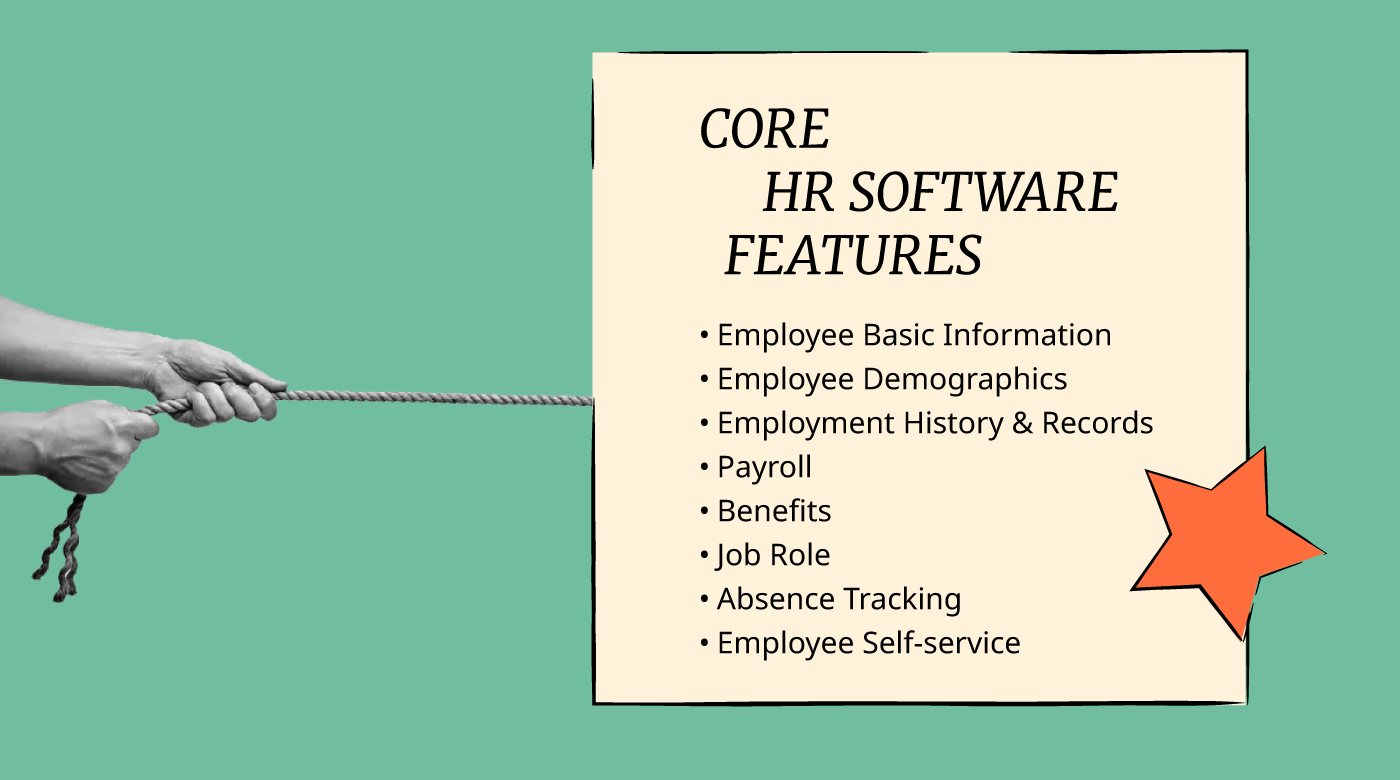
When selecting HR software, keep an eye out for the following key features:
- Employee database management: Your central hub for storing and organizing worker information, including contact details, job titles, and employment history. This feature simplifies keeping track of your growing team and makes updates a breeze.
- Payroll processing: Handle employee payments, calculate deductions, and manage tax filings automatically. You save time, minimize errors, and make payday drama-free for everyone.
- Time and attendance tracking: Monitor hours worked, vacations, and sick days. This helps ensure compliance, prevent time theft, and makes it much easier for you to plan team schedules.
- Recruitment and applicant tracking: Streamline the hiring process by posting jobs, filtering resumes, and tracking candidate progress—all in one spot. This feature can make finding your next all-star much less overwhelming.
- Performance management: Set goals, collect feedback, schedule reviews, and track employee growth. You get a clearer picture of who’s excelling and where coaching might help.
- Benefits administration: Make enrolling in health insurance, retirement plans, and other perks simple for your team. This keeps everyone happy and reduces administrative headaches for you.
- Compliance management: Keep up with labor laws, track document expiration dates, and manage certifications. This helps you avoid costly mistakes and keeps your HR operations running smoothly.
- Self-service portal: Empower your team to update their info, request time off, and access pay stubs on their own—meaning fewer emails and faster responses for everyone.
Common HR Software AI Features
Beyond the standard HR software features listed above, many of these solutions are incorporating AI with features like:
- Smart onboarding automation: AI personalizes onboarding experiences, sending the right info, training modules, and reminders to new hires. This gets new team members up to speed quickly and creates a great first impression.
- Resume screening: AI quickly sifts through applications, highlighting top candidates based on job requirements and past hiring trends. This saves countless hours in the hiring process and helps you focus on the best fits.
- Predictive analytics: AI analyzes workplace data to forecast trends like turnover, absenteeism, or high performers. You get actionable insights to make smarter, forecasting-driven HR decisions.
- Automated employee engagement surveys: AI generates, distributes, and analyzes engagement surveys, helping you spot morale issues before they snowball. This lets you take action early for a happier workplace.
- Chatbot support: AI-powered chatbots answer common HR questions from employees anytime, offering instant support on everything from policies to benefits—without clogging your inbox.
- Sentiment analysis: AI checks employee messages, survey responses, or feedback forums to gauge morale and engagement levels. You see patterns that might be invisible otherwise, helping you spot trouble or wins early.
Benefits of HR Software
HR software is designed to make your human resource functions more efficient. By investing in modern HR software, you can reduce administrative burdens, make better data-driven decisions, and uncover actionable insights to help you strategically manage your workforce more effectively.
As you build your business case for a new HR software, you'll want to highlight the following benefits:
- Increased Efficiency: By automating routine tasks, HR software significantly reduces the time and effort required for administrative processes, giving your HR professionals more time to focus on other strategic tasks, such as talent management and employee engagement.
- Streamlined Data Management: HR software provides a centralized database for all employee information, making data management more secure and accessible. This centralized system ensures that employee records are kept up-to-date and can be accessed or updated by authorized personnel only, reducing the risk of data discrepancies and loss.
- Improved Compliance: HR software simplifies the process of keeping up with changing labor laws and regulations thanks to regular software updates. This helps organizations avoid potential legal issues by ensuring that their HR practices remain in compliance with all relevant laws and regulations.
- Data-Driven Decision Making: Thanks to built-in analytics and reporting tools, HR software offers insights into workforce trends and other HR metrics. These insights enable managers and HR professionals to make informed decisions regarding workforce management, talent acquisition, and retention strategies, ultimately leading to better organizational planning and performance.
- Enhanced Employee Experience: Most HR software offers employee self-service portals that empower employees to manage their personal information, submit time-off requests, and access their payroll and benefits information online. This level of autonomy improves the overall employee experience, leading to higher engagement and satisfaction levels.
By streamlining administrative tasks, improving data management and compliance, enabling informed decision-making, and enhancing the employee experience, HR software represents a valuable investment for businesses aiming to optimize their HR functions and drive organizational success.

Costs & Pricing for HR Software
Something to look out for in any HR software solution is fair, transparent, and scalable pricing. Most providers offer different pricing tiers to cater to the needs of small businesses and startups, midsize businesses, and enterprise businesses.
You can expect to pay a monthly per-user fee for HR software under a SaaS (software-as-a-service) contract agreement. To give you a sense of the pricing landscape, I've compiled average prices for the most common HR software packages into the table below.
Plan Comparison Table for HR Software Solutions
| Plan Type | Average Price | Common Features Included |
|---|---|---|
| Free | $0 | Basic employee management, time-tracking, limited reporting, and access for a limited number of users |
| Basic | $2 - $8 per user/month | Employee self-service, leave management, basic reporting, and payroll abilities or integration |
| Professional | $8 - $15 per user/month | Performance management, benefits management, advanced reporting, and enhanced security features |
| Enterprise | Custom Pricing | Custom integrations, full-suite HR management, dedicated support, advanced analytics and reporting |
I always strive to choose software with transparent pricing models. However, sometimes those details are only available upon request due to the modular nature of their system. You can often still get a clear understanding of their different plan levels and the features that are included in each by visiting their websites.
If cost is your biggest factor, this article digs into the costs of HR software and how you can decide what's best for your company.
There’s always room for negotiation on HR software pricing. I always recommend trying to get a better deal based on your needs.

If you only have a small number of employees, you can likely get started with a free or basic plan initially. However, there are several reasons why you may want to opt for a more advanced plan, including:
- Employee Count Increase: Many basic plans have limitations on the number of employees you can manage. As your employee headcount grows, you'll need to scale up to a plan that can accommodate more users and offer more extensive features and better scalability.
- Multiple Locations: If your organization has multiple locations, or is poised for future expansion, a basic plan won't suit your needs for long. Advanced HR software typically offers multi-location support to make this process easier.
- Automation of Processes: Basic plans generally don't include automation tools. However, advanced HR software can automate repetitive tasks such as onboarding, offboarding, performance reviews, and time-off requests, freeing your HR staff up to focus on other strategic initiatives.
- Data Analytics and Reporting: Upgraded plans often include advanced analytics and reporting capabilities, providing insights into workforce trends, employee performance, and other key metrics.
- Tailored Solutions: If you want a solution that's tailored to your specific needs, you'll need to scale up to an advanced software plan. Higher-priced plans offer greater customization capabilities to accommodate industry-specific requirements or unique organizational structures.
By upgrading to a more advanced HR software plan, companies can better manage their growing workforce, streamline HR processes, enhance employee experience, and ensure compliance with legal and regulatory requirements, ultimately contributing to overall organizational efficiency and success.
Types of HR Software
HR software is quite a broad category with many different sub-types. However, when people refer to HR software generally, they are usually thinking of an HRIS, HCM, or HRMS system.
- A Human Resource Information System (HRIS) is the most basic form of HR database that stores employee information and contains modules for basic HR functions (e.g., time-tracking, benefits, and sometimes (but not always!) payroll).
- A Human Resource Management System (HRMS) goes beyond basic functions to add additional modules for higher-level tasks, such as recruiting or applicant tracking, performance management, and employee engagement.
- Lastly, a Human Capital Management [System] (HCM system) usually offers a slightly broader set of modules than an HRMS (though not always), often with a more strategic focus on workforce planning. As a result, these human resources systems are more likely to include features for employee scheduling or native integrations with enterprise resource planning software (ERP software).
When it comes to price, an HRIS is the most affordable option, with HCM and HRMS priced higher, often with enterprise-level HR software features and pricing upon request. Since many HR software companies use these terms interchangeably, it's important to focus on the features you actually need, rather than the nomenclature the software commonly goes by.
Other Sub-Types of HR Software
There are more sub-types of HR software beyond just the core HR software types noted above. For example, the following HR management software sub-types are aimed at specific users or functions:
- HR Software for Small Business
- HR Software for Payroll
- HR Software for Onboarding
- Open Source HR Software
- HR Tracking Software
- HR Software Applications / Apps
Recruitment Tools
These are the most popular types of recruiting software for sourcing and screening candidates, integrating more diverse candidates, dealing with large volumes of applications, and conducting video interviews:
- Applicant Tracking Systems (ATS)
- Enterprise Recruitment Software
- Diversity Recruiting Software for DEI Hiring
- Video Interviewing Platforms
- HR CRM Software
- Cloud Recruiting Software
Employee Performance
Performance management software will help your staff to reach their full potential and add much-needed structure to their long-term development plans:
Employee Engagement
If you're looking for ways to motivate and celebrate your staff, employee engagement and recognition software is what you need:
Scheduling & Time Tracking
Scheduling and time-tracking software are essential tools for any hourly-based workforce. These types of HR employee management software will help you create shift schedules and track time off requests with ease:
- Attendance Tracking Software
- Employee Shift Scheduling Software
- Leave Management Software
- Online Employee Scheduling Software
Payroll & Accounting Solutions
Here are my lists of the payroll software and companies out there, plus my top choices for expense reporting:
Benefits Management & Compensation
Employees care fiercely about their benefits, so you should always handle these with care. These types of HR software tools simplify the enrolment and management process for you and help you offer non-monetary perks as well:
Resource Management Software
If you're looking for software to help you manage your resources — including your human resources, and physical resources like inventory and equipment — these types of resource management software may be a better fit:
HR Software: Frequently Asked Questions
Here are some commonly asked questions and answers about software HR and how it can help you streamline your business processes.
How can I ensure smooth data migration to new HR software?
You can ensure smooth data migration by planning ahead, cleaning existing records, and choosing an HR software vendor with proven migration support. Work with your IT team to map fields, set timelines, and run test transfers before a full launch. You should also ask your vendor about assisted migration services and post-migration data checks so nothing gets lost or corrupted.
What integrations should I prioritize when selecting HR software?
You should prioritize integrations with payroll, time tracking, accounting software, and applicant tracking systems. If your company uses tools like Microsoft 365, Slack, or job boards, confirm the HR software connects with those too. Fully-functional integrations help prevent duplicate data entry and save time for your HR team.
How do I measure ROI on HR software?
You can measure ROI on HR software by tracking time savings, reduction in manual errors, improved compliance, and lower HR admin costs. Compare pre-implementation metrics (like onboarding time or payroll errors) to post-implementation data. Also consider employee feedback and increased process transparency when assessing value.
How do HR platforms manage data security?
Most HR platforms manage data security through a range of features and approaches, including:
- Data encryption for in transit and at rest data
- Secure cloud storage
- Regular security audits
- Compliance with international standards like GDPR and ISO/IEC 27001
- Detailed access controls to prevent unauthorized access
- Two-factor authentication
- Single sign-on
You should also check if your vendor is certified (like SOC 2 or ISO 27001), and ask about secure data backup and recovery plans. Make sure your HR team sets strong internal user permissions, too.
What are the average implementation times for HR software?
Implementation times for HR software typically range from a few weeks to several months, depending on your company’s size and the system’s complexity. Small businesses often go live in 2-4 weeks, while larger organizations might take 2-6 months. For HR systems that include payroll functionalities, the implementation process needs to accommodate running payroll in parallel for several pay periods too.
To help you plan accordingly, ask your vendor for a clear implementation timeline and key project milestones.
Are there sub-types of HR software for different business types?
Yes, different types of HR software are built for businesses of all sizes and industries. Some focus on essentials like payroll and time-off tracking, while others offer advanced analytics, performance management, or compliance for certain sectors.
The three main types of HR software most people search for are known as HRIS, HCM and HRMS. Essentially, they are all synonyms for different levels of HR management tools. Within each of these types, there are HR software companies out there that have catered their software to solve particular pain points that are unique to each industry.
Here are some examples:
- HR software for healthcare is designed to ensure compliance with strict regulations like HIPAA, while streamlining operations that are crucial for healthcare organizations, such as scheduling employees, reducing staff burnout, managing high turnover, and verifying applicant credentials before hiring.
- HR software for law firms is built to help teams safeguard data and maintain compliance, while also providing a framework for managing sensitive legal documents and tracking billable vs non-billable hours in order to easily bill clients for time worked.
- HR software for accountants is designed to support both workforce and financial management tasks. This means these systems come with strong financial components such as time tracking, invoicing and billing, and payroll and tax management features. They are also designed to mesh with accounting standards, such as GAAP or IFRS.
What's the best HR software for Canadian businesses?
If you’re operating in Canada, choosing a homegrown HR solution just makes sense. Canadian-made software is built with local labor laws and CRA requirements in mind—helping you stay compliant without the guesswork.
But it’s not just about compliance. Here’s why Canadian companies benefit from Canadian HR software:
-
Bilingual support in English and French is more readily available.
-
Payroll features are tailored to Canadian regulations and tax structures.
-
Built-in cultural relevance, like statutory holidays and provincial standards.
-
Integration with local benefits like healthcare and RRSPs.
-
Deeper market insight—Canadian providers know your landscape.
-
Local support teams, and sometimes even in-person meetings if you’re near a major city (how Canadian is that?).
If that sounds like the right fit, you’re in luck—I’ve already rounded up the top HR systems developed by Canadians, for Canadians. Check out my curated list of the best Canadian HR software to find the one that meets your needs, or my list of the best Canadian payroll systems if payroll is all you’re looking for.
What HR software is best for startups?
The best HR software for startups is scalable, easy to use, and budget-friendly—so you can hit the ground running without overcomplicating your workflow. Most startups lean toward cloud-based tools thanks to their lower upfront costs, flexible access, and faster setup.
Startups should prioritize platforms that cover the essentials: recruitment, onboarding, payroll, performance tracking, and responsive support when things get busy. Look for solutions with modular features or pay-as-you-grow pricing so your software evolves as your team grows.
Not sure where to begin? Start with our curated list of the best HR software for startups, which was created with growing teams in mind.
What's the best HR software for managing an international team?
If you’re managing a global workforce, the best HR software combines tech with international HR expertise—helping you stay compliant across borders while supporting your team wherever they are.
Look for platforms that include or integrate with global payroll services (to manage multi-currency payments) and employer of record (EOR) services, which legally hire international employees on your behalf. These solutions take the complexity out of cross-border hiring, tax compliance, and local labor laws.
In short, international HR software isn’t just about features—it’s about access to the right services and support to confidently grow your team worldwide.
What's the difference between cloud and on-premise HR software, and which is better?
The key difference comes down to where the software lives:
-
Cloud-based HR software is hosted online and accessed through a browser—perfect for remote teams, automatic updates, and lower upfront costs.
-
On-premise HR software is installed directly on your company’s servers, giving you full control over your data, but requiring more investment in IT infrastructure and ongoing maintenance.
So, which one’s better? That depends on your organization’s needs:
-
Choose cloud-based software if you want something cost-effective, easy to scale, accessible from anywhere, and light on IT overhead.
-
Go with on-premise software if you’re in a highly regulated industry, need to tightly control your data, or have an in-house IT team that can handle updates and customization.
In general, small to mid-sized businesses tend to prefer cloud-based HR systems, while larger enterprises with stricter security protocols often opt for on-premise solutions.
Final Thoughts
Choosing the right HR software can significantly improve your HR department’s efficiency by automating key tasks, ensuring compliance, and enhancing your employee experience.
When selecting a new system, or upgrading existing HR software, talk to your different user groups first to make sure you understand all the challenges your team is facing. Then, focus on software that satisfies all your needs and desired outcomes to avoid wasting time and resources.
Whether you're looking to streamline payroll, recruitment, or performance management, there's a variety of HR software solutions available to fit businesses of every size.
Ultimately, the right HR software must align with your goals, budget, and technical requirements in order to drive better organizational performance.
Stay in Touch
If you found this list of the top HR systems helpful, please stay in touch! Consider subscribing to our weekly People Managing People newsletter to stay up-to-date on our latest podcasts, how-to guides, best practices, and, of course, more software recommendations.